Page 1273 of 3502
WARNING CHIME
DI-67
C
D
E
F
G
H
I
J
L
MA
B
DI
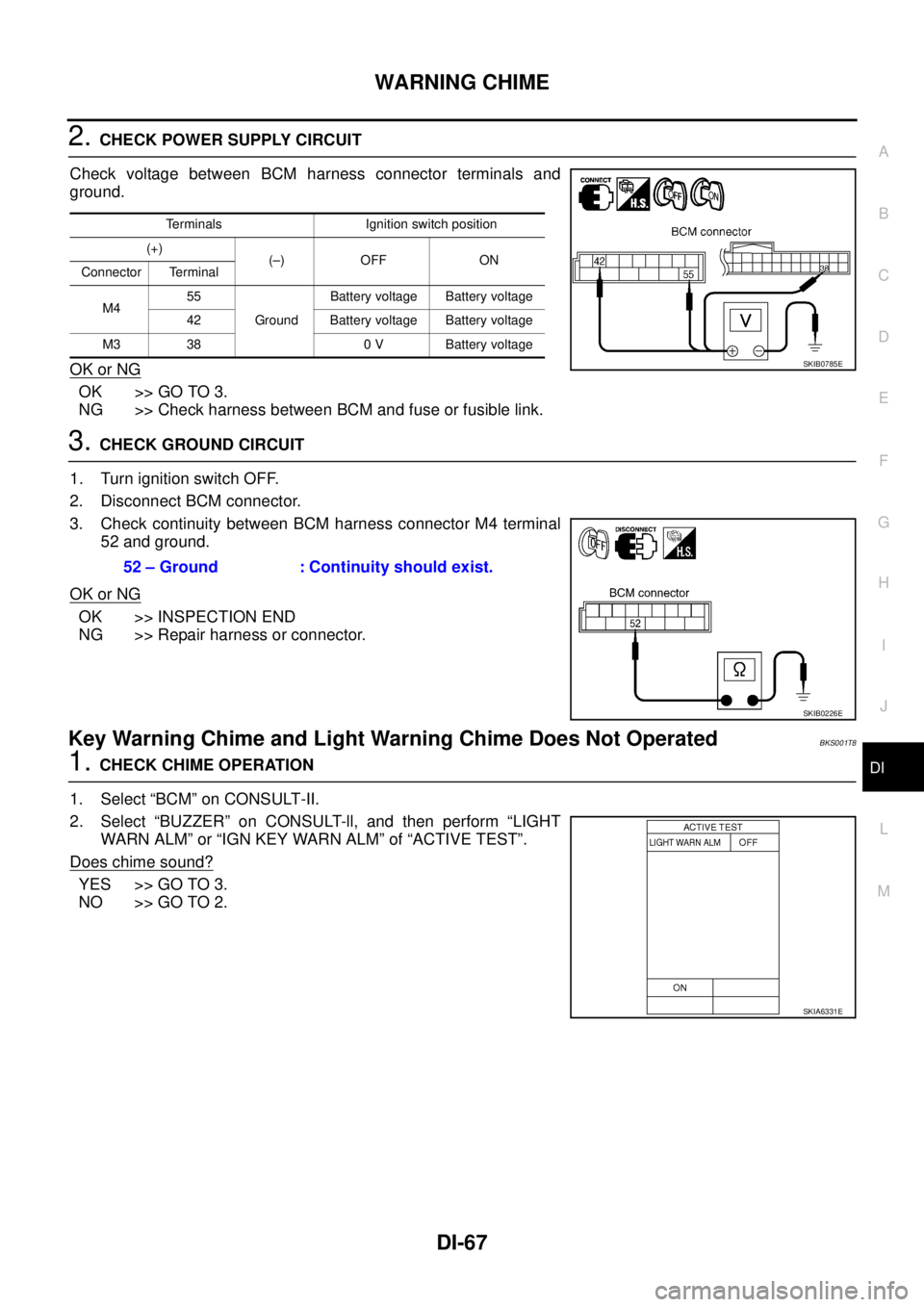
2. CHECK POWER SUPPLY CIRCUIT
Check voltage between BCM harness connector terminals and
ground.
OK or NG
OK >> GO TO 3.
NG >> Check harness between BCM and fuse or fusible link.
3. CHECK GROUND CIRCUIT
1. Turn ignition switch OFF.
2. Disconnect BCM connector.
3. Check continuity between BCM harness connector M4 terminal
52 and ground.
OK or NG
OK >> INSPECTION END
NG >> Repair harness or connector.
Key Warning Chime and Light Warning Chime Does Not OperatedBKS001T8
1. CHECK CHIME OPERATION
1. Select “BCM” on CONSULT-II.
2. Select “BUZZER” on CONSULT-ll, and then perform “LIGHT
WARN ALM” or “IGN KEY WARN ALM” of “ACTIVE TEST”.
Does chime sound?
YES >> GO TO 3.
NO >> GO TO 2.
Terminals Ignition switch position
(+)
(–) OFF ON
Connector Terminal
M455
GroundBattery voltage Battery voltage
42 Battery voltage Battery voltage
M3 38 0 V Battery voltage
SKIB0785E
52 – Ground : Continuity should exist.
SKIB0226E
SKIA6331E
Page 1275 of 3502
WARNING CHIME
DI-69
C
D
E
F
G
H
I
J
L
MA
B
DI
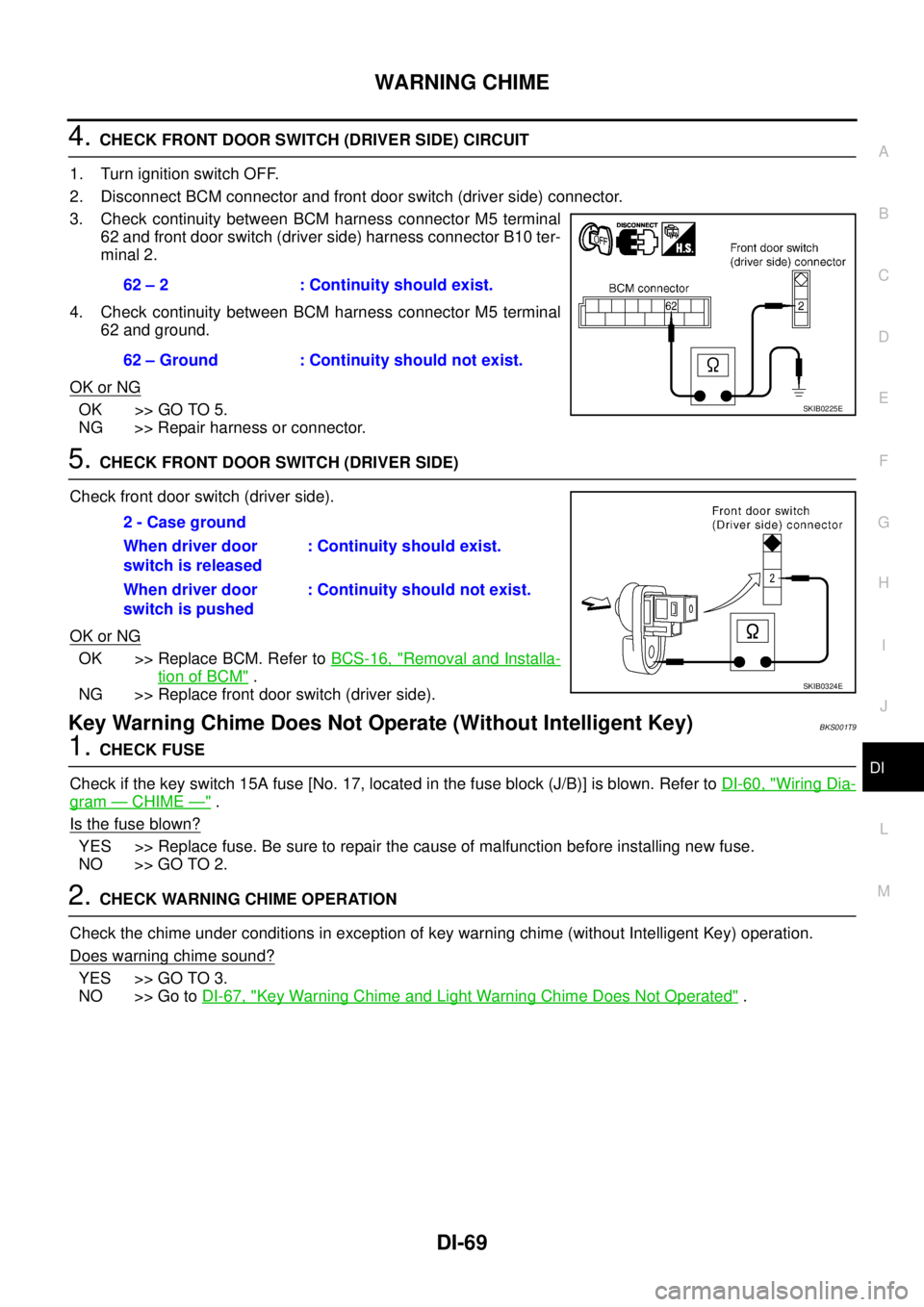
4. CHECK FRONT DOOR SWITCH (DRIVER SIDE) CIRCUIT
1. Turn ignition switch OFF.
2. Disconnect BCM connector and front door switch (driver side) connector.
3. Check continuity between BCM harness connector M5 terminal
62 and front door switch (driver side) harness connector B10 ter-
minal 2.
4. Check continuity between BCM harness connector M5 terminal
62 and ground.
OK or NG
OK >> GO TO 5.
NG >> Repair harness or connector.
5. CHECK FRONT DOOR SWITCH (DRIVER SIDE)
Check front door switch (driver side).
OK or NG
OK >> Replace BCM. Refer to BCS-16, "Removal and Installa-
tion of BCM" .
NG >> Replace front door switch (driver side).
Key Warning Chime Does Not Operate (Without Intelligent Key)BKS001T9
1. CHECK FUSE
Check if the key switch 15A fuse [No. 17, located in the fuse block (J/B)] is blown. Refer to DI-60, "
Wiring Dia-
gram — CHIME —" .
Is the fuse blown?
YES >> Replace fuse. Be sure to repair the cause of malfunction before installing new fuse.
NO >> GO TO 2.
2. CHECK WARNING CHIME OPERATION
Check the chime under conditions in exception of key warning chime (without Intelligent Key) operation.
Does warning chime sound?
YES >> GO TO 3.
NO >> Go to DI-67, "
Key Warning Chime and Light Warning Chime Does Not Operated" . 62 – 2 : Continuity should exist.
62 – Ground : Continuity should not exist.
SKIB0225E
2 - Case ground
When driver door
switch is released: Continuity should exist.
When driver door
switch is pushed: Continuity should not exist.
SKIB0324E
Page 1277 of 3502
WARNING CHIME
DI-71
C
D
E
F
G
H
I
J
L
MA
B
DI
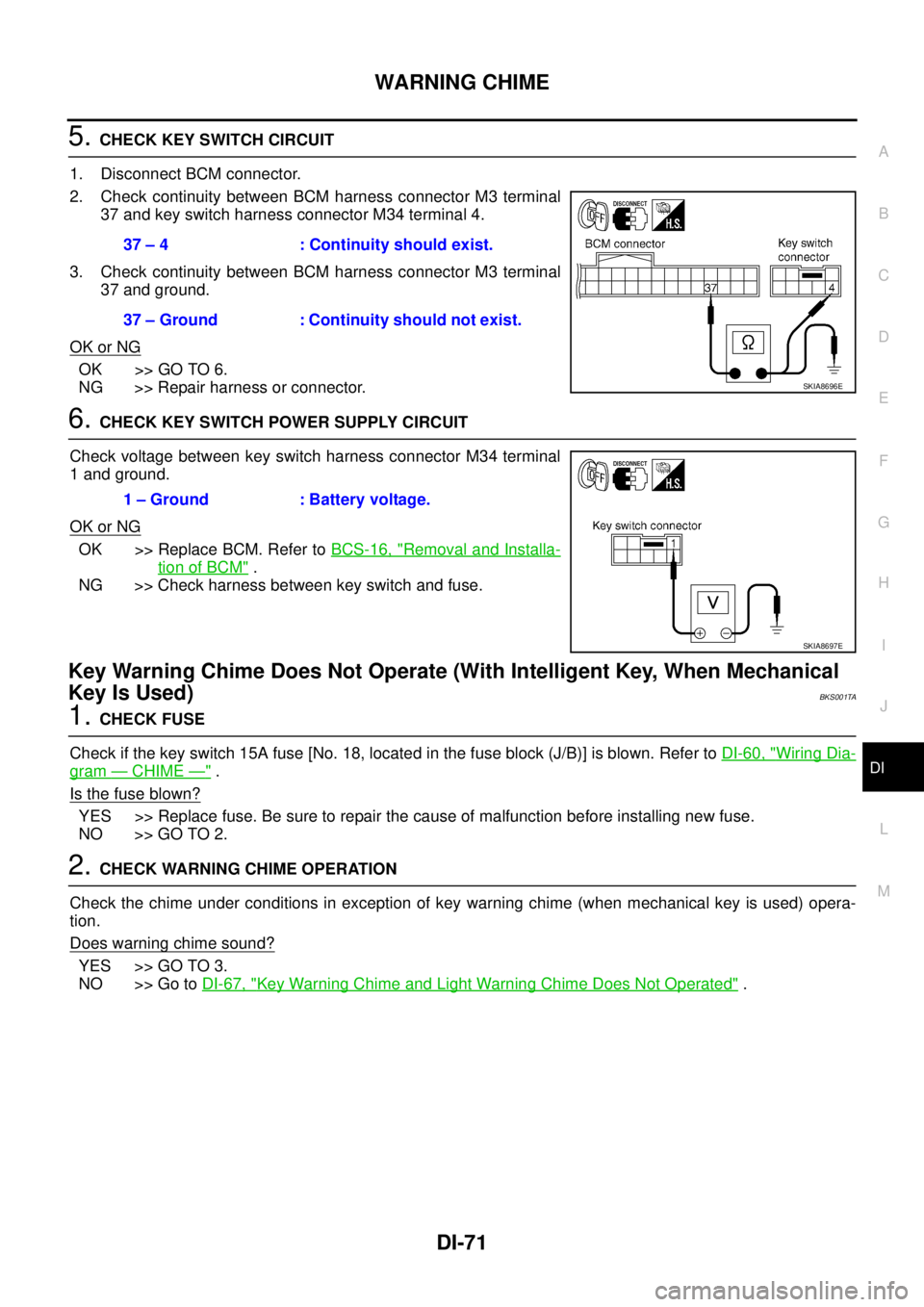
5. CHECK KEY SWITCH CIRCUIT
1. Disconnect BCM connector.
2. Check continuity between BCM harness connector M3 terminal
37 and key switch harness connector M34 terminal 4.
3. Check continuity between BCM harness connector M3 terminal
37 and ground.
OK or NG
OK >> GO TO 6.
NG >> Repair harness or connector.
6. CHECK KEY SWITCH POWER SUPPLY CIRCUIT
Check voltage between key switch harness connector M34 terminal
1 and ground.
OK or NG
OK >> Replace BCM. Refer to BCS-16, "Removal and Installa-
tion of BCM" .
NG >> Check harness between key switch and fuse.
Key Warning Chime Does Not Operate (With Intelligent Key, When Mechanical
Key Is Used)
BKS001TA
1. CHECK FUSE
Check if the key switch 15A fuse [No. 18, located in the fuse block (J/B)] is blown. Refer to DI-60, "
Wiring Dia-
gram — CHIME —" .
Is the fuse blown?
YES >> Replace fuse. Be sure to repair the cause of malfunction before installing new fuse.
NO >> GO TO 2.
2. CHECK WARNING CHIME OPERATION
Check the chime under conditions in exception of key warning chime (when mechanical key is used) opera-
tion.
Does warning chime sound?
YES >> GO TO 3.
NO >> Go to DI-67, "
Key Warning Chime and Light Warning Chime Does Not Operated" . 37 – 4 : Continuity should exist.
37 – Ground : Continuity should not exist.
SKIA8696E
1 – Ground : Battery voltage.
SKIA8697E
Page 1278 of 3502
DI-72
WARNING CHIME
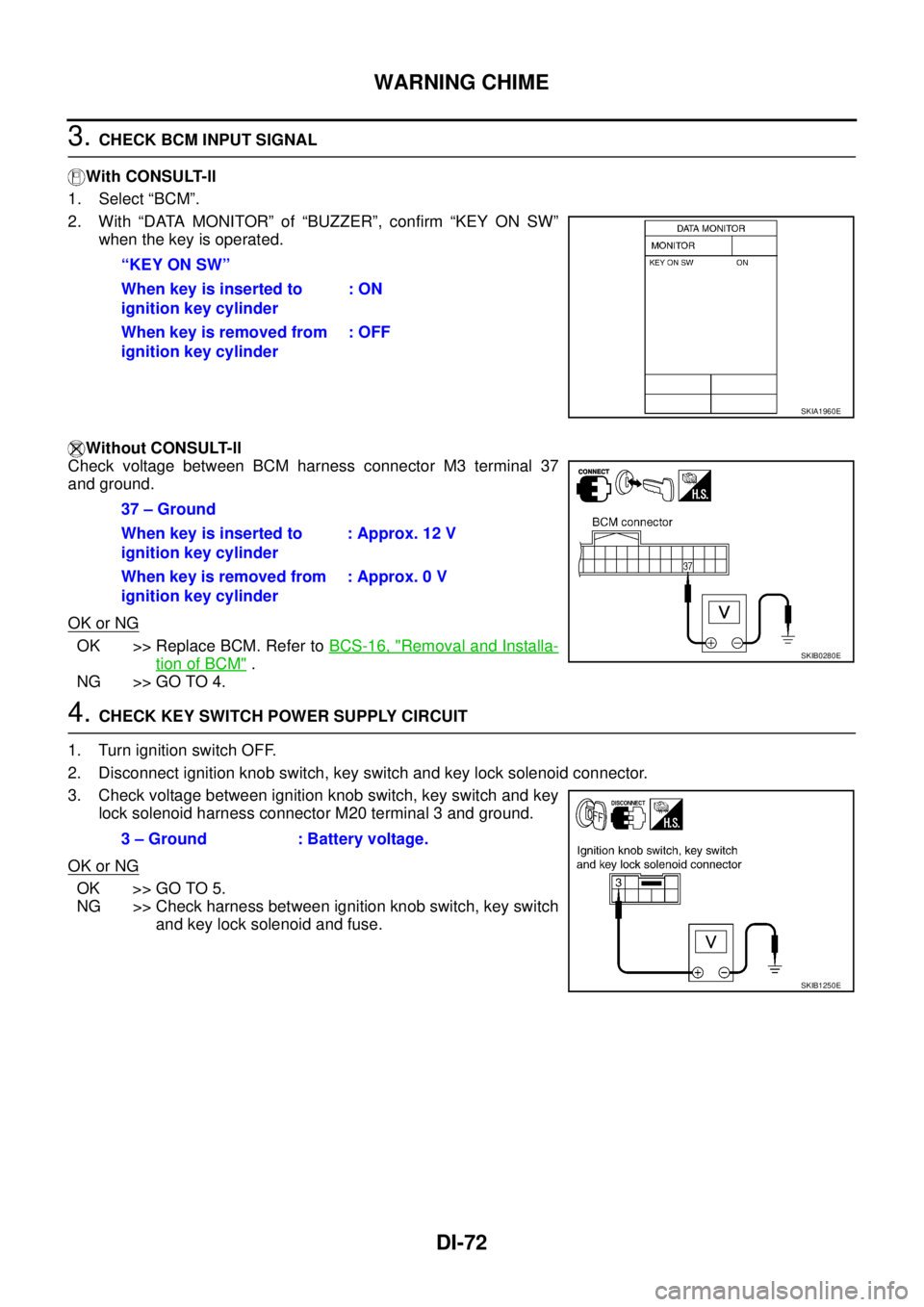
3. CHECK BCM INPUT SIGNAL
With CONSULT-ll
1. Select “BCM”.
2. With “DATA MONITOR” of “BUZZER”, confirm “KEY ON SW”
when the key is operated.
Without CONSULT-ll
Check voltage between BCM harness connector M3 terminal 37
and ground.
OK or NG
OK >> Replace BCM. Refer to BCS-16, "Removal and Installa-
tion of BCM" .
NG >> GO TO 4.
4. CHECK KEY SWITCH POWER SUPPLY CIRCUIT
1. Turn ignition switch OFF.
2. Disconnect ignition knob switch, key switch and key lock solenoid connector.
3. Check voltage between ignition knob switch, key switch and key
lock solenoid harness connector M20 terminal 3 and ground.
OK or NG
OK >> GO TO 5.
NG >> Check harness between ignition knob switch, key switch
and key lock solenoid and fuse. “KEY ON SW”
When key is inserted to
ignition key cylinder: ON
When key is removed from
ignition key cylinder: OFF
SKIA1960E
37 – Ground
When key is inserted to
ignition key cylinder: Approx. 12 V
When key is removed from
ignition key cylinder: Approx. 0 V
SKIB0280E
3 – Ground : Battery voltage.
SKIB1250E
Page 1280 of 3502
DI-74
WARNING CHIME
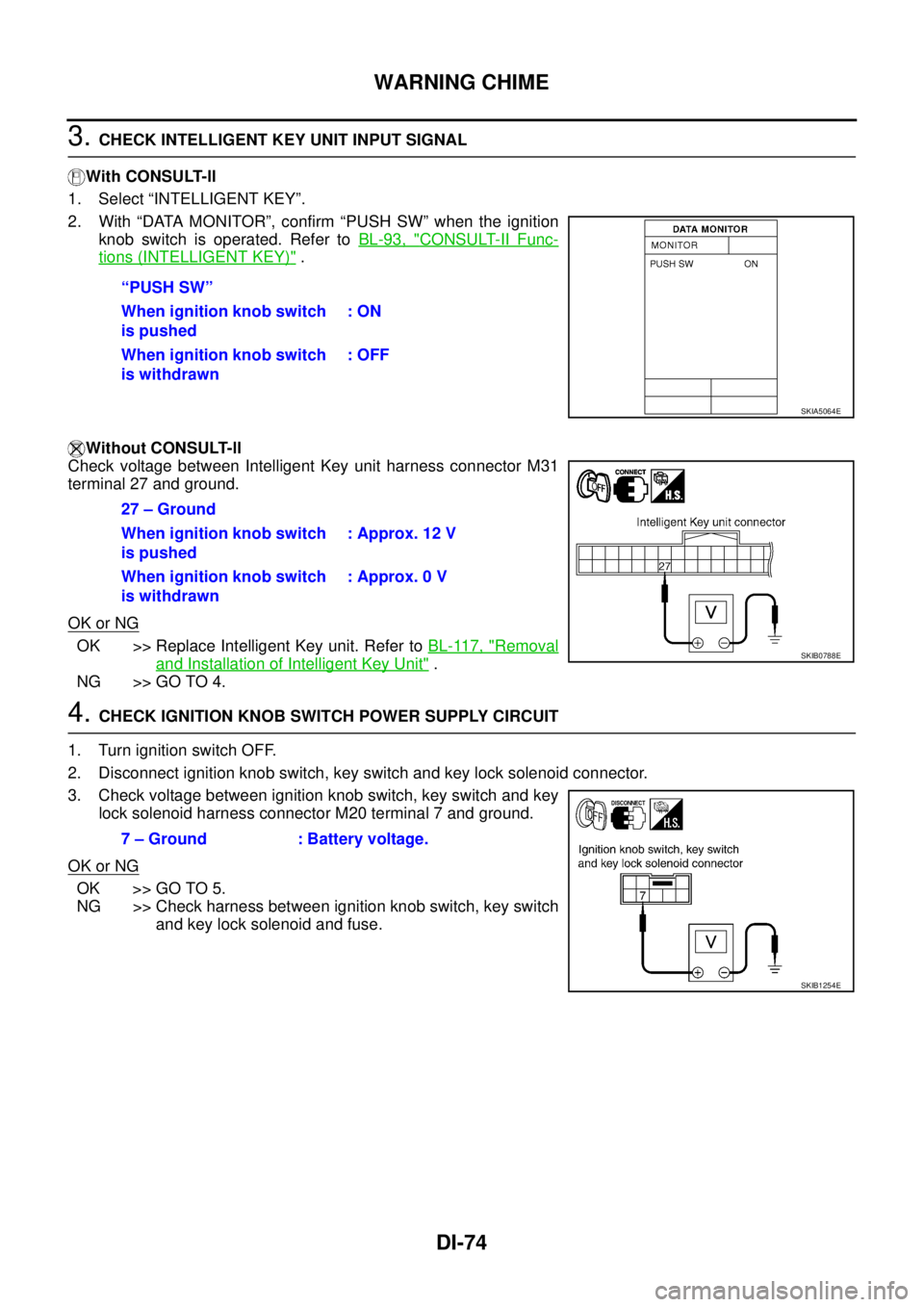
3. CHECK INTELLIGENT KEY UNIT INPUT SIGNAL
With CONSULT-ll
1. Select “INTELLIGENT KEY”.
2. With “DATA MONITOR”, confirm “PUSH SW” when the ignition
knob switch is operated. Refer to BL-93, "
CONSULT-II Func-
tions (INTELLIGENT KEY)" .
Without CONSULT-ll
Check voltage between Intelligent Key unit harness connector M31
terminal 27 and ground.
OK or NG
OK >> Replace Intelligent Key unit. Refer to BL-117, "Removal
and Installation of Intelligent Key Unit" .
NG >> GO TO 4.
4. CHECK IGNITION KNOB SWITCH POWER SUPPLY CIRCUIT
1. Turn ignition switch OFF.
2. Disconnect ignition knob switch, key switch and key lock solenoid connector.
3. Check voltage between ignition knob switch, key switch and key
lock solenoid harness connector M20 terminal 7 and ground.
OK or NG
OK >> GO TO 5.
NG >> Check harness between ignition knob switch, key switch
and key lock solenoid and fuse. “PUSH SW”
When ignition knob switch
is pushed: ON
When ignition knob switch
is withdrawn: OFF
SKIA5064E
27 – Ground
When ignition knob switch
is pushed: Approx. 12 V
When ignition knob switch
is withdrawn: Approx. 0 V
SKIB0788E
7 – Ground : Battery voltage.
SKIB1254E
Page 1332 of 3502
![NISSAN TEANA 2003 Service Manual EC-50
[QR]
BASIC SERVICE PROCEDURE
2. Perform “FUEL PRESSURE RELEASE” in “WORK SUPPORT”
mode with CONSULT-II.
3. Start engine.
4. After engine stalls, crank it two or three times to release](/manual-img/5/57392/w960_57392-1331.png "NISSAN TEANA 2003 Service Manual EC-50
[QR]
BASIC SERVICE PROCEDURE
2. Perform “FUEL PRESSURE RELEASE” in “WORK SUPPORT”
mode with CONSULT-II.
3. Start engine.
4. After engine stalls, crank it two or three times to release")
EC-50
[QR]
BASIC SERVICE PROCEDURE
2. Perform “FUEL PRESSURE RELEASE” in “WORK SUPPORT”
mode with CONSULT-II.
3. Start engine.
4. After engine stalls, crank it two or three times to release all fuel
pressure.
5. Turn ignition switch OFF.
Without CONSULT-II
1. Remove fuel pump fuse located in IPDM E/R.
2. Start engine.
3. After engine stalls, crank it two or three times to release all fuel
pressure.
4. Turn ignition switch OFF.
5. Reinstall fuel pump fuse after servicing fuel system.
FUEL PRESSURE CHECK
Before disconnecting fuel line, release fuel pressure from fuel line to eliminate danger.
NOTE:
Prepare pans or saucers under the disconnected fuel line because the fuel may spill out. The fuel pres-
sure cannot be completely released because J31 models do not have fuel return system.
CAUTION:
�The fuel hose connection method used when taking fuel pressure check must not be used for
other purposes.
�Be careful not to scratch or put debris around connection area when servicing, so that the quick
connector maintains sealability with O-rings inside.
�When installing fuel hose quick connector, refer to EM-19, "INTAKE MANIFOLD" .
1. Release fuel pressure to zero. Refer to EC-49, "
FUEL PRESSURE RELEASE" .
2. Prepare fuel hose and fuel hose clamp for fuel pressure check, and connect fuel pressure gauge.
�Use suitable fuel hose for fuel pressure check (genuine NISSAN fuel hose without quick connector).
�To avoid unnecessary force or tension to hose, use moderately long fuel hose for fuel pressure check.
�Do not use the fuel hose for checking fuel pressure with damage or cracks on it.
�Use Pressure Gauge to check fuel pressure.
3. Remove fuel hose. Refer to EM-19, "
INTAKE MANIFOLD" .
�Do not twist or kink fuel hose because it is plastic hose.
�Do not remove fuel hose from quick connector.
�Keep the original fuel hose to be free from intrusion of dust or foreign substances with a suitable cover.
SEF214Y
PBIB2110E
Page 1389 of 3502
![NISSAN TEANA 2003 Service Manual POWER SUPPLY AND GROUND CIRCUIT
EC-107
[QR]
C
D
E
F
G
H
I
J
K
L
MA
EC
Specification data are reference values and are measured between each terminal and ground.
CAUTION:
Do not use ECM ground termin](/manual-img/5/57392/w960_57392-1388.png "NISSAN TEANA 2003 Service Manual POWER SUPPLY AND GROUND CIRCUIT
EC-107
[QR]
C
D
E
F
G
H
I
J
K
L
MA
EC
Specification data are reference values and are measured between each terminal and ground.
CAUTION:
Do not use ECM ground termin")
POWER SUPPLY AND GROUND CIRCUIT
EC-107
[QR]
C
D
E
F
G
H
I
J
K
L
MA
EC
Specification data are reference values and are measured between each terminal and ground.
CAUTION:
Do not use ECM ground terminals when measuring input/output voltage. Doing so may result in dam-
age to the ECM's transistor. Use a ground other than ECM terminals, such as the ground.
Diagnostic ProcedureBBS005CI
1. INSPECTION START
Start engine.
Is engine running?
Ye s o r N o
Ye s > > G O T O 8 .
No >> GO TO 2.
2. CHECK ECM POWER SUPPLY CIRCUIT-I
1. Turn ignition switch OFF and then ON.
2. Check voltage between ECM terminal 109 and ground with
CONSULT-II or tester.
OK or NG
OK >> GO TO 4.
NG >> GO TO 3.
3. DETECT MALFUNCTIONING PART
Check the following.
�Fuse block (J/B) connector M1
�10A fuse
�Harness for open or short between ECM and fuse
>> Repair open circuit or short to ground or short to power in harness or connectors.
TERMI-
NAL
NO.WIRE
COLORITEM CONDITION DATA (DC Voltage)
1 B ECM ground[Engine is running]
�Idle speedBody ground
109 R Ignition switch[Ignition switch: OFF]0V
[Ignition switch: ON]BATTERY VOLTAGE
(11 - 14V)
111 W / BECM relay
(Self shut-off)[Engine is running]
[Ignition switch: OFF]
�For a few seconds after turning ignition
switch OFF0 - 1.0V
[Ignition switch: OFF]
�More than a few seconds after turning igni-
tion switch OFFBATTERY VOLTAGE
(11 - 14V)
11 5
11 6B
BECM ground[Engine is running]
�Idle speedBody ground
11 9
120R/G
R/GPower supply for ECM[Ignition switch: ON]BATTERY VOLTAGE
(11 - 14V)
Voltage: Battery voltage
MBIB0015E
Page 1392 of 3502
EC-110
[QR]
POWER SUPPLY AND GROUND CIRCUIT
12. CHECK ECM POWER SUPPLY CIRCUIT-VI
1. Disconnect ECM harness connector.
2. Disconnect IPDM E/R harness connector.
3. Check harness continuity between ECM terminal 111 and IPDM E/R terminal 46.
Refer to Wiring Diagram.
4. Also check harness for short to ground and short to power.
OK or NG
OK >> GO TO 14.
NG >> GO TO 13.
13. DETECT MALFUNCTIONING PART
Check the following.
�Harness or connectors E103, M53
�Harness for open or short between ECM and IPDM E/R
>> Repair open circuit or short to ground or short to power in harness or connectors.
14. CHECK 15A FUSE
1. Disconnect 15A fuse from IPDM E/R.
2. Check 15A fuse.
OK or NG
OK >> GO TO 18.
NG >> Replace 15A fuse.
15. CHECK GROUND CONNECTIONS
1. Turn ignition switch OFF.
2. Loosen and retighten two ground screws on the body.
Refer to E C - 111 , "
Ground Inspection" .
OK or NG
OK >> GO TO 16.
NG >> Repair or replace ground connections.Continuity should exist.
PBIB2160E
![NISSAN TEANA 2003 Service Manual EC-110
[QR]
POWER SUPPLY AND GROUND CIRCUIT
12. CHECK ECM POWER SUPPLY CIRCUIT-VI
1. Disconnect ECM harness connector.
2. Disconnect IPDM E/R harness connector.
3. Check harness continuity between E](/manual-img/5/57392/w960_57392-1391.png "NISSAN TEANA 2003 Service Manual EC-110
[QR]
POWER SUPPLY AND GROUND CIRCUIT
12. CHECK ECM POWER SUPPLY CIRCUIT-VI
1. Disconnect ECM harness connector.
2. Disconnect IPDM E/R harness connector.
3. Check harness continuity between E")