Page 687 of 3502

POWER DOOR LOCK SYSTEM
BL-29
C
D
E
F
G
H
J
K
L
MA
B
BL
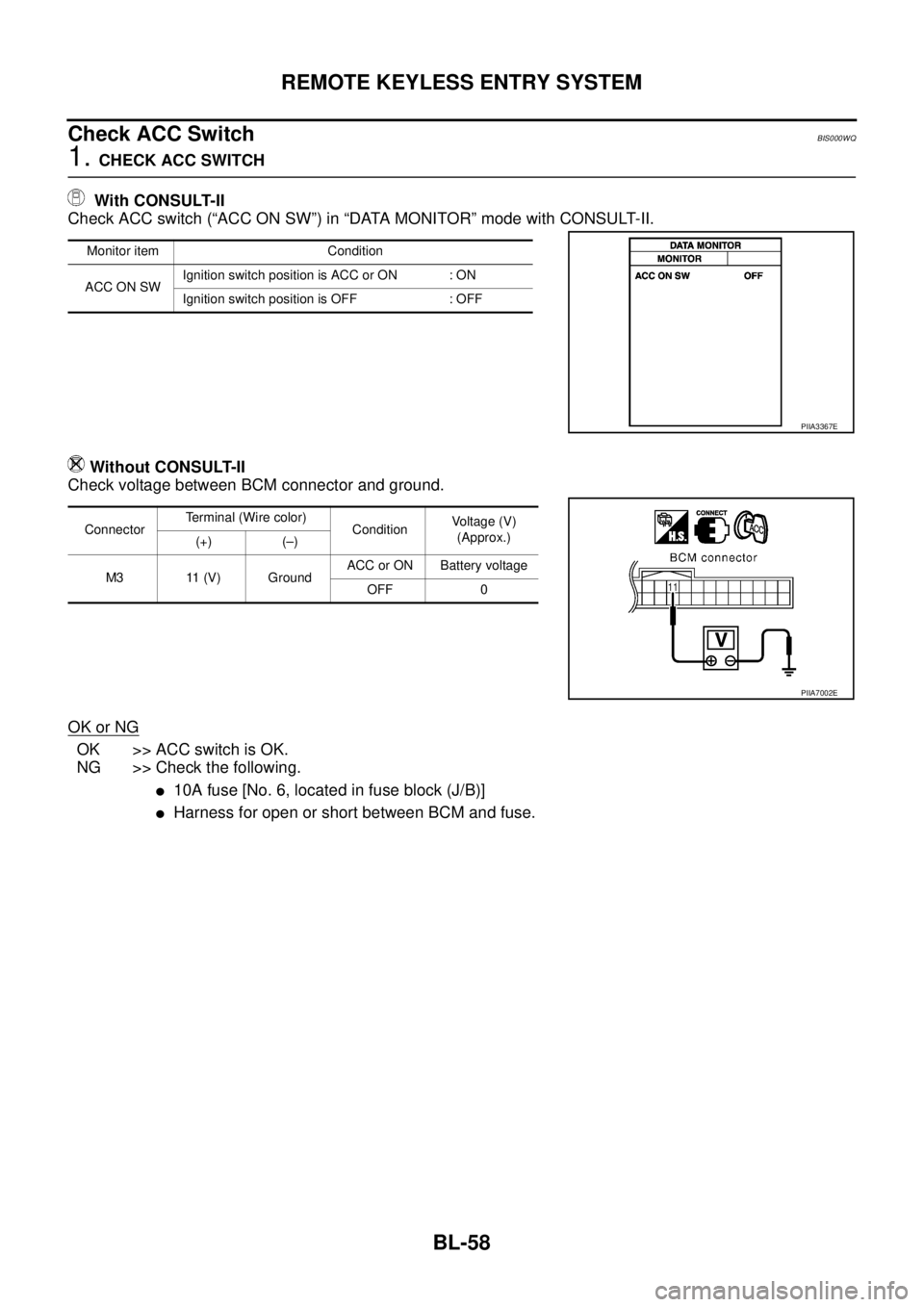
Terminals and Reference Value for BCMBIS000W1
*1: with intelligent key*2: without intelligent key
Work FlowBIS000W2
1. Check the symptom and customer's requests.
2. Understand the outline of system. Refer to BL-22, "
System Description" .
3. According to the trouble diagnosis chart by symptom, repair or replace the cause of the malfunction.
Refer to BL-31, "
Trouble Diagnosis Chart by Symptom" .
4. Does power door lock system operate normally?
YES: GO TO 5.
NO: GO TO 3.
5. INSPECTION END
Te r m i -
nalWire
colorItemSignal
Input/
OutputConditionVoltage (V)
(Approx.)
7 LG/R Door unlock sensor signal InputDriver side door
lock knobON (Lock) 5
OFF (Unlock) 0
12 R/LFront door switch
(Passenger side) signalInputFront door
(Passenger side)ON (Open) 0
OFF (Close) Battery voltage
13 R/B Rear door switch RH signal Input Rear door RHON (Open) 0
OFF (Close) Battery voltage
37B/R
*1
BR*2Key switch signal Input KeyInserted Battery voltage
Removed 0
39 L CAN-HInput/
Output——
40 P CAN-LInput/
Output——
42 Y/R Power source (Fuse) Input — Battery voltage
50 VDoor lock actuator
LOCK output signalOutputDoor lock and unlock switch
(Free → Lock)0 → Battery voltage → 0
51 G/YDoor lock actuator
UNLOCK output signalOutputDoor lock and unlock switch
(Free → Unlock)0 → Battery voltage → 0
52 B Ground — — 0
55 W/B Power source (Fusible link) Input — Battery voltage
60 GRDoor lock and unlock switch
LOCK signalInputDoor lock and
unlock switchLock 0
Other than above Battery voltage
61 GR/RDoor lock and unlock switch
UNLOCK signalInputDoor lock and
unlock switchUnlock 0
Other than above Battery voltage
62 SBFront door switch
(Driver side) signalInputFront door
(Driver side)ON (Open) 0
OFF (Close) Battery voltage
63 R/W Rear door switch LH signal Input Rear door LHON (Open) 0
OFF (Close) Battery voltage
Page 690 of 3502
![NISSAN TEANA 2003 Service Manual BL-32
POWER DOOR LOCK SYSTEM
BCM Power Supply and Ground CircuitBIS000W5
1. CHECK FUSE
�Check 15A fuse [No.17, located in fuse block (J/B)]
�Check 15A fuse [No.18, located in fuse block (J/B)] (With](/manual-img/5/57392/w960_57392-689.png "NISSAN TEANA 2003 Service Manual BL-32
POWER DOOR LOCK SYSTEM
BCM Power Supply and Ground CircuitBIS000W5
1. CHECK FUSE
�Check 15A fuse [No.17, located in fuse block (J/B)]
�Check 15A fuse [No.18, located in fuse block (J/B)] (With")
BL-32
POWER DOOR LOCK SYSTEM
BCM Power Supply and Ground CircuitBIS000W5
1. CHECK FUSE
�Check 15A fuse [No.17, located in fuse block (J/B)]
�Check 15A fuse [No.18, located in fuse block (J/B)] (With Intelligent Key)
�Check 50A fusible link (letter M located in the fuse and fusible link box)
NOTE:
Refer to BL-21, "
Component Parts and Harness Connector Location" .
OK or NG
OK >> GO TO 2.
NG >> If fuse is blown, be sure to eliminate cause of malfunction before installing new fuse, refer to PG-
3, "POWER SUPPLY ROUTING CIRCUIT" .
2. CHECK POWER SUPPLY CIRCUIT
1. Turn ignition switch OFF.
2. Disconnect BCM connector.
3. Check voltage between BCM connector M4 terminals 42, 55 and
ground.
OK or NG
OK >> GO TO 3.
NG >> Repair or replace BCM power supply circuit.
3. CHECK GROUND CIRCUIT
Check continuity between BCM connector M4 terminal 52 and
ground.
OK or NG
OK >> Power supply and ground circuit are OK.
NG >> Repair or replace BCM ground circuit.42 (Y/R) – Ground : Battery voltage
55 (W/B) – Ground : Battery voltage
PIIA6374E
52 (B) – Ground : Continuity should exist.
PIIA9131E
Page 694 of 3502
BL-36
POWER DOOR LOCK SYSTEM
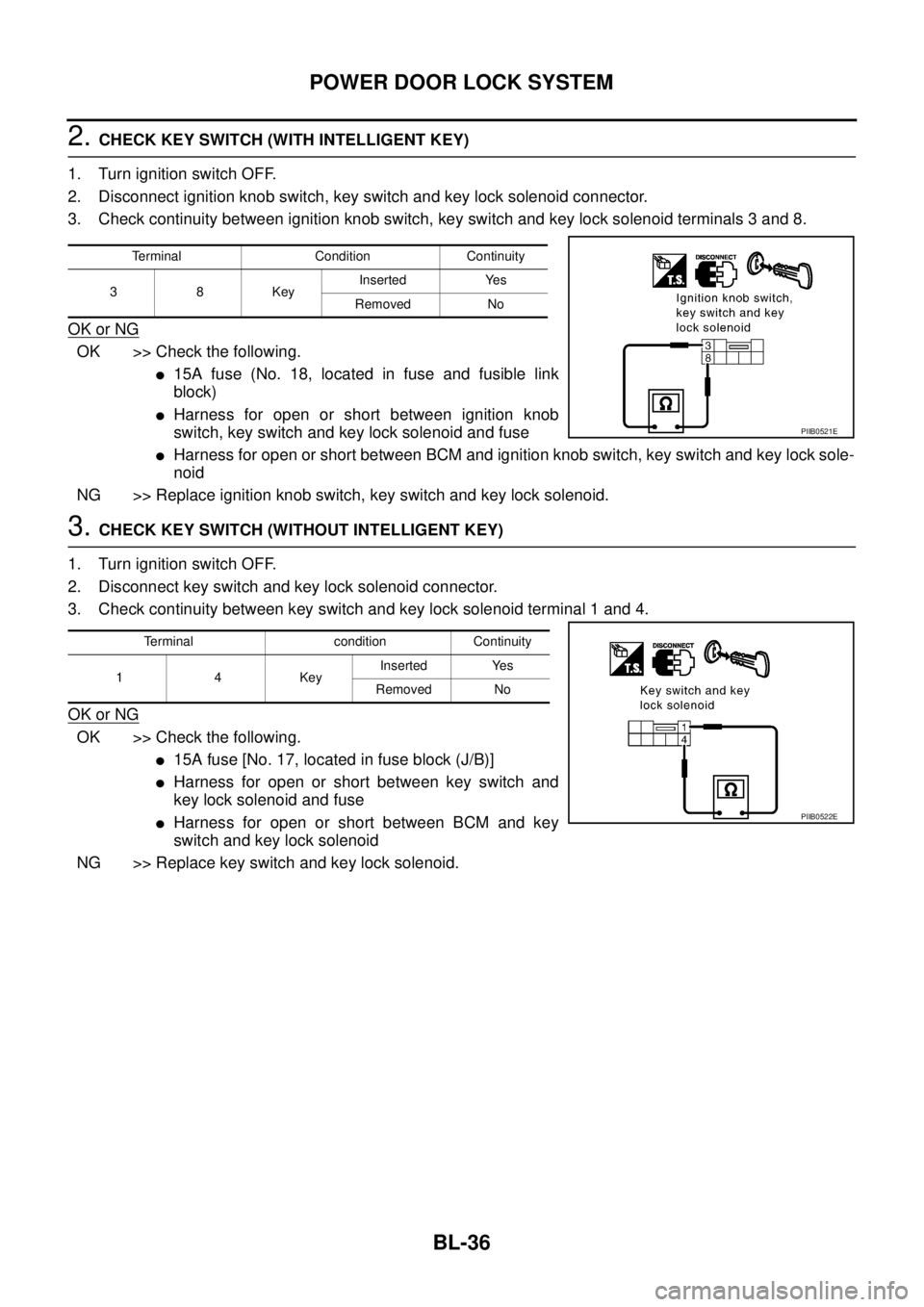
2. CHECK KEY SWITCH (WITH INTELLIGENT KEY)
1. Turn ignition switch OFF.
2. Disconnect ignition knob switch, key switch and key lock solenoid connector.
3. Check continuity between ignition knob switch, key switch and key lock solenoid terminals 3 and 8.
OK or NG
OK >> Check the following.
�15A fuse (No. 18, located in fuse and fusible link
block)
�Harness for open or short between ignition knob
switch, key switch and key lock solenoid and fuse
�Harness for open or short between BCM and ignition knob switch, key switch and key lock sole-
noid
NG >> Replace ignition knob switch, key switch and key lock solenoid.
3. CHECK KEY SWITCH (WITHOUT INTELLIGENT KEY)
1. Turn ignition switch OFF.
2. Disconnect key switch and key lock solenoid connector.
3. Check continuity between key switch and key lock solenoid terminal 1 and 4.
OK or NG
OK >> Check the following.
�15A fuse [No. 17, located in fuse block (J/B)]
�Harness for open or short between key switch and
key lock solenoid and fuse
�Harness for open or short between BCM and key
switch and key lock solenoid
NG >> Replace key switch and key lock solenoid.
Terminal Condition Continuity
38KeyInserted Yes
Removed No
PIIB0521E
Terminal condition Continuity
14KeyInserted Yes
Removed No
PIIB0522E
Page 704 of 3502
BL-46
REMOTE KEYLESS ENTRY SYSTEM
REMOTE KEYLESS ENTRY SYSTEMPFP:28596
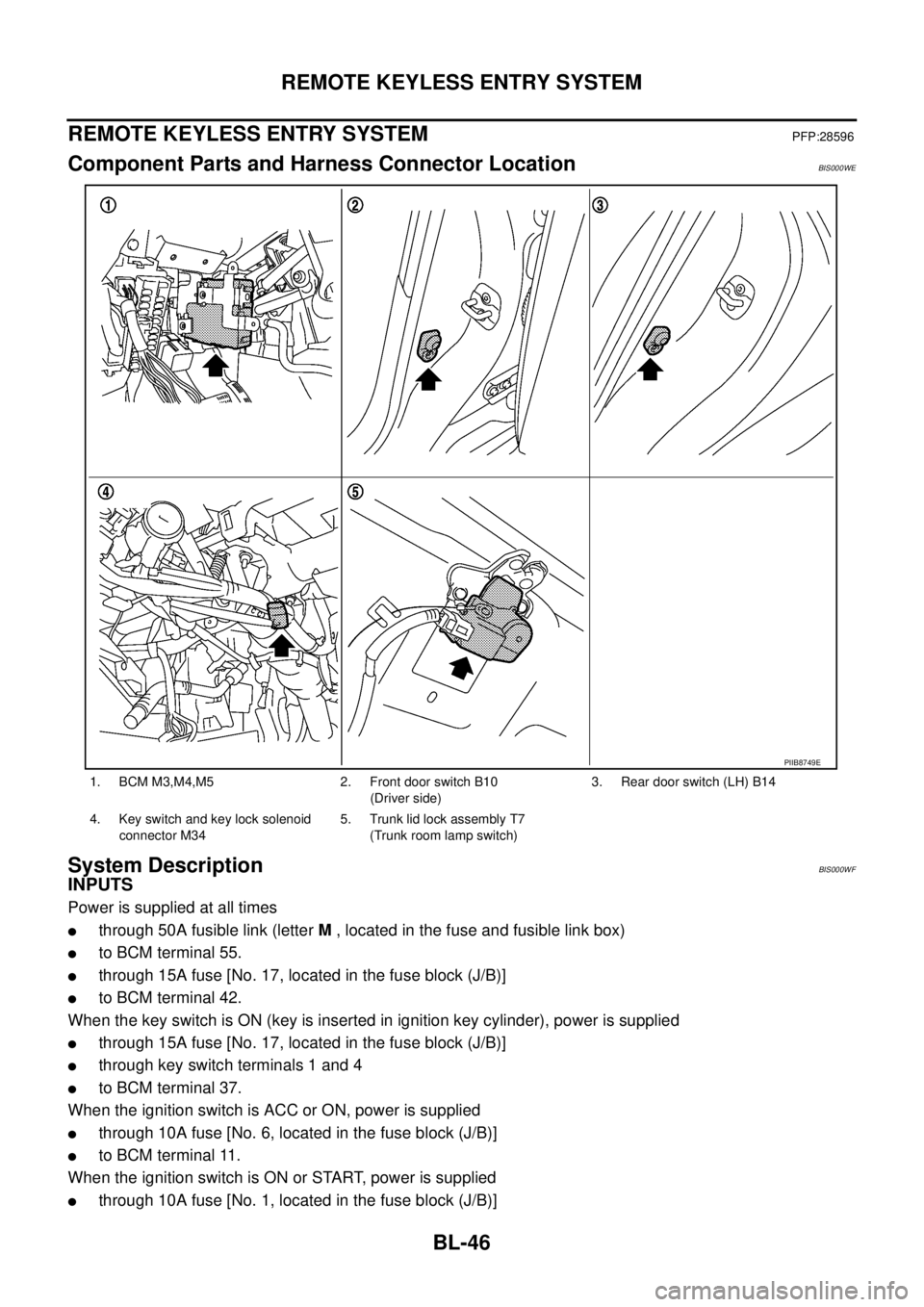
Component Parts and Harness Connector LocationBIS000WE
System DescriptionBIS000WF
INPUTS
Power is supplied at all times
�through 50A fusible link (letter M , located in the fuse and fusible link box)
�to BCM terminal 55.
�through 15A fuse [No. 17, located in the fuse block (J/B)]
�to BCM terminal 42.
When the key switch is ON (key is inserted in ignition key cylinder), power is supplied
�through 15A fuse [No. 17, located in the fuse block (J/B)]
�through key switch terminals 1 and 4
�to BCM terminal 37.
When the ignition switch is ACC or ON, power is supplied
�through 10A fuse [No. 6, located in the fuse block (J/B)]
�to BCM terminal 11.
When the ignition switch is ON or START, power is supplied
�through 10A fuse [No. 1, located in the fuse block (J/B)]
1. BCM M3,M4,M5 2. Front door switch B10
(Driver side)3. Rear door switch (LH) B14
4. Key switch and key lock solenoid
connector M345. Trunk lid lock assembly T7
(Trunk room lamp switch)
PIIB8749E
Page 711 of 3502
REMOTE KEYLESS ENTRY SYSTEM
BL-53
C
D
E
F
G
H
J
K
L
MA
B
BL
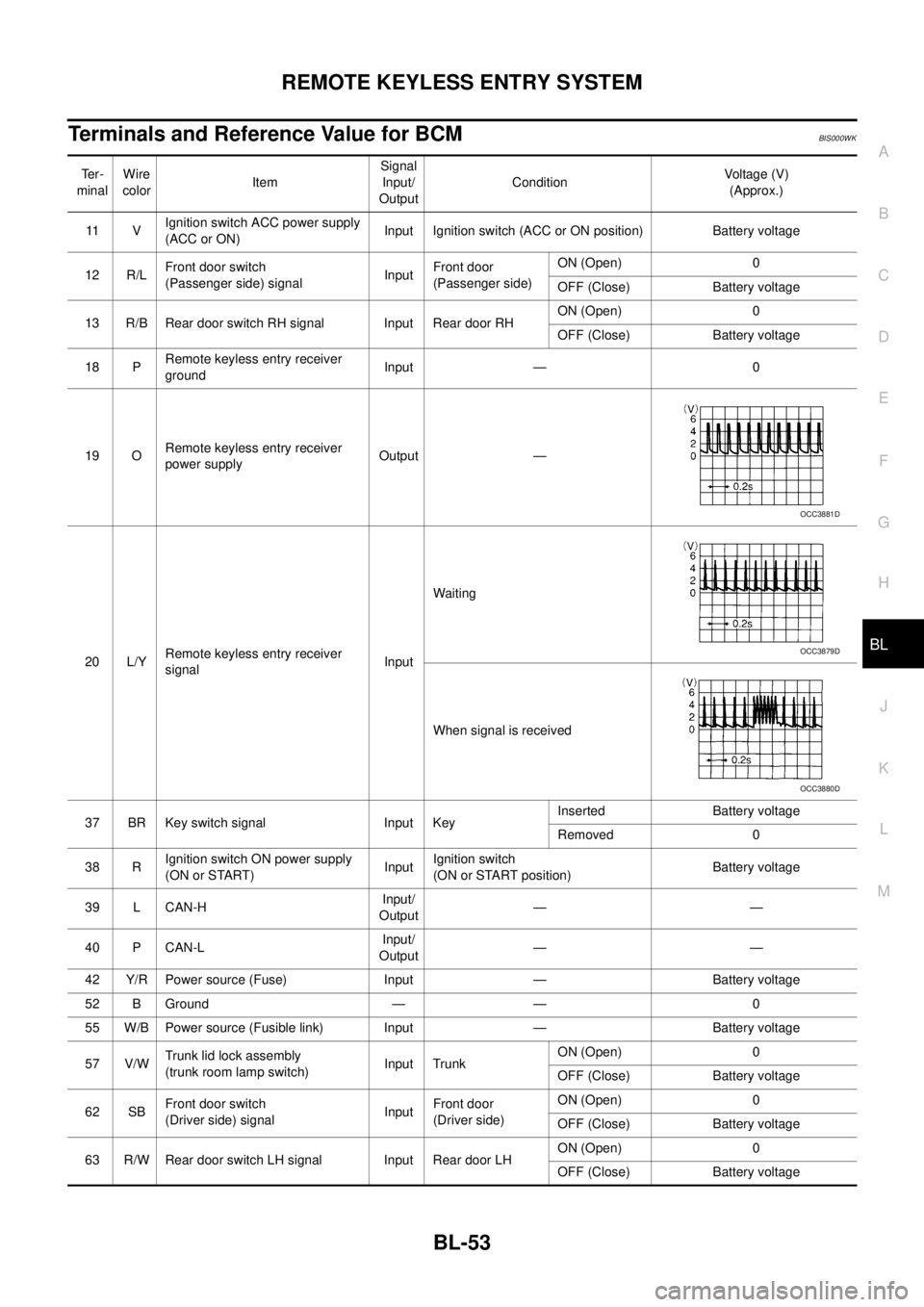
Terminals and Reference Value for BCMBIS000WK
Te r -
minalWire
colorItemSignal
Input/
OutputConditionVoltage (V)
(Approx.)
11 VIgnition switch ACC power supply
(ACC or ON)Input Ignition switch (ACC or ON position) Battery voltage
12 R/LFront door switch
(Passenger side) signalInputFront door
(Passenger side)ON (Open) 0
OFF (Close) Battery voltage
13 R/B Rear door switch RH signal Input Rear door RHON (Open) 0
OFF (Close) Battery voltage
18 PRemote keyless entry receiver
groundInput — 0
19 ORemote keyless entry receiver
power supplyOutput —
20 L/YRemote keyless entry receiver
signalInputWaiting
When signal is received
37 BR Key switch signal Input KeyInserted Battery voltage
Removed 0
38 RIgnition switch ON power supply
(ON or START)InputIgnition switch
(ON or START position)Battery voltage
39 L CAN-HInput/
Output——
40 P CAN-LInput/
Output——
42 Y/R Power source (Fuse) Input — Battery voltage
52 B Ground — — 0
55 W/B Power source (Fusible link) Input — Battery voltage
57 V/WTrunk lid lock assembly
(trunk room lamp switch)Input TrunkON (Open) 0
OFF (Close) Battery voltage
62 SBFront door switch
(Driver side) signalInputFront door
(Driver side)ON (Open) 0
OFF (Close) Battery voltage
63 R/W Rear door switch LH signal Input Rear door LHON (Open) 0
OFF (Close) Battery voltage
OCC3881D
OCC3879D
OCC3880D
Page 716 of 3502
BL-58
REMOTE KEYLESS ENTRY SYSTEM
Check ACC SwitchBIS000WQ
1. CHECK ACC SWITCH
With CONSULT-II
Check ACC switch (“ACC ON SW”) in “DATA MONITOR” mode with CONSULT-II.
Without CONSULT-II
Check voltage between BCM connector and ground.
OK or NG
OK >> ACC switch is OK.
NG >> Check the following.
�10A fuse [No. 6, located in fuse block (J/B)]
�Harness for open or short between BCM and fuse.
Monitor item Condition
ACC ON SWIgnition switch position is ACC or ON : ON
Ignition switch position is OFF : OFF
PIIA3367E
ConnectorTerminal (Wire color)
ConditionVoltage (V)
(Approx.)
(+) (–)
M3 11 (V) GroundACC or ON Battery voltage
OFF 0
PIIA7002E
Page 721 of 3502

REMOTE KEYLESS ENTRY SYSTEM
BL-63
C
D
E
F
G
H
J
K
L
MA
B
BL
Check Key SwitchBIS000WS
1. CHECK KEY SWITCH INPUT SIGNAL
With CONSULT-II
Check ignition key switch “KEY ON SW” in “DATA MONITOR” mode with CONSULT-II.
�When key is inserted in ignition key cylinder
�When key is removed from ignition key cylinder
Without CONSULT-II
Check voltage between BCM connector and ground.
OK or NG
OK >> Key switch circuit is OK.
NG >> GO TO 2.
2. CHECK KEY SWITCH
1. Turn ignition switch OFF.
2. Disconnect key switch and key lock solenoid connector.
3. Check continuity between key switch and key lock solenoid terminal 1 and 4.
OK or NG
OK >> Check the following.
�15A fuse [No. 17, located in fuse block (J/B)]
�Harness for open or short between key switch and
key lock solenoid and fuse
�Harness for open or short between BCM and key
switch and key lock solenoid
NG >> Replace key switch.KEY ON SW : ON
KEY ON SW : OFF
PIIA6470E
ConnectorTerminal (Wire color)
ConditionVoltage (V)
(Approx.)
(+) (-)
M3 37 (B/R) Ground KeyInserted Battery voltage
Removed 0
PIIA6378E
Terminal condition Continuity
14KeyInserted Yes
Removed No
PIIB0522E
Page 746 of 3502
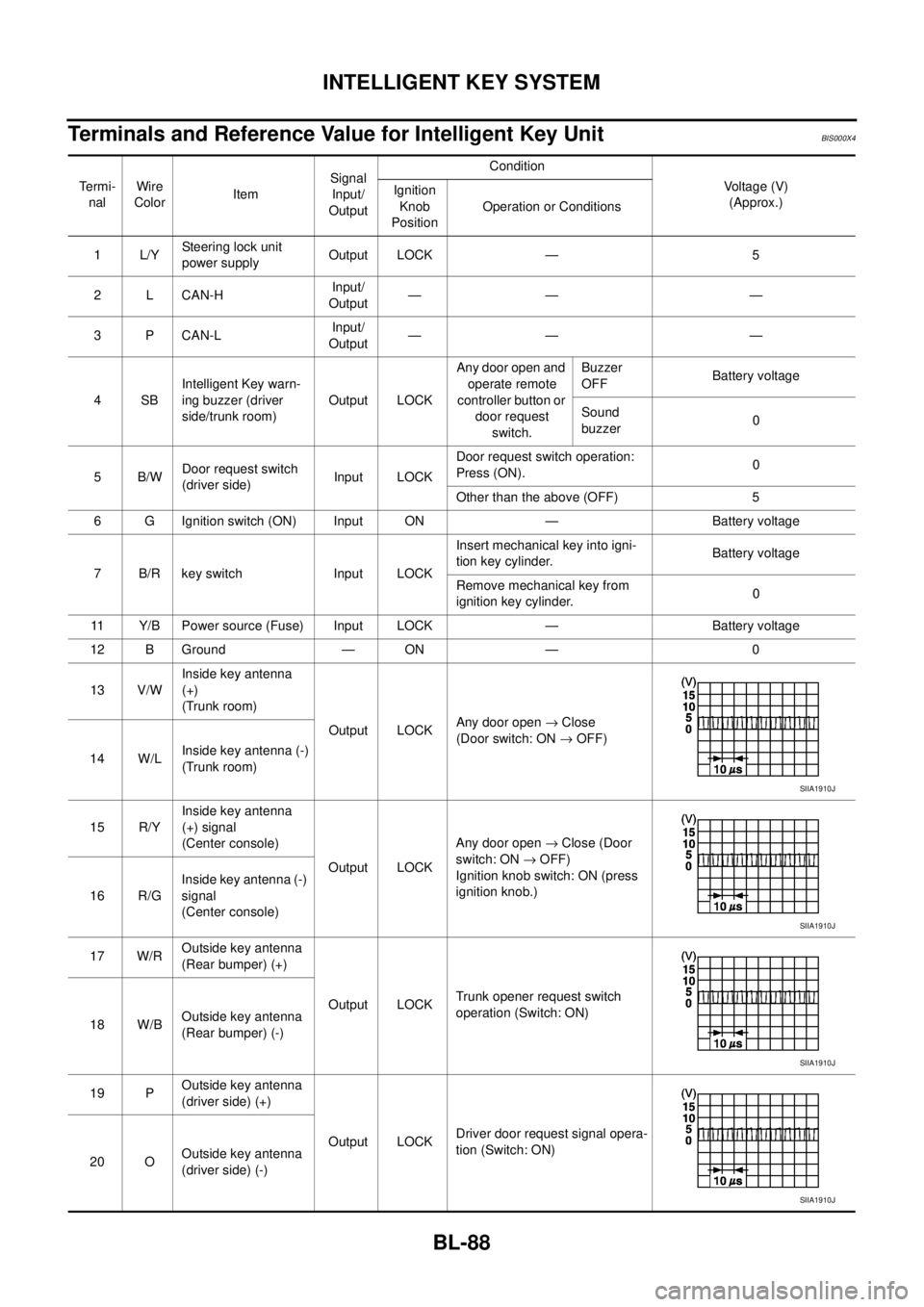
BL-88
INTELLIGENT KEY SYSTEM
Terminals and Reference Value for Intelligent Key UnitBIS000X4
Te r m i -
nalWire
ColorItemSignal
Input/
OutputCondition
Voltage (V)
(Approx.) Ignition
Knob
PositionOperation or Conditions
1L/YSteering lock unit
power supplyOutput LOCK — 5
2 L CAN-HInput/
Output—— —
3 P CAN-LInput/
Output—— —
4SBIntelligent Key warn-
ing buzzer (driver
side/trunk room)Output LOCKAny door open and
operate remote
controller button or
door request
switch.Buzzer
OFFBattery voltage
Sound
buzzer0
5B/WDoor request switch
(driver side)Input LOCKDoor request switch operation:
Press (ON).0
Other than the above (OFF) 5
6 G Ignition switch (ON) Input ON — Battery voltage
7 B/R key switch Input LOCKInsert mechanical key into igni-
tion key cylinder.Battery voltage
Remove mechanical key from
ignition key cylinder.0
11 Y/B Power source (Fuse) Input LOCK — Battery voltage
12 B Ground — ON — 0
13 V/WInside key antenna
(+)
(Trunk room)
Output LOCKAny door open → Close
(Door switch: ON → OFF)
14 W/LInside key antenna (-)
(Trunk room)
15 R/YInside key antenna
(+) signal
(Center console)
Output LOCKAny door open → Close (Door
switch: ON → OFF)
Ignition knob switch: ON (press
ignition knob.)
16 R/GInside key antenna (-)
signal
(Center console)
17 W/ROutside key antenna
(Rear bumper) (+)
Output LOCKTrunk opener request switch
operation (Switch: ON)
18 W/BOutside key antenna
(Rear bumper) (-)
19 POutside key antenna
(driver side) (+)
Output LOCKDriver door request signal opera-
tion (Switch: ON)
20 OOutside key antenna
(driver side) (-)
SIIA1910J
SIIA1910J
SIIA1910J
SIIA1910J