Page 154 of 426
&Security indicator light
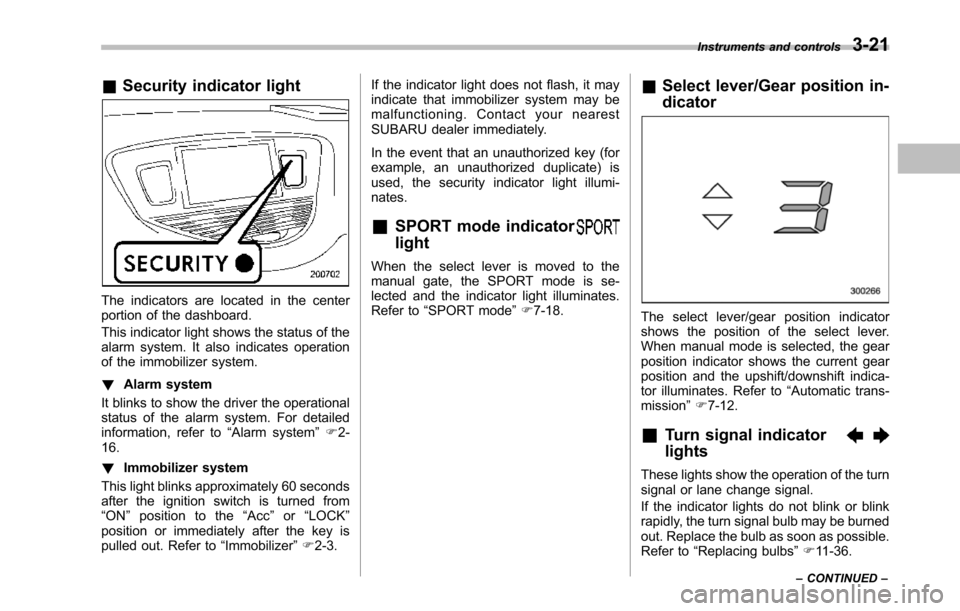
The indicators are located in the centerportion of the dashboard.
This indicator light shows the status of thealarm system. It also indicates operationof the immobilizer system.
!Alarm system
It blinks to show the driver the operationalstatus of the alarm system. For detailedinformation, refer to“Alarm system”F2-16.
!Immobilizer system
This light blinks approximately 60 secondsafter the ignition switch is turned from“ON”position to the“Acc”or“LOCK”position or immediately after the key ispulled out. Refer to“Immobilizer”F2-3.
If the indicator light does not flash, it mayindicate that immobilizer system may bemalfunctioning. Contact your nearestSUBARU dealer immediately.
In the event that an unauthorized key (forexample, an unauthorized duplicate) isused, the security indicator light illumi-nates.
&SPORT mode indicator
light
When the select lever is moved to themanual gate, the SPORT mode is se-lected and theindicator light illuminates.Refer to“SPORTmode”F7-18.
&Select lever/Gear position in-
dicator
The select lever/gear position indicatorshows the position of the select lever.When manual mode is selected, the gearposition indicator shows the current gearposition andthe upshift/downshift indica-tor illuminates. Refer to“Automatic trans-mission”F7-12.
&Turn signal indicator
lights
These lights show the operation of the turnsignal or lane change signal.
If the indicator lights do not blink or blinkrapidly, the turn signal bulb may be burnedout. Replace the bulb as soon as possible.Refer to“Replacing bulbs”F11-36.
Instruments and controls3-21
–CONTINUED–
Page 177 of 426
3-44Instruments and controls
Tilt steering wheel
WARNING
Do not adjust the steering wheel tiltposition while driving. This maycause loss of vehicle control andresult in personal injury.
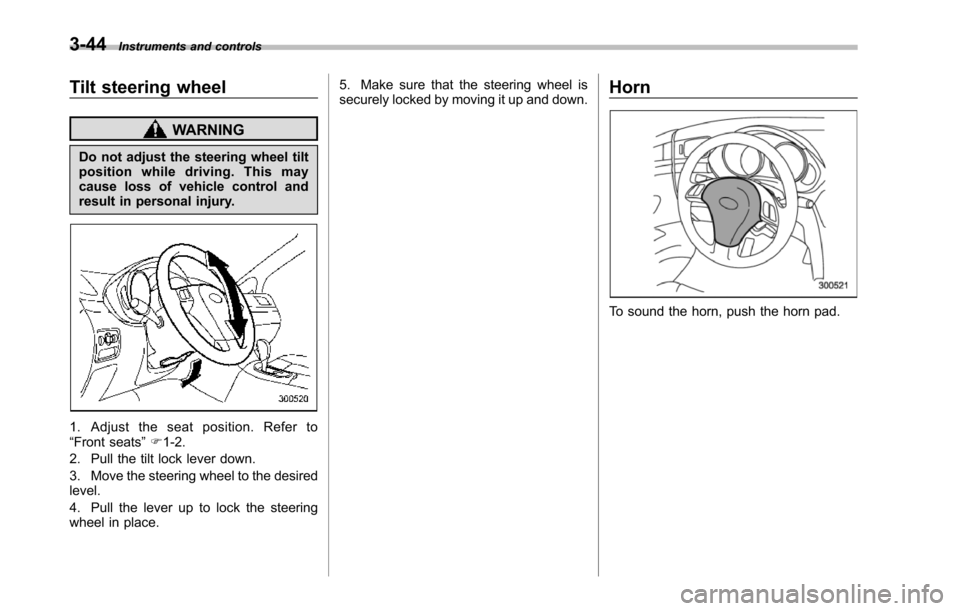
1. Adjust the seat position. Refer to“Front seats”F1-2.
2. Pull the tilt lock lever down.
3. Move the steering wheel to the desiredlevel.
4. Pull the lever up to lock the steeringwheel in place.
5. Make sure that the steering wheel issecurely locked by moving it up and down.Horn
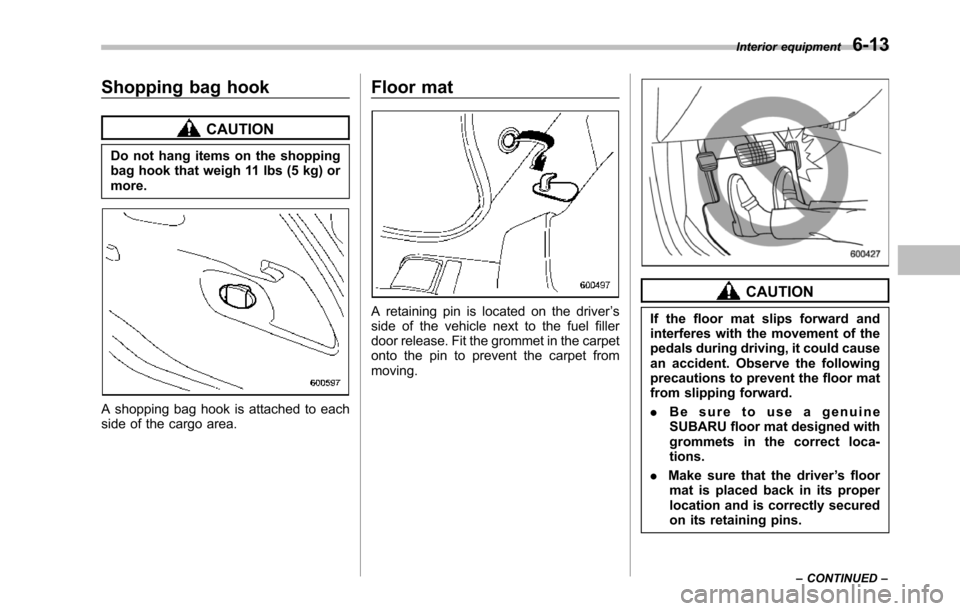
To sound the horn, push the horn pad.
Page 190 of 426
10. Secure the glove box with the one clip.
11. Install the instrument panel side cover.
CAUTION
Contact your SUBARU dealer if thefollowingoccurs, even if it is not yettime to change the filter.
–Reduction of the airflow throughthe vents.
–Windshield gets easily fogged ormisted.
NOTE
The filter can influence the air condi-tioning, heating and defroster perfor-mance if not properly maintained.
Climate control4-13
Page 234 of 426
Shopping bag hook
CAUTION
Do not hang items on the shoppingbag hook that weigh 11 lbs (5 kg) ormore.
A shopping bag hook is attached to eachside of the cargo area.
Floor mat
A retaining pin is located on the driver’sside of the vehicle next to the fuel fillerdoor release. Fit the grommet in the carpetonto the pin to prevent the carpet frommoving.
CAUTION
If the floor mat slips forward andinterferes with the movement of thepedals during driving, it could causean accident. Observe the followingprecautions to prevent the floor matfromslipping forward.
.Be sure to use a genuineSUBARU floor mat designed withgrommets in the correct loca-tions.
.Make sure that the driver’s floormat is placed back in its properlocation and is correctly securedon its retaining pins.
Interior equipment6-13
–CONTINUED–
Page 237 of 426
6-16Interior equipment
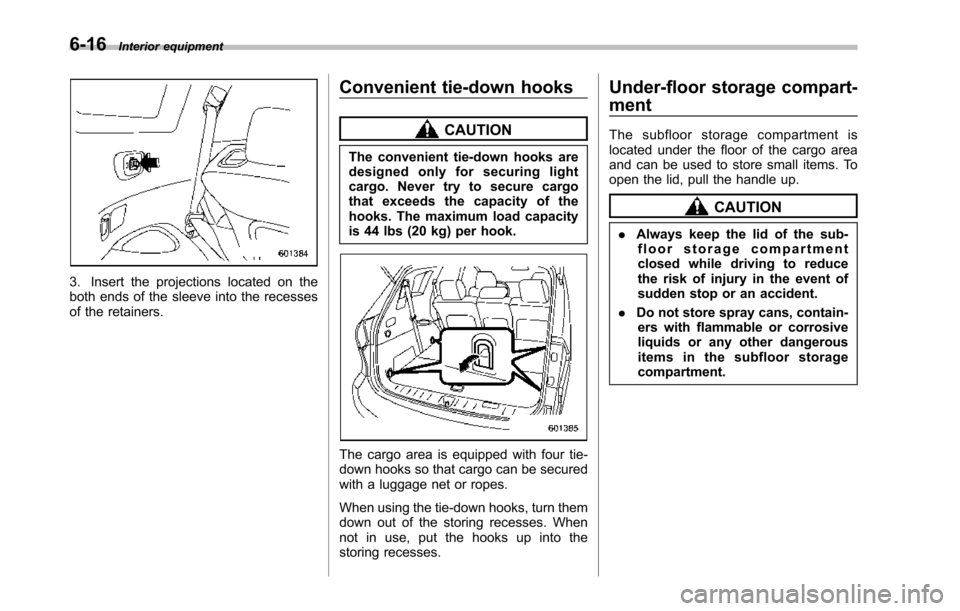
3. Insert the projections located on theboth ends of the sleeve into the recessesof the retainers.
Convenient tie-down hooks
CAUTION
The convenient tie-down hooks aredesigned only for securing lightcargo. Never try to secure cargothat exceeds the capacity of thehooks. The maximum load capacityis 44 lbs (20 kg) per hook.
Thecargo area is equipped with four tie-down hooks so that cargo can be securedwith a luggage net or ropes.
When using the tie-down hooks, turn themdown out of the storing recesses. Whennot in use, put the hooks up into thestoring recesses.
Under-floor storage compart-
ment
The subfloor storage compartment islocated under the floor of the cargo areaand can be used to store small items. Toopen the lid, pull the handle up.
CAUTION
.Always keep the lid of the sub-floor storage compartmentclosed whiledriving to reducethe risk of injury in the event ofsudden stop or an accident.
.Do not store spray cans, contain-ers with flammable or corrosiveliquids or any other dangerousitems in the subfloor storagecompartment.
Page 238 of 426
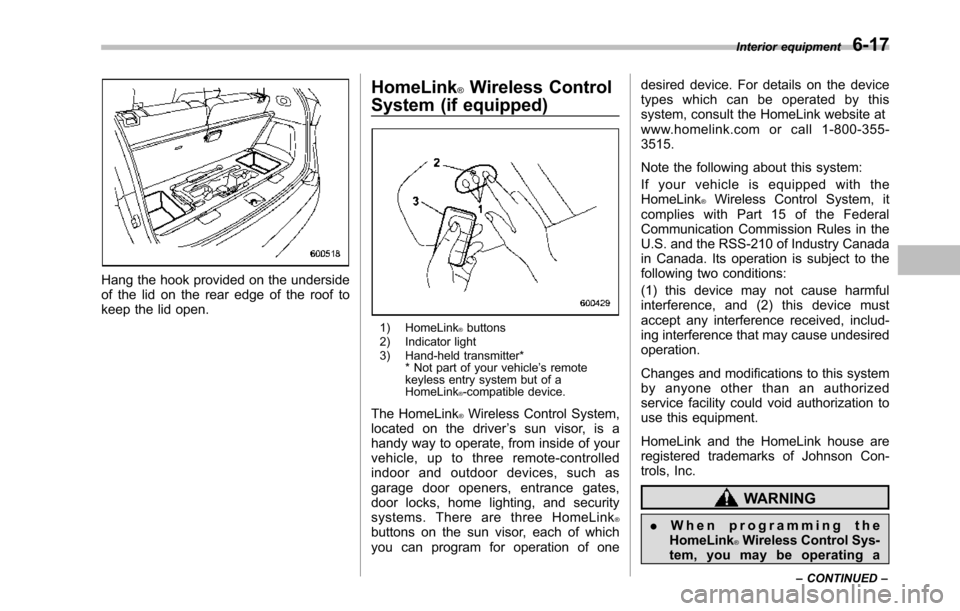
Hang the hook provided on the undersideof the lid on the rear edge of the roof tokeepthe lid open.
HomeLink®Wireless Control
System (if equipped)
1) HomeLink®buttons2) Indicator light3) Hand-held transmitter** Not part of your vehicle’s remotekeyless entry system but of aHomeLink®-compatible device.
The HomeLink®Wireless Control System,located on the driver’s sun visor, is ahandy way to operate, from inside of yourvehicle, up to three remote-controlledindoor and outdoor devices, such asgarage door openers, entrance gates,door locks, home lighting, and securitysystems. There are three HomeLink®buttons on the sun visor, each of whichyou can program for operation of one
desired device. For details on the devicetypes which can be operated by thissystem, consult the HomeLink website atwww.homelink.com or call 1-800-355-3515.
Note the following about this system:
If your vehicle is equipped with theHomeLink®Wireless Control System, itcomplies with Part 15 of the FederalCommunication Commission Rules in theU.S. and the RSS-210 of Industry Canadain Canada. Its operation is subject to thefollowing two conditions:
(1) this device may not cause harmfulinterference, and (2) this device mustaccept any interference received, includ-ing interference that may cause undesiredoperation.
Changes and modifications to this systemby anyone other than an authorizedservice facility could void authorization touse this equipment.
HomeLink and the HomeLink house areregistered trademarks of Johnson Con-trols, Inc.
WARNING
.When programming theHomeLink®Wireless Control Sys-tem, you may be operating a
Interior equipment6-17
–CONTINUED–
Page 242 of 426
opener by pressing the programmedHomeLink®button.
&Programming other devices
To program other devices such as doorlocks, home lighting and security systems,contact HomeLink at www.homelink.comor call 1-800-355-3515.
&Operating the HomeLink®
Wireless Control System
Once programmed, the HomeLink®Wire-less Control System can be used toremote-controlthe devices to which itsbuttons are programmed. To activate adevice, simply press the appropriate but-ton.The indicator light illuminates, indicat-ing that the signal is being transmitted.
&Erasing HomeLink®button
memory
NOTE
.Performing this procedure erasesthe memory of all the preprogrammedbuttons simultaneously. The memoryof individual buttons cannot be erased..It is recommended that upon thesale of the vehicle, the memory of allprogrammed HomeLink®buttons beerased for security purposes.
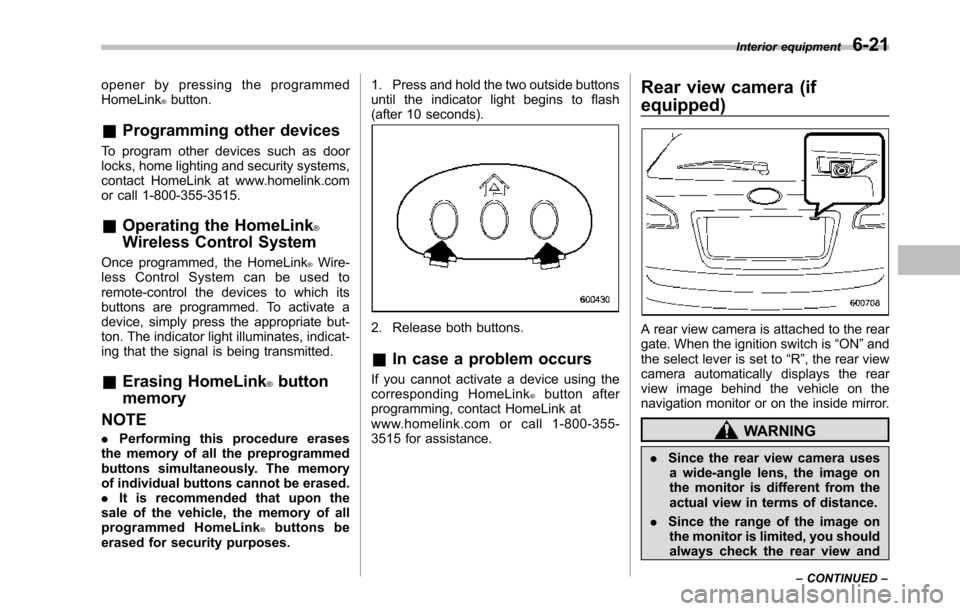
1. Press and hold the two outside buttonsuntil the indicator light begins to flash(after 10 seconds).
2. Release both buttons.
&In case a problem occurs
If you cannot activate a device using thecorresponding HomeLink®button afterprogramming, contact HomeLink atwww.homelink.com or call 1-800-355-3515 for assistance.
Rear view camera (if
equipped)
A rear view camera is attached to the reargate. When the ignition switch is“ON”andthe select lever is set to“R”, the rear viewcamera automatically displays the rearview image behind the vehicle on thenavigation monitor or on the inside mirror.
WARNING
.Since the rear view camera usesa wide-angle lens, the image onthe monitor is different from theactual view in terms of distance.
.Since the range of the image onthe monitor is limited, you shouldalways check the rear view and
Interior equipment6-21
–CONTINUED–
Page 251 of 426
7-4Starting and operating
WARNING
Before opening the fuel filler cap,first touch the vehicle body or ametal portion of the fuel pump orsimilar object to discharge anystatic electricity that may be presenton your body. If your body is carry-ing an electrostatic charge, there isa possibility that an electric sparkcould ignite the fuel, which couldburn you. To avoid acquiring a newstatic electric charge, do not getback into the vehicle while refuelingis in progress.
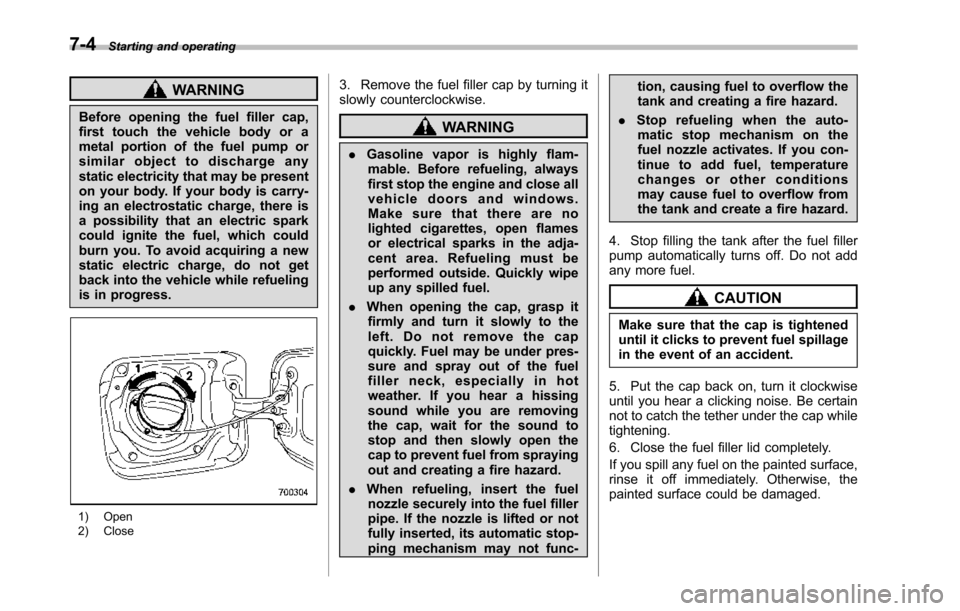
1) Open2) Close
3. Remove the fuel filler cap by turning itslowly counterclockwise.
WARNING
.Gasoline vapor is highly flam-mable. Before refueling, alwaysfirst stop the engine and close allvehicle doors and windows.Make sure that there are nolighted cigarettes, open flamesor electrical sparks in the adja-cent area. Refueling must beperformed outside. Quickly wipeup any spilled fuel.
.When opening the cap, grasp itfirmly and turn it slowly to theleft. Do not remove the capquickly. Fuel may be under pres-sure and spray out of the fuelfiller neck, especially in hotweather. If you hear a hissingsound while you are removingthe cap, wait for the sound tostop and then slowly open thecapto prevent fuel from sprayingout and creating a fire hazard.
.When refueling, insert the fuelnozzle securely into the fuel fillerpipe. If the nozzle is lifted or notfullyinserted, its automatic stop-ping mechanism may not func-
tion, causing fuel to overflow thetank and creating a fire hazard.
.Stop refueling when the auto-matic stop mechanism on thefuel nozzle activates. If you con-tinue to add fuel, temperaturechanges or other conditionsmay cause fuel to overflow fromthe tank and create a fire hazard.
4. Stop filling the tank after the fuel fillerpump automatically turns off. Do not addany more fuel.
CAUTION
Make sure that the cap is tighteneduntil it clicks to prevent fuel spillagein the event of an accident.
5. Put the cap back on, turn it clockwiseuntil you hear a clicking noise. Be certainnot to catch the tether under the cap whiletightening.
6. Close the fuel filler lid completely.
If you spill any fuel on the painted surface,rinse it off immediately. Otherwise, thepainted surface could be damaged.