2014 SUBARU TRIBECA ECU
[x] Cancel search: ECUPage 109 of 426
2-4Keys and doors
integrated unit, and combination meter.
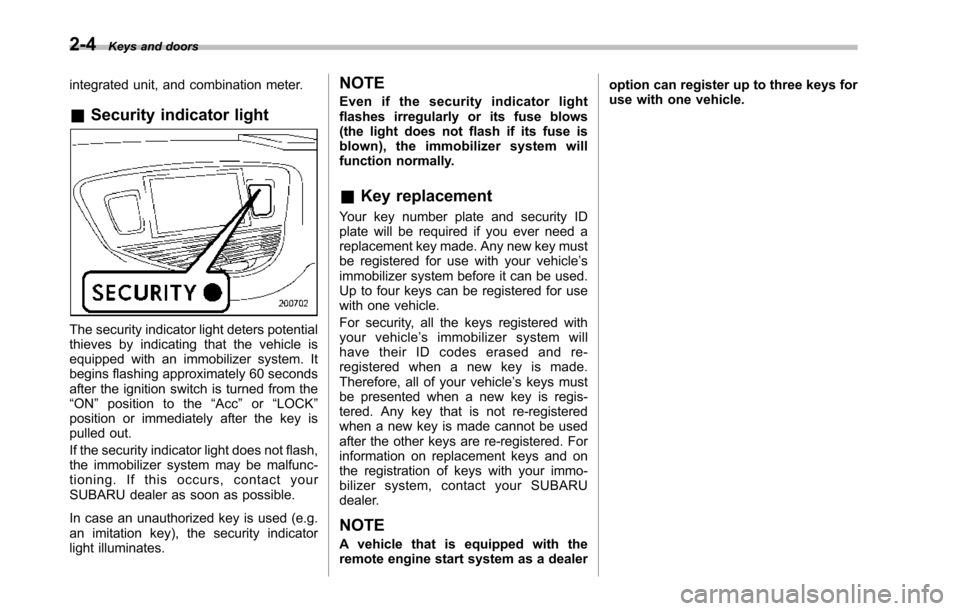
&Security indicator light
The security indicator light deters potentialthieves by indicating that the vehicle isequipped with an immobilizer system. Itbegins flashing approximately 60 secondsafter the ignition switch is turned from the“ON”position to the“Acc”or“LOCK”position or immediately after the key ispulled out.
If the security indicator light does not flash,the immobilizer system may be malfunc-tioning. If this occurs, contact yourSUBARUdealer as soon as possible.
In case an unauthorized key is used (e.g.an imitation key), the security indicatorlight illuminates.
NOTE
Even if the security indicator lightflashes irregularly or its fuse blows(the light does not flash if its fuse isblown), the immobilizer system willfunction normally.
&Key replacement
Your key number plate and security IDplate will be required if you ever need areplacement key made. Any new key mustbe registered for use with your vehicle’simmobilizer system before it can be used.Up to four keys can be registered for usewith one vehicle.
For security, all the keys registered withyour vehicle’simmobilizersystemwillhave their ID codes erased and re-registered when a new key is made.Therefore, all of your vehicle’s keys mustbe presented when a new key is regis-tered. Any key that is not re-registeredwhen a new key is made cannot be usedafter the other keys are re-registered. Forinformation on replacement keys and onthe registration of keys with your immo-bilizer system, contact your SUBARUdealer.
NOTE
A vehicle that is equipped with theremote engine start system as a dealer
option can register up to three keys foruse with one vehicle.
Page 117 of 426
2-12Keys and doors
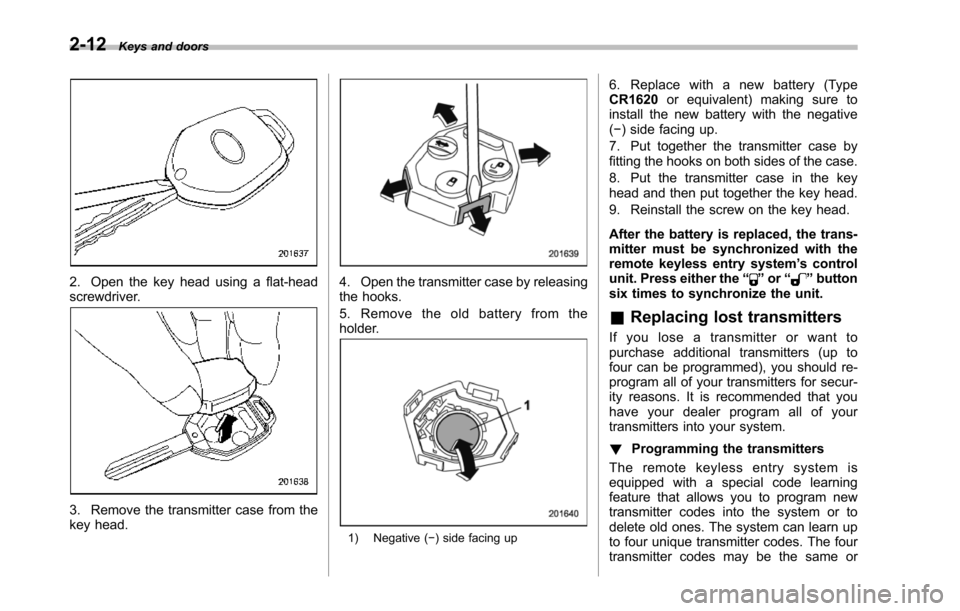
2. Open the key head using a flat-headscrewdriver.
3. Remove the transmitter case from thekey head.
4. Open the transmitter case by releasingthe hooks.
5. Remove the old battery from theholder.
1) Negative (!) side facing up
6. Replace with a new battery (TypeCR1620or equivalent) making sure toinstall the new battery with the negative(!) side facing up.
7. Put together the transmitter case byfitting thehooks on both sides of the case.
8. Put the transmitter case in the keyhead and then put together the key head.
9. Reinstall the screw on the key head.
After the battery is replaced, the trans-mitter must be synchronized with theremote keyless entry system’s controlunit. Press either the“”or“”buttonsix times to synchronize the unit.
&Replacing lost transmitters
If you lose a transmitter or want topurchase additional transmitters (up tofour can be programmed), you should re-program all of your transmitters for secur-ity reasons. It is recommended that youhave your dealer program all of yourtransmittersinto your system.
!Programming the transmitters
The remote keyless entry system isequipped witha special code learningfeature that allows you to program newtransmitter codes into the system or todelete old ones. The system can learn upto four unique transmitter codes. The fourtransmitter codes may be the same or
Page 120 of 426
NOTE
.When you finish entering the eighthdigit, an electronic tone will sound for30 seconds..If the interval between one push ofthe switch and the next exceeds 5seconds, an error will occur. In thisevent, perform the procedure againbeginning with part 4. If an error occurssix times, perform the procedure againstarting with part 3.
8. Before the electronic tone stopssounding, use the power door lockingswitch to reenter the transmitter codebeginningwith the leftmost digit.
NOTE
If you do not start entering the numberusing the lock knob before the electro-nic tone stops sounding, an error willoccur. In this event, perform the proce-dure again beginning with part 3.
9. When you have finished entering thecode a second time, an electronic tone willsound for 1 second and automatic doorlocking and unlocking operation will takeplace once to indicate completion ofregistration, provided the code enteredthe second time is identical to that enteredthe first time.
NOTE
If the code entered the second time isnot identical to the code entered thefirst time, an error will occur. In thisevent, perform the procedure againbeginning with part 5. If an error occursfive times, perform the procedure againstarting with part 3.
10. If you wish to program another trans-mitter code into the system (up to fourtransmitter codes can be programmed intothe system), perform the procedure begin-ning with part 4. When you have finishedprogramming all of the necessary trans-mitter codes into the system, remove thekey from the ignition switch.
11. Test every registered transmitter toconfirm correctoperation.
!Deleting old transmitter codes
The control unit of the remote keylessentry system has four memory locations tostore transmitter codes, giving it the abilityto operate with up to four transmitters.When you lose a transmitter, the losttransmitter’s code remains in the memory.For security reasons, lost transmittercodes should be deleted from the mem-ory.
To delete old transmitter codes, programfour transmitter codes into the system. If
you have only one current transmitter,program it four times. If you have twocurrent transmitters, program each onetwice. If you have three current transmit-ters, program two of them once and thethird one twice. This process will leaveonly current transmitter codes in thesystem’s memory.
NOTE
Make sure no one else is operatingtheir keyless entry system within rangeof your vehicle when programmingtransmitters. If someone else were tooperate their remote transmitter whileyou are programming your transmit-ters, it is possible that their transmittercode will be programmed into yoursystem, allowing them unauthorizedaccess to your vehicle.
Keys and doors2-15
Page 123 of 426
2-18Keys and doors
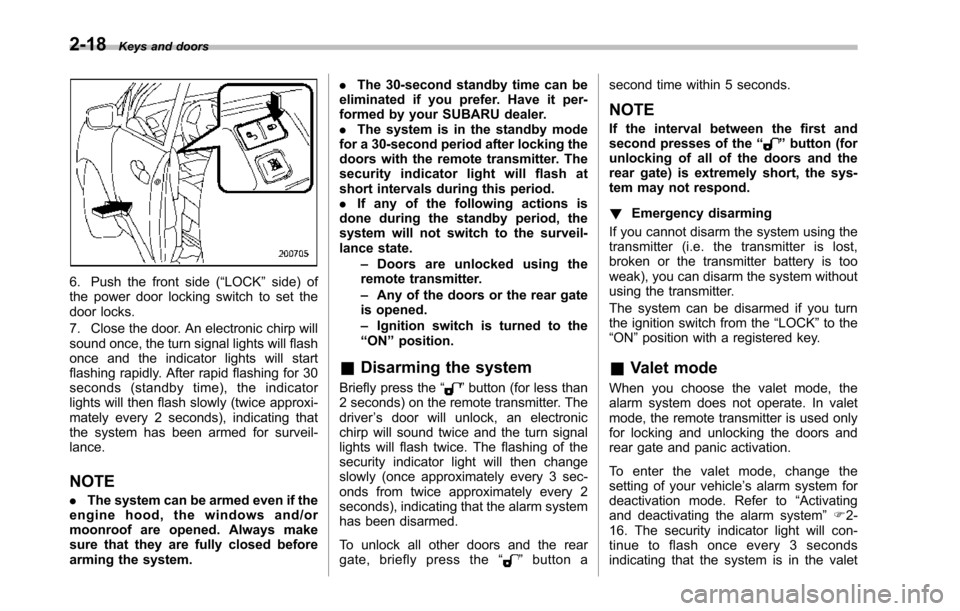
6. Push the front side (“LOCK”side) ofthe power door locking switch to set thedoor locks.
7. Close the door. An electronic chirp willsound once,the turn signal lights will flashonce and the indicator lights will startflashing rapidly. After rapid flashing for 30seconds (standby time), the indicatorlights will then flash slowly (twice approxi-mately every 2 seconds), indicating thatthe system has been armed for surveil-lance.
NOTE
.The system can be armed even if theengine hood, the windows and/ormoonroof are opened. Always makesure that they are fully closed beforearming the system.
.The 30-second standby time can beeliminated if you prefer. Have it per-formed by your SUBARU dealer..The system is in the standby modefor a 30-second period after locking thedoors with the remote transmitter. Thesecurity indicator light will flash atshort intervals during this period..If any of the following actions isdoneduring the standby period, thesystem will not switch to the surveil-lance state.–Doors are unlocked using theremote transmitter.–Any of the doors or the rear gateis opened.–Ignition switch is turned to the“ON”position.
&Disarming the system
Briefly press the“”button (for less than2 seconds) on the remote transmitter. Thedriver’s door will unlock, an electronicchirp will sound twice and the turn signallights willflash twice. The flashing of thesecurity indicator light will then changeslowly (once approximately every 3 sec-onds from twice approximately every 2seconds), indicating that the alarm systemhas been disarmed.
To unlock all other doors and the reargate, briefly press the“”button a
second time within 5 seconds.
NOTE
If the interval between the first andsecond presses of the“”button (forunlocking of all of the doors and therear gate) is extremely short, the sys-tem may not respond.
!Emergency disarming
If you cannot disarm the system using thetransmitter (i.e. the transmitter is lost,broken or the transmitter battery is tooweak), you can disarm the system withoutusing the transmitter.
The system can be disarmed if you turnthe ignition switch from the“LOCK”to the“ON”position with a registered key.
&Valet mode
When you choose the valet mode, thealarm system does not operate. In valetmode, the remote transmitter is used onlyfor locking and unlocking the doors andrear gate and panic activation.
To enter the valet mode, change thesetting of your vehicle’s alarm system fordeactivation mode. Refer to“Activatingand deactivatingthe alarm system”F2-16. The security indicator light will con-tinue to flash once every 3 secondsindicating that the system is in the valet
Page 124 of 426
mode.
To exit valet mode, change the setting ofyour vehicle’s alarm system for activationmode. Refer to“Activating and deactivat-ing the alarm system”F2-16.
&Passive arming
When passive arming mode has beenprogrammed by the dealer, arming of thesystem is automatically accomplishedwithout using the remote transmitter. Notethat in this mode, DOORS MUST BEMANUALLY LOCKED.
!To enter the passive mode
If you wish to program the passive armingmode, have it done by your SUBARUdealer.
!Armingthe system
CAUTION
In passive mode, the system willautomatically activate the alarm butWILL NOT automatically lock thedoors. In order to lock the doorsyou must either lock them as in-dicated in step 4 below or with thekey once they have been closed.Failure to lock the doors manuallywill result in a higher security risk.
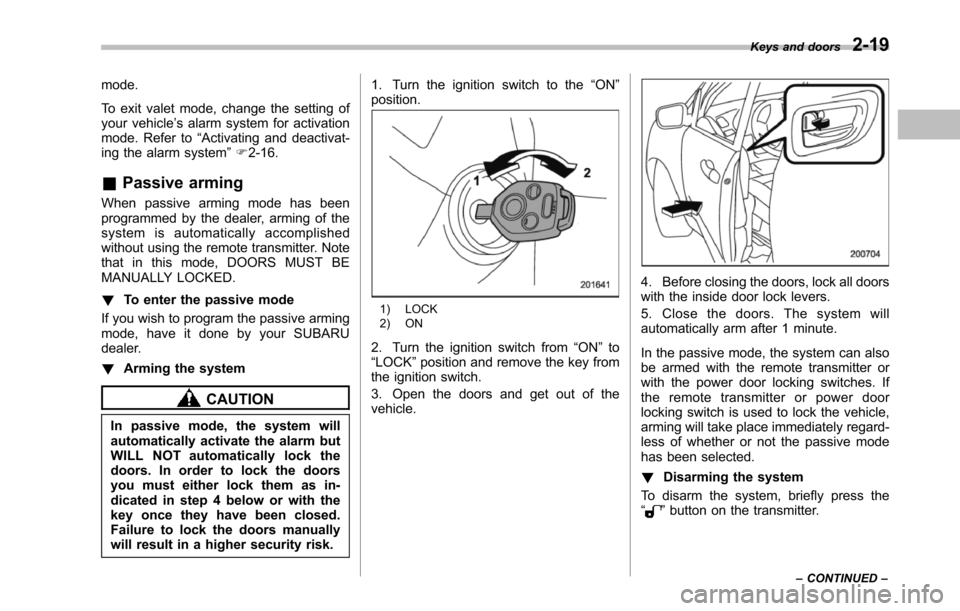
1. Turn the ignition switch to the“ON”position.
1) LOCK2) ON
2. Turn the ignition switch from“ON”to“LOCK”position and remove the key fromthe ignition switch.
3. Open the doors and get out of thevehicle.
4. Before closing the doors, lock all doorswith the inside door lock levers.
5. Close the doors. The system willautomatically arm after 1 minute.
In the passive mode, the system can alsobe armed with the remote transmitter orwith the power door locking switches. Ifthe remote transmitter or power doorlocking switch is used to lock the vehicle,arming will take place immediately regard-less of whether or not the passive modehas been selected.
!Disarming the system
To disarm the system, briefly press the“”button on the transmitter.
Keys and doors2-19
–CONTINUED–
Page 125 of 426
2-20Keys and doors
&Tripped sensor identification
The security indicator light flashes whenthe alarm system has been triggered.Also, the number of flashes indicates thelocation of unauthorized intrusion or theseverity of impact on the vehicle.
When the ignition switch is turned to the“ON”position, the indicator light willilluminate for 1 second and then flash asfollows.
.When a door or rear gate was opened:5 times
.When the ignition switch was turned tothe“ON”position by using a key notregistered with your immobilizer system: 3times
.When a strong impact or multipleimpacts were sensed: twice (only vehicleswith shock sensors (dealer option))
.When a light impact was sensed: once(onlyvehicles with shock sensors (dealeroption))
NOTE
Any of the above indicator light flash-ing patterns will recur each time theignition switchis turned to the“ON”position. Rearming the alarm systemcancels the flashing pattern of thesecurity indicator light.
&Shock sensors (dealer op-
tion)
The shock sensors trigger the alarmsystem when they sense impacts appliedto the vehicle and when any of theirelectric wires is cut. The alarm systemcauses the horn to sound and the turnsignal lights to flash for a short time whenthe sensed impact is weak, but it warns ofa strong impact or multiple impacts bysounding the horn and flashing the turnsignal lights, both lasting approximately 30seconds.
If you desire, your SUBARU dealer canconnect them and set them for activationor deactivation.
NOTE
.The shock sensors are not alwaysable to sense impacts caused by break-ing in, and cannot sense an impact thatdoes not cause vibration (such asbreaking the glass using a rescuehammer)..The shock sensors may sense vi-bration like those shown in the follow-ing list and trigger the alarm system.Select the settings of the alarm systemand shock sensors appropriately de-pending on where you usually parkyour vehicle.
Example:–Vibration from construction site–Vibration in multistory car park–Vibration from trains.You can have the sensitivity of theshock sensors adjusted to your pre-ference by your SUBARU dealer.
Page 134 of 426
Ignition switch..................................................... 3-3LOCK.................................................................. 3-3Acc ..................................................................... 3-4ON ...................................................................... 3-4START ................................................................ 3-4Key reminder chime............................................ 3-4Ignition switch light............................................. 3-4
Hazard warning flasher....................................... 3-5
Meters and gauges.............................................. 3-5Combination meter illumination........................... 3-5Canceling the function for meter needle/gaugemovement and combination meter sequentialillumination upon turning on the ignitionswitch............................................................... 3-5Speedometer....................................................... 3-6Odometer............................................................ 3-6Double trip meter................................................ 3-7Tachometer......................................................... 3-7Fuel gauge.......................................................... 3-8Temperature gauge............................................. 3-8
Warning and indicator lights.............................. 3-9Seatbelt warning light and chime........................ 3-10SRS airbag system warning light........................ 3-11Front passenger’s frontal airbag ON and OFFindicators......................................................... 3-12CHECK ENGINE warning light/Malfunctionindicator light................................................... 3-12Charge warning light.......................................... 3-13Oil pressure warning light.................................. 3-13AT OIL TEMP warning light................................. 3-13
Rear differential oil temperature warninglight................................................................ 3-13Low tire pressure warning light.......................... 3-14ABS warning light.............................................. 3-15Brake system warning light................................ 3-16Low fuel warning light....................................... 3-17Door open warning light.................................... 3-17Windshield washer fluid warning light................ 3-17All-Wheel Drive warning light ............................. 3-18Vehicle Dynamics Control warning light (U.S.-spec models and Canada-spec. models)/VehicleDynamics Control operation indicator light (allmodels)........................................................... 3-18Traction Control system OFF indicator light(U.S.-specmodels and Canada-spec.models)........................................................... 3-19Vehicle Dynamics Control warning light (LatinAmerica-spec. models)/Traction Control OFFindicator light (Latin America-spec. models)..... 3-19Security indicator light....................................... 3-21SPORT mode indicator light............................... 3-21Select lever/Gear position indicator.................... 3-21Turn signal indicator lights................................. 3-21High beam indicator light................................... 3-22Cruise control indicator light.............................. 3-22Cruise control set indicator light........................ 3-22Headlight indicator light..................................... 3-22Front fog lightindicator light.............................. 3-22
Clock.................................................................. 3-22
Outside temperature indicator.......................... 3-23Low outside temperature warning...................... 3-24
Instruments and controls
3
Page 137 of 426
3-4Instruments and controls
&Acc
In this position the electrical accessories(radio, accessory power outlet, etc.) canbe used.
&ON
This is the normal operating position afterthe engine is started.
&START
CAUTION
Do not turn the ignition switch to the“START”position while the engineis running.
The engineis started in this position. Thestarter cranks the engine to start it. Whenthe key is released (after the engine hasstarted), the key automatically returns tothe“ON”position.
If your registered key fails to start theengine, pull out the key once (the securityindicator light will blink), and then insertthe key in the ignition switch and turn it tothe“START”position and again try to startthe engine.
NOTE
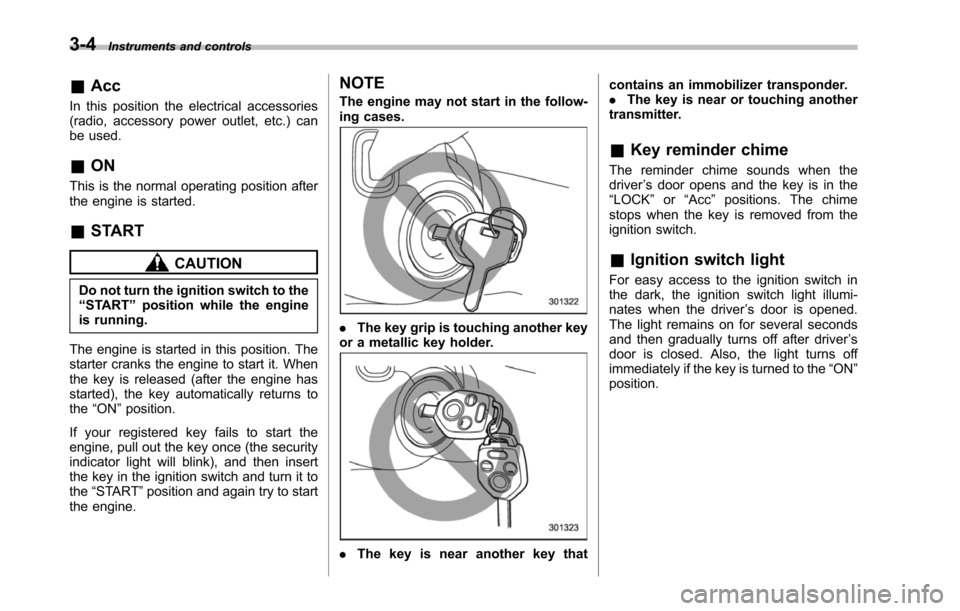
The engine may not start in the follow-ing cases.
.The key grip is touching another keyor a metallic key holder.
.Thekey is near another key that
contains an immobilizer transponder..The key is near or touching anothertransmitter.
&Key reminder chime
The reminder chime sounds when thedriver’s door opens and the key is in the“LOCK”or“Acc”positions. The chimestops when the key is removed from theignition switch.
&Ignition switch light
For easy access to the ignition switch inthe dark, the ignition switch light illumi-nates whenthe driver’s door is opened.The light remains on for several secondsand then gradually turns off after driver’sdoor is closed. Also, the light turns offimmediately if the key is turned to the“ON”position.