Page 994 of 1285
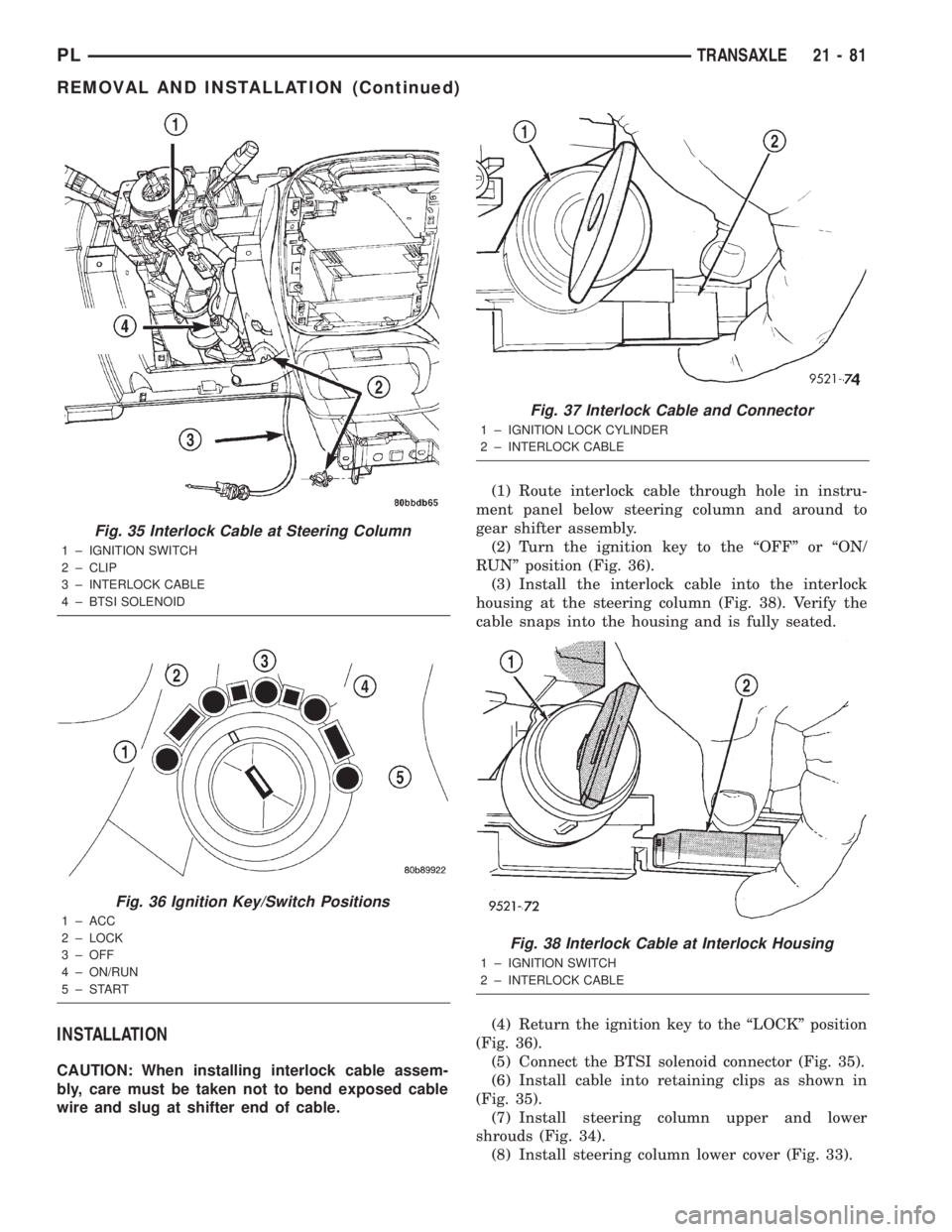
INSTALLATION
CAUTION: When installing interlock cable assem-
bly, care must be taken not to bend exposed cable
wire and slug at shifter end of cable.(1) Route interlock cable through hole in instru-
ment panel below steering column and around to
gear shifter assembly.
(2) Turn the ignition key to the ªOFFº or ªON/
RUNº position (Fig. 36).
(3) Install the interlock cable into the interlock
housing at the steering column (Fig. 38). Verify the
cable snaps into the housing and is fully seated.
(4) Return the ignition key to the ªLOCKº position
(Fig. 36).
(5) Connect the BTSI solenoid connector (Fig. 35).
(6) Install cable into retaining clips as shown in
(Fig. 35).
(7) Install steering column upper and lower
shrouds (Fig. 34).
(8) Install steering column lower cover (Fig. 33).
Fig. 35 Interlock Cable at Steering Column
1 ± IGNITION SWITCH
2 ± CLIP
3 ± INTERLOCK CABLE
4 ± BTSI SOLENOID
Fig. 36 Ignition Key/Switch Positions
1 ± ACC
2 ± LOCK
3 ± OFF
4 ± ON/RUN
5±START
Fig. 37 Interlock Cable and Connector
1 ± IGNITION LOCK CYLINDER
2 ± INTERLOCK CABLE
Fig. 38 Interlock Cable at Interlock Housing
1 ± IGNITION SWITCH
2 ± INTERLOCK CABLE
PLTRANSAXLE 21 - 81
REMOVAL AND INSTALLATION (Continued)
Page 995 of 1285
(9) Verify that shifter is in gated ªPARKº.
(10) Install the cable core end to the plastic cam of
the shifter mechanism. Snap the shifter/ignition
interlock cable end fitting into the groove in the gear-
shift mechanism as shown in (Fig. 32).
(11)Adjust interlock cable/system as follows:
If interlock cable is being replaced, it will come with
an adjustment pin. Remove the pin from the cable
and allow the cable to ªself-adjustº. Lock cable
adjustment by pressing down on the adjuster lock
until bottomed at the cable housing. If interlock cable
is being re-used, no pin will be provided. Pry up on
cable adjuster lock to release and allow cable to ªself-
adjustº. Lock cable adjustment by pressing down on
the adjuster lock until bottomed at the cable housing.
(12)Connect battery negative cable and ver-
ify interlock system operation as follows:
(13) Install shifter bezel (Fig. 31).
(14) Install center console assembly (Fig. 30).
(15) Install gearshift knob and tighten set screw to
2 N´m (15 in. lbs.) torque (Fig. 29).
INTERLOCK MECHANISM
REMOVAL
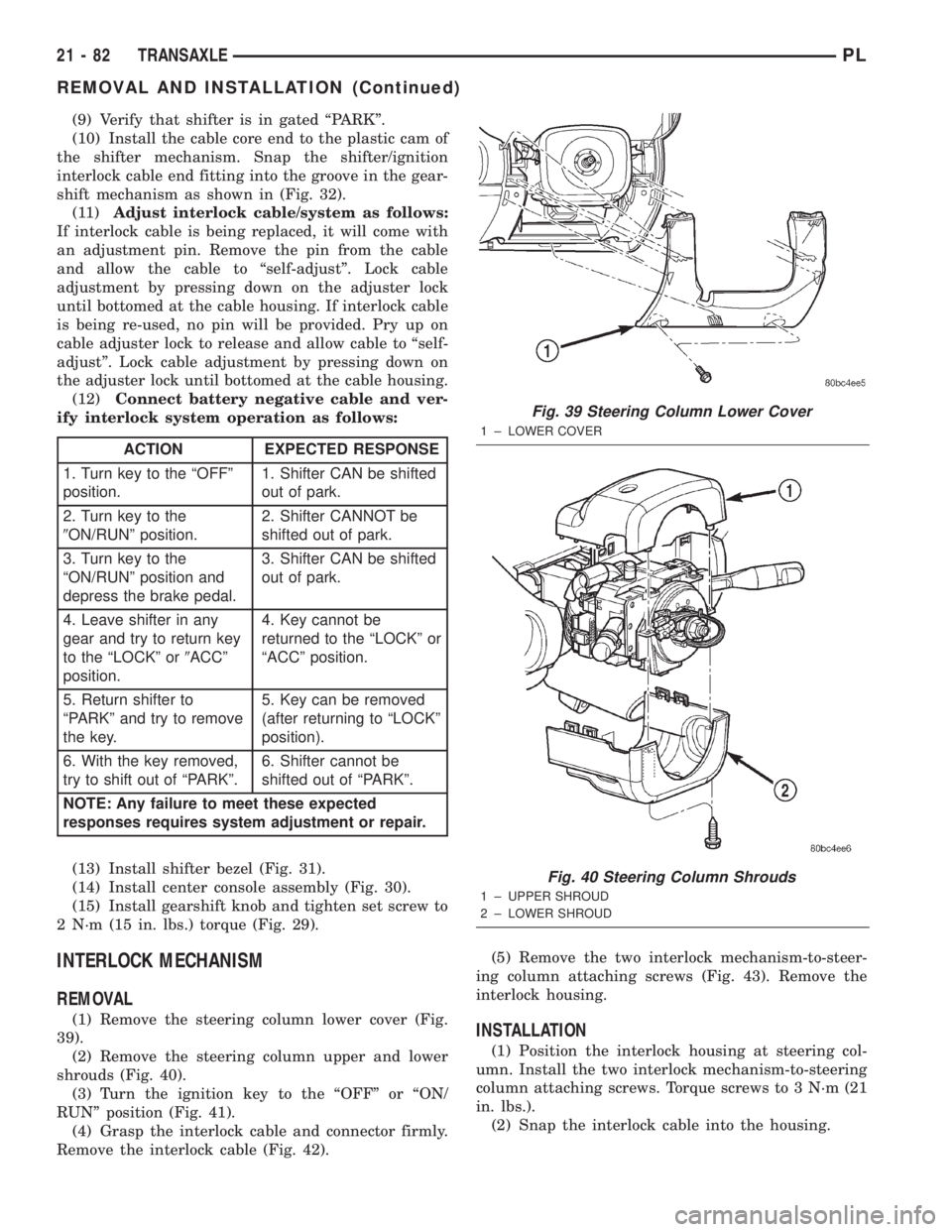
(1) Remove the steering column lower cover (Fig.
39).
(2) Remove the steering column upper and lower
shrouds (Fig. 40).
(3) Turn the ignition key to the ªOFFº or ªON/
RUNº position (Fig. 41).
(4) Grasp the interlock cable and connector firmly.
Remove the interlock cable (Fig. 42).(5) Remove the two interlock mechanism-to-steer-
ing column attaching screws (Fig. 43). Remove the
interlock housing.INSTALLATION
(1) Position the interlock housing at steering col-
umn. Install the two interlock mechanism-to-steering
column attaching screws. Torque screws to 3 N´m (21
in. lbs.).
(2) Snap the interlock cable into the housing.
ACTION EXPECTED RESPONSE
1. Turn key to the ªOFFº
position.1. Shifter CAN be shifted
out of park.
2. Turn key to the
9ON/RUNº position.2. Shifter CANNOT be
shifted out of park.
3. Turn key to the
ªON/RUNº position and
depress the brake pedal.3. Shifter CAN be shifted
out of park.
4. Leave shifter in any
gear and try to return key
to the ªLOCKº or9ACCº
position.4. Key cannot be
returned to the ªLOCKº or
ªACCº position.
5. Return shifter to
ªPARKº and try to remove
the key.5. Key can be removed
(after returning to ªLOCKº
position).
6. With the key removed,
try to shift out of ªPARKº.6. Shifter cannot be
shifted out of ªPARKº.
NOTE: Any failure to meet these expected
responses requires system adjustment or repair.
Fig. 39 Steering Column Lower Cover
1 ± LOWER COVER
Fig. 40 Steering Column Shrouds
1 ± UPPER SHROUD
2 ± LOWER SHROUD
21 - 82 TRANSAXLEPL
REMOVAL AND INSTALLATION (Continued)
Page 996 of 1285
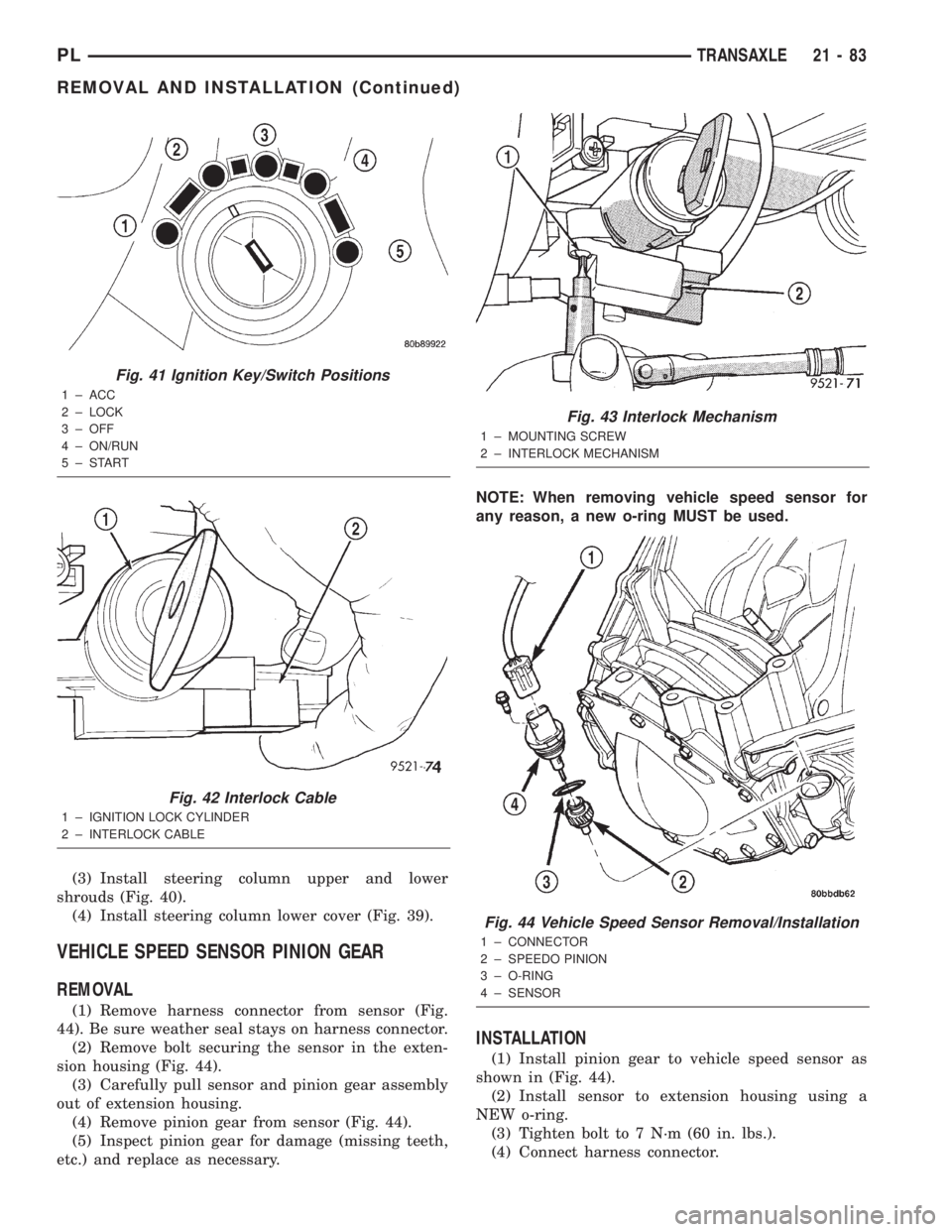
(3) Install steering column upper and lower
shrouds (Fig. 40).
(4) Install steering column lower cover (Fig. 39).
VEHICLE SPEED SENSOR PINION GEAR
REMOVAL
(1) Remove harness connector from sensor (Fig.
44). Be sure weather seal stays on harness connector.
(2) Remove bolt securing the sensor in the exten-
sion housing (Fig. 44).
(3) Carefully pull sensor and pinion gear assembly
out of extension housing.
(4) Remove pinion gear from sensor (Fig. 44).
(5) Inspect pinion gear for damage (missing teeth,
etc.) and replace as necessary.NOTE: When removing vehicle speed sensor for
any reason, a new o-ring MUST be used.
INSTALLATION
(1) Install pinion gear to vehicle speed sensor as
shown in (Fig. 44).
(2) Install sensor to extension housing using a
NEW o-ring.
(3) Tighten bolt to 7 N´m (60 in. lbs.).
(4) Connect harness connector.
Fig. 41 Ignition Key/Switch Positions
1 ± ACC
2 ± LOCK
3 ± OFF
4 ± ON/RUN
5±START
Fig. 42 Interlock Cable
1 ± IGNITION LOCK CYLINDER
2 ± INTERLOCK CABLE
Fig. 43 Interlock Mechanism
1 ± MOUNTING SCREW
2 ± INTERLOCK MECHANISM
Fig. 44 Vehicle Speed Sensor Removal/Installation
1 ± CONNECTOR
2 ± SPEEDO PINION
3 ± O-RING
4 ± SENSOR
PLTRANSAXLE 21 - 83
REMOVAL AND INSTALLATION (Continued)
Page 999 of 1285
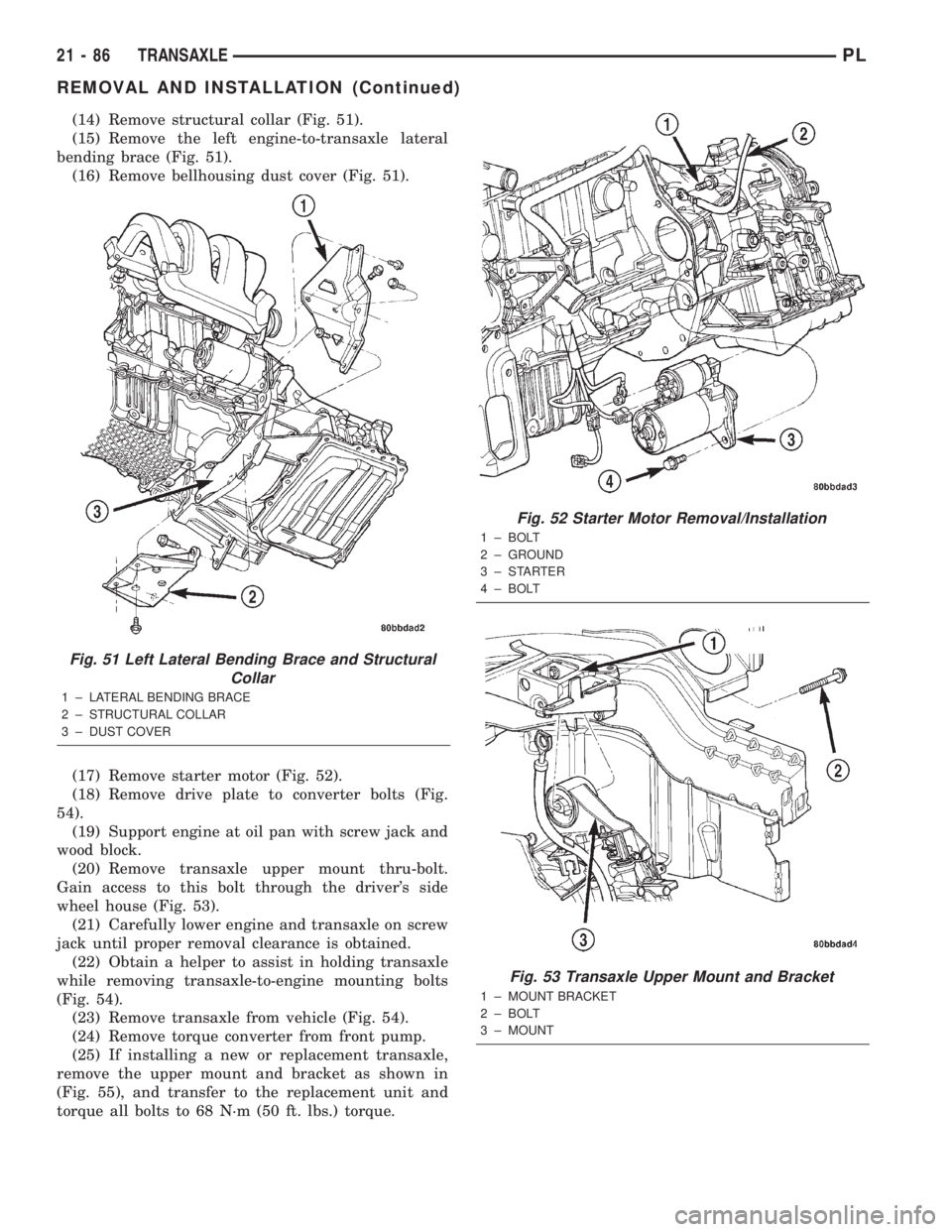
(14) Remove structural collar (Fig. 51).
(15) Remove the left engine-to-transaxle lateral
bending brace (Fig. 51).
(16) Remove bellhousing dust cover (Fig. 51).
(17) Remove starter motor (Fig. 52).
(18) Remove drive plate to converter bolts (Fig.
54).
(19) Support engine at oil pan with screw jack and
wood block.
(20) Remove transaxle upper mount thru-bolt.
Gain access to this bolt through the driver's side
wheel house (Fig. 53).
(21) Carefully lower engine and transaxle on screw
jack until proper removal clearance is obtained.
(22) Obtain a helper to assist in holding transaxle
while removing transaxle-to-engine mounting bolts
(Fig. 54).
(23) Remove transaxle from vehicle (Fig. 54).
(24) Remove torque converter from front pump.
(25) If installing a new or replacement transaxle,
remove the upper mount and bracket as shown in
(Fig. 55), and transfer to the replacement unit and
torque all bolts to 68 N´m (50 ft. lbs.) torque.
Fig. 51 Left Lateral Bending Brace and Structural
Collar
1 ± LATERAL BENDING BRACE
2 ± STRUCTURAL COLLAR
3 ± DUST COVER
Fig. 52 Starter Motor Removal/Installation
1 ± BOLT
2 ± GROUND
3±STARTER
4 ± BOLT
Fig. 53 Transaxle Upper Mount and Bracket
1 ± MOUNT BRACKET
2 ± BOLT
3 ± MOUNT
21 - 86 TRANSAXLEPL
REMOVAL AND INSTALLATION (Continued)
Page 1004 of 1285
ASSEMBLY
When rebuilding, reverse the above procedure.
VALVE BODY
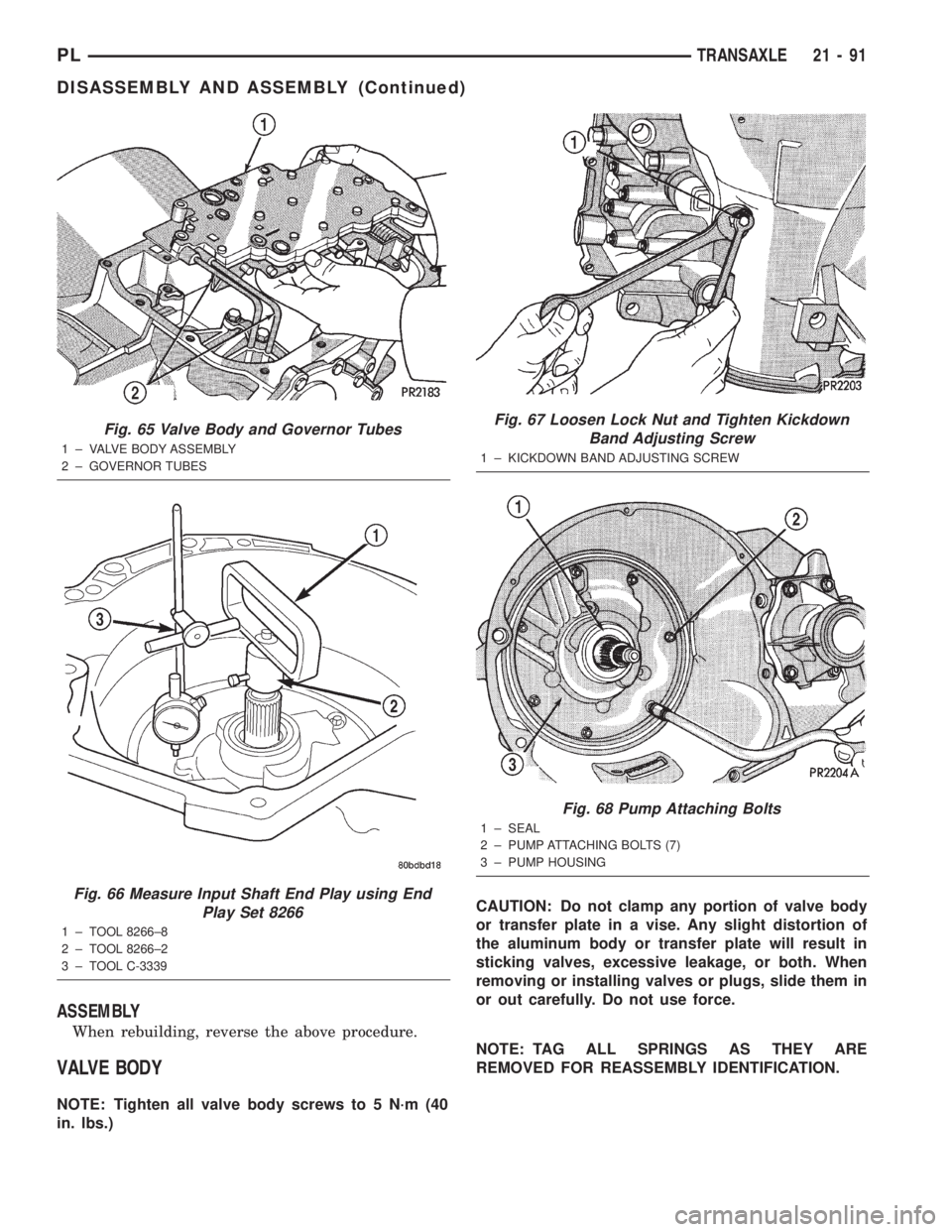
NOTE: Tighten all valve body screws to 5 N´m (40
in. lbs.)CAUTION: Do not clamp any portion of valve body
or transfer plate in a vise. Any slight distortion of
the aluminum body or transfer plate will result in
sticking valves, excessive leakage, or both. When
removing or installing valves or plugs, slide them in
or out carefully. Do not use force.
NOTE: TAG ALL SPRINGS AS THEY ARE
REMOVED FOR REASSEMBLY IDENTIFICATION.
Fig. 65 Valve Body and Governor Tubes
1 ± VALVE BODY ASSEMBLY
2 ± GOVERNOR TUBES
Fig. 66 Measure Input Shaft End Play using End
Play Set 8266
1 ± TOOL 8266±8
2 ± TOOL 8266±2
3 ± TOOL C-3339
Fig. 67 Loosen Lock Nut and Tighten Kickdown
Band Adjusting Screw
1 ± KICKDOWN BAND ADJUSTING SCREW
Fig. 68 Pump Attaching Bolts
1 ± SEAL
2 ± PUMP ATTACHING BOLTS (7)
3 ± PUMP HOUSING
PLTRANSAXLE 21 - 91
DISASSEMBLY AND ASSEMBLY (Continued)
Page 1009 of 1285
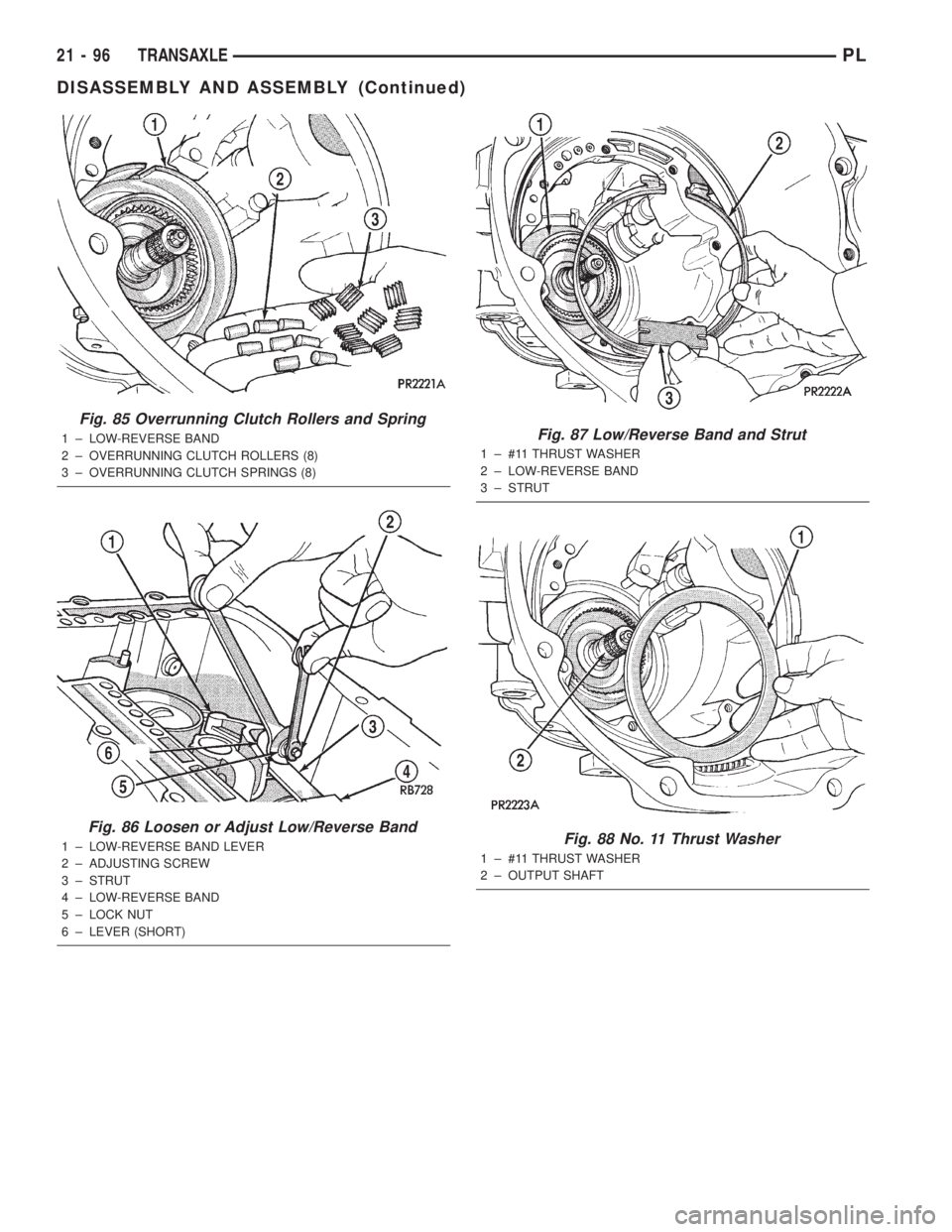
Fig. 85 Overrunning Clutch Rollers and Spring
1 ± LOW-REVERSE BAND
2 ± OVERRUNNING CLUTCH ROLLERS (8)
3 ± OVERRUNNING CLUTCH SPRINGS (8)
Fig. 86 Loosen or Adjust Low/Reverse Band
1 ± LOW-REVERSE BAND LEVER
2 ± ADJUSTING SCREW
3 ± STRUT
4 ± LOW-REVERSE BAND
5 ± LOCK NUT
6 ± LEVER (SHORT)
Fig. 87 Low/Reverse Band and Strut
1 ± #11 THRUST WASHER
2 ± LOW-REVERSE BAND
3 ± STRUT
Fig. 88 No. 11 Thrust Washer
1 ± #11 THRUST WASHER
2 ± OUTPUT SHAFT
21 - 96 TRANSAXLEPL
DISASSEMBLY AND ASSEMBLY (Continued)
Page 1033 of 1285
DETERMINING SHIM THICKNESS
Shim thickness need be determined only if any of
the following parts are replaced:
²Transaxle case
²Transfer shaft
²Transfer shaft gear
²Transfer shaft bearings
²Governor support retainer
²Transfer shaft bearing retainer
²Retainer snap ring
²Governor support
Refer to Bearing Adjustment Procedure in rear of
this section to determine proper shim thickness.
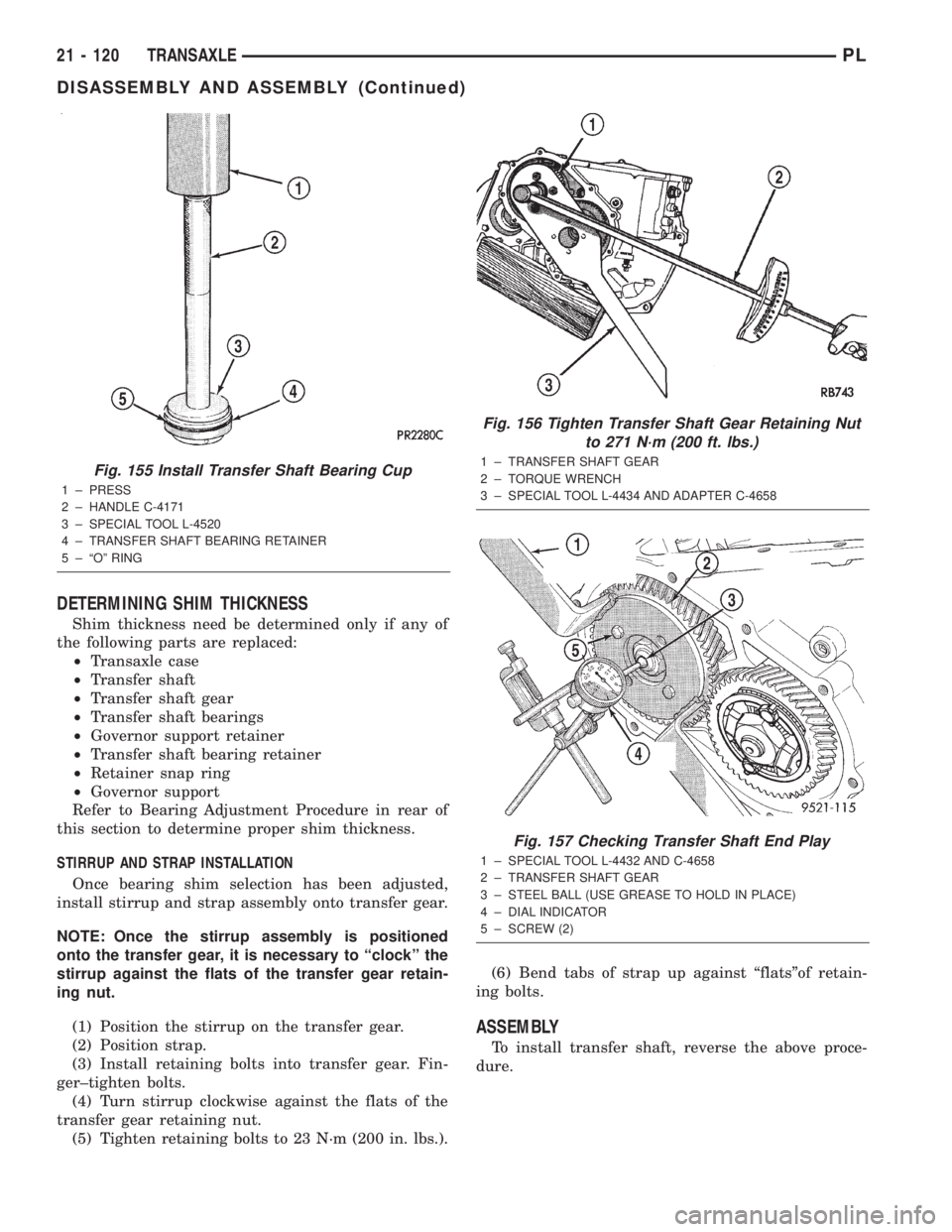
STIRRUP AND STRAP INSTALLATION
Once bearing shim selection has been adjusted,
install stirrup and strap assembly onto transfer gear.
NOTE: Once the stirrup assembly is positioned
onto the transfer gear, it is necessary to ªclockº the
stirrup against the flats of the transfer gear retain-
ing nut.
(1) Position the stirrup on the transfer gear.
(2) Position strap.
(3) Install retaining bolts into transfer gear. Fin-
ger±tighten bolts.
(4) Turn stirrup clockwise against the flats of the
transfer gear retaining nut.
(5) Tighten retaining bolts to 23 N´m (200 in. lbs.).(6) Bend tabs of strap up against ªflatsºof retain-
ing bolts.
ASSEMBLY
To install transfer shaft, reverse the above proce-
dure.
Fig. 155 Install Transfer Shaft Bearing Cup
1 ± PRESS
2 ± HANDLE C-4171
3 ± SPECIAL TOOL L-4520
4 ± TRANSFER SHAFT BEARING RETAINER
5 ± ªOº RING
Fig. 156 Tighten Transfer Shaft Gear Retaining Nut
to 271 N´m (200 ft. lbs.)
1 ± TRANSFER SHAFT GEAR
2 ± TORQUE WRENCH
3 ± SPECIAL TOOL L-4434 AND ADAPTER C-4658
Fig. 157 Checking Transfer Shaft End Play
1 ± SPECIAL TOOL L-4432 AND C-4658
2 ± TRANSFER SHAFT GEAR
3 ± STEEL BALL (USE GREASE TO HOLD IN PLACE)
4 ± DIAL INDICATOR
5 ± SCREW (2)
21 - 120 TRANSAXLEPL
DISASSEMBLY AND ASSEMBLY (Continued)
Page 1041 of 1285
STIRRUP AND RETAINING STRAP
INSTALLATION
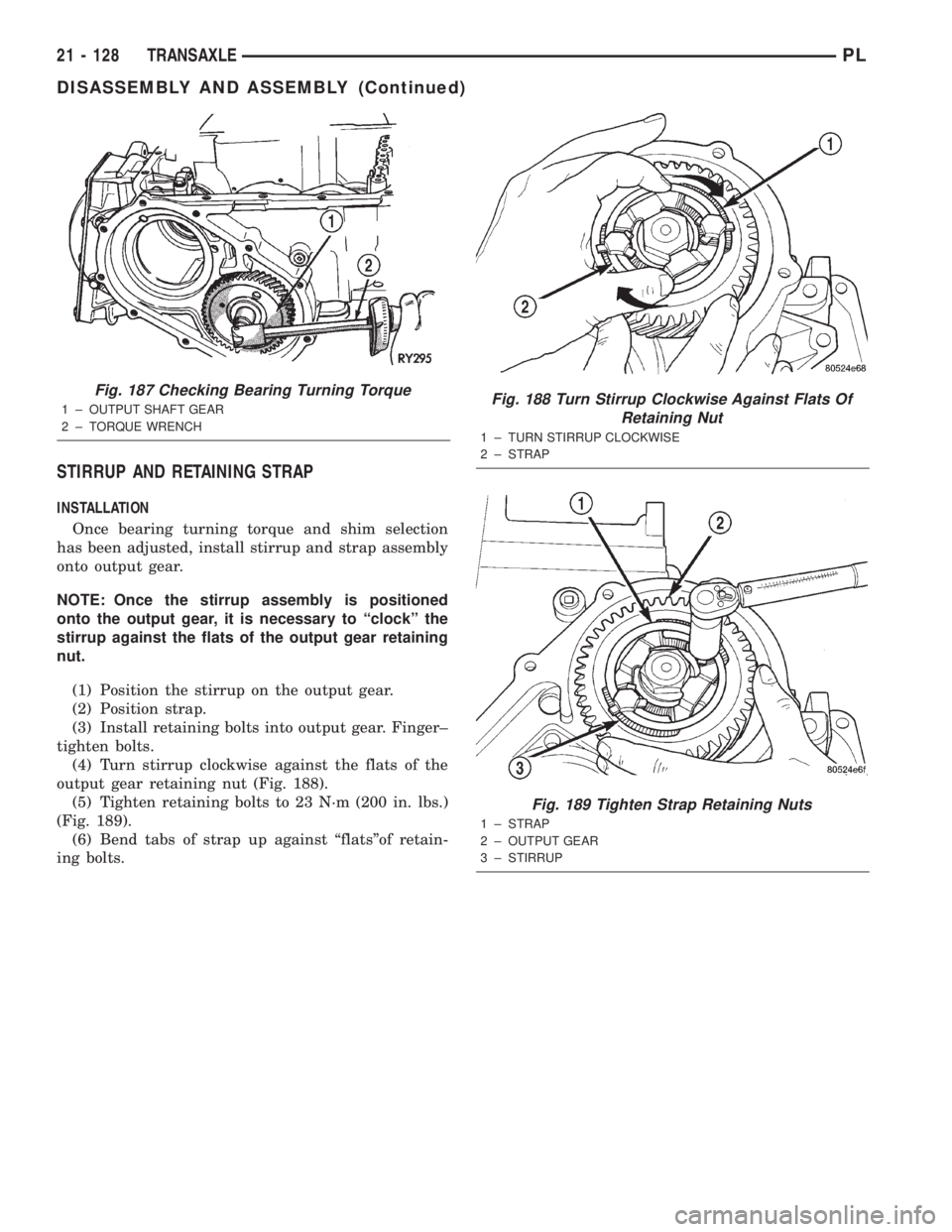
Once bearing turning torque and shim selection
has been adjusted, install stirrup and strap assembly
onto output gear.
NOTE: Once the stirrup assembly is positioned
onto the output gear, it is necessary to ªclockº the
stirrup against the flats of the output gear retaining
nut.
(1) Position the stirrup on the output gear.
(2) Position strap.
(3) Install retaining bolts into output gear. Finger±
tighten bolts.
(4) Turn stirrup clockwise against the flats of the
output gear retaining nut (Fig. 188).
(5) Tighten retaining bolts to 23 N´m (200 in. lbs.)
(Fig. 189).
(6) Bend tabs of strap up against ªflatsºof retain-
ing bolts.
Fig. 187 Checking Bearing Turning Torque
1 ± OUTPUT SHAFT GEAR
2 ± TORQUE WRENCHFig. 188 Turn Stirrup Clockwise Against Flats Of
Retaining Nut
1 ± TURN STIRRUP CLOCKWISE
2 ± STRAP
Fig. 189 Tighten Strap Retaining Nuts
1 ± STRAP
2 ± OUTPUT GEAR
3 ± STIRRUP
21 - 128 TRANSAXLEPL
DISASSEMBLY AND ASSEMBLY (Continued)