2005 NISSAN NAVARA reset
[x] Cancel search: resetPage 1046 of 3171
EC-66
TROUBLE DIAGNOSIS
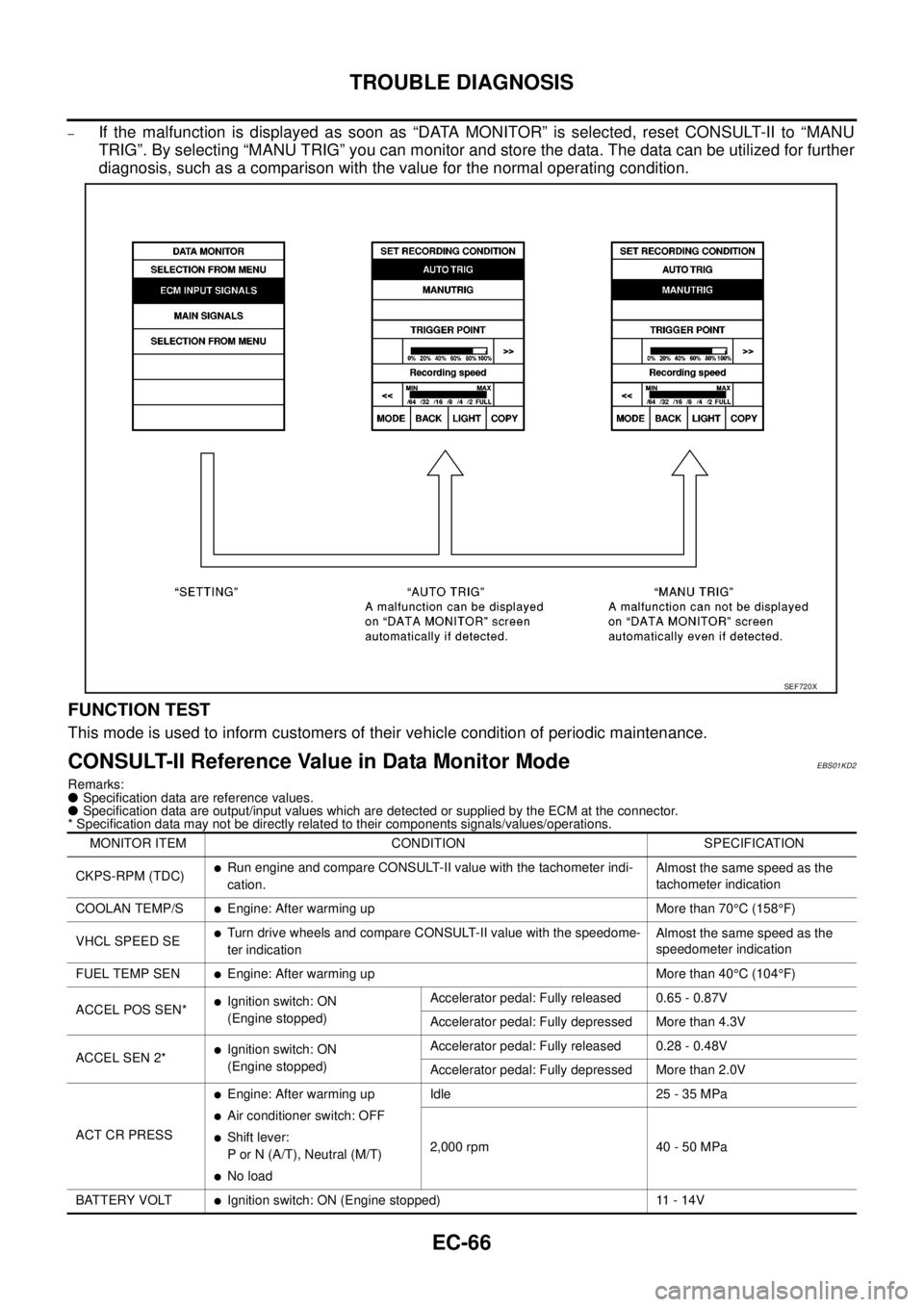
–If the malfunction is displayed as soon as “DATA MONITOR” is selected, reset CONSULT-II to “MANU
TRIG”. By selecting “MANU TRIG” you can monitor and store the data. The data can be utilized for further
diagnosis, such as a comparison with the value for the normal operating condition.
FUNCTION TEST
This mode is used to inform customers of their vehicle condition of periodic maintenance.
CONSULT-II Reference Value in Data Monitor ModeEBS01KD2
Remarks:
lSpecification data are reference values.
lSpecification data are output/input values which are detected or supplied by the ECM at the connector.
* Specification data may not be directly related to their components signals/values/operations.
SEF720X
MONITOR ITEM CONDITION SPECIFICATION
CKPS-RPM (TDC)
lRun engine and compare CONSULT-II value with the tachometer indi-
cation.Almost the same speed as the
tachometer indication
COOLAN TEMP/S
lEngine: After warming up More than 70°C(158°F)
VHCL SPEED SE
lTurn drive wheels and compare CONSULT-II value with the speedome-
ter indicationAlmost the same speed as the
speedometer indication
FUEL TEMP SEN
lEngine: After warming up More than 40°C(104°F)
ACCEL POS SEN*
lIgnition switch: ON
(Engine stopped)Accelerator pedal: Fully released 0.65 - 0.87V
Accelerator pedal: Fully depressed More than 4.3V
ACCEL SEN 2*
lIgnition switch: ON
(Engine stopped)Accelerator pedal: Fully released 0.28 - 0.48V
Accelerator pedal: Fully depressed More than 2.0V
ACT CR PRESS
lEngine: After warming up
lAir conditioner switch: OFF
lShift lever:
P or N (A/T), Neutral (M/T)
lNo loadIdle 25 - 35 MPa
2,000 rpm 40 - 50 MPa
BATTERY VOLT
lIgnition switch: ON (Engine stopped) 11 - 14V
Page 1660 of 3171
GI-38
CONTROL UNIT CONFIGURATION PROCEDURE
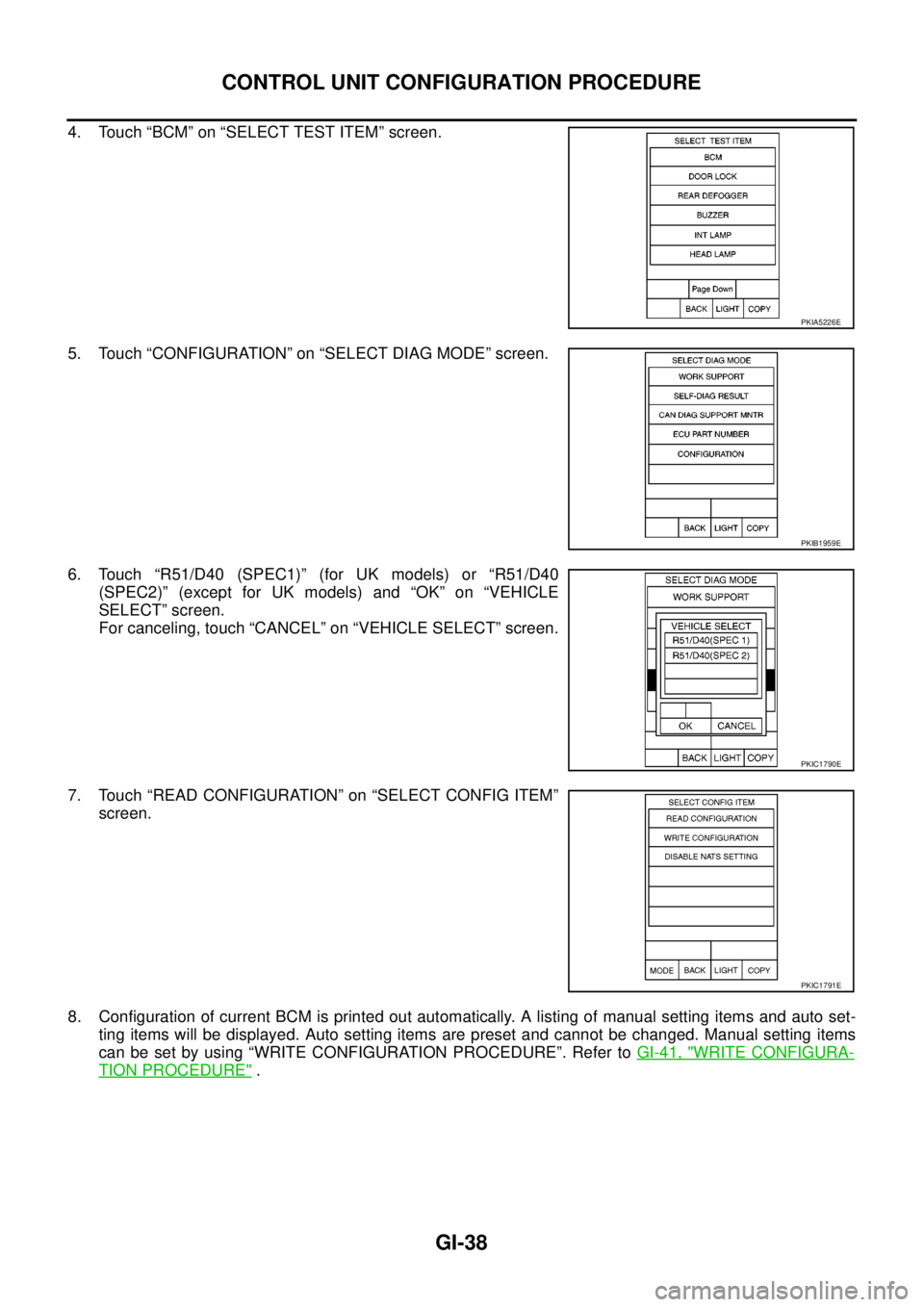
4. Touch “BCM” on “SELECT TEST ITEM” screen.
5. Touch “CONFIGURATION” on “SELECT DIAG MODE” screen.
6. Touch “R51/D40 (SPEC1)” (for UK models) or “R51/D40
(SPEC2)” (except for UK models) and “OK” on “VEHICLE
SELECT” screen.
For canceling, touch “CANCEL” on “VEHICLE SELECT” screen.
7. Touch “READ CONFIGURATION” on “SELECT CONFIG ITEM”
screen.
8. Configuration of current BCM is printed out automatically. A listing of manual setting items and auto set-
ting items will be displayed. Auto setting items are preset and cannot be changed. Manual setting items
can be set by using “WRITE CONFIGURATION PROCEDURE”. Refer toGI-41, "
WRITE CONFIGURA-
TION PROCEDURE".
PKIA5226E
PKIB1959E
PKIC1790E
PKIC1791E
Page 1687 of 3171

GW-1
GLASSES, WINDOW SYSTEM & MIRRORS
IBODY
CONTENTS
C
D
E
F
G
H
J
K
L
M
SECTIONGW
A
B
GW
GLASSES, WINDOW SYSTEM & MIRRORS
PRECAUTIONS .......................................................... 3
Precautions for Supplemental Restraint System
(SRS)“AIRBAG”and“SEATBELTPRE-TEN-
SIONER” .................................................................. 3
Precautions for Procedures without Cowl Top Cover..... 3
Handling for Adhesive and Primer ........................... 3
Trouble Diagnosis Precaution .................................. 3
PREPARATION ........................................................... 4
Commercial Service Tool ......................................... 4
SQUEAK AND RATTLE TROUBLE DIAGNOSES..... 5
Work Flow ................................................................ 5
CUSTOMER INTERVIEW ..................................... 5
DUPLICATE THE NOISE AND TEST DRIVE ....... 6
CHECK RELATED SERVICE BULLETINS ........... 6
LOCATE THE NOISE AND IDENTIFY THE
ROOT CAUSE ...................................................... 6
REPAIR THE CAUSE ........................................... 6
CONFIRM THE REPAIR ....................................... 7
Generic Squeak and Rattle Troubleshooting ........... 7
INSTRUMENT PANEL .......................................... 7
CENTER CONSOLE ............................................. 7
DOORS ................................................................. 7
TRUNK .................................................................. 8
SUNROOF/HEADLINING ..................................... 8
SEATS ................................................................... 8
UNDERHOOD ....................................................... 8
Diagnostic Worksheet .............................................. 9
WINDSHIELD GLASS ...............................................11
Removal and Installation ......................................... 11
REMOVAL ............................................................ 11
INSTALLATION .................................................... 11
POWER WINDOW SYSTEM .................................... 15
Component Parts and Harness Connector Location... 15
System Description ................................................ 15
MANUAL OPERATION ....................................... 16
AUTO OPERATION ............................................ 18
POWER WINDOW LOCK ................................... 18
DRIVER WINDOW ANTI-PINCH FUNCTION ..... 18
Schematic .............................................................. 19Wiring Diagram – WINDOW – ................................ 20
Terminal and Reference Value for Power Window
Main Switch ............................................................ 24
Terminal and Reference Value for Each Door's
Power Window Switch ............................................ 24
Terminal and Reference Value for BCM ................. 25
Work Flow ............................................................... 25
Trouble Diagnosis Symptom Chart ......................... 25
BCM Power Supply and Ground Circuit Check ...... 26
Power Window Main Switch Power Supply and
Ground Circuit Check ............................................. 27
Driver Side Power Window Motor Check ............... 28
Passenger Side Power Window Motor Circuit
Check ..................................................................... 29
Rear LH Power Window Motor Circuit Check ......... 30
Rear RH Power Window Motor Circuit Check ........ 31
Passenger Side Power Window Circuit Check ....... 31
Rear LH Power Window Circuit Check ................... 32
Rear RH Power Window Circuit Check .................. 33
Power Window Switch Check 1 .............................. 33
Power Window Switch Check 2 .............................. 34
FRONT DOOR GLASS AND REGULATOR ............. 35
Removal and Installation ........................................ 35
DOOR GLASS ..................................................... 35
REGULATOR ASSEMBLY .................................. 36
Disassembly and Assembly .................................... 37
REGULATOR ASSEMBLY .................................. 37
Inspection after Installation ..................................... 37
FITTING INSPECTION ....................................... 37
RESET OPERATION ........................................... 37
REAR DOOR GLASS AND REGULATOR ............... 38
Removal and Installation ........................................ 38
DOOR GLASS ..................................................... 38
REGULATOR ASSEMBLY .................................. 39
Disassembly and Assembly .................................... 40
REGULATOR ASSEMBLY .................................. 40
Inspection after Installation ..................................... 40
FITTING INSPECTION ....................................... 40
Page 1723 of 3171
FRONT DOOR GLASS AND REGULATOR
GW-37
C
D
E
F
G
H
J
K
L
MA
B
GW
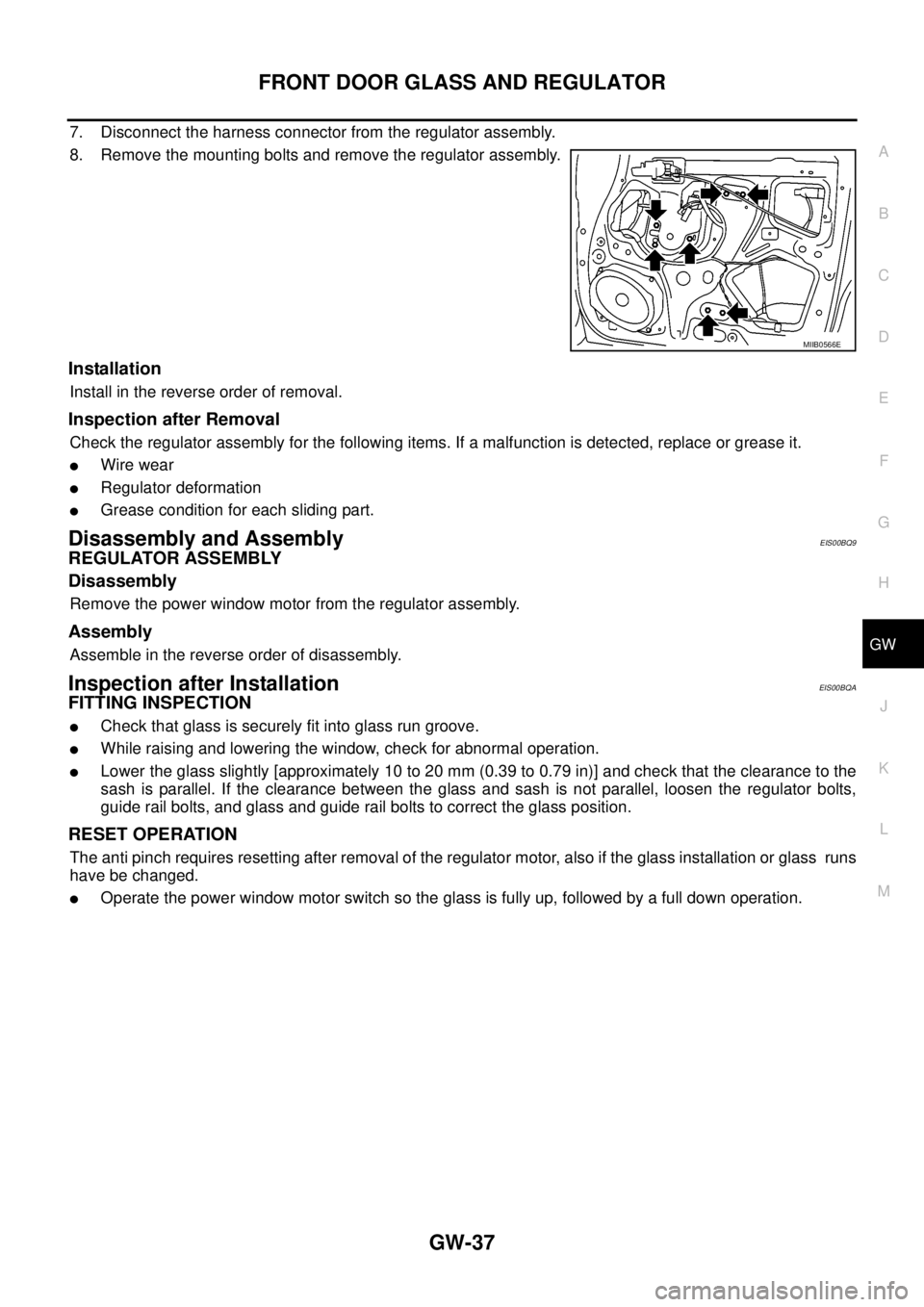
7. Disconnect the harness connector from the regulator assembly.
8. Remove the mounting bolts and remove the regulator assembly.
Installation
Install in the reverse order of removal.
Inspection after Removal
Check the regulator assembly for the following items. If a malfunction is detected, replace or grease it.
lWire wear
lRegulator deformation
lGrease condition for each sliding part.
Disassembly and AssemblyEIS00BQ9
REGULATOR ASSEMBLY
Disassembly
Remove the power window motor from the regulator assembly.
Assembly
Assemble in the reverse order of disassembly.
Inspection after InstallationEIS00BQA
FITTING INSPECTION
lCheck that glass is securely fit into glass run groove.
lWhile raising and lowering the window, check for abnormal operation.
lLower the glass slightly [approximately 10 to 20 mm (0.39 to 0.79 in)] and check that the clearance to the
sash is parallel. If the clearance between the glass and sash is not parallel, loosen the regulator bolts,
guide rail bolts, and glass and guide rail bolts to correct the glass position.
RESET OPERATION
The anti pinch requires resetting after removal of the regulator motor, also if the glass installation or glass runs
have be changed.
lOperate the power window motor switch so the glass is fully up, followed by a full down operation.
MIIB0566E
Page 2401 of 3171
MTC-14
PRECAUTIONS
SERVICE COUPLERS
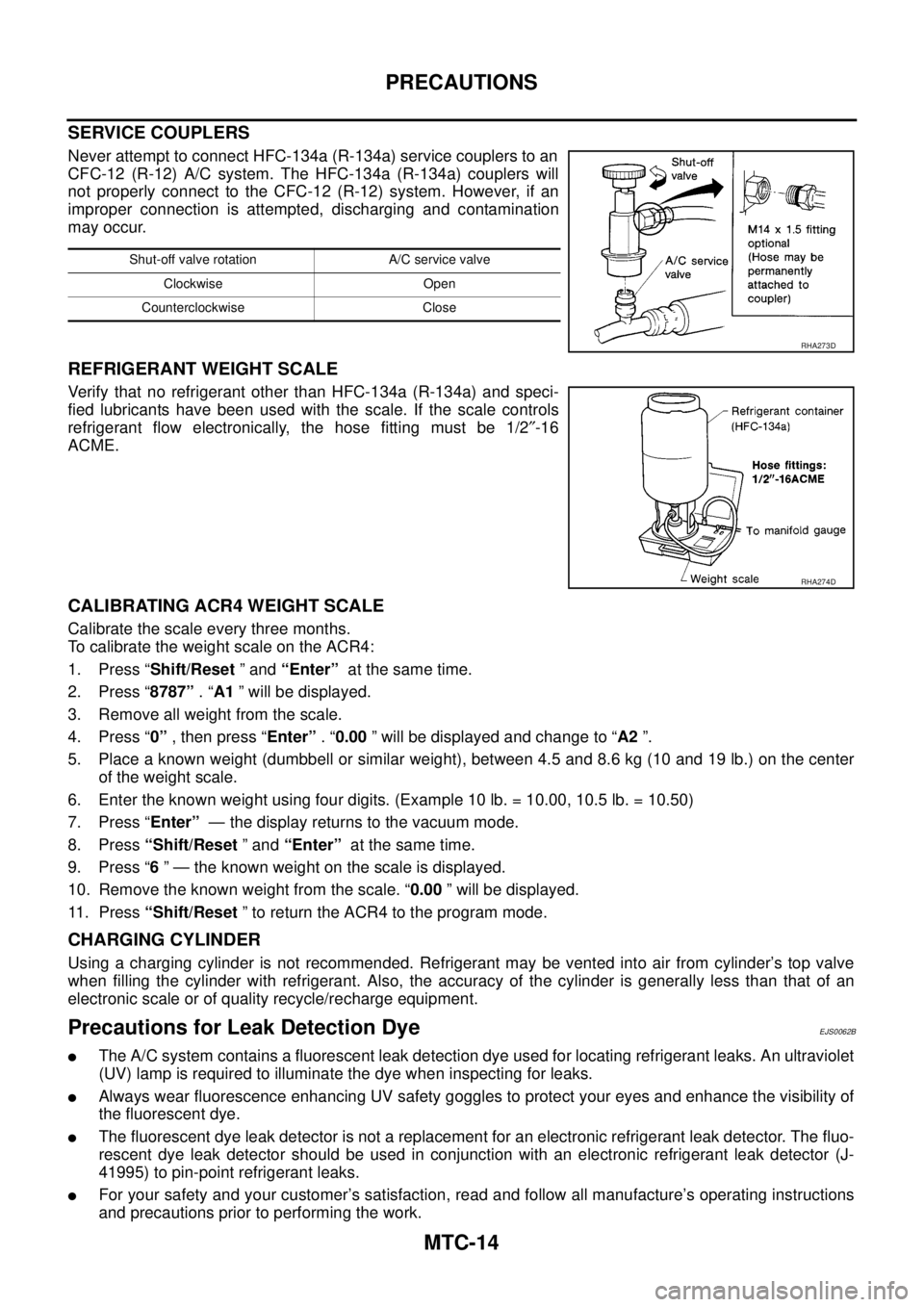
Never attempt to connect HFC-134a (R-134a) service couplers to an
CFC-12 (R-12) A/C system. The HFC-134a (R-134a) couplers will
not properly connect to the CFC-12 (R-12) system. However, if an
improper connection is attempted, discharging and contamination
may occur.
REFRIGERANT WEIGHT SCALE
Verify that no refrigerant other than HFC-134a (R-134a) and speci-
fied lubricants have been used with the scale. If the scale controls
refrigerant flow electronically, the hose fitting must be 1/2²-16
ACME.
CALIBRATING ACR4 WEIGHT SCALE
Calibrate the scale every three months.
To calibrate the weight scale on the ACR4:
1. Press “Shift/Reset”and“Enter”at the same time.
2. Press “8787”.“A1” will be displayed.
3. Remove all weight from the scale.
4. Press “0”, then press “Enter”.“0.00” will be displayed and change to “A2”.
5. Place a known weight (dumbbell or similar weight), between 4.5 and 8.6 kg (10 and 19 lb.) on the center
of the weight scale.
6. Enter the known weight using four digits. (Example 10 lb. = 10.00, 10.5 lb. = 10.50)
7. Press “Enter”— the display returns to the vacuum mode.
8. Press“Shift/Reset”and“Enter”at the same time.
9. Press “6” — the known weight on the scale is displayed.
10. Remove the known weight from the scale. “0.00” will be displayed.
11. Press“Shift/Reset” to return the ACR4 to the program mode.
CHARGING CYLINDER
Using a charging cylinder is not recommended. Refrigerant may be vented into air from cylinder’s top valve
when filling the cylinder with refrigerant. Also, the accuracy of the cylinder is generally less than that of an
electronic scale or of quality recycle/recharge equipment.
Precautions for Leak Detection DyeEJS0062B
lThe A/C system contains a fluorescent leak detection dye used for locating refrigerant leaks. An ultraviolet
(UV) lamp is required to illuminate the dye when inspecting for leaks.
lAlways wear fluorescence enhancing UV safety goggles to protect your eyes and enhance the visibility of
the fluorescent dye.
lThe fluorescent dye leak detector is not a replacement for an electronic refrigerant leak detector. The fluo-
rescent dye leak detector should be used in conjunction with an electronic refrigerant leak detector (J-
41995) to pin-point refrigerant leaks.
lFor your safety and your customer’s satisfaction, read and follow all manufacture’s operating instructions
and precautions prior to performing the work.
Shut-off valve rotation A/C service valve
Clockwise Open
Counterclockwise Close
RHA273D
RHA274D
Page 2467 of 3171
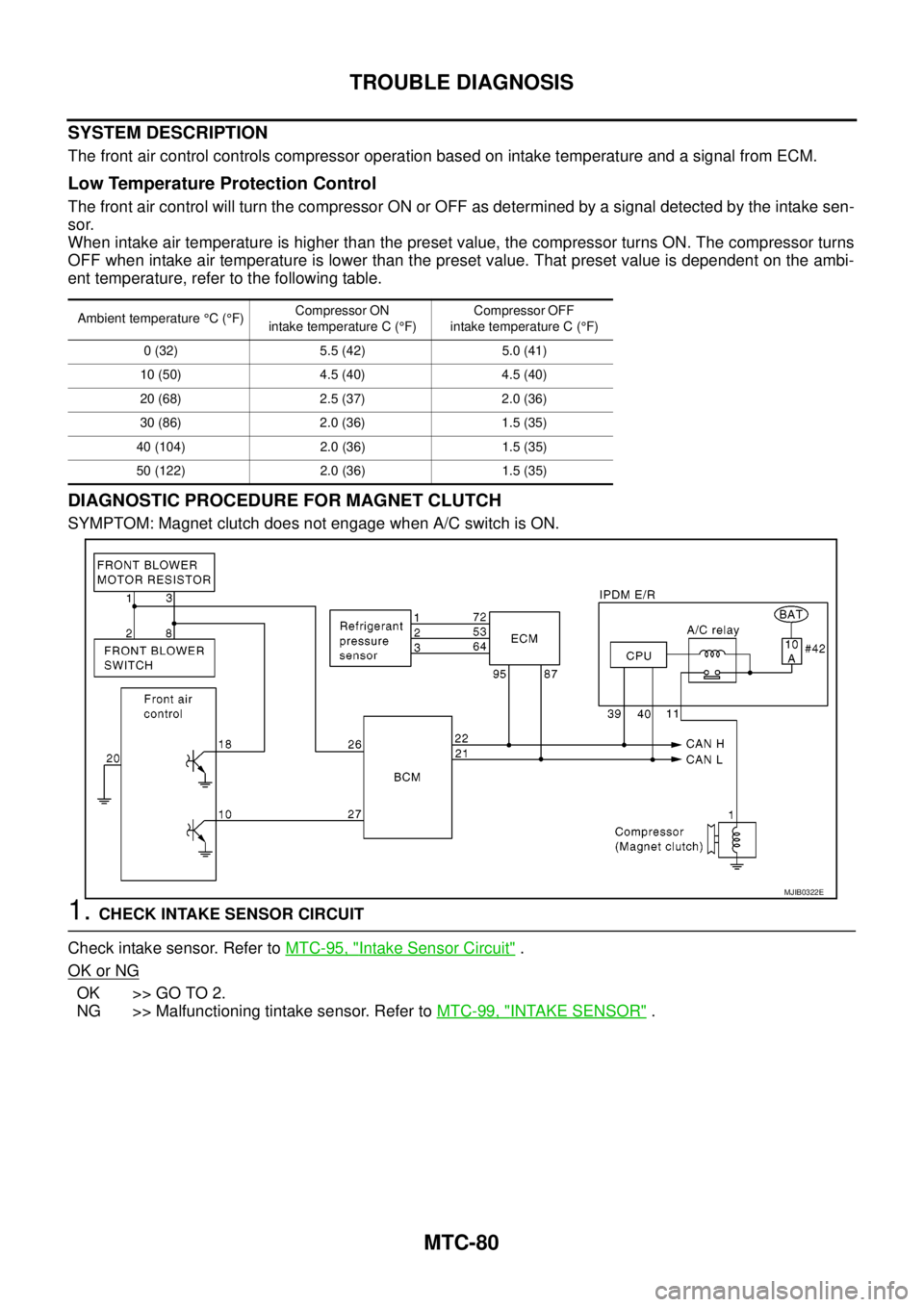
MTC-80
TROUBLE DIAGNOSIS
SYSTEM DESCRIPTION
The front air control controls compressor operation based on intake temperature and a signal from ECM.
Low Temperature Protection Control
The front air control will turn the compressor ON or OFF as determined by a signal detected by the intake sen-
sor.
When intake air temperature is higher than the preset value, the compressor turns ON. The compressor turns
OFF when intake air temperature is lower than the preset value. That preset value is dependent on the ambi-
ent temperature, refer to the following table.
DIAGNOSTIC PROCEDURE FOR MAGNET CLUTCH
SYMPTOM: Magnet clutch does not engage when A/C switch is ON.
1.CHECK INTAKE SENSOR CIRCUIT
Check intake sensor. Refer toMTC-95, "
Intake Sensor Circuit".
OK or NG
OK >> GO TO 2.
NG >> Malfunctioning tintake sensor. Refer toMTC-99, "
INTAKE SENSOR".
Ambient temperature°C(°F)Compressor ON
intake temperature C (°F)Compressor OFF
intake temperature C (°F)
0 (32) 5.5 (42) 5.0 (41)
10 (50) 4.5 (40) 4.5 (40)
20 (68) 2.5 (37) 2.0 (36)
30 (86) 2.0 (36) 1.5 (35)
40 (104) 2.0 (36) 1.5 (35)
50 (122) 2.0 (36) 1.5 (35)
MJIB0322E
Page 2678 of 3171

RF-1
ROOF
IBODY
CONTENTS
C
D
E
F
G
H
J
K
L
M
SECTIONRF
A
B
RF
ROOF
PRECAUTIONS .......................................................... 2
Precautions for Supplemental Restraint System
(SRS)“AIRBAG”and“SEATBELTPRE-TEN-
SIONER” .................................................................. 2
Precautions .............................................................. 2
PREPARATION ........................................................... 3
Commercial Service Tool ......................................... 3
SQUEAK AND RATTLE TROUBLE DIAGNOSES..... 4
Work Flow ................................................................ 4
CUSTOMER INTERVIEW ..................................... 4
DUPLICATE THE NOISE AND TEST DRIVE ....... 5
CHECK RELATED SERVICE BULLETINS ........... 5
LOCATE THE NOISE AND IDENTIFY THE
ROOT CAUSE ...................................................... 5
REPAIR THE CAUSE ........................................... 5
CONFIRM THE REPAIR ....................................... 6
Generic Squeak and Rattle Troubleshooting ........... 6
INSTRUMENT PANEL .......................................... 6
CENTER CONSOLE ............................................. 6
DOORS ................................................................. 6
TRUNK .................................................................. 7
SUNROOF/HEADLINING ..................................... 7
SEATS ................................................................... 7
UNDERHOOD ....................................................... 7
Diagnostic Worksheet .............................................. 8
SUNROOF ................................................................ 10
Component Parts and Harness Connector Location... 10
System Description ................................................. 11
TILT UP / SLIDE CLOSE OPERATION ................ 11
TILT DOWN / SLIDE OPEN OPERATION ........... 11AUTO OPERATION ............................................. 11
ANTI-PINCH FUNCTION .................................... 11
MEMORY RESET PROCEDURE ....................... 12
INITIALIZATION PROCEDURE .......................... 12
CAN Communication System Description .............. 13
CAN Communication Unit ....................................... 13
Wiring Diagram — SROOF — ................................ 14
Terminals and Reference Value for BCM ............... 15
Terminals and Reference Value for Sunroof Motor
Assembly ................................................................ 15
Work Flow ............................................................... 16
Trouble Diagnosis Symptom Chart ......................... 16
BCM Power Supply and Ground Circuit Check ...... 16
Sunroof Motor Assembly Power Supply and Ground
Circuit Check .......................................................... 17
Sunroof Switch System Check ............................... 18
Fitting Adjustment ................................................... 20
GAP ADJUSTMENT ............................................ 20
HEIGHT DIFFERENCE ADJUSTMENT .............. 20
Removal and Installation ........................................ 21
SUNROOF UNIT ................................................. 22
GLASS LID .......................................................... 22
WIND DEFLECTOR ............................................ 23
SUNSHADE ........................................................ 23
SUNROOF MOTOR ............................................ 23
DRAIN HOSES .................................................... 25
WEATHERSTRIP ................................................ 25
REAR DRAIN ASSEMBLY .................................. 25
LINK AND WIRE ASSEMBLY ............................. 26
Page 2689 of 3171

RF-12
SUNROOF
MEMORY RESET PROCEDURE
1. Please observe the following instructions while confirming the sunroof operation.
NOTE:
Do not disconnect the electronic power while the sunroof is operating or within 5 seconds after the sunroof
stops. (to wipe-out the memory of lid position and operating friction.)
2. Initialization of system should be conducted after the following conditions.
lWhen the battery is out or connector is disconnected while sunroof is operating or within 5 seconds
after sunroof stops.
lWhen the sunroof motor is changed.
lWhen an emergency handle is used.
lWhen the sunroof does not operate normally. (Incomplete initialization conditions)
INITIALIZATION PROCEDURE
If sunroof does not close or open normally, use following procedure to return sunroof operation to normal.
1. Close sunroof if it is not in close position. It may be necessary to repeatedly push TILT UP/SLIDE CLOSE
switch to close sunroof.
2. Tilt up sunroof, and release TILT UP/SLIDE CLOSE switch once.
3. Keep pushing TILT UP/SLIDE CLOSE switch. After 10seconds, glass lid will back up a few millimeters.
then will be stopped at normal tilt up position.
(Keep pushing TILT UP/SLIDE CLOSE switch during this operation.)
4. Within first 10 seconds of releasing TILT UP/SLIDE CLOSE switch, keep pushing TILT UP/SLIDE CLOSE
switch again. After 4 seconds, glass lid will be automatically TILT DOWN®SLIDE OPEN®SLIDE
CLOSE.
(Keep pushing TILT UP/SLIDE CLOSE switch during this operation.)
5. After glass lid stops, release TILT UP/SLIDE CLOSE switch later 0.5 seconds.
6. Initializing procedure is completed. Confirm proper operation of sunroof (slide open, slide close, tilt up, tilt
down).