Page 625 of 3502
INTEGRATED COLOR DISPLAY SYSTEM
AV-97
C
D
E
F
G
H
I
J
L
MA
B
AV
Unable to Operate System with A/C and AV SwitchBKS00284
Symptom: Unable to operate A/C system and audio system with A/C and AV switch. (Unable to start self-diag-
nosis.)
1. CHECK CONDITION
1. Turn ignition switch ON.
2. Check if an image is displayed on the screen.
Is an image displayed on the screen?
YES >> GO TO 2.
NO >> Repair malfunctioning part. Refer to AV- 9 9 , "
All Images Are Not Displayed" .
2. SELF-DIAGNOSIS OF A/C AND AV SWITCH
Start self-diagnosis of A/C and AV switch, and check the self-diagnosis result. Refer to AV- 8 4 , "
A/C and AV
Switch Self-Diagnosis Function" .
OK or NG
OK >> GO TO 4.
NG >> GO TO 3.
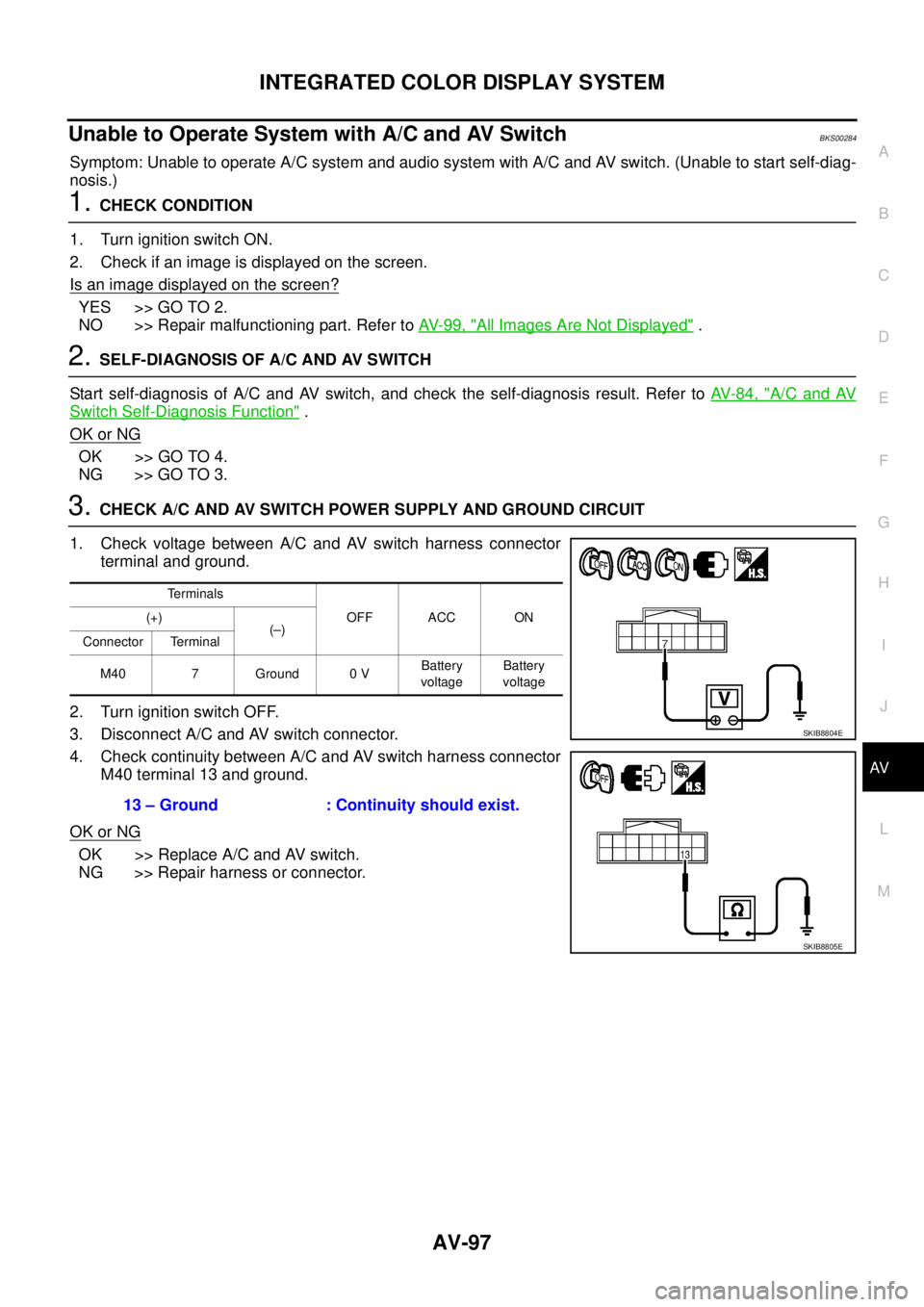
3. CHECK A/C AND AV SWITCH POWER SUPPLY AND GROUND CIRCUIT
1. Check voltage between A/C and AV switch harness connector
terminal and ground.
2. Turn ignition switch OFF.
3. Disconnect A/C and AV switch connector.
4. Check continuity between A/C and AV switch harness connector
M40 terminal 13 and ground.
OK or NG
OK >> Replace A/C and AV switch.
NG >> Repair harness or connector.
Terminals
OFF ACC ON (+)
(–)
Connector Terminal
M40 7 Ground 0 VBattery
voltageBattery
voltage
13 – Ground : Continuity should exist.
SKIB8804E
SKIB8805E
Page 628 of 3502
AV-100
INTEGRATED COLOR DISPLAY SYSTEM
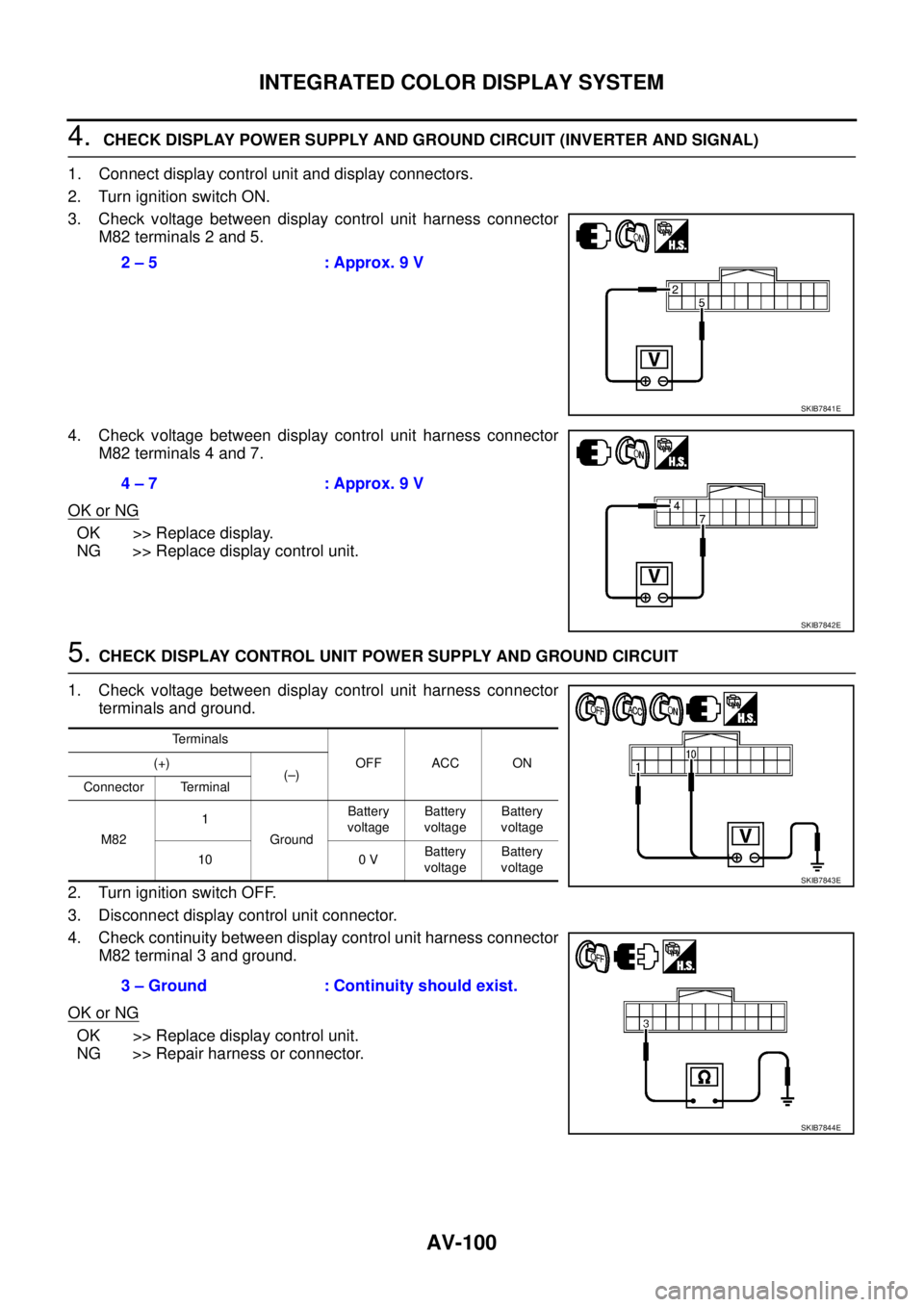
4. CHECK DISPLAY POWER SUPPLY AND GROUND CIRCUIT (INVERTER AND SIGNAL)
1. Connect display control unit and display connectors.
2. Turn ignition switch ON.
3. Check voltage between display control unit harness connector
M82 terminals 2 and 5.
4. Check voltage between display control unit harness connector
M82 terminals 4 and 7.
OK or NG
OK >> Replace display.
NG >> Replace display control unit.
5. CHECK DISPLAY CONTROL UNIT POWER SUPPLY AND GROUND CIRCUIT
1. Check voltage between display control unit harness connector
terminals and ground.
2. Turn ignition switch OFF.
3. Disconnect display control unit connector.
4. Check continuity between display control unit harness connector
M82 terminal 3 and ground.
OK or NG
OK >> Replace display control unit.
NG >> Repair harness or connector.2 – 5 : Approx. 9 V
SKIB7841E
4 – 7 : Approx. 9 V
SKIB7842E
Terminals
OFF ACC ON (+)
(–)
Connector Terminal
M821
GroundBattery
voltageBattery
voltageBattery
voltage
10 0 VBattery
voltageBattery
voltage
3 – Ground : Continuity should exist.
SKIB7843E
SKIB7844E
Page 629 of 3502
INTEGRATED COLOR DISPLAY SYSTEM
AV-101
C
D
E
F
G
H
I
J
L
MA
B
AV
Rear View Image Is Not Displayed (RGB Image Is Displayed)BKS00286
Symptom: Rear view image is not displayed when selector lever is set in R position. (RGB image is displayed.)
1. CHECK CONDITION
1. Turn ignition switch ON.
2. When setting selector lever in R position, make sure that the screen does not change or changes into the
screen where nothing is displayed.
Does the screen change into the screen where nothing is displayed?
YES >> GO TO 2.
NO >> GO TO 12.
2. CONSULT-II FUNCTIONS
1. Connect “CONSULT-II”. Refer to AV- 9 4 , "
CONSULT-II BASIC OPERATION PROCEDURE" .
2. Check if “REARVIEW CAMERA” is shown on the SELECT SYSTEM screen.
Is
“REARVIEW CAMERA” shown?
YES >> GO TO 3.
NO >> Check rear view camera control unit power supply and ground circuit, and repair malfunctioning
part.
3. CONSULT-II FUNCTIONS
Check if reverse signals input to the rear view camera control unit are normal with DATA MONITOR. Refer to
AV- 9 4 , "
DATA MONITOR" .
OK or NG
OK >> GO TO 4.
NG >> Check rear view camera control unit reverse signal circuit, and repair malfunctioning part.
4. CHECK HARNESS
1. Turn ignition switch OFF.
2. Disconnect rear view camera control unit and rear view camera connectors.
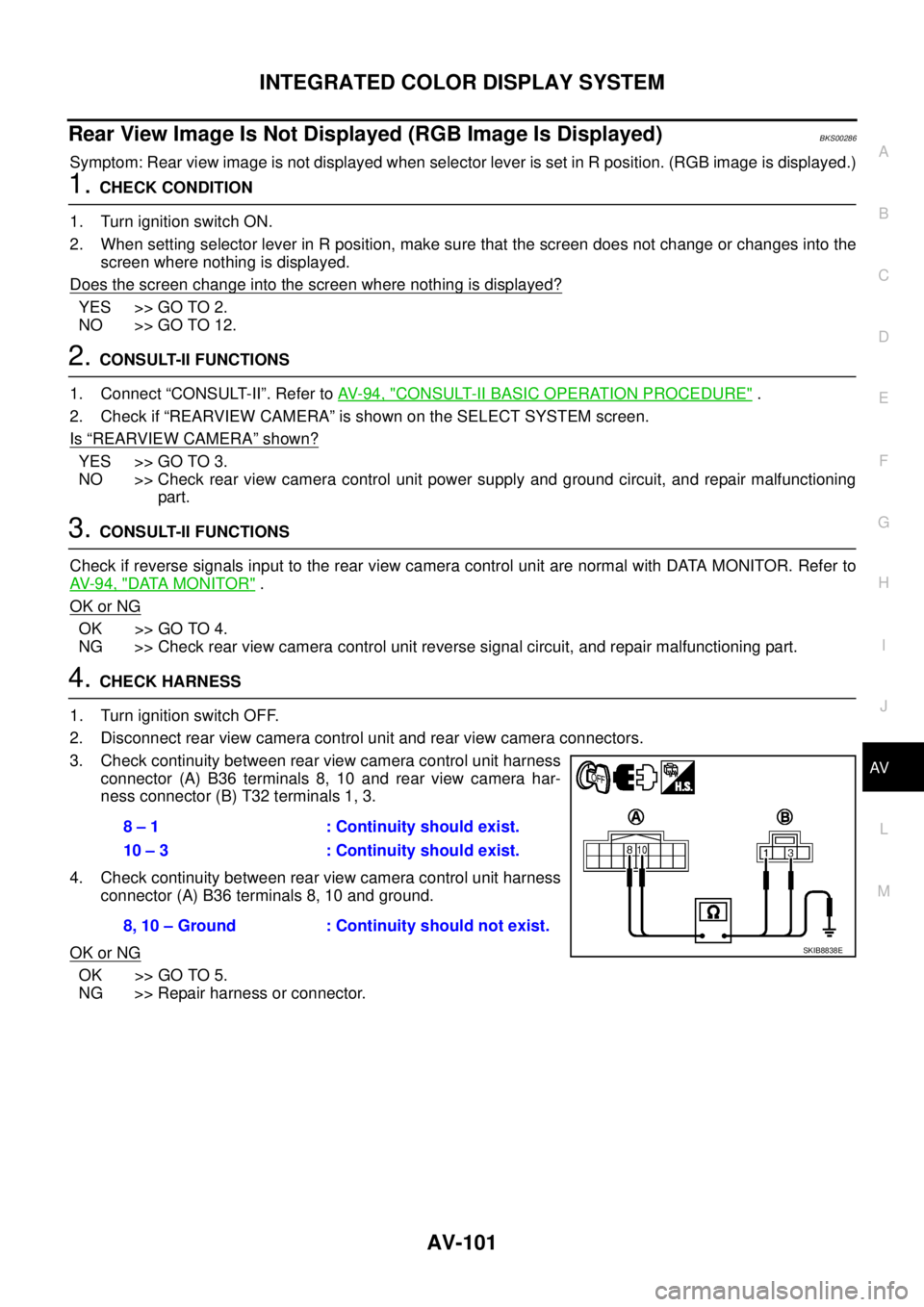
3. Check continuity between rear view camera control unit harness
connector (A) B36 terminals 8, 10 and rear view camera har-
ness connector (B) T32 terminals 1, 3.
4. Check continuity between rear view camera control unit harness
connector (A) B36 terminals 8, 10 and ground.
OK or NG
OK >> GO TO 5.
NG >> Repair harness or connector.8 – 1 : Continuity should exist.
10 – 3 : Continuity should exist.
8, 10 – Ground : Continuity should not exist.
SKIB8838E
Page 630 of 3502
AV-102
INTEGRATED COLOR DISPLAY SYSTEM
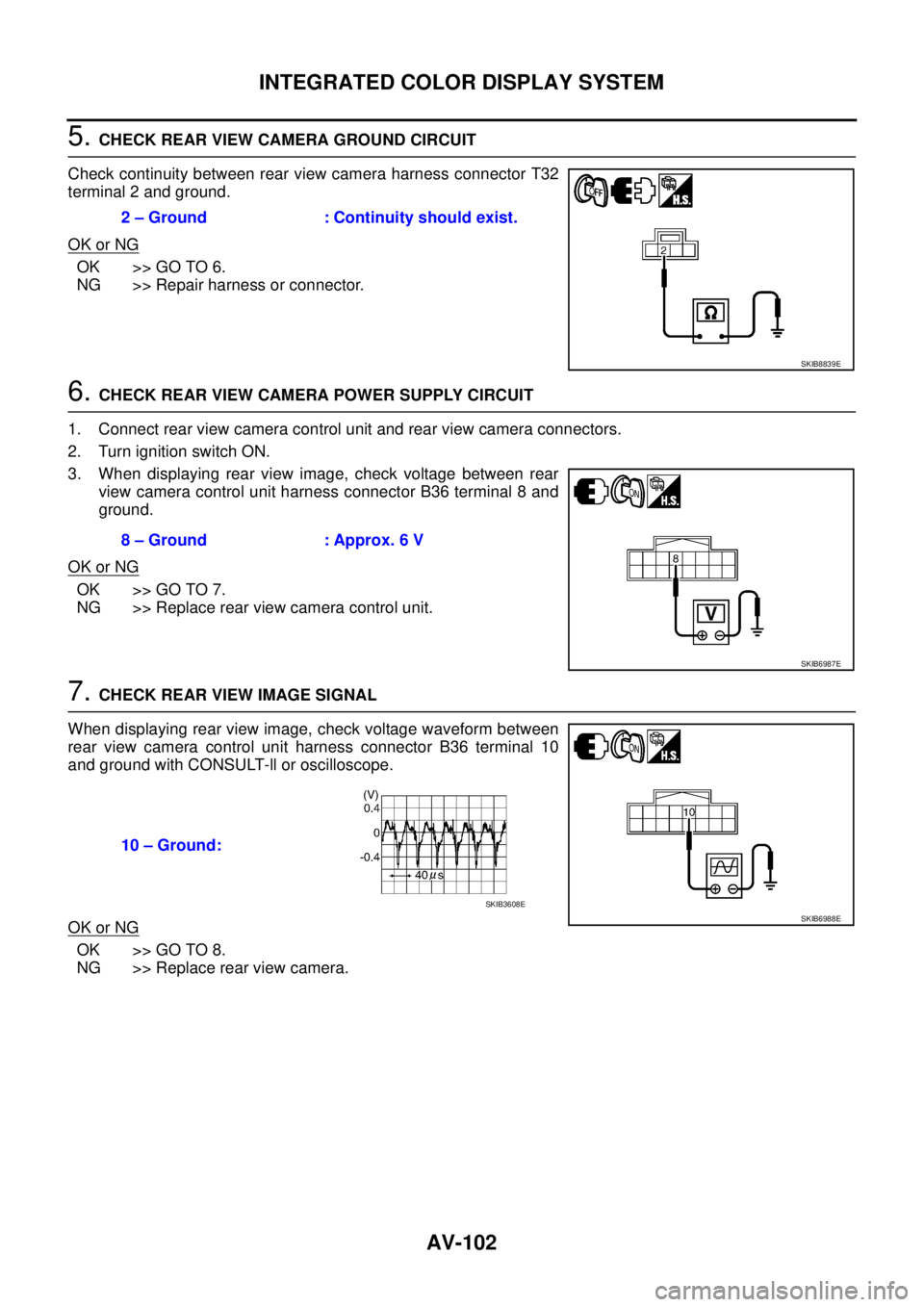
5. CHECK REAR VIEW CAMERA GROUND CIRCUIT
Check continuity between rear view camera harness connector T32
terminal 2 and ground.
OK or NG
OK >> GO TO 6.
NG >> Repair harness or connector.
6. CHECK REAR VIEW CAMERA POWER SUPPLY CIRCUIT
1. Connect rear view camera control unit and rear view camera connectors.
2. Turn ignition switch ON.
3. When displaying rear view image, check voltage between rear
view camera control unit harness connector B36 terminal 8 and
ground.
OK or NG
OK >> GO TO 7.
NG >> Replace rear view camera control unit.
7. CHECK REAR VIEW IMAGE SIGNAL
When displaying rear view image, check voltage waveform between
rear view camera control unit harness connector B36 terminal 10
and ground with CONSULT-ll or oscilloscope.
OK or NG
OK >> GO TO 8.
NG >> Replace rear view camera.2 – Ground : Continuity should exist.
SKIB8839E
8 – Ground : Approx. 6 V
SKIB6987E
10 – Ground:
SKIB6988ESKIB3608E
Page 643 of 3502
BCS-1
BODY CONTROL SYSTEM
K ELECTRICAL
CONTENTS
C
D
E
F
G
H
I
J
L
M
SECTION BCS
A
B
BCS
BODY CONTROL SYSTEM
PRECAUTIONS .......................................................... 2
Precautions for Supplemental Restraint System
(SRS) “AIR BAG” and “SEAT BELT PRE-TEN-
SIONER” .................................................................. 2
BCM (BODY CONTROL MODULE) ........................... 3
System Description .................................................. 3
BCM FUNCTION ................................................... 3
COMBINATION SWITCH READING FUNCTION ..... 3
BCM STATUS CONTROL ..................................... 7
SYSTEMS CONTROLLED BY BCM DIRECTLY ..... 8
SYSTEMS CONTROLLED BY BCM AND IPDM
E/R ........................................................................ 8
SYSTEMS CONTROLLED BY BCM AND COM-
BINATION METER ................................................ 8
SYSTEMS CONTROLLED BY BCM, COMBINA-
TION METER AND IPDM E/R .............................. 8SYSTEMS CONTROLLED BY BCM AND INTEL-
LIGENT KEY UNIT ................................................ 8
MAJOR COMPONENTS AND CONTROL SYS-
TEM ....................................................................... 9
CAN Communication Unit ....................................... 10
Schematic ............................................................... 11
CONSULT-II Function (BCM) ................................. 13
CONSULT-II BASIC OPERATION ....................... 13
ITEMS OF EACH PART ...................................... 13
WORK SUPPORT ............................................... 14
CAN Communication Inspection Using CONSULT-
II (Self-Diagnosis) ................................................... 14
Check BCM Power Supply and Ground Circuit ...... 15
Removal and Installation of BCM ........................... 16
REMOVAL ........................................................... 16
INSTALLATION ................................................... 16
Page 648 of 3502
BCS-6
BCM (BODY CONTROL MODULE)
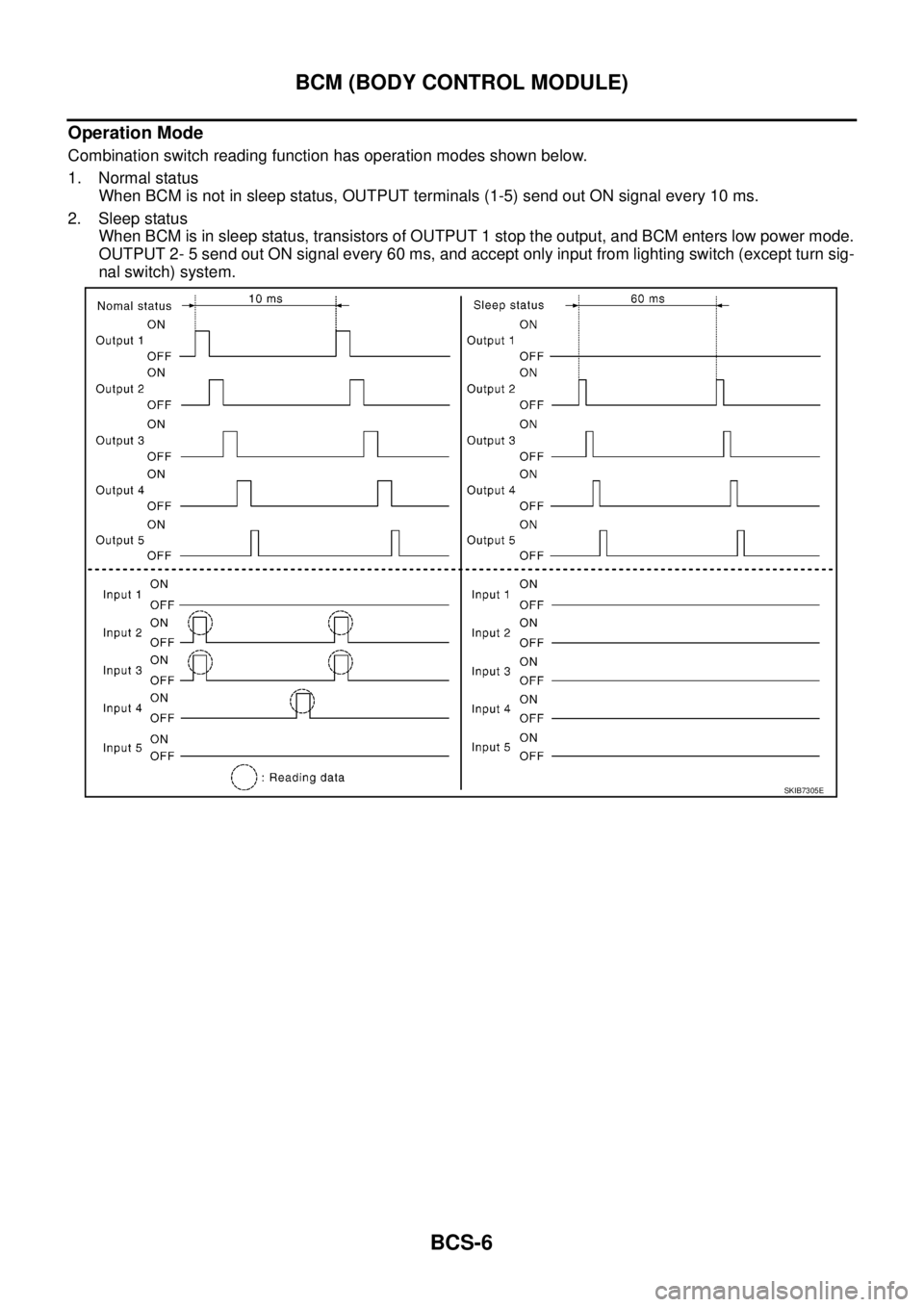
Operation Mode
Combination switch reading function has operation modes shown below.
1. Normal status
When BCM is not in sleep status, OUTPUT terminals (1-5) send out ON signal every 10 ms.
2. Sleep status
When BCM is in sleep status, transistors of OUTPUT 1 stop the output, and BCM enters low power mode.
OUTPUT 2- 5 send out ON signal every 60 ms, and accept only input from lighting switch (except turn sig-
nal switch) system.
SKIB7305E
Page 649 of 3502

BCM (BODY CONTROL MODULE)
BCS-7
C
D
E
F
G
H
I
J
L
MA
B
BCS
BCM STATUS CONTROL
BCM changes its status depending on the operation status in order to save power consumption.
1. CAN communication status
�With ignition switch ON, CAN communicates with other control units normally.
�Control by BCM is being operated properly.
�When ignition switch is OFF, switching to sleep mode is possible.
�Even when ignition switch is OFF, if CAN communication with IPDM E/R, Intelligent Key unit or unified
meter and A/C amp. is active, CAN communication status is active.
2. Sleep transient status
�This status shuts down CAN communication when ignition switch is turned OFF.
�It transmits sleep request signal to IPDM E/R, Intelligent Key unit, driver seat control unit and unified
meter and A/C amp.
�2 seconds after CAN communication of all control units stops, sleep transient status switches to CAN
communication inactive status.
3. CAN communication inactive status
�With ignition switch OFF, CAN communication is not active.
�With ignition switch OFF, control performed only by BCM is active.
�When all controls that BCM performs stop, CAN communication inactive status switches to sleep sta-
tus.
4. Sleep status
�BCM is activated with low power mode.
�CAN communication is not active.
�When CAN communication operation is detected, it switches to CAN communication status.
�When a state of the following switches changes, it switches to CAN communication state.
–Ignition switch (ACC, ON)
–Key switch
–Ignition knob switch
–Hazard switch
–Door lock/unlock switch
–Front door switch (driver side, passenger side)
–Rear door switch (RH, LH)
–Trunk lid opener switch
–Trunk room lamp switch
–Combination switch (passing, lighting switch 1ST position, front fog lamp)
–Remote keyless entry receiver (lock/unlock signal)
�When control performed only by BCM is required by switch, it shifts to CAN communication inactive
mode.
�Status of combination switch reading function is changed.
Page 650 of 3502
BCS-8
BCM (BODY CONTROL MODULE)
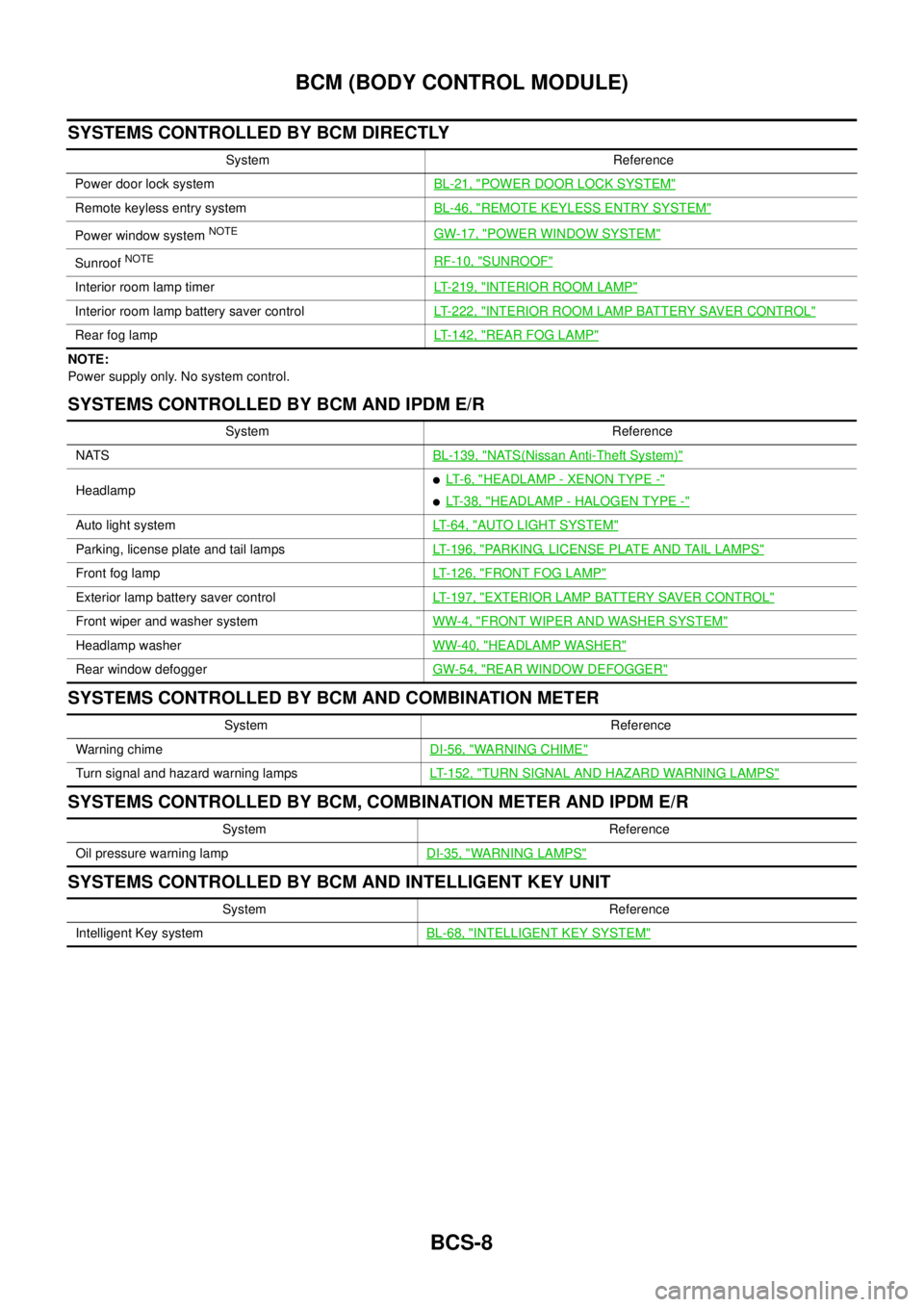
SYSTEMS CONTROLLED BY BCM DIRECTLY
NOTE:
Power supply only. No system control.
SYSTEMS CONTROLLED BY BCM AND IPDM E/R
SYSTEMS CONTROLLED BY BCM AND COMBINATION METER
SYSTEMS CONTROLLED BY BCM, COMBINATION METER AND IPDM E/R
SYSTEMS CONTROLLED BY BCM AND INTELLIGENT KEY UNIT
System Reference
Power door lock systemBL-21, "
POWER DOOR LOCK SYSTEM"
Remote keyless entry systemBL-46, "REMOTE KEYLESS ENTRY SYSTEM"
Power window system NOTEGW-17, "POWER WINDOW SYSTEM"
Sunroof NOTERF-10, "SUNROOF"
Interior room lamp timerLT-219, "INTERIOR ROOM LAMP"
Interior room lamp battery saver controlLT-222, "INTERIOR ROOM LAMP BATTERY SAVER CONTROL"
Rear fog lampLT-142, "REAR FOG LAMP"
System Reference
NATSBL-139, "
NATS(Nissan Anti-Theft System)"
Headlamp�LT- 6 , "HEADLAMP - XENON TYPE -"
�LT-38, "HEADLAMP - HALOGEN TYPE -"
Auto light systemLT-64, "AUTO LIGHT SYSTEM"
Parking, license plate and tail lamps LT-196, "PARKING, LICENSE PLATE AND TAIL LAMPS"
Front fog lampLT-126, "FRONT FOG LAMP"
Exterior lamp battery saver controlLT-197, "EXTERIOR LAMP BATTERY SAVER CONTROL"
Front wiper and washer systemWW-4, "FRONT WIPER AND WASHER SYSTEM"
Headlamp washerWW-40, "HEADLAMP WASHER"
Rear window defoggerGW-54, "REAR WINDOW DEFOGGER"
System Reference
Warning chimeDI-56, "
WARNING CHIME"
Turn signal and hazard warning lampsLT-152, "TURN SIGNAL AND HAZARD WARNING LAMPS"
System Reference
Oil pressure warning lampDI-35, "
WARNING LAMPS"
System Reference
Intelligent Key systemBL-68, "
INTELLIGENT KEY SYSTEM"