Page 556 of 3502
AV-28
AUDIO (WITH INTEGRATED COLOR DISPLAY SYSTEM)
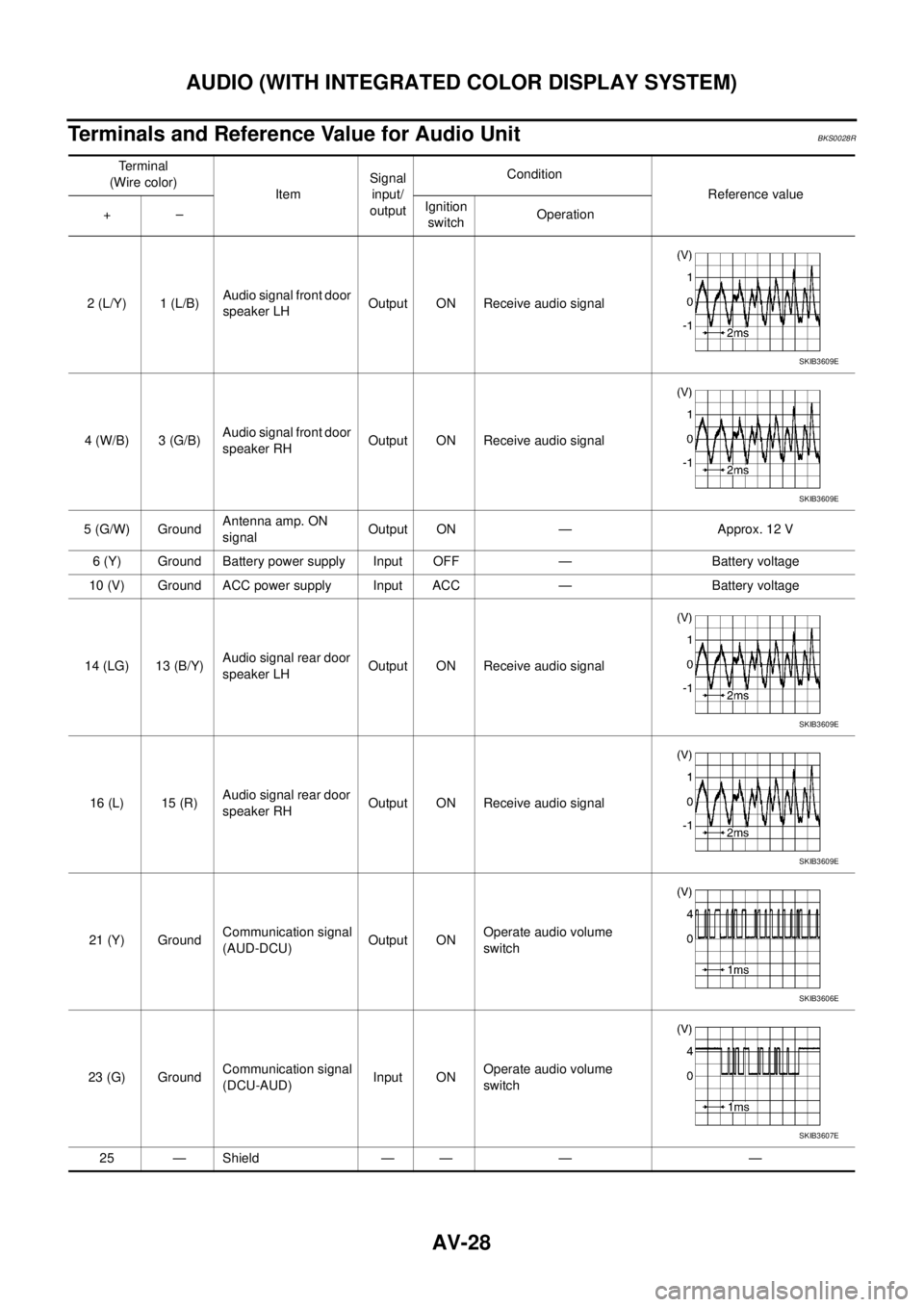
Terminals and Reference Value for Audio UnitBKS0028R
Te r m i n a l
(Wire color)
ItemSignal
input/
outputCondition
Reference value
+–Ignition
switchOperation
2 (L/Y) 1 (L/B)Audio signal front door
speaker LHOutput ON Receive audio signal
4 (W/B) 3 (G/B)Audio signal front door
speaker RHOutput ON Receive audio signal
5 (G/W) GroundAntenna amp. ON
signalOutput ON — Approx. 12 V
6 (Y) Ground Battery power supply Input OFF — Battery voltage
10 (V) Ground ACC power supply Input ACC — Battery voltage
14 (LG) 13 (B/Y)Audio signal rear door
speaker LHOutput ON Receive audio signal
16 (L) 15 (R)Audio signal rear door
speaker RHOutput ON Receive audio signal
21 (Y) GroundCommunication signal
(AUD-DCU)Output ONOperate audio volume
switch
23 (G) GroundCommunication signal
(DCU-AUD)Input ONOperate audio volume
switch
25 — Shield — — — —
SKIB3609E
SKIB3609E
SKIB3609E
SKIB3609E
SKIB3606E
SKIB3607E
Page 558 of 3502
AV-30
AUDIO (WITH INTEGRATED COLOR DISPLAY SYSTEM)
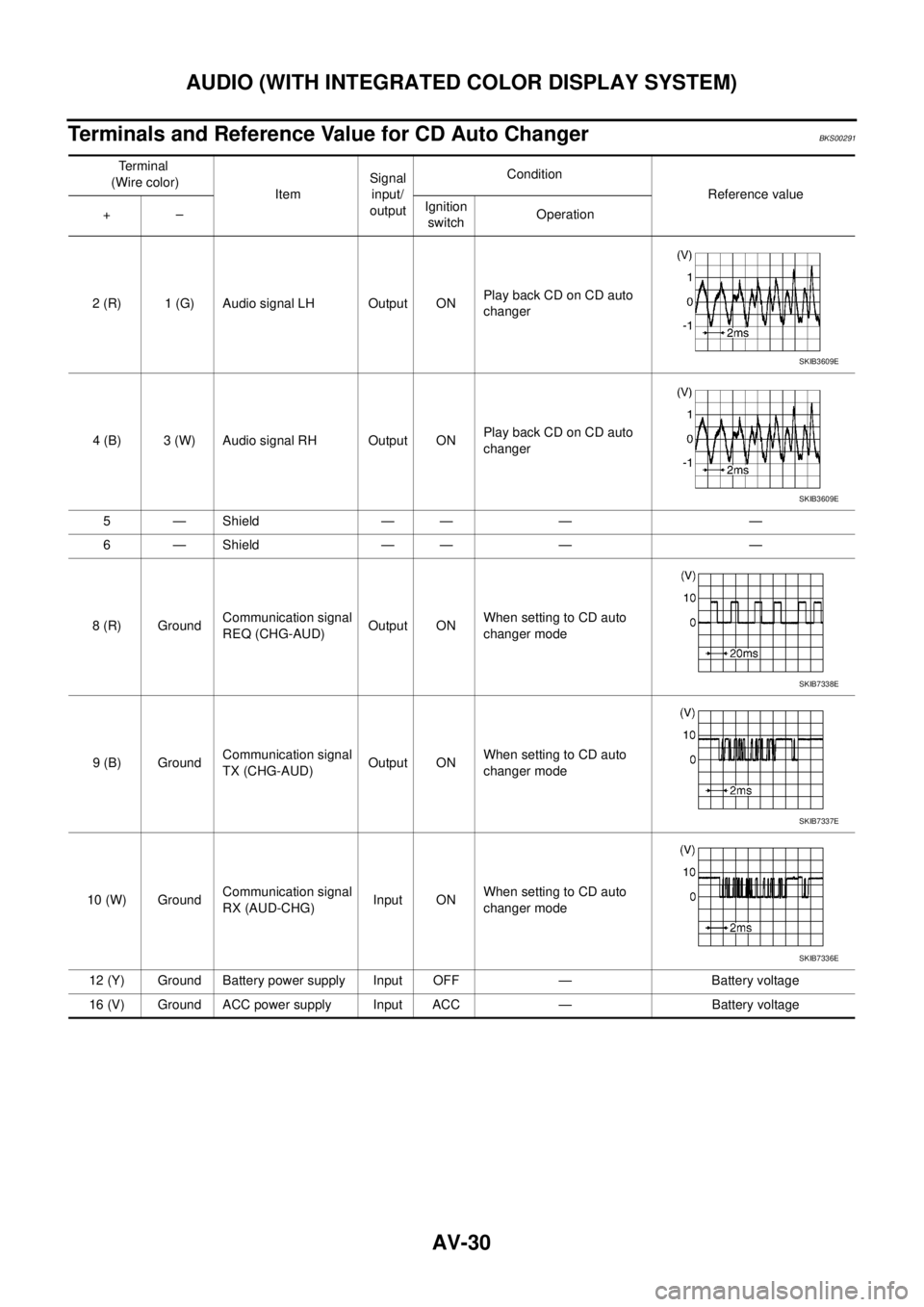
Terminals and Reference Value for CD Auto ChangerBKS00291
Te r m i n a l
(Wire color)
ItemSignal
input/
outputCondition
Reference value
+–Ignition
switchOperation
2 (R) 1 (G) Audio signal LH Output ONPlay back CD on CD auto
changer
4 (B) 3 (W) Audio signal RH Output ONPlay back CD on CD auto
changer
5 — Shield — — — —
6 — Shield — — — —
8 (R) GroundCommunication signal
REQ (CHG-AUD)Output ONWhen setting to CD auto
changer mode
9 (B) GroundCommunication signal
TX (CHG-AUD)Output ONWhen setting to CD auto
changer mode
10 (W) GroundCommunication signal
RX (AUD-CHG)Input ONWhen setting to CD auto
changer mode
12 (Y) Ground Battery power supply Input OFF — Battery voltage
16 (V) Ground ACC power supply Input ACC — Battery voltage
SKIB3609E
SKIB3609E
SKIB7338E
SKIB7337E
SKIB7336E
Page 559 of 3502
AUDIO (WITH INTEGRATED COLOR DISPLAY SYSTEM)
AV-31
C
D
E
F
G
H
I
J
L
MA
B
AV
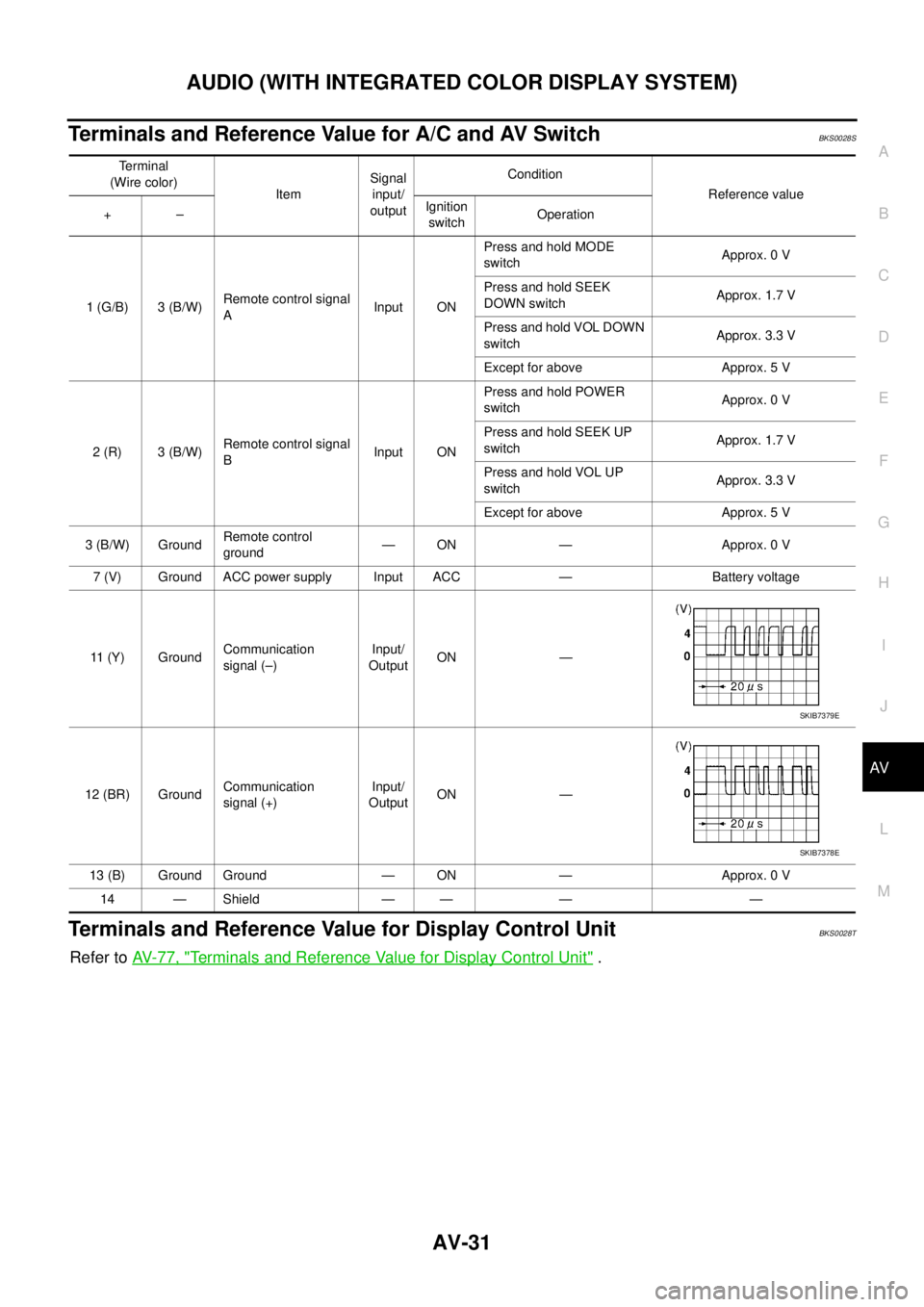
Terminals and Reference Value for A/C and AV SwitchBKS0028S
Terminals and Reference Value for Display Control UnitBKS0028T
Refer to AV- 7 7 , "Terminals and Reference Value for Display Control Unit" .
Terminal
(Wire color)
ItemSignal
input/
outputCondition
Reference value
+–Ignition
switchOperation
1 (G/B) 3 (B/W)Remote control signal
AInput ONPress and hold MODE
switchApprox. 0 V
Press and hold SEEK
DOWN switchApprox. 1.7 V
Press and hold VOL DOWN
switchApprox. 3.3 V
Except for above Approx. 5 V
2 (R) 3 (B/W)Remote control signal
BInput ONPress and hold POWER
switchApprox. 0 V
Press and hold SEEK UP
switchApprox. 1.7 V
Press and hold VOL UP
switchApprox. 3.3 V
Except for above Approx. 5 V
3 (B/W) GroundRemote control
ground— ON — Approx. 0 V
7 (V) Ground ACC power supply Input ACC — Battery voltage
11 (Y) GroundCommunication
signal (–)Input/
OutputON —
12 (BR) GroundCommunication
signal (+)Input/
OutputON —
13 (B) Ground Ground — ON — Approx. 0 V
14 — Shield — — — —
SKIB7379E
SKIB7378E
Page 561 of 3502
AUDIO (WITH INTEGRATED COLOR DISPLAY SYSTEM)
AV-33
C
D
E
F
G
H
I
J
L
MA
B
AV
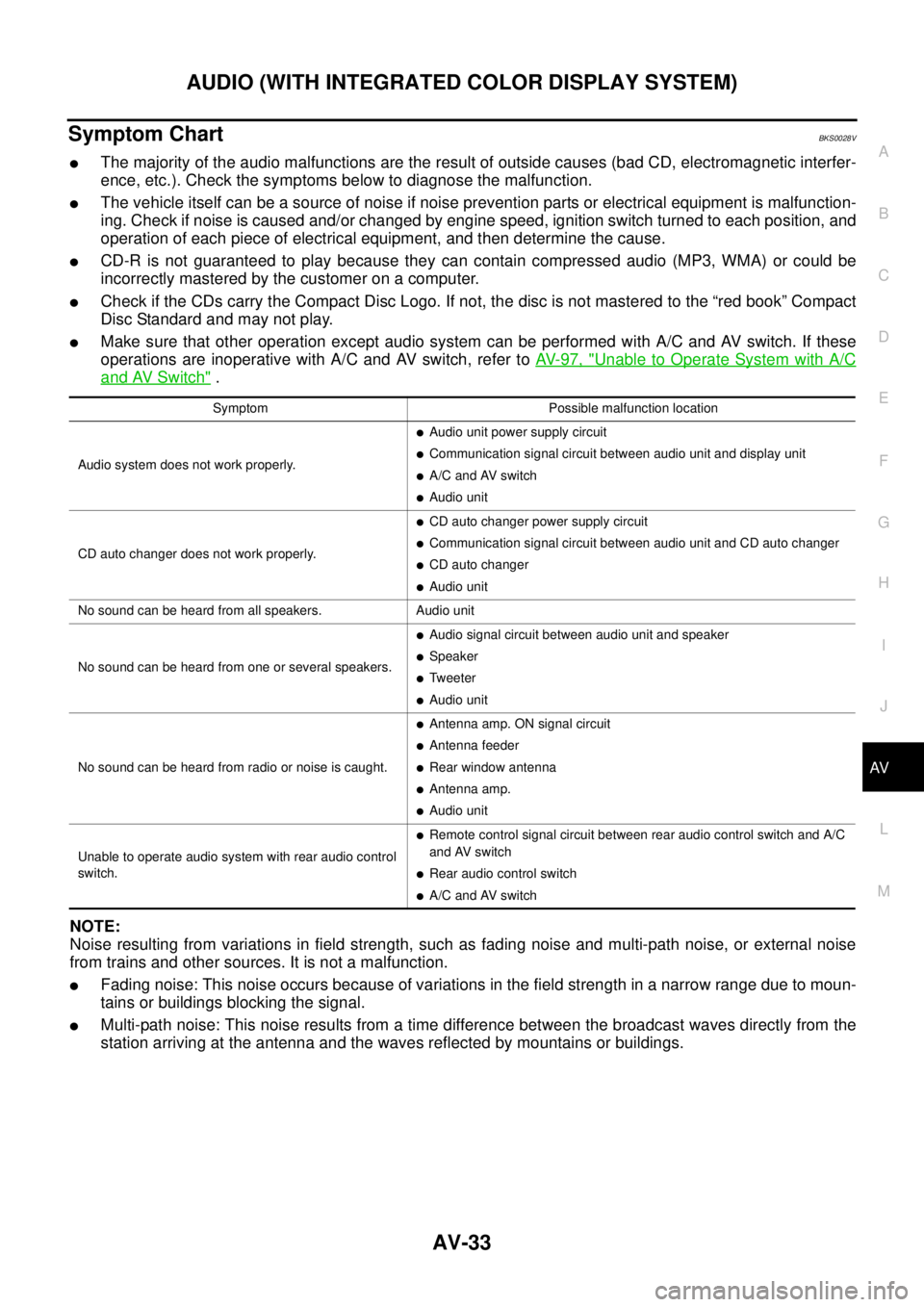
Symptom ChartBKS0028V
�The majority of the audio malfunctions are the result of outside causes (bad CD, electromagnetic interfer-
ence, etc.). Check the symptoms below to diagnose the malfunction.
�The vehicle itself can be a source of noise if noise prevention parts or electrical equipment is malfunction-
ing. Check if noise is caused and/or changed by engine speed, ignition switch turned to each position, and
operation of each piece of electrical equipment, and then determine the cause.
�CD-R is not guaranteed to play because they can contain compressed audio (MP3, WMA) or could be
incorrectly mastered by the customer on a computer.
�Check if the CDs carry the Compact Disc Logo. If not, the disc is not mastered to the “red book” Compact
Disc Standard and may not play.
�Make sure that other operation except audio system can be performed with A/C and AV switch. If these
operations are inoperative with A/C and AV switch, refer to AV- 9 7 , "
Unable to Operate System with A/C
and AV Switch" .
NOTE:
Noise resulting from variations in field strength, such as fading noise and multi-path noise, or external noise
from trains and other sources. It is not a malfunction.
�Fading noise: This noise occurs because of variations in the field strength in a narrow range due to moun-
tains or buildings blocking the signal.
�Multi-path noise: This noise results from a time difference between the broadcast waves directly from the
station arriving at the antenna and the waves reflected by mountains or buildings.
Symptom Possible malfunction location
Audio system does not work properly.
�Audio unit power supply circuit
�Communication signal circuit between audio unit and display unit
�A/C and AV switch
�Audio unit
CD auto changer does not work properly.
�CD auto changer power supply circuit
�Communication signal circuit between audio unit and CD auto changer
�CD auto changer
�Audio unit
No sound can be heard from all speakers. Audio unit
No sound can be heard from one or several speakers.
�Audio signal circuit between audio unit and speaker
�Speaker
�Tweeter
�Audio unit
No sound can be heard from radio or noise is caught.
�Antenna amp. ON signal circuit
�Antenna feeder
�Rear window antenna
�Antenna amp.
�Audio unit
Unable to operate audio system with rear audio control
switch.
�Remote control signal circuit between rear audio control switch and A/C
and AV switch
�Rear audio control switch
�A/C and AV switch
Page 580 of 3502
AV-52
INTEGRATED DISPLAY SYSTEM
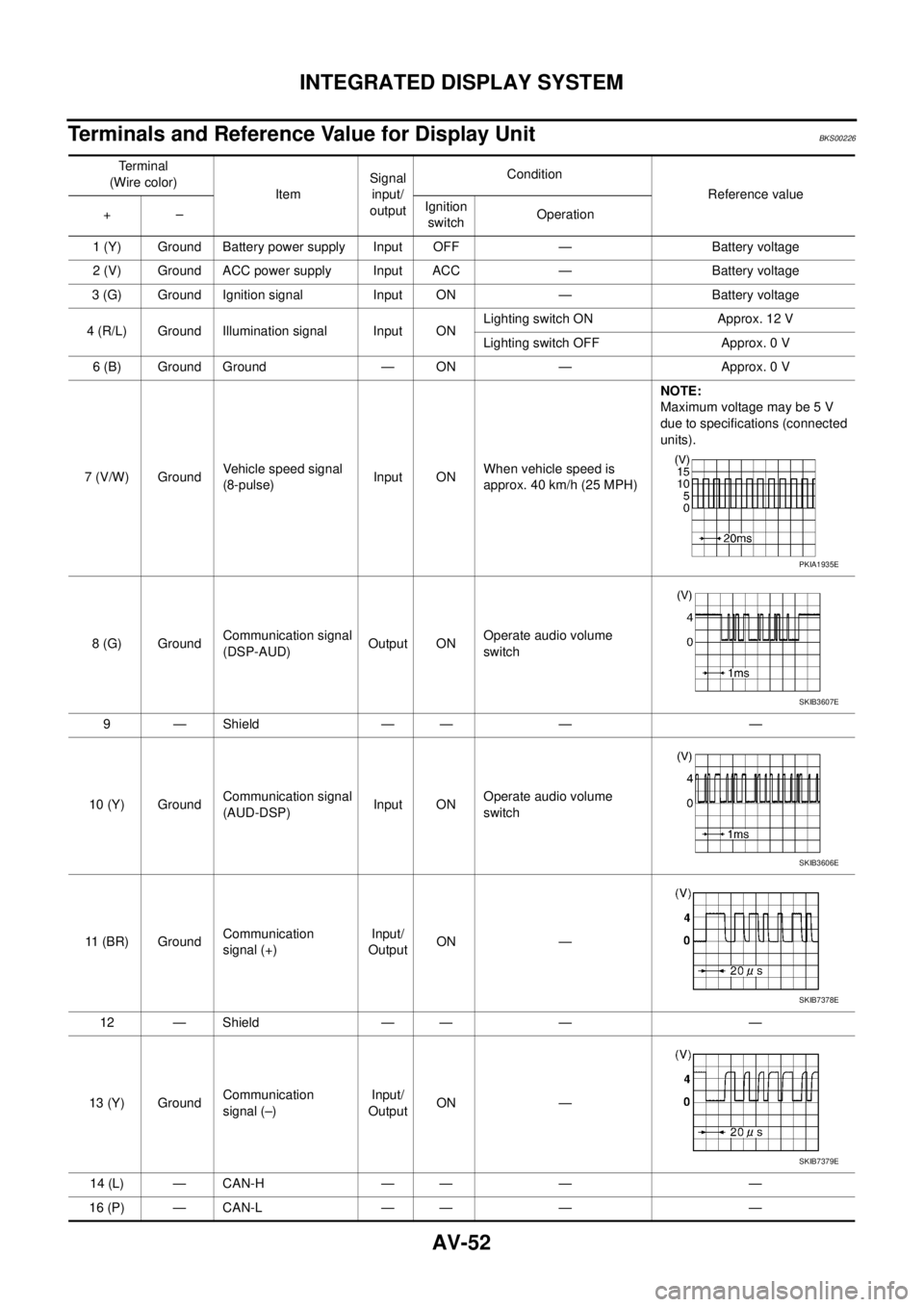
Terminals and Reference Value for Display UnitBKS00226
Te r m i n a l
(Wire color)
ItemSignal
input/
outputCondition
Reference value
+–Ignition
switchOperation
1 (Y) Ground Battery power supply Input OFF — Battery voltage
2 (V) Ground ACC power supply Input ACC — Battery voltage
3 (G) Ground Ignition signal Input ON — Battery voltage
4 (R/L) Ground Illumination signal Input ONLighting switch ON Approx. 12 V
Lighting switch OFF Approx. 0 V
6 (B) Ground Ground — ON — Approx. 0 V
7 (V/W) GroundVehicle speed signal
(8-pulse)Input ONWhen vehicle speed is
approx. 40 km/h (25 MPH)NOTE:
Maximum voltage may be 5 V
due to specifications (connected
units).
8 (G) GroundCommunication signal
(DSP-AUD)Output ONOperate audio volume
switch
9 — Shield — — — —
10 (Y) GroundCommunication signal
(AUD-DSP)Input ONOperate audio volume
switch
11 (BR) GroundCommunication
signal (+)Input/
OutputON —
12 — Shield — — — —
13 (Y) GroundCommunication
signal (–)Input/
OutputON —
14 (L) — CAN-H — — — —
16 (P) — CAN-L — — — —
PKIA1935E
SKIB3607E
SKIB3606E
SKIB7378E
SKIB7379E
Page 581 of 3502
INTEGRATED DISPLAY SYSTEM
AV-53
C
D
E
F
G
H
I
J
L
MA
B
AV
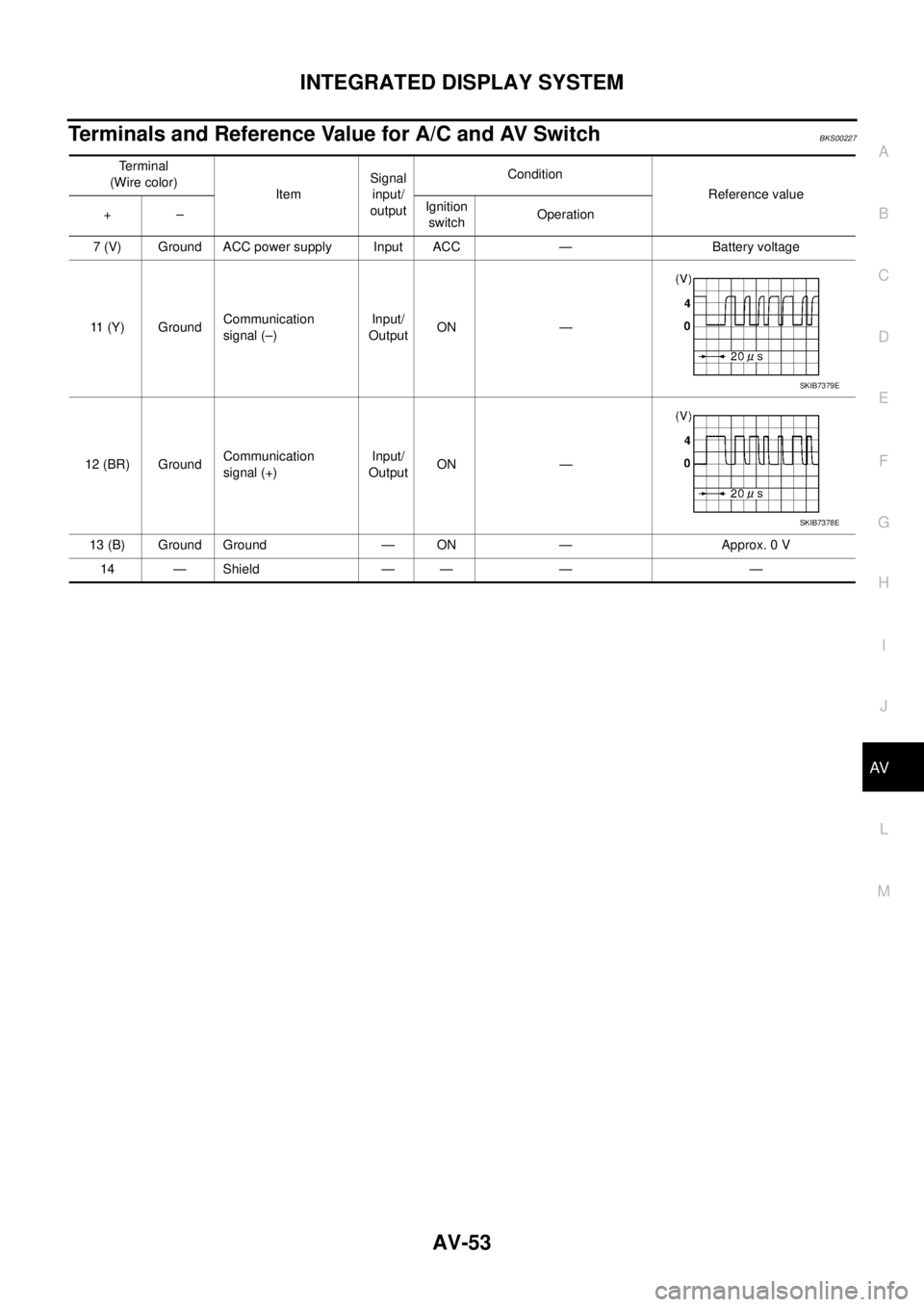
Terminals and Reference Value for A/C and AV SwitchBKS00227
Terminal
(Wire color)
ItemSignal
input/
outputCondition
Reference value
+–Ignition
switchOperation
7 (V) Ground ACC power supply Input ACC — Battery voltage
11 (Y) GroundCommunication
signal (–)Input/
OutputON —
12 (BR) GroundCommunication
signal (+)Input/
OutputON —
13 (B) Ground Ground — ON — Approx. 0 V
14 — Shield — — — —
SKIB7379E
SKIB7378E
Page 585 of 3502
INTEGRATED DISPLAY SYSTEM
AV-57
C
D
E
F
G
H
I
J
L
MA
B
AV
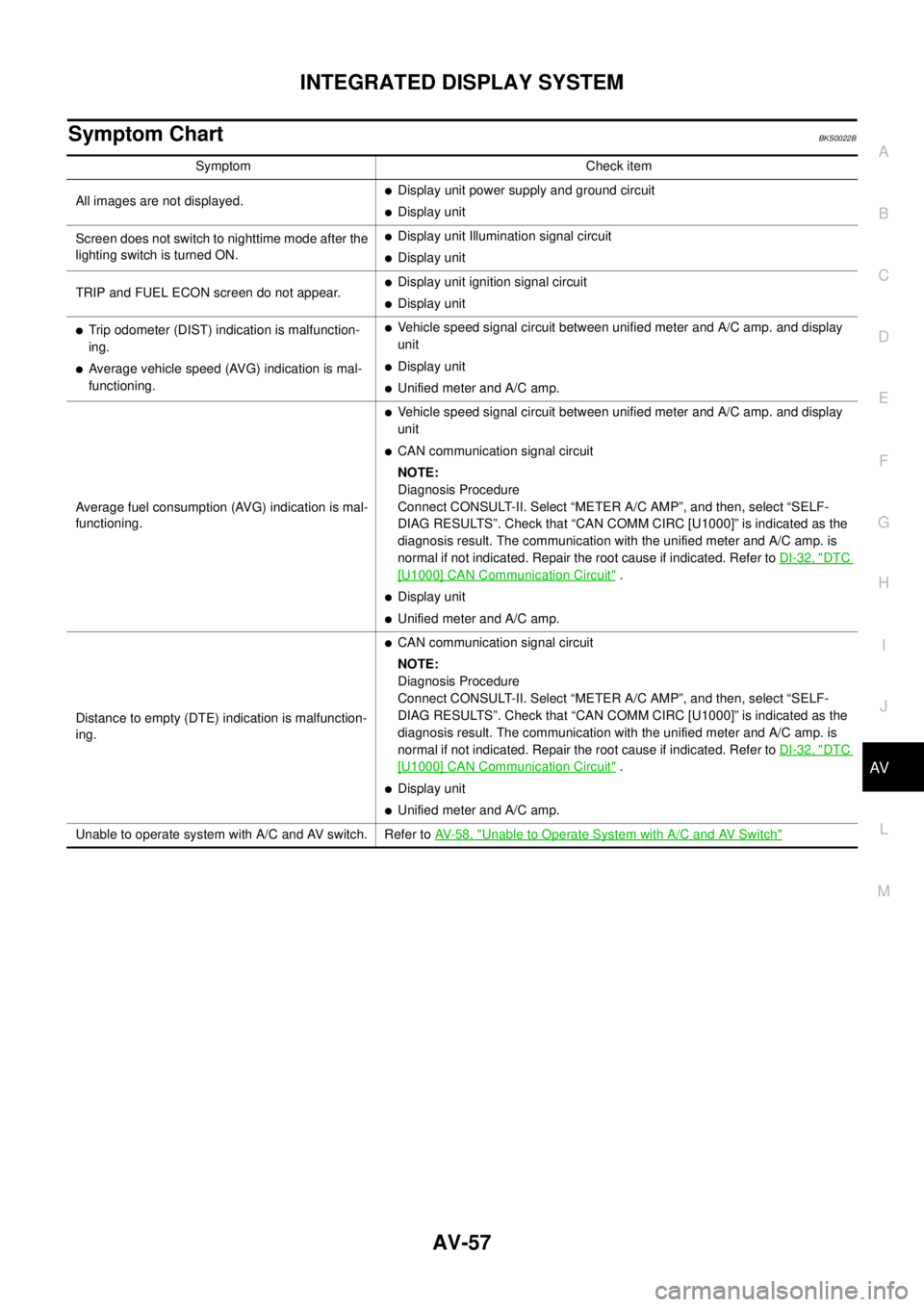
Symptom ChartBKS0022B
Symptom Check item
All images are not displayed.
�Display unit power supply and ground circuit
�Display unit
Screen does not switch to nighttime mode after the
lighting switch is turned ON.
�Display unit Illumination signal circuit
�Display unit
TRIP and FUEL ECON screen do not appear.
�Display unit ignition signal circuit
�Display unit
�Trip odometer (DIST) indication is malfunction-
ing.
�Average vehicle speed (AVG) indication is mal-
functioning.
�Vehicle speed signal circuit between unified meter and A/C amp. and display
unit
�Display unit
�Unified meter and A/C amp.
Average fuel consumption (AVG) indication is mal-
functioning.
�Vehicle speed signal circuit between unified meter and A/C amp. and display
unit
�CAN communication signal circuit
NOTE:
Diagnosis Procedure
Connect CONSULT-II. Select “METER A/C AMP”, and then, select “SELF-
DIAG RESULTS”. Check that “CAN COMM CIRC [U1000]” is indicated as the
diagnosis result. The communication with the unified meter and A/C amp. is
normal if not indicated. Repair the root cause if indicated. Refer to DI-32, "
DTC
[U1000] CAN Communication Circuit" .
�Display unit
�Unified meter and A/C amp.
Distance to empty (DTE) indication is malfunction-
ing.
�CAN communication signal circuit
NOTE:
Diagnosis Procedure
Connect CONSULT-II. Select “METER A/C AMP”, and then, select “SELF-
DIAG RESULTS”. Check that “CAN COMM CIRC [U1000]” is indicated as the
diagnosis result. The communication with the unified meter and A/C amp. is
normal if not indicated. Repair the root cause if indicated. Refer to DI-32, "
DTC
[U1000] CAN Communication Circuit" .
�Display unit
�Unified meter and A/C amp.
Unable to operate system with A/C and AV switch. Refer to AV- 5 8 , "
Unable to Operate System with A/C and AV Switch"
Page 586 of 3502
AV-58
INTEGRATED DISPLAY SYSTEM
Unable to Operate System with A/C and AV SwitchBKS0022J
1. CHECK CONDITION
1. Turn ignition switch ON.
2. Check if an image is displayed on the screen.
Is an image displayed on the screen?
YES >> GO TO 2.
NO >> Repair malfunctioning part. Refer to AV- 5 7 , "
Symptom Chart" .
2. SELF-DIAGNOSIS OF A/C AND AV SWITCH
Start self-diagnosis of A/C and AV switch, and check the self-diagnosis result. Refer to AV- 5 4 , "
A/C and AV
Switch Self-Diagnosis Function" .
OK or NG
OK >> GO TO 4.
NG >> GO TO 3.
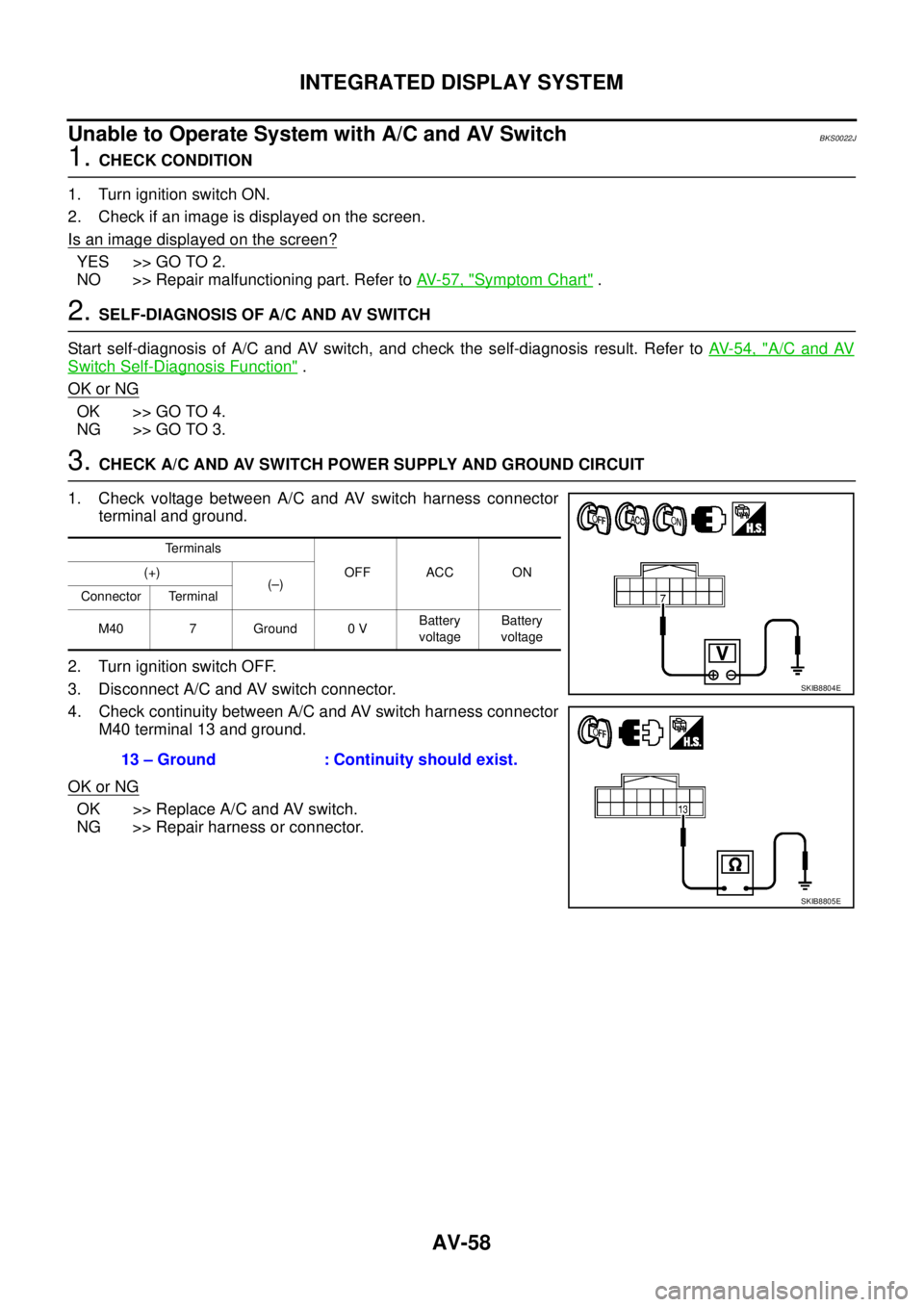
3. CHECK A/C AND AV SWITCH POWER SUPPLY AND GROUND CIRCUIT
1. Check voltage between A/C and AV switch harness connector
terminal and ground.
2. Turn ignition switch OFF.
3. Disconnect A/C and AV switch connector.
4. Check continuity between A/C and AV switch harness connector
M40 terminal 13 and ground.
OK or NG
OK >> Replace A/C and AV switch.
NG >> Repair harness or connector.
Terminals
OFF ACC ON (+)
(–)
Connector Terminal
M40 7 Ground 0 VBattery
voltageBattery
voltage
13 – Ground : Continuity should exist.
SKIB8804E
SKIB8805E