Page 685 of 3502
POWER DOOR LOCK SYSTEM
BL-27
C
D
E
F
G
H
J
K
L
MA
B
BL
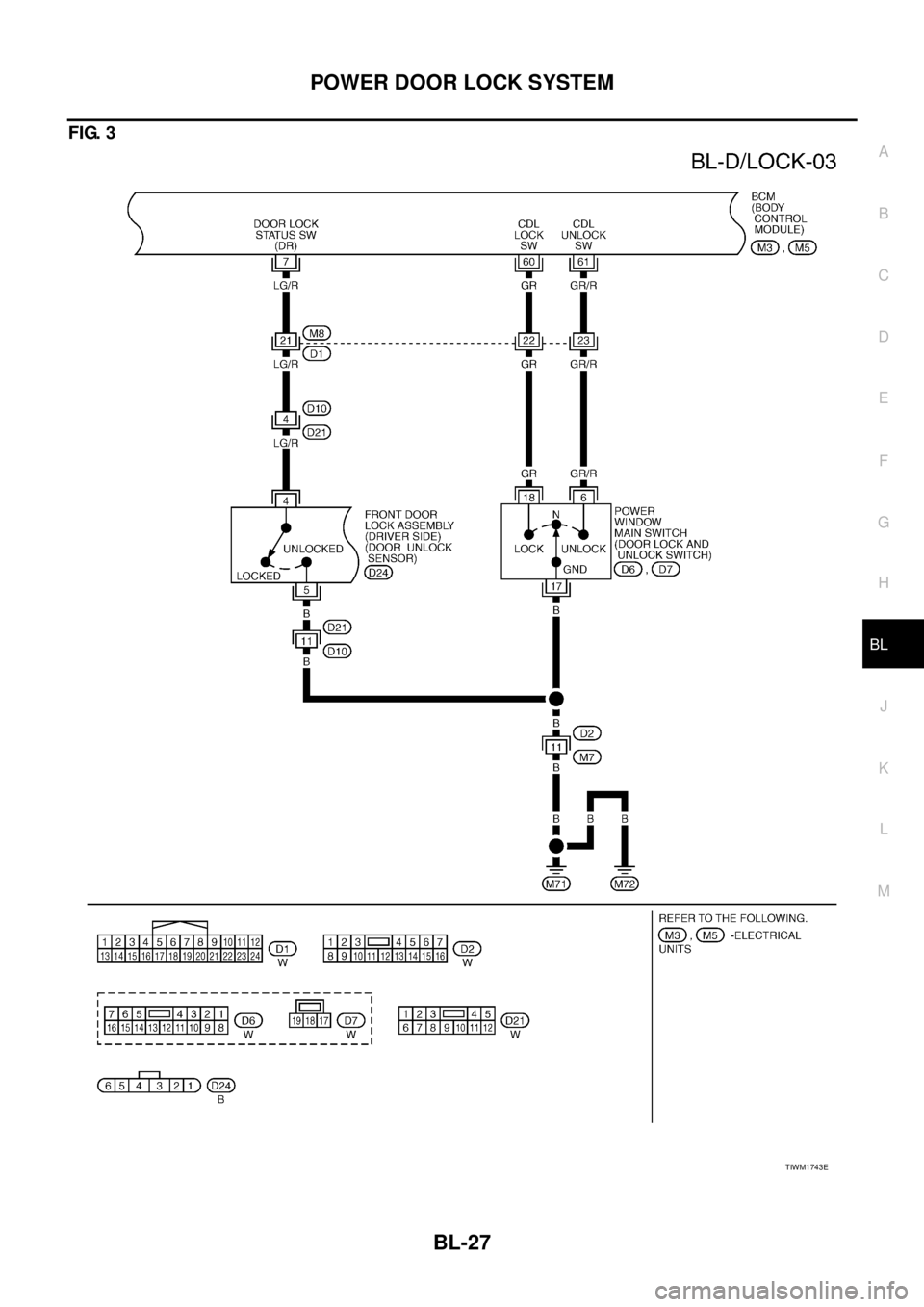
FIG. 3
TIWM1743E
Page 686 of 3502
BL-28
POWER DOOR LOCK SYSTEM
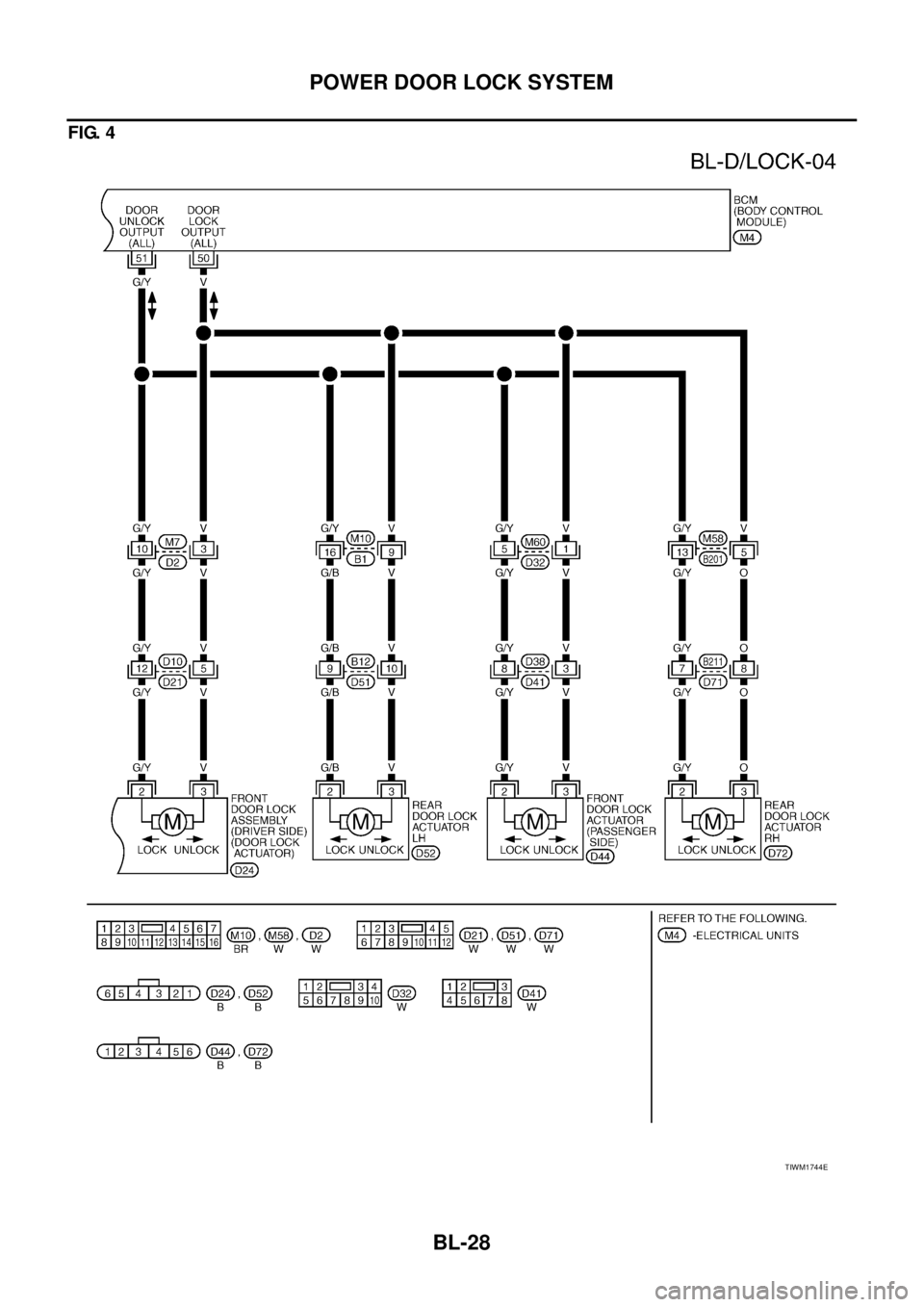
FIG. 4
TIWM1744E
Page 687 of 3502

POWER DOOR LOCK SYSTEM
BL-29
C
D
E
F
G
H
J
K
L
MA
B
BL
Terminals and Reference Value for BCMBIS000W1
*1: with intelligent key*2: without intelligent key
Work FlowBIS000W2
1. Check the symptom and customer's requests.
2. Understand the outline of system. Refer to BL-22, "
System Description" .
3. According to the trouble diagnosis chart by symptom, repair or replace the cause of the malfunction.
Refer to BL-31, "
Trouble Diagnosis Chart by Symptom" .
4. Does power door lock system operate normally?
YES: GO TO 5.
NO: GO TO 3.
5. INSPECTION END
Te r m i -
nalWire
colorItemSignal
Input/
OutputConditionVoltage (V)
(Approx.)
7 LG/R Door unlock sensor signal InputDriver side door
lock knobON (Lock) 5
OFF (Unlock) 0
12 R/LFront door switch
(Passenger side) signalInputFront door
(Passenger side)ON (Open) 0
OFF (Close) Battery voltage
13 R/B Rear door switch RH signal Input Rear door RHON (Open) 0
OFF (Close) Battery voltage
37B/R
*1
BR*2Key switch signal Input KeyInserted Battery voltage
Removed 0
39 L CAN-HInput/
Output——
40 P CAN-LInput/
Output——
42 Y/R Power source (Fuse) Input — Battery voltage
50 VDoor lock actuator
LOCK output signalOutputDoor lock and unlock switch
(Free → Lock)0 → Battery voltage → 0
51 G/YDoor lock actuator
UNLOCK output signalOutputDoor lock and unlock switch
(Free → Unlock)0 → Battery voltage → 0
52 B Ground — — 0
55 W/B Power source (Fusible link) Input — Battery voltage
60 GRDoor lock and unlock switch
LOCK signalInputDoor lock and
unlock switchLock 0
Other than above Battery voltage
61 GR/RDoor lock and unlock switch
UNLOCK signalInputDoor lock and
unlock switchUnlock 0
Other than above Battery voltage
62 SBFront door switch
(Driver side) signalInputFront door
(Driver side)ON (Open) 0
OFF (Close) Battery voltage
63 R/W Rear door switch LH signal Input Rear door LHON (Open) 0
OFF (Close) Battery voltage
Page 688 of 3502

BL-30
POWER DOOR LOCK SYSTEM
CONSULT-II Function (BCM)BIS000W3
CONSULT-II can display each diagnostic item using the diagnostic test modes shown following.
CONSULT-II START PROCEDURE
Refer to GI-34, "CONSULT-II Start Procedure" .
CONSULT-II APPLICATION ITEMS
Data Monitor
*: With Intelligent Key system
Active Test
BCM diagnosis
partInspection item, Self-diagnosis
modeContent
Door lockDATA MONITOR Displays BCM input data on real-time basis.
ACTIVE TEST Sends drive signals to door lock actuator to perform operation check.
Monitor item Content
IGN ON SW Indicates [ON/OFF] condition of ignition switch in ON position.
KEY ON SW Indicates [ON/OFF] condition of key switch.
CDL LOCK SW Indicates [ON/OFF] condition of lock signal from door lock and unlock switch.
CDL UNLOCK SW Indicates [ON/OFF] condition of unlock signal from door lock and unlock switch.
DOOR SW-DR Indicates [ON/OFF] condition of front door switch driver side.
DOOR SW-AS Indicates [ON/OFF] condition of front door switch passenger side.
DOOR SW-RR Indicates [ON/OFF] condition of rear door switch RH.
DOOR SW-RL Indicates [ON/OFF] condition of rear door switch LH.
BACK DOOR SW This is displayed even when it is not equipped.
LOCK STATUS Indicates [ON/OFF] condition of driver side door lock knob
SHOCK SENSOR Indicates [ON/OFF] condition of shock sensor
VEHICLE SPEED Indicates [km/h] condition of vehicle speed
KEYLESS LOCK Indicates [ON/OFF] condition of lock signal from keyfob.
KEYLESS UNLOCK Indicates [ON/OFF] condition of unlock signal from keyfob.
I-KEY LOCK* Indicates [ON/OFF] condition of lock signal from door request switch.
I-KEY UNLOCK* Indicates [ON/OFF] condition of unlock signal from door request switch.
Test item Content
DOOR LOCKThis test is able to check all door lock actuators lock or unlock operation.
These actuators lock or unlock when “LOCK” or “UNLOCK” on CONSULT-II screen is touched.
Page 689 of 3502

POWER DOOR LOCK SYSTEM
BL-31
C
D
E
F
G
H
J
K
L
MA
B
BL
Trouble Diagnosis Chart by SymptomBIS000W4
Always check the “Work Flow” before troubleshooting. Refer to BL-29, "Work Flow" .
Symptom Diagnoses service procedureReference
page
All door lock actuator does not operate1. Check BCM power supply and ground cir-
cuit BL-32
2. Check door lock and unlock switchBL-37
3. Check door unlock sensorBL-42
4. Check door lock actuator output signalBL-39
5. Replace BCMBCS-16
Key reminder door system does not operate properly.1. Check key switchBL-352. Check door switchBL-33
3. Replace BCMBCS-16
Power door lock does not operate with door lock and unlock switch.1. Check door lock and unlock switchBL-372. Replace BCMBCS-16
Power door lock does not operate with driver side door lock knob or
door key cylinder operation.
(Power door lock operate properly with door lock and unlock switch.)1. Check door unlock sensorBL-42
2. Replace BCMBCS-16
Specific door lock actuator does not operate. Check door lock actuator circuitBL-40
Page 690 of 3502
![NISSAN TEANA 2003 Service Manual BL-32
POWER DOOR LOCK SYSTEM
BCM Power Supply and Ground CircuitBIS000W5
1. CHECK FUSE
�Check 15A fuse [No.17, located in fuse block (J/B)]
�Check 15A fuse [No.18, located in fuse block (J/B)] (With](/manual-img/5/57392/w960_57392-689.png "NISSAN TEANA 2003 Service Manual BL-32
POWER DOOR LOCK SYSTEM
BCM Power Supply and Ground CircuitBIS000W5
1. CHECK FUSE
�Check 15A fuse [No.17, located in fuse block (J/B)]
�Check 15A fuse [No.18, located in fuse block (J/B)] (With")
BL-32
POWER DOOR LOCK SYSTEM
BCM Power Supply and Ground CircuitBIS000W5
1. CHECK FUSE
�Check 15A fuse [No.17, located in fuse block (J/B)]
�Check 15A fuse [No.18, located in fuse block (J/B)] (With Intelligent Key)
�Check 50A fusible link (letter M located in the fuse and fusible link box)
NOTE:
Refer to BL-21, "
Component Parts and Harness Connector Location" .
OK or NG
OK >> GO TO 2.
NG >> If fuse is blown, be sure to eliminate cause of malfunction before installing new fuse, refer to PG-
3, "POWER SUPPLY ROUTING CIRCUIT" .
2. CHECK POWER SUPPLY CIRCUIT
1. Turn ignition switch OFF.
2. Disconnect BCM connector.
3. Check voltage between BCM connector M4 terminals 42, 55 and
ground.
OK or NG
OK >> GO TO 3.
NG >> Repair or replace BCM power supply circuit.
3. CHECK GROUND CIRCUIT
Check continuity between BCM connector M4 terminal 52 and
ground.
OK or NG
OK >> Power supply and ground circuit are OK.
NG >> Repair or replace BCM ground circuit.42 (Y/R) – Ground : Battery voltage
55 (W/B) – Ground : Battery voltage
PIIA6374E
52 (B) – Ground : Continuity should exist.
PIIA9131E
Page 691 of 3502
POWER DOOR LOCK SYSTEM
BL-33
C
D
E
F
G
H
J
K
L
MA
B
BL
Check Door SwitchBIS000W6
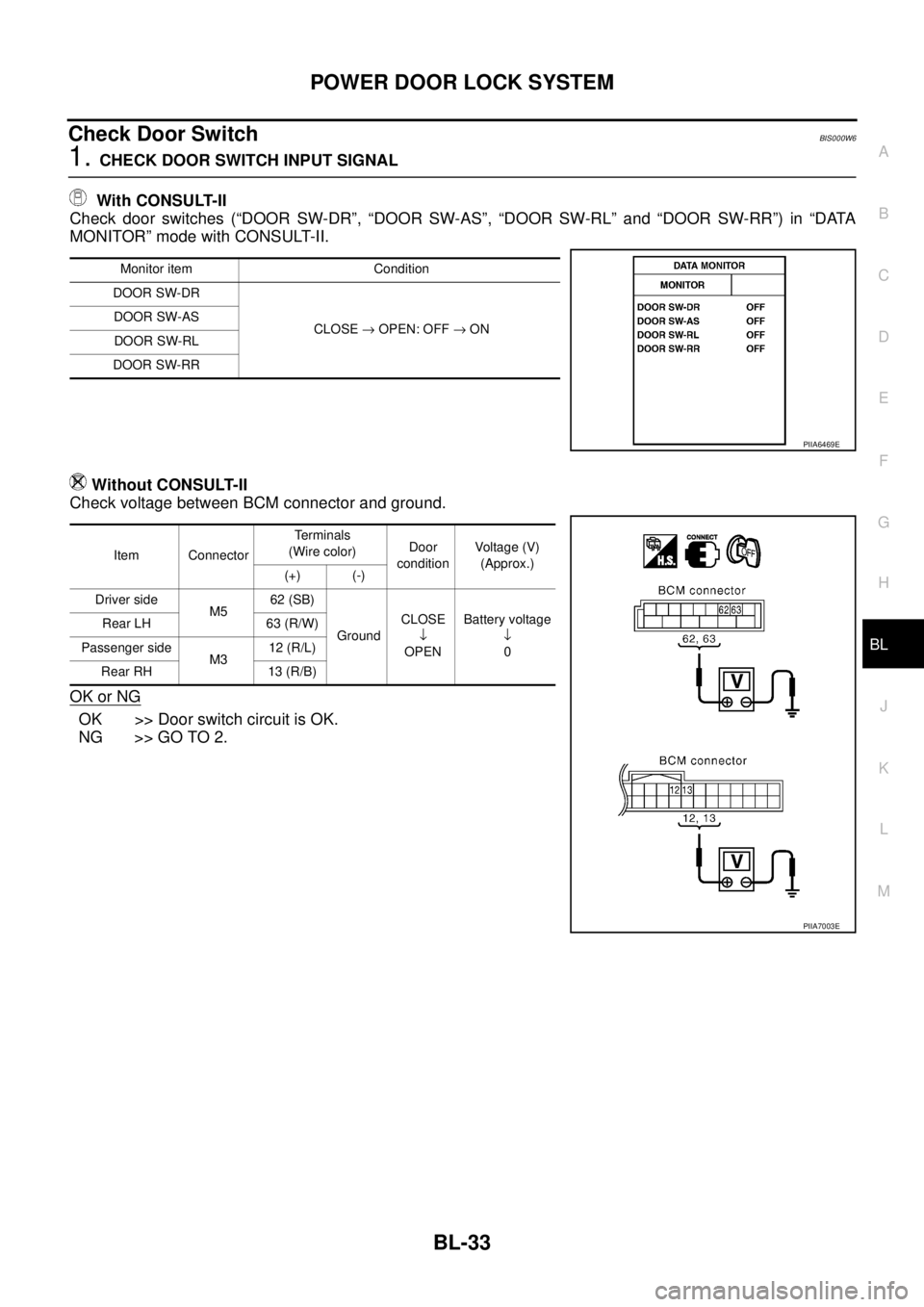
1. CHECK DOOR SWITCH INPUT SIGNAL
With CONSULT-II
Check door switches (“DOOR SW-DR”, “DOOR SW-AS”, “DOOR SW-RL” and “DOOR SW-RR”) in “DATA
MONITOR” mode with CONSULT-II.
Without CONSULT-II
Check voltage between BCM connector and ground.
OK or NG
OK >> Door switch circuit is OK.
NG >> GO TO 2.
Monitor item Condition
DOOR SW-DR
CLOSE → OPEN: OFF → ON DOOR SW-AS
DOOR SW-RL
DOOR SW-RR
PIIA6469E
Item ConnectorTe r m i n a l s
(Wire color)Door
conditionVoltage (V)
(Approx.)
(+) (-)
Driver side
M562 (SB)
GroundCLOSE
↓
OPENBattery voltage
↓
0 Rear LH 63 (R/W)
Passenger side
M312 (R/L)
Rear RH 13 (R/B)
PIIA7003E
Page 692 of 3502
BL-34
POWER DOOR LOCK SYSTEM
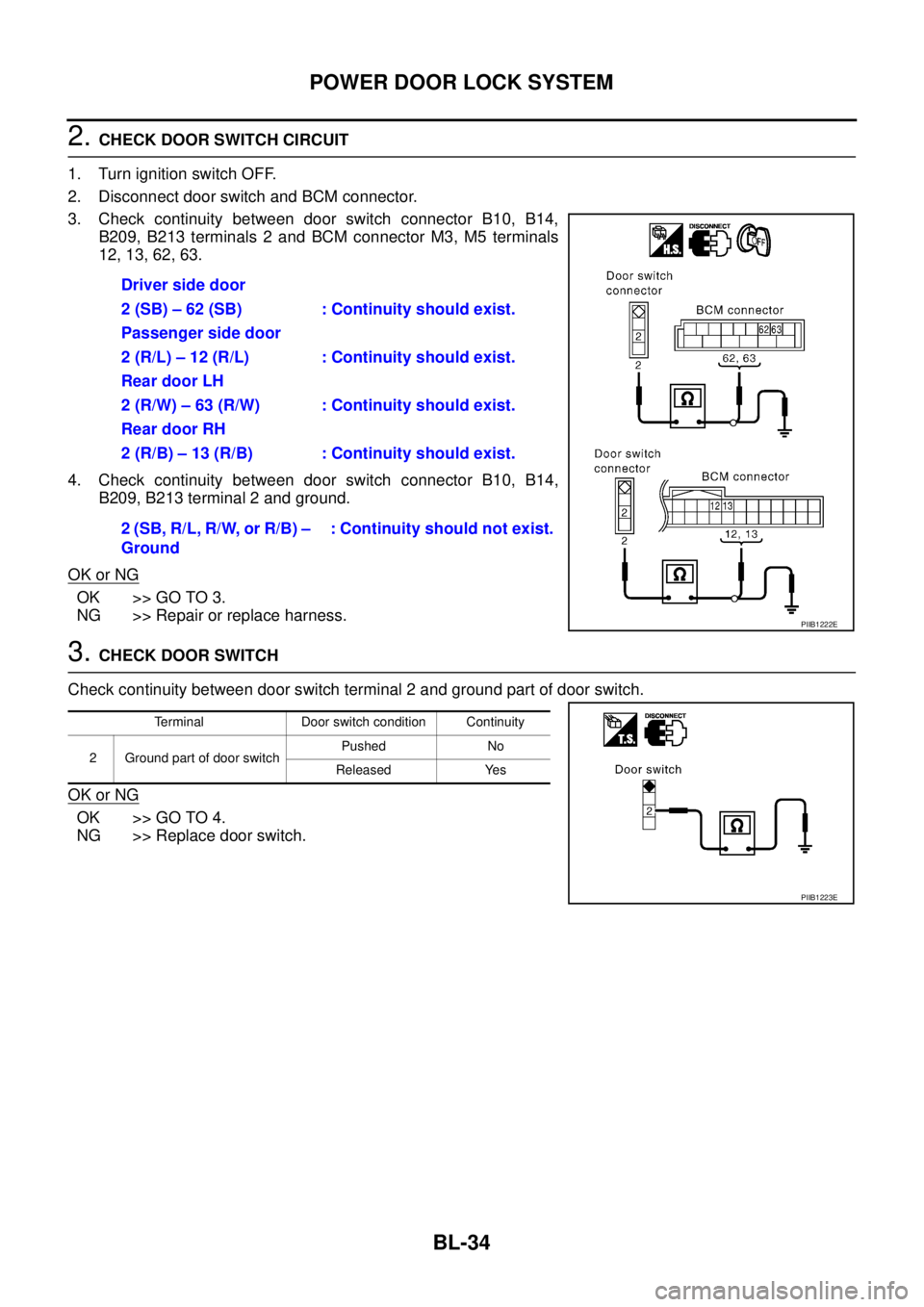
2. CHECK DOOR SWITCH CIRCUIT
1. Turn ignition switch OFF.
2. Disconnect door switch and BCM connector.
3. Check continuity between door switch connector B10, B14,
B209, B213 terminals 2 and BCM connector M3, M5 terminals
12, 13, 62, 63.
4. Check continuity between door switch connector B10, B14,
B209, B213 terminal 2 and ground.
OK or NG
OK >> GO TO 3.
NG >> Repair or replace harness.
3. CHECK DOOR SWITCH
Check continuity between door switch terminal 2 and ground part of door switch.
OK or NG
OK >> GO TO 4.
NG >> Replace door switch.Driver side door
2 (SB) – 62 (SB) : Continuity should exist.
Passenger side door
2 (R/L) – 12 (R/L) : Continuity should exist.
Rear door LH
2 (R/W) – 63 (R/W) : Continuity should exist.
Rear door RH
2 (R/B) – 13 (R/B) : Continuity should exist.
2 (SB, R/L, R/W, or R/B) –
Ground: Continuity should not exist.
PIIB1222E
Terminal Door switch condition Continuity
2 Ground part of door switchPushed No
Released Yes
PIIB1223E