Page 2420 of 4323
I28249
DI±2218
± DIAGNOSTICSNAVIGATION SYSTEM
2412 Author�: Date�:
2005 SEQUOIA (RM1146U)
Panel switch does not function
INSPECTION PROCEDURE
1 Check panel switch.
CHECK:
Check for foreign matter around the switch that might prevent operation.
OK:
No foreign matter is found.
NG Remove any foreign matter found.
OK
2 Display check mode (Panel switch check mode).
PREPARATION:
Enter the ºDisplay Checkº mode (Panel Switch Check Mode)
(See page DI±2176).
CHECK:
Operate the abnormal switch and check if the switch name and
status are correctly displayed.
OK:
The switch name and status are correctly displayed
as operated.
OK Replace radio and navigation assy.
NG
Proceed to next circuit inspection shown in problem symptoms table (See page DI±2184).
DIDCD±01
Page 2421 of 4323
I28222
± DIAGNOSTICSNAVIGATION SYSTEM
DI±2219
2413 Author�: Date�:
2005 SEQUOIA (RM1146U)
Touch panel switch does not function
INSPECTION PROCEDURE
1 Check touch panel.
CHECK:
Check for dirt on the display surface.
OK:
The display surface is clean.
NG Remove any dirt found and recheck touch pan-
el.
OK
2 Display check mode (Touch switch check).
PREPARATION:
Enter the ºDisplay Checkº mode (Touch Switch Check) (See
page DI±2176).
CHECK:
Touch the display in the area where the abnormal switch oc-
curs.
OK:
A º+º mark appears at the touched position.
OK Replace radio and navigation assy.
NG
Proceed to next circuit inspection shown in problem symptoms table (See page DI±2184).
DIDCE±01
Page 2422 of 4323
I28250
DI±2220
± DIAGNOSTICSNAVIGATION SYSTEM
2414 Author�: Date�:
2005 SEQUOIA (RM1146U)
Display panel does not open, tilt, or tilts improperly
INSPECTION PROCEDURE
1 Check radio and navigation assy.
CHECK:
Check for foreign matter or obstructions caught in the moving
parts of the panel.
OK:
No obstruction or foreign matter is found.
NG Remove any obstruction or foreign matter
found.
OK
2 Operation check.
CHECK:
Check if the navigation and audio systems function properly.
OK:
Navigation and audio systems function properly.
OK Replace radio and navigation assy.
NG
Proceed to next circuit inspection shown in problem symptoms table (See page DI±2184).
DIDCG±01
Page 2428 of 4323
I28255
DI±2226
± DIAGNOSTICSNAVIGATION SYSTEM
2420 Author�: Date�:
2005 SEQUOIA (RM1146U)
3 Inspect radio and navigation assy.
PREPARATION:
Remove the antenna plug from the radio and navigation assy.
CHECK:
With the radio and navigation assy connector connected, turn
the ignition switch to the ACC position.
Turn on the radio and choose the AM mode.
Place a screwdriver or a piece of metal such as thin wire on an
antenna jack of the radio and navigation assy and check that
the noise is heard from the speaker.
OK:
Noise occurs.
NG Replace radio and navigation assy.
OK
4 Check antenna assy.
CHECK:
Check that the antenna is securely installed.
OK:
The antenna is installed properly.
NG Install antenna assy properly.
OK
Page 2429 of 4323
± DIAGNOSTICSNAVIGATION SYSTEM
DI±2227
2421 Author�: Date�:
2005 SEQUOIA (RM1146U)
5 Check antenna cord sub±assy.
PREPARATION:
Remove the antenna plug of the radio and navigation assy and antenna assy.
CHECK:
Measure the resistance between the antenna assy and radio and navigation assy to check for an open circuit
in the antenna cord sub±assy.
OK:
Below 1 W
CHECK:
Measure the resistance between the antenna cord sub±assy and body ground to check for a short circuit
in the antenna cord sub±assy.
OK:
10 kW or higher
NG Replace antenna cord sub±assy.
OK
6 Replace amplifier antenna assy.
CHECK:
Replace the amplifier antenna assy and check if it operates normally.
OK:
The amplifier antenna assy operates normally.
OK Normal operation.
NG
Proceed to next circuit inspection shown in problem symptoms table (See page DI±2184).
Page 2435 of 4323

± DIAGNOSTICSNAVIGATION SYSTEM
DI±2233
2427 Author�: Date�:
2005 SEQUOIA (RM1146U)
Abnormal noise occurs
INSPECTION PROCEDURE
1 Check speaker installation
CHECK:
Check if each speaker is securely installed.
OK:
Each speaker is securely installed.
HINT:
The radio is equipped with a noise prevention system that blocks only excessively loud noise. If loud noise
occurs, check that all wiring is proper and that the antenna installation part ground and noise±prevention
equipment are installed.
Conditions under which noise occursNoise type
Noise increases when the accelerator pedal is depressed, but stops when
the engine is stopped.Generator noise
Noise occurs during A/C or heater operation.Blower motor noise
Noise occurs when the vehicle accelerates rapidly on an unpaved road or
after the ignition switch is turned on.Fuel pump noise
Noise occurs when the horn switch is pressed and released or when pressed
and held.Horn noise
Quiet noise is occurs while the engine is running, but stops when the engine
is stopped.Ignition noise
Noise occurs synchronously with the blink of the turn signal.Flasher noise
Noise occurs during window washer operation.Washer noise
Noise occurs while the engine is running, and continues even after the engine
is stopped.Water temperature sensor noise
Noise occurs during wiper operation.Wiper noise
Noise occurs when the brake pedal is depressed.Stop light switch noise
Others.Static electricity stored on the vehicle
HINT:
�Identify the condition under which the noise occurs, and check the noise filter on the relevant part.
�First ensure that the noise is not coming from outside. Failure to do so makes noise source detection
difficult and may lead to a misdiagnosis.
�Noise should be removed in descending order of loudness.
NG Install it properly.
OK
Identification of noise source (See page DI±2174).
DIDCO±01
Page 2447 of 4323
± DIAGNOSTICSNAVIGATION SYSTEM
DI±2245
2439 Author�: Date�:
2005 SEQUOIA (RM1146U)
GPS mark is not displayed
INSPECTION PROCEDURE
1 Check cabin.
CHECK:
Check the cabin for any object that might interrupt radio reception on the instrument panel. If such an object
exists, remove it and check if the GPS mark reappears.
HINT:
GPS works using extremely weak radio waves originating from satellites. If the signal is interrupted by ob-
structions or another radio wave, the GPS system may not be able to properly receive the signal.
OK:
Mark appears.
OK Normal operation.
NG
2 Check surroundings.
CHECK:
Check if the vehicle is in a location where GPS signal reception is bad. If the vehicle is in such a place, move
it elsewhere and check if the GPS mark reappears.
HINT:
�GPS uses 24 satellites in 6 orbits so that at any time 4 satellites will be in line±of±sight of your vehicle.
�GPS signals may not be received, however, based on surroundings, vehicle direction, and time.
DIDD1±01
Page 3651 of 4323
H11174: 4 Clips
H11372
3 Clips
H11177
2 Clips
H16769
5 Clips
H24384
BO±90
± BODYINSTRUMENT PANEL
3643 Author�: Date�:
2005 SEQUOIA (RM1146U)
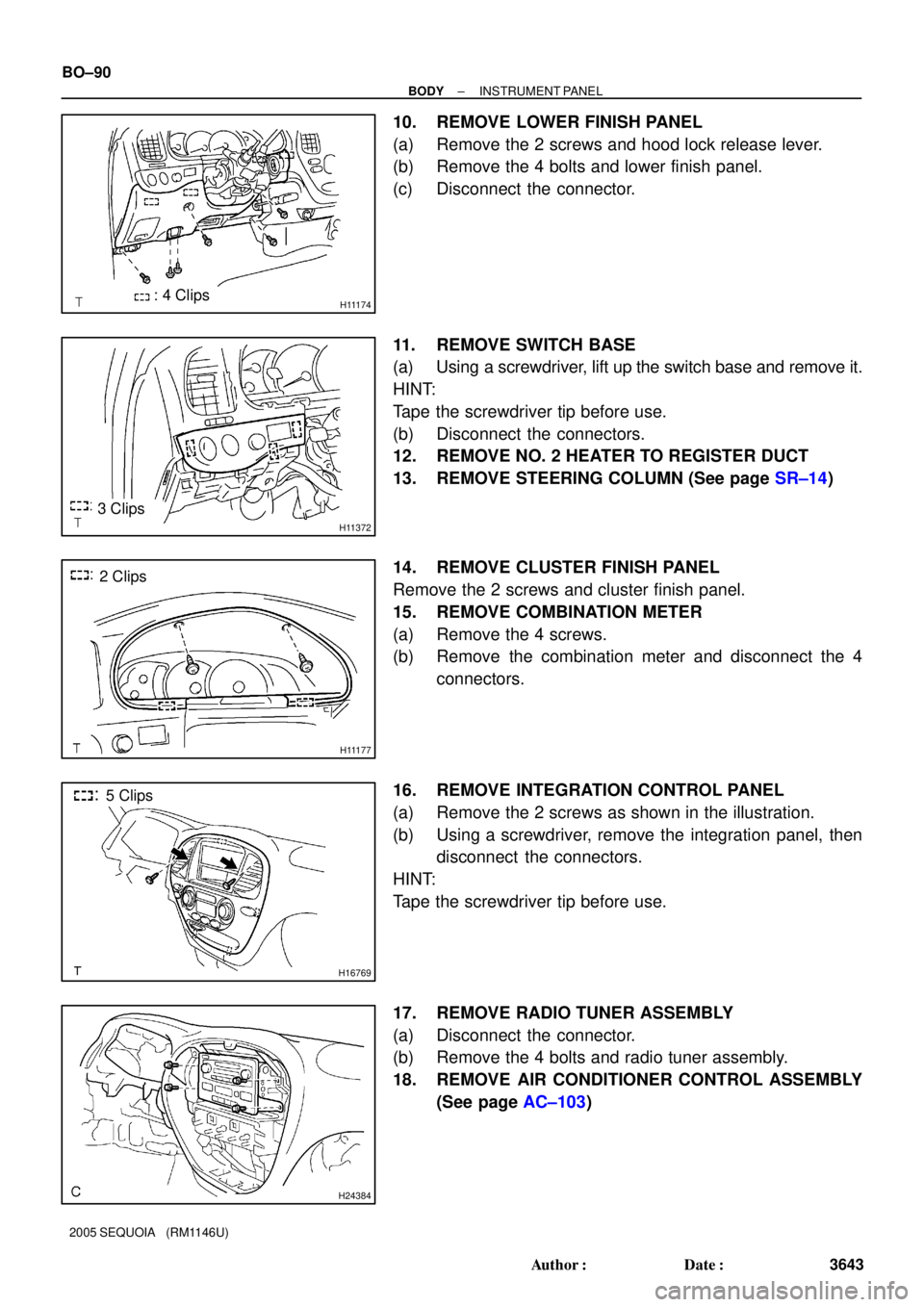
10. REMOVE LOWER FINISH PANEL
(a) Remove the 2 screws and hood lock release lever.
(b) Remove the 4 bolts and lower finish panel.
(c) Disconnect the connector.
11. REMOVE SWITCH BASE
(a) Using a screwdriver, lift up the switch base and remove it.
HINT:
Tape the screwdriver tip before use.
(b) Disconnect the connectors.
12. REMOVE NO. 2 HEATER TO REGISTER DUCT
13. REMOVE STEERING COLUMN (See page SR±14)
14. REMOVE CLUSTER FINISH PANEL
Remove the 2 screws and cluster finish panel.
15. REMOVE COMBINATION METER
(a) Remove the 4 screws.
(b) Remove the combination meter and disconnect the 4
connectors.
16. REMOVE INTEGRATION CONTROL PANEL
(a) Remove the 2 screws as shown in the illustration.
(b) Using a screwdriver, remove the integration panel, then
disconnect the connectors.
HINT:
Tape the screwdriver tip before use.
17. REMOVE RADIO TUNER ASSEMBLY
(a) Disconnect the connector.
(b) Remove the 4 bolts and radio tuner assembly.
18. REMOVE AIR CONDITIONER CONTROL ASSEMBLY
(See page AC±103)