1999 DODGE NEON fuse
[x] Cancel search: fusePage 325 of 1200
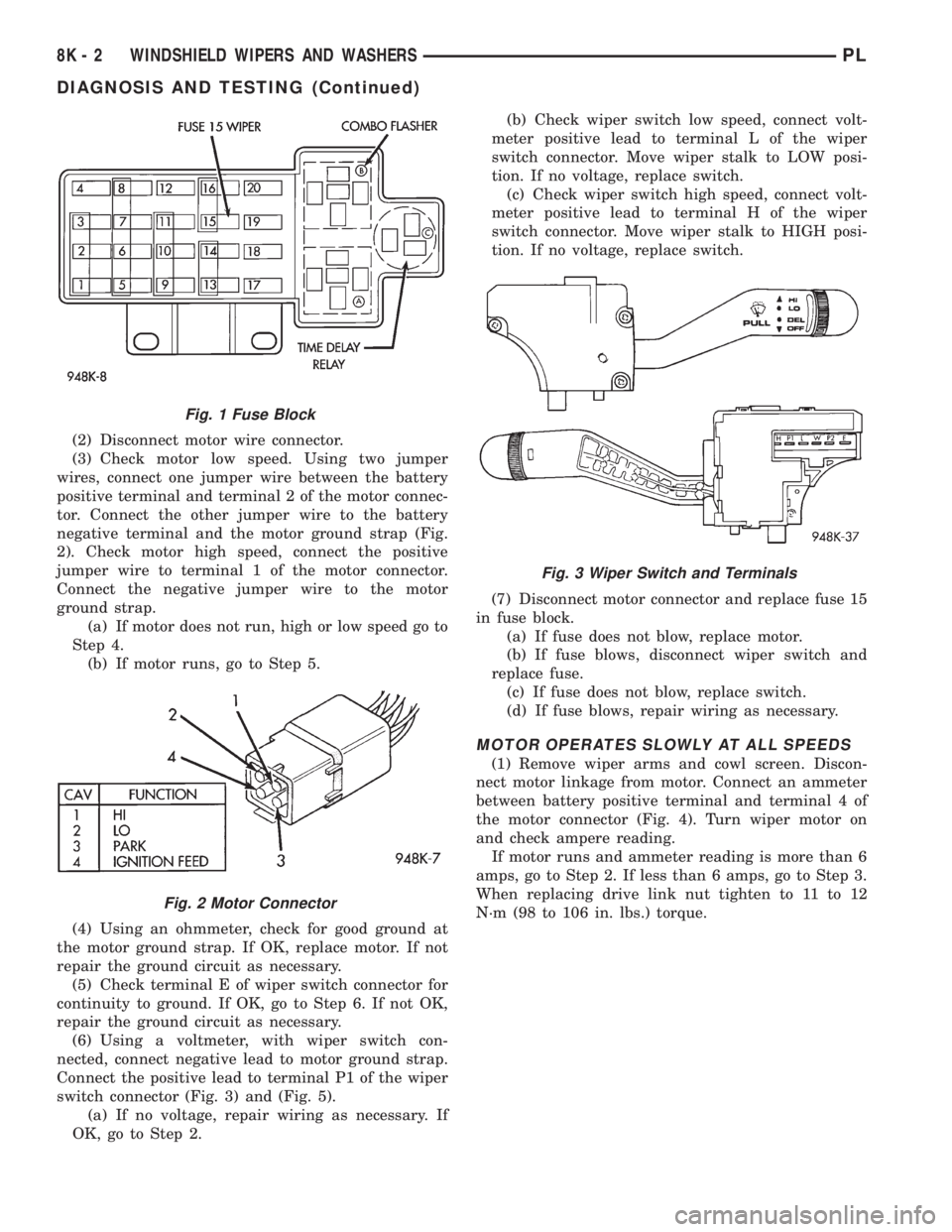
(2) Disconnect motor wire connector.
(3) Check motor low speed. Using two jumper
wires, connect one jumper wire between the battery
positive terminal and terminal 2 of the motor connec-
tor. Connect the other jumper wire to the battery
negative terminal and the motor ground strap (Fig.
2). Check motor high speed, connect the positive
jumper wire to terminal 1 of the motor connector.
Connect the negative jumper wire to the motor
ground strap.
(a) If motor does not run, high or low speed go to
Step 4.
(b) If motor runs, go to Step 5.
(4) Using an ohmmeter, check for good ground at
the motor ground strap. If OK, replace motor. If not
repair the ground circuit as necessary.
(5) Check terminal E of wiper switch connector for
continuity to ground. If OK, go to Step 6. If not OK,
repair the ground circuit as necessary.
(6) Using a voltmeter, with wiper switch con-
nected, connect negative lead to motor ground strap.
Connect the positive lead to terminal P1 of the wiper
switch connector (Fig. 3) and (Fig. 5).
(a) If no voltage, repair wiring as necessary. If
OK, go to Step 2.(b) Check wiper switch low speed, connect volt-
meter positive lead to terminal L of the wiper
switch connector. Move wiper stalk to LOW posi-
tion. If no voltage, replace switch.
(c) Check wiper switch high speed, connect volt-
meter positive lead to terminal H of the wiper
switch connector. Move wiper stalk to HIGH posi-
tion. If no voltage, replace switch.
(7) Disconnect motor connector and replace fuse 15
in fuse block.
(a) If fuse does not blow, replace motor.
(b) If fuse blows, disconnect wiper switch and
replace fuse.
(c) If fuse does not blow, replace switch.
(d) If fuse blows, repair wiring as necessary.
MOTOR OPERATES SLOWLY AT ALL SPEEDS
(1) Remove wiper arms and cowl screen. Discon-
nect motor linkage from motor. Connect an ammeter
between battery positive terminal and terminal 4 of
the motor connector (Fig. 4). Turn wiper motor on
and check ampere reading.
If motor runs and ammeter reading is more than 6
amps, go to Step 2. If less than 6 amps, go to Step 3.
When replacing drive link nut tighten to 11 to 12
N´m (98 to 106 in. lbs.) torque.
Fig. 1 Fuse Block
Fig. 2 Motor Connector
Fig. 3 Wiper Switch and Terminals
8K - 2 WINDSHIELD WIPERS AND WASHERSPL
DIAGNOSIS AND TESTING (Continued)
Page 327 of 1200
WIPER MOTOR TEST
CONDITION POSSIBLE CAUSES CORRECTION
Wiper blades do not park properly. (1) Wiper arms improperly
parked.
(2) Wiper arms are loose on
pivot shaft.
(3) Motor crank loose at output
shaft.(1) Remove wiper arms and repark.
Refer to Wiper Arm Removal and
Installation.
(2) Remove wiper arm and repark. Refer
to Wiper Arm Removal and Installation.
(3) Remove wiper arm, run wiper motor
to park position and remove the module.
Without rotating the motor output shaft,
remove the crank and clean any foreign
matter from the motor shaft. Install the
motor crank in its original position.
Motor stops in any position when
the switch is turned off.(1) Open park circuit. (1) Check park switch by disconnecting
the wire connector and apply battery
voltage to Pin 4. Place a jumper wire
from Pin 2 to Pin 3 and then to an
external ground. Replace motor if it does
not park.
Motor will not stop when the switch
is turned off.(1) Faulty switch.
(2) Lock of dynamic brake on
wet glass.(1) check switch in low, high and
intermittent position.
(2) Ensure park switch has clean ground.
Wiper blades slap against cowl
screen or window moldings.(1) Wiper arms are parked
incorrectly.(1) Park wiper arms. Refer to Wiper Arm
Adjustment.
Blades chatter. (1) Foreign substance such as
polish on glass or blades.
(2) Arms twisted, blade at
wrong angle on glass.
(3) Blade structure bent.
(4) Blade element has
permanent set.(1) Clean glass and blade element with
non-abrasive cleaner.
(2) Replace arm.
(3) Replace blade.
(4) Replace blade element.
Wiper knock at reversal. (1) Linkage bushings worn.
(2) Armature endplay in motor.(1) Replace worn link. Refer to Wiper
Linkage Removal and Installation.
(2) Replace wiper motor. Refer to Wiper
Motor Removal and Installation.
Wiper motor will not run. (1) Blown fuse.
(2) New fuse blows.
(3) New fuse blows.
(4) No Voltage at motor.
(5) Poor ground.(1) Replace fuse, and run system.
(2) Check for short in wiring or switch.
(3) Replace fuse, remove motor
connector, turn switch ON, fuse does not
blow, replace motor.
(4) Check switch and wiring harness.
Refer to Group 8W, Wiring Diagrams.
(5) Repair ground wire connection as
necessary.
8K - 4 WINDSHIELD WIPERS AND WASHERSPL
DIAGNOSIS AND TESTING (Continued)
Page 330 of 1200
LAMPS
CONTENTS
page page
BULB APPLICATION...................... 13
HEADLAMP ALIGNMENT................... 4
LAMP BULB SERVICE..................... 6LAMP DIAGNOSIS........................ 1
LAMP SERVICE........................... 9
LAMP SYSTEMS......................... 12
LAMP DIAGNOSIS
INDEX
page page
GENERAL INFORMATION
DAYTIME RUNNING LAMP MODULE.......... 1
GENERAL INFORMATION.................. 1
SAFETY PRECAUTIONS................... 1DIAGNOSIS AND TESTING
DIAGNOSTIC PROCEDURES................ 1
FOG LAMP.............................. 3
HEADLAMP DIAGNOSIS................... 2
GENERAL INFORMATION
GENERAL INFORMATION
Each vehicle is equipped with various lamp assem-
blies. A good ground is necessary for proper lighting
operation. Grounding is provided by the lamp socket
when it comes in contact with the metal body, or
through a separate ground wire.
When changing lamp bulbs check the socket for
corrosion. If corrosion is present, clean it with a wire
brush and coat the inside of the socket lightly with
Mopar Multi-Purpose Grease or equivalent.
SAFETY PRECAUTIONS
WARNING: EYE PROTECTION SHOULD BE USED
WHEN SERVICING GLASS COMPONENTS. PER-
SONAL INJURY CAN RESULT.
CAUTION: Do not touch the glass of halogen bulbs
with fingers or other possibly oily surface, reduced
bulb life will result.
Do not use bulbs with higher candle power than
indicated in the Bulb Application table at the end of
this group. Damage to lamp and/or Daytime Run-
ning Lamp Module can result.
Do not use fuses, circuit breakers or relays hav-
ing greater amperage value than indicated on the
fuse panel or in the Owners Manual.When it is necessary to remove components to ser-
vice another, it should not be necessary to apply
excessive force or bend a component to remove it.
Before damaging a trim component, verify hidden
fasteners or captured edges are not holding the com-
ponent in place.
DAYTIME RUNNING LAMP MODULE
PL vehicles built for use in Canada are equipped
with a Daytime Running Lamp (DRL) system. The
DRL system operates the headlamps at 50% illumi-
nation with the headlamp switch OFF, park brake
released and the ignition ON. The DRL system is
controlled by the Daytime Running Lamp Module.
The DRL module overrides the headlamp switch
when the headlamps are turned OFF. The headlamps
operate normally when the headlamps are turned
ON.
DIAGNOSIS AND TESTING
DIAGNOSTIC PROCEDURES
When a vehicle experiences problems with the
headlamp system, verify the condition of the battery
connections, charging system, headlamp bulbs, wire
connectors, relay, high beam dimmer switch and
headlamp switch. Refer to Group 8W, Wiring Dia-
grams for component locations and circuit informa-
tion.
PLLAMPS 8L - 1
Page 331 of 1200
HEADLAMP DIAGNOSIS
Always begin any diagnosis by testing all of the fuses and circuit breakers in the system. Refer to Group 8W,
Wiring Diagrams.
Conventional and halogen headlamps are interchangeable. It is recommended that they not be intermixed on
a given vehicle.
CONDITION POSSIBLE CAUSES CORRECTION
HEADLAMPS ARE DIM
WITH ENGINE IDLING1. Loose or corroded battery cables. 1. Clean and secure battery cable clamps
and posts.
OR IGNITION TURNED
OFF2. Loose or worn generator drive
belt.2. Adjust or replace generator drive belt.
3. Charging system output too low. 3. Test and repair charging system, refer to
Group 8A,
4. Battery has insufficient charge. 4. Test battery state-of-charge,
refer to Group 8A.
5. Battery is sulfated or shorted. 5. Load test battery, refer to Group 8A.
6. Poor lighting circuit Z1-ground. 6. Test for voltage drop across Z1-ground
locations, refer to Group 8W.
7. Both headlamp bulbs defective. 7. Replace both headlamp bulbs.
HEADLAMP BULBS
BURN OUT1. Charging system output too high. 1. Test and repair charging system, refer to
Group 8A.
FREQUENTLY 2. Loose or corroded terminals or
splices in circuit.2. Inspect and repair all connectors and
splices, refer to Group 8W.
HEADLAMPS ARE DIM
WITH ENGINE RUNNING1. Charging system output too low. 1. Test and repair charging system, refer to
Group 8A.
ABOVE IDLE* 2. Poor lighting circuit Z1-ground. 2. Test for voltage drop across Z1-ground
locations, refer to Group 8W.
3. High resistance in headlamp
circuit.3. Test amperage draw of headlamp circuit.
4. Both headlamp bulbs defective. 4. Replace both headlamp bulbs.
HEADLAMPS FLASH
RANDOMLY1. Poor lighting circuit Z1-ground. 1. Test for voltage drop across Z1-ground
locations, refer to Group 8W.
2. High resistance in headlamp
circuit.2. Test amperage draw of headlamp circuit.
Should not exceed 30 amps.
3. Faulty headlamps switch circuit
breaker.3. Replace headlamp switch.
4. Loose or corroded terminals or
splices in circuit.4. Inspect and repair all connectors and
splices, refer to Group 8W.
HEADLAMPS DO NOT
ILLUMINATE1. No voltage to headlamps. 1. Repair open headlamp circuit, refer to
Group 8W.
2. No Z1-ground at headlamps. 2. Repair circuit ground, refer to Group 8W.
3. Faulty headlamp switch. 3. Replace headlamp switch.
4. Faulty headlamp dimmer
(multi-function) switch.4. Replace multi-function switch.
5. Broken connector terminal or wire
splice in headlamp circuit.5. Repair connector terminal or wire splice.
1. Headlamps stay on with
key out (DRLM equipped
vehicles).1. Failed DRLM 1. Replace DRLM.
*Canada vehicles must have lamps ON.
8L - 2 LAMPSPL
DIAGNOSIS AND TESTING (Continued)
Page 332 of 1200
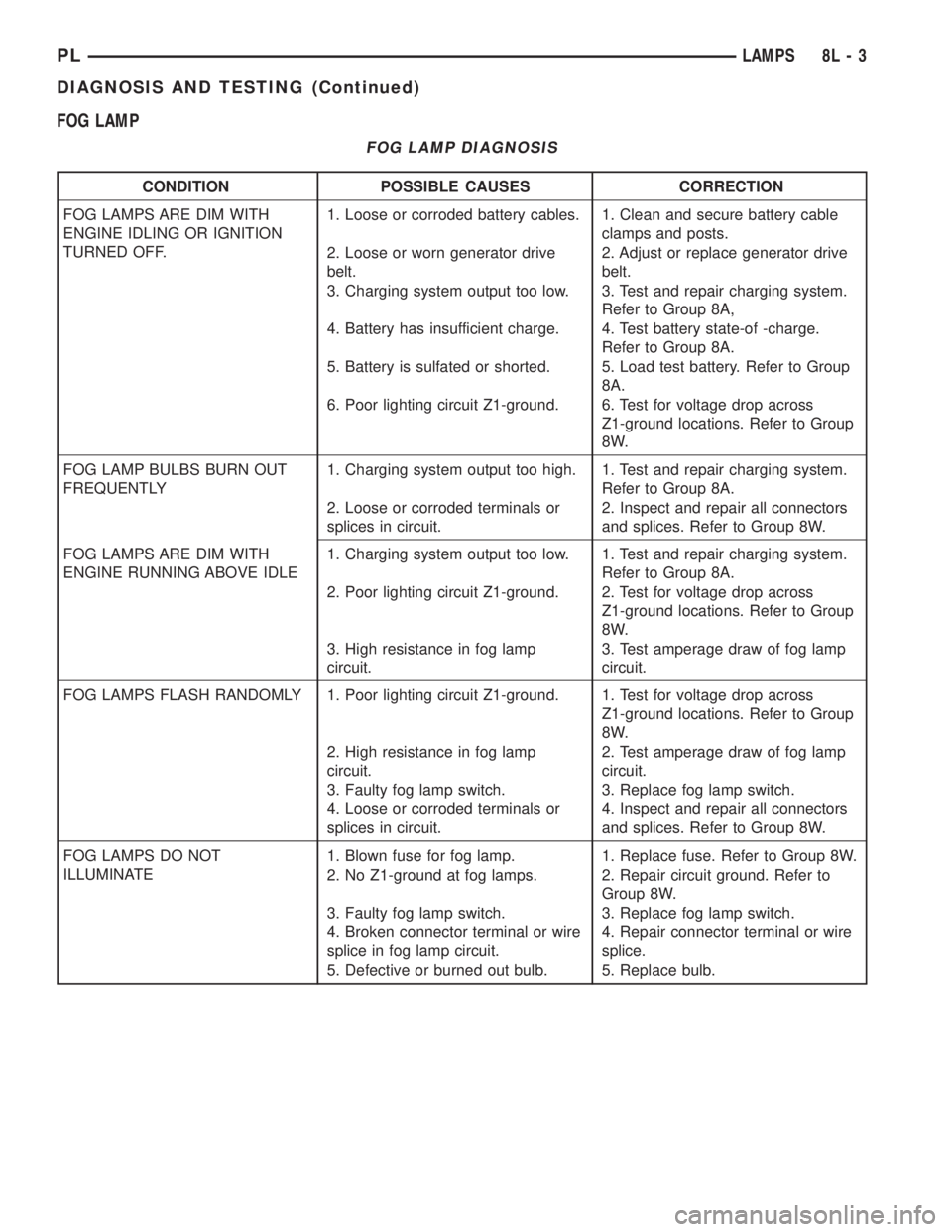
FOG LAMP
FOG LAMP DIAGNOSIS
CONDITION POSSIBLE CAUSES CORRECTION
FOG LAMPS ARE DIM WITH
ENGINE IDLING OR IGNITION
TURNED OFF.1. Loose or corroded battery cables. 1. Clean and secure battery cable
clamps and posts.
2. Loose or worn generator drive
belt.2. Adjust or replace generator drive
belt.
3. Charging system output too low. 3. Test and repair charging system.
Refer to Group 8A,
4. Battery has insufficient charge. 4. Test battery state-of -charge.
Refer to Group 8A.
5. Battery is sulfated or shorted. 5. Load test battery. Refer to Group
8A.
6. Poor lighting circuit Z1-ground. 6. Test for voltage drop across
Z1-ground locations. Refer to Group
8W.
FOG LAMP BULBS BURN OUT
FREQUENTLY1. Charging system output too high. 1. Test and repair charging system.
Refer to Group 8A.
2. Loose or corroded terminals or
splices in circuit.2. Inspect and repair all connectors
and splices. Refer to Group 8W.
FOG LAMPS ARE DIM WITH
ENGINE RUNNING ABOVE IDLE1. Charging system output too low. 1. Test and repair charging system.
Refer to Group 8A.
2. Poor lighting circuit Z1-ground. 2. Test for voltage drop across
Z1-ground locations. Refer to Group
8W.
3. High resistance in fog lamp
circuit.3. Test amperage draw of fog lamp
circuit.
FOG LAMPS FLASH RANDOMLY 1. Poor lighting circuit Z1-ground. 1. Test for voltage drop across
Z1-ground locations. Refer to Group
8W.
2. High resistance in fog lamp
circuit.2. Test amperage draw of fog lamp
circuit.
3. Faulty fog lamp switch. 3. Replace fog lamp switch.
4. Loose or corroded terminals or
splices in circuit.4. Inspect and repair all connectors
and splices. Refer to Group 8W.
FOG LAMPS DO NOT
ILLUMINATE1. Blown fuse for fog lamp. 1. Replace fuse. Refer to Group 8W.
2. No Z1-ground at fog lamps. 2. Repair circuit ground. Refer to
Group 8W.
3. Faulty fog lamp switch. 3. Replace fog lamp switch.
4. Broken connector terminal or wire
splice in fog lamp circuit.4. Repair connector terminal or wire
splice.
5. Defective or burned out bulb. 5. Replace bulb.
PLLAMPS 8L - 3
DIAGNOSIS AND TESTING (Continued)
Page 364 of 1200
ELECTRICALLY HEATED SYSTEMS
CONTENTS
page page
DESCRIPTION AND OPERATION
INTRODUCTION......................... 1
REAR WINDOW DEFOGGER SWITCH........ 1
DIAGNOSIS AND TESTING
DEFOGGER SYSTEM..................... 1GRID LINES............................ 2
REAR WINDOW DEFOGGER SWITCH........ 2
SERVICE PROCEDURES
GRID LINE AND TERMINAL REPAIR......... 3
DESCRIPTION AND OPERATION
INTRODUCTION
For proper operation of the Rear Window Defogger
system refer to the Owner's Manual.
The system consists of a rear glass with two verti-
cal bus bars and a series of electrically connected
grid lines fired on the inside surface. A control switch
and a timer relay combined into a single assembly is
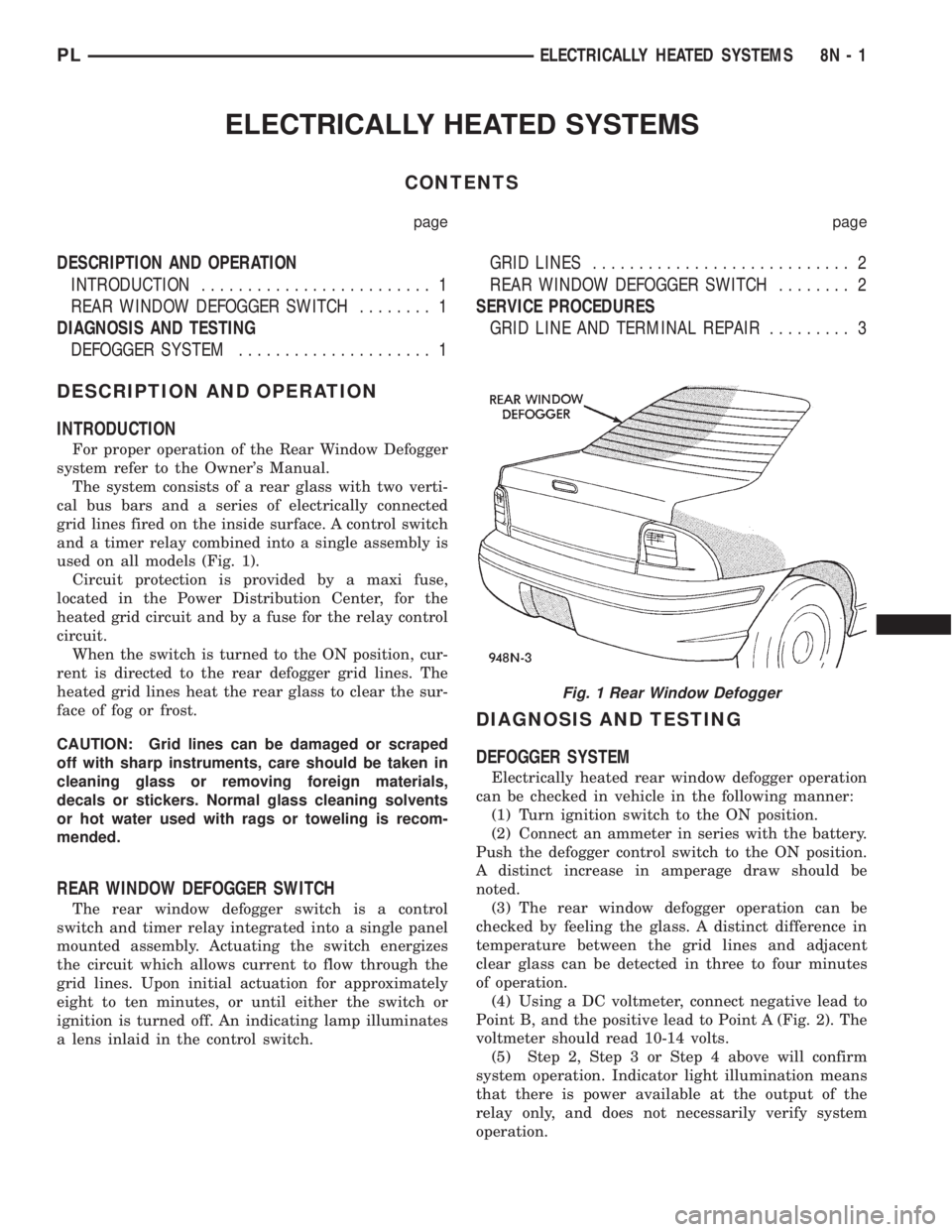
used on all models (Fig. 1).
Circuit protection is provided by a maxi fuse,
located in the Power Distribution Center, for the
heated grid circuit and by a fuse for the relay control
circuit.
When the switch is turned to the ON position, cur-
rent is directed to the rear defogger grid lines. The
heated grid lines heat the rear glass to clear the sur-
face of fog or frost.
CAUTION: Grid lines can be damaged or scraped
off with sharp instruments, care should be taken in
cleaning glass or removing foreign materials,
decals or stickers. Normal glass cleaning solvents
or hot water used with rags or toweling is recom-
mended.
REAR WINDOW DEFOGGER SWITCH
The rear window defogger switch is a control
switch and timer relay integrated into a single panel
mounted assembly. Actuating the switch energizes
the circuit which allows current to flow through the
grid lines. Upon initial actuation for approximately
eight to ten minutes, or until either the switch or
ignition is turned off. An indicating lamp illuminates
a lens inlaid in the control switch.
DIAGNOSIS AND TESTING
DEFOGGER SYSTEM
Electrically heated rear window defogger operation
can be checked in vehicle in the following manner:
(1) Turn ignition switch to the ON position.
(2) Connect an ammeter in series with the battery.
Push the defogger control switch to the ON position.
A distinct increase in amperage draw should be
noted.
(3) The rear window defogger operation can be
checked by feeling the glass. A distinct difference in
temperature between the grid lines and adjacent
clear glass can be detected in three to four minutes
of operation.
(4) Using a DC voltmeter, connect negative lead to
Point B, and the positive lead to Point A (Fig. 2). The
voltmeter should read 10-14 volts.
(5) Step 2, Step 3 or Step 4 above will confirm
system operation. Indicator light illumination means
that there is power available at the output of the
relay only, and does not necessarily verify system
operation.
Fig. 1 Rear Window Defogger
PLELECTRICALLY HEATED SYSTEMS 8N - 1
Page 365 of 1200
(6) If turning the switch ON produced no distinct
current draw on the ammeter the problem should be
isolated in the following manner:
(a) Confirm the ignition switch is ON.
(b) Ensure that the heated rear glass feed wire
is connected to the terminal or pigtail and that the
ground wire is in fact grounded.
(c) Ensure that the maxi-fuse and control circuit
fuse are OK and all electrical connections are
secure.
(7) When the above steps have been completed and
the system is still inoperative, one or more of the fol-
lowing is defective:
(a) Control switch/timer relay module.
(b) All rear window grid lines would have to be
broken or one of the feed wires are not connected
for the system to be inoperative.
(8) If turning the switch ON produces severe volt-
meter deflection, the circuit should be closely checked
for a shorting condition.
(9) If the system operation has been verified but
indicator lamp does not light, replace the switch.
(10) For detailed wiring information, refer to group
8W, Wiring Diagrams.
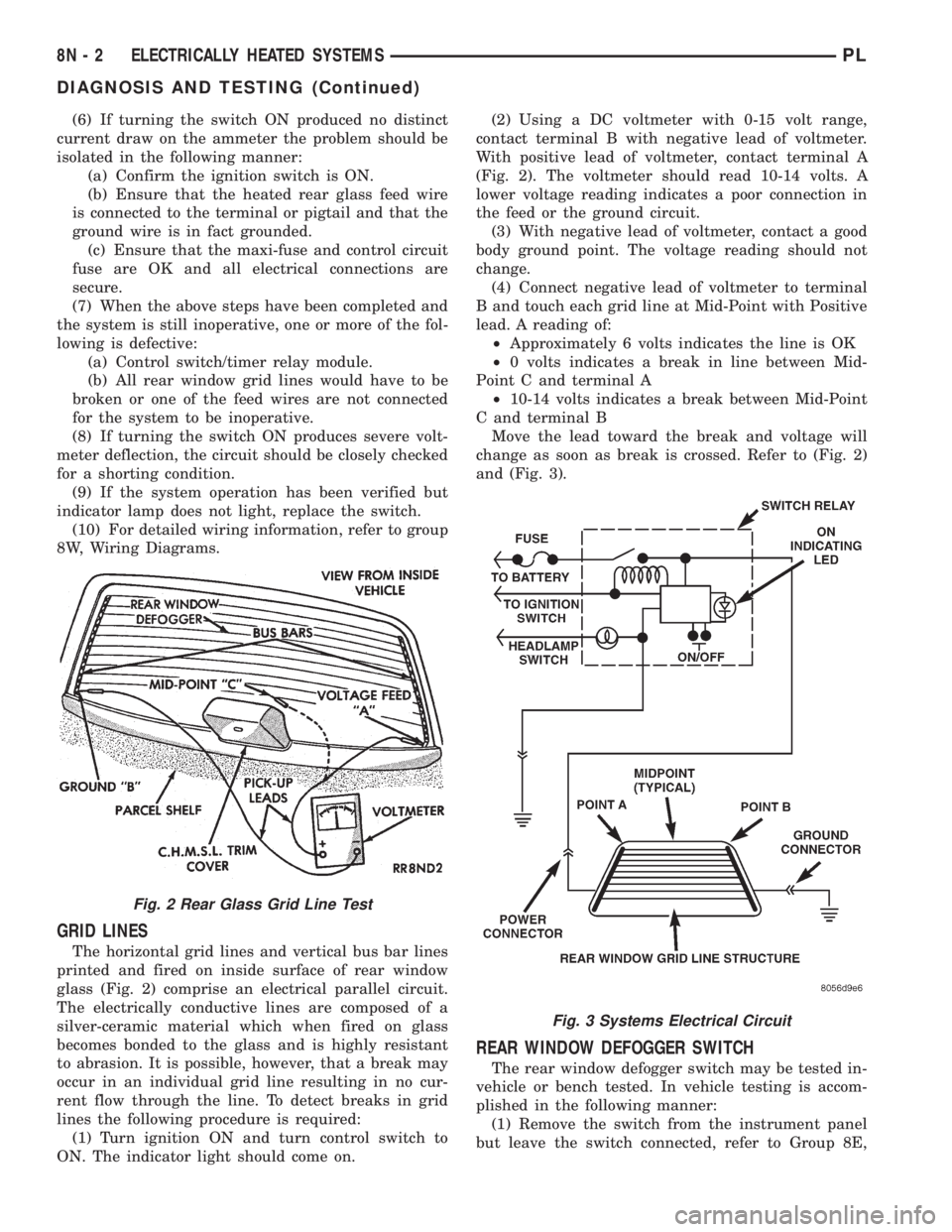
GRID LINES
The horizontal grid lines and vertical bus bar lines
printed and fired on inside surface of rear window
glass (Fig. 2) comprise an electrical parallel circuit.
The electrically conductive lines are composed of a
silver-ceramic material which when fired on glass
becomes bonded to the glass and is highly resistant
to abrasion. It is possible, however, that a break may
occur in an individual grid line resulting in no cur-
rent flow through the line. To detect breaks in grid
lines the following procedure is required:
(1) Turn ignition ON and turn control switch to
ON. The indicator light should come on.(2) Using a DC voltmeter with 0-15 volt range,
contact terminal B with negative lead of voltmeter.
With positive lead of voltmeter, contact terminal A
(Fig. 2). The voltmeter should read 10-14 volts. A
lower voltage reading indicates a poor connection in
the feed or the ground circuit.
(3) With negative lead of voltmeter, contact a good
body ground point. The voltage reading should not
change.
(4) Connect negative lead of voltmeter to terminal
B and touch each grid line at Mid-Point with Positive
lead. A reading of:
²Approximately 6 volts indicates the line is OK
²0 volts indicates a break in line between Mid-
Point C and terminal A
²10-14 volts indicates a break between Mid-Point
C and terminal B
Move the lead toward the break and voltage will
change as soon as break is crossed. Refer to (Fig. 2)
and (Fig. 3).
REAR WINDOW DEFOGGER SWITCH
The rear window defogger switch may be tested in-
vehicle or bench tested. In vehicle testing is accom-
plished in the following manner:
(1) Remove the switch from the instrument panel
but leave the switch connected, refer to Group 8E,
Fig. 2 Rear Glass Grid Line Test
Fig. 3 Systems Electrical Circuit
8N - 2 ELECTRICALLY HEATED SYSTEMSPL
DIAGNOSIS AND TESTING (Continued)
Page 366 of 1200
Instrument Panel and Systems for removal proce-
dures.
(2) Turn the ignition switch ON.
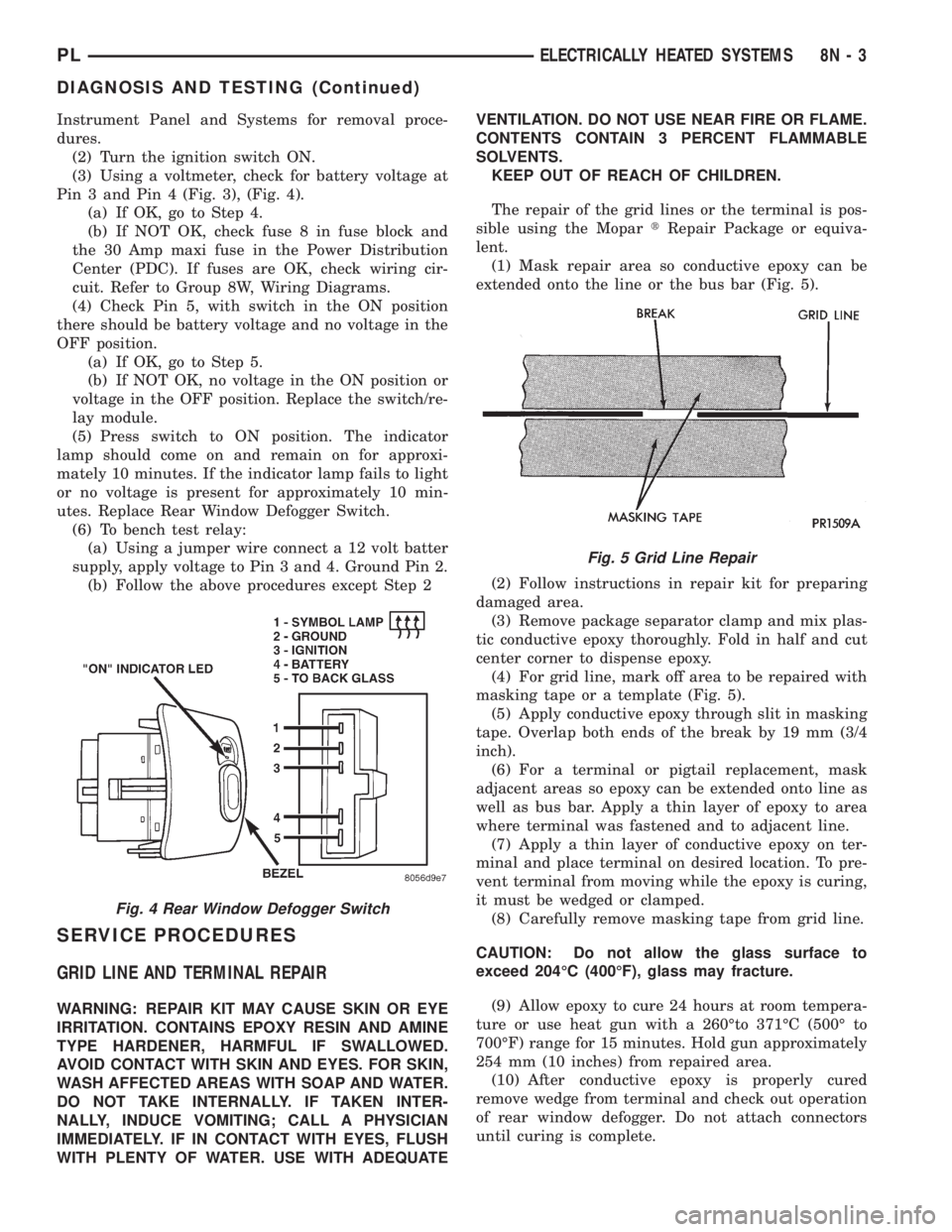
(3) Using a voltmeter, check for battery voltage at
Pin 3 and Pin 4 (Fig. 3), (Fig. 4).
(a) If OK, go to Step 4.
(b) If NOT OK, check fuse 8 in fuse block and
the 30 Amp maxi fuse in the Power Distribution
Center (PDC). If fuses are OK, check wiring cir-
cuit. Refer to Group 8W, Wiring Diagrams.
(4) Check Pin 5, with switch in the ON position
there should be battery voltage and no voltage in the
OFF position.
(a) If OK, go to Step 5.
(b) If NOT OK, no voltage in the ON position or
voltage in the OFF position. Replace the switch/re-
lay module.
(5) Press switch to ON position. The indicator
lamp should come on and remain on for approxi-
mately 10 minutes. If the indicator lamp fails to light
or no voltage is present for approximately 10 min-
utes. Replace Rear Window Defogger Switch.
(6) To bench test relay:
(a) Using a jumper wire connect a 12 volt batter
supply, apply voltage to Pin 3 and 4. Ground Pin 2.
(b) Follow the above procedures except Step 2
SERVICE PROCEDURES
GRID LINE AND TERMINAL REPAIR
WARNING: REPAIR KIT MAY CAUSE SKIN OR EYE
IRRITATION. CONTAINS EPOXY RESIN AND AMINE
TYPE HARDENER, HARMFUL IF SWALLOWED.
AVOID CONTACT WITH SKIN AND EYES. FOR SKIN,
WASH AFFECTED AREAS WITH SOAP AND WATER.
DO NOT TAKE INTERNALLY. IF TAKEN INTER-
NALLY, INDUCE VOMITING; CALL A PHYSICIAN
IMMEDIATELY. IF IN CONTACT WITH EYES, FLUSH
WITH PLENTY OF WATER. USE WITH ADEQUATEVENTILATION. DO NOT USE NEAR FIRE OR FLAME.
CONTENTS CONTAIN 3 PERCENT FLAMMABLE
SOLVENTS.
KEEP OUT OF REACH OF CHILDREN.
The repair of the grid lines or the terminal is pos-
sible using the MopartRepair Package or equiva-
lent.
(1) Mask repair area so conductive epoxy can be
extended onto the line or the bus bar (Fig. 5).
(2) Follow instructions in repair kit for preparing
damaged area.
(3) Remove package separator clamp and mix plas-
tic conductive epoxy thoroughly. Fold in half and cut
center corner to dispense epoxy.
(4) For grid line, mark off area to be repaired with
masking tape or a template (Fig. 5).
(5) Apply conductive epoxy through slit in masking
tape. Overlap both ends of the break by 19 mm (3/4
inch).
(6) For a terminal or pigtail replacement, mask
adjacent areas so epoxy can be extended onto line as
well as bus bar. Apply a thin layer of epoxy to area
where terminal was fastened and to adjacent line.
(7) Apply a thin layer of conductive epoxy on ter-
minal and place terminal on desired location. To pre-
vent terminal from moving while the epoxy is curing,
it must be wedged or clamped.
(8) Carefully remove masking tape from grid line.
CAUTION: Do not allow the glass surface to
exceed 204ÉC (400ÉF), glass may fracture.
(9) Allow epoxy to cure 24 hours at room tempera-
ture or use heat gun with a 260Éto 371ÉC (500É to
700ÉF) range for 15 minutes. Hold gun approximately
254 mm (10 inches) from repaired area.
(10) After conductive epoxy is properly cured
remove wedge from terminal and check out operation
of rear window defogger. Do not attach connectors
until curing is complete.
Fig. 4 Rear Window Defogger Switch
Fig. 5 Grid Line Repair
PLELECTRICALLY HEATED SYSTEMS 8N - 3
DIAGNOSIS AND TESTING (Continued)