2023 HYUNDAI IONIQ 6 infotainment
[x] Cancel search: infotainmentPage 455 of 582
7
7-111
Forward/Reverse Parking
Distance Warning Settings
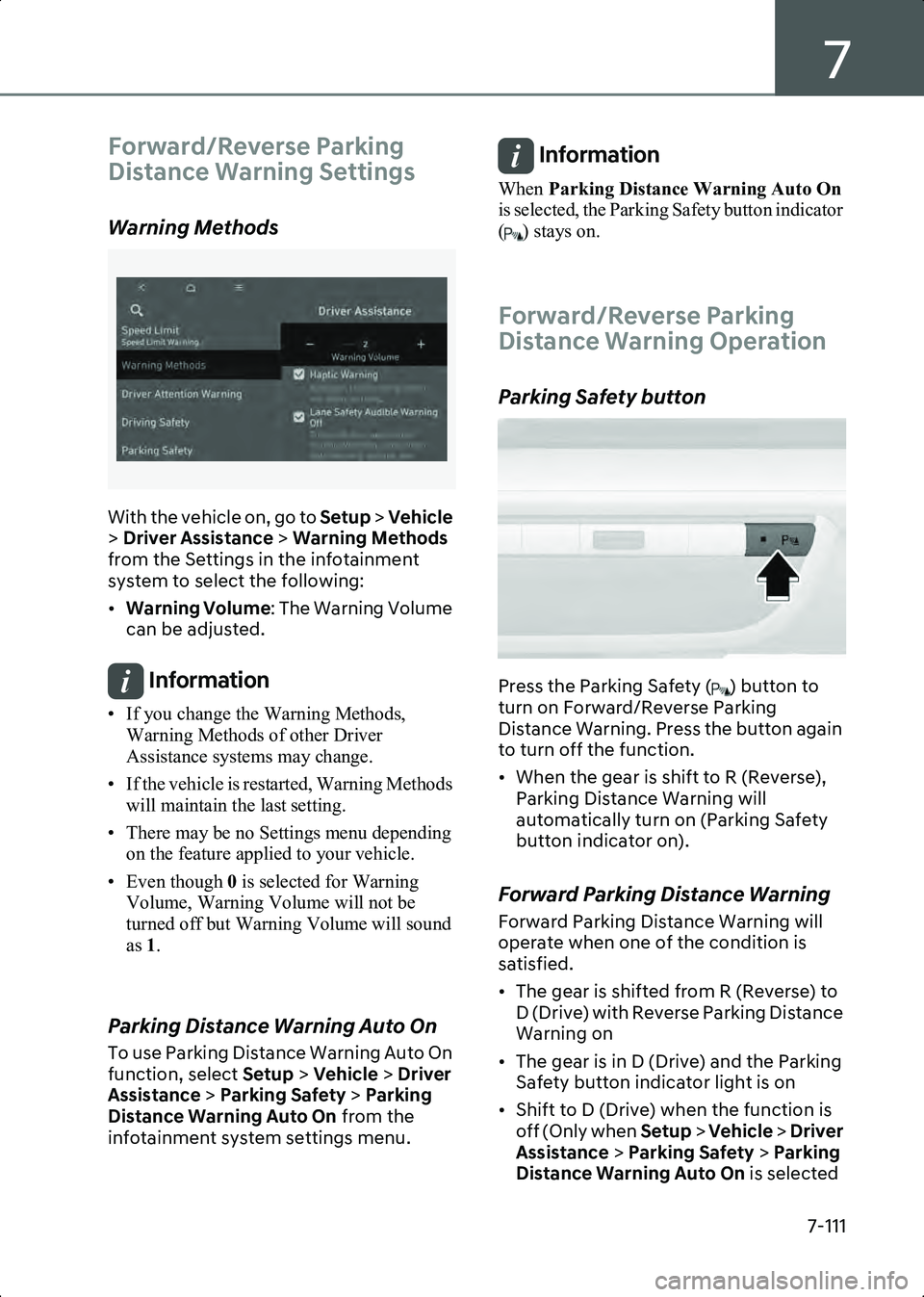
Warning Methods
B7001902_2
With the vehicle on, go to Setup > Vehicle
> Driver Assistance > Warning Methods
from the Settings in the infotainment
system to select the following:
• Warning Volume : The Warning Volume
can be adjusted.
Information • If you change the Warning Methods, Warning Methods of other Driver
Assistance systems may change.
• If the vehicle is restarted, Warning Methods will maintain the last setting.
• There may be no Settings menu depending on the feature applied to your vehicle.
• Even though 0 is selected for Warning
Volume, Warning Volume will not be
turned off but Warning Volume will sound
as 1.
Parking Distance Warning Auto On
To use Parking Distance Warning Auto On
function, select Setup > Vehicle > Driver
Assistance > Parking Safety > Parking
Distance Warning Auto On from the
infotainment system settings menu.
Information When Parking Distance Warning Auto On
is selected, the Parking Safety button indicator
( ) stays on.
Forward/Reverse Parking
Distance Warning Operation
Parking Safety button
B7007201
Press the Parking Safety ( ) button to
turn on Forward/Reverse Parking
Distance Warning. Press the button again
to turn off the function.
• When the gear is shift to R (Reverse), Parking Distance Warning will
automatically turn on (Parking Safety
button indicator on).
Forward Parking Distance Warning
Forward Parking Distance Warning will
operate when one of the condition is
satisfied.
• The gear is shifted from R (Reverse) to D (Drive) with Reverse Parking Distance
Warning on
• The gear is in D (Drive) and the Parking Safety button indicator light is on
• Shift to D (Drive) when the function is off (Only when Setup > Vehicle > Driver
Assistance > Parking Safety > Parking
Distance Warning Auto On is selected
Hyundai_CE_en_US.book Page 111
Page 456 of 582
Driver Assistance System
7-112
from the infotainment system settings
menu.)
• The gear is shifted to R (only front corner warning is on)
Information • Forward Parking Distance Warning will operate only when the vehicle’s forward
speed is below 6 mph (10 km/h).
• Forward Parking Distance Warning is deactivated if the vehicle speed reaches
above 18 mph (30 km/h). It will not
reactivate although the vehicle speed drops
below 6 mph (10 km/h).
(Only when Setup > Vehicle > Driver
Assistance > Parking Safety > Parking
Distance Warning Auto On is not selected
from the infotainment system settings menu.)
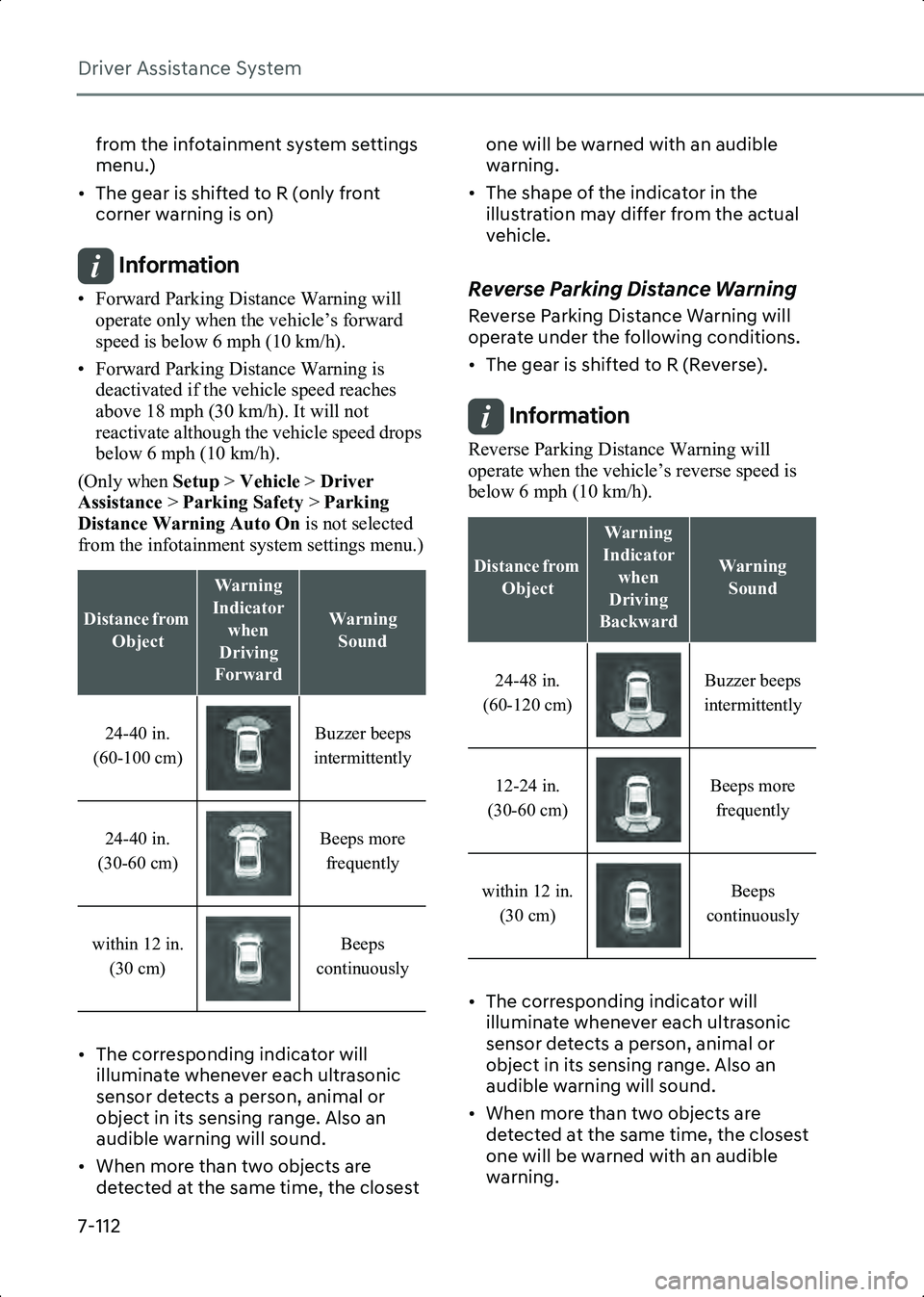
• The corresponding indicator will illuminate whenever each ultrasonic
sensor detects a person, animal or
object in its sensing range. Also an
audible warning will sound.
• When more than two objects are detected at the same time, the closest one will be warned with an audible
warning.
• The shape of the indicator in the illustration may differ from the actual
vehicle.Reverse Parking Distance Warning
Reverse Parking Distance Warning will
operate under the following conditions.
• The gear is shifted to R (Reverse).
Information Reverse Parking Distance Warning will
operate when the vehicle’s reverse speed is
below 6 mph (10 km/h).
• The corresponding indicator will illuminate whenever each ultrasonic
sensor detects a person, animal or
object in its sensing range. Also an
audible warning will sound.
• When more than two objects are detected at the same time, the closest
one will be warned with an audible
warning.
Distance from
Object
Warning
Indicator when
Driving
Forward
Warning Sound
24-40 in.
(60-100 cm) Buzzer beeps
intermittently
24-40 in.
(30-60 cm) Beeps more
frequently
within 12 in. (30 cm) Beeps
continuously
Distance from Object
Warning
Indicator when
Driving
Backward
Warning Sound
24-48 in.
(60-120 cm) Buzzer beeps
intermittently
12-24 in.
(30-60 cm) Beeps more
frequently
within 12 in. (30 cm) Beeps
continuously
Hyundai_CE_en_US.book Page 112
Page 459 of 582
7
7-115
Forward/Side/Reverse
Parking Distance Warning
if equipped
(PDW)
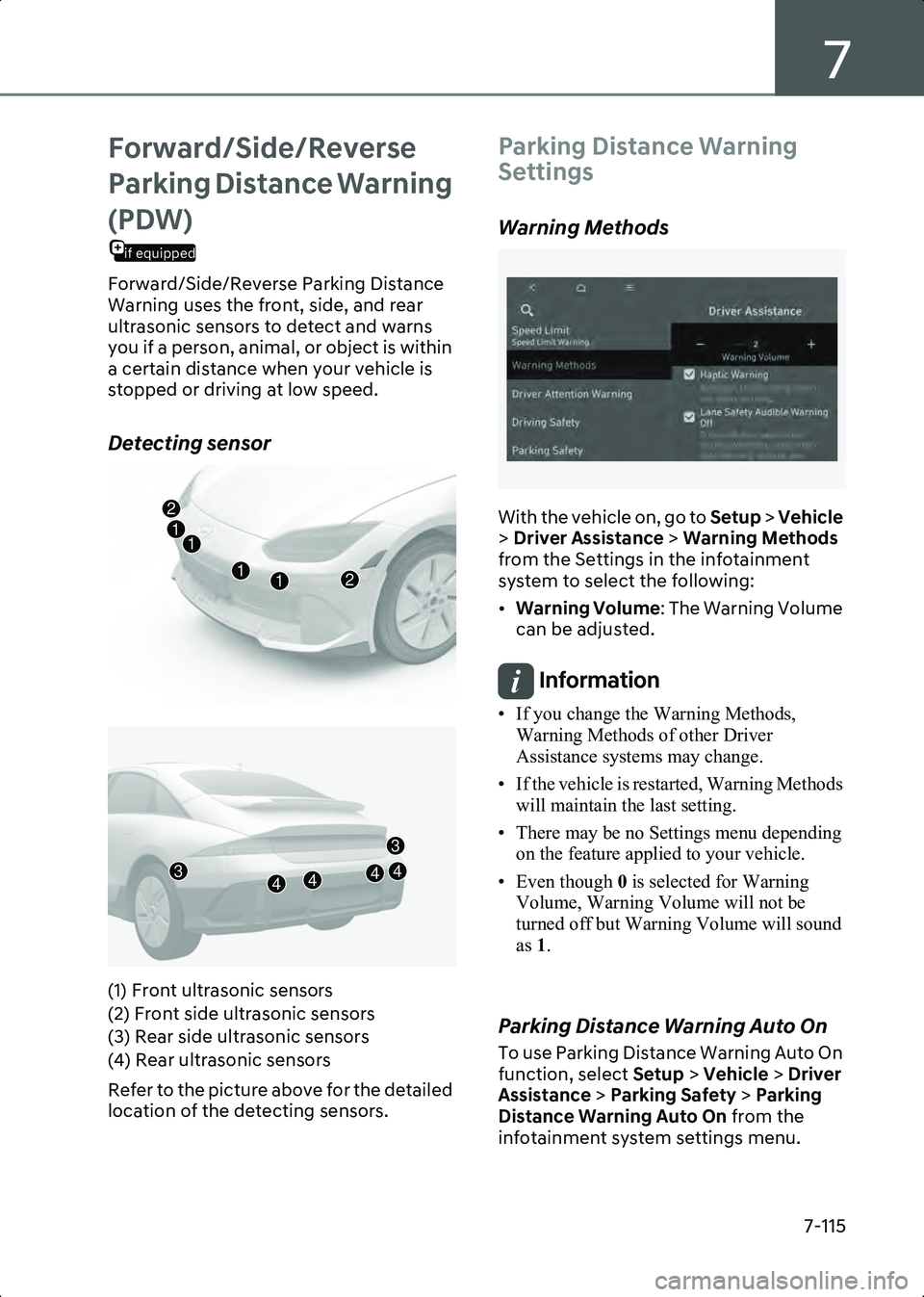
Forward/Side/Reverse Parking Distance
Warning uses the front, side, and rear
ultrasonic sensors to detect and warns
you if a person, animal, or object is within
a certain distance when your vehicle is
stopped or driving at low speed.
Detecting sensor
B7007401
B7007402
(1) Front ultrasonic sensors
(2) Front side ultrasonic sensors
(3) Rear side ultrasonic sensors
(4) Rear ultrasonic sensors
Refer to the picture above for the detailed
location of the detecting sensors.
Parking Distance Warning
Settings
Warning Methods
B7001902_2
With the vehicle on, go to Setup > Vehicle
> Driver Assistance > Warning Methods
from the Settings in the infotainment
system to select the following:
• Warning Volume : The Warning Volume
can be adjusted.
Information • If you change the Warning Methods, Warning Methods of other Driver
Assistance systems may change.
• If the vehicle is restarted, Warning Methods will maintain the last setting.
• There may be no Settings menu depending on the feature applied to your vehicle.
• Even though 0 is selected for Warning
Volume, Warning Volume will not be
turned off but Warning Volume will sound
as 1.
Parking Distance Warning Auto On
To use Parking Distance Warning Auto On
function, select Setup > Vehicle > Driver
Assistance > Parking Safety > Parking
Distance Warning Auto On from the
infotainment system settings menu.
12
21
1
1
43444
3
Hyundai_CE_en_US.book Page 115
Page 460 of 582
Driver Assistance System
7-116
Information When Parking Distance Warning Auto On
is selected, the Parking Safety button indicator
( ) stays on.
Parking Distance Warning
Operation
Parking Safety button
B7007601
Press the Parking Safety ( ) button to
turn on Forward/Reverse Parking
Distance Warning. Press the button again
to turn off the function.
• When the gear is shift to R (Reverse), Parking Distance Warning will
automatically turn on (Parking Safety
button indicator on).
Forward Parking Distance Warning
Forward Parking Distance Warning will
operate under the following conditions.
• The gear is shifted from R (Reverse) to D (Drive) with Reverse Parking Distance
Warning on
• The gear is in D (Drive) and the Parking Safety ( ) button indicator light is on
• Shift to D (Drive) when the function is off
(Only when Setup > Vehicle > Driver
Assistance > Parking Safety > Parking
Distance Warning Auto On is selected from the infotainment system settings
menu.)
• Shift to R (Reverse) (only front corner warning is on)
Information • Forward Parking Distance Warning will operate only when the vehicle’s forward
speed is below 6 mph (10 km/h).
• Forward Parking Distance Warning is deactivated if the vehicle speed reaches
above 18 mph (30 km/h). It will not
reactivate although the vehicle speed drops
below 6 mph (10 km/h).
(Only when Setup > Vehicle > Driver
Assistance > Parking Safety > Parking
Distance Warning Auto On is not selected
from the infotainment system settings
menu.)
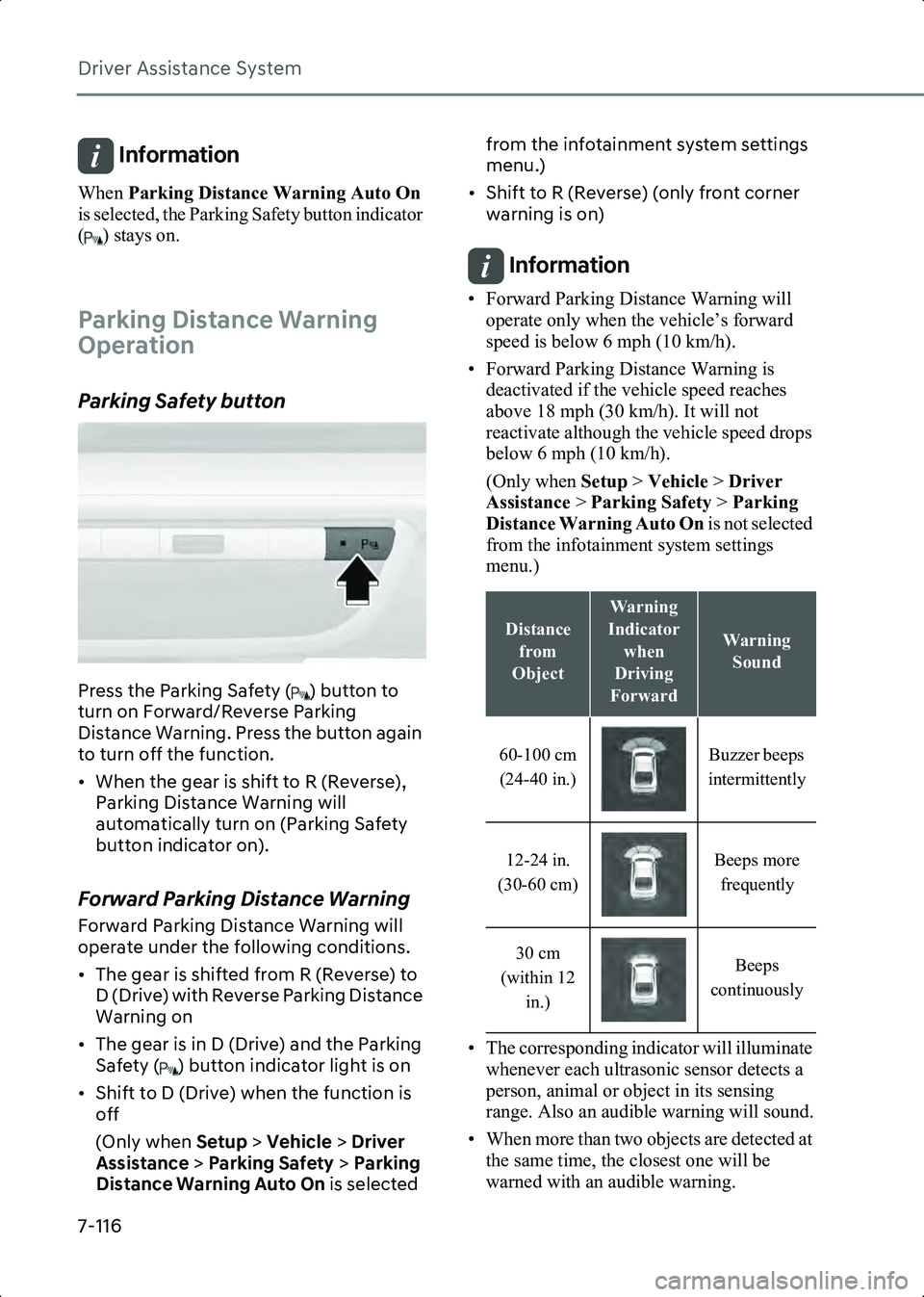
• The corresponding indicator will illuminate whenever each ultrasonic sensor detects a
person, animal or object in its sensing
range. Also an audible warning will sound.
• When more than two objects are detected at the same time, the closest one will be
warned with an audible warning.
Distance
from
Object
Warning
Indicator when
Driving
Forward
Warning Sound
60-100 cm (24-40 in.) Buzzer beeps
intermittently
12-24 in.
(30-60 cm) Beeps more
frequently
30 cm
(within 12 in.) Beeps
continuously
Hyundai_CE_en_US.book Page 116
Page 461 of 582
7
7-117
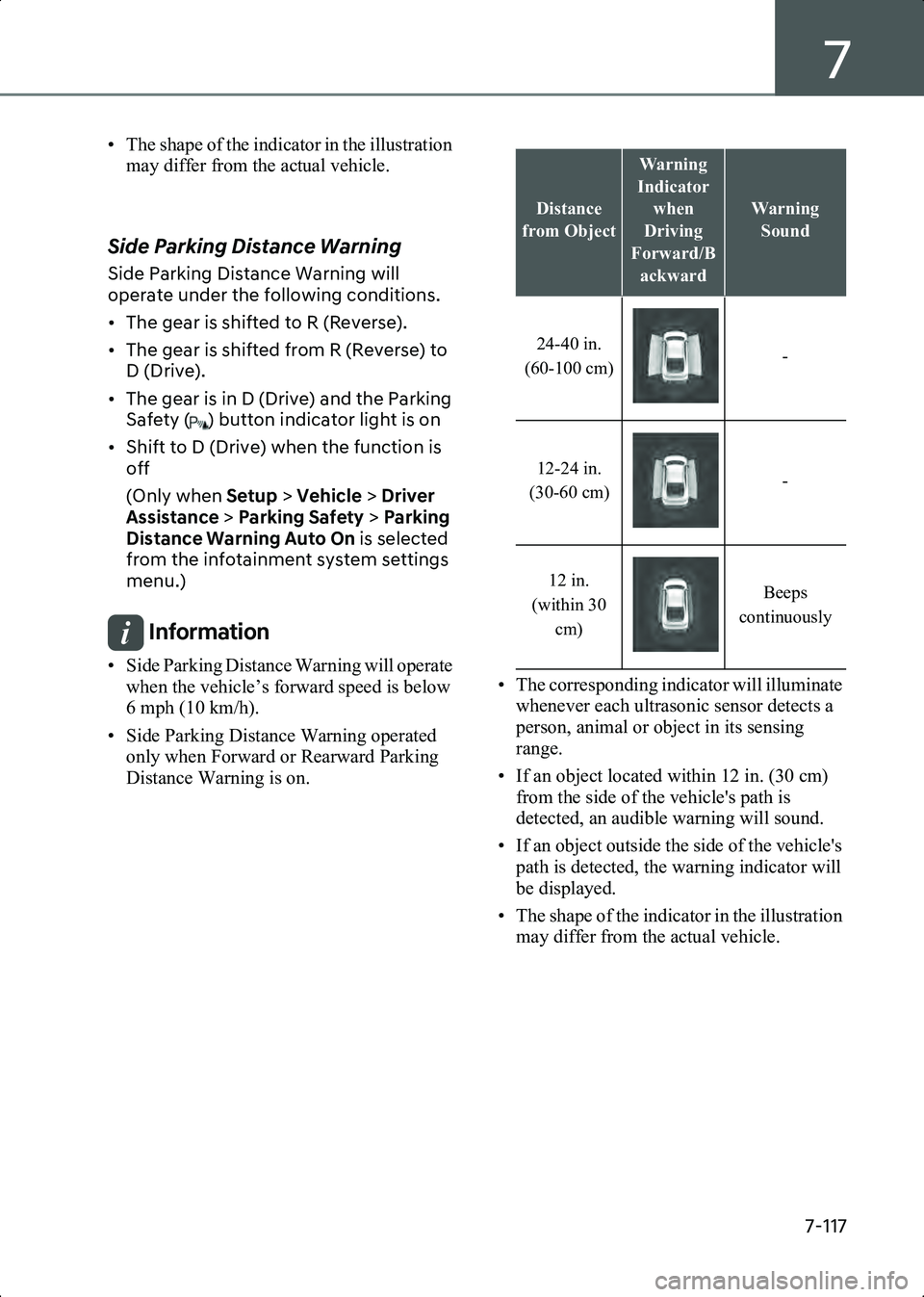
• The shape of the indicator in the illustration may differ from the actual vehicle.
Side Parking Distance Warning
Side Parking Distance Warning will
operate under the following conditions.
• The gear is shifted to R (Reverse).
• The gear is shifted from R (Reverse) to D (Drive).
• The gear is in D (Drive) and the Parking Safety ( ) button indicator light is on
• Shift to D (Drive) when the function is off
(Only when Setup > Vehicle > Driver
Assistance > Parking Safety > Parking
Distance Warning Auto On is selected
from the infotainment system settings
menu.)
Information • Side Parking Distance Warning will operate when the vehicle’s forward speed is below
6 mph (10 km/h).
• Side Parking Distance Warning operated only when Forward or Rearward Parking
Distance Warning is on. • The corresponding indicator will illuminate
whenever each ultrasonic sensor detects a
person, animal or object in its sensing
range.
• If an object located within 12 in. (30 cm) from the side of the vehicle's path is
detected, an audible warning will sound.
• If an object outside the side of the vehicle's path is detected, the warning indicator will
be displayed.
• The shape of the indicator in the illustration may differ from the actual vehicle.
Distance
from Object
Warning
Indicator when
Driving
Forward/B ackward
Warning Sound
24-40 in.
(60-100 cm) -
12-24 in.
(30-60 cm) -
12 in.
(within 30 cm) Beeps
continuously
Hyundai_CE_en_US.book Page 117
Page 465 of 582
7
7-121
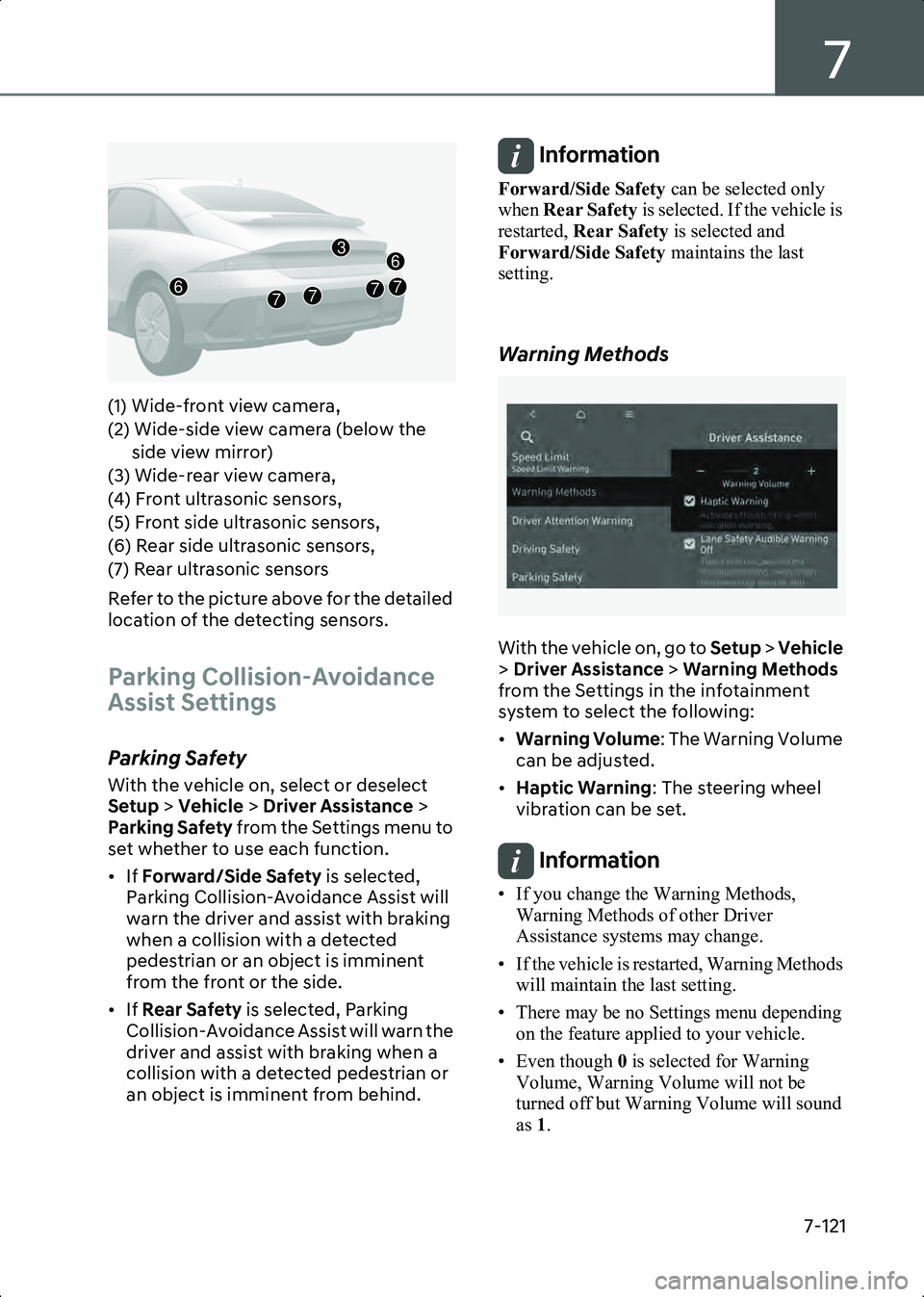
B7007803_1(1) Wide-front view camera,
(2) Wide-side view camera (below the side view mirror)
(3) Wide-rear view camera,
(4) Front ultrasonic sensors,
(5) Front side ultrasonic sensors,
(6) Rear side ultrasonic sensors,
(7) Rear ultrasonic sensors
Refer to the picture above for the detailed
location of the detecting sensors.
Parking Collision-Avoidance
Assist Settings
Parking Safety
With the vehicle on, select or deselect
Setup > Vehicle > Driver Assistance >
Parking Safety from the Settings menu to
set whether to use each function.
• If Forward/Side Safety is selected,
Parking Collision-Avoidance Assist will
warn the driver and assist with braking
when a collision with a detected
pedestrian or an object is imminent
from the front or the side.
• If Rear Safety is selected, Parking
Collision-Avoidance Assist will warn the
driver and assist with braking when a
collision with a detected pedestrian or
an object is imminent from behind.
Information Forward/Side Safety can be selected only
when Rear Safety is selected. If the vehicle is
restarted, Rear Safety is selected and
Forward/Side Safety maintains the last
setting.
Warning Methods
B7000205
With the vehicle on, go to Setup > Vehicle
> Driver Assistance > Warning Methods
from the Settings in the infotainment
system to select the following:
• Warning Volume : The Warning Volume
can be adjusted.
• Haptic Warning : The steering wheel
vibration can be set.
Information • If you change the Warning Methods, Warning Methods of other Driver
Assistance systems may change.
• If the vehicle is restarted, Warning Methods will maintain the last setting.
• There may be no Settings menu depending on the feature applied to your vehicle.
• Even though 0 is selected for Warning
Volume, Warning Volume will not be
turned off but Warning Volume will sound
as 1.
7677
3
7
6
Hyundai_CE_en_US.book Page 121
Page 466 of 582
Driver Assistance System
7-122
• When Haptic Warning is deselected while
Warning Volume is selected as 0, Warning
Volume will activate and be selected as 2.
• When Warning Volume is selected as 0
while Haptic Warning is deselected,
steering wheel vibration will activate.
Parking Collision-Avoidance
Assist Operation
B7008001
Turning Parking Collision Avoidance
Assist On/Off
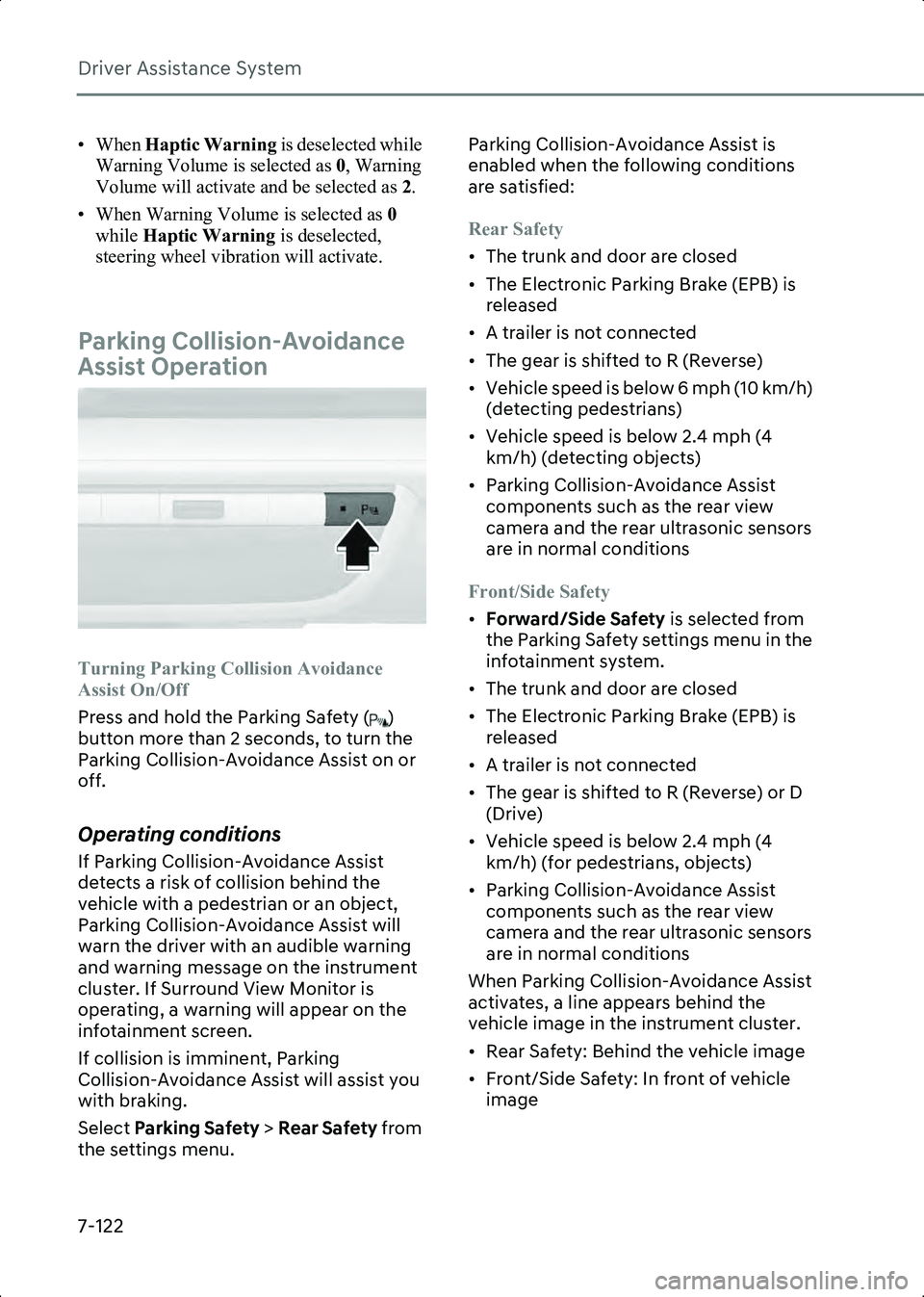
Press and hold the Parking Safety ( )
button more than 2 seconds, to turn the
Parking Collision-Avoidance Assist on or
off.
Operating conditions
If Parking Collision-Avoidance Assist
detects a risk of collision behind the
vehicle with a pedestrian or an object,
Parking Collision-Avoidance Assist will
warn the driver with an audible warning
and warning message on the instrument
cluster. If Surround View Monitor is
operating, a warning will appear on the
infotainment screen.
If collision is imminent, Parking
Collision-Avoidance Assist will assist you
with braking.
Select Parking Safety > Rear Safety from
the settings menu. Parking Collision-Avoidance Assist is
enabled when the following conditions
are satisfied:
Rear Safety
• The trunk and door are closed
• The Electronic Parking Brake (EPB) is
released
• A trailer is not connected
• The gear is shifted to R (Reverse)
• Vehicle speed is below 6 mph (10 km/h) (detecting pedestrians)
• Vehicle speed is below 2.4 mph (4 km/h) (detecting objects)
• Parking Collision-Avoidance Assist components such as the rear view
camera and the rear ultrasonic sensors
are in normal conditions
Front/Side Safety
• Forward/Side Safety is selected from
the Parking Safety settings menu in the
infotainment system.
• The trunk and door are closed
• The Electronic Parking Brake (EPB) is released
• A trailer is not connected
• The gear is shifted to R (Reverse) or D (Drive)
• Vehicle speed is below 2.4 mph (4 km/h) (for pedestrians, objects)
• Parking Collision-Avoidance Assist components such as the rear view
camera and the rear ultrasonic sensors
are in normal conditions
When Parking Collision-Avoidance Assist
activates, a line appears behind the
vehicle image in the instrument cluster.
• Rear Safety: Behind the vehicle image
• Front/Side Safety: In front of vehicle image
Hyundai_CE_en_US.book Page 122
Page 473 of 582
7
7-129
camera performance and Remote
Smart Parking Assist may not operate
properly.
• Do not manually adjust the side view mirror or use Remote Smart Parking
Assist after a hard impact on the side
view mirror. When a collision occurs or
the side view mirror is manually
operated, Remote Smart Parking Assist
may not operate properly.
Remote Smart Parking Assist
Settings
Warning Methods
B7002602
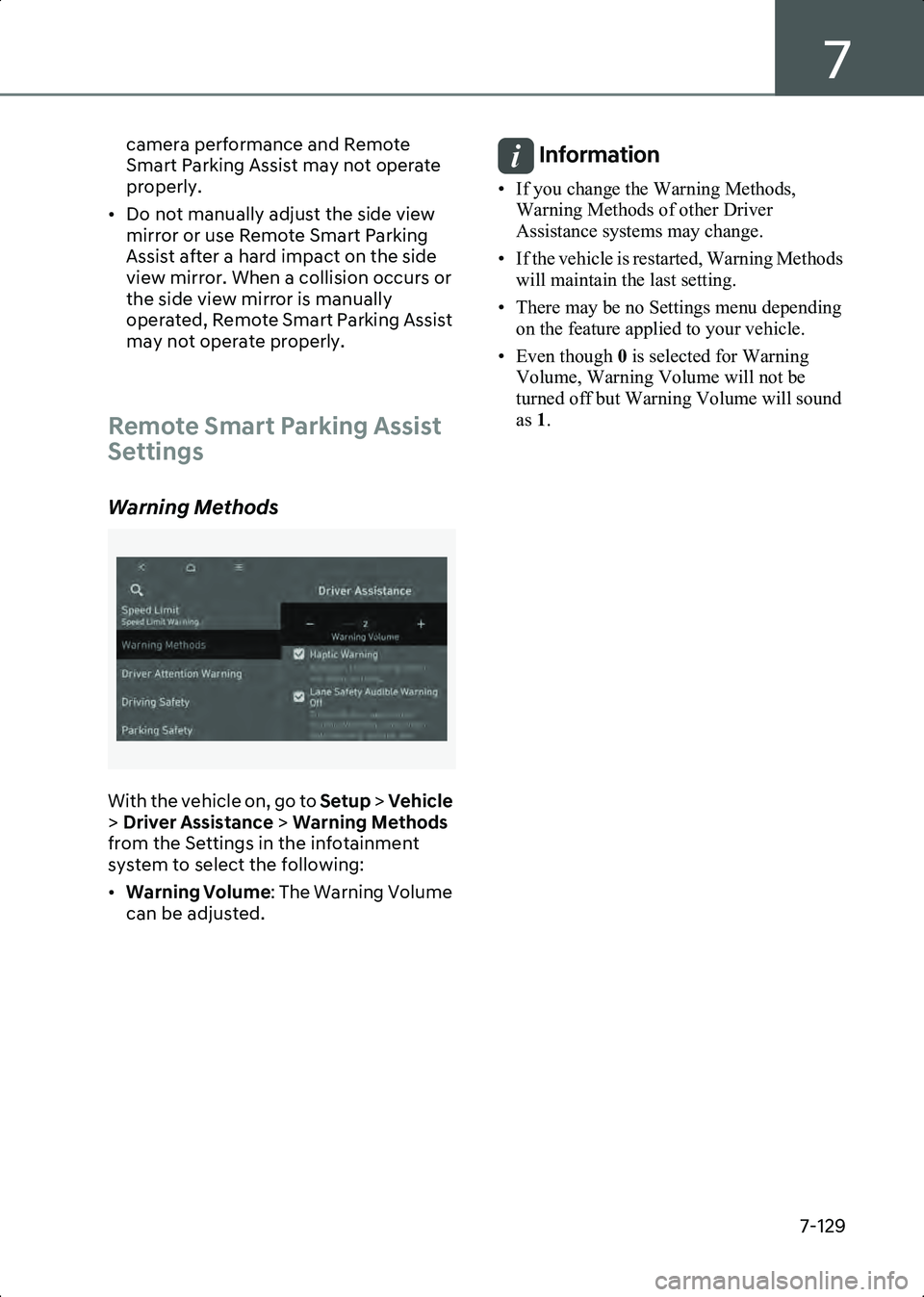
With the vehicle on, go to Setup > Vehicle
> Driver Assistance > Warning Methods
from the Settings in the infotainment
system to select the following:
• Warning Volume : The Warning Volume
can be adjusted.
Information • If you change the Warning Methods, Warning Methods of other Driver
Assistance systems may change.
• If the vehicle is restarted, Warning Methods will maintain the last setting.
• There may be no Settings menu depending on the feature applied to your vehicle.
• Even though 0 is selected for Warning
Volume, Warning Volume will not be
turned off but Warning Volume will sound
as 1.
Hyundai_CE_en_US.book Page 129