Page 3141 of 3641
CRASH ZONE SENSORSR-25
< REMOVAL AND INSTALLATION >
C
DE
F
G
I
J
K L
M A
B
SR
N
O P
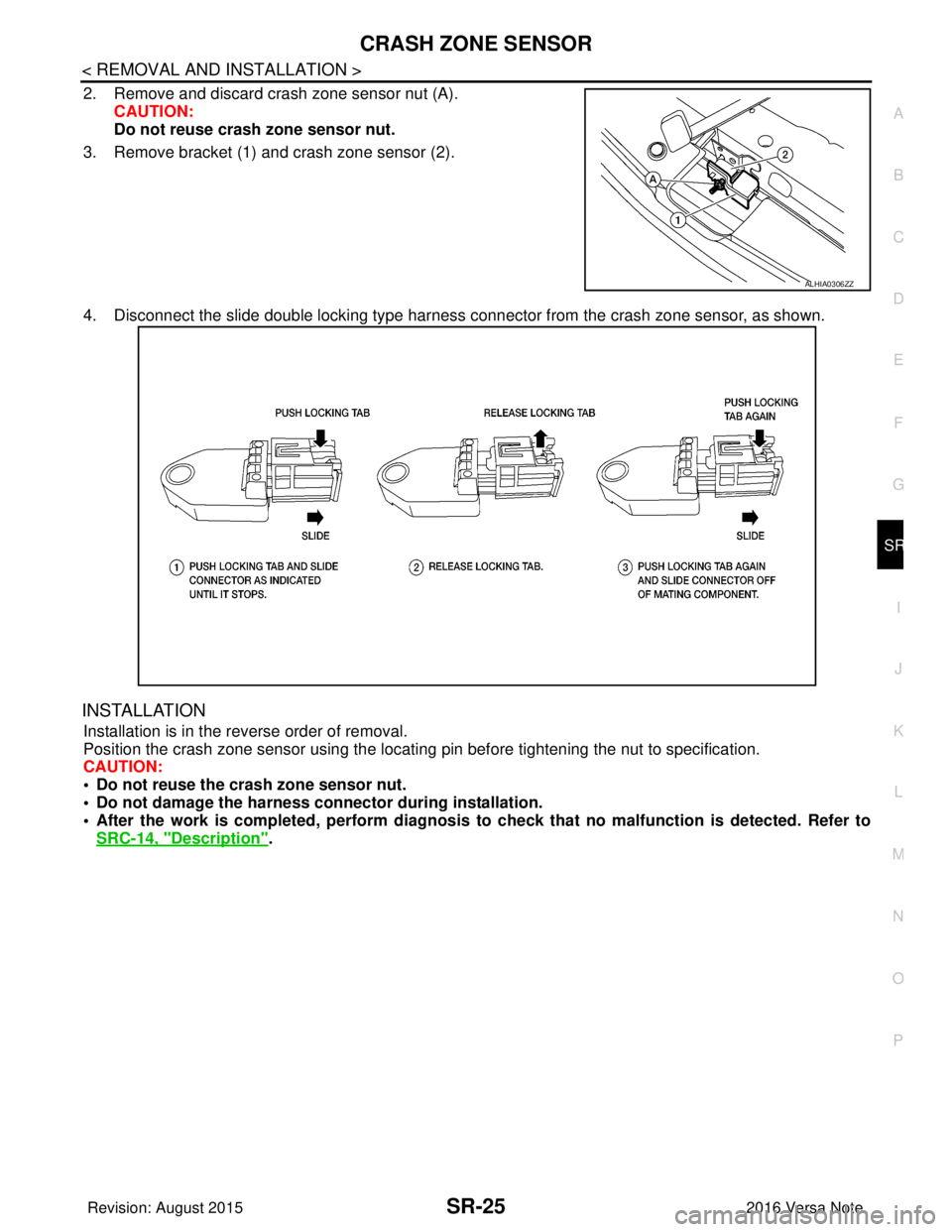
2. Remove and discard crash zone sensor nut (A). CAUTION:
Do not reuse crash zone sensor nut.
3. Remove bracket (1) and crash zone sensor (2).
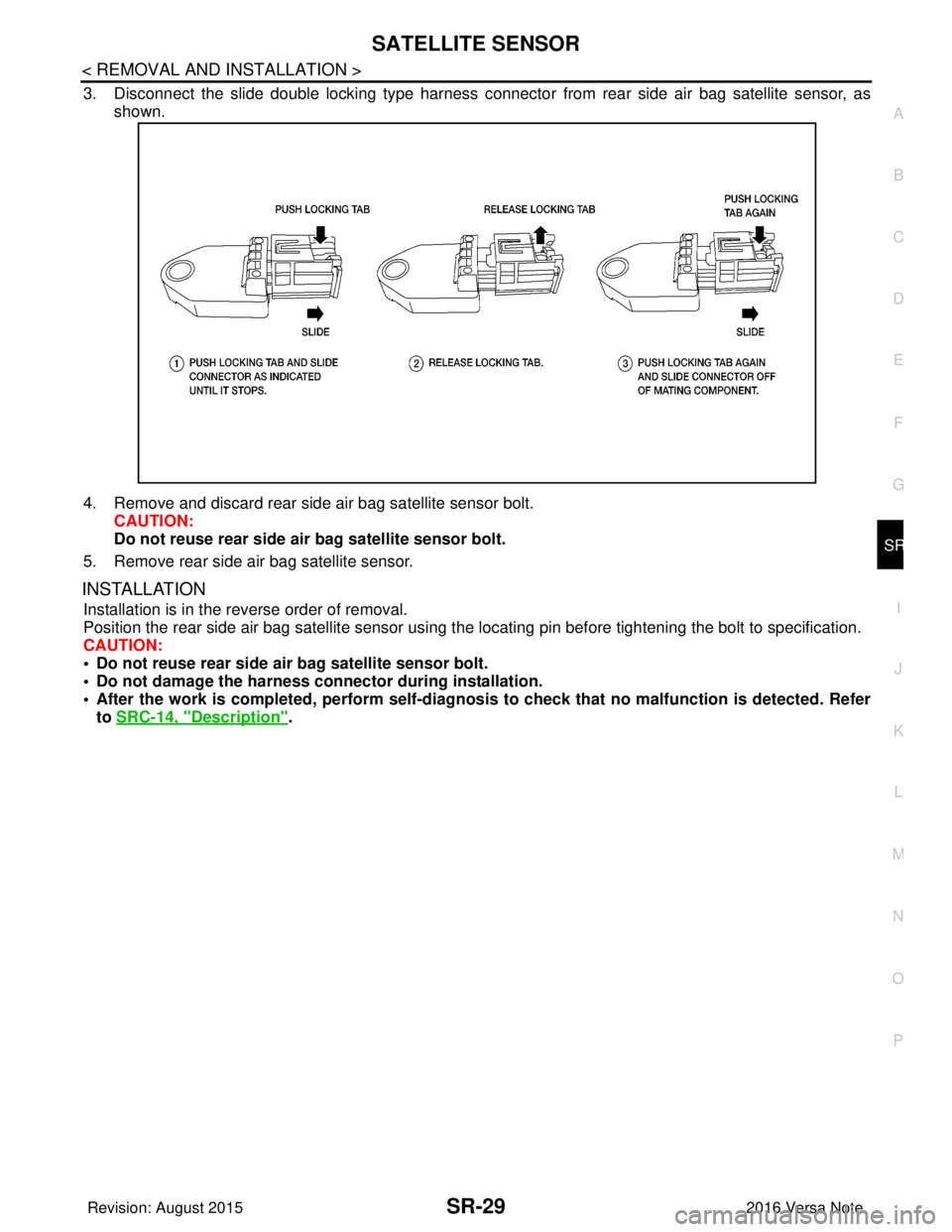
4. Disconnect the slide double locking type harness connector from the crash zone sensor, as shown.
INSTALLATION
Installation is in the reverse order of removal.
Position the crash zone sensor using the locating pin before tightening the nut to specification.
CAUTION:
• Do not reuse the crash zone sensor nut.
• Do not damage the harness conn ector during installation.
• After the work is completed, perform diagnosis to check that no malfunction is detected. Refer to
SRC-14, "
Description".
ALHIA0306ZZ
Revision: August 2015 2016 Versa Note
cardiagn.com
Page 3143 of 3641
SATELLITE SENSORSR-27
< REMOVAL AND INSTALLATION >
C
DE
F
G
I
J
K L
M A
B
SR
N
O P
3. Disconnect the slide double locking type harness connecto r from the front door satellite sensor, as shown.
4. Remove and discard front door satellite sensor nuts. CAUTION:
Do not reuse front door satellite sensor nuts.
5. Remove front door satellite sensor.
INSTALLATION
Installation is in the reverse order of removal.
CAUTION:
• Do not reuse front door satellite sensor nuts.
• Do not damage the harness conn ector during installation.
• After the work is completed, perform self-diagnosi s to check that no malfunction is detected. Refer
to SRC-14, "
Description".
Removal and Installation - Fron t Side Air Bag Satellite SensorINFOID:0000000012430579
WARNING:
• Before servicing the SRS, turn ig nition switch OFF, disconnect both battery terminals then wait at
least three minutes.
• Do not strike the front side air bag satellite sensor.
• Replace the front side air bag satellite sensor if it has been dropped or sustained an impact.
• Do not use air tools or electric tools for servicing.
• Replace the front side air bag satellite sensor (LH/RH) if either the side air bag module or the side
curtain air bag module has been deployed.
REMOVAL
1. Disconnect negative and positive battery terminals, then wait at least three minutes. Refer to PG-70,
"Removal and Installation (Battery)".
2. Remove center pillar lower finisher. Refer to INT-25, "
CENTER PILLAR LOWER FINISHER : Removal
and Installation".
3. Remove and discard front side air bag satellite sensor nut. CAUTION:
Do not reuse front side air bag satellite sensor nut.
4. Remove front side air bag satellite sensor.
Revision: August 2015 2016 Versa Note
cardiagn.com
Page 3144 of 3641
SR-28
< REMOVAL AND INSTALLATION >
SATELLITE SENSOR
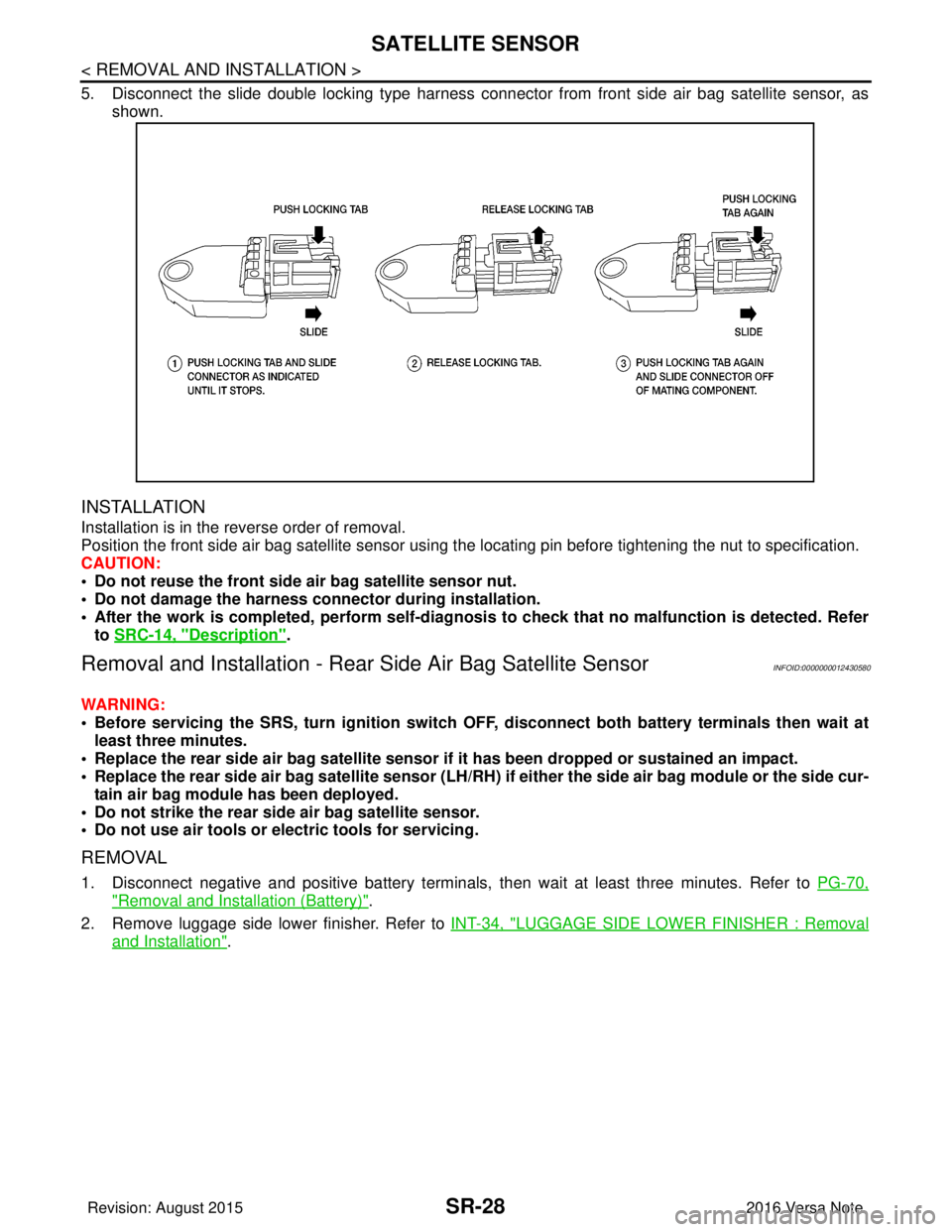
5. Disconnect the slide double locking type harness connector from front side air bag satellite sensor, asshown.
INSTALLATION
Installation is in the reverse order of removal.
Position the front side air bag satellite sensor using t he locating pin before tightening the nut to specification.
CAUTION:
• Do not reuse the front side air bag satellite sensor nut.
• Do not damage the harness connector during installation.
• After the work is completed, perform self-diagnos is to check that no malfunction is detected. Refer
to SRC-14, "
Description".
Removal and Installation - Rear Side Air Bag Satellite SensorINFOID:0000000012430580
WARNING:
• Before servicing the SRS, turn ignition switch OFF, disconnect bot h battery terminals then wait at
least three minutes.
• Replace the rear side air bag satellite sensor if it has been dropped or sustained an impact.
• Replace the rear side air bag satellite sensor (LH/RH) if either the side air bag module or the side cur-
tain air bag module has been deployed.
• Do not strike the rear side air bag satellite sensor.
• Do not use air tools or el ectric tools for servicing.
REMOVAL
1. Disconnect negative and positive battery terminals, then wait at least three minutes. Refer to PG-70,
"Removal and Installation (Battery)".
2. Remove luggage side lower finisher. Refer to INT-34, "
LUGGAGE SIDE LOWER FINISHER : Removal
and Installation".
Revision: August 2015 2016 Versa Note
cardiagn.com
Page 3145 of 3641
SATELLITE SENSORSR-29
< REMOVAL AND INSTALLATION >
C
DE
F
G
I
J
K L
M A
B
SR
N
O P
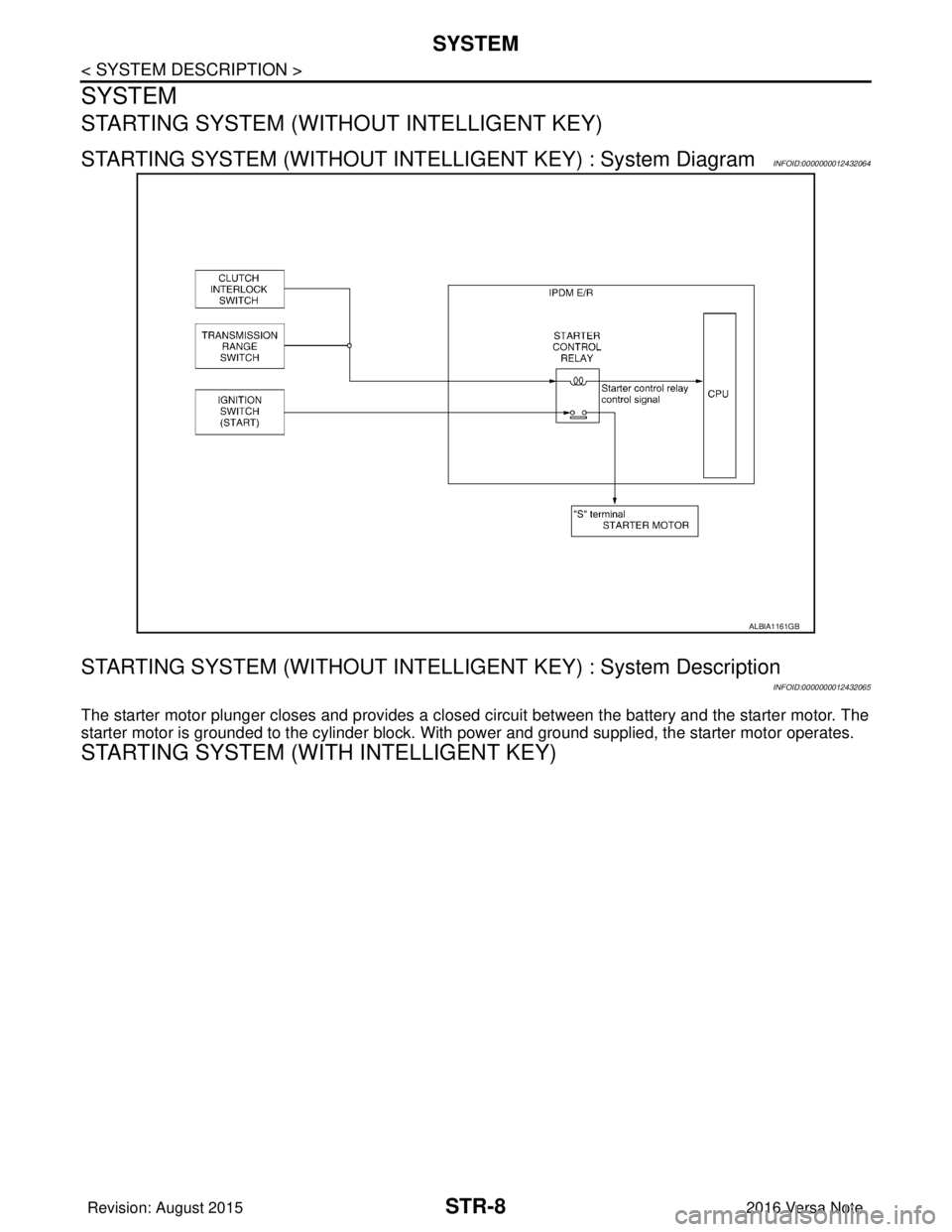
3. Disconnect the slide double locking type harness connecto r from rear side air bag satellite sensor, as
shown.
4. Remove and discard rear side air bag satellite sensor bolt. CAUTION:
Do not reuse rear side ai r bag satellite sensor bolt.
5. Remove rear side air bag satellite sensor.
INSTALLATION
Installation is in the reverse order of removal.
Position the rear side air bag satellite sensor using the locating pin before tightening the bolt to specification.
CAUTION:
• Do not reuse rear side ai r bag satellite sensor bolt.
• Do not damage the harness conn ector during installation.
• After the work is completed, perform self-diagnosi s to check that no malfunction is detected. Refer
to SRC-14, "
Description".
Revision: August 2015 2016 Versa Note
cardiagn.com
Page 3147 of 3641
AIR BAG DIAGNOSIS SENSOR UNITSR-31
< REMOVAL AND INSTALLATION >
C
DE
F
G
I
J
K L
M A
B
SR
N
O P
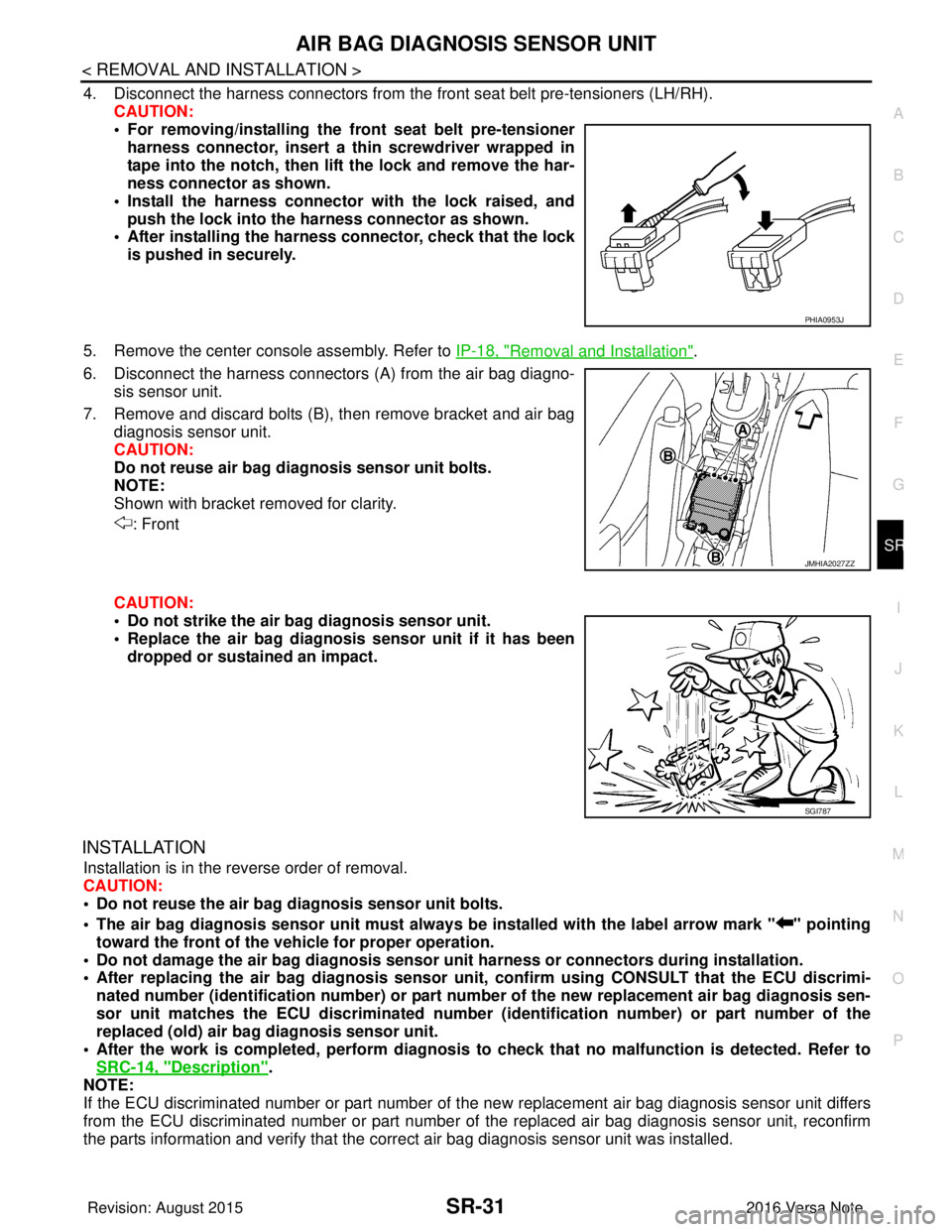
4. Disconnect the harness connectors from the front seat belt pre-tensioners (LH/RH).
CAUTION:
• For removing/installing the front seat belt pre-tensioner
harness connector, insert a thin screwdriver wrapped in
tape into the notch, then lift the lock and remove the har-
ness connector as shown.
• Install the harness connector with the lock raised, and push the lock into the harness connector as shown.
• After installing the harness connector, check that the lock
is pushed in securely.
5. Remove the center console assembly. Refer to IP-18, "
Removal and Installation".
6. Disconnect the harness connectors (A) from the air bag diagno-
sis sensor unit.
7. Remove and discard bolts (B), then remove bracket and air bag diagnosis sensor unit.
CAUTION:
Do not reuse air bag diagnosis sensor unit bolts.
NOTE:
Shown with bracket removed for clarity.
: Front
CAUTION:
• Do not strike the air ba g diagnosis sensor unit.
• Replace the air bag diagnosis sensor unit if it has been
dropped or sustained an impact.
INSTALLATION
Installation is in the reverse order of removal.
CAUTION:
• Do not reuse the air bag diagnosis sensor unit bolts.
• The air bag diagnosis sensor unit must always be installed with the label arrow mark " " pointing
toward the front of the vehicle for proper operation.
• Do not damage the air bag diagnosis sensor un it harness or connectors during installation.
• After replacing the air bag diagnosis sensor un it, confirm using CONSULT that the ECU discrimi-
nated number (identification number) or part number of the new replacement air bag diagnosis sen-
sor unit matches the ECU discrimin ated number (identification number) or part number of the
replaced (old) air bag diagnosis sensor unit.
• After the work is completed, perform diagnosis to check that no malfunction is detected. Refer to
SRC-14, "
Description".
NOTE:
If the ECU discriminated number or part number of the new replacement air bag diagnosis sensor unit differs
from the ECU discriminated number or part number of the replaced air bag diagnosis sensor unit, reconfirm
the parts information and verify that the corre ct air bag diagnosis sensor unit was installed.
PHIA0953J
JMHIA2027ZZ
SGI787
Revision: August 2015 2016 Versa Note
cardiagn.com
Page 3157 of 3641
COMPONENT PARTSSTR-5
< SYSTEM DESCRIPTION >
C
DE
F
G H
I
J
K L
M A
STR
NP
O
STARTING SYSTEM (WITHOUT INTELL
IGENT KEY) : Component Description
INFOID:0000000012432061
STARTING SYSTEM (WITH INTELLIGENT KEY)
No.Component part Description
1. IPDM E/R CPU inside IPDM E/R operates the starter control relay when
the ignition switch is in the start position.
2. Transmission range switch (CVT Models) Supplies power to the starter co
ntrol relay (inside IPDM E/R)
when the selector lever is shifted into the P or N position.
3. Starter motor The starter motor plunger closes and the motor is supplied
with battery power, which in turn cranks the engine, when the
S terminal is supplied with electric power.
4. Clutch interlock switch (M/T Models) Clutch interlock switch supplies power to the coil side of the
starter control relay when the clutch pedal is depressed to
crank the engine.
Revision: August 2015
2016 Versa Note
cardiagn.com
Page 3159 of 3641
COMPONENT PARTSSTR-7
< SYSTEM DESCRIPTION >
C
DE
F
G H
I
J
K L
M A
STR
NP
O
3. Starter motor
The starter motor plunger closes and the motor is supplied with bat-
tery power, which in turn cranks the engine, when the S terminal is
supplied with electric power.
4. Clutch interlock switch (M/T) Clutch interlock switch supplies power to the coil side of the starter
relay and starter control relay (inside IPDM E/R) when the clutch
pedal is depressed to crank the engine.
5. BCM BCM controls the starter relay.
Revision: August 2015 2016 Versa Note
cardiagn.com
Page 3160 of 3641
STR-8
< SYSTEM DESCRIPTION >
SYSTEM
SYSTEM
STARTING SYSTEM (WITHOUT INTELLIGENT KEY)
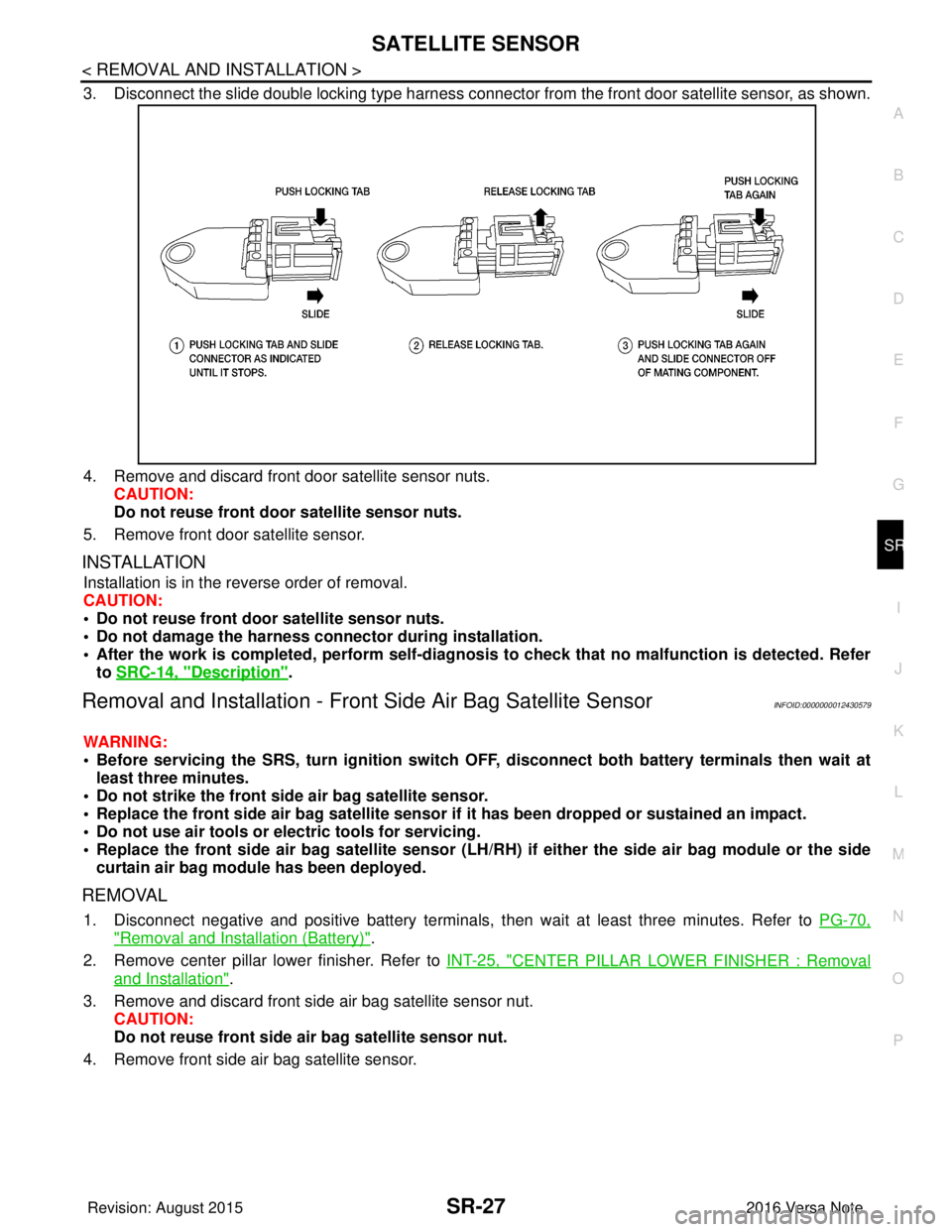
STARTING SYSTEM (WITHOUT INTELLIGENT KEY) : System DiagramINFOID:0000000012432064
STARTING SYSTEM (WITHOUT INTELLI GENT KEY) : System Description
INFOID:0000000012432065
The starter motor plunger closes and provides a closed circuit between the battery and the starter motor. The
starter motor is grounded to the cylinder block. With power and ground supplied, the starter motor operates.
STARTING SYSTEM (WITH INTELLIGENT KEY)
ALBIA1161GB
Revision: August 2015 2016 Versa Note
cardiagn.com