2016 NISSAN NOTE fuse
[x] Cancel search: fusePage 2536 of 3641
![NISSAN NOTE 2016 Service Repair Manual PCS
COMPONENT PARTSPCS-33
< SYSTEM DESCRIPTION > [POWER DISTRIBUTION SYSTEM]
C
D
E
F
G H
I
J
K L
B A
O P
N
SYSTEM DESCRIPTION
COMPONENT PARTS
Component Parts LocationINFOID:0000000012433288
AWMIA1438Z](/manual-img/5/57363/w960_57363-2535.png "NISSAN NOTE 2016 Service Repair Manual PCS
COMPONENT PARTSPCS-33
< SYSTEM DESCRIPTION > [POWER DISTRIBUTION SYSTEM]
C
D
E
F
G H
I
J
K L
B A
O P
N
SYSTEM DESCRIPTION
COMPONENT PARTS
Component Parts LocationINFOID:0000000012433288
AWMIA1438Z")
PCS
COMPONENT PARTSPCS-33
< SYSTEM DESCRIPTION > [POWER DISTRIBUTION SYSTEM]
C
D
E
F
G H
I
J
K L
B A
O P
N
SYSTEM DESCRIPTION
COMPONENT PARTS
Component Parts LocationINFOID:0000000012433288
AWMIA1438ZZ
No.
Component Description
1. Accessory relay-2 • Accessory relay-2 is controlled by BCM.
• Accessory relay-2 supplies accessory power supply or ignition switch ACC signal to each ECU
when ignition switch is turned to ACC or ON.
• BCM compares status of accessory relay-2 control signal, and ignition switch position judged
by BCM.
2. BCM • BCM controls power distribution system.
• BCM judges ignition switch position by push-button ignition switch (push switch) and vehicle
condition.
• BCM checks ignition switch position internally.
3. Push-button ignition
switch Push-button ignition switch (push switch) is pressed, and transmits status signal to BCM and
IPDM E/R.
4. IPDM E/R • IPDM E/R detects push-button ignition switch (push switch) status, and transmits push-button
ignition switch status signal (CAN) to BCM.
• IPDM E/R receives ignition relay-1 (IPDM E/R) control signal and ignition switch ON signal
(CAN) from BCM, and controls igniti on relay-1 (built into IPDM E/R)
5. Blower relay (in fuse
block) • Blower relay is controlled by BCM.
• Blower relay supplies ignition switch ON power supply or ignition switch ON signal to air con-
ditioning system when ignition switch is turned ON.
• BCM compares status of blower relay control signal and ignition switch position judged by BCM.
6. Accessory relay-1 (in
fuse block) • Accessory relay-1 is controlled by BCM.
• Accessory relay-1 supplies accessory power supply or ignition switch ACC signal to each ECU
when ignition switch is turned ACC or ON.
• BCM compares status of accessory relay-1 control signal, and ignition switch position judged by BCM.
7. Ignition relay-2 (in fuse
block) • Ignition relay-2 is controlled by BCM.
• Ignition relay-2 supplies ignition switch ON power supply or ignition switch ON signal to each
ECU and system when ignition switch is turned ON.
• BCM compares status of ignition relay-2 control signal and ignition switch position judged by
BCM.
• BCM monitors ignition relay-2 operating status by ignition relay feedback signal.
Revision: August 2015 2016 Versa Note
cardiagn.com
Page 2561 of 3641
![NISSAN NOTE 2016 Service Repair Manual PCS-58
< DTC/CIRCUIT DIAGNOSIS >[POWER DISTRIBUTION SYSTEM]
B2615 BLOWER RELAY CIRCUIT
B2615 BLOWER RELAY CIRCUIT
DTC LogicINFOID:0000000012433303
DTC DETECTION LOGIC
DTC CONFIRMATION PROCEDURE
1.PERF](/manual-img/5/57363/w960_57363-2560.png "NISSAN NOTE 2016 Service Repair Manual PCS-58
< DTC/CIRCUIT DIAGNOSIS >[POWER DISTRIBUTION SYSTEM]
B2615 BLOWER RELAY CIRCUIT
B2615 BLOWER RELAY CIRCUIT
DTC LogicINFOID:0000000012433303
DTC DETECTION LOGIC
DTC CONFIRMATION PROCEDURE
1.PERF")
PCS-58
< DTC/CIRCUIT DIAGNOSIS >[POWER DISTRIBUTION SYSTEM]
B2615 BLOWER RELAY CIRCUIT
B2615 BLOWER RELAY CIRCUIT
DTC LogicINFOID:0000000012433303
DTC DETECTION LOGIC
DTC CONFIRMATION PROCEDURE
1.PERFORM SELF DIAGNOSTIC RESULT
1. Turn ignition switch to ON, and wait for 1 second or more.
2. Check “Self Diagnostic Result” of “BCM” using CONSULT.
Is DTC B2615 detected?
YES >> Go to PCS-60, "Diagnosis Procedure".
NO >> Inspection End.
Diagnosis ProcedureINFOID:0000000012433304
Regarding Wiring Diagram information, refer to PCS-42, "Wiring Diagram".
1.CHECK BLOWER RELAY CONTROL SIGNAL VOLTAGE
1. Remove blower relay.
2. Check voltage between blower relay connector J-1 terminal 2 and ground.
Is the inspection result normal?
YES >> GO TO 3.
NO >> GO TO 2.
2.CHECK BLOWER RELAY CONTROL SIGNAL CIRCUIT
1. Turn ignition switch OFF.
2. Disconnect BCM connector M98.
3. Check continuity between BCM connector M98 terminal 106 and blower relay connector J-1 terminal 2.
4. Check continuity between BCM connector M98 terminal 106 and ground.
Is the inspection result normal?
YES >> Replace BCM. Refer to BCS-74, "Removal and Installation".
NO >> Repair or replace harness or connectors.
CONSULT Display DTC Detection Condition Possible Cause
BLOWER RELAY CIRCUIT
[B2615] An immediate operation of blower relay is requested
by BCM, but there is no response for more than 1
second. • Harness or connectors.
• Blower relay.
• Fuse block J/B.
•BCM.
Blower relay
GroundCondition Vo l ta g e
(Approx.)
Connector Terminal
J-1 2—Ignition: OFF
0 V
Ignition: ON Battery voltage
BCM Blower relay
Continuity
Connector TerminalConnector Terminal
M98 106J-1 2Yes
BCM
GroundContinuity
Connector Terminal
M98 106 No
Revision: August 2015 2016 Versa Note
cardiagn.com
Page 2563 of 3641
![NISSAN NOTE 2016 Service Repair Manual PCS-60
< DTC/CIRCUIT DIAGNOSIS >[POWER DISTRIBUTION SYSTEM]
B2616 IGNITION RELAY CIRCUIT
B2616 IGNITION RELAY CIRCUIT
DTC LogicINFOID:0000000012433305
DTC DETECTION LOGIC
DTC CONFIRMATION PROCEDURE
1.](/manual-img/5/57363/w960_57363-2562.png "NISSAN NOTE 2016 Service Repair Manual PCS-60
< DTC/CIRCUIT DIAGNOSIS >[POWER DISTRIBUTION SYSTEM]
B2616 IGNITION RELAY CIRCUIT
B2616 IGNITION RELAY CIRCUIT
DTC LogicINFOID:0000000012433305
DTC DETECTION LOGIC
DTC CONFIRMATION PROCEDURE
1.")
PCS-60
< DTC/CIRCUIT DIAGNOSIS >[POWER DISTRIBUTION SYSTEM]
B2616 IGNITION RELAY CIRCUIT
B2616 IGNITION RELAY CIRCUIT
DTC LogicINFOID:0000000012433305
DTC DETECTION LOGIC
DTC CONFIRMATION PROCEDURE
1. PERFORM SELF DIAGNOSTIC RESULT
1. Turn ignition switch to ON, and wait for 1 second or more.
2. Check “Self Diagnostic Result” of “BCM” using CONSULT.
Is DTC B2616 detected?
YES >> Refer to PCS-60, "Diagnosis Procedure".
NO >> Inspection End.
Diagnosis ProcedureINFOID:0000000012433306
Regarding Wiring Diagram information, refer to PCS-42, "Wiring Diagram".
1.CHECK IGNITION RELAY-2 CONTROL SIGNAL VOLTAGE
1. Remove ignition relay-2.
2. Check voltage between ignition relay-2 connector J-3 terminal 1 and ground.
Is the inspection result normal?
YES >> GO TO 3.
NO >> GO TO 2.
2.CHECK IGNITION RELAY-2 CONTROL SIGNAL CIRCUIT
1. Turn ignition switch OFF.
2. Disconnect BCM connector M98.
3. Check continuity between BCM connector M98 terminal 99 and ignition relay-2 connector J-3 terminal 1.
4. Check continuity between BCM connector M98 terminal 99 and ground.
Is the inspection result normal?
YES >> Replace BCM. Refer to BCS-74, "Removal and Installation".
NO >> Repair or replace harness or connectors.
CONSULT Display DTC Detection Condition Possible Cause
IGNITION RELAY CIRCUIT
[B2616] An immediate operation of ignition relay-2 is re-
quested by BCM, but there is no response for more
than 1 second. • Harness or connectors.
• Ignition relay-2.
• Fuse block J/B.
•BCM.
Ignition relay-2
Ground Condition Vo l ta g e
(Approx.)
Connector Terminal
J-3 1—Ignition: OFF
0 V
Ignition: ON Battery voltage
BCM Ignition relay-2
Continuity
Connector TerminalConnector Terminal
M98 99J-3 1Yes
BCM
GroundContinuity
Connector Terminal
M98 99 No
Revision: August 2015 2016 Versa Note
cardiagn.com
Page 2576 of 3641
![NISSAN NOTE 2016 Service Repair Manual PCS
POWER SUPPLY AND GROUND CIRCUITPCS-73
< DTC/CIRCUIT DIAGNOSIS > [POWER DISTRIBUTION SYSTEM]
C
D
E
F
G H
I
J
K L
B A
O P
N
POWER SUPPLY AND GROUND CIRCUIT
BCM
BCM : Diagnosis ProcedureINFOID:000000](/manual-img/5/57363/w960_57363-2575.png "NISSAN NOTE 2016 Service Repair Manual PCS
POWER SUPPLY AND GROUND CIRCUITPCS-73
< DTC/CIRCUIT DIAGNOSIS > [POWER DISTRIBUTION SYSTEM]
C
D
E
F
G H
I
J
K L
B A
O P
N
POWER SUPPLY AND GROUND CIRCUIT
BCM
BCM : Diagnosis ProcedureINFOID:000000")
PCS
POWER SUPPLY AND GROUND CIRCUITPCS-73
< DTC/CIRCUIT DIAGNOSIS > [POWER DISTRIBUTION SYSTEM]
C
D
E
F
G H
I
J
K L
B A
O P
N
POWER SUPPLY AND GROUND CIRCUIT
BCM
BCM : Diagnosis ProcedureINFOID:0000000012542520
Regarding Wiring Diagram information, refer to
BCS-52, "Wiring Diagram".
1.CHECK FUSES AND FUSIBLE LINK
Check that the following fuses and fusible link are not blown.
Is the fuse blown?
YES >> Replace the blown fuse or fusible link after repairing the affected circuit.
NO >> GO TO 2.
2.CHECK POWER SUPPLY CIRCUIT
1. Disconnect BCM connector M99.
2. Check voltage between BCM connector M99 and ground.
Is the inspection result normal?
YES >> GO TO 3.
NO >> Repair harness or connector.
3.CHECK GROUND CIRCUIT
Check continuity between BCM connector M99 and ground.
Is the inspection result normal?
YES >> Inspection End.
NO >> Repair harness or connector.
IPDM E/R (INTELLIGENT POWER DIST RIBUTION MODULE ENGINE ROOM)
IPDM E/R (INTELLIGENT POWER DISTRIBUTION MODULE ENGINE ROOM) : Di-
agnosis Procedure
INFOID:0000000012542521
Regarding Wiring Diagram information, refer to PCS-21, "Wiring Diagram".
1. CHECK FUSE AND FUSIBLE LINKS
Check that the following IPDM E/R fuse or fusible links are not blown.
Terminal No. Signal nameFuses and fusible link No.
57 Battery power supply 12 (10A)
70 G (40A)
BCM
Ground Voltage
Connector Terminal
M99 57
— Battery voltage
70
BCM GroundContinuity
Connector Terminal
M99 67—Yes
Revision: August 2015 2016 Versa Note
cardiagn.com
Page 2577 of 3641
![NISSAN NOTE 2016 Service Repair Manual PCS-74
< DTC/CIRCUIT DIAGNOSIS >[POWER DISTRIBUTION SYSTEM]
POWER SUPPLY AND GROUND CIRCUIT
Is the fuse blown?
YES >> Replace the blown fuse or fusible link after repairing the affected circuit.
NO >>](/manual-img/5/57363/w960_57363-2576.png "NISSAN NOTE 2016 Service Repair Manual PCS-74
< DTC/CIRCUIT DIAGNOSIS >[POWER DISTRIBUTION SYSTEM]
POWER SUPPLY AND GROUND CIRCUIT
Is the fuse blown?
YES >> Replace the blown fuse or fusible link after repairing the affected circuit.
NO >>")
PCS-74
< DTC/CIRCUIT DIAGNOSIS >[POWER DISTRIBUTION SYSTEM]
POWER SUPPLY AND GROUND CIRCUIT
Is the fuse blown?
YES >> Replace the blown fuse or fusible link after repairing the affected circuit.
NO >> GO TO 2.
2. CHECK BATTERY POWER SUPPLY CIRCUIT
1. Disconnect IPDM E/R connector E42.
2. Check voltage between IPDM E/R connector E42 and ground.
Is the inspection result normal?
YES >> GO TO 3.
NO >> Repair or replace harness or connectors.
3. CHECK GROUND CIRCUIT
1. Disconnect IPDM E/R connectors E45, E46 and E47.
2. Check continuity between IPDM E/R connectors and ground.
Is the inspection result normal?
YES >> Inspection End.
NO >> Repair or replace harness or connectors.
Terminal No. Signal nameFuse and fusible link Nos.
1 Battery power supply A (120A), E (80A)
2 B (60A)
IPDM E/R
GroundVol tag e
(Approx.)
Connector Terminal
E42 1
—Battery voltage
2
IPDM E/R
GroundContinuity
Connector Terminal
E45 19
Ye s
E46 60
E47 89
Revision: August 2015 2016 Versa Note
cardiagn.com
Page 2588 of 3641

PG
PG-1
ELECTRICAL & POWER CONTROL
C
DE
F
G H
I
J
K L
B
SECTION PG
A
O P
N
CONTENTS
POWER SUPPLY, GROUND & CIRCUIT ELEMENTS
PRECAUTION .......
........................................3
PRECAUTIONS .............................................. .....3
Precaution for Supplemental Restraint System
(SRS) "AIR BAG" and "SEAT BELT PRE-TEN-
SIONER" ............................................................. ......
3
Precaution for Power Generation Voltage Variable
Control System ..........................................................
3
PREPARATION ............................................4
PREPARATION .............................................. .....4
Special Service Tools .......................................... ......4
Commercial Service Tool ..........................................4
SYSTEM DESCRIPTION ..............................5
ELECTRICAL UNITS LOCATION .................. .....5
Electrical Units Location ...................................... ......5
COMPONENT PARTS ........................................9
Circuit Breaker (Built Into BCM) .......................... ......9
Harness Connector ...................................................9
Standardized Relay ............................................. ....12
WIRING DIAGRAM ......................................15
POWER SUPPLY ROUTING CIRCUIT .......... ....15
Wiring Diagram — Battery Power Supply — ....... ....15
Wiring Diagram — Accessory Power Supply — .....23
Wiring Diagram — Ignition Power Supply — ..........27
GROUND ............................................................35
Ground Distribution ............................................. ....35
HARNESS ...................................................... ....42
Harness Layout ................................................... ....42
FUSE BLOCK - JUNCTION BOX (J/B) .............58
Terminal Arrangement ............................................58
FUSE AND FUSIBLE LINK BOX ................... ....59
Terminal Arrangement ............................................59
IPDM E/R (INTELLIGENT POWER DISTRI-
BUTION MODULE ENGINE ROOM) ................
60
IPDM E/R Terminal Arrangement ........................ ....60
BASIC INSPECTION ...................................61
BATTERY ..........................................................61
How to Handle Battery ......................................... ....61
Work Flow ................................................................61
INSPECTION AND ADJUSTMENT ..................64
ADDITIONAL SERVICE WHEN REMOVING BAT-
TERY NEGATIVE TERMINAL ............................... ....
64
ADDITIONAL SERVICE WHEN REMOVING
BATTERY NEGATIVE TERMINAL : Special Re-
pair Requirement .....................................................
64
FUSE INSPECTION ..........................................65
How To Check .........................................................65
FUSIBLE LINK INSPECTION ...........................69
Fusible Link .............................................................69
REMOVAL AND INSTALLATION ...............70
BATTERY ..........................................................70
Exploded View ..................................................... ....70
Removal and Installation (Battery) ..........................70
Removal and Installation (Battery Tray) ..................71
BATTERY TERMINAL WITH FUSIBLE LINK ...72
Exploded View .........................................................72
Removal and Installation .........................................72
BATTERY CURRENT SENSOR .......................73
Exploded View .........................................................73
Removal and Installation .........................................73
SERVICE DATA AND SPECIFICATIONS
(SDS) ............... .......................................... ...
74
Revision: August 2015 2016 Versa Note
cardiagn.com
Page 2630 of 3641
PG
HARNESSPG-43
< WIRING DIAGRAM >
C
DE
F
G H
I
J
K L
B A
O P
N
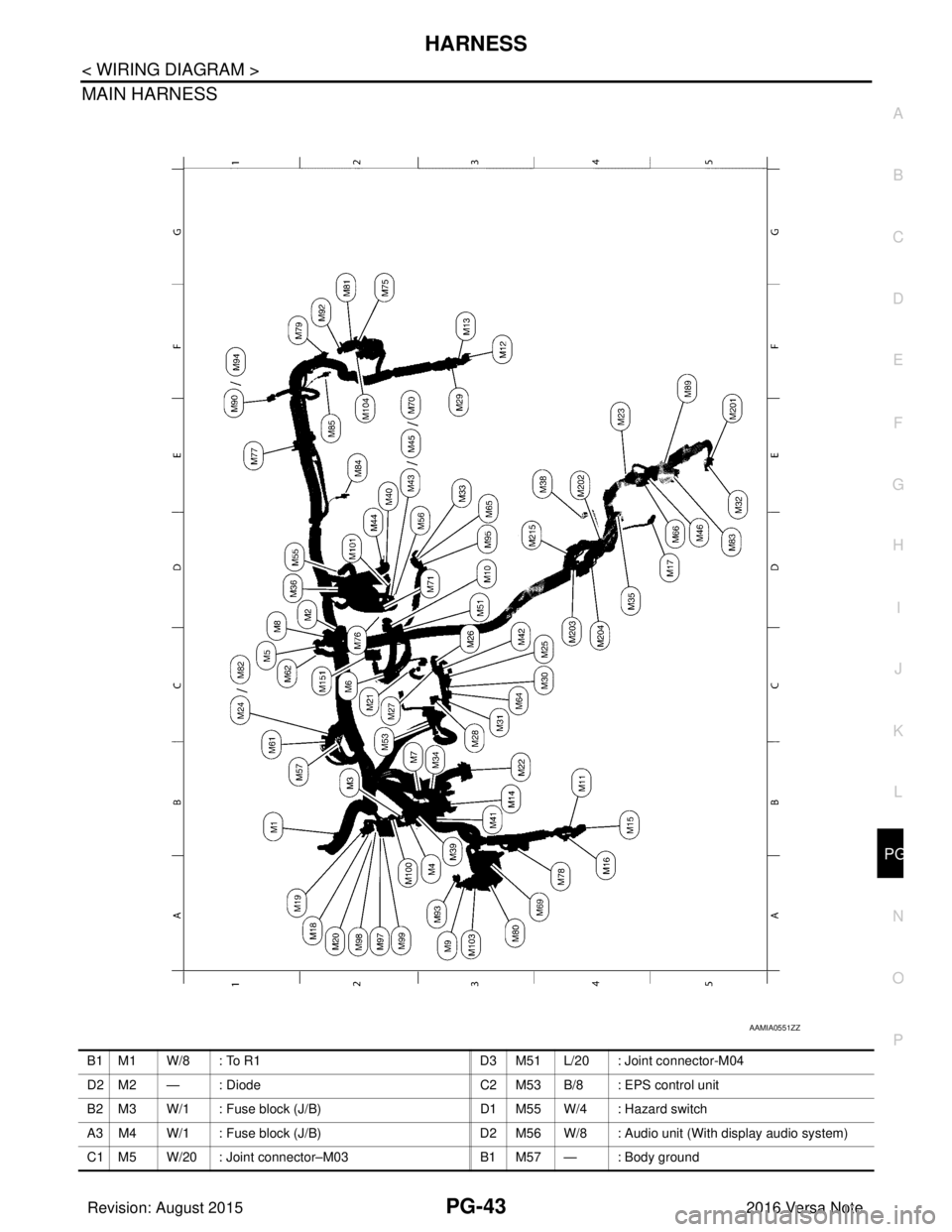
MAIN HARNESS
AAMIA0551ZZ
B1 M1 W/8 : To R1
D3 M51 L/20 : Joint connector-M04
D2 M2 — : Diode C2 M53 B/8 : EPS control unit
B2 M3 W/1 : Fuse block (J/B) D1 M55 W/4 : Hazard switch
A3 M4 W/1 : Fuse block (J/B) D2 M56 W/8 : Audio unit (With display audio system)
C1 M5 W/20 : Joint connector–M03 B1 M57 — : Body ground
Revision: August 2015 2016 Versa Note
cardiagn.com
Page 2645 of 3641
PG-58
< WIRING DIAGRAM >
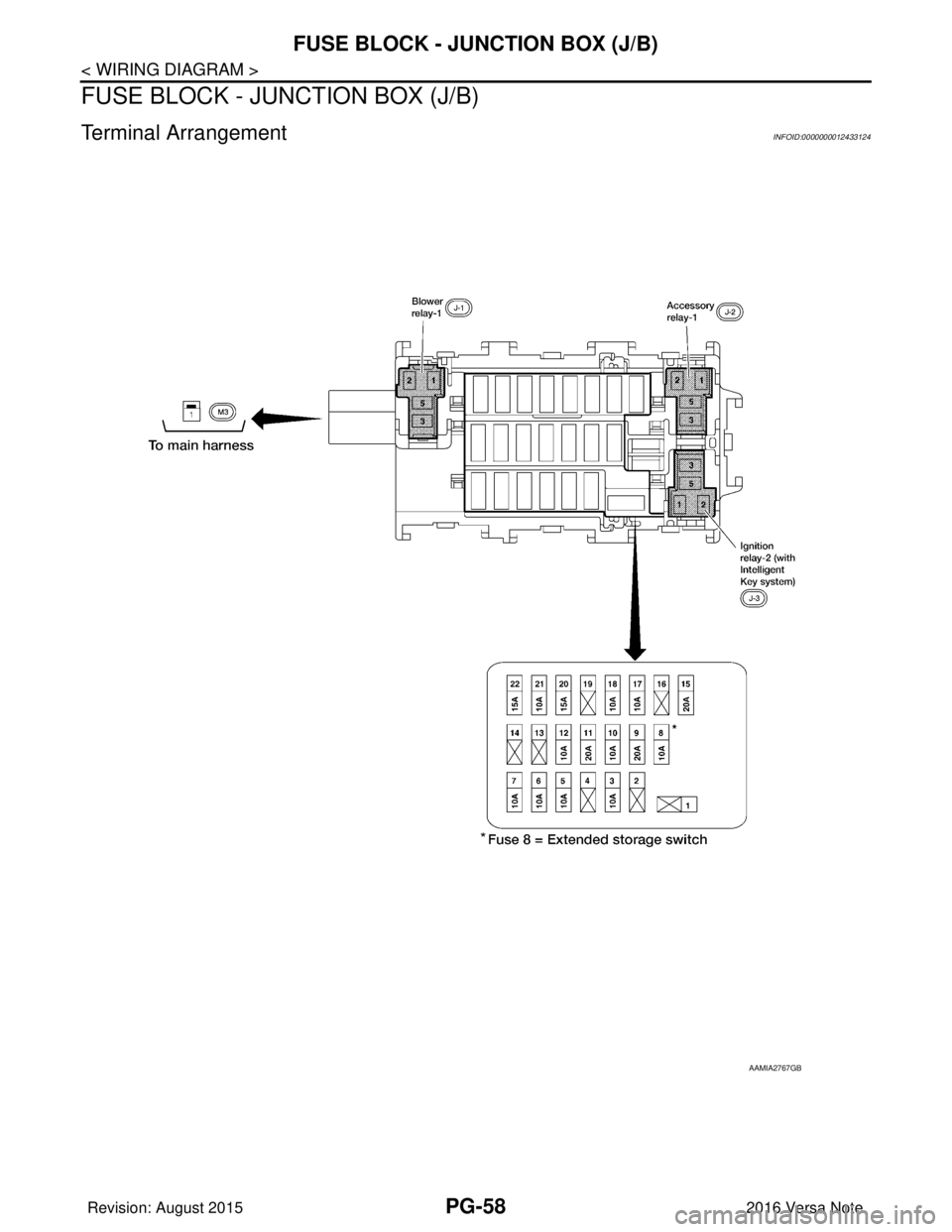
FUSE BLOCK - JUNCTION BOX (J/B)
FUSE BLOCK - JUNCTION BOX (J/B)
Terminal ArrangementINFOID:0000000012433124
AAMIA2767GB
Revision: August 20152016 Versa Note
cardiagn.com