Page 665 of 2453

SL-36
Front Door Latch and Door Lock Actuator Assembly
SECURITY AND LOCKS
7. Front Door Latch and Door
Lock Actuator Assembly
A: REMOVAL
1) Disconnect the ground cable from battery.
2) Raise the rear door glass to the top position.
3) Remove the front door trim.
MOVAL, Door Trim.>
4) Remove the cable from the front inner remote.
5) Remove the sealing cover.
MOVAL, Front Sealing Cover.>
6) Remove the door sash.
MOVAL, Front Regulator and Motor Assembly.>
7) Remove the connection rod of the key cylinder
lever. (Driver’s side only)
8) Remove the three screws and one bolt.
9) Remove the front door latch and actuator as-
sembly, and disconnect the connector.
B: INSTALLATION
Install in the reverse order of removal.
NOTE:
Make sure lock and unlock works correctly after in-
stallation.
C: INSPECTION
1) Check the rod and cable for deformation. When
it is deformed, straighten it because failure opera-
tions may occur. When it is unrepairable, replace
the front door latch and actuator assembly.
2) Check the lever, rod and cable for smooth oper-
ation.
SL-00443
Page 666 of 2453
SL-37
Front Door Lock Actuator
SECURITY AND LOCKS
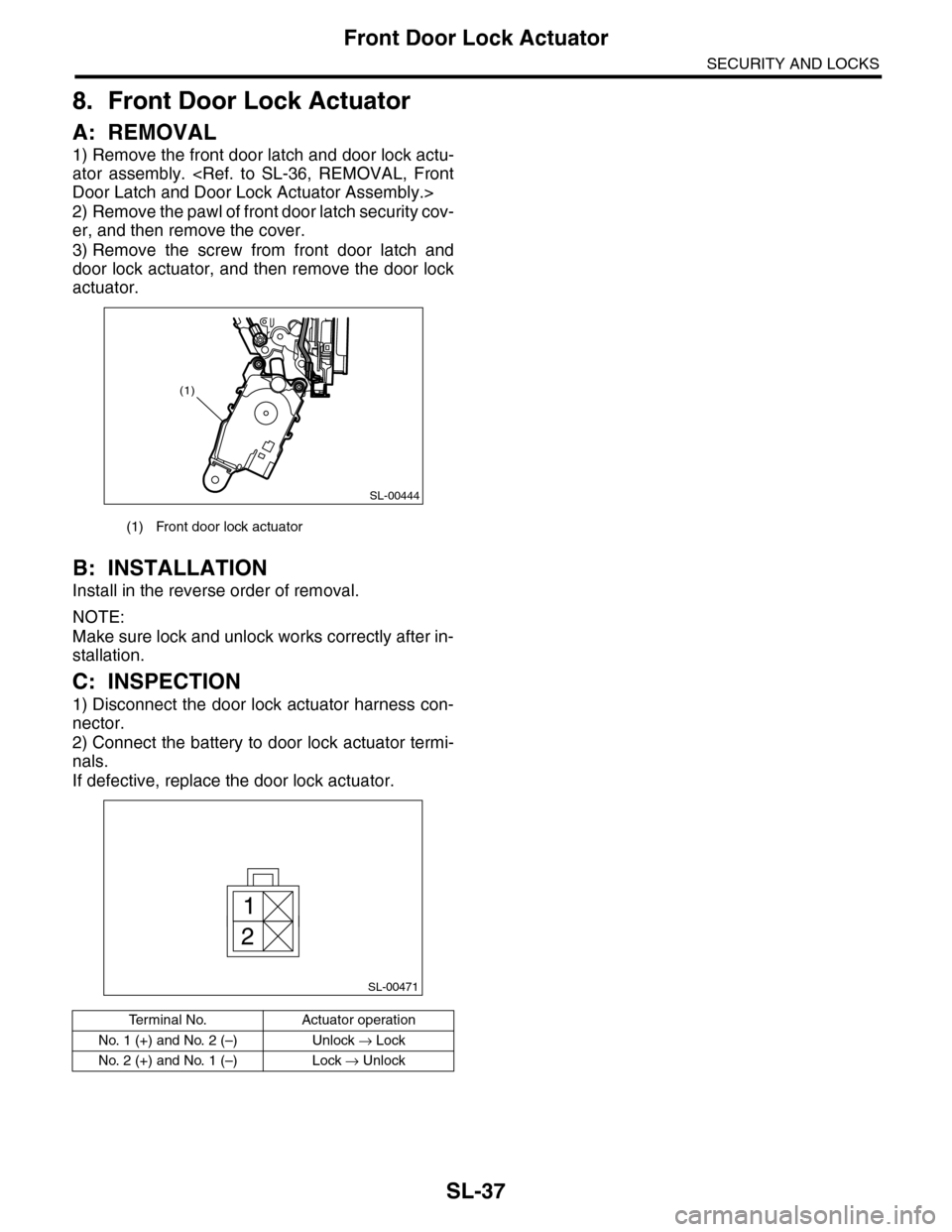
8. Front Door Lock Actuator
A: REMOVAL
1) Remove the front door latch and door lock actu-
ator assembly.
Door Latch and Door Lock Actuator Assembly.>
2) Remove the pawl of front door latch security cov-
er, and then remove the cover.
3) Remove the screw from front door latch and
door lock actuator, and then remove the door lock
actuator.
B: INSTALLATION
Install in the reverse order of removal.
NOTE:
Make sure lock and unlock works correctly after in-
stallation.
C: INSPECTION
1) Disconnect the door lock actuator harness con-
nector.
2) Connect the battery to door lock actuator termi-
nals.
If defective, replace the door lock actuator.
(1) Front door lock actuator
Te r m i n a l N o . A c t u a t o r o p e r a t i o n
No. 1 (+) and No. 2 (–) Unlock → Lock
No. 2 (+) and No. 1 (–) Lock → Unlock
SL-00444
(1)
SL-00471
1
2
Page 668 of 2453
SL-39
Rear Outer Handle
SECURITY AND LOCKS
10.Rear Outer Handle
A: REMOVAL
1) Raise the rear door glass to the top position.
2) Disconnect the ground cable from battery.
3) Remove the rear door trim.
MOVAL, Door Trim.>
4) Remove the sealing cover.
MOVAL, Rear Sealing Cover.>
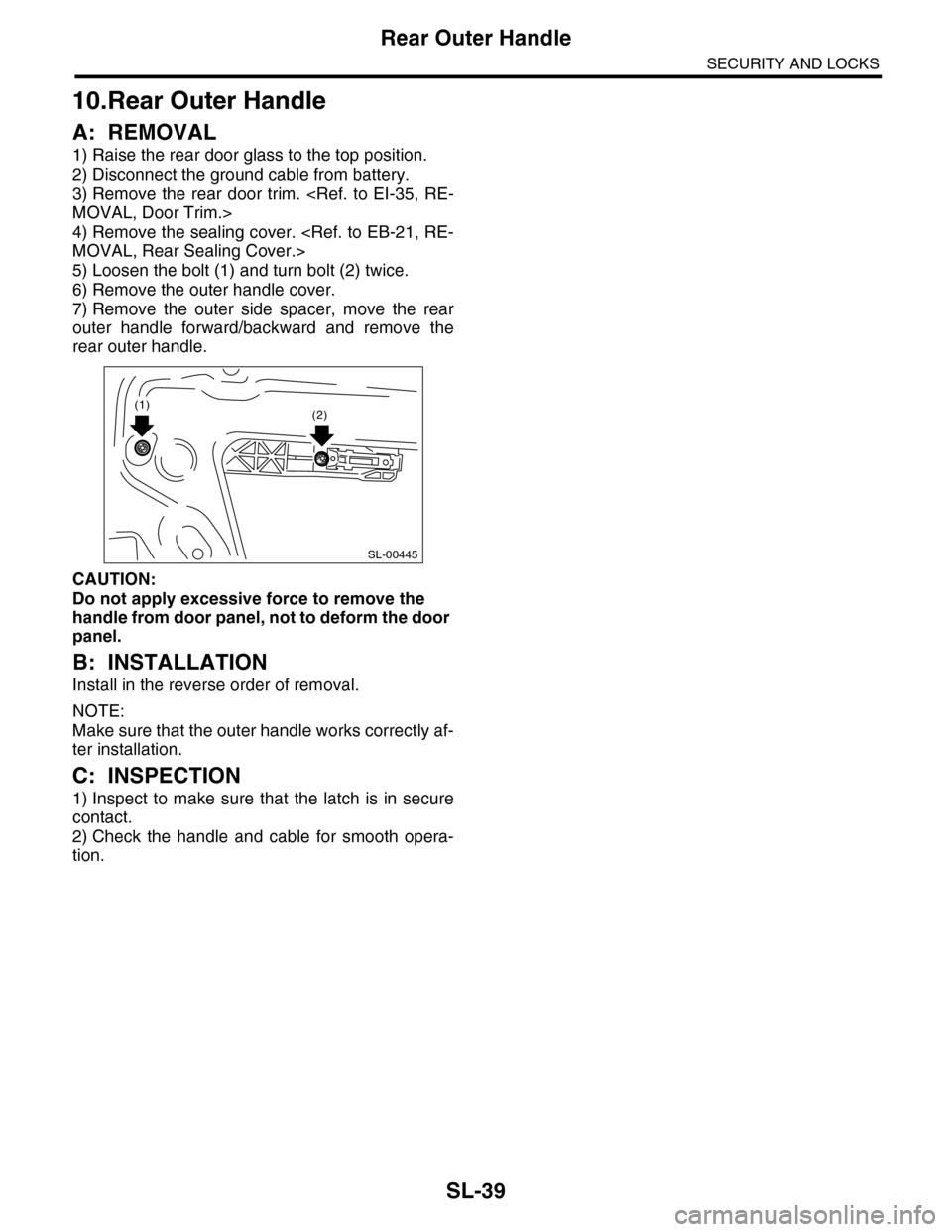
5) Loosen the bolt (1) and turn bolt (2) twice.
6) Remove the outer handle cover.
7) Remove the outer side spacer, move the rear
outer handle forward/backward and remove the
rear outer handle.
CAUTION:
Do not apply excessive force to remove the
handle from door panel, not to deform the door
panel.
B: INSTALLATION
Install in the reverse order of removal.
NOTE:
Make sure that the outer handle works correctly af-
ter installation.
C: INSPECTION
1) Inspect to make sure that the latch is in secure
contact.
2) Check the handle and cable for smooth opera-
tion.
SL-00445
(1)(2)
Page 669 of 2453

SL-40
Rear Door Latch and Door Lock Actuator Assembly
SECURITY AND LOCKS
11.Rear Door Latch and Door
Lock Actuator Assembly
A: REMOVAL
1) Raise the door glass to the top position.
2) Disconnect the ground cable from battery.
3) Remove the rear door trim.
MOVAL, Door Trim.>
4) Remove the cable from rear inner remote.
to SL-38, REMOVAL, Rear Inner Remote.>
5) Remove the sealing cover.
MOVAL, Rear Sealing Cover.>
6) Remove the rear sash.
MOVAL, Rear Regulator and Motor Assembly.>
7) Pull out the cable from the cable clamp of the
outer handle.
8) Remove the three screws and one bolt.
9) Disconnect the connectors, and then remove the
rear door latch and door lock actuator assembly.
B: INSTALLATION
Install in the reverse order of removal.
NOTE:
Make sure lock and unlock works correctly after in-
stallation.
C: INSPECTION
1) Check the cable for deformation. When it is de-
formed, straighten it because failure operations
may occur. When it is unrepairable, replace the
rear door latch and door lock actuator assembly.
2) Check that the lever and cable operates smooth-
ly.
SL-00443
Page 670 of 2453
SL-41
Rear Door Lock Actuator
SECURITY AND LOCKS
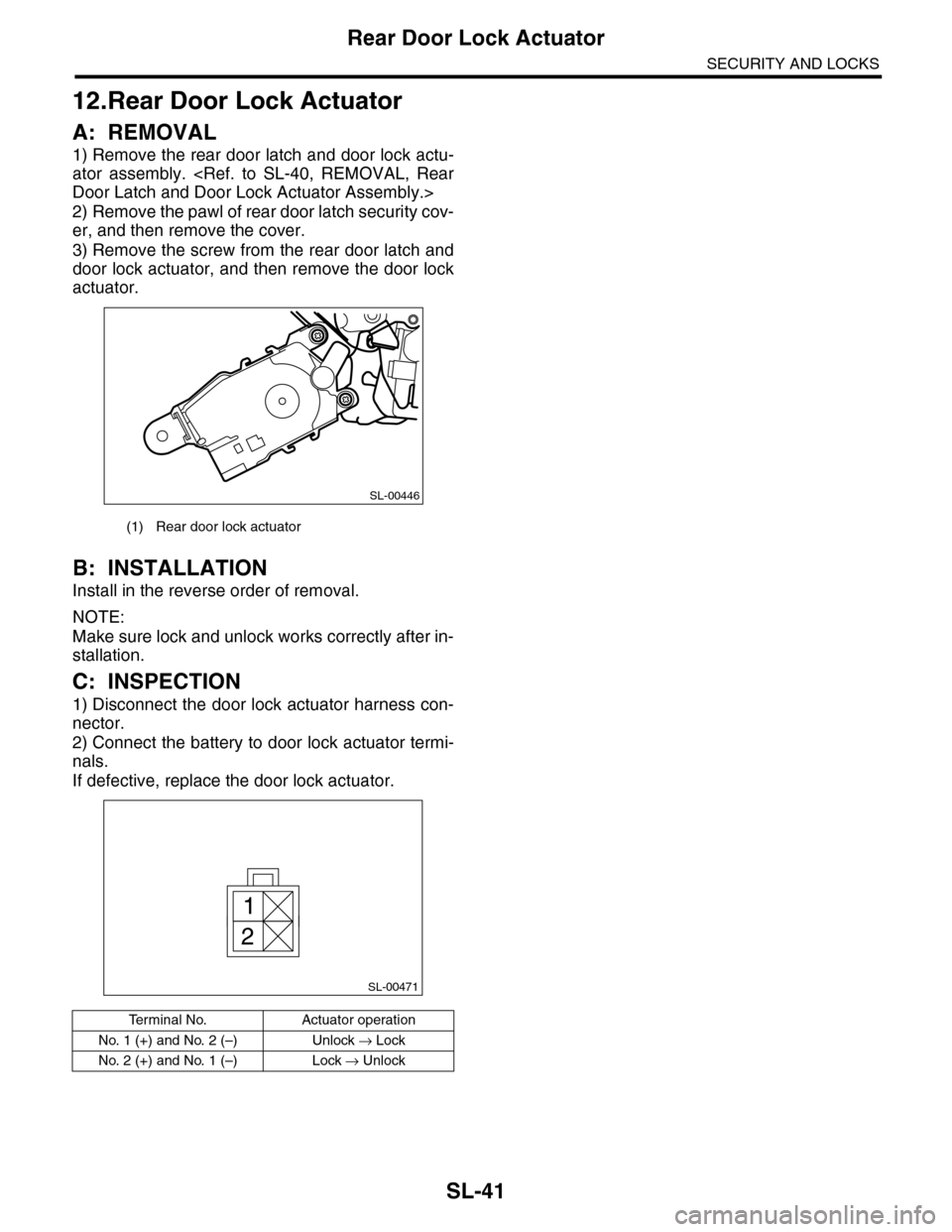
12.Rear Door Lock Actuator
A: REMOVAL
1) Remove the rear door latch and door lock actu-
ator assembly.
Door Latch and Door Lock Actuator Assembly.>
2) Remove the pawl of rear door latch security cov-
er, and then remove the cover.
3) Remove the screw from the rear door latch and
door lock actuator, and then remove the door lock
actuator.
B: INSTALLATION
Install in the reverse order of removal.
NOTE:
Make sure lock and unlock works correctly after in-
stallation.
C: INSPECTION
1) Disconnect the door lock actuator harness con-
nector.
2) Connect the battery to door lock actuator termi-
nals.
If defective, replace the door lock actuator.
(1) Rear door lock actuator
Te r m i n a l N o . A c t u a t o r o p e r a t i o n
No. 1 (+) and No. 2 (–) Unlock → Lock
No. 2 (+) and No. 1 (–) Lock → Unlock
SL-00446
SL-00471
1
2
Page 672 of 2453
SL-43
Rear Gate Latch Assembly
SECURITY AND LOCKS
14.Rear Gate Latch Assembly
A: REMOVAL
1) Disconnect the ground cable from battery.
2) Remove the rear gate trim.
MOVAL, Rear Gate Trim.>
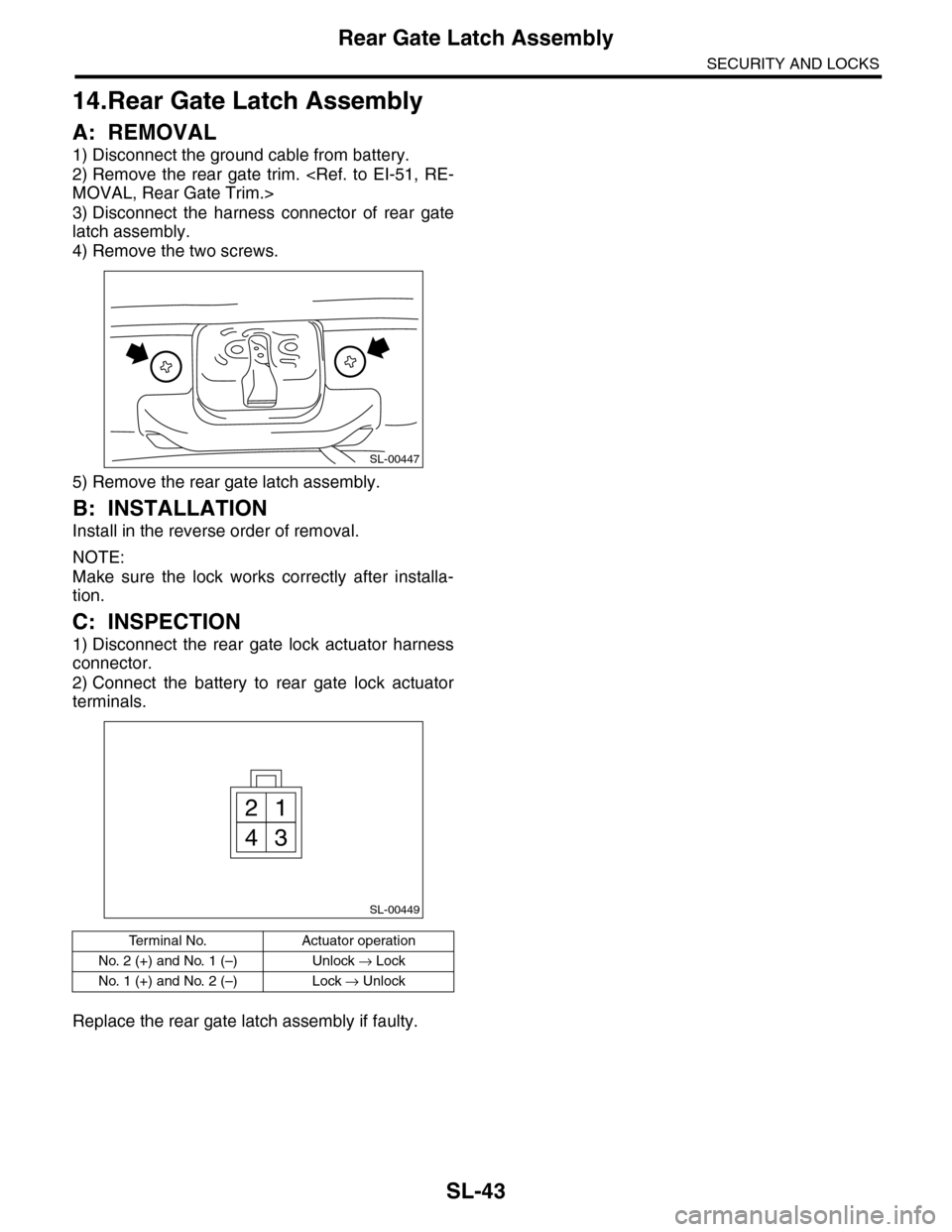
3) Disconnect the harness connector of rear gate
latch assembly.
4) Remove the two screws.
5) Remove the rear gate latch assembly.
B: INSTALLATION
Install in the reverse order of removal.
NOTE:
Make sure the lock works correctly after installa-
tion.
C: INSPECTION
1) Disconnect the rear gate lock actuator harness
connector.
2) Connect the battery to rear gate lock actuator
terminals.
Replace the rear gate latch assembly if faulty.
Te r m i n a l N o . A c t u a t o r o p e r a t i o n
No. 2 (+) and No. 1 (–) Unlock → Lock
No. 1 (+) and No. 2 (–) Lock → Unlock
SL-00447
SL-00449
21
43
Page 675 of 2453
SL-46
Ignition Key Lock
SECURITY AND LOCKS
17.Ignition Key Lock
A: REPLACEMENT
1) Disconnect the ground cable from battery.
2) Remove the steering column.
REMOVAL, Tilt Steering Column.>
3) Secure the steering column in a vise. Remove
the bolt with a drill.
4) Remove the ignition key lock.
5) Using a new bolt, tighten the bolts all the way.
B: INSPECTION
1) Remove the instrument panel lower panel.
2) Remove the lower column cover.
3) Unfasten the fixing clip which secures harness,
and then disconnect the connector of the ignition
switch from body harness.
4) Turn the ignition key plate to each position and
check the continuity between terminals of ignition
connector.
If NG, replace the ignition switch.
SL-00024
SL-00025
Switch position Terminal No. Standard
LOCK — —
ACC No. 3 and No. 4 Less than 1 Ω
ON
No. 3, No. 1 and
No. 4
No. 3 and No. 6
Less than 1 Ω
ST
No. 3 and No. 1
No. 3, No. 2 and
No. 6
Less than 1 Ω
SL-00266
13
456
2
Page 678 of 2453

SL-49
Impact Sensor
SECURITY AND LOCKS
20.Impact Sensor
A: REMOVAL
1) Remove the key from ignition switch.
2) Close all doors and the rear gate.
3) Press the UNLOCK button of the keyless trans-
mitter.
4) Change the setting of impact sensor using Sub-
aru Select Monitor.
5) Disconnect the ground cable from battery.
6) Remove the impact sensor.
B: INSTALLATION
1) Remove the key from ignition switch.
2) Close all doors and the rear gate.
3) Press the UNLOCK button of the keyless trans-
mitter.
4) Disconnect the ground cable from battery.
5) Install the impact sensor.
6) Connect the ground cable to the battery.
7) Change the setting of impact sensor using Sub-
aru Select Monitor.
C: OPERATION
1. IMPACT SENSOR SETTING USING SUB-
ARU SELECT MONITOR
1) Connect the Subaru Select Monitor to data link
connector.
2) Turn the ignition switch to ON.
3) Select {Integ. unit} from main menu.
4) Select {ECU customizing}.
5) Make a impact monitor setting.
•When installing: ON
•When removing: OFF
6) Make a impact monitor ON/OFF setting.
•When installing: ON
•When removing: OFF
7) Turn the ignition switch to OFF, and then remove
the Subaru Select Monitor.
D: ADJUSTMENT
1. CHECK IMPACT SENSOR
1) Remove the key from ignition switch.
2) Close all windows.
3) Close all doors and the rear gate. Leave open
the front hood.
4) Press the LOCK button of the keyless transmit-
ter from outside of vehicle.
5) Check that the security indicator light blinks
twice within 0.5 seconds in 2 seconds cycle after 30
seconds.
6) Hit the windshield with your palm continuously
and check the security alarm operates. Lift up the
front hood approx. 12 cm (4.7 in) or more, and then
drop it off to check the operation of security alarm.
7) If NG, adjust the impact sensitivity.
2. IMPACT SENSITIVITY ADJUSTMENT
1) Connect the Subaru Select Monitor to data link
connector.
2) Turn the ignition switch to ON.
3) Select {Impact Sensor} from the main menu.
4) Make a {ECU customizing}.
•Sensitivity can be adjusted in 11 levels (0 to 10).
•Initial setting is 5.
•Smaller number means more sensitive.
•Larger number means less sensitive.
5) Turn the ignition switch to OFF, and then remove
the Subaru Select Monitor.
NOTE:
•Set the sensor so as not to let the alarm on nor-
mal vibration (reclining to the door, hit the ball and
etc.).
•Set the sensor to operate the alarm with hitting
the door or window glass, etc. continuously like a
mayhem by robbery.
•Ask the customer about parking situation for set-
ting, because the alarm operate when the vibration
not only the burglar but also the construction etc.