Page 694 of 2453
SR-10
Sunroof Switch
SUNROOF/T-TOP/CONVERTIBLE TOP (SUNROOF)
6. Sunroof Switch
A: REMOVAL
1) Disconnect the ground cable from battery.
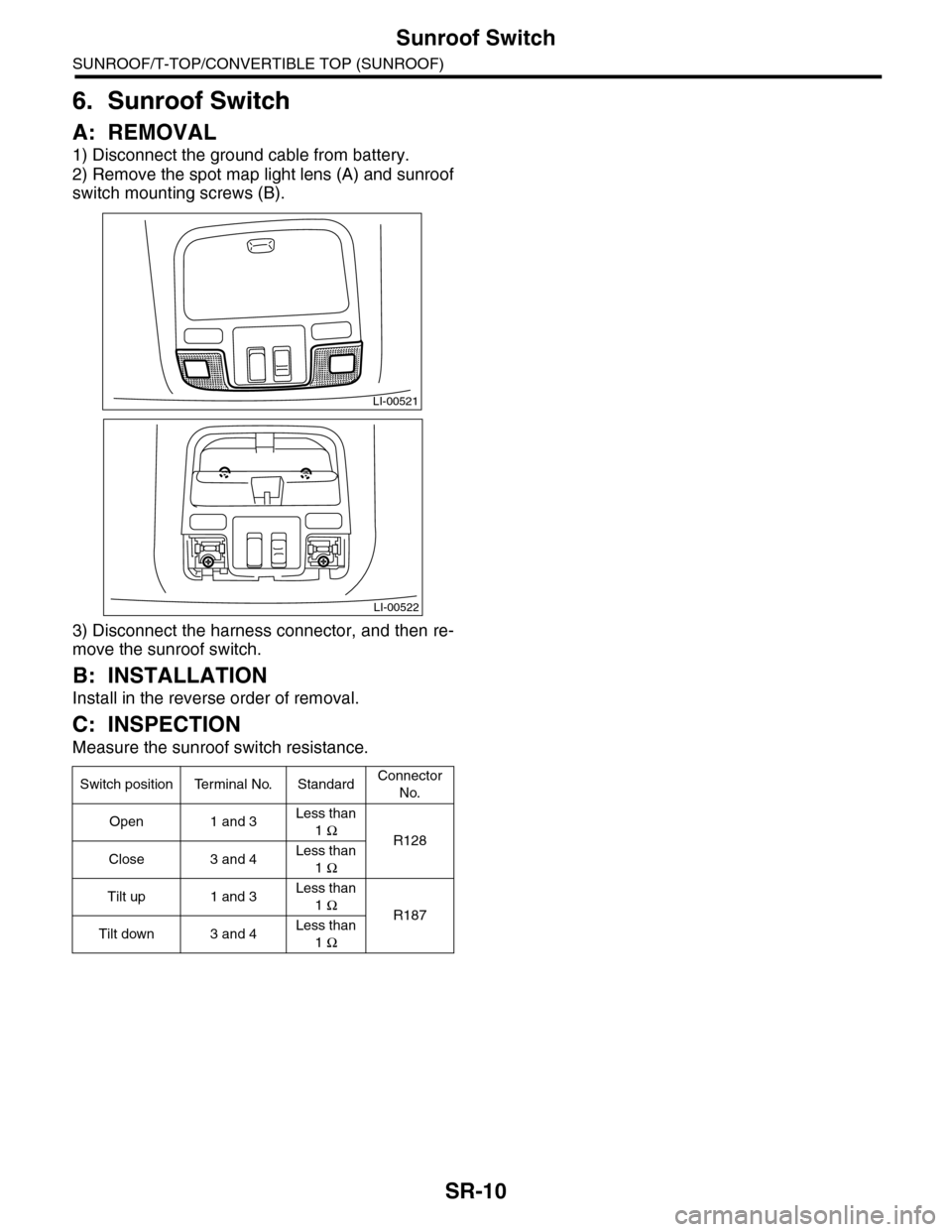
2) Remove the spot map light lens (A) and sunroof
switch mounting screws (B).
3) Disconnect the harness connector, and then re-
move the sunroof switch.
B: INSTALLATION
Install in the reverse order of removal.
C: INSPECTION
Measure the sunroof switch resistance.
Switch position Terminal No. StandardConnector
No.
Open 1 and 3Less than
1 ΩR128
Close 3 and 4Less than
1 Ω
Tilt up 1 and 3Less than
1 ΩR187
Tilt down 3 and 4Less than
1 Ω
LI-00521
LI-00522
Page 701 of 2453
WW-6
Combination Switch (Wiper)
WIPER AND WASHER SYSTEMS
3. Combination Switch (Wiper)
A: REMOVAL
1) Disconnect the ground cable from battery.
2) Remove the driver’s airbag module.
15, REMOVAL, Driver’s Airbag Module.>
3) Remove the steering wheel.
MOVAL, Steering Wheel.>
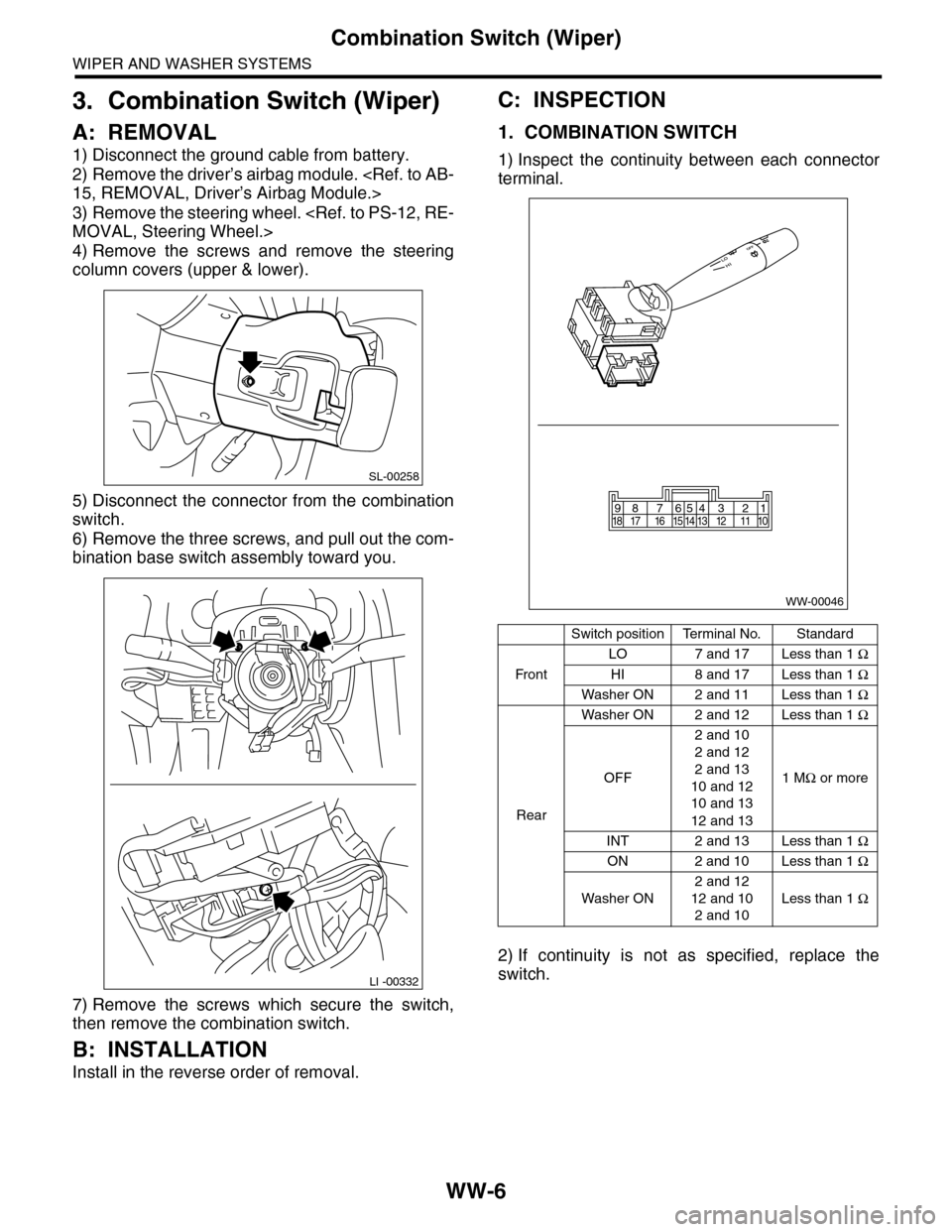
4) Remove the screws and remove the steering
column covers (upper & lower).
5) Disconnect the connector from the combination
switch.
6) Remove the three screws, and pull out the com-
bination base switch assembly toward you.
7) Remove the screws which secure the switch,
then remove the combination switch.
B: INSTALLATION
Install in the reverse order of removal.
C: INSPECTION
1. COMBINATION SWITCH
1) Inspect the continuity between each connector
terminal.
2) If continuity is not as specified, replace the
switch.
SL-00258
LI -00332
Switch positionTerminal No.Standard
Fr o n t
LO 7 and 17 Less than 1 Ω
HI 8 and 17 Less than 1 Ω
Washer ON 2 and 11 Less than 1 Ω
Rear
Washer ON 2 and 12 Less than 1 Ω
OFF
2 and 10
2 and 12
2 and 13
10 and 12
10 and 13
12 and 13
1 MΩ or more
INT 2 and 13 Less than 1 Ω
ON 2 and 10 Less than 1 Ω
Washer ON
2 and 12
12 and 10
2 and 10
Less than 1 Ω
WW-00046
87654321917 16 15 14 13 12 11 1018
Page 702 of 2453

WW-7
Combination Switch (Wiper)
WIPER AND WASHER SYSTEMS
2. FRONT WIPER
1) Check with Subaru Select Monitor
2) Check the intermittent operation (inspection of
the wiper switch alone)
(1) Set the voltage meter between connector
terminal No. 7 (+) and No. 2 (–).
(2) Connect the battery between connector ter-
minal No. 7 (+) and No. 2 (–).
(3) Turn the wiper switch to INT.
(4) Connect the battery ground terminal to the
connector terminal No. 16 for five seconds.
(5) After connecting the battery ground terminal
for five seconds in step (4), connect the battery
positive terminal to the connector terminal No.
16 for five seconds.
(6) After connecting the battery ground terminal
and the battery positive terminal to the connec-
tor terminal No. 16 for five seconds each in step
(4) and (5), connect the ground terminal to the
connector terminal No. 16 again.
(7) Perform the step (1) to (6) above at MIN and
MAX position of the intermittent control switch.
If operation is not as specification, replace the
wiper switch assembly.
3) Inspect the vehicle speed response (With the
wiper switch installed on the vehicle)
(1) Operational check
Position the front wiper switch to INT, then mea-
sure the intermittent stationary time at each ve-
hicle speed.
If operation is not as specified, replace the
switch.
(2) CHECK VEHICLE SPEED SIGNAL.
Raise the vehicle speed to more than 10 km/h
(6 mph), then measure the voltage between the
wiper switch connector and the chassis ground.
Terminals
No. 15 (+) — Chassis ground (–):
Step Check Yes No
1CHECK INPUT SIGNAL TO THE BODY INTE-
GRATED UNIT.
When the front wiper switch is operated, check
the input signal using the Subaru Select Moni-
tor.
1) Connect the Subaru Select Monitor to data
link connector.
2) Turn the ignition switch to ON.
3) Select {Integ. unit} from main menu.
4) Select the {Current Data Display & Save}.
5) Check the input signal when the front wiper
switch is set to LO or HI.
Is the input signal normal? Finish the diagno-
sis.
Replace the body
integrated unit.
Body Integrated
Unit.>
S: Intermittent down-
time (sec.)
(A): Connect battery ter-
minal to No. 16 in
Step (4).
Intermittent stationary time
specification
MIN: Approx. 4 seconds
MAX: Approx. 21seconds
Switch positionVe h i c l e s p e e d
(km/h (MPH))
Intermittent
stationary time
(sec.)
MIN.
0 (0) Approx. 4
30 (19) Approx. 1.5
60 (37) Approx. 1
MAX.
0 (0) Approx. 21
30 (19) Approx. 19.5
60 (37) Approx. 18
Check Yes No
Does the voltage repeat
12 V and 0 V?
Ve h i c l e s p e e d
signal is nor-
mal.
Replace the
wiper switch.
Page 708 of 2453
WW-13
Washer Tank and Motor
WIPER AND WASHER SYSTEMS
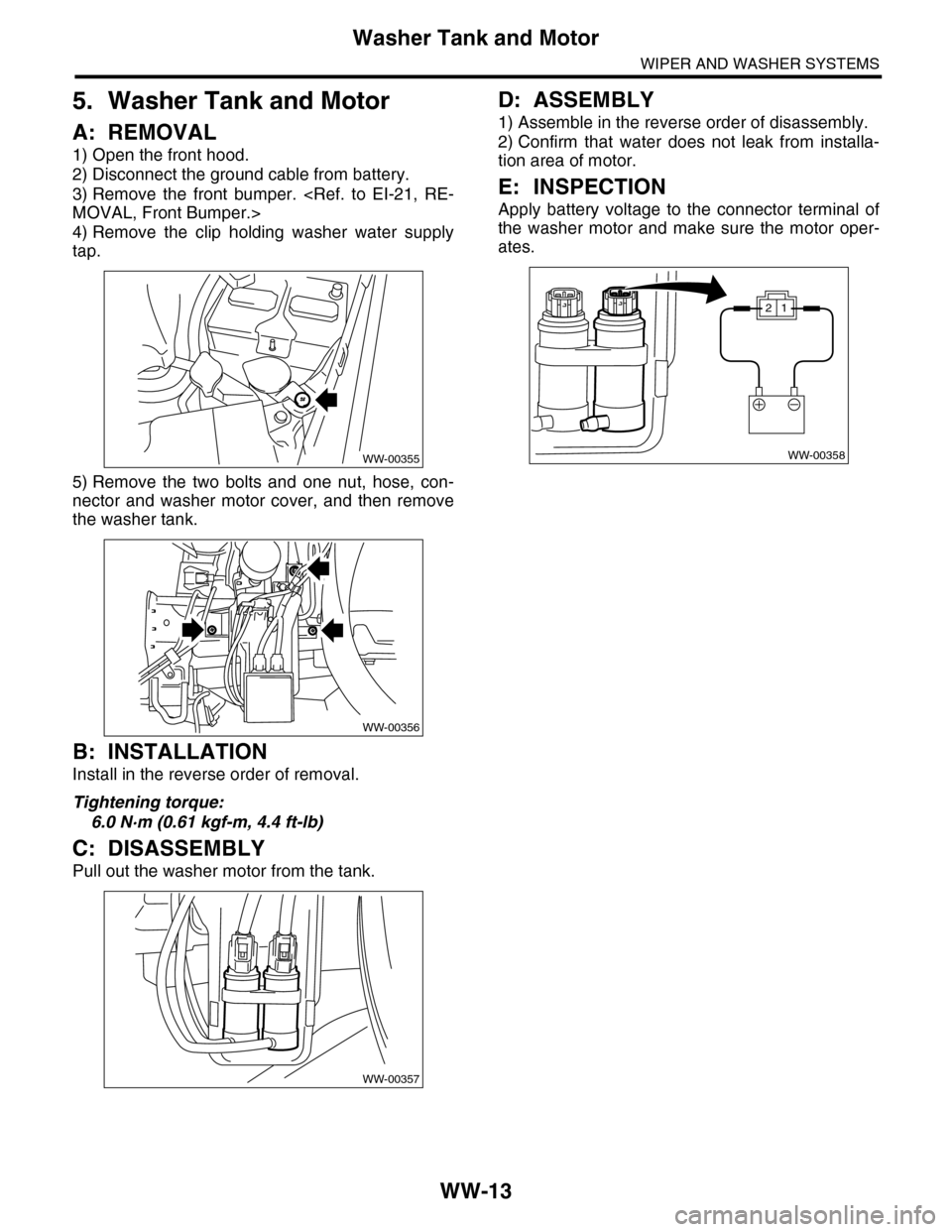
5. Washer Tank and Motor
A: REMOVAL
1) Open the front hood.
2) Disconnect the ground cable from battery.
3) Remove the front bumper.
MOVAL, Front Bumper.>
4) Remove the clip holding washer water supply
tap.
5) Remove the two bolts and one nut, hose, con-
nector and washer motor cover, and then remove
the washer tank.
B: INSTALLATION
Install in the reverse order of removal.
Tightening torque:
6.0 N·m (0.61 kgf-m, 4.4 ft-lb)
C: DISASSEMBLY
Pull out the washer motor from the tank.
D: ASSEMBLY
1) Assemble in the reverse order of disassembly.
2) Confirm that water does not leak from installa-
tion area of motor.
E: INSPECTION
Apply battery voltage to the connector terminal of
the washer motor and make sure the motor oper-
ates.
WW-00355
WW-00356
WW-00357
WW-00358
12
Page 709 of 2453

WW-14
Wiper Relay Unit
WIPER AND WASHER SYSTEMS
6. Wiper Relay Unit
A: REMOVAL
1) Disconnect the ground cable from battery.
2) Remove the wiper arm.
MOVAL, Front Wiper Arm.>
3) Remove the cowl panel.
MOVAL, Cowl Panel.>
4) Disconnect connector (A) of the wiper motor as-
sembly.
5) Remove bolt (B) and clip (C).
6) Disconnect connector (D) of the wiper relay unit.
NOTE:
Unit body, bracket, and rubber mount is an assem-
bly component and cannot be disassembled.
B: INSTALLATION
Install in the reverse order of removal.
CAUTION:
•Do not reuse the clips. Always replace them
with new ones.
•Make sure the connector connection and clip
insertion is secure, and confirm the contact
C: INSPECTION
1) Inspect the continuity of 4 pole connector.
2) Connect the battery to the 3 pole connector and
measure the continuity of 4 pole connector.
3) When measurement value is different from the
specification, replace the wiper relay unit.
Te r m i n a l N o . S p e c i f i c a t i o n
1 and 2 Less than 1 Ω
Te r m i n a l N o .Specification3 pole connector 4 pole connector
2 and 3 1 and 4 Less than 1 Ω
1 and 2 3 and 4 Less than 1 Ω
Page 711 of 2453
WW-16
Front Wiper Motor and Link
WIPER AND WASHER SYSTEMS
8. Front Wiper Motor and Link
A: REMOVAL
1) Disconnect the ground cable from battery.
2) Remove the cowl panel.
MOVAL, Cowl Panel.>
3) Disconnect the connector of wiper motor assem-
bly.
4) Remove the bolt, and then remove the wiper as-
sembly.
NOTE:
The wiper motor and wiper link is an assembly part
and is not to be disassembled.
B: INSTALLATION
Install in the reverse order of removal.
Tightening torque:
Refer to “COMPONENT” of “General Descrip-
tion”.
NENT, General Description.>
C: INSPECTION
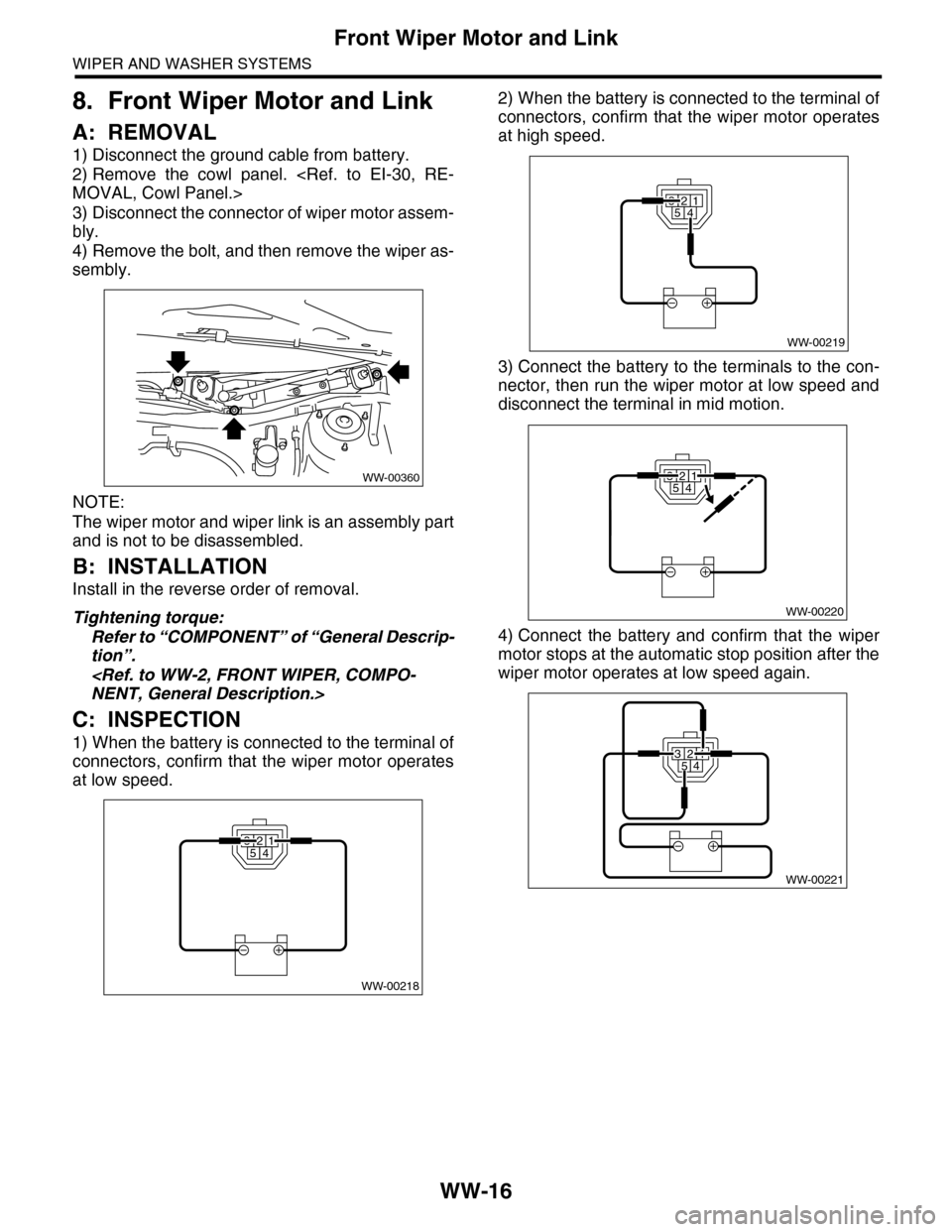
1) When the battery is connected to the terminal of
connectors, confirm that the wiper motor operates
at low speed.
2) When the battery is connected to the terminal of
connectors, confirm that the wiper motor operates
at high speed.
3) Connect the battery to the terminals to the con-
nector, then run the wiper motor at low speed and
disconnect the terminal in mid motion.
4) Connect the battery and confirm that the wiper
motor stops at the automatic stop position after the
wiper motor operates at low speed again.
WW-00360
WW-00218
32541
32541
WW-00219
WW-00220
32541
WW-00221
32541
Page 714 of 2453
WW-19
Rear Wiper Motor
WIPER AND WASHER SYSTEMS
11.Rear Wiper Motor
A: REMOVAL
1) Disconnect the ground cable from battery.
2) Remove the rear wiper arm.
REMOVAL, Rear Wiper Arm.>
3) Remove the rear gate lower trim.
REMOVAL, Rear Gate Trim.>
4) Disconnect the harness connector of wiper mo-
tor assembly.
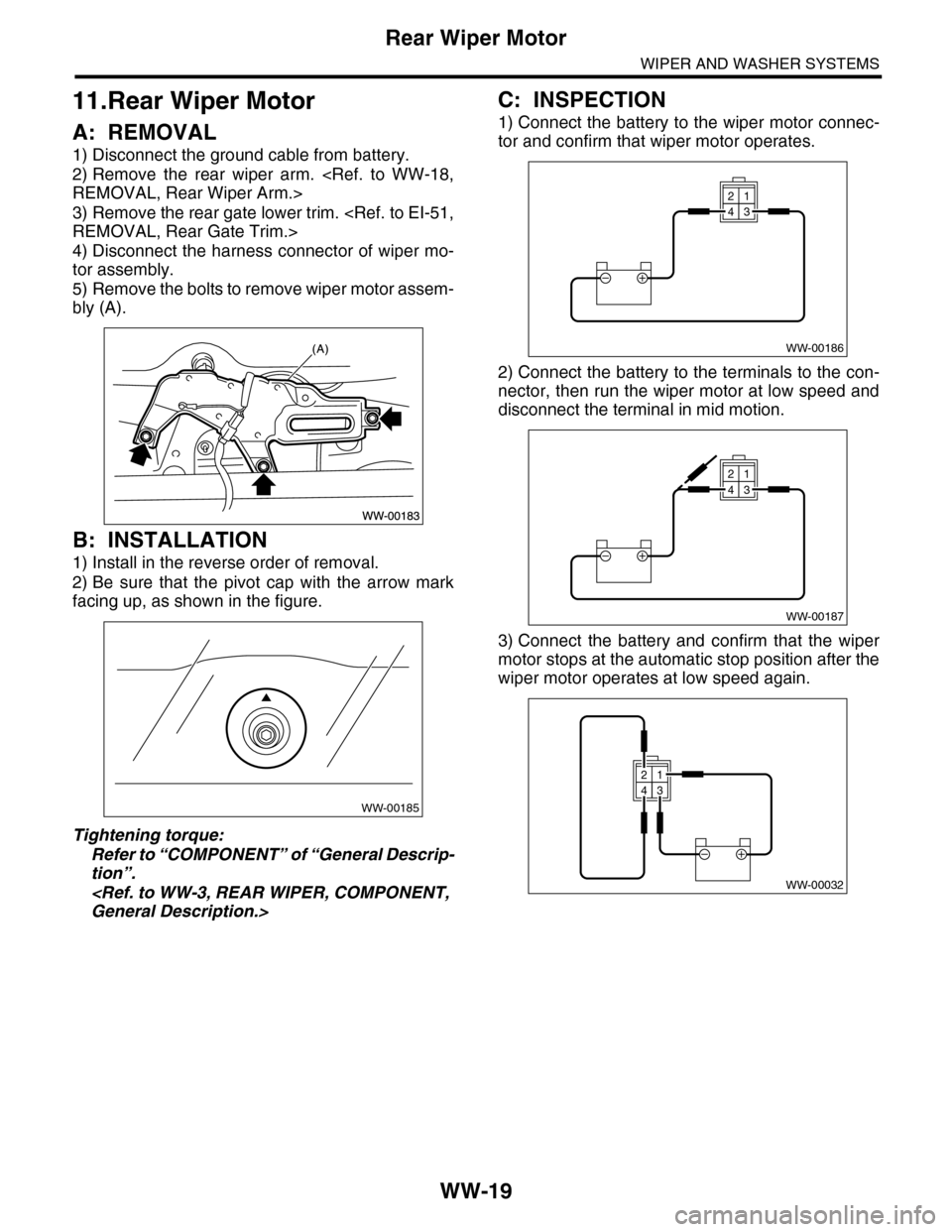
5) Remove the bolts to remove wiper motor assem-
bly (A).
B: INSTALLATION
1) Install in the reverse order of removal.
2) Be sure that the pivot cap with the arrow mark
facing up, as shown in the figure.
Tightening torque:
Refer to “COMPONENT” of “General Descrip-
tion”.
General Description.>
C: INSPECTION
1) Connect the battery to the wiper motor connec-
tor and confirm that wiper motor operates.
2) Connect the battery to the terminals to the con-
nector, then run the wiper motor at low speed and
disconnect the terminal in mid motion.
3) Connect the battery and confirm that the wiper
motor stops at the automatic stop position after the
wiper motor operates at low speed again.
WW-00185
WW-00186
21
43
WW-00187
21
43
WW-00032
21
43
Page 751 of 2453
BR-37
Stop Light Switch
BRAKE
15.Stop Light Switch
A: REMOVAL
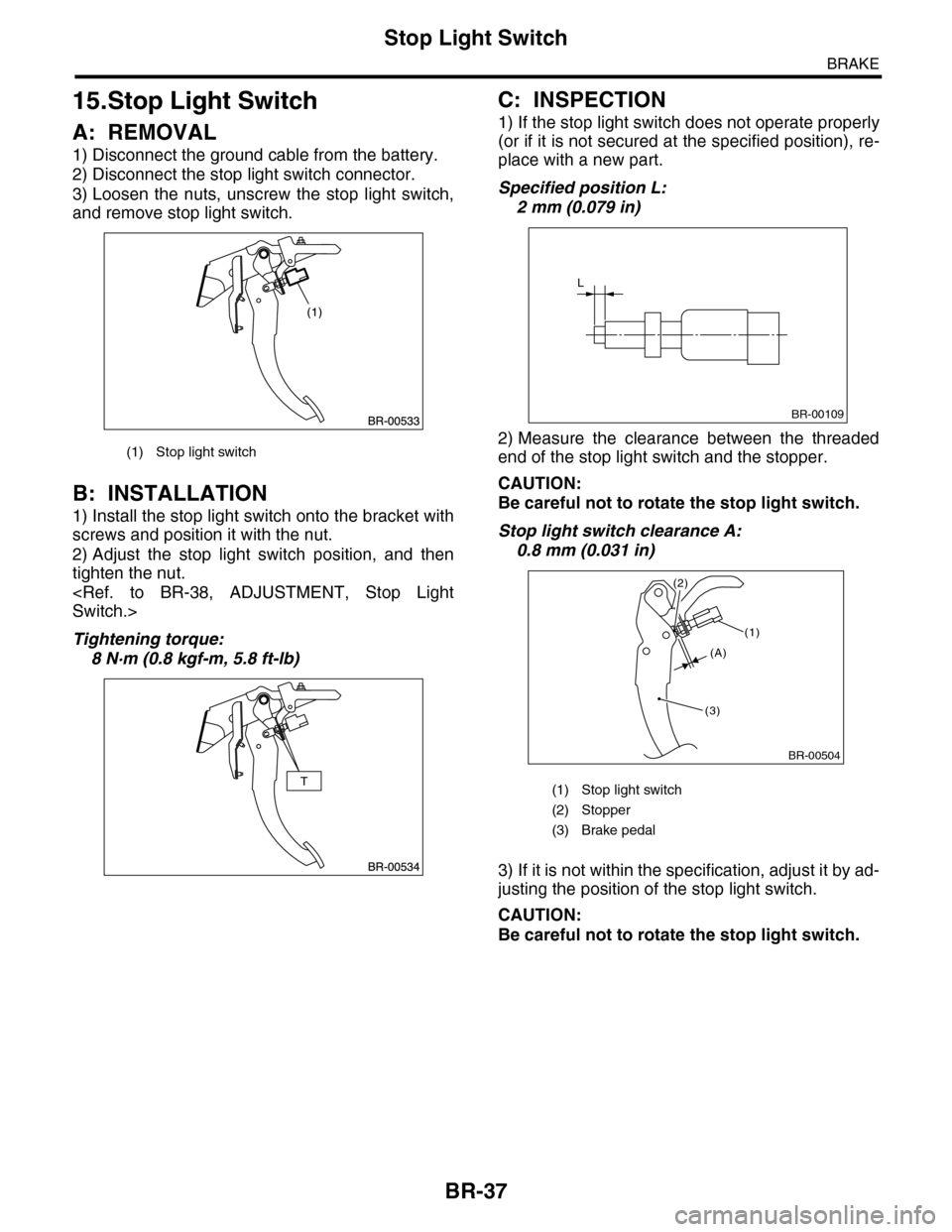
1) Disconnect the ground cable from the battery.
2) Disconnect the stop light switch connector.
3) Loosen the nuts, unscrew the stop light switch,
and remove stop light switch.
B: INSTALLATION
1) Install the stop light switch onto the bracket with
screws and position it with the nut.
2) Adjust the stop light switch position, and then
tighten the nut.
Switch.>
Tightening torque:
8 N·m (0.8 kgf-m, 5.8 ft-lb)
C: INSPECTION
1) If the stop light switch does not operate properly
(or if it is not secured at the specified position), re-
place with a new part.
Specified position L:
2 mm (0.079 in)
2) Measure the clearance between the threaded
end of the stop light switch and the stopper.
CAUTION:
Be careful not to rotate the stop light switch.
Stop light switch clearance A:
0.8 mm (0.031 in)
3) If it is not within the specification, adjust it by ad-
justing the position of the stop light switch.
CAUTION:
Be careful not to rotate the stop light switch.
(1) Stop light switch
(1) Stop light switch
(2) Stopper
(3) Brake pedal
L
BR-00109
BR-00504
(1)
(3)
(2)
(A)