2006 LAND ROVER FRELANDER 2 length
[x] Cancel search: lengthPage 2796 of 3229
Lighting
76
L
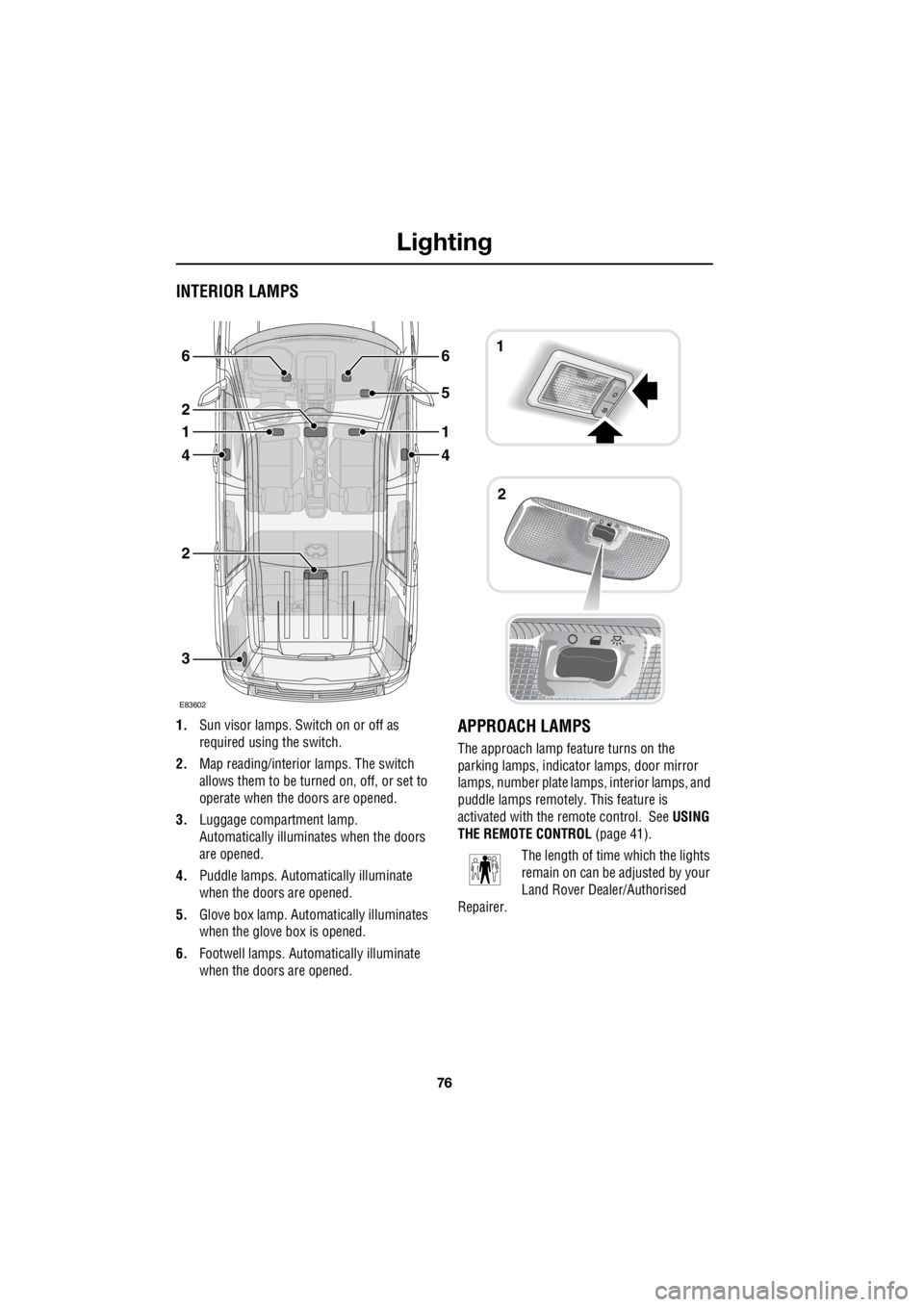
INTERIOR LAMPS
1. Sun visor lamps. Sw itch on or off as
required using the switch.
2. Map reading/interior lamps. The switch
allows them to be turn ed on, off, or set to
operate when the doors are opened.
3. Luggage compartment lamp.
Automatically illuminates when the doors
are opened.
4. Puddle lamps. Automatically illuminate
when the doors are opened.
5. Glove box lamp. Auto matically illuminates
when the glove box is opened.
6. Footwell lamps. Auto matically illuminate
when the doors are opened.APPROACH LAMPS
The approach lamp feature turns on the
parking lamps, indica tor lamps, door mirror
lamps, number plate lamps, interior lamps, and
puddle lamps remotely . This feature is
activated with the remote control. See USING
THE REMOTE CONTROL (page 41).
The length of time which the lights
remain on can be adjusted by your
Land Rover Dealer/Authorised
Repairer.
3
2
4
1
2
6
4
1
5
61
2
E83602
Page 2811 of 3229
91
Wipers and washers
R
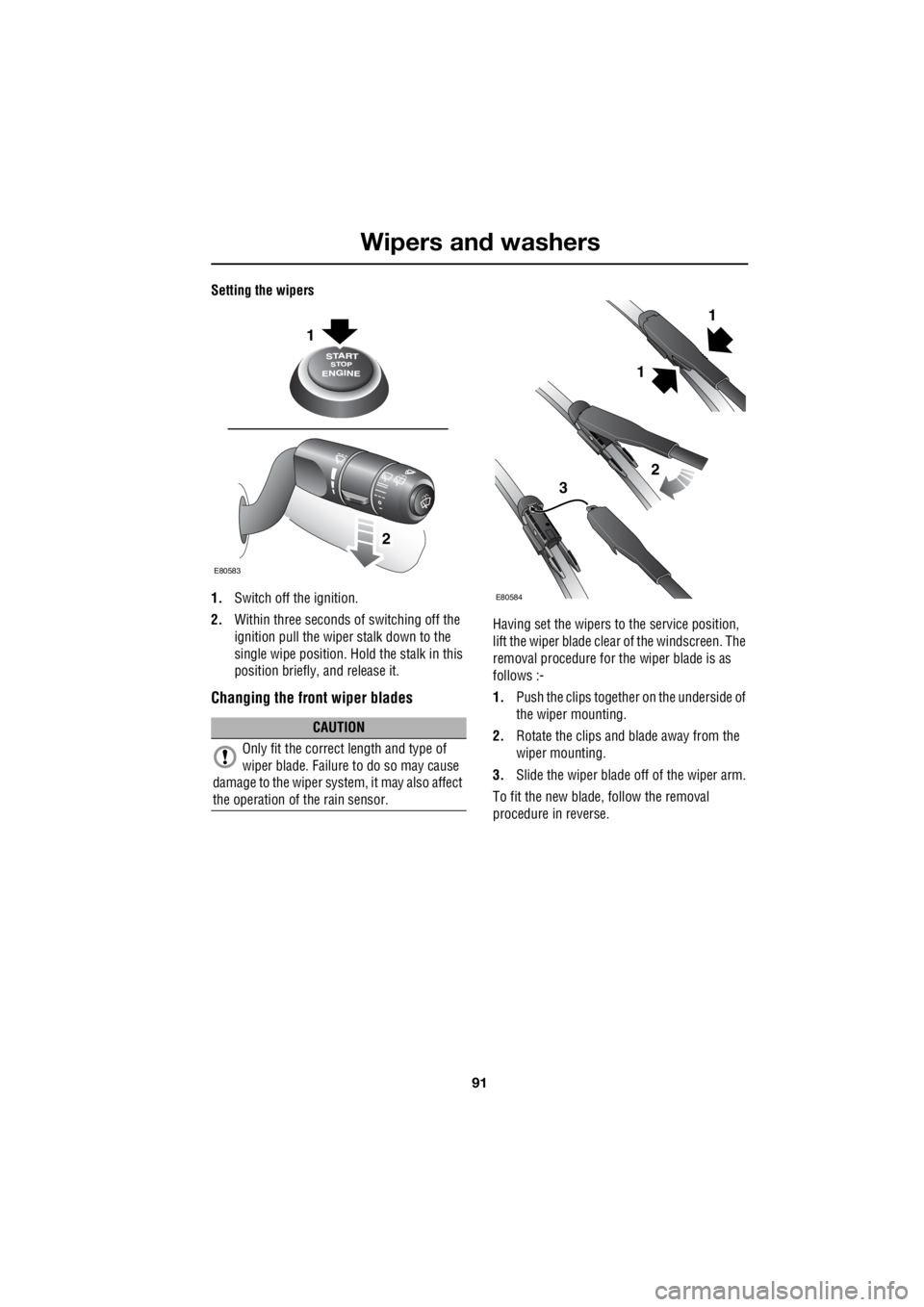
Setting the wipers
1. Switch off the ignition.
2. Within three seconds of switching off the
ignition pull the wiper stalk down to the
single wipe position. Ho ld the stalk in this
position briefly, and release it.
Changing the front wiper blades
Having set the wipers to the service position,
lift the wiper blade clea r of the windscreen. The
removal procedure for the wiper blade is as
follows :-
1. Push the clips together on the underside of
the wiper mounting.
2. Rotate the clips and blade away from the
wiper mounting.
3. Slide the wiper blade off of the wiper arm.
To fit the new blade, follow the removal
procedure in reverse.
CAUTION
Only fit the correct length and type of
wiper blade. Failure to do so may cause
damage to the wiper system, it may also affect
the operation of the rain sensor.
1
2
E80583
1
2
3
E80584
1
Page 2838 of 3229
Transmission
118
L
TransmissionMANUAL TRANSMISSION
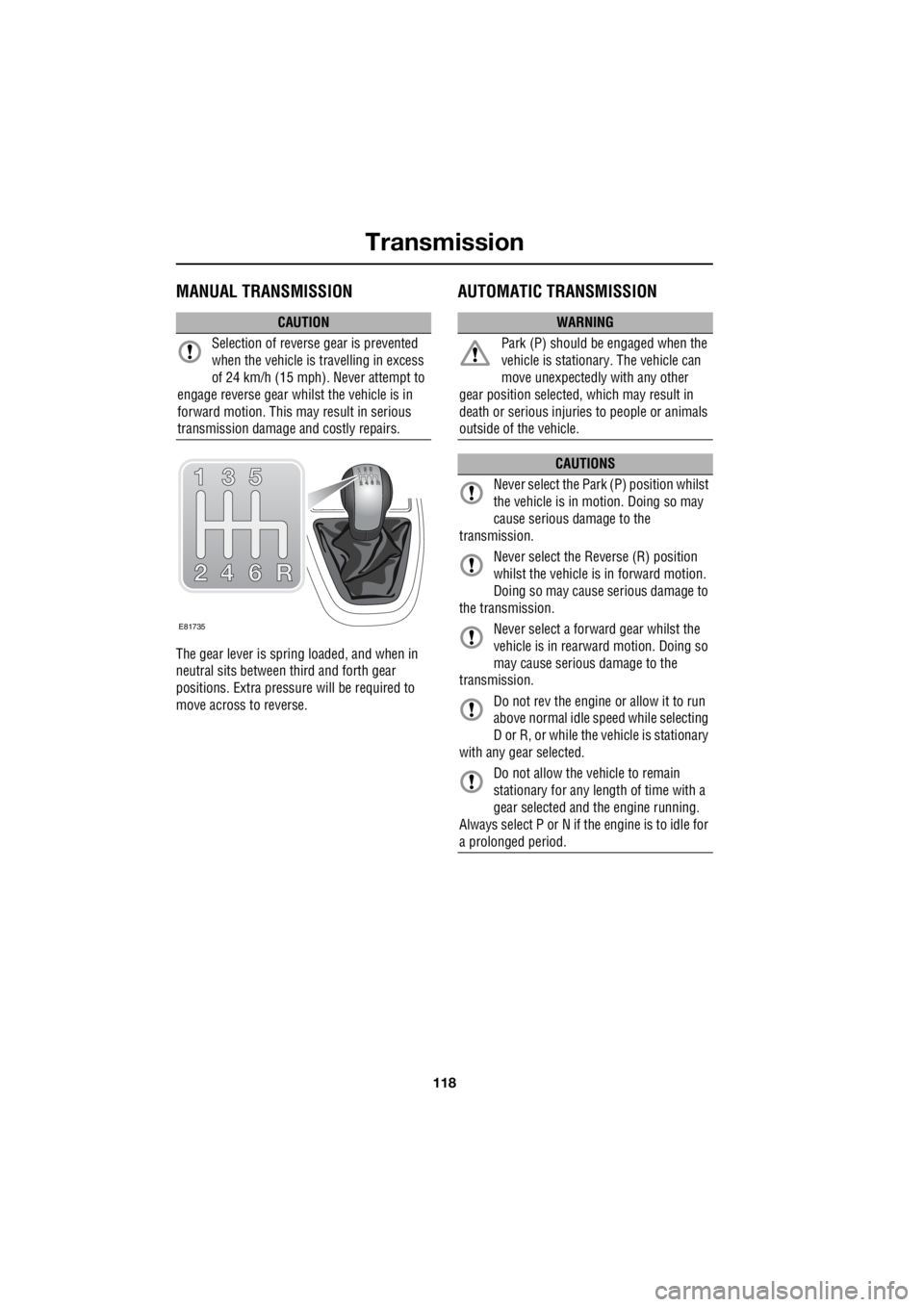
The gear lever is spring loaded, and when in
neutral sits between third and forth gear
positions. Extra pressure will be required to
move across to reverse.
AUTOMATIC TRANSMISSION
CAUTION
Selection of reverse gear is prevented
when the vehicle is travelling in excess
of 24 km/h (15 mph). Never attempt to
engage reverse gear whilst the vehicle is in
forward motion. This may result in serious
transmission damage and costly repairs.
E81735
WARNING
Park (P) should be engaged when the
vehicle is stationary. The vehicle can
move unexpectedly with any other
gear position selected, which may result in
death or serious injuries to people or animals
outside of the vehicle.
CAUTIONS
Never select the Park (P) position whilst
the vehicle is in motion. Doing so may
cause serious damage to the
transmission.
Never select the Reverse (R) position
whilst the vehicle is in forward motion.
Doing so may cause serious damage to
the transmission.
Never select a forward gear whilst the
vehicle is in rearwa rd motion. Doing so
may cause serious damage to the
transmission.
Do not rev the engine or allow it to run
above normal idle sp eed while selecting
D or R, or while the vehicle is stationary
with any gear selected.
Do not allow the vehicle to remain
stationary for any length of time with a
gear selected and the engine running.
Always select P or N if the engine is to idle for
a prolonged period.
Page 2850 of 3229
Cruise control
130
L
Cruise controlPRINCIPLE OF OPERATION
Cruise control enables the driver to maintain a
constant road speed without using the
accelerator pedal. This is particularly useful for
motorway cruising, or for any journey where a
constant speed can be maintained for a lengthy
period.
USING CRUISE CONTROL
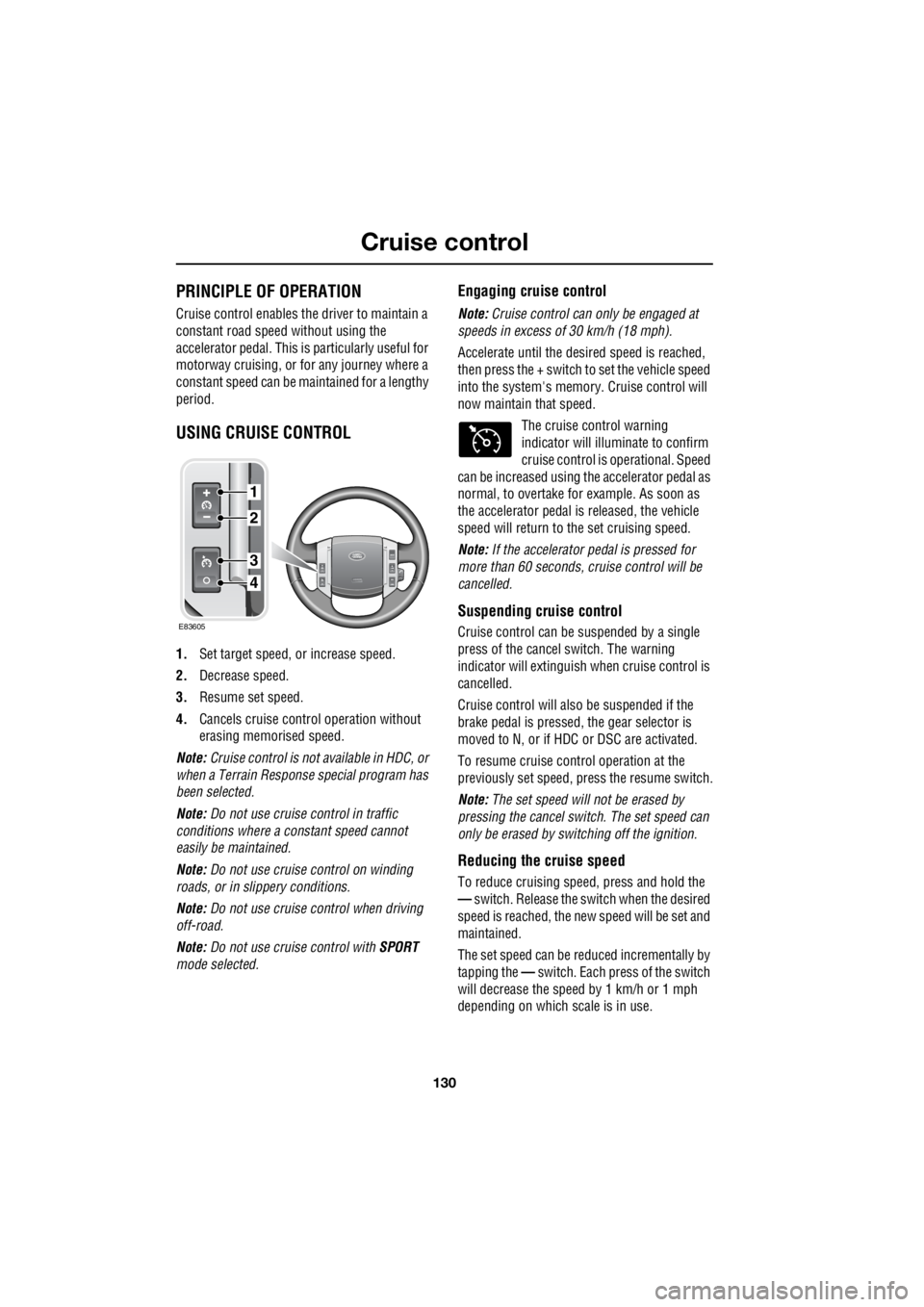
1. Set target speed, or increase speed.
2. Decrease speed.
3. Resume set speed.
4. Cancels cruise contro l operation without
erasing memorised speed.
Note: Cruise control is not available in HDC, or
when a Terrain Respons e special program has
been selected.
Note: Do not use cruise control in traffic
conditions where a constant speed cannot
easily be maintained.
Note: Do not use cruise control on winding
roads, or in slippery conditions.
Note: Do not use cruise control when driving
off-road.
Note: Do not use cruise control with SPORT
mode selected.
Engaging cruise control
Note: Cruise control can only be engaged at
speeds in excess of 30 km/h (18 mph).
Accelerate until the desired spee d is reached,
then press the + switch to set the vehicle speed
into the system's memory. Cruise control will
now maintain that speed.
The cruise control warning
indicator will illuminate to confirm
cruise control is operational. Speed
can be increased using th e accelerator pedal as
normal, to overtake fo r example. As soon as
the accelerator pedal is released, the vehicle
speed will return to the set cruising speed.
Note: If the accelerator pedal is pressed for
more than 60 seconds, cruise control will be
cancelled.
Suspending cruise control
Cruise control can be suspended by a single
press of the cancel switch. The warning
indicator will extinguish when cruise control is
cancelled.
Cruise control will also be suspended if the
brake pedal is pressed, the gear selector is
moved to N, or if HDC or DSC are activated.
To resume cruise cont rol operation at the
previously set speed, press the resume switch.
Note: The set speed will not be erased by
pressing the cancel switch. The set speed can
only be erased by switching off the ignition.
Reducing the cruise speed
To reduce cruising speed, press and hold the
— switch. Release the switch when the desired
speed is reached, the ne w speed will be set and
maintained.
The set speed can be reduced incrementally by
tapping the — switch. Each press of the switch
will decrease the spee d by 1 km/h or 1 mph
depending on which scale is in use.
1
E83605
2
3
4
Page 2933 of 3229
213
Technical specifications
R
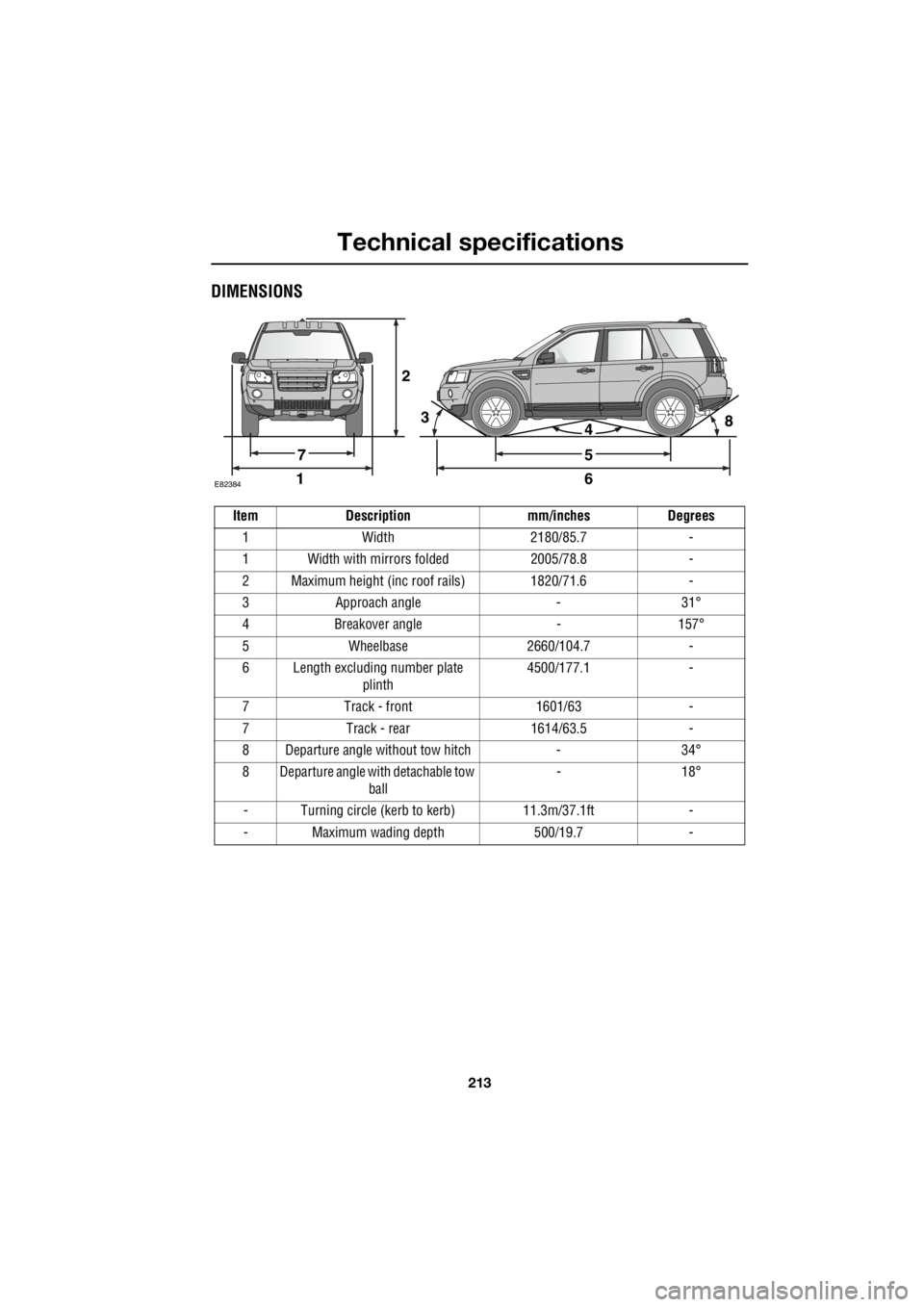
DIMENSIONS
2
E8238416
5
438
7
Item Description mm/inches Degrees 1 Width 2180/85.7 -
1 Width with mirrors folded 2005/78.8 -
2 Maximum height (inc roof rails) 1820/71.6 -
3 Approach angle - 31°
4 Breakover angle - 157°
5 Wheelbase 2660/104.7 -
6 Length excluding number plate plinth 4500/177.1 -
7 Track - front 1601/63 -
7 Track - rear 1614/63.5 -
8 Departure angle without tow hitch - 34°
8 Departure angle with detachable tow ball - 18°
- Turning circle (kerb to kerb) 11.3m/37.1ft -
- Maximum wading depth 500/19.7 -
Page 3104 of 3229
USING THIS PUBLICATION
08/20089
Section numbering
The sections in this publication are ordered to match the Global Outline numbering system as found in the current Workshop
Manual. The Power and Ground distribution circuits can be found under section 414-01, BATTERY, MOUNTING AND CABLES.
Note: Where circuit diagrams show more than one sub-system, the circuit will be located in the section that carries the first-named
sub-system, for example: Starting and Charging will be located under section 303-06 Starting System, since 'Starting' is the first-
named sub-system.
Circuit sheet numbering
The figures in brackets to the left of the page number indicate a circuit sheet number and the total number of sheets per circuit, for
example (01 / 05) represents sheet 1 of 5.
Understanding the circuit diagrams
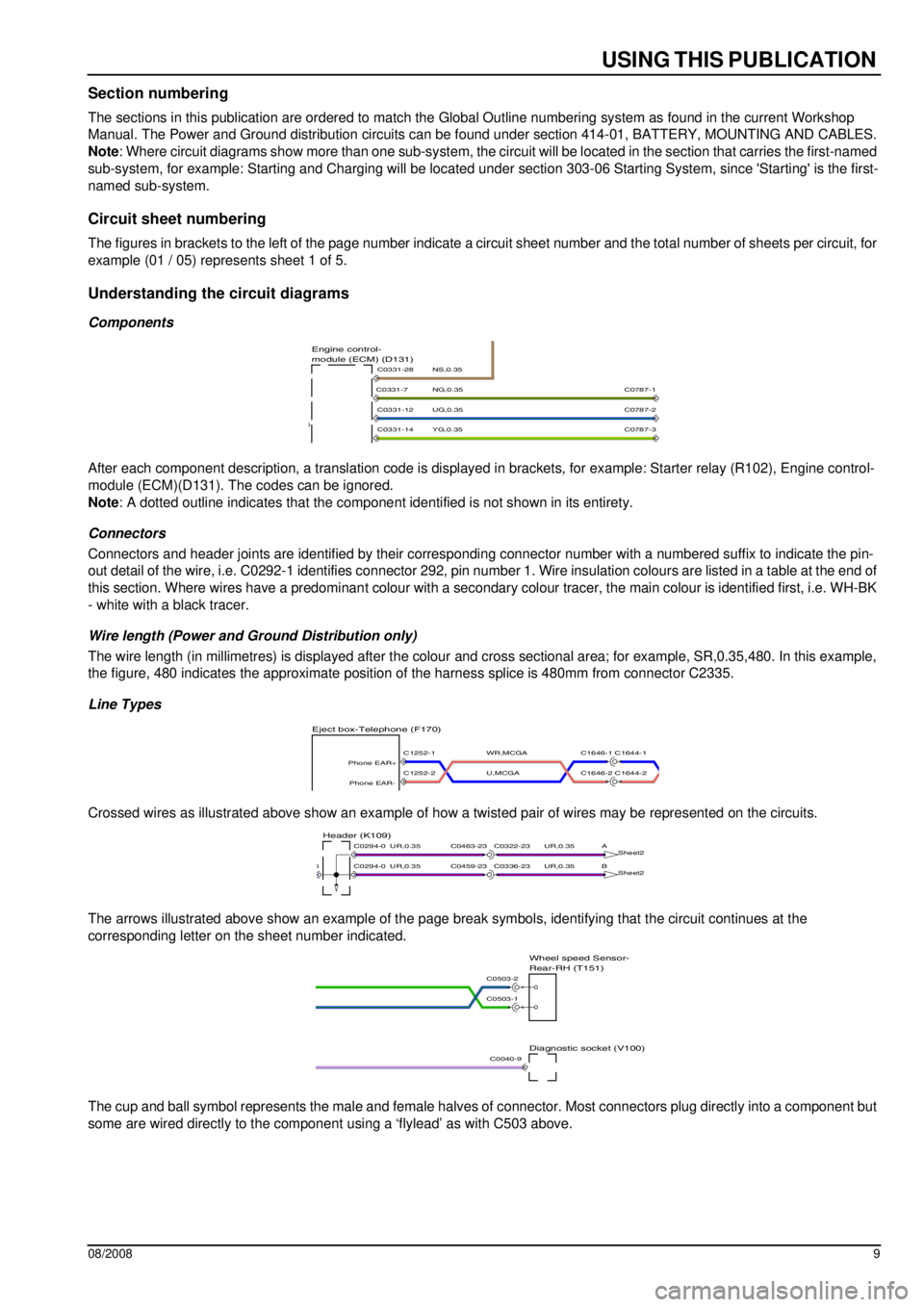
Components
After each component description, a translation code is displayed in brackets, for example: Starter relay (R102), Engine control-
module (ECM)(D131). The codes can be ignored.
Note: A dotted outline indicates that the component identified is not shown in its entirety.
Connectors
Connectors and header joints are identified by their corresponding connector number with a numbered suffix to indicate the pin-
out detail of the wire, i.e. C0292-1 identifies connector 292, pin number 1. Wire insulation colours are listed in a table at the end of
this section. Where wires have a predominant colour with a secondary colour tracer, the main colour is identified first, i.e. WH-BK
- white with a black tracer.
Wire length (Power and Ground Distribution only)
The wire length (in millimetres) is displayed after the colour and cross sectional area; for example, SR,0.35,480. In this example,
the figure, 480 indicates the approximate position of the harness splice is 480mm from connector C2335.
Line Types
Crossed wires as illustrated above show an example of how a twisted pair of wires may be represented on the circuits.
The arrows illustrated above show an example of the page break symbols, identifying that the circuit continues at the
corresponding letter on the sheet number indicated.
The cup and ball symbol represents the male and female halves of connector. Most connectors plug directly into a component but
some are wired directly to the component using a ‘flylead’ as with C503 above.
YG,0.35
UG,0.35
NG,0.35
NS,0.35module (ECM) (D131) Engine control-
C0331-14
C0331-12
C0331-7
C0331-28
C0787-2
C0787-3
C0787-1
U,MCGA
WR,MCGA
Eject box-Telephone (F170)
C1646-1 C1644-1
C1646-2 C1644-2C1252-2
Phone EAR-
C1252-1
Phone EAR+
UR,0.35UR,0.35
UR,0.35UR,0.35
B
Sheet2
A
Sheet2Header (K109)
C0336-23C0459-23
C0322-23C0463-23
C0294-00
C0294-0
Diagnostic socket (V100)
Rear-RH (T151) Wheel speed Sensor-
C0503-1
C0503-2
C0040-9
Page 3209 of 3229
USING THIS PUBLICATION
08/2008 9
Section numbering
The sections in this publication are ordered to match the Global Outline numbering system as found in the current Workshop
Manual. The Power and Ground distribution circuits can be found under section 414-01, BATTERY, MOUNTING AND CABLES.
Note : Where circuit diagrams show more than one sub-system, the circ uit will be located in the section that carries the first-named
sub-system, for example: Starting and Charging will be located unde r section 303-06 Starting System, since 'Starting' is the first-
named sub-system.
Circuit sheet numbering
The figures in brackets to the left of the page number indicate a circuit sheet number and the total number of sheets per circu it, for
example (01 / 05) represents sheet 1 of 5.
Understanding the circuit diagrams
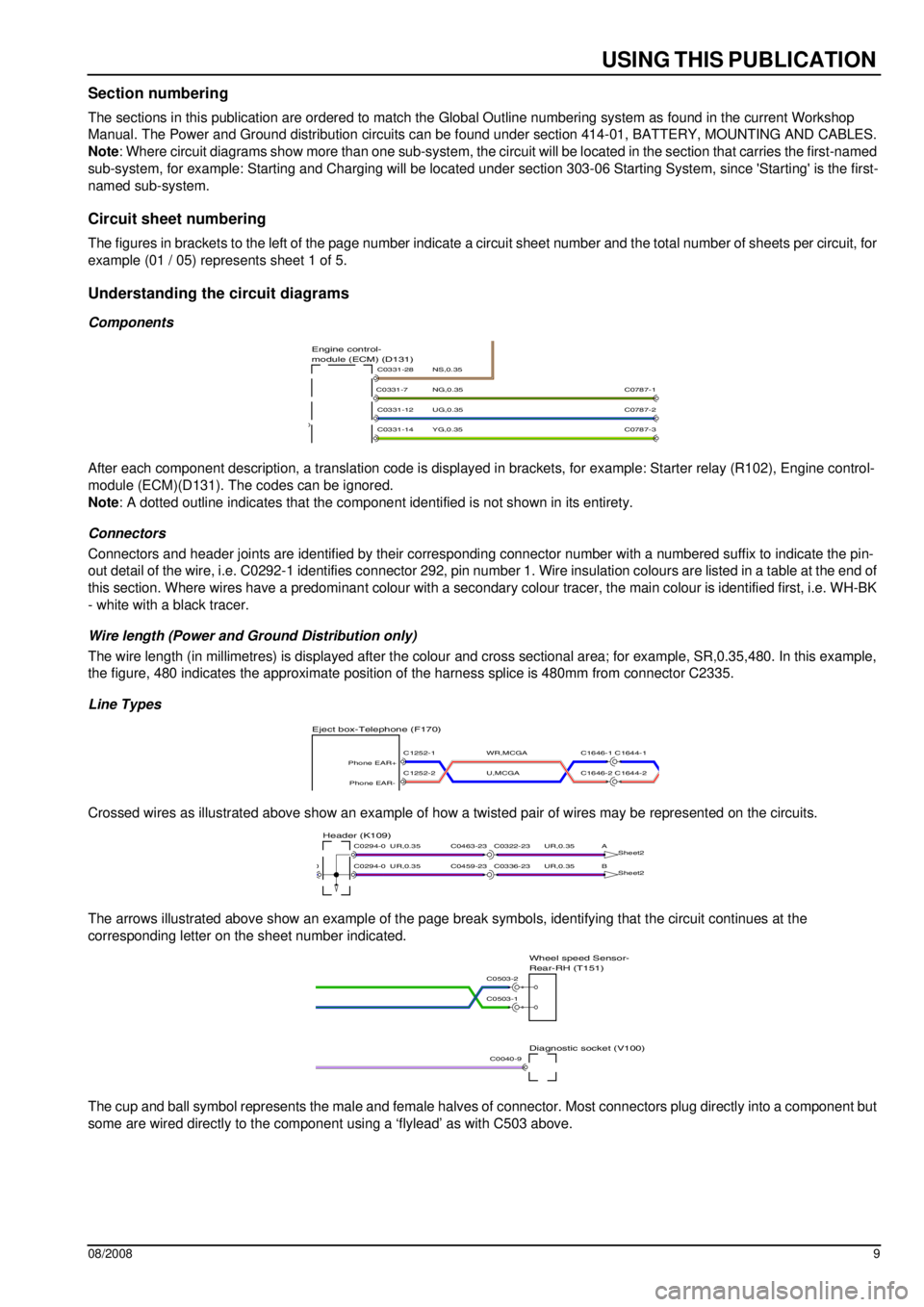
Components
After each component description, a translation code is displayed in brackets, for example: Starter relay (R102), Engine control-
module (ECM)(D131). The codes can be ignored.
Note : A dotted outline indicates that the compone nt identified is not shown in its entirety.
Connectors
Connectors and header joints are identified by their corresponding connector number wit h a numbered suffix to indicate the pin-
out detail of the wire, i.e. C0292-1 identifies connector 292, pin number 1. Wire insulation colours are listed in a table at t he end of
this section. Where wires have a predominan t colour with a secondary colour tracer, the main colour is identified first, i.e. WH-BK
- white with a black tracer.
Wire length (Power and Ground Distribution only)
The wire length (in millimetres) is displayed after the colour and cross sectional area; for example, SR,0.35,480. In this example,
the figure, 480 indicates the approximate position of the harness splice is 480mm from connector C2335.
Line Types
Crossed wires as illustrated above show an example of how a twisted pair of wires may be represented on the circuits.
The arrows illustrated above show an example of the page break symbols, identifying that the circuit continues at the
corresponding letter on the sheet number indicated.
The cup and ball symbol represents the male and female halves of connector. Most connectors plug directly into a component but
some are wired directly to the component using a ‘flylead’ as with C503 above.
YG,0.35
UG,0.35
NG,0.35
NS,0.35module (ECM) (D131)
Engine control-
C0331-14
C0331-12
C0331-7
C0331-28
C0787-2
C0787-3
C0787-1
U,MCGA
WR,MCGA
Eject box-Telephone (F170)
C1646-1 C1644-1
C1646-2 C1644-2C1252-2
Phone EAR-
C1252-1
Phone EAR+
UR,0.35UR,0.35
UR,0.35UR,0.35
B Sheet2
A
Sheet2Header (K109)
C0336-23C0459-23
C0322-23C0463-23
C0294-00
C0294-0
Diagnostic socket (V100)
Rear-RH (T151)
Wheel speed Sensor-
C0503-1
C0503-2
C0040-9