2006 LAND ROVER FRELANDER 2 start stop button
[x] Cancel search: start stop buttonPage 2959 of 3229

239
Digital audio broadcasting
R
2. Press and hold the preset button (for about
two seconds) on which you want to store
the current channel. Audio output is muted
for a further two seconds while the channel
is stored and a confirmation message is
displayed.
3. Repeat steps 1 and 2 for each channel that
you want to store as a preset.
Note: You cannot store a subchannel as a
preset. If you try to stor e a subchannel, you will
store the channel to which the subchannel
belongs.
Recalling a preset channel
Make sure that you have selected the
appropriate digital source ( DAB1 or DAB2 ) and
then press and release the preset button you
require. The channel y ou have selected will
start to play automatically.
Note: If you try to recall a channel that has
previously been stored as a preset but is now
unavailable or invalid, the message No channel
found is displayed. You must choose another
channel.
Scrolling through presets
Rotate the menu control to scroll through all
available presets for the current digital source
( DAB1 or DAB2 ). When you stop rotating, the
selected channel will start to play automatically
after a few seconds.
Note: If you are listening to a subchannel, then
rotating the menu control will return you to,
and then scroll through, the channel preset list.
14 : 54
1234DAB1 [8]
BBC 5LIVE
E88129
E88131
14 : 54
1234DAB1 [7]
BBC Radio 1
14 : 54
1234DAB1 [7]
BBC Radio 1
14 : 54
1234DAB1 [8]
BBC Radio 2
14 : 54
1234DAB1 [9]
BBC Radio 3
Page 2966 of 3229
Compact disc player
246
L
EJECTING COMPACT DISCS
It is only possible to eject a single disc, if it is
currently selected or playing.
To eject a disc, press and release the eject
button. A confirmation message will be shown
on the information display. After a short pause,
the disc will be presente d. The disc should then
be removed.
Note: If the disc is not removed from the slot
within fifteen seconds, it will be drawn back
into the player.
EJECTING MULTIPLE COMPACT
DISCS
All the discs loaded in the player can be ejected
in sequence. To eject all of the discs, press and
hold the eject button. A confirmation message
will be shown on the information display. After
a short pause, the first disc will be presented.
The disc should then be removed.
The discs will be ejected one at a time with a
short pause in between each.
To stop the process, press any CD number
button ( 1 to 6).
COMPACT DISC SELECTION
To select one of the loaded discs, briefly press
the disc number required ( 1 to 6). If the
position selected does not contain a disc, there
will be a pause and a message will appear on
the information display.
Once a disc has been inserted, there will be a
pause while the player reads the disc
information. Playback will then begin at the
start of track one.
COMPACT DISC PLAYBACK
To start compact disc pl ayback, briefly press
the CD mode button, followed by the disc
number required. If no di sc number is selected,
playback will begin at one of two places:
• If the discs have not been removed since
their last use, playback will begin from the
point at which it wa s stopped previously.
• If the discs have not been used since they
were inserted, playback will begin at the
start of the first loaded disc.
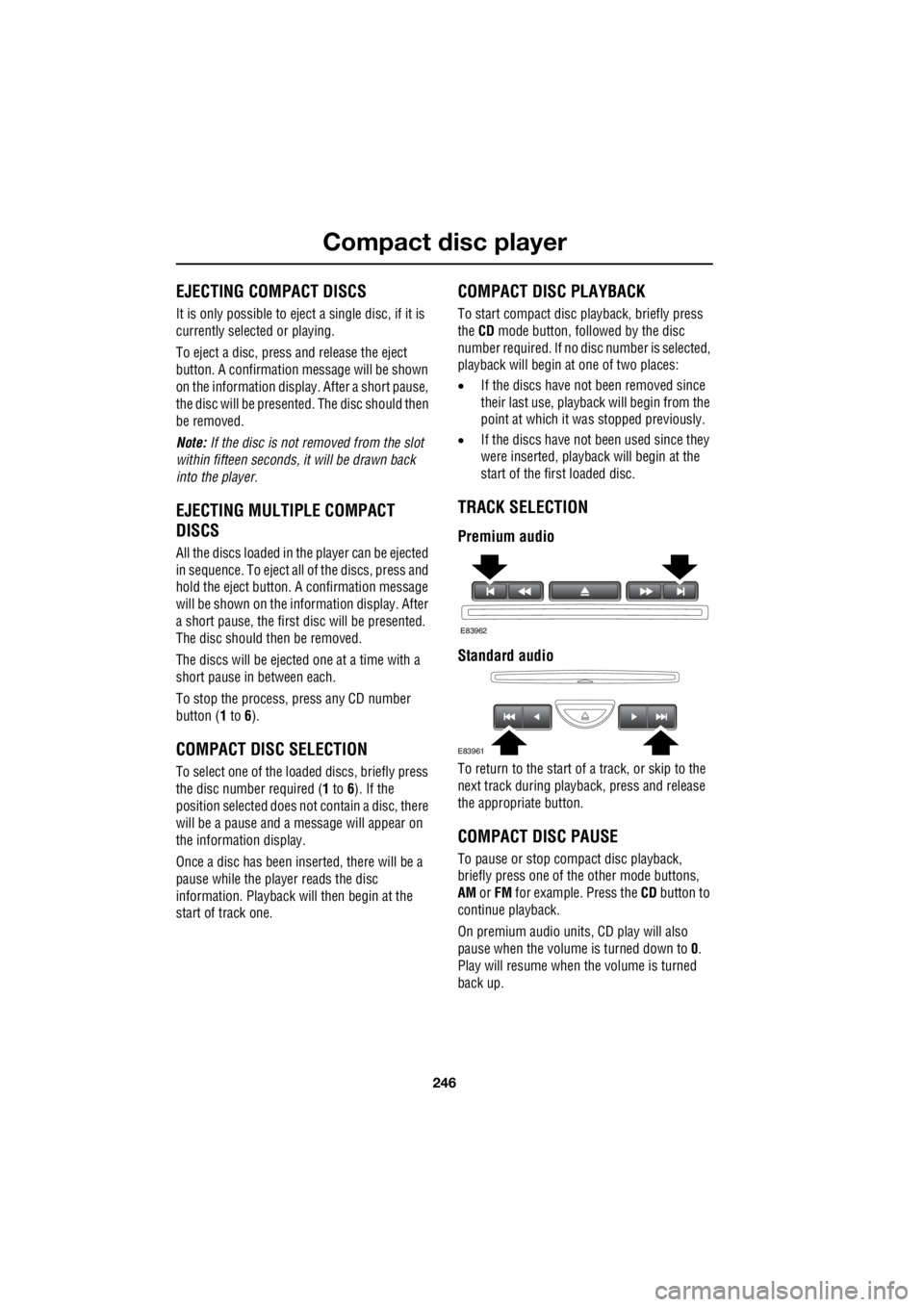
TRACK SELECTION
Premium audio
Standard audio
To return to the start of a track, or skip to the
next track during playba ck, press and release
the appropriate button.
COMPACT DISC PAUSE
To pause or stop compact disc playback,
briefly press one of th e other mode buttons,
AM or FM for example. Press the CD button to
continue playback.
On premium audio units, CD play will also
pause when the volume is turned down to 0.
Play will resume when the volume is turned
back up.
E83962
E83961
Page 2968 of 3229
Compact disc player
248
L
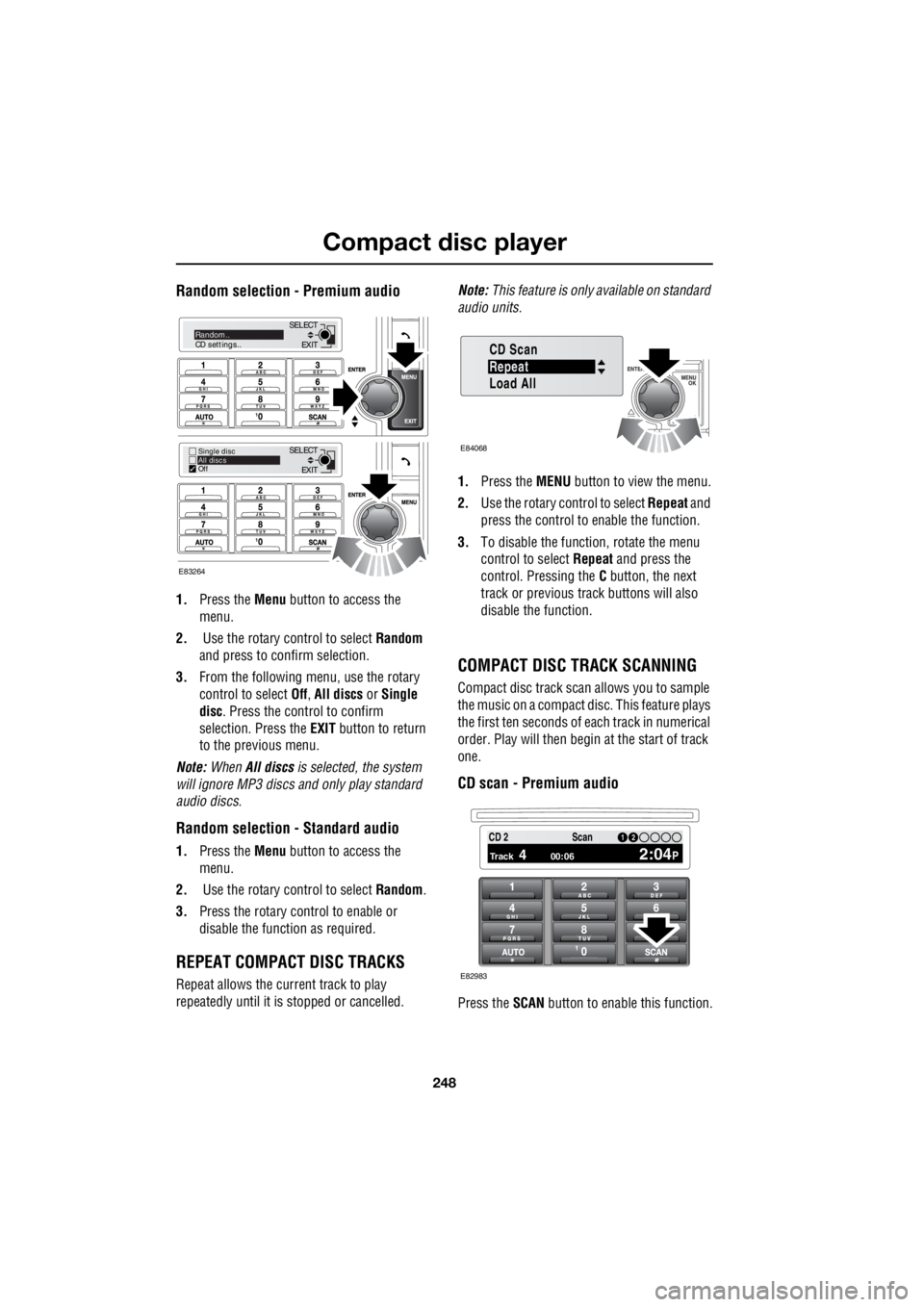
Random selection - Premium audio
1. Press the Menu button to access the
menu.
2. Use the rotary control to select Random
and press to confirm selection.
3. From the following menu, use the rotary
control to select Off, All discs or Single
disc . Press the control to confirm
selection. Press the EXIT button to return
to the previous menu.
Note: When All discs is selected, the system
will ignore MP3 discs and only play standard
audio discs.
Random selection - Standard audio
1. Press the Menu button to access the
menu.
2. Use the rotary control to select Random.
3. Press the rotary control to enable or
disable the function as required.
REPEAT COMPACT DISC TRACKS
Repeat allows the current track to play
repeatedly until it is stopped or cancelled. Note:
This feature is only available on standard
audio units.
1. Press the MENU button to view the menu.
2. Use the rotary control to select Repeat and
press the control to enable the function.
3. To disable the function, rotate the menu
control to select Repeat and press the
control. Pressing the C button, the next
track or previous track buttons will also
disable the function.
COMPACT DISC TRACK SCANNING
Compact disc track scan allows you to sample
the music on a compact disc. This feature plays
the first ten seconds of each track in numerical
order. Play will then begin at the start of track
one.
CD scan - Premium audio
Press the SCAN button to enable this function.
EXIT
SELECT
EXIT
SELECTRandom..
CD settings..
Single disc
All discs
Off
E83264
Repeat
CD Scan
Load All
E84068
PTY1 12 3 4 6CD 2
Track 4 00:06 2:04P
12Scan
E82983
Page 2972 of 3229
Rear passenger controls
252
L
Rear passenger controlsREAR SEAT CONTROLS
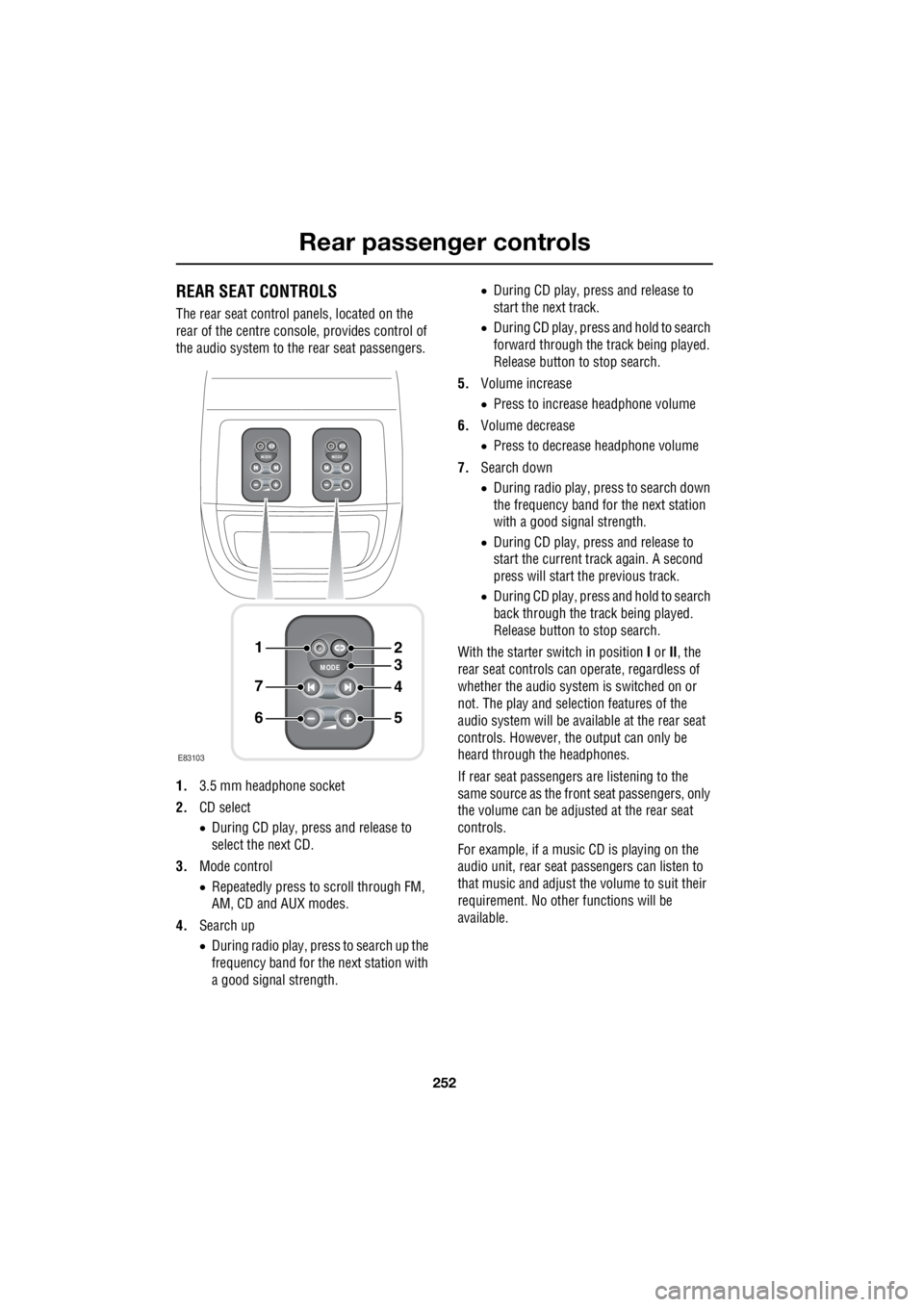
The rear seat control panels, located on the
rear of the centre consol e, provides control of
the audio system to the rear seat passengers.
1. 3.5 mm headphone socket
2. CD select
• During CD play, press and release to
select the next CD.
3. Mode control
• Repeatedly press to scroll through FM,
AM, CD and AUX modes.
4. Search up
• During radio play, press to search up the
frequency band for the next station with
a good signal strength. •
During CD play, press and release to
start the next track.
• During CD play, press and hold to search
forward through the track being played.
Release button to stop search.
5. Volume increase
• Press to increase headphone volume
6. Volume decrease
• Press to decrease headphone volume
7. Search down
• During radio play, press to search down
the frequency band for the next station
with a good signal strength.
• During CD play, press and release to
start the current track again. A second
press will start the previous track.
• During CD play, press and hold to search
back through the track being played.
Release button to stop search.
With the starter switch in position I or II, the
rear seat controls can operate, regardless of
whether the audio system is switched on or
not. The play and selection features of the
audio system will be available at the rear seat
controls. However, the output can only be
heard through the headphones.
If rear seat passengers are listening to the
same source as the front seat passengers, only
the volume can be adjusted at the rear seat
controls.
For example, if a music CD is playing on the
audio unit, rear seat pa ssengers can listen to
that music and adjust the volume to suit their
requirement. No other functions will be
available.
MODE
+
MODE
+
MODE
+
1
7
6
4
3
2
5
E83103
Page 2996 of 3229

Index
276
L
Rear seat controls . . . . . . . . . . . . . . . . . . 252
Rear seats . . . . . . . . . . . . . . . . . . . . . . . . . 51 Folding the rear seats . . . . . . . . . . . . . . 52
Raising the rear seats . . . . . . . . . . . . . . 53
Rear window wiper and washers . . . . . . . . 89 Reversing . . . . . . . . . . . . . . . . . . . . . . . 89
Wash/wipe . . . . . . . . . . . . . . . . . . . . . . 89
Wiper . . . . . . . . . . . . . . . . . . . . . . . . . . 89
Recommended towing weights . . . . . . . . 152
Reduced engine performance . . . . . . . . . 128 Check engine - petrol models only . . . 128
Engine management syst em (EMS) fault . .
128
Refuelling . . . . . . . . . . . . . . . . . . . . . . . . 145 Fuel filler . . . . . . . . . . . . . . . . . . . . . . . 145
Regional mode (REG) . . . . . . . . . . . . . . . 228 Regional mode - Premium audio . . . . 228
Regional mode - Standard audio. . . . . 229
Remote control . . . . . . . . . . . . . . . . . . . . . 41
Repairing minor paint damage . . . . . . . . 156
Repeat compact disc tracks. . . . . . . . . . . 248
Resetting the audio unit. . . . . . . . . . . . . . 233
Running out of fuel . . . . . . . . . . . . . . . . . 144
Running-in . . . . . . . . . . . . . . . . . . . . . . . 128
S
Safety . . . . . . . . . . . . . . . . . . . . . . . . . . . . 36
Safety precautions . . . . . . . . . . . . . . . . . . 142
Seat belt height adjustment . . . . . . . . . . . . 56
Seat belt reminder . . . . . . . . . . . . . . . . . . . 55
Seat belts
Principle of operation . . . . . . . . . . . . . . 54
Settings . . . . . . . . . . . . . . . . . . . . . . . . . . 240 Advanced settings . . . . . . . . . . . . . . . . 242
Auto-tune . . . . . . . . . . . . . . . . . . . . . . 241
DAB radio text . . . . . . . . . . . . . . . . . . . 241
DAB search . . . . . . . . . . . . . . . . . . . . . 240
FM traffic and news. . . . . . . . . . . . . . . 244
Shuffle/random . . . . . . . . . . . . . . . . . . . . 247 Random selection - Premium audio . . 248
Random selection - Standard audio . . 248
Sitting in the correct position . . . . . . . . . . 47
Snow chains . . . . . . . . . . . . . . . . . . . . . . 192
Stability control . . . . . . . . . . . . . . . . . . . . 141 Principle of operation . . . . . . . . . . . . . 140 Starting a diesel engine. . . . . . . . . . . . . . . 115
Automatic transmission . . . . . . . . . . . . 115
Manual transmission . . . . . . . . . . . . . . 115
Stopping the engine . . . . . . . . . . . . . . . 116
Starting a petrol engine. . . . . . . . . . . . . . . 114 Starting . . . . . . . . . . . . . . . . . . . . . . . . 114
Stopping the engine . . . . . . . . . . . . . . . 114
Starting the engine General information . . . . . . . . . . . . . . . 113
Station preset buttons . . . . . . . . . . . . . . . 226
Storage compartments . . . . . . . . . . . . . . . 112
Sun visors. . . . . . . . . . . . . . . . . . . . . . . . . 107
Sunroof. . . . . . . . . . . . . . . . . . . . . . . . . . . 105
Supplementary restraints system Principle of operation . . . . . . . . . . . . . . . 58
T
Technical specificationsAccessory wheels and tyres . . . . . . . . . 194
Capacities . . . . . . . . . . . . . . . . . . . . . . . 170
Fuel consumption . . . . . . . . . . . . . . . . . 146
Fuel specification . . . . . . . . . . . . . . . . . 146
Lubricants and fluids . . . . . . . . . . . . . . 169
Transmission fluids a nd capacities. . . . 122
Telephone . . . . . . . . . . . . . . . . . . . . . . . . . 261
General information . . . . . . . . . . . . . . . 254
Telephone controls . . . . . . . . . . . . . . . . . . 255 Telephone controls - Steering wheel . . 256
Telephone setup . . . . . . . . . . . . . . . . . . . . 258 Dialled calls . . . . . . . . . . . . . . . . . . . . . 259
Missed calls . . . . . . . . . . . . . . . . . . . . . 258
Phone settings . . . . . . . . . . . . . . . . . . . 259
Received calls. . . . . . . . . . . . . . . . . . . . 258
Telephone main menu . . . . . . . . . . . . . 258
Telephone voice control . . . . . . . . . . . . . . 270
Terrain response . . . . . . . . . . . . . . . . . . . . 132 Principle of operation . . . . . . . . . . . . . . 132
Tow bar. . . . . . . . . . . . . . . . . . . . . . . . . . . 153 Tow bar dimensions a nd mounting points .
153
Towing a trailer . . . . . . . . . . . . . . . . . . . . . 150 Trailer electrical connection . . . . . . . . . 150
Towing points . . . . . . . . . . . . . . . . . . . . . . 207
Front and rear towing eyes . . . . . . . . . . 207
Towing the vehicle on four wheels . . . . . . 208 Towing procedure . . . . . . . . . . . . . . . . 208