2005 NISSAN NAVARA check engine
[x] Cancel search: check enginePage 956 of 3171
DI-46
WARNING LAMPS
5.CHECK IPDM E/R (CONSULT-II)
Perform self-diagnosis of IPDM E/R. Refer toPG-16, "
CONSULT-II Function (IPDM E/R)".
Self-diagnosis results
No malfunction detected>>Replace combination meter.
Malfunction detected>> Check applicable parts, and repair or replace corresponding parts.
Oil Pressure Warning Lamp Keeps Blinking (Oil Level Is Normal)EKS00MM6
NOTE:
For engine oil level inspection, refer toLU-5, "
ENGINE OIL LEVEL".
If combination meter detects that oil level sensor is open or short circuit, oil level warning is displayed.
1.CHECK OIL LEVEL SENSOR
1. Turn ignition switch OFF.
2. Disconnect oil level sensor connector.
3. Check oil level sensor. Refer toDI-47, "
OIL LEVEL SENSOR".
OK or NG
OK >> GO TO 2.
NG >> Replace oil level sensor.
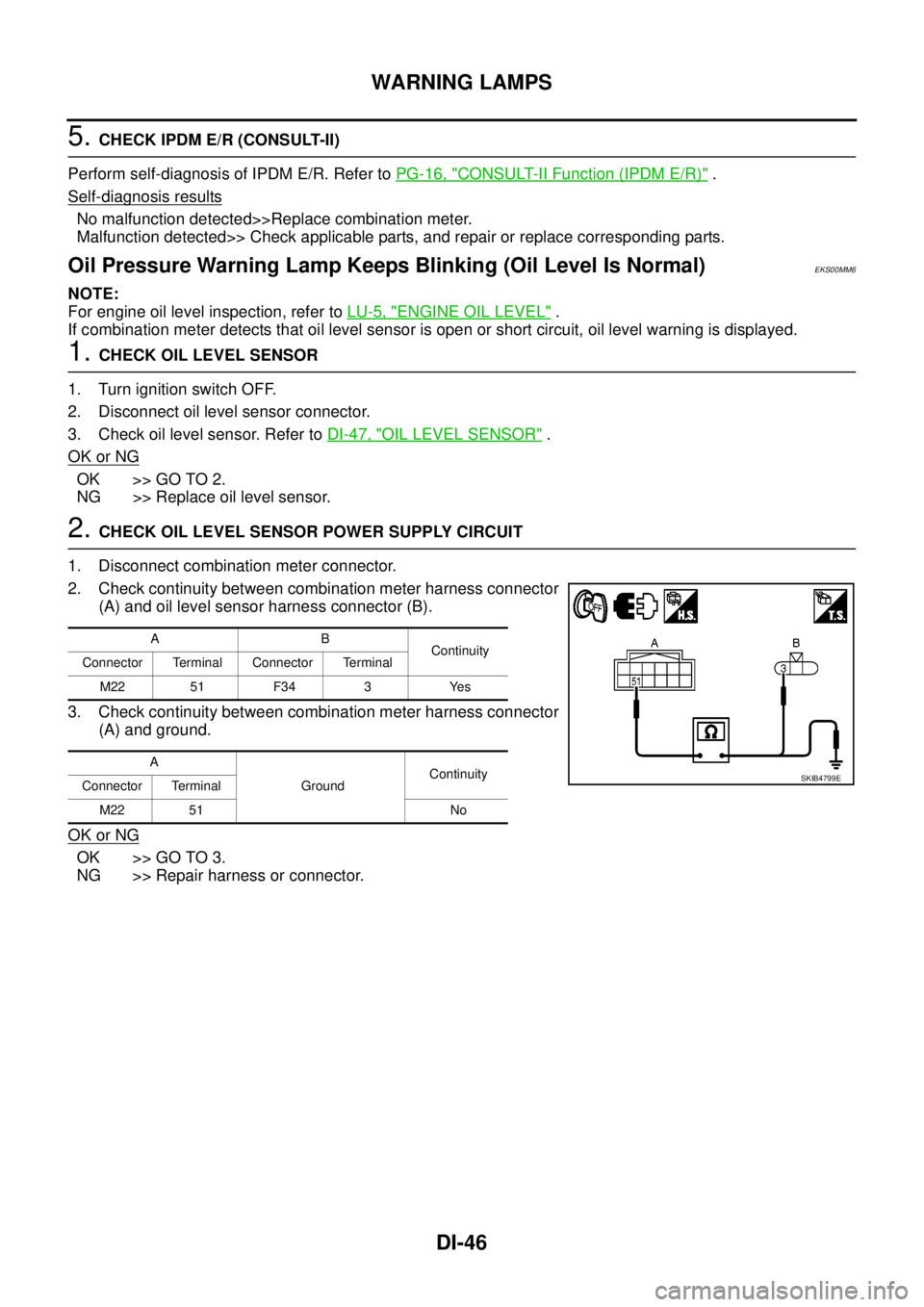
2.CHECK OIL LEVEL SENSOR POWER SUPPLY CIRCUIT
1. Disconnect combination meter connector.
2. Check continuity between combination meter harness connector
(A) and oil level sensor harness connector (B).
3. Check continuity between combination meter harness connector
(A) and ground.
OK or NG
OK >> GO TO 3.
NG >> Repair harness or connector.
AB
Continuity
Connector Terminal Connector Terminal
M22 51 F34 3 Yes
A
GroundContinuity
Connector Terminal
M22 51 No
SKIB4799E
Page 957 of 3171
WARNING LAMPS
DI-47
C
D
E
F
G
H
I
J
L
MA
B
DI
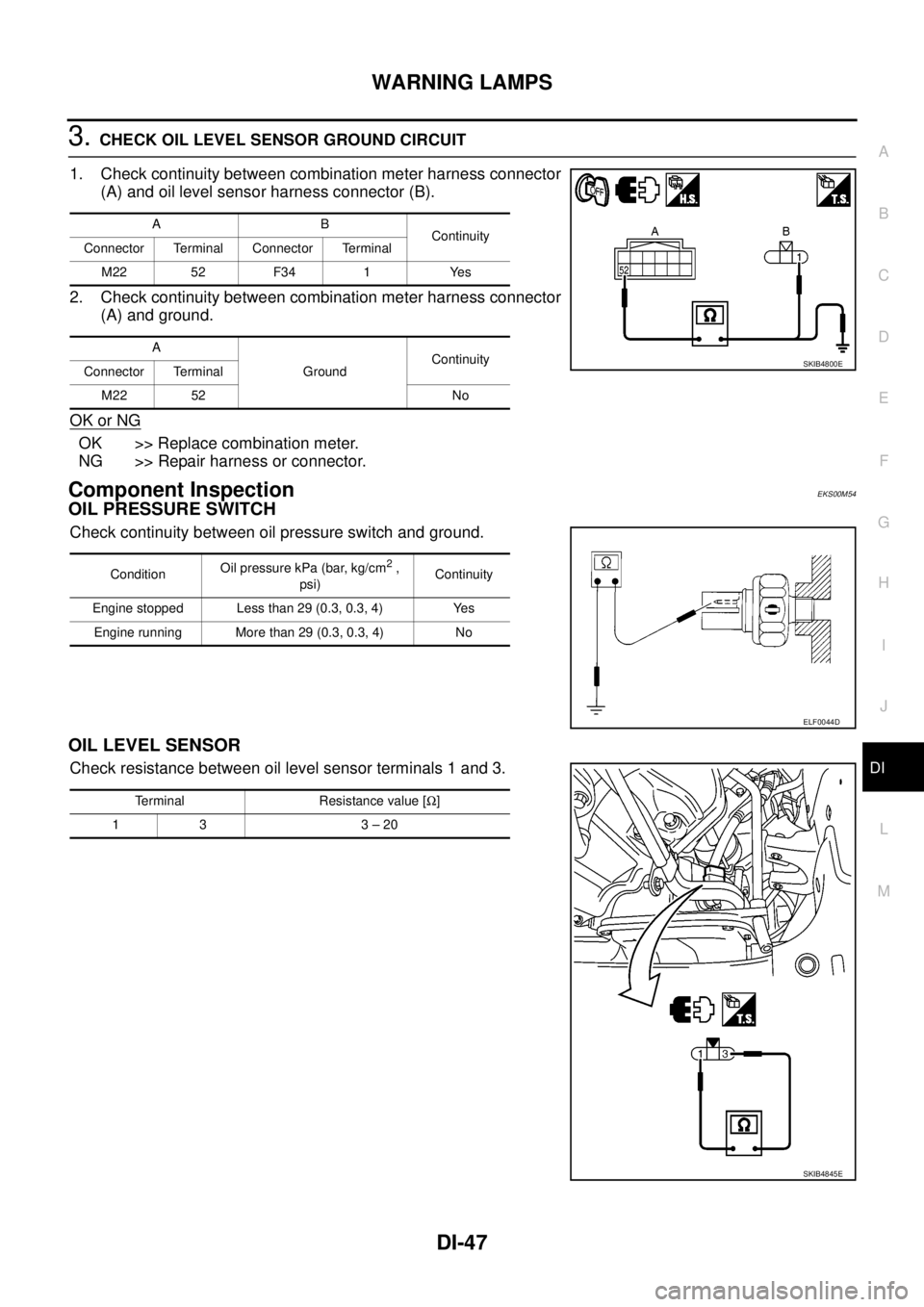
3.CHECK OIL LEVEL SENSOR GROUND CIRCUIT
1. Check continuity between combination meter harness connector
(A) and oil level sensor harness connector (B).
2. Check continuity between combination meter harness connector
(A) and ground.
OK or NG
OK >> Replace combination meter.
NG >> Repair harness or connector.
Component InspectionEKS00M54
OIL PRESSURE SWITCH
Check continuity between oil pressure switch and ground.
OIL LEVEL SENSOR
Check resistance between oil level sensor terminals 1 and 3.
AB
Continuity
Connector Terminal Connector Terminal
M22 52 F34 1 Yes
A
GroundContinuity
Connector Terminal
M22 52 No
SKIB4800E
ConditionOil pressure kPa (bar, kg/cm2,
psi)Continuity
Engine stopped Less than 29 (0.3, 0.3, 4) Yes
Engine running More than 29 (0.3, 0.3, 4) No
ELF0044D
Terminal Resistance value [W]
13 3–20
SKIB4845E
Page 982 of 3171

EC-2
DTC Confirmation Procedure ................................. 88
Diagnostic Procedure ............................................. 89
Component Inspection ............................................ 90
Removal and Installation ........................................ 91
DTC P0102, P0103 MAF SENSOR ........................... 92
Component Description .......................................... 92
CONSULT-II Reference Value in Data Monitor Mode
... 92
ECM Terminals and Reference Value ..................... 92
On Board Diagnosis Logic ...................................... 93
DTC Confirmation Procedure ................................. 93
Wiring Diagram ....................................................... 94
Diagnostic Procedure ............................................. 95
Component Inspection ............................................ 96
Removal and Installation ........................................ 97
DTC P0112, P0113 IAT SENSOR ............................. 98
Component Description .......................................... 98
On Board Diagnosis Logic ...................................... 98
DTC Confirmation Procedure ................................. 98
Wiring Diagram .....................................................100
Diagnostic Procedure ...........................................101
Component Inspection ..........................................102
Removal and Installation ......................................102
DTC P0117, P0118 ECT SENSOR ..........................103
Description ............................................................103
On Board Diagnosis Logic ....................................103
DTC Confirmation Procedure ...............................103
Wiring Diagram .....................................................105
Diagnostic Procedure ...........................................106
Component Inspection ..........................................107
Removal and Installation ......................................107
DTC P0122, P0123 APP SENSOR .........................108
Description ............................................................108
CONSULT-II Reference Value in Data Monitor Mode
.108
ECM Terminals and Reference Value ...................108
On Board Diagnosis Logic ....................................109
DTC Confirmation Procedure ...............................109
Wiring Diagram .....................................................110
Diagnostic Procedure ............................................111
Component Inspection ..........................................112
Removal and Installation ......................................112
DTC P0182, P0183 FUEL PUMP TEMPERATURE
SENSOR ..................................................................113
Description ............................................................113
CONSULT-II Reference Value in Data Monitor Mode
.113
ECM Terminals and Reference Value ...................113
On Board Diagnosis Logic ....................................113
DTC Confirmation Procedure ...............................114
Wiring Diagram .....................................................115
Diagnostic Procedure ...........................................116
Removal and Installation ......................................117
DTC P0192, P0193 FRP SENSOR .........................118
Description ............................................................118
CONSULT-II Reference Value in Data Monitor Mode
.118
ECM Terminals and Reference Value ...................118
On Board Diagnosis Logic ....................................118DTC Confirmation Procedure ................................119
Wiring Diagram .....................................................120
Diagnostic Procedure ............................................121
Component Inspection ..........................................122
Removal and Installation .......................................122
DTC P0200 FUEL INJECTOR .................................123
On Board Diagnosis Logic ....................................123
DTC Confirmation Procedure ................................123
Diagnostic Procedure ............................................123
DTC P0201 - P0204 FUEL INJECTOR ...................125
Component Description ........................................125
CONSULT-II Reference Value in Data Monitor Mode
.125
ECM Terminals and Reference Value ...................125
On Board Diagnosis Logic ....................................126
DTC Confirmation Procedure ................................127
Wiring Diagram .....................................................128
Diagnostic Procedure ............................................129
Component Inspection ..........................................130
Removal and Installation .......................................131
DTC P0217 ENGINE OVER TEMPERATURE ........132
Description ............................................................132
CONSULT-II Reference Value in Data Monitor Mode
.133
On Board Diagnosis Logic ....................................133
Overall Function Check .........................................133
Wiring Diagram .....................................................135
Diagnostic Procedure ............................................137
Main 12 Causes of Overheating ...........................140
Component Inspection ..........................................141
DTC P0222, P0223 APP SENSOR .........................142
Description ............................................................142
CONSULT-II Reference Value in Data Monitor Mode
.142
ECM Terminals and Reference Value ...................142
On Board Diagnosis Logic ....................................143
DTC Confirmation Procedure ................................143
Wiring Diagram .....................................................144
Diagnostic Procedure ............................................145
Component Inspection ..........................................146
Removal and Installation .......................................146
DTC P0234 TC SYSTEM .........................................147
Description ............................................................147
ECM Terminals and Reference Value ...................147
On Board Diagnosis Logic ....................................148
Overall Function Check .........................................148
Wiring Diagram .....................................................149
Diagnostic Procedure ............................................150
Component Inspection ..........................................152
Removal and Installation .......................................152
DTC P0237, P0238 TC BOOST SENSOR ..............153
Component Description ........................................153
CONSULT-II Reference Value in Data Monitor Mode
.153
ECM Terminals and Reference Value ...................153
On Board Diagnosis Logic ....................................154
DTC Confirmation Procedure ................................154
Wiring Diagram .....................................................155
Diagnostic Procedure ............................................156
Page 992 of 3171
EC-12
PRECAUTIONS
lAfter performing each TROUBLE DIAGNOSIS, perform DTC
Confirmation Procedure or Overall Function Check.
The DTC should not be displayed in the DTC Confirmation
Procedure if the repair is completed. The Overall Function
Check should be a good result if the repair is completed.
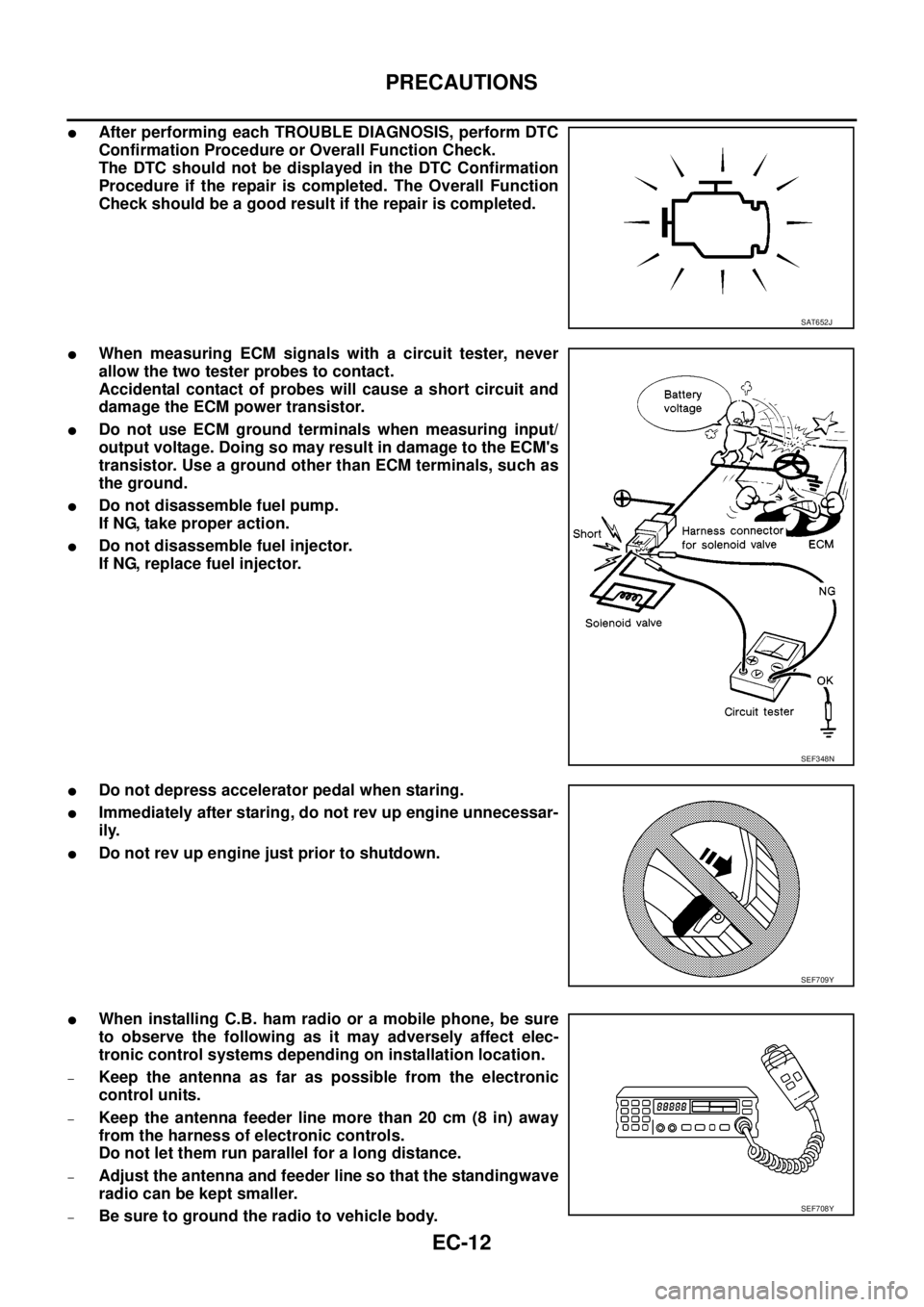
lWhen measuring ECM signals with a circuit tester, never
allow the two tester probes to contact.
Accidental contact of probes will cause a short circuit and
damage the ECM power transistor.
lDo not use ECM ground terminals when measuring input/
output voltage. Doing so may result in damage to the ECM's
transistor. Use a ground other than ECM terminals, such as
the ground.
lDo not disassemble fuel pump.
If NG, take proper action.
lDo not disassemble fuel injector.
If NG, replace fuel injector.
lDo not depress accelerator pedal when staring.
lImmediately after staring, do not rev up engine unnecessar-
ily.
lDo not rev up engine just prior to shutdown.
lWhen installing C.B. ham radio or a mobile phone, be sure
to observe the following as it may adversely affect elec-
tronic control systems depending on installation location.
–Keep the antenna as far as possible from the electronic
control units.
–Keep the antenna feeder line more than 20 cm (8 in) away
from the harness of electronic controls.
Do not let them run parallel for a long distance.
–Adjust the antenna and feeder line so that the standingwave
radio can be kept smaller.
–Be sure to ground the radio to vehicle body.
SAT652J
SEF348N
SEF709Y
SEF708Y
Page 1001 of 3171
ENGINE CONTROL SYSTEM
EC-21
C
D
E
F
G
H
I
J
K
L
MA
EC
If the engine speed is above 2,800 rpm under no load (for example, the shift position is neutral and engine
speed is over 2,800 rpm) fuel will be cut off after some time. The exact time when the fuel is cut off varies
based on engine speed. Fuel cut will be operated until the engine speed reaches 1,500 rpm, then fuel cut will
be cancelled.
NOTE:
This function is different from deceleration control listed underEC-18, "
Fuel Injection Control System"
.
Crankcase Ventilation SystemEBS01KCI
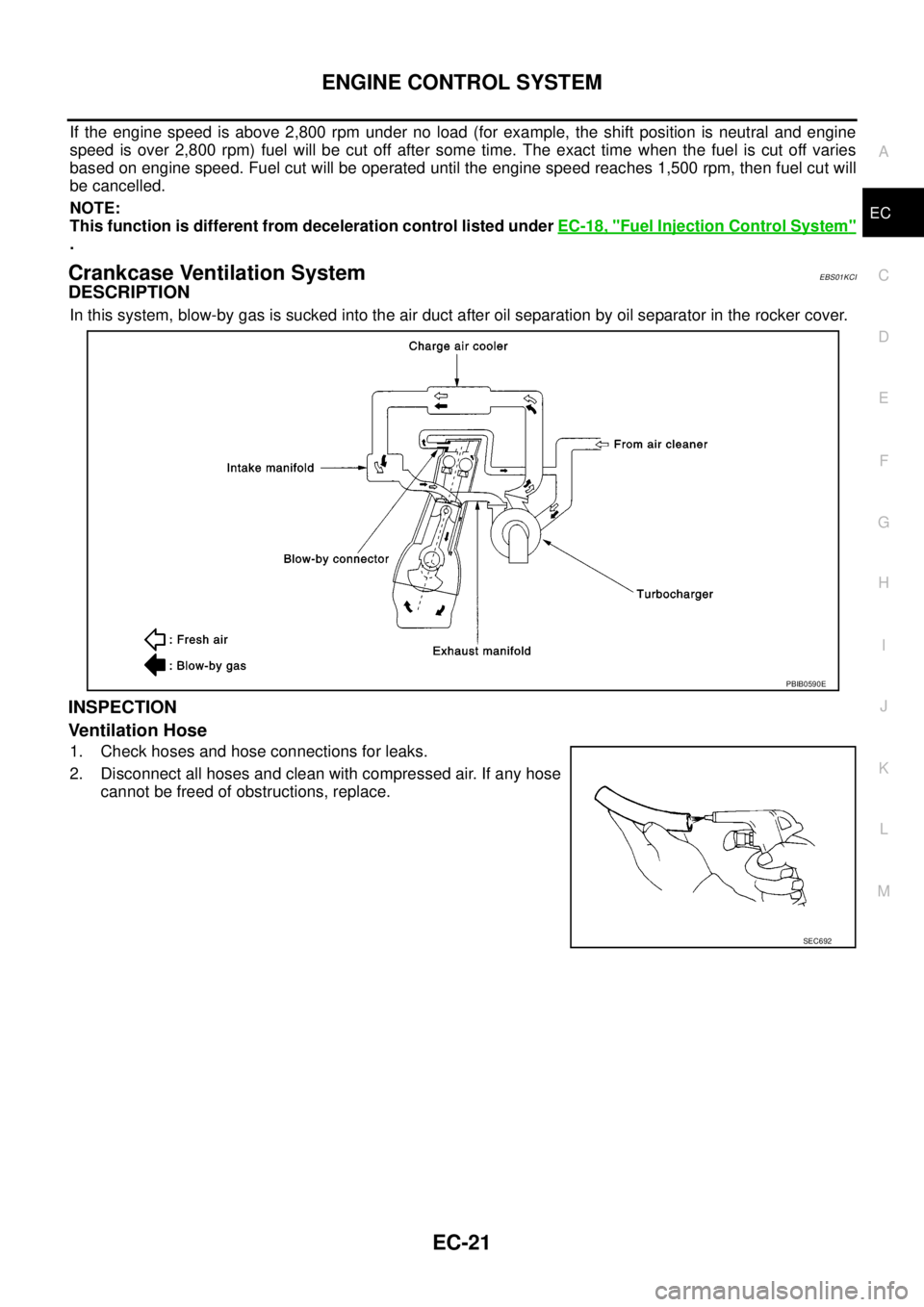
DESCRIPTION
In this system, blow-by gas is sucked into the air duct after oil separation by oil separator in the rocker cover.
INSPECTION
Ventilation Hose
1. Check hoses and hose connections for leaks.
2. Disconnect all hoses and clean with compressed air. If any hose
cannot be freed of obstructions, replace.
PBIB0590E
SEC692
Page 1005 of 3171
BASIC SERVICE PROCEDURE
EC-25
C
D
E
F
G
H
I
J
K
L
MA
EC
Injector Adjustment Value RegistrationEBS01KCM
DESCRIPTION
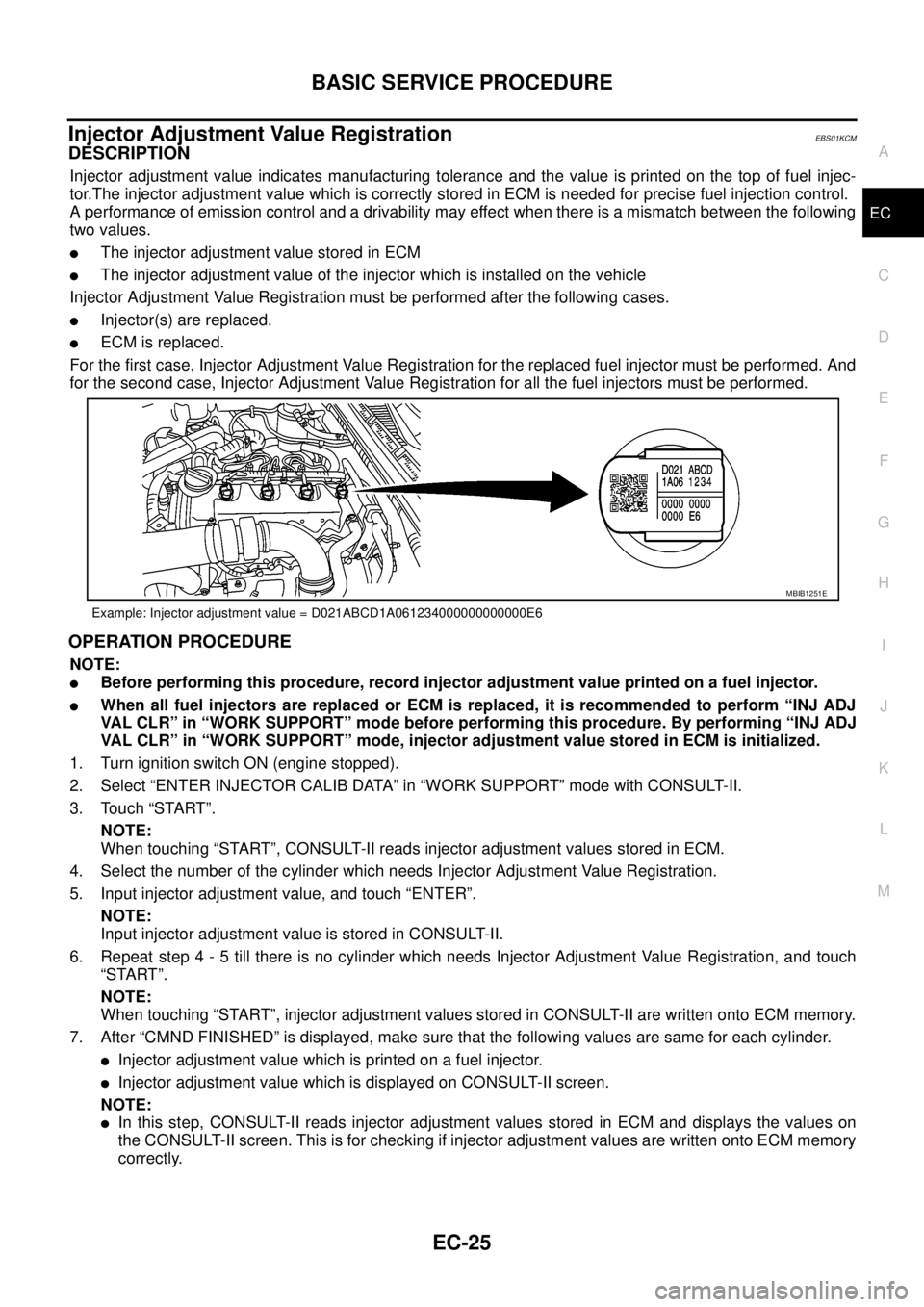
Injector adjustment value indicates manufacturing tolerance and the value is printed on the top of fuel injec-
tor.The injector adjustment value which is correctly stored in ECM is needed for precise fuel injection control.
A performance of emission control and a drivability may effect when there is a mismatch between the following
two values.
lThe injector adjustment value stored in ECM
lThe injector adjustment value of the injector which is installed on the vehicle
Injector Adjustment Value Registration must be performed after the following cases.
lInjector(s) are replaced.
lECM is replaced.
For the first case, Injector Adjustment Value Registration for the replaced fuel injector must be performed. And
for the second case, Injector Adjustment Value Registration for all the fuel injectors must be performed.
OPERATION PROCEDURE
NOTE:
lBefore performing this procedure, record injector adjustment value printed on a fuel injector.
lWhen all fuel injectors are replaced or ECM is replaced, it is recommended to perform “INJ ADJ
VAL CLR” in “WORK SUPPORT” mode before performing this procedure. By performing “INJ ADJ
VAL CLR” in “WORK SUPPORT” mode, injector adjustment value stored in ECM is initialized.
1. Turn ignition switch ON (engine stopped).
2. Select “ENTER INJECTOR CALIB DATA” in “WORK SUPPORT” mode with CONSULT-II.
3. Touch “START”.
NOTE:
When touching “START”, CONSULT-II reads injector adjustment values stored in ECM.
4. Select the number of the cylinder which needs Injector Adjustment Value Registration.
5. Input injector adjustment value, and touch “ENTER”.
NOTE:
Input injector adjustment value is stored in CONSULT-II.
6. Repeat step 4 - 5 till there is no cylinder which needs Injector Adjustment Value Registration, and touch
“START”.
NOTE:
When touching “START”, injector adjustment values stored in CONSULT-II are written onto ECM memory.
7. After “CMND FINISHED” is displayed, make sure that the following values are same for each cylinder.
lInjector adjustment value which is printed on a fuel injector.
lInjector adjustment value which is displayed on CONSULT-II screen.
NOTE:
lIn this step, CONSULT-II reads injector adjustment values stored in ECM and displays the values on
the CONSULT-II screen. This is for checking if injector adjustment values are written onto ECM memory
correctly.
Example: Injector adjustment value = D021ABCD1A061234000000000000E6
MBIB1251E
Page 1008 of 3171
EC-28
ON BOARD DIAGNOSTIC (OBD) SYSTEM
lIf the battery is disconnected, the emission-related diagnostic information will be lost within 24
hours.
lThe following data are cleared when the ECM memory is erased.
–Diagnostic trouble codes
–Freeze frame data
–Fuel pump learning value
Actual work procedures are explained using a DTC as an example. Be careful so that not only the DTC, but all
of the data listed above, are cleared from the ECM memory during work procedures.
Freeze Frame DataEBS01KCP
The ECM records the driving conditions such as calculated load value, engine coolant temperature, engine
speed, vehicle speed and intake manifold pressure at the moment a malfunction is detected.
The data, stored together with the DTC data, are called freeze frame data and displayed on CONSULT-II. For
details, seeEC-28, "
Freeze Frame Data".
Only one set of freeze frame data can be stored in the ECM. If freeze frame data is stored in the ECM memory
and another freeze frame data occurs later, the first (original) freeze frame data remains unchanged in the
ECM memory.
Freeze frame data (along with the DTCs) are cleared when the ECM memory is erased. Procedures for clear-
ing the ECM memory are described inEC-27, "
HOW TO ERASE DTC".
NATS (Nissan Anti-theft System)EBS01KCQ
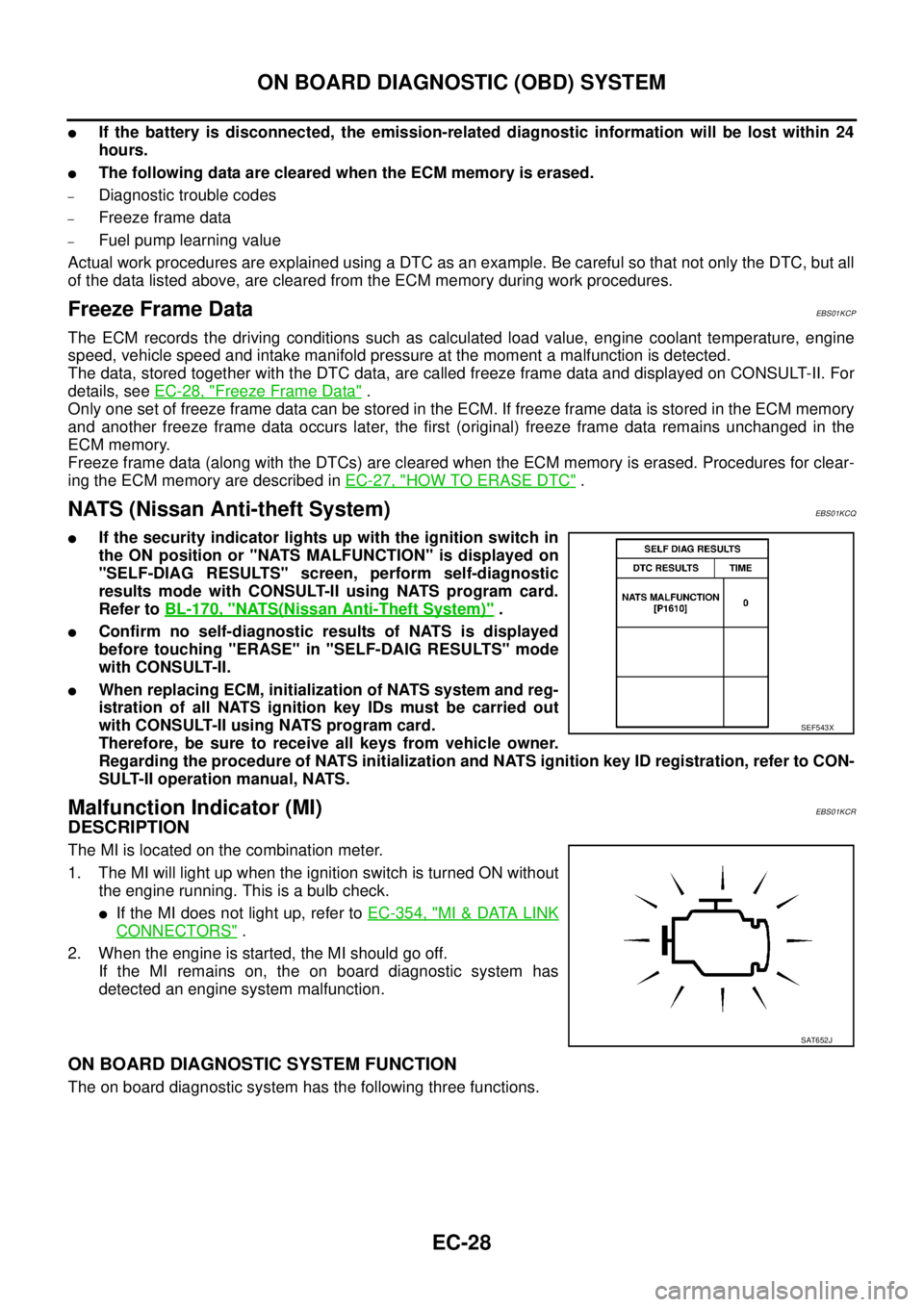
lIf the security indicator lights up with the ignition switch in
the ON position or "NATS MALFUNCTION" is displayed on
"SELF-DIAG RESULTS" screen, perform self-diagnostic
results mode with CONSULT-II using NATS program card.
Refer toBL-170, "
NATS(Nissan Anti-Theft System)".
lConfirm no self-diagnostic results of NATS is displayed
before touching "ERASE" in "SELF-DAIG RESULTS" mode
with CONSULT-II.
lWhen replacing ECM, initialization of NATS system and reg-
istration of all NATS ignition key IDs must be carried out
with CONSULT-II using NATS program card.
Therefore, be sure to receive all keys from vehicle owner.
Regarding the procedure of NATS initialization and NATS ignition key ID registration, refer to CON-
SULT-II operation manual, NATS.
Malfunction Indicator (MI)EBS01KCR
DESCRIPTION
The MI is located on the combination meter.
1. The MI will light up when the ignition switch is turned ON without
the engine running. This is a bulb check.
lIf the MI does not light up, refer toEC-354, "MI&DATA LINK
CONNECTORS".
2. When the engine is started, the MI should go off.
If the MI remains on, the on board diagnostic system has
detected an engine system malfunction.
ON BOARD DIAGNOSTIC SYSTEM FUNCTION
The on board diagnostic system has the following three functions.
SEF543X
SAT652J
Page 1009 of 3171
ON BOARD DIAGNOSTIC (OBD) SYSTEM
EC-29
C
D
E
F
G
H
I
J
K
L
MA
EC
HOWTOSWITCHDIAGNOSTICTESTMODE
NOTE:
lIt is better to count the time accurately with a clock.
lIt is impossible to switch the diagnostic mode when an accelerator pedal position sensor circuit
has a malfunction.
lAlways ECM returns to Diagnostic Test Mode I after ignition switch is turned OFF.
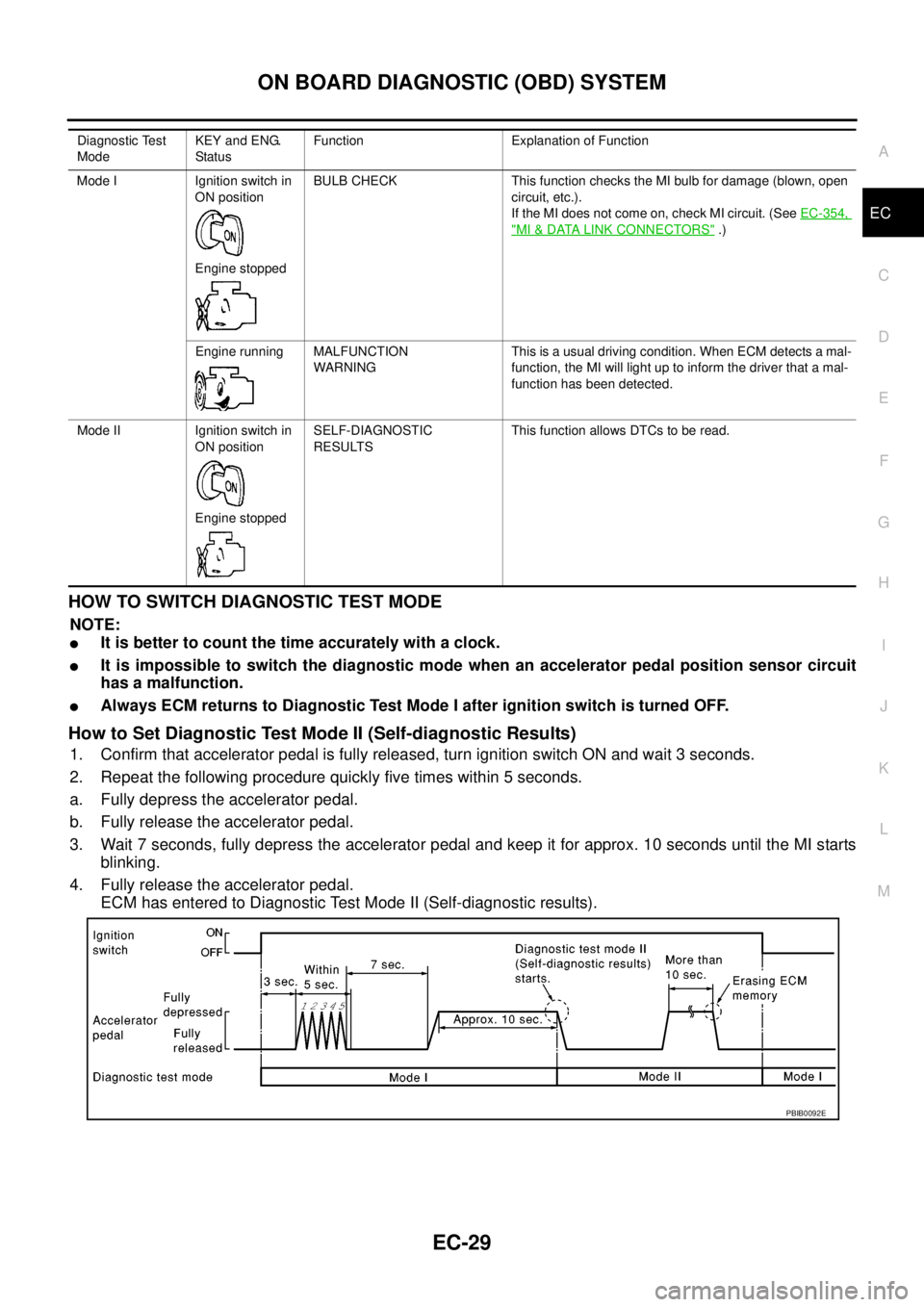
How to Set Diagnostic Test Mode II (Self-diagnostic Results)
1. Confirm that accelerator pedal is fully released, turn ignition switch ON and wait 3 seconds.
2. Repeat the following procedure quickly five times within 5 seconds.
a. Fully depress the accelerator pedal.
b. Fully release the accelerator pedal.
3. Wait 7 seconds, fully depress the accelerator pedal and keep it for approx. 10 seconds until the MI starts
blinking.
4. Fully release the accelerator pedal.
ECM has entered to Diagnostic Test Mode II (Self-diagnostic results).
Diagnostic Test
ModeKEY and ENG.
Statu sFunction Explanation of Function
Mode I Ignition switch in
ON position
Engine stoppedBULB CHECK This function checks the MI bulb for damage (blown, open
circuit, etc.).
If the MI does not come on, check MI circuit. (SeeEC-354,
"MI&DATA LINK CONNECTORS".)
Engine running MALFUNCTION
WARNINGThis is a usual driving condition. When ECM detects a mal-
function, the MI will light up to inform the driver that a mal-
function has been detected.
Mode II Ignition switch in
ON position
Engine stoppedSELF-DIAGNOSTIC
RESULTSThis function allows DTCs to be read.
PBIB0092E