Page 499 of 513
fVI
CHASSIS
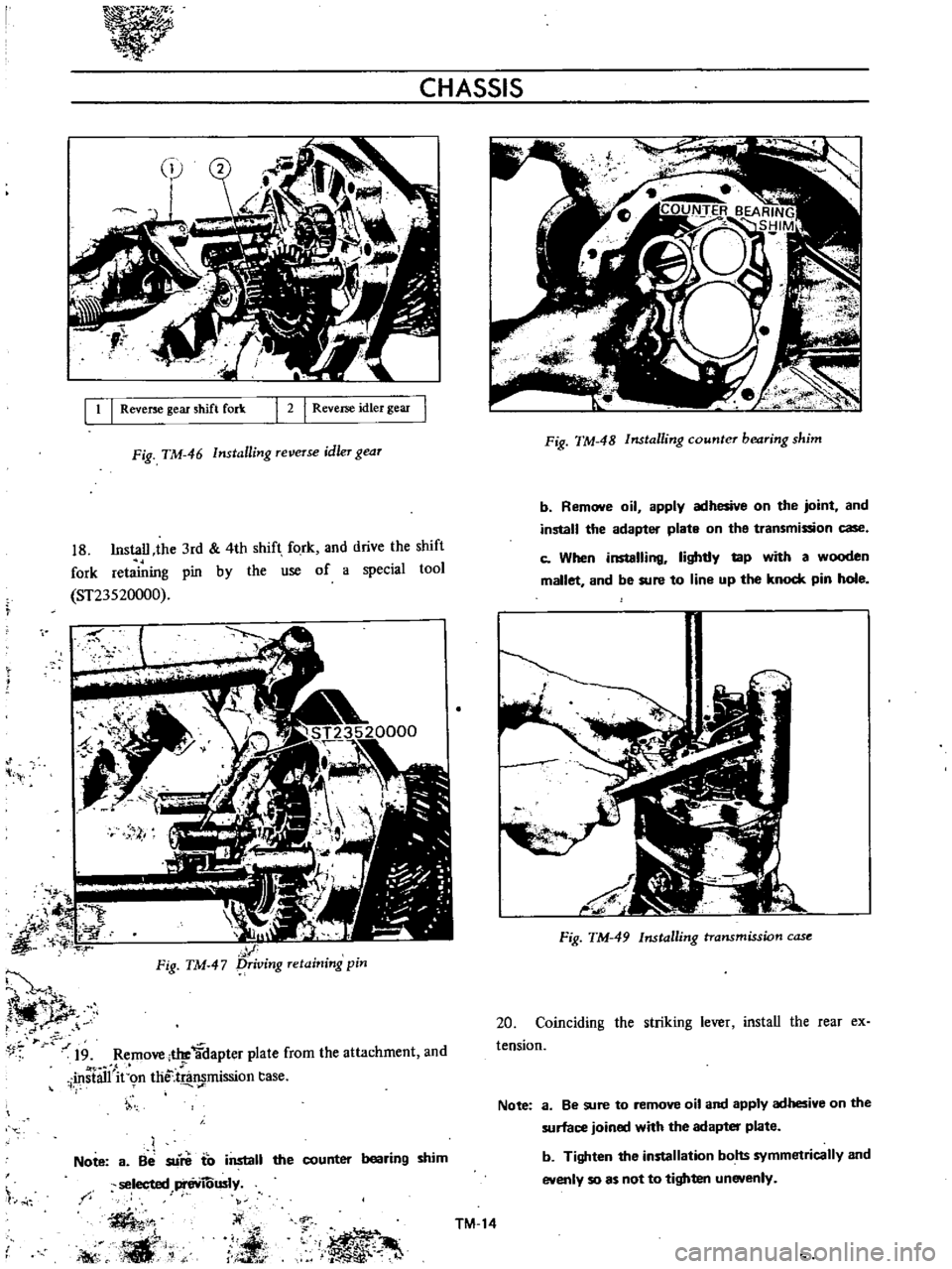
9
Install
the
steel
ball
synchro
hub
thrust
washer
and
main
shaft
pilot
bearing
Note
a
Grease
sliding
surface
of
the
steel
ball
and
thrust
washer
b
When
nstailing
the
thrust
washer
be
careful
to
face
the
front
and
rear
directions
correctly
THRUST
SIDE
FRONT
OIL
GROOVE
SlOE
REARl
if
c
o
DINT
FOR
OIL
r
1
r
Fig
TM
J8
Synchro
hub
thrust
washer
i
the
main
bearing
front
side
to
the
main
drive
gear
m
stall
the
main
bearing
washer
and
snap
ring
Note
When
installing
the
main
bearing
washer
be
sure
to
face
the
web
portion
to
the
bearing
side
b
Be
SUo
re
to
fit
the
snap
ring
correct
y
r
secu
tDthegroove
t
I
i
II
t
d
l
I
t
iIf
i
c
c
f
1
ST22350000
It
i
r
4
t
r
4
FiftJ
g
mairi
shafi
bearing
A
I
t
T
M
12
II
Install
the
baulk
ring
on
the
main
drive
gear
and
combining
with
the
main
shaft
complete
the
main
shaft
assembly
12
Combine
the
main
shaft
assembly
with
the
counter
shaft
and
install
them
on
the
adapter
plate
Note
Apply
the
main
bearing
front
end
approximately
5
mm
0
1969
in
fim
line
up
the
counter
shaft
bearing
center
lightly
tap
the
main
drive
gear
with
a
wooden
mallet
and
thus
install
the
main
shaft
assembly
and
counter
slieft
on
the
adapter
plate
Fig
TM
40
Combining
gear
assembly
13
Install
the
shift
fork
on
each
fork
rod
1
II0te
a
Pay
attention
on
the
shift
fork
installing
direc
tion
b
Be
sure
that
there
is
no
98
between
the
fork
rod
and
shift
fork
J
b
I
1
lIst
2nd
shift
rod
2
Striking
rod
13
13rd
4th
hift
rod
4
Reverse
shift
rod
Fig
TM
41
La
put
of
shift
fork
and
fork
rod
1
r
J
Page 501 of 513
7
CHASSIS
I
1
I
Reverse
gear
shift
fork
2
I
Reverse
idler
gear
Fig
TM
46
Installing
reVeTse
idler
gear
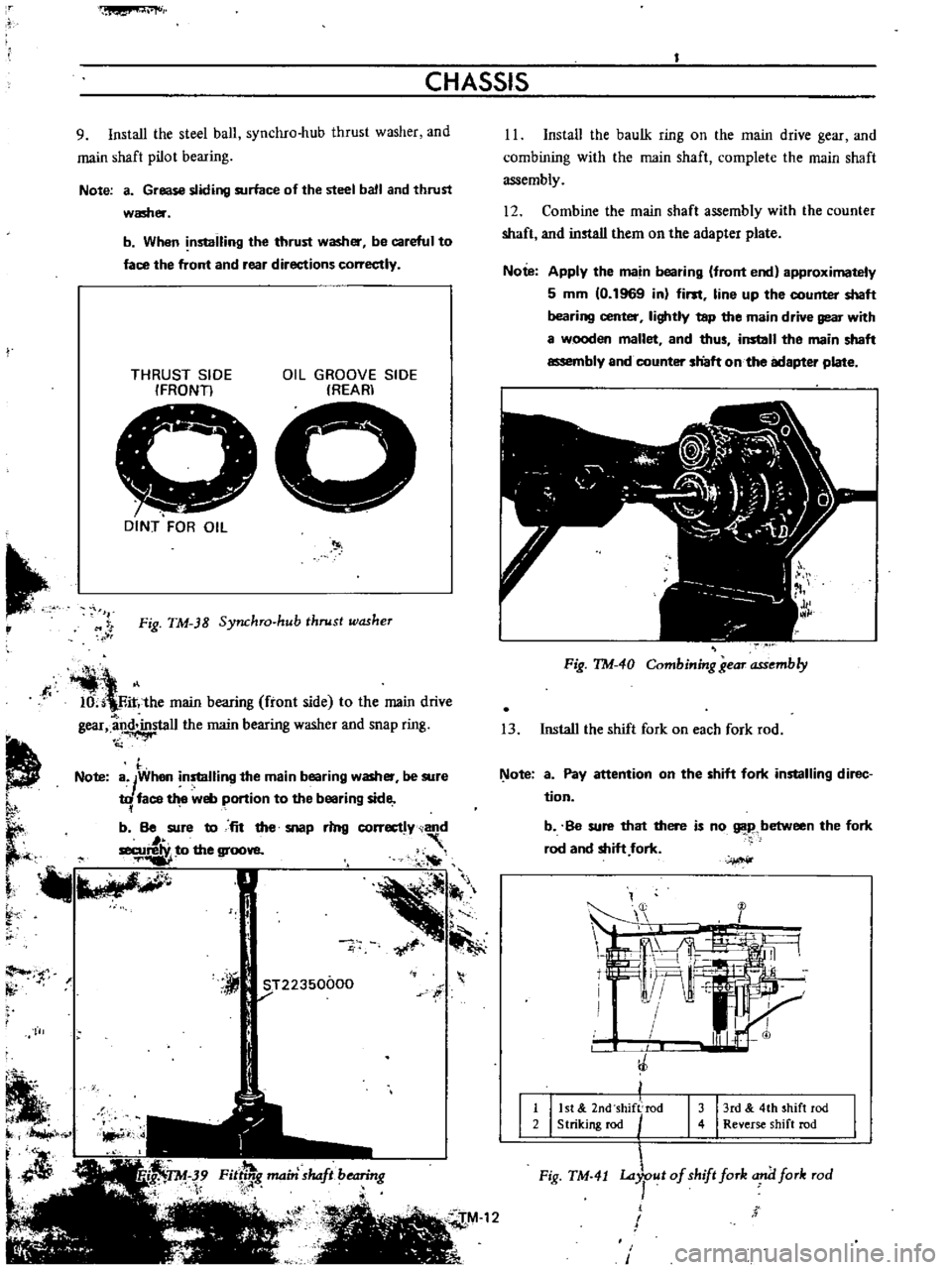
18
Install
the
3rd
4th
shift
fork
and
drive
the
shift
fork
retaining
pin
by
the
use
of
a
special
tool
ST23520000
t
1
f
1
1
t
t
A
t1
5
t
ii
r
Fig
TM
47
f
Jt
r
19
Remo
Al
tIJe
3dapter
plate
from
the
attachment
and
i
stall
in
m
t
j
t
mission
tase
I
1
Note
a
Be
su
to
install
selected
I
eviOusly
the
counter
bearing
shim
i
r
t
1
K
s
l
i
1t
p
Fig
TM
48
Installing
counter
bearing
shim
b
Remove
oil
apply
adhesive
on
the
joint
and
install
the
adapter
plate
on
the
transmission
case
c
When
installing
lightly
lap
with
a
wooden
mallet
and
be
sure
to
line
up
the
knock
pin
hole
Fig
TM
49
Installing
transmission
case
20
Coinciding
the
striking
le
Alr
install
the
rear
ex
tension
Note
3
Be
sure
to
remove
oil
and
apply
adhesive
on
the
surface
joined
with
the
adapter
plate
b
Tighten
the
installation
bolts
symmetrically
and
evenly
so
as
not
to
tighten
unevenly
TM
14
Page 502 of 513
YO
TRANSMISSION
27
Upon
completion
of
the
reassembly
confIrm
that
Measure
depth
from
the
front
cover
installing
I
The
main
shaft
is
notJ
tiirned
synchronously
when
I
surface
to
end
surface
of
the
main
bearing
outer
gear
is
shifted
to
neutral
and
the
main
drive
gear
is
turned
race
by
the
use
of
vernier
caliper
depth
gauge
nd
light1y
select
shimlsl
from
those
shown
in
the
foIlOW
g
l
table
so
that
the
depth
is
5
g
15
mm
0
1
9
2
Operatin
r
e
is
not
excessive
d
gears
n
be
t
o
0059
in
i
shifted
smoothly
when
Ifjifted
to
the
mdlVldual
speeds
rt
6
1
1
itl
M
il
TM
15
If
tl
Fig
TM
50
Installing
rear
extension
21
Install
the
bushing
plunger
return
spring
and
return
spring
plug
Note
When
installing
apply
adhesive
to
the
return
spring
plug
t
l
4
0
fj
I
t
I
Plunger
2
Bush
I
31
Return
spnng
4
Return
spring
plug
Fig
TM
51
Installing
return
spring
22
23
24
Install
the
stopper
pin
and
E
rjng
Instal
e
speedometer
pinion
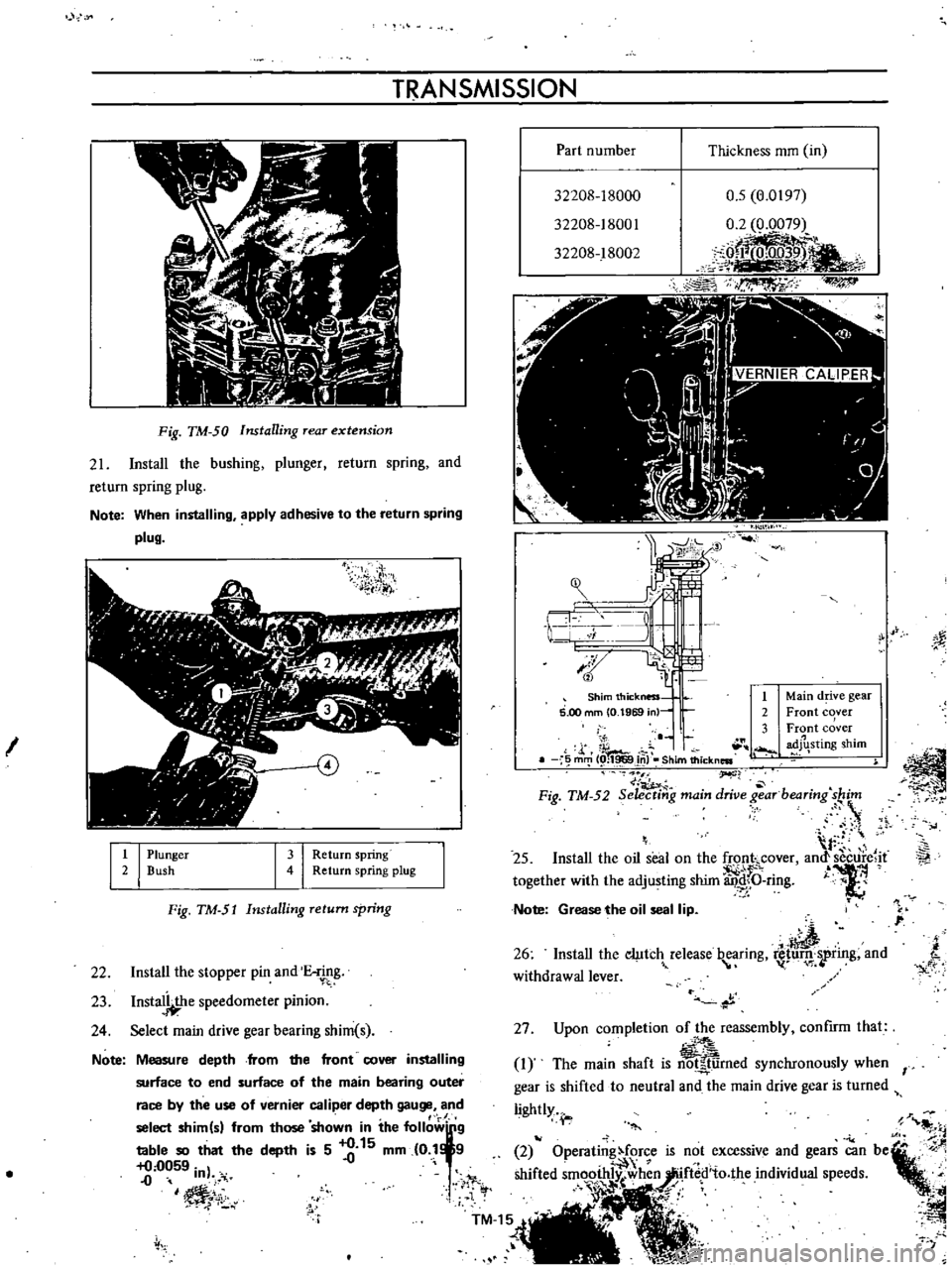
Select
main
drive
gear
bearing
shim
s
Note
Part
number
Thickness
mm
in
32208
18000
32208
18001
32208
18002
0
5
0
0197
0
2
0
0079
jeL
J
f
l
r
I
l
0
J
3
I
L
r
1
v
tti
t
4J
m
cv
Shim
thickness
t
5
00
mm
O
1969
n
2
3
J
ib
m
J
i
I
Shim
thickness
f
I
M
r
Fig
TM
52
Seiecti
g
main
drive
7
arbeari
g
s
j
I
25
Install
the
oil
seal
on
the
fronhcover
amtsecure
it
together
with
the
adjusting
shim
4f
J
ring
0
Note
Grease
the
oil
seal
lip
I
26
Install
the
ci
Itc
release
b
aring
luru
rring
and
withdrawal
lever
p
Main
d
ve
gear
Front
cover
Front
cover
adJhsting
shim
i
Ii
Page 504 of 513
TRANSMISSION
COLUMN
SHIFT
CONTROL
SYSTEM
Removal
Remove
the
steering
wheel
assembly
Fig
TM
54
Rem01
ing
steering
wheel
2
Remove
the
steering
column
shell
cover
turn
signal
and
lighting
switch
completely
Fig
TM
55
Removing
steering
column
shell
cover
Fig
TM
56
Removing
turn
signal
and
lighting
switch
3
Remove
the
snap
ring
and
control
lever
pivot
pin
and
withdraw
the
hand
lever
A
A
V
l
Y
e
f
I
1
I
V
e
tl
f
r
4
2i
L
1
I
Snap
ring
2
Control
lever
pivot
pin
I
3
I
C
washer
Fig
TM
57
Withdrawing
hand
ever
4
Remove
the
C
washer
TM
17
i
MI
ig
r
M
5J
emOVing
change
lever
J
y
Ji
1
r
oJ
Page 505 of 513
CHASSIS
5
Remove
the
speed
change
retainer
bolt
I
6
Remove
the
speed
change
retainer
2
7
Remove
the
2nd
top
change
lever
and
bush
13
from
the
control
rod
4
8
Lower
the
control
rod
so
that
the
control
lever
pin
comes
out
from
the
lower
bracket
5
and
withdraw
the
control
lever
pin
Note
low
the
control
rod
to
such
an
extent
that
the
con
b
ol
lever
pin
does
not
interfere
the
lower
bracket
9
Withdraw
the
control
rod
from
the
passenger
com
partment
10
Remove
the
cotter
pins
and
disconnect
the
speed
change
rods
Remove
the
cross
shaft
from
the
side
member
and
withdraw
the
cross
shaft
assembly
Fig
TM
59
Cross
shaft
assembly
Inspection
and
repair
Check
all
sliding
parts
and
component
parts
for
wear
and
other
damages
and
replace
as
required
Note
Especially
for
collapsible
type
control
rod
be
careful
not
to
apply
a
large
load
toward
the
axial
direction
when
delivering
and
installing
When
installing
the
control
rod
if
slackness
exists
toward
the
axial
direction
replace
S
i
TM
18
C
1
rr
i
Al
Installation
Install
the
control
system
in
reverse
sequence
of
removal
Before
installing
and
assembling
apply
chassis
grease
to
all
sliding
surfaces
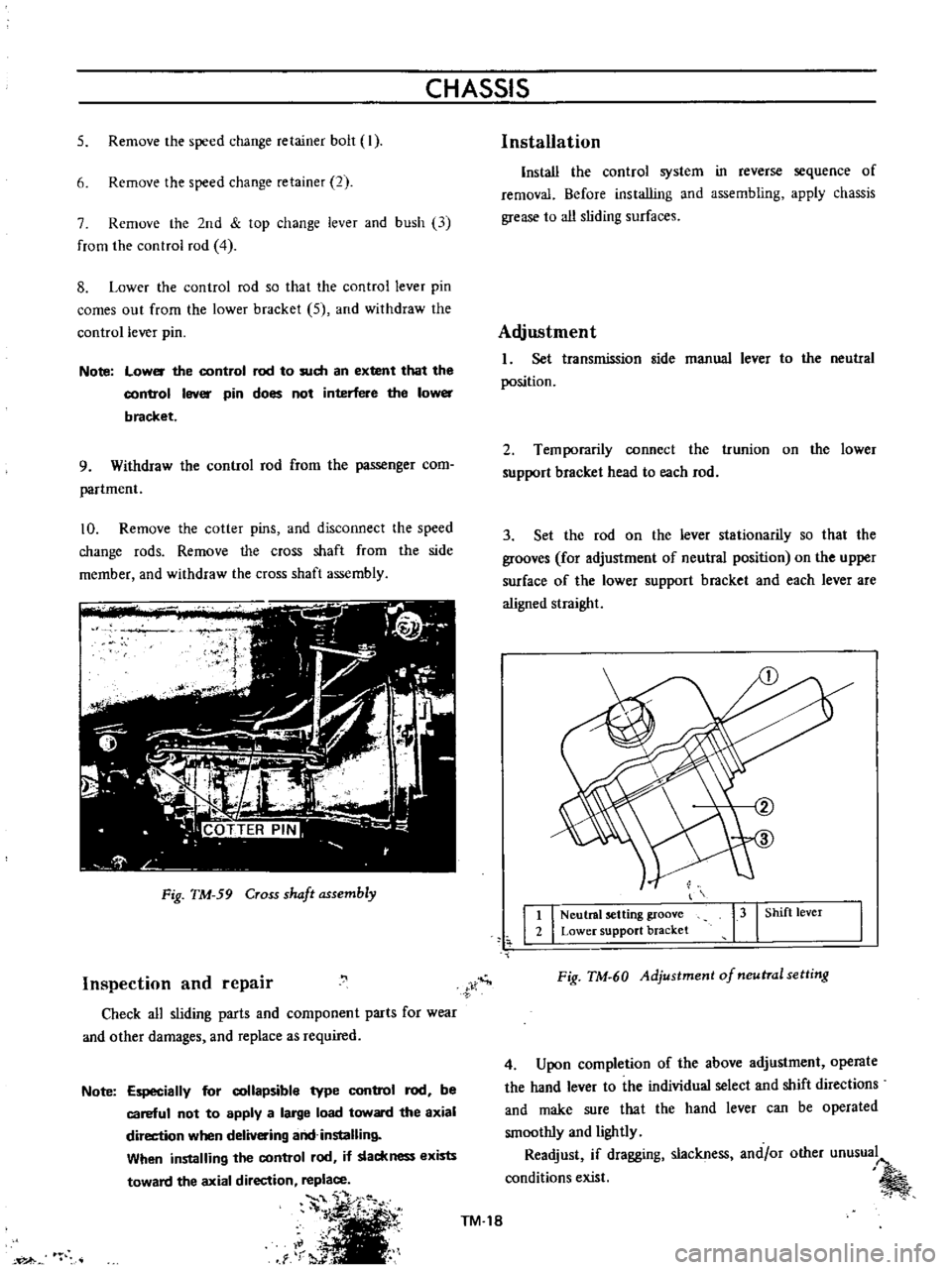
Adjustment
I
Set
transmission
side
manual
lever
to
the
neutral
position
2
Temporarily
connect
the
trunion
on
the
lower
support
bracket
head
to
each
rod
3
Set
the
rod
on
the
lever
stationarily
so
that
the
grooves
for
adjustment
of
neutral
position
on
the
upper
surface
of
the
lower
support
bracket
and
each
lever
are
aligned
straight
t
I
Neutral
setting
groove
2
Lower
support
bracket
13
I
Shift
lever
Fig
TM
60
Adjustment
of
neutral
setting
4
Upon
completion
of
the
above
adjustment
operate
the
hand
lever
to
the
individual
select
and
shift
directions
and
make
sure
that
the
hand
lever
can
be
operated
smoothly
and
lightly
Readjust
if
dragging
slackness
and
or
other
unusual
conditions
exist