Page 161 of 680
4
LCD Display ..................................................................................................... 4-29
LCD Display Control ................................................................................................... 4-29
View Modes ................................................................................................................ 4-29
Driving assist view .................................................................................................. 4-30
Turn By Turn (TBT) view .......................................................................................... 4-30
Utility view ................................................................................................................ 4-31
Accumulated info .................................................................................................... 4-31
Additional information display ................................................................................ 4-33
Vehicle Settings (infotainment system) ........................................................4-34
Setting Your Vehicle .................................................................................................. 4-34
4. Instrument Cluster
Page 162 of 680
4-4
Instrument Cluster
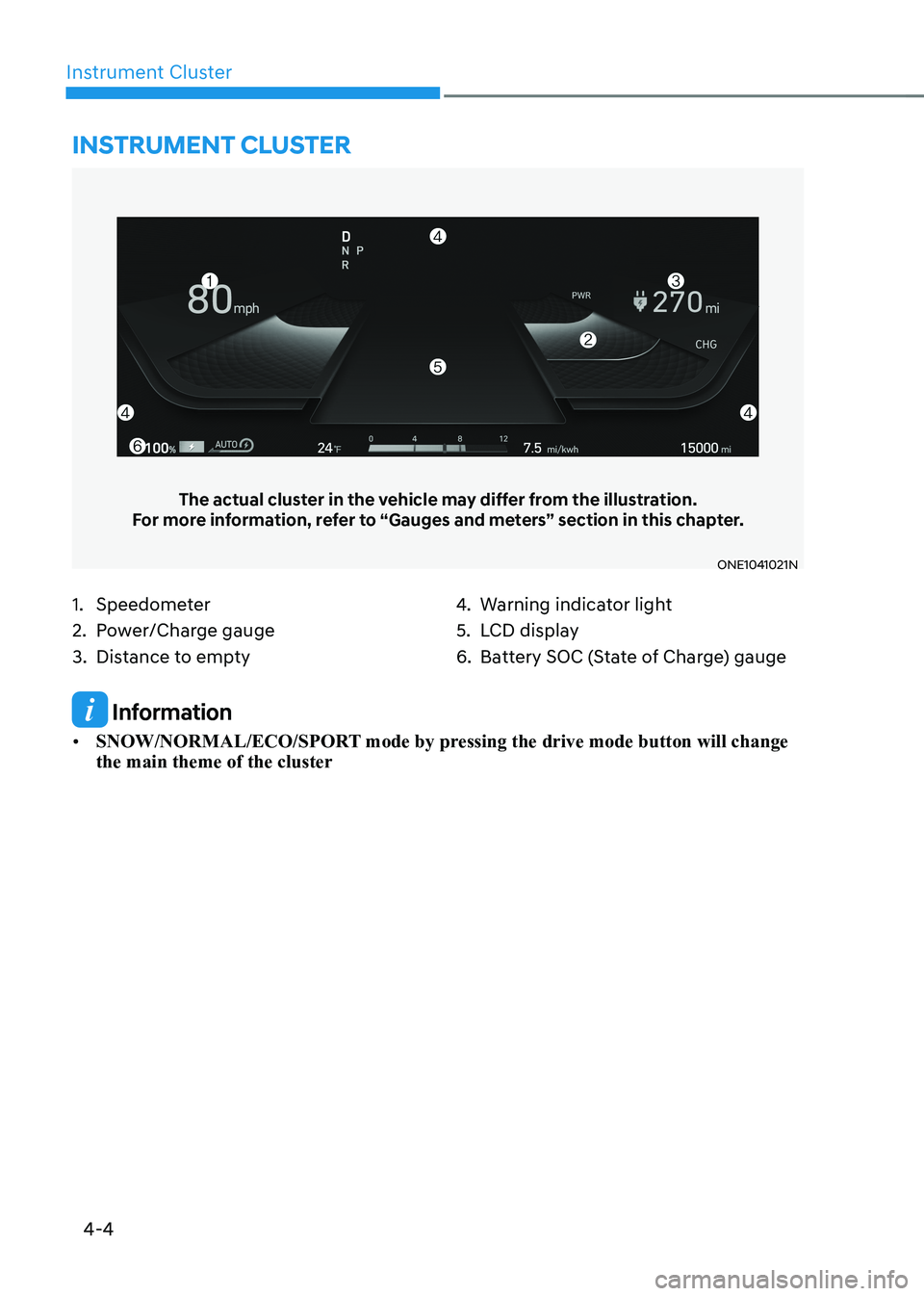
1. Speedometer
2. Power/Charge gauge
3. Distance to empty4.
Warning indicator light
5. LCD display
6. Battery SOC (State of Charge) gauge
Instrument cluster
The actual cluster in the vehicle may differ from the illustration.
For more information, refer to “Gauges and meters” section in this chapter.
ONE1041021N
Information
• SNOW/NORMAL/ECO/SPORT mode by pressing the drive mode button will change the main theme of the cluster
Page 163 of 680
04
4-5
Instrument Cluster Control
Instrument panel illumination
ONE1041055N
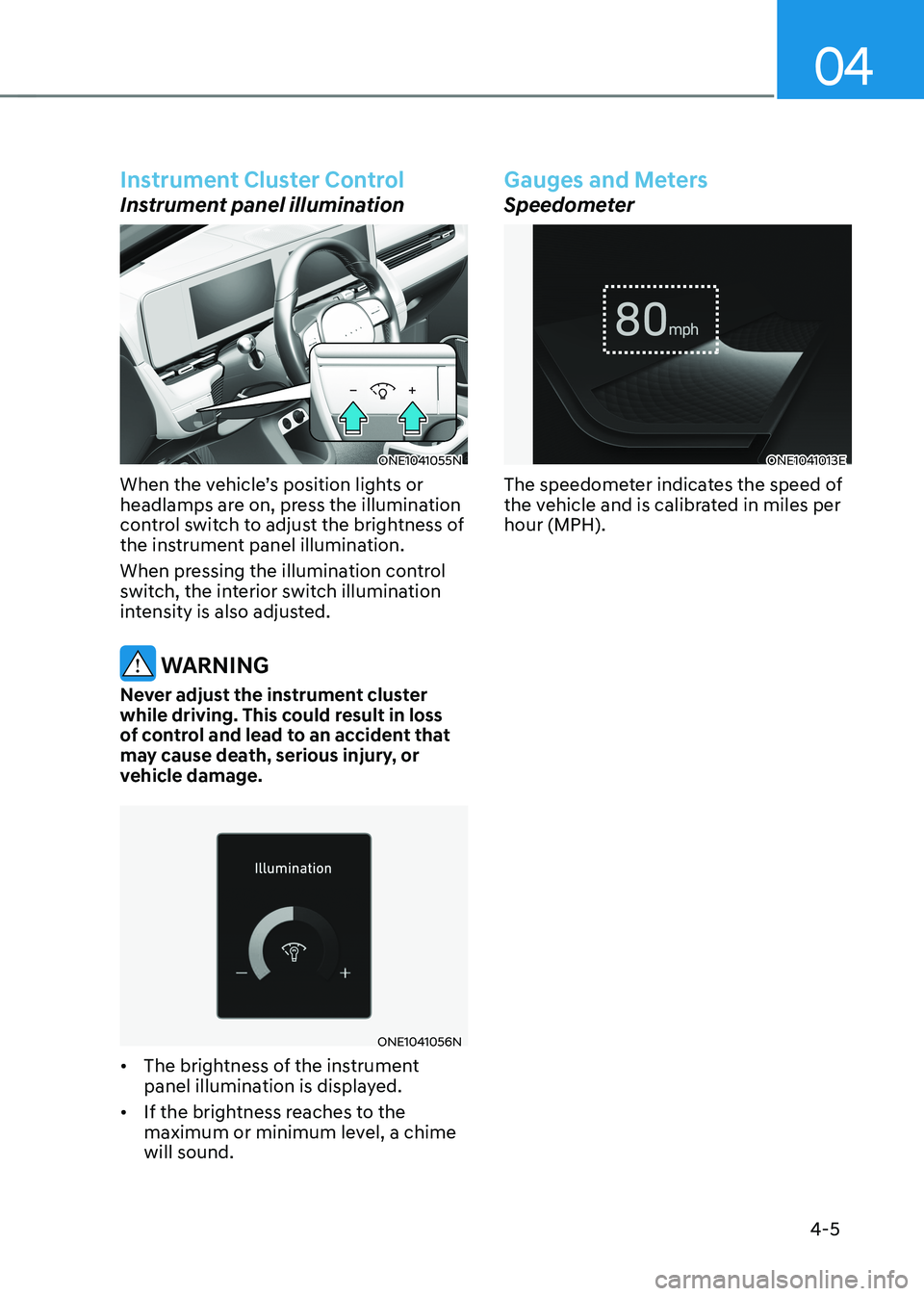
When the vehicle’s position lights or
headlamps are on, press the illumination
control switch to adjust the brightness of
the instrument panel illumination.
When pressing the illumination control
switch, the interior switch illumination
intensity is also adjusted.
WARNING
Never adjust the instrument cluster
while driving. This could result in loss
of control and lead to an accident that
may cause death, serious injury, or
vehicle damage.
ONE1041056N
• The brightness of the instrument
panel illumination is displayed.
• If the brightness reaches to the
maximum or minimum level, a chime will sound.
Gauges and Meters
Speedometer
ONE1041013E
The speedometer indicates the speed of
the vehicle and is calibrated in miles per hour (MPH).
Page 165 of 680

04
4 -7
ONE1Q011011
When the remaining battery is lower than
10 % on the SOC gauge, the warning light (
) turns ON to alert you of the battery
level.
When the warning light (
) turns ON,
the vehicle can drive an additional 18 ~
25 miles (30 ~ 40 km) depending on the
driving speed, heater/air conditioner,
weather, driving style, and other factors.
Charging is required.
NOTICE
The output is limited as the remaining
battery is low.
When the Power Down Indicator Light
is on, the vehicle may be limited to
a certain speed, it may be difficult
to climb hills, or the vehicle may be
pushed back, so charge it immediately. Outside temperature gauge
ONE1041014N
This gauge indicates the current outside
air temperatures by 1°F (1°C).
Note that the temperature indicated
on the LCD display may not change
as quickly as the outside temperature
(there may be a slight delay before the
temperature changes.)
You can change the temperature
unit from the Settings menu in the
infotainment system screen. Select:
- General Settings → Unit → Temperature Unit → °C/°F
For detailed information, refer to the
separately supplied infotainment
system manual.
Both the temperature unit on the cluster
LCD display and climate control screen will change.
Page 167 of 680

04
4-9
Reduction Gear Shift Indicator
ONE1041015
The indicator displays which gear is
selected.
Regenerative braking level indicator
ONE1061036
The regenerative brake indicates the
level of the regenerative braking that
you set. And it also indicates Smart
regenerative system’s operation status.
For more details, refer to "Regenerative
Braking System" in chapter 6.
Warning and Indicator Lights
Information
Make sure that all warning lights are OFF
after starting the vehicle. If any light is still ON, this indicates a situation that needs attention.
Ready indicator
This indicator illuminates:
When the vehicle is ready to be driven. - ON : Normal driving is possible.
- OFF : Normal driving is not possible, or a problem has occurred.
- Blinking : Emergency driving.
When the ready indicator goes OFF
or blinks, there is a problem with the
system. In this case, have your vehicle
inspected by an authorized HYUNDAI
dealer.
Service warning light
This warning light illuminates:
• When the START/STOP button is in the ON position.
- It illuminates for approximately 3 seconds and then goes off.
• When there is a problem with related
parts of the electric vehicle control
system, such as sensors, etc.
When the warning light illuminates while
driving, or does not go OFF after starting
the vehicle, have your vehicle inspected
by an authorized HYUNDAI dealer.
Page 171 of 680

04
4-13
WARNING
Electronic Brake Force Distribution
(EBD) system warning light
When both ABS and Parking Brake &
Brake Fluid warning lights are on, the
brake system will not work normally
and you may experience an unexpected
and dangerous situation during sudden
braking.
If this occurs, avoid high speed driving
and abrupt braking.
Have the vehicle inspected by an
authorized HYUNDAI dealer as soon as possible.
NOTICE
Electronic Brake Force Distribution
(EBD) system warning light
When the ABS warning light is on
or both ABS and Parking Brake &
Brake Fluid warning lights are on, the
speedometer, odometer, or tripmeter
may not work. Also, the EPS warning
light may illuminate and the steering
effort may increase or decrease.
If this occurs, have the vehicle
inspected by an authorized HYUNDAI dealer as soon as possible. Electric Power Steering (EPS)
warning light
This warning light illuminates:
•
When you set the Start/Stop button to the ON position.
- The electric powering steering warning light illuminates for about 3
seconds and then goes off.
• Whenever there is a malfunction with
the electric power steering.
If this occurs, have the vehicle
inspected by an authorized HYUNDAI
dealer.
Master warning light
This warning light illuminates:
When there is a malfunction in operation
in any of the following systems: - Forward Collision-Avoidance Assist malfunction (if equipped)
- Forward Collision-Avoidance Assist radar blocked (if equipped)
- Blind-Spot Collision Warning malfunction (if equipped)
- Blind-Spot Collision Warning radar blocked (if equipped)
- LED headlamp malfunction (if equipped)
- High Beam Assist malfunction (if equipped)
- Smart Cruise Control malfunction (if equipped)
- Smart Cruise Control radar blocked (if equipped)
- Tire Pressure Monitoring System (TPMS) malfunction
To identify the details of the warning,
look at the LCD display.
Page 172 of 680

Instrument Cluster
4-14
Electronic Parking Brake
(EPB) warning light
This warning light illuminates:
•
When you set the Start/Stop button to the ON position.
- The EPB warning light illuminates for about 3 seconds and then goes
off.
• Whenever there is a malfunction with EPB.
If this occurs, have the vehicle
inspected by an authorized HYUNDAI
dealer.
Information
The Electronic Parking Brake (EPB) warning light may illuminate when
the Electronic Stability Control (ESC)
indicator light comes on to indicate that
ESC is not working properly. This does not indicate malfunction of EPB. Low tire pressure warning
light
This warning light illuminates:
•
When you set the Start/Stop button to the ON position.
- The low tire pressure warning light illuminates for approximately 3
seconds and then goes off.
• When one or more of your tires are
significantly underinflated. (The
location of the underinflated tires are
displayed on the LCD display.)
For more details, refer to “Tire Pressure
Monitoring System (TPMS)” section in
chapter 8.
This warning light remains ON after
blinking for approximately 60 seconds, or
repeatedly blinks ON and OFF in 3 second intervals:
When there is a malfunction with the TPMS.
If this occurs, have the vehicle inspected
by an authorized HYUNDAI dealer as soon as possible.
For more details, refer to “Tire Pressure
Monitoring System (TPMS)” section in
chapter 8.
Page 177 of 680

04
4-19
High Beam Assist indicator
light (if equipped)
This indicator light illuminates:
When the high-beam is on with the light
switch in the AUTO position.
If your vehicle detects oncoming or
preceding vehicles, High Beam Assist
will switch the high beam to low beam
automatically.
For more details, refer to “High Beam
Assist (HBA)” section in chapter 5.
AUTO HOLD indicator light
This indicator light illuminates:
•
[White] When you activate Auto Hold
by pressing the AUTO HOLD switch.
• [Green] When you stop the vehicle
completely by depressing the brake
pedal with Auto Hold activated.
• [Yellow] Whenever there is a
malfunction with the Auto Hold function.
If this occurs, have the vehicle
inspected by an authorized HYUNDAI
dealer.
For more details, refer to “Electronic
Parking Brake (EPB)” section in chapter 6.
LCD Display Messages
Shift to P
This message is displayed if you try to
turn off the vehicle without the gear in
the P (Park) position.
If this occurs, the Start/Stop button turns
to the ACC position.
Low key battery
This message is displayed if the battery
of the smart key is discharged while
changing the Start/Stop button to the OFF position.
Press START button while turning wheel (if equipped)
This message is displayed if the steering
wheel does not unlock normally when
the Start/Stop button is pressed.
You should press the Start/Stop button
while turning the steering wheel right
and left.
Press brake pedal to start vehicle
This message is displayed if the Start/
Stop button changes to the ACC position
twice by pressing the button repeatedly
without depressing the brake pedal.
You can start the vehicle by depressing
the brake pedal and then pressing the
Start/Stop button.