Page 43 of 680
Foreword / Electric Vehicle System Overview
1-38
à Example for setting the ICCB charge level
The example is only for reference and may vary according to the surrounding
environment.
Outlet current ICCB charge level Control box display window
14-16A 12A
ONX4EPHQ011007L
13-12A
10A
11-10A 8A
9-8A 6A
CAUTION
Please make sure that charge level selection matches the capacity of your circuit
breaker to avoid blown fuse.
Page 46 of 680
01
1-41
ONE1Q011058E
10. After charging has started, the estimated charging time is displayed
on the instrument cluster for about 1
minute.
If you open the driver seat door while
charging, the estimated charging time
is also displayed on the instrument
cluster for about 1 minute. When
scheduled charging or scheduled
air conditioner/heater is set, the
estimated charging time is displayed
as “--” .
Information
Depending on the condition and durability
of the high voltage battery, charger
specifications, and ambient temperature,
the time required for charging the battery
may vary. Checking Charging Status
When charging the high voltage battery,
the charge level can be checked from
outside the vehicle.
For more details, refer to ‘Charge
Indicator Lamp for Electric Vehicle’ in
this chapter.
Page 51 of 680
Foreword / Electric Vehicle System Overview
1-46
ONX4EPHQ011009L
Plugged into vehicle (POWER Green ON,
FAULT Red Blink) • Diagnostic device failure
• Current leakage
• Abnormal temperature
Contact an authorized HYUNDAI dealer.
ONX4EPHQ011010L
• Leakage current failure (POWER Green
ON, FAULT Red Blink)
• After disconnecting and reconnecting
the power plug, press and release the
button for 2 seconds or longer to clear
the error.
Contact an authorized HYUNDAI dealer.
ONX4EPHQ011011L
Power saving mode • 7-segment display is turned off if there
is no status change for more than 1
minute.
Page 54 of 680

01
1-49
Charging the eleCtriC vehiCle (abrupt stop)
Action to be taken when charging stops abruptly
When the high voltage battery does not charge, check the followings:
1. Check the charging setting for the vehicle. Refer to “Charge Management”, in this chapter (for example, When scheduled charging is set, charging is not initiated
immediately when the AC charger or portable charger (ICCB: In-Cable Control Box)
is connected.)
2. Check the operation status of AC charger, portable charger and DC charger. (Charging Status Indicator Lamp for Portable Charger, refer to “Checking Charging
Status” for trickle charge in this chapter.)
à Actual method for indicating the charging status may vary in accordance with the
charger manufacturer.
3. When the vehicle does not charge and a warning message appears on the cluster, check the corresponding message. Refer to “LCD Display Messages”, in this chapter.
4. If the vehicle is properly charged when charged with another normally working
charger, contact the charger manufacturer.
5. If the vehicle does not charge when charged with another normally working charger, contact an authorized HYUNDAI dealer for inspection.
6. If charging fails and the service warning light (
) is lit in the cluster, contact an
authorized HYUNDAI dealer.
Page 56 of 680

01
1-51
Virtual Engine Sound System
The Virtual Engine Sound System
generates engine sound for pedestrians
to hear vehicle sound because there is
no sound while the Electric Vehicle (EV)
is operating. • If the vehicle is in the ready (
)
mode and the gear is not in P (Park),
the VESS will be operated.
• When the gear is shifted to R
(Reverse), an additional warning
sound will be heard.
CAUTION
• The vehicle is much quieter while
driving than a conventional gasoline-
powered vehicle. Be aware of your
surroundings and always drive safely.
• After you park the vehicle or while
you are waiting at a traffic light,
check whether there are children or
obstacles around the vehicle.
• Check if there is something behind
the vehicle when driving in reverse.
Pedestrians may not hear the sound
of the vehicle.
Distance to Empty
ONE1Q011049E
The distance to empty is displayed
differently according to the selected
drive mode in the Drive Mode Integrated
Control System.
For more information, refer to “Drive
Mode Integrated Control System” in
chapter 6.
When destination is not set • On average, a vehicle can drive about
199 miles (320 km) (Standard type) /
249 miles (400 km) (Extended type).
• Under certain circumstances where
the air conditioner/heater is ON,
the distance to empty is impacted,
resulting in a possible distance range
from 106 ~ 286 miles (170 ~ 460 km)
(Standard type) / 130 ~ 354 miles
(210 ~ 570 km) (Extended type).
When using the heater during cold
weather or driving at high speed, the
high voltage battery consumes a lot
more electricity. This may reduce the
distance to empty significantly.
• After ‘0 km’ has been displayed,
the vehicle can drive an additional
2~5 miles (3~8 km) depending on
driving speed, heater/air conditioner,
weather, driving style, and other
factors.
Page 57 of 680

Foreword / Electric Vehicle System Overview
1-52
•
Distance to empty that is displayed
on the instrument cluster after
completing a recharge may vary
significantly depending on previous
operating patterns.
When previous driving patterns
include high speed driving, resulting
in the high voltage battery using more
electricity than usual, the estimated
distance to empty is reduced. When
the high voltage battery uses little
electricity in ECO mode, the estimated
distance to empty increases.
• Distance to empty may depend on
many factors such as the charge
amount of the high voltage battery,
weather, temperature, durability of
the battery, geographical features,
and driving style.
• Natural degradation may occur with
the high voltage battery depending
on the number of years the vehicle is
used. This may reduce the distance to
empty.
When destination is set
When the destination is set, the distance
to empty may change. The distance
to empty is recalculated using the
information of the destination. However,
the distance to empty may vary
significantly based on traffic conditions,
driving habits, and condition of the
vehicle.
Tips for Improving Distance to
Empty
• If you operate the air conditioner /
heater too much, the driving battery
uses too much electricity. This
may reduce the distance to empty.
Therefore, it is recommended that
you set the cabin temperature to
22°C AUTO. This setting that has
been certified by various assessment
tests to maintain optimal energy
consumption rates while keeping the
temperature fresh.
Turn OFF the heater and air
conditioner if you do not need them.
• When the heater or air conditioning
system is on the energy consumption
is reduced if recirculation mode is
selected instead of selecting the fresh
mode. The fresh mode requires large
amount of energy consumption as
the outside air has to be re-heated or cooled.
• When using the heater or air
conditioning system use the DRIVER
ONLY or scheduled air conditioner/
heater function.
• Depress and hold the accelerator
pedal to maintain speed and drive
economically.
• Gradually depress and release the
accelerator pedal when accelerating
or decelerating.
• Always maintain specified tire
pressures.
• Do not use unnecessary electrical
components while driving.
• Do not load unnecessary items in the
vehicle.
• Do not mount parts that may increase
air resistance.
Page 58 of 680
01
1-53
ECO Driving
ONE1Q011034E
In order to check the ECO driving history,
select ‘Menu → ECO Driving’ on the
screen.
Electric energy economy history
ONE1Q011035E
It is possible to check the history of
electric energy economy with the date
and distance of previous driving. The
icon is displayed on the most efficient
electric energy economy record.
Electricity Use
ONE1Q011007E
In order to check the current energy
consumption for each system of the
vehicle, select ‘Menu → Electricity Use’ on
the screen.
ONE1Q011002L
1. ‘Battery care’ shows the momentary power and energy consumption which
are used when:
- Operating the winter mode to increase the battery temperature
during winter to improve the driving
performance.
- Cooling down the battery temperature during summer to
prevent over temperature of the
battery.
2. ‘Climate’ shows the power and energy consumption which are used by the
heater or air conditioner.
Page 63 of 680
Foreword / Electric Vehicle System Overview
1-58
LCD Display Messages
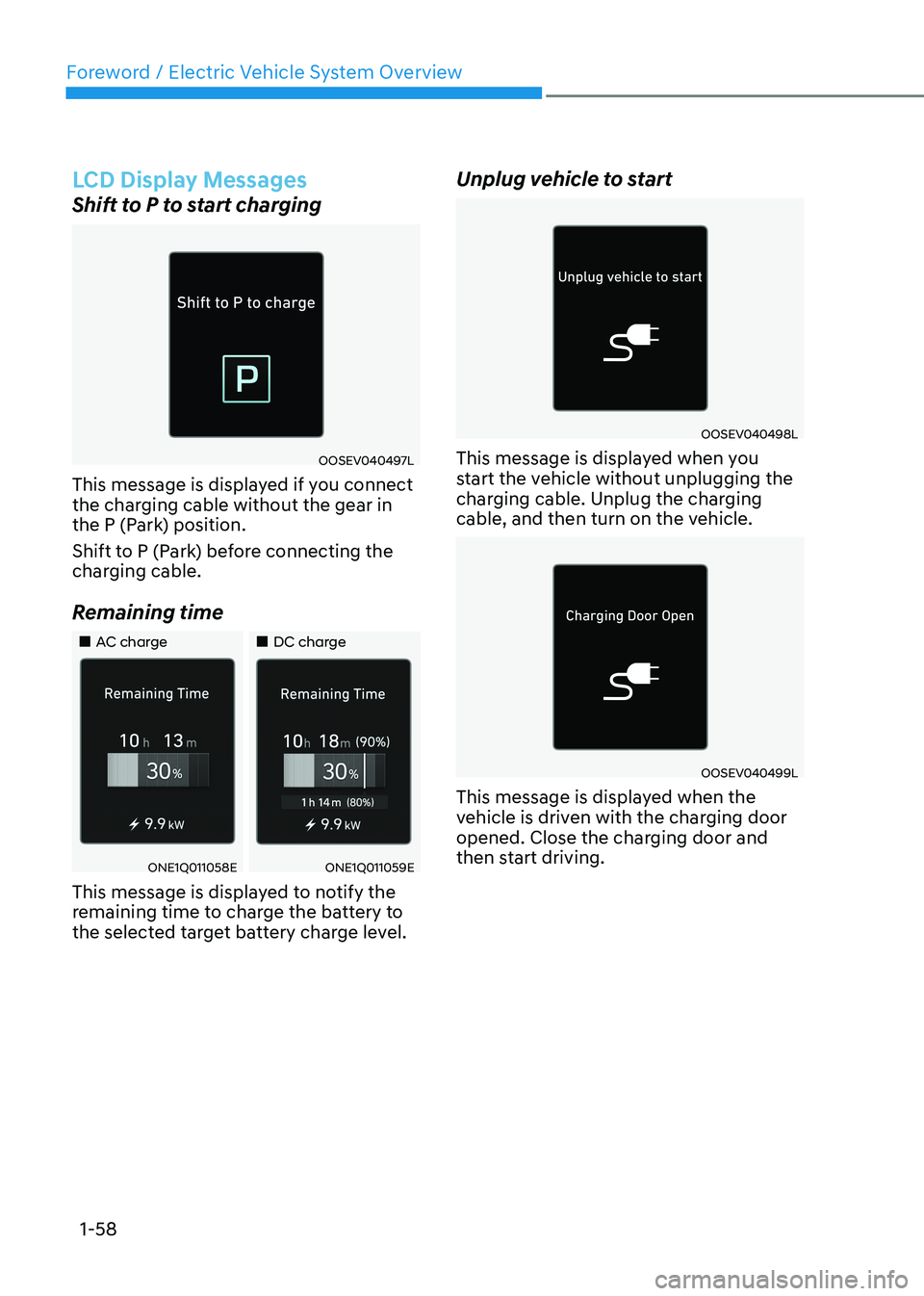
Shift to P to start charging
OOSEV040497L
This message is displayed if you connect
the charging cable without the gear in
the P (Park) position.
Shift to P (Park) before connecting the
charging cable.
Remaining time
„„AC charge „„DC charge
ONE1Q011058EONE1Q011059E
This message is displayed to notify the
remaining time to charge the battery to
the selected target battery charge level. Unplug vehicle to start
OOSEV040498L
This message is displayed when you
start the vehicle without unplugging the
charging cable. Unplug the charging
cable, and then turn on the vehicle.
OOSEV040499L
This message is displayed when the
vehicle is driven with the charging door
opened. Close the charging door and
then start driving.