2017 MERCEDES-BENZ G-Class key
[x] Cancel search: keyPage 58 of 286
Child-proof locks
Important safety notes
GWARNING
If childre nare traveling in th evehicle ,the y
could:
Ropen doors, thus endangering other people
or road users
Rexit th evehicle and be caught by oncoming
traffic
Roperate vehicle equipmenta nd become
trapped
Thereisar iskofana ccidenta nd injury.
Always activat ethe child-proof locks and
override feature if childre nare traveling in the
vehicle .When leaving th evehicle ,always take
th ek eywithy ou and lockt hevehicle .Never
leave childre nunattende dinthevehicle.
Override feature for:
Rth er ear doors(Ypage 56)
Rther ear side windows (Ypage 56)
GWARNING
If you leave childre nunsupervised in th evehi-
cle ,the yc oul dset it in motion by, for example:
Rrelease th eparking brake.
Rshiftt heautomatic transmission out of the
parking position P.
Rstart theengine.
In addition,t heym ay operate vehicle equip-
men tand become trapped. Thereisar isko f
an accidenta nd injury.
When leaving th evehicle ,always tak ethe
SmartKey withy ou and lockthevehicle .Never
leave childre nunsupervised in th evehicle.
GWARNING
If persons, particularly childre nare subjected
to prolonged exposuretoe xtremeheat or
cold, there is ariskofi njury, possibly even
fatal. Never leave childre nunattende dinthe
vehicle.
GWARNING
If th echild restraint system is subjected to
direct sunlight,p artsm ay get ver yhot.C hil-
dren may burn themselve sonthese parts,
particularly on th emetal partsoft hechild
restraint system. Thereisar iskofi njury.
If you leave th evehicle ,taking th echild with
you, always ensure that th echild restraint
system is no texposedtod irect sunlight.P ro-
tect it withab lanket, for example .Ifthechild
restraint system has been exposedtod irect
sunlight,l et it cooldown before securin gthe
child in it. Never leave childre nunattende din
th ev ehicle.
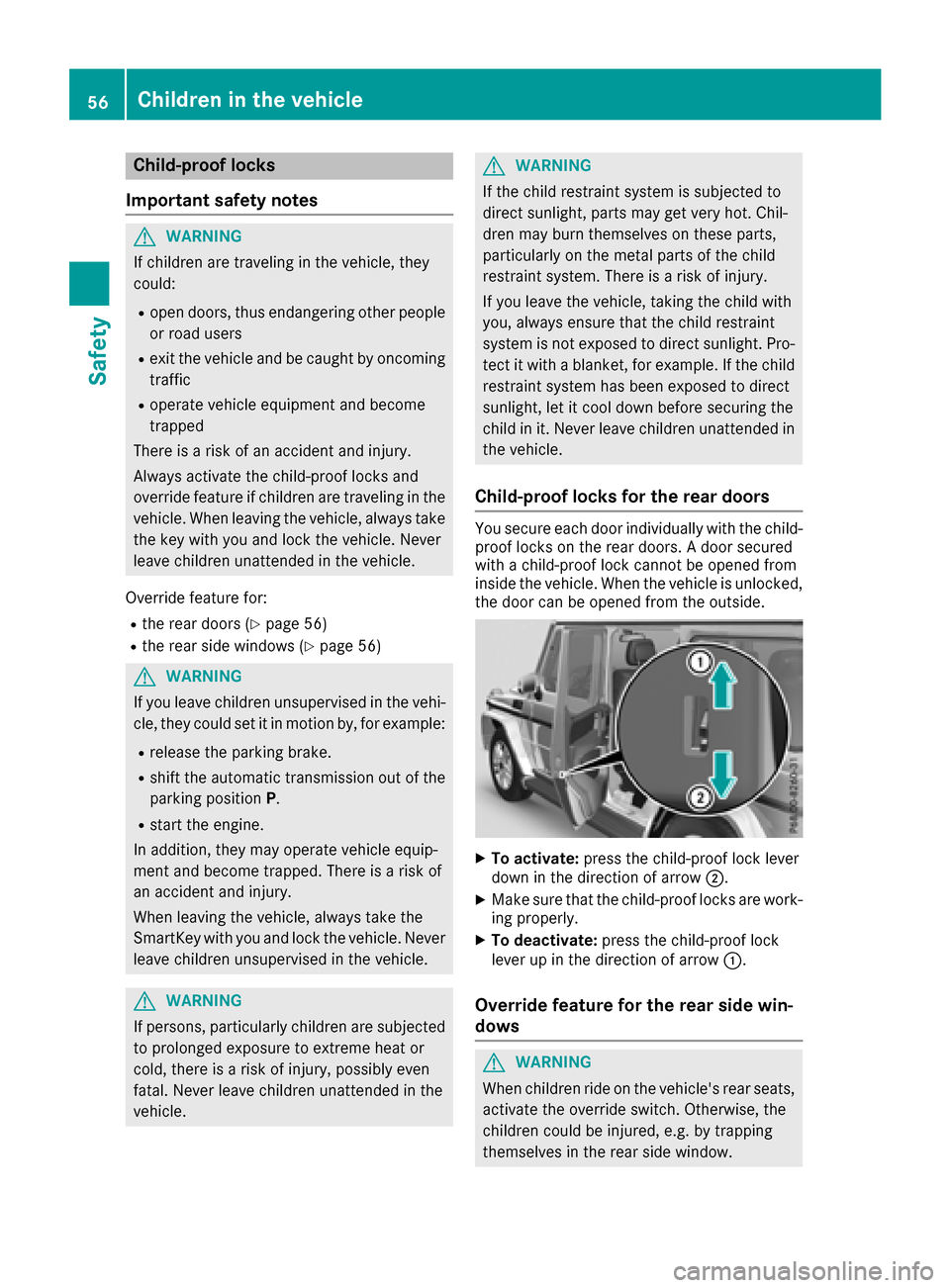
Child-proof locks for th ereard oors
You secure each door individually witht hechild-
proof locks on th erear doors. Adoor secured
withac hild-proof lockc annotbeo pened from
inside th evehicle .When th evehicle is unlocked,
th ed oor can be opened from th eoutside.
XTo activate: pressthe child-proof lockl ever
down in th edirection of arrow ;.
XMakesure that th echild-proof locks are work-
ing properly.
XTo deactivate: pressthe child-proof lock
leve rupint hedirection of arrow :.
Overridefeature for th erears idew in-
dows
GWARNING
When childre nride on th evehicle's rear seats,
activat ethe override switch .Otherwise, the
childre ncoul dbei njured, e.g .bytrapping
themselve sintherear side window.
56Children in th evehicle
Safety
Page 63 of 286
EBD (electronic brakeforce distribu-
tion)
General information
EB Dm onitors and controls th ebrak epressure
on th erear wheels to improve driving stability
while braking.
Important safety notes
iObserv ethe "Important safety notes" sec-
tio n(Ypage 57).
GWARNING
If EB Dism alfunctioning, th erear wheels can
lock, e.g .unde rfull braking .This increases the
risk of skiddinga nd an accident.
You should therefore adapt your driving style
to th edifferenth andlingcharacteristics .Have
th eb rak esystem checked at aqualified spe-
cialist workshop.
Observ einformatio nregardin gindicator and
warning lamps (
Ypage 190) as well as display
messages (Ypage 172).
ADAPTIV EBRAKE
ADAPTIVEB RAKE provide sincreased braking
safety. In addition to th ebraking function,
ADAPTIVEB RAKE also has th eHOLDf unction
(
Ypage 139) and hill start assist(Ypage 127).
Protection against theft
Immobilizer
The immobilizer prevent syour vehicle from
beings tarted without th ecorrec tSma rtKey.
XTo activate: remove theSmartKey from the
ignition lock.
XTo deactivate: switch on theignition.
When leavin gthe vehicle ,always tak ethe
SmartKey with you and lockt hevehicle .The
engine can be started by anyon ewithavalid
SmartKey that is left inside th evehicle.
iThe immobilizer is always deactivate dwhen
you start th eengine. In th
eeven ttha tthe engine canno tbestarted
(yet th evehicle's battery is charged), th esys-
te misn otoperational. Contac tanauthorized
Mercedes-Ben zCenter or call
1-800-FOR-MERCedes (in th eUSA)or
1-800-387-0100 (in Canada).
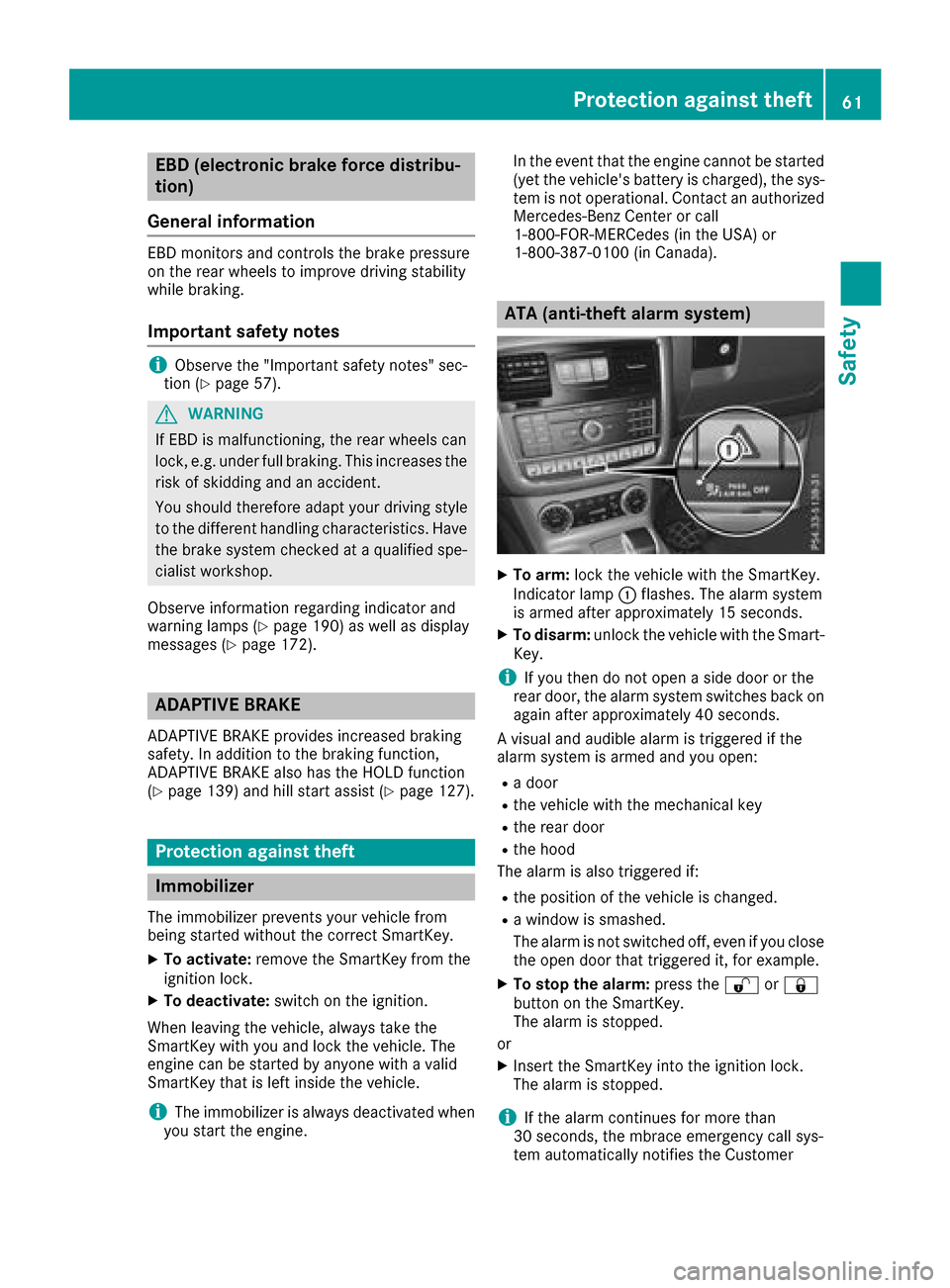
ATA (anti-thef talarm system)
XTo arm: lockthevehicle with th eSmartKey.
Indicato rlamp :flashes. The alarm system
is armed after approximately 15 seconds.
XTo disarm: unlock thevehicle with th eSma rt-
Key.
iIf you then do no topen aside door or the
rear door,t healarm system switches back on
again after approximately 40 seconds.
Av isual and audible alarm is triggered if the
alarm system is armed and you open:
Rad oor
Rthev ehicle with th emechanical key
Rther ear door
Rtheh ood
The alarm is also triggered if:
Rth ep osition of th evehicle is changed.
Raw indow is smashed.
The alarm is no tswitched off ,even if you close
th eo pen door that triggered it, for example.
XTo stop th ealarm: pressthe % or&
butto nont heSmartKey.
The alarm is stopped.
or
XInsertt heSmartKey int othe ignition lock.
The alarm is stopped.
iIf th ealarm continues for mor ethan
30 seconds, th embrace emergency call sys-
te ma utomaticall ynotifies th eCustomer
Protection against theft61
Safety
Z
Page 65 of 286
SmartKey
Important safety notes
GWARNING
If children are left unsupervised in the vehicle,
they could:
Ropen the doors, thus endangering other
people or road users.
Rget out and disrupt traffic.
Roperate the vehicle's equipment.
Additionally, children could set the vehicle in
motion if, for example, they:
Rrelease the parking brake.
Rshifting the automatic transmission out of
park position P
RStart the engine.
There is arisk of an accident and injury.
When leaving the vehicle, always take the
SmartKey with you and lock the vehicle. Never
leave children or animals unattended in the
vehicle. Always keep the SmartKey out of
reach of children.
GWARNING
If you attach heavy or large object stothe
SmartKey, the SmartKey could be uninten-
tionally turned in the ignition lock. This could
cause the engine to be switched off. There is a risk of an accident.
Do not attach any heavy or large object stothe
SmartKey. Remove any bulky key rings before
insertingt he SmartKey into the ignition lock.
!Keep the SmartKey away from stron gmag-
netic fields. Otherwise, the remote control
function could be affected.
Strong magnetic fields can occur in the vicin-
ity of powerful electrical installations.
Do not keep the SmartKey:
Rwith electronic devices, e.g. amobile phone
or another SmartKey.
Rwith metallic objects, e.g. coins or metal foil.
Rinside metallic objects, e.g. ametal case.
This can affect the functionality of the Smart- Key. Ac
heck which periodically establishes aradio
connection between the vehicle and the Smart-
Key determines whether avalid SmartKey is in
the vehicle. This occurs, for example:
Rwhen startin gthe engine
Rwhile driving
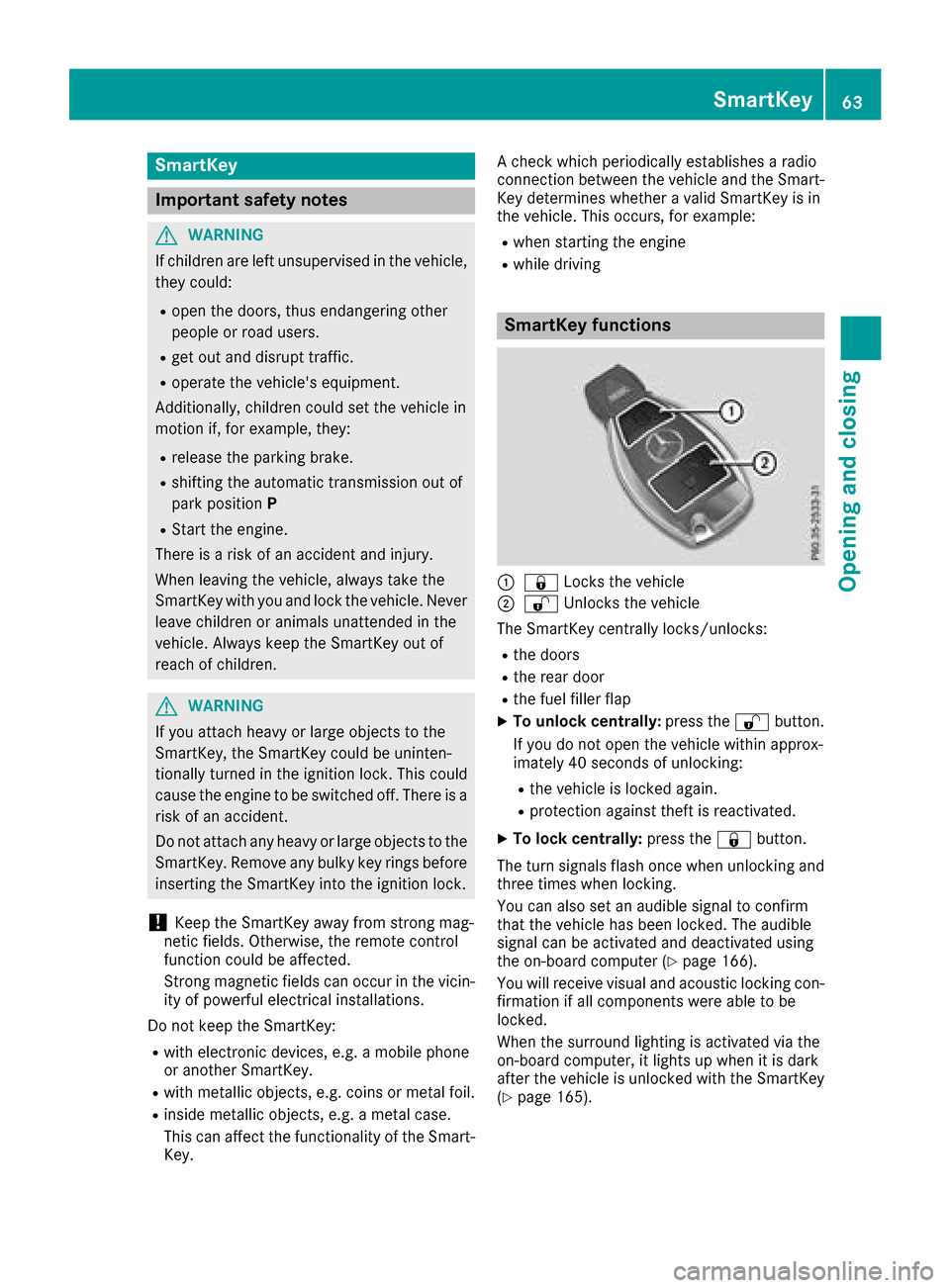
SmartKey functions
:& Locks the vehicle
;%Unlockst he vehicle
The SmartKey centrally locks/unlocks:
Rthe doors
Rthe rear door
Rthe fuel filler flap
XTo unlock centrally: press the%button.
If you do not open the vehicle within approx-
imately 40 seconds of unlocking:
Rthe vehicle is locked again.
Rprotection against theft is reactivated.
XTo lock centrally: press the&button.
The turn signals flash once when unlocking and
three times when locking.
You can also set an audible signal to confirm
that the vehicle has been locked. The audible
signal can be activated and deactivated using
the on-board computer (
Ypage 166).
You will receive visual and acoustic locking con-
firmation if all components were able to be
locked.
When the surround lighting is activated via the
on-board computer, it lights up when it is dark
after the vehicle is unlocked with the SmartKey (
Ypage 165).
SmartKey63
Opening and closing
Z
Page 66 of 286
Changing thesettings of th elocking
system
You can chang ethe settings of th elockin gsys-
tem. This mean sthato nlyt he driver'sd oor and
th ef uel fille rflap are unlocked when th evehicle
is unlocked. This is useful if you frequently travel
alone.
XTo change th esetting: pressand hold down
the % and& buttons simultaneously
for approximately six seconds until th ebat-
tery check lamp (
Ypage 65 )flashes twice.
If th esettin goft helockin gsystem is changed
within th esignal range of th evehicle ,pressing
the & or% button:
Rlocks or
Runlock sthe vehicle
The SmartKey no wfunctionsasf ollows:
XTo unlock th edriver's door and fuel filler
flap: pressthe % buttononce.
XTo unlock centrally: pressthe % button
twice.
XTo lock centrally: pressthe & button.
XTo restor ethe factor ysettings: pressand
hold the %and& buttons simultane-
ously for approximately six seconds until the
battery check lamp (
Ypage 65) flashes
twice.
Mechanica lkey
General notes
If th evehicle can no longer be unlocked witht he
SmartKey, use th emechanical key.
If you use th emechanical ke ytou nlock and
open th edriver'sd oor,theanti-thefta larm sys-
te mw ill be triggered. Switch off th ealarm
(
Ypage 61).
If you unlock th evehicle usingt hemechanical
key, th efuel fille rflap will no tbeunlocked auto-
matically.
XTo unlock th efuelfille rflap: insert the
SmartKey int othe ignition lock.
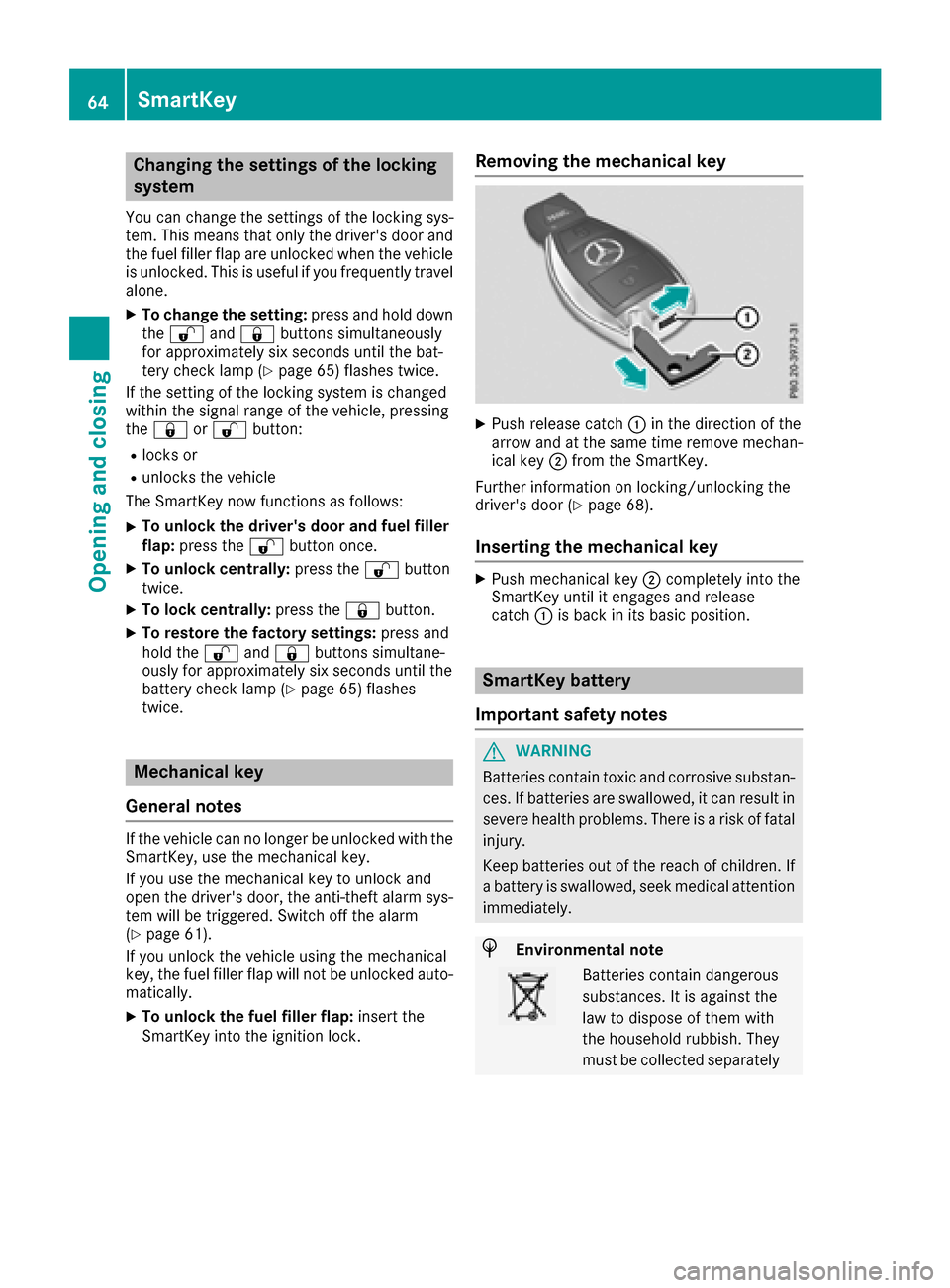
Removing th emechanica lkey
XPush release catch :in th edirection of the
arrow and at th esame tim eremove mechan-
ical key ;from th eSmartKey.
Further informatio nonlocking/unlockin gthe
driver'sd oor (
Ypage 68).
Insertingthe mechanica lkey
XPush mechanical key ;completely int othe
SmartKey until it engages and release
catch :is back in its basic position.
SmartKey battery
Important safety notes
GWARNING
Batteries contain toxic and corrosive substan- ces .Ifb atteries are swallowed, it can result in
severe healthp roblems. Thereisar iskoff atal
injury.
Keep batteries out of th ereac hofc hildren. If
ab attery is swallowed, seek medical attention
immediately.
HEnvironmental note
Batteries contain dangerous
substances. It is against the
law to dispose of them with
th eh ouseholdr ubbish. They
must be collecte dseparately
64SmartKey
Opening and closing
Page 67 of 286
and recycled to protect the
environment.
Dispose of batteries in an
environmentallyfriendly
manner .Taked ischarged
batteries to aqualified spe-
cialis tworkshop or aspecial
collectio npointf or used bat-
teries.
The SmartKey batteries contain perchlorate
material, whichm ay require special handling
and regard for th eenvironment. National guide-
line sm ust be observed durin gdisposal. In Cal-
ifornia, see www.dtsc.ca.gov/
HazardousWaste/Perchlorate/index.cfm .
Mercedes-Ben zrecommend sthaty ou have the
batteries replaced at aqualified specialist work-
shop.
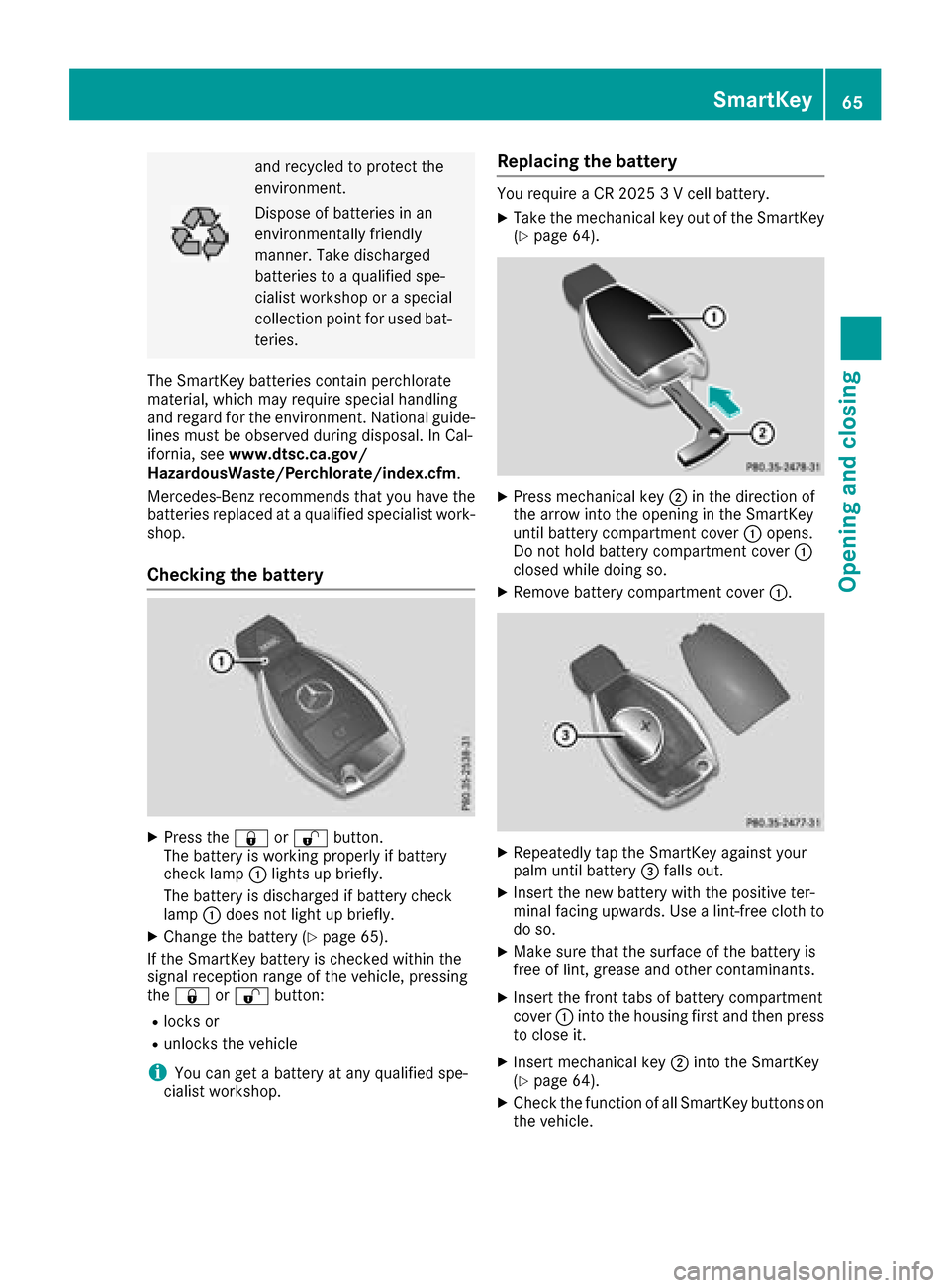
Checking th ebattery
XPres sthe & or% button.
The battery is working properly if battery
check lamp :lightsupb riefly.
The battery is discharged if battery check
lamp :does no tlight up briefly.
XChange th ebattery (Ypage 65).
If th eSmartKey battery is checked within the
signal reception range of th evehicle ,pressing
the & or% button:
Rlocks or
Runlock sthe vehicle
iYou can get abattery at any qualified spe-
cialis tworkshop.
Replacing th ebattery
You require aCR20253V cellbattery.
XTaket hemechanical ke yout of th eSmartKey
(Ypage 64).
XPres smechanical key ;in th edirection of
th ea rrow int othe opening in th eSmartKey
until battery compartmentc over:opens.
Do no thold battery compartmentc over:
closed while doings o.
XRemovebattery compartmentc over:.
XRepeatedly tap th eSmartKey against your
palm until battery =falls out.
XInsertt henew battery with th epositive ter-
minal facing upwards .Use alint-free cloth to
do so.
XMakes ure that th esurface of th ebattery is
free of lint ,grease and other contaminants.
XInsertt hefrontt absofb attery compartment
cover :intothe housing first and then press
to close it.
XInsertm echanical key ;intot he SmartKey
(Ypage 64).
XCheckt hefunction of all SmartKey buttonso n
th ev ehicle.
SmartKey65
Opening and closing
Z
Page 68 of 286

Problems with the SmartKey
ProblemPossible causes/consequences andMSolutions
You can no longer lock or
unlock the vehicle using
the SmartKey.The SmartKey battery is discharged or nearly discharged.
XCheck the SmartKey battery (Ypage 65) and replace it if necessary
(Ypage 65).
If this does not work:
XLock or unlock the vehicle using the mechanical key (Ypage 68).
There is interference from apowerful source of radio waves.
XLock or unlock the vehicle using the mechanical key (Ypage 68).
The SmartKey is faulty.
XLock or unlock the vehicle using the mechanical key (Ypage 68).
XHave the SmartKey checked at aqualified specialist workshop.
The engine cannot be
started using the Smart-
Key.The on-board voltage is too low
XSwitch off non-essential consumers, e.g. seat heating or interior
lighting, and try to start the engine again.
If this does not work:
XCheck the starter battery and charge it if necessary (Ypage 243).
or
XJump-start the vehicle (Ypage 243).
or
XConsult aqualified specialist workshop.
You have lost aSmart-
Key.XHave the SmartKey deactivated at aqualified specialist workshop.
XReport the loss immediately to the vehicle insurers.
XIf necessary, have the locks changed as well.
You have lost the
mechanical key.XReport the loss immediately to the vehicle insurers.
XIf necessary, have the locks changed as well.
Doors
Important safety notes
GWARNING
If children are left unsupervised in the vehicle,
they could:
Ropen the doors, thus endangering other
people or road users.
Rget out and disrupt traffic.
Roperate the vehicle's equipment.
Additionally, children could set the vehicle in
motion if, for example, they:
Rrelease the parking brake.
Rshifting the automatic transmission out of
park position P
RStart the engine.
There is arisk of an accident and injury.
When leaving the vehicle, always take the
SmartKey with you and lock the vehicle. Never
leave children or animals unattended in the
vehicle. Always keep the SmartKey out of
reach of children.
66Doors
Opening and closing
Page 69 of 286
Unlocking and opening doors from
the inside
You can openadoor from inside the vehicle
even if it has been locked. You can only open the
rear doors from inside the vehicle if they are not secured by the child-proof lock s(
Ypage 56). If
the vehicle has previously been locked with the
SmartKey, openin gadoor from the inside will
trigger the anti-theft alarm system .Switc hoff
the alarm (
Ypage 61).
Only open the door when the traffic situation
permits.
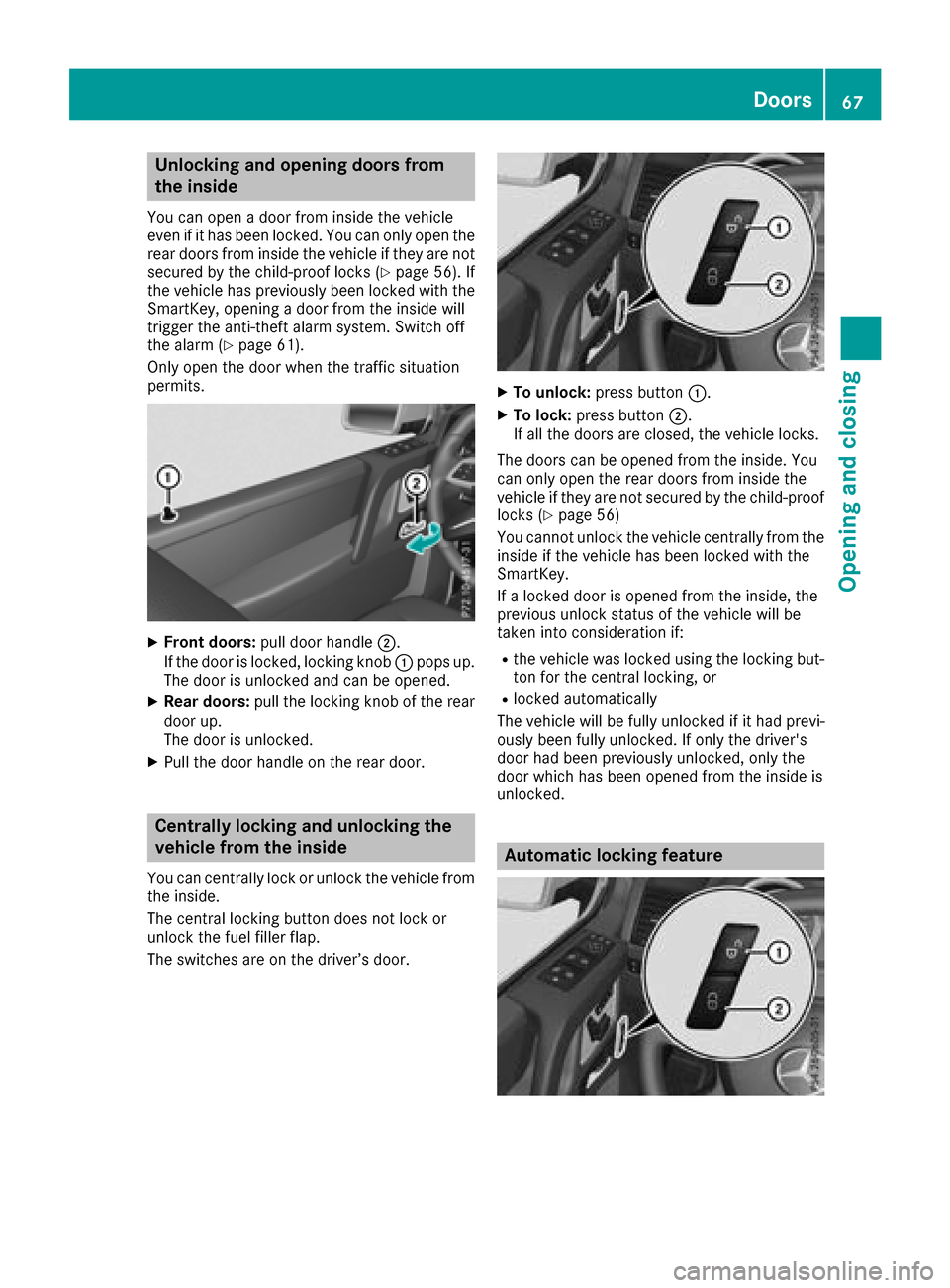
XFront doors: pull door handle ;.
If the door is locked, locking knob :pops up.
The door is unlocked and can be opened.
XRear doors: pull the locking knob of the rear
door up.
The door is unlocked.
XPull the door handle on the rear door.
Centrally locking and unlocking the
vehicle from the inside
You can centrally lock or unlock the vehicle from
the inside.
The central locking button does not lock or
unlock the fuel filler flap.
The switches are on the driver’s door.
XTo unlock: press button :.
XTo lock:press button ;.
If all the doors are closed, the vehicle locks.
The doors can be opened from the inside. You
can only open the rear doors from inside the
vehicle if they are not secured by the child-proof
lock s(
Ypage 56)
You cannot unlock the vehicle centrally from the
inside if the vehicle has been locked with the
SmartKey.
If al ocked door is opened from the inside, the
previous unlock status of the vehicle will be
taken int oconsideratio nif:
Rthe vehicle was locked using the locking but-
ton for the central locking, or
Rlocked automatically
The vehicle will be fully unlocked if it had previ-
ously been fully unlocked. If only the driver's
door had been previously unlocked, only the
door which has been opened from the inside is
unlocked.
Automatic locking feature
Doors67
Opening and closing
Z
Page 70 of 286
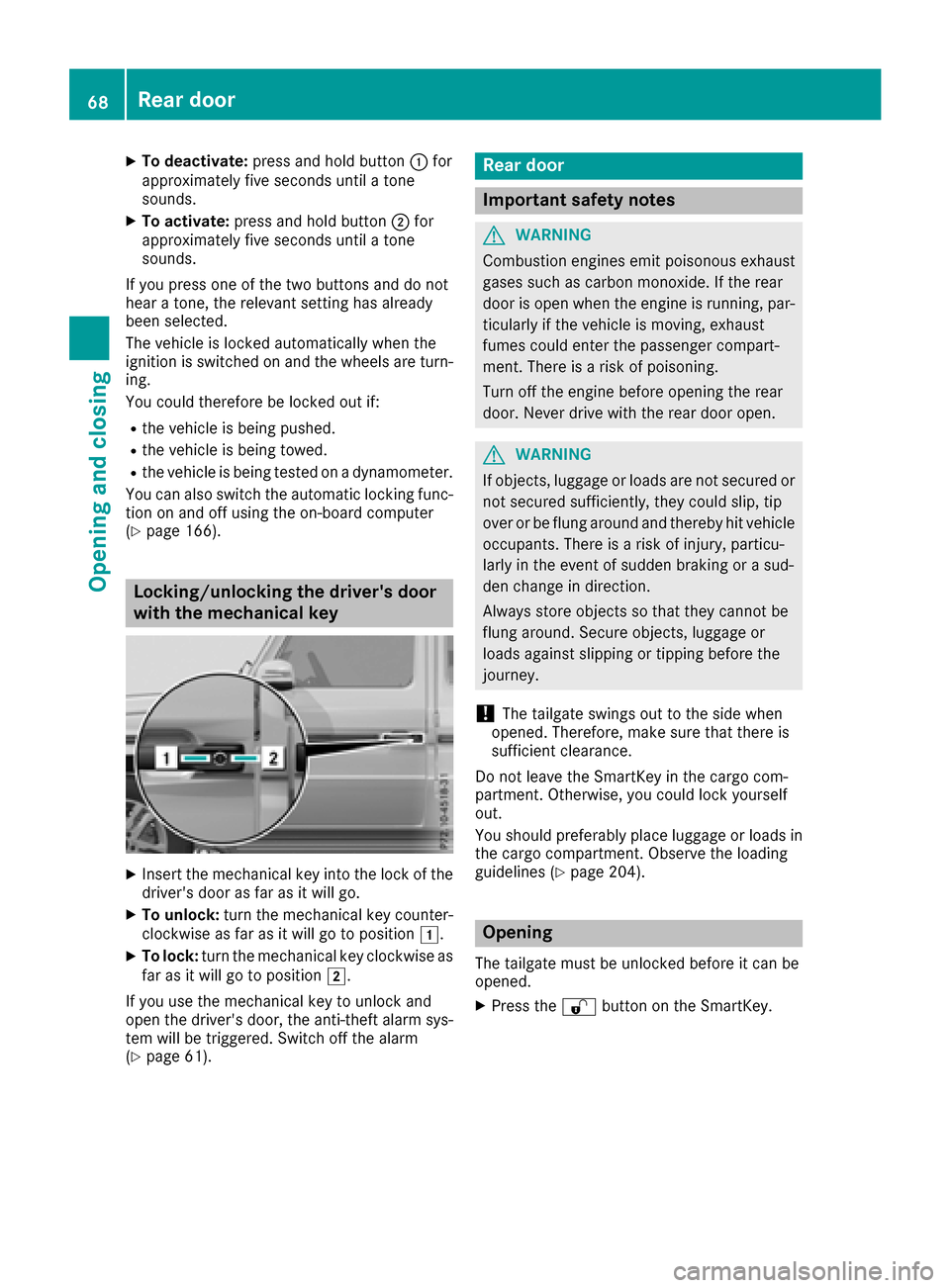
XTo deactivate:press and holdbutton :for
approximatelyf ives econds unti latone
sounds.
XTo activate: press and hol dbutton ;for
approximatelyf ives econds unti latone
sounds.
If yo upress one of the two buttons and do not
hea rat one, the relevant setting hasa lready
been selected.
The vehicl eislocked automaticall ywhent he
ignition is switched on and the wheels are turn-
ing.
Yo uc ould therefore be locked outi f:
Rthe vehicleisbeing pushed.
Rthe vehicl eisbeing towed.
Rthe vehicl eisbeing teste donadynamometer.
Yo uc an also switch the automatic locking func-
tio nona nd off using the on-board computer
(
Ypage 166).
Locking/unlockin gthe driver's door
with the mechanical key
XInsert the mechanical key into the lock of the driver's door as far as it will go.
XTo unlock: turn the mechanical key counter-
clockwise as far as it will go to position 1.
XTo lock:turn the mechanical key clockwise as
far as it will go to position 2.
If yo uusethe mechanical key to unlock and
open the driver's door, the anti-thef talarm sys-
tem will be triggered .Switch off the alarm
(
Ypage 61).
Rear door
Important safety notes
GWARNING
Combustio nengines emi tpoison ouse xhaust
gases such as carbo nmonoxide. If the rear
door is open when the engine is running ,par-
ticularly if the vehicl eismoving, exhaust
fumes could enter the passenger compart-
ment. There is ariskofp oisoning .
Turn off the engine before opening the rear
door. Never drive with the reard ooro pen.
GWARNING
If objects, luggage or load sare not secured or
not secured sufficiently ,they could slip ,tip
overorbef lung around and thereb yhitvehicle
occupants. There is ariskofi njury,p articu-
larly in the event of sudden braking or asud-
de nc hange in direction.
Alway sstoreo bjects so thatt hey cannotbe
flung around .Secure objects, luggage or
load sagain st slipping or tipping before the
journey.
!The tailgate swing soutto the side when
opened. Therefore, make sure thatt hereis
sufficient clearance.
Do not leave the SmartKey in the cargo com-
partment. Otherwise, yo ucould lock yourself
out.
Yo us houl dpreferabl yplace luggage or load sin
the cargo compartment. Observe the loading
guideline s(
Ypage 204).
Opening
The tailgate must be unlockedb efore it can be
opened.
XPress the %button on the SmartKey.
68Rear door
Opening and closing