2017 MERCEDES-BENZ G-Class parking brake
[x] Cancel search: parking brakePage 7 of 286
Kickdown ....................................... 112
Manualshifting .............................. 115
Neutral (ECO start/stop func-
tion) ............................................... 111
Overview ........................................ 109
Problem (malfunction) ................... 117
Programs elector button ................ 113
Pulling awa y................................... 105
Selector lever ................................ 110
Shift ranges ................................... 114
Steering wheelp addleshifters ...... 114
Trailer towing ................................. 113
Transmission position display ........ 110
Automatic transmission emer-
gencym ode....................................... 117
Axle load, permissible( trailertow-
ing) ...................................................... 284
B
BabySmart™
Air ba gdeactivation system ............. 53
Back button ....................................... 199
Backup lamp
Replacing bulb s............................... 91
Ball coupling
Installing ........................................ 152
BAS (Brake Assist System) ................. 58
Battery (SmartKey)
Checking .......................................... 65
Important safety notes .................... 64
Replacing ......................................... 65
Battery (vehicle)
Charging ........................................ 243
Displa ymessage ............................ 178
Important safety notes .................. 241
Jump starting ................................. 243
Overview ........................................ 241
Blind SpotA ssist
Activating/deactivating ................. 164
Activating/deactivating (on-
board computer) ............................ 164
Displa ymessage ............................ 181
Notes/function .............................. 137
Blootooth
®
Connecting adifferent mobile
phone ............................................ 203 Bluetooth
®
Searching for
amobilephone ........ 202
see also Digital Operator's Man-
ua l.................................................. 198
Telephony ...................................... 201
Brake fluid
Displa ymessage ............................ 173
Notes. ............................................ 279
Brake fluid level ................................ 230
Brake forc edistribution
see EBD (electronicb rake force
distribution)
Brake lamp
Replacing bulb s............................... 91
Brake lamps
Displa ymessage ............................ 176
Brakes
ABS .................................................. 57
BAS .................................................. 58
Brake fluid (notes) ......................... 279
Displa ymessage ............................ 171
EBD .................................................. 61
High-performance brake system .... 125
HOLD function ............................... 139
Important safety notes .................. 123
Maintenance .................................. 124
Parking brake ................................ 121
Riding tip s...................................... 123
Warning lamp ................................. 189
Breakdown
see Fla ttire
see Towing away
Brightness control( instrument
clusterl ighting) ................................... 32
Brush guard ....................................... 221
Bulbs
Backu plam p.................................... 89
Brake lamp ...................................... 89
Rear fog lamp .................................. 89
Standing lamps (fro nt) ..................... 89
Sta
nding lamps (rear) ...................... 89
Tail lamp .......................................... 89
Turn signall amp(front) .................... 89
Turn signall amp(rear) ..................... 89
see Replacing bulbs
Index5
Page 16 of 286

Service menu ................................. 164
Settingsmenu ............................... 164
Standard display ............................ 160
Telephone menu ............................ 163
Tripm enu ...................................... 160
TV operation .................................. 163
Vehicl esubmenu ........................... 166
Video DVD operation ..................... 162
Operatin gsafety
Declaration of conformity ................ 26
Important safety notes .................... 26
Operatin gsystem
see On-board computer
Operation
Digital Operator's Manua l................ 22
Operator's Manual
Vehicl eequipment ........................... 24
Outside temperature display ........... 157
Overhead controlp anel...................... 36
Override feature
Rear sid ewindow s........................... 56
P
Paint code number ............................ 275
Paintwork (cleaning instructions) ... 233
Parking
Engaging park position .................. 110
Important safety notes .................. 120
Parking brake ................................ 121
Position of exterio rmirror, front-
passenger sid e................................. 83
Rear vie wcamera .......................... 143
Switching off the engine ................ 121
see PARKTRONIC
Parking aid
see Exterior mirrors
see PARKTRONIC
see Rear vie wcamera
Parking brake
Applying ......................................... 121
Displa ymessage ............................ 172
Emergency braking ........................ 121
Warning lamp ................................. 193
Parking lamps
Switching on/off. ............................. 86
PARKTRONIC
Deactivating/activating ................. 142 Driving system ............................... 140
Function/note
s............................. 140
Important safety notes .................. 140
Problem (malfunction) ................... 142
Range of the sensors ..................... 140
Trailer towing ................................. 142
Warning display ............................. 141
PASSENGER AI RBAG OFF
Indicato rlam p.................................. 39
Problems (malfunctions ).................. 55
Permanent all-whee ldrive
Off-road system ............................. 139
Pets in the vehicle ............................... 57
Phone book
see also Digital Operator's Man-
ual.................................................. 198
Plastict rim (cleaning instruc-
tions) .................................................. 236
Powe rsuppl y(trailer) ....................... 156
Powe rwashers .................................. 232
Program selecto rbutton .................. 113
Protectio nagainst theft
ATA (Anti-Theft Alarm system). ........ 61
Immobilizer ...................................... 61
Protectio nofthe environment
Generaln otes .................................. 23
Pulling away
Automati ctransmission ................. 105
Generaln otes ................................ 105
Trailer ............................................ 105
Q
QR code
Mercedes-Benz Guid eApp ................. 1
Rescuec ard ..................................... 28
Qualified specialist workshop ........... 27
R
RACETIME R(on-board computer,
Mercedes-AMG vehicles) .................. 168
RACETIMER
Deleting al llap s............................. 169
Displaying and starting .................. 168
Displaying the intermediate time ... 168
Resetting the current la p............... 169
Starting anew la p.......................... 168
14Index
Page 22 of 286
Turn signalsDisplay message ............................ 176
Replacing bulb s(front) ..................... 90
Switching on/off .............................. 87
TV
Operating (on-boar dcomputer) ..... 163
see Separate operating instructions
Two-way radio
Frequencie s................................... 274
Installation ..................................... 274
Transmission output( maximum) .... 274
TWR (Tongue Weight Rating) (defi-
nition) ................................................. 269
Type identificatio nplate
see Vehicl eide ntificatio nplate
U
Unlocking
Emergency unlocking ....................... 68
From insid ethe vehicl e(central
unlocking button) ............................. 67
US Bd evices
Connecting to the Media Inter-
face ...............................................2 03
V
Vanity mirror
Sun visor. ....................................... 211
Vehicle
Correct use ...................................... 27
Data acquisition ............................... 28
Display message ............................ 186
Equipment ....................................... 24
Individua lsettings .......................... 164
Limited Warranty .............................2 8
Loading .......................................... 260
Locking (in an emergency) ............... 68
Locking (SmartKey) .......................... 63
Lowering ........................................ 272
Maintenance .................................... 25
Operation outsidet he USA/
Canada ............................................ 25
Parking .......................................... 120
Parking for along period. ............... 122
Pulling awa y................................... 105
Raising ........................................... 270
Securing from rolling away ............ 270 Tow-starting ................................... 248
Towing ........................................... 246
Transporting .................................. 247
Unlocking (i
nanemergency) ........... 68
Unlocking (SmartKey). ..................... 63
Vehicl edata. .................................. 281
Vehicl edata ....................................... 281
Vehicl edata (off-road driving)
Approach/departure angle ............ 283
Fording depth ................................ 283
Maximu mgradient climbing abil-
ity .................................................. 283
Vehicl edimensions ........................... 281
Vehicl eemergencyl ocking ................ 68
Vehicl eidentificatio nnumber
see VIN
Vehicl eidentificatio nplate .............. 275
Vehicl etoolkit.................................. 239
Ventilation
Setting the airflow ........................... 98
Video
Operating the DVD ......................... 162
see also Digital Operator's Man-
ual.................................................. 198
VIN
Type plate ...................................... 275W
Warning and indicator lampsABS ................................................ 190
Brakes ........................................... 189
Check Engine ................................. 194
Coolant .......................................... 194
Distance warning ........................... 196
DISTRONIC PLUS. .......................... 196
ESP
®.............................................. 191
ESP®OFF ....................................... 192
Fue ltank ........................................ 194
Generaln otes ................................ 187
Overview .......................................... 32
Parking brake ................................ 193
PASSENGER AIR BAG OFF ............... 39
Reserve fue l................................... 194
Restraint system ............................ 193
Seatb elt. ....................................... 188
Tire pressure monitor .................... 197
Warning triangle ................................ 238
20Index
Page 34 of 286

Instrumentcluster
FunctionPag e
:Speedometer wit hsegments157
Warning and indicator lamps:
÷ ESP®19 1
å ESP®OF F191
! ABS190
J Brakes(yellow)18 9
L Low-beam headlamps85
TParking lamp s86
KHigh-beam headlamps87
Brakes(red)18 9
$ USAo nly
J Canad aonly
Parking brak e193
F USAo nly
J Canad aonly
· Distanc ewarning196
;#! Turn signals87
=Multifunction display159
FunctionPag e
?Tachometer157
Warning and indicator lamps:
R Rear fog lamp86
;CheckEngine19 4
h Tirep ressur emonitor197
6 Restrain tsystem38
ü Seat belt s188
ACoolan ttem perature gauge158
Warning and indicator lamps:
? Coolan t194
BFue llevel indicator
Warning and indicator lamps:
8 Reserve fuel wit hfuel
filler flap location indicator
(right-hand side )
194
CInstrumen tcluste rlighting15 7
32Instrumen tcluster
At ag lance
Page 37 of 286
Center console, lower section
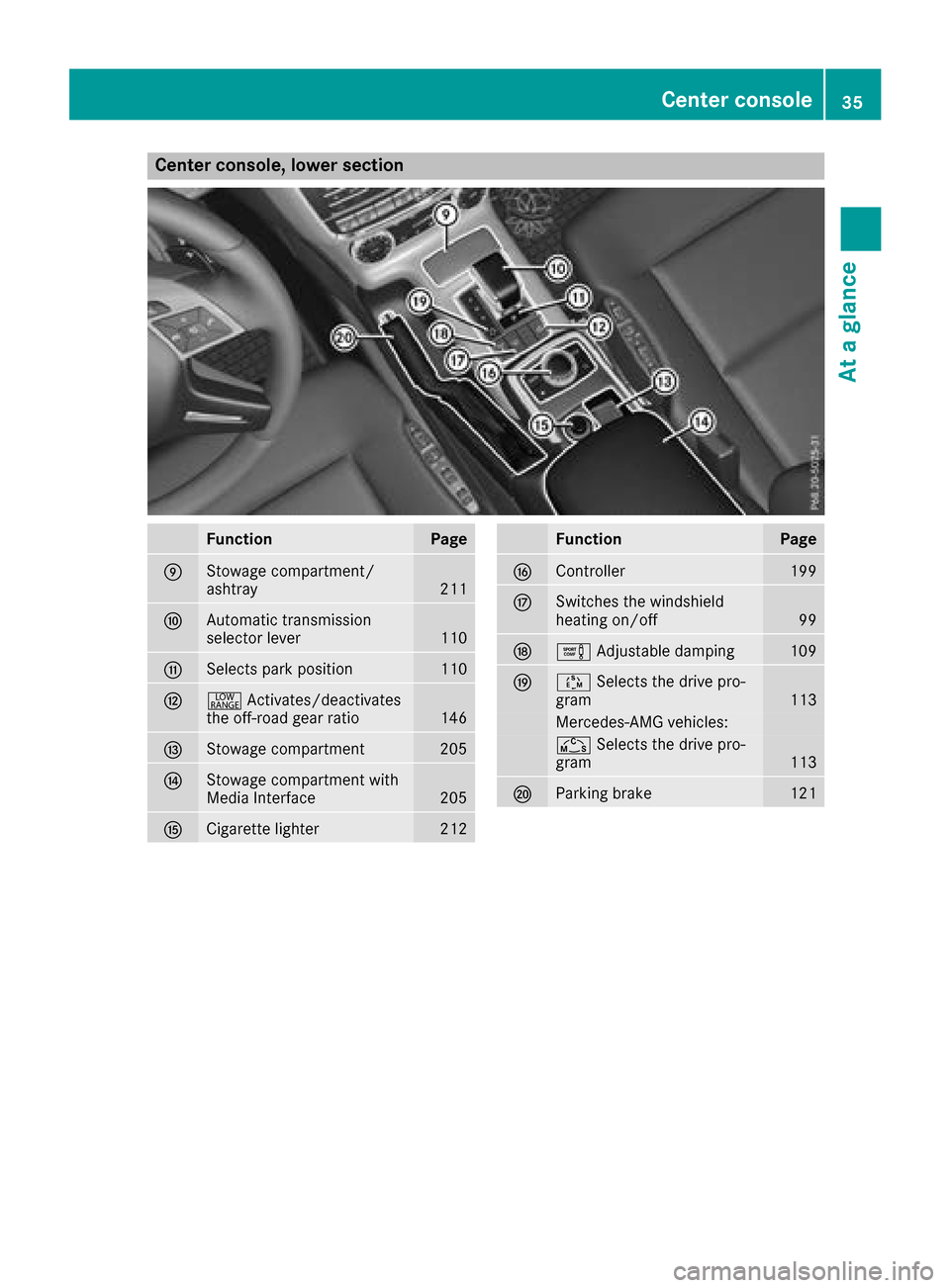
FunctionPage
EStowage compartment/
ashtray211
FAutomatic transmission
selectorlever110
GSelect spark position110
H+ Activates/deactivates
th eo ff-road gear ratio146
IStowage compartment205
JStowage compartmen twith
Media Interface205
KCigarett elighter212
FunctionPage
LController199
MSwitches th ewindshield
heating on/off99
Ne Adjustable damping109
OÚSelect sthe driv epro-
gram113
Mercedes-AM Gvehicles:
Ñ Select sthe driv epro-
gram113
PParking brake121
Center console35
At ag lance
Page 51 of 286
XWith your hand flat, firmly push the NECK-
PRO head restraint cushion back in the direc-tion of arrow =until it engages.
XRepeat this procedure for the secondN ECK-
PRO head restraint.
iResettin gthe NECK-PRO head restraints
requires alot of strength. If you have difficulty
resetting the NECK-PRO head restraints, have
this work carried out at aqualified specialist
workshop.
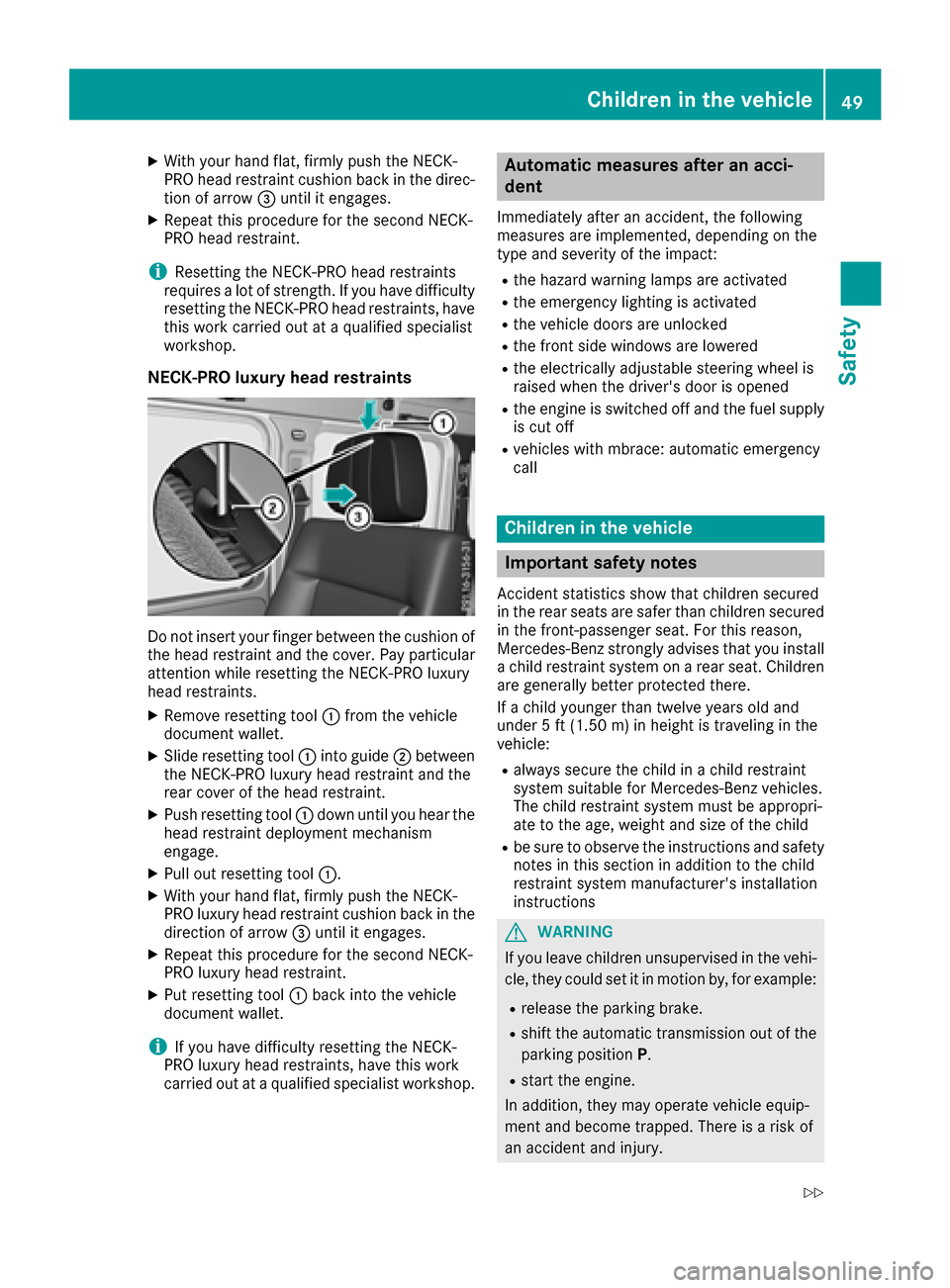
NECK-PRO luxuryh ead restraints
Do not insert your finger between the cushion of
the head restraint and the cover. Pay particular
attention while resetting the NECK-PRO luxury
head restraints.
XRemove resetting tool :from the vehicle
document wallet.
XSlide resetting tool :into guide ;between
the NECK-PRO luxury head restraint and the
rear cover of the head restraint.
XPush resetting tool :down until you hear the
head restraint deployment mechanism
engage.
XPull out resetting tool :.
XWith your hand flat, firmly push the NECK-
PRO luxury head restraint cushion back in the
direction of arrow=until it engages.
XRepeat this procedure for the secondN ECK-
PRO luxury head restraint.
XPut resetting tool :back into the vehicle
document wallet.
iIf you have difficulty resetting the NECK-
PRO luxury head restraints, have this work
carried out at aqualified specialist workshop.
Automatic measures after an acci-
dent
Immediately after an accident ,the following
measures are implemented, depending on the
type and severityoft he impact:
Rthe hazard warning lamps are activated
Rthe emergency lighting is activated
Rthe vehicle doors are unlocked
Rthe frontside windows are lowered
Rthe electrically adjustable steerin gwheel is
raised when the driver's door is opened
Rthe engine is switched off and the fuel supply
is cut off
Rvehicles with mbrace: automatic emergency
call
Children in the vehicle
Important safety notes
Accident statistics show that children secured
in the rear seats are safer than children secured
in the front-passenger seat. For this reason,
Mercedes-Benz strongly advises that you install
ac hild restraint system on arear seat. Children
are generally better protected there.
If ac hild younger than twelve years old and
under 5ft(1.50m )inh eight is travelin ginthe
vehicle:
Ralwayss ecure the child in achild restraint
system suitable for Mercedes-Benz vehicles.
The child restraint system must be appropri-
ate to the age, weight and size of the child
Rbe sure to observe the instruction sand safety
notes in this section in addition to the child
restraint system manufacturer's installation
instructions
GWARNING
If you leave children unsupervised in the vehi-
cle, they could set it in motion by, for example:
Rrelease the parking brake.
Rshift the automatic transmission out of the
parking position P.
Rstart the engine.
In addition, they may operate vehicle equip-
ment and become trapped. There is arisk of
an accident and injury.
Children in the vehicle49
Safety
Z
Page 58 of 286
Child-proof locks
Important safety notes
GWARNING
If childre nare traveling in th evehicle ,the y
could:
Ropen doors, thus endangering other people
or road users
Rexit th evehicle and be caught by oncoming
traffic
Roperate vehicle equipmenta nd become
trapped
Thereisar iskofana ccidenta nd injury.
Always activat ethe child-proof locks and
override feature if childre nare traveling in the
vehicle .When leaving th evehicle ,always take
th ek eywithy ou and lockt hevehicle .Never
leave childre nunattende dinthevehicle.
Override feature for:
Rth er ear doors(Ypage 56)
Rther ear side windows (Ypage 56)
GWARNING
If you leave childre nunsupervised in th evehi-
cle ,the yc oul dset it in motion by, for example:
Rrelease th eparking brake.
Rshiftt heautomatic transmission out of the
parking position P.
Rstart theengine.
In addition,t heym ay operate vehicle equip-
men tand become trapped. Thereisar isko f
an accidenta nd injury.
When leaving th evehicle ,always tak ethe
SmartKey withy ou and lockthevehicle .Never
leave childre nunsupervised in th evehicle.
GWARNING
If persons, particularly childre nare subjected
to prolonged exposuretoe xtremeheat or
cold, there is ariskofi njury, possibly even
fatal. Never leave childre nunattende dinthe
vehicle.
GWARNING
If th echild restraint system is subjected to
direct sunlight,p artsm ay get ver yhot.C hil-
dren may burn themselve sonthese parts,
particularly on th emetal partsoft hechild
restraint system. Thereisar iskofi njury.
If you leave th evehicle ,taking th echild with
you, always ensure that th echild restraint
system is no texposedtod irect sunlight.P ro-
tect it withab lanket, for example .Ifthechild
restraint system has been exposedtod irect
sunlight,l et it cooldown before securin gthe
child in it. Never leave childre nunattende din
th ev ehicle.
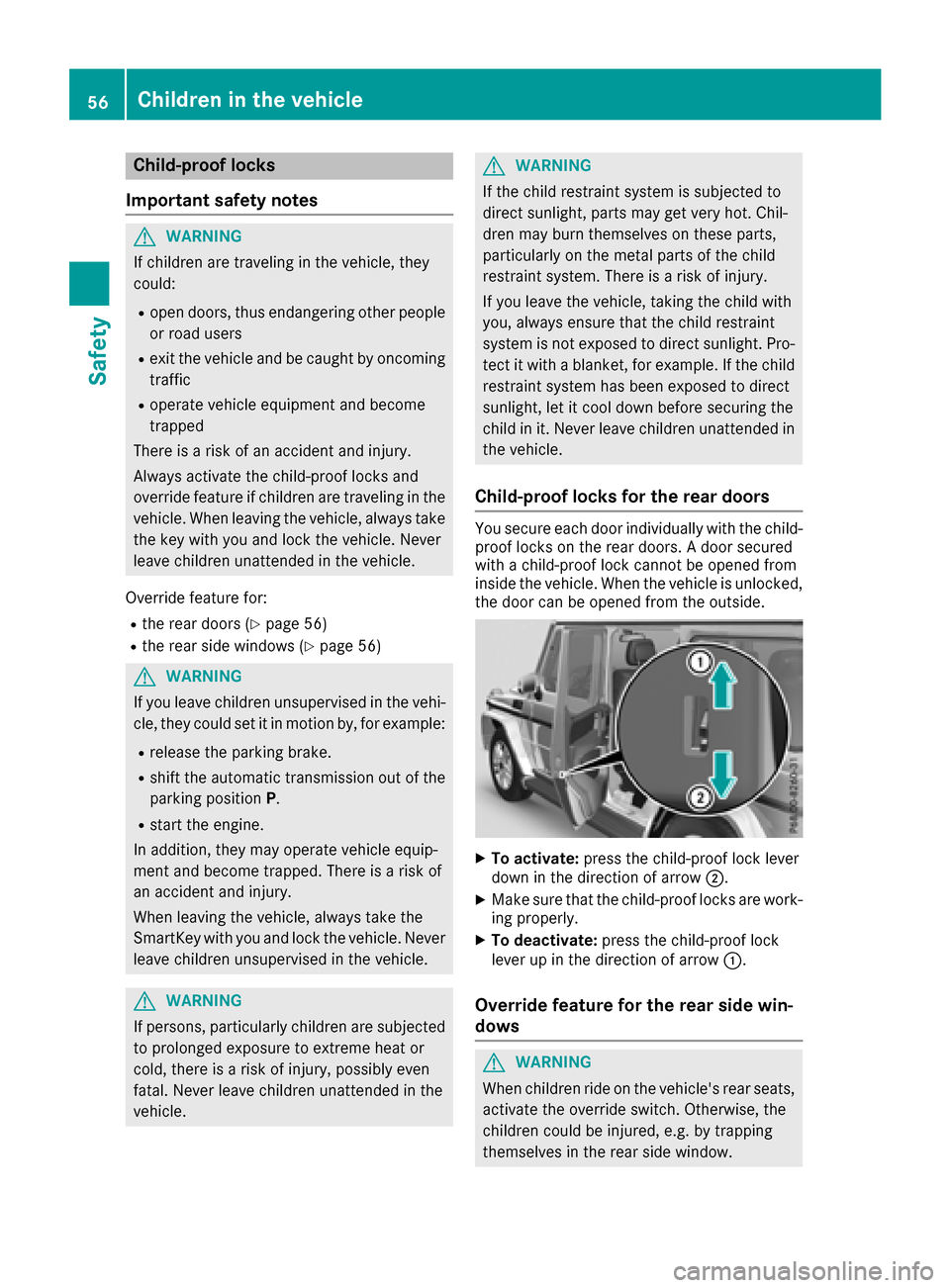
Child-proof locks for th ereard oors
You secure each door individually witht hechild-
proof locks on th erear doors. Adoor secured
withac hild-proof lockc annotbeo pened from
inside th evehicle .When th evehicle is unlocked,
th ed oor can be opened from th eoutside.
XTo activate: pressthe child-proof lockl ever
down in th edirection of arrow ;.
XMakesure that th echild-proof locks are work-
ing properly.
XTo deactivate: pressthe child-proof lock
leve rupint hedirection of arrow :.
Overridefeature for th erears idew in-
dows
GWARNING
When childre nride on th evehicle's rear seats,
activat ethe override switch .Otherwise, the
childre ncoul dbei njured, e.g .bytrapping
themselve sintherear side window.
56Children in th evehicle
Safety
Page 65 of 286
SmartKey
Important safety notes
GWARNING
If children are left unsupervised in the vehicle,
they could:
Ropen the doors, thus endangering other
people or road users.
Rget out and disrupt traffic.
Roperate the vehicle's equipment.
Additionally, children could set the vehicle in
motion if, for example, they:
Rrelease the parking brake.
Rshifting the automatic transmission out of
park position P
RStart the engine.
There is arisk of an accident and injury.
When leaving the vehicle, always take the
SmartKey with you and lock the vehicle. Never
leave children or animals unattended in the
vehicle. Always keep the SmartKey out of
reach of children.
GWARNING
If you attach heavy or large object stothe
SmartKey, the SmartKey could be uninten-
tionally turned in the ignition lock. This could
cause the engine to be switched off. There is a risk of an accident.
Do not attach any heavy or large object stothe
SmartKey. Remove any bulky key rings before
insertingt he SmartKey into the ignition lock.
!Keep the SmartKey away from stron gmag-
netic fields. Otherwise, the remote control
function could be affected.
Strong magnetic fields can occur in the vicin-
ity of powerful electrical installations.
Do not keep the SmartKey:
Rwith electronic devices, e.g. amobile phone
or another SmartKey.
Rwith metallic objects, e.g. coins or metal foil.
Rinside metallic objects, e.g. ametal case.
This can affect the functionality of the Smart- Key. Ac
heck which periodically establishes aradio
connection between the vehicle and the Smart-
Key determines whether avalid SmartKey is in
the vehicle. This occurs, for example:
Rwhen startin gthe engine
Rwhile driving
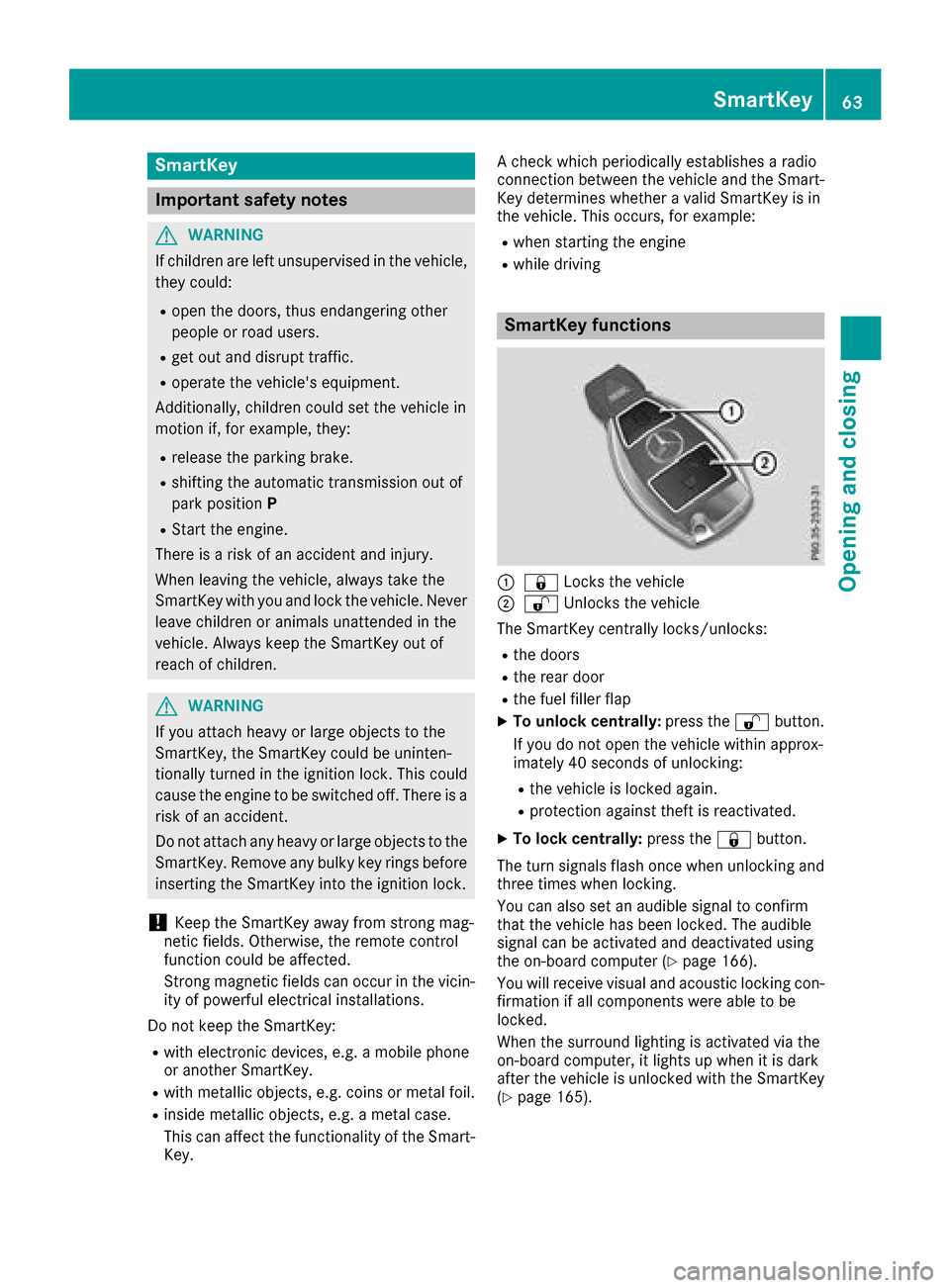
SmartKey functions
:& Locks the vehicle
;%Unlockst he vehicle
The SmartKey centrally locks/unlocks:
Rthe doors
Rthe rear door
Rthe fuel filler flap
XTo unlock centrally: press the%button.
If you do not open the vehicle within approx-
imately 40 seconds of unlocking:
Rthe vehicle is locked again.
Rprotection against theft is reactivated.
XTo lock centrally: press the&button.
The turn signals flash once when unlocking and
three times when locking.
You can also set an audible signal to confirm
that the vehicle has been locked. The audible
signal can be activated and deactivated using
the on-board computer (
Ypage 166).
You will receive visual and acoustic locking con-
firmation if all components were able to be
locked.
When the surround lighting is activated via the
on-board computer, it lights up when it is dark
after the vehicle is unlocked with the SmartKey (
Ypage 165).
SmartKey63
Opening and closing
Z