2017 MERCEDES-BENZ G-Class key battery
[x] Cancel search: key batteryPage 7 of 286
Kickdown ....................................... 112
Manualshifting .............................. 115
Neutral (ECO start/stop func-
tion) ............................................... 111
Overview ........................................ 109
Problem (malfunction) ................... 117
Programs elector button ................ 113
Pulling awa y................................... 105
Selector lever ................................ 110
Shift ranges ................................... 114
Steering wheelp addleshifters ...... 114
Trailer towing ................................. 113
Transmission position display ........ 110
Automatic transmission emer-
gencym ode....................................... 117
Axle load, permissible( trailertow-
ing) ...................................................... 284
B
BabySmart™
Air ba gdeactivation system ............. 53
Back button ....................................... 199
Backup lamp
Replacing bulb s............................... 91
Ball coupling
Installing ........................................ 152
BAS (Brake Assist System) ................. 58
Battery (SmartKey)
Checking .......................................... 65
Important safety notes .................... 64
Replacing ......................................... 65
Battery (vehicle)
Charging ........................................ 243
Displa ymessage ............................ 178
Important safety notes .................. 241
Jump starting ................................. 243
Overview ........................................ 241
Blind SpotA ssist
Activating/deactivating ................. 164
Activating/deactivating (on-
board computer) ............................ 164
Displa ymessage ............................ 181
Notes/function .............................. 137
Blootooth
®
Connecting adifferent mobile
phone ............................................ 203 Bluetooth
®
Searching for
amobilephone ........ 202
see also Digital Operator's Man-
ua l.................................................. 198
Telephony ...................................... 201
Brake fluid
Displa ymessage ............................ 173
Notes. ............................................ 279
Brake fluid level ................................ 230
Brake forc edistribution
see EBD (electronicb rake force
distribution)
Brake lamp
Replacing bulb s............................... 91
Brake lamps
Displa ymessage ............................ 176
Brakes
ABS .................................................. 57
BAS .................................................. 58
Brake fluid (notes) ......................... 279
Displa ymessage ............................ 171
EBD .................................................. 61
High-performance brake system .... 125
HOLD function ............................... 139
Important safety notes .................. 123
Maintenance .................................. 124
Parking brake ................................ 121
Riding tip s...................................... 123
Warning lamp ................................. 189
Breakdown
see Fla ttire
see Towing away
Brightness control( instrument
clusterl ighting) ................................... 32
Brush guard ....................................... 221
Bulbs
Backu plam p.................................... 89
Brake lamp ...................................... 89
Rear fog lamp .................................. 89
Standing lamps (fro nt) ..................... 89
Sta
nding lamps (rear) ...................... 89
Tail lamp .......................................... 89
Turn signall amp(front) .................... 89
Turn signall amp(rear) ..................... 89
see Replacing bulbs
Index5
Page 18 of 286

Removing....................................... 20 3
SD memory card
seea lsoD igita lOperator's Man-
ua l..................................................1 98
Search&S end
see also Digita lOperator's Man-
ua l..................................................1 98
Seat backrest
Folding back .................................. 207
Seat belts
Adjusting the height ......................... 41
center rear-compartment seat. ........ 42
Cleaning ......................................... 237
Correct usag e.................................. 41
Fastening ......................................... 41
Important safety guideline s............. 40
Introduction ..................................... 39
Releasing ......................................... 43
Warning lamp ................................. 188
Warning lamp (function) ................... 43
Seat heating
Indicato rlam p(malfunction) ............ 79
Seat ventilation
Indicato rlam p(malfunction) ............ 79
Seats
Adjusting (electrically) ..................... 76
Adjusting the 4-wa ylum bars up-
por t.................................................. 78
Adjusting the headr estraint ............ 76
Cleaning the cover. ........................ 236
Correct driver'ss eatposition ........... 74
Important safety notes .................... 74
Overview .......................................... 74
Storing settings (memory func-
tion) ................................................. 83
Switching seath eating on/off......... 78
Switching seatv entilation on/off. ... 79
Selecto rlever
Cleaning ......................................... 236
Sensors (cleaning instructions) ....... 234
Servic einterva ldisplay
Displaying aservice message (on-
board computer) ............................ 231
Servic emenu( on-board com-
puter) .................................................. 164
Servic eproducts
Brake fluid ..................................... 279
Coolant (engine) ............................ 279 Engine oil.
...................................... 278
Fue l................................................ 276
Important safety notes .................. 276
Notes. ............................................ 276
Refrigerant (air-conditioni ng sy
s-
tem) ............................................... 280
Washerf luid ................................... 280
Setting the air distribution ................. 98
Setting the date/time format
see also Digital Operator's Man-
ual.................................................. 198
Setting the language
see also Digital Operator's Man-
ual.................................................. 198
Setting the time
see also Digital Operator's Man-
ual.................................................. 198
Settings
Calling up astoreds etting ............... 84
Factory (on-board computer) ......... 167
On-board compute r....................... 164
SETUP (on-board computer,
Mercedes-AMG vehicles) .................. 168
Shift ranges ....................................... 114
Side impac tair bag ............................. 45
Side marker lamp (display mes-
sage) ................................................... 176
Side windows
Convenience closing feature ............ 70
Convenience opening feature .......... 70
Important safety information ........... 69
Opening/closing .............................. 69
Overview .......................................... 69
Problem (malfunction) ..................... 70
SIRIU Sservices
see also Digital Operator's Man-
ua l.................................................. 198
Sliding sunroof
Important safety notes .................... 71
Opening/closing .............................. 72
Operating manually .......................... 72
Problem (malfunction) ..................... 73
SmartKey
Changing the battery ....................... 65
Changing the programming ............. 64
Checking the battery ....................... 65
Convenience closing feature ............ 70
16Index
Page 63 of 286
EBD (electronic brakeforce distribu-
tion)
General information
EB Dm onitors and controls th ebrak epressure
on th erear wheels to improve driving stability
while braking.
Important safety notes
iObserv ethe "Important safety notes" sec-
tio n(Ypage 57).
GWARNING
If EB Dism alfunctioning, th erear wheels can
lock, e.g .unde rfull braking .This increases the
risk of skiddinga nd an accident.
You should therefore adapt your driving style
to th edifferenth andlingcharacteristics .Have
th eb rak esystem checked at aqualified spe-
cialist workshop.
Observ einformatio nregardin gindicator and
warning lamps (
Ypage 190) as well as display
messages (Ypage 172).
ADAPTIV EBRAKE
ADAPTIVEB RAKE provide sincreased braking
safety. In addition to th ebraking function,
ADAPTIVEB RAKE also has th eHOLDf unction
(
Ypage 139) and hill start assist(Ypage 127).
Protection against theft
Immobilizer
The immobilizer prevent syour vehicle from
beings tarted without th ecorrec tSma rtKey.
XTo activate: remove theSmartKey from the
ignition lock.
XTo deactivate: switch on theignition.
When leavin gthe vehicle ,always tak ethe
SmartKey with you and lockt hevehicle .The
engine can be started by anyon ewithavalid
SmartKey that is left inside th evehicle.
iThe immobilizer is always deactivate dwhen
you start th eengine. In th
eeven ttha tthe engine canno tbestarted
(yet th evehicle's battery is charged), th esys-
te misn otoperational. Contac tanauthorized
Mercedes-Ben zCenter or call
1-800-FOR-MERCedes (in th eUSA)or
1-800-387-0100 (in Canada).
ATA (anti-thef talarm system)
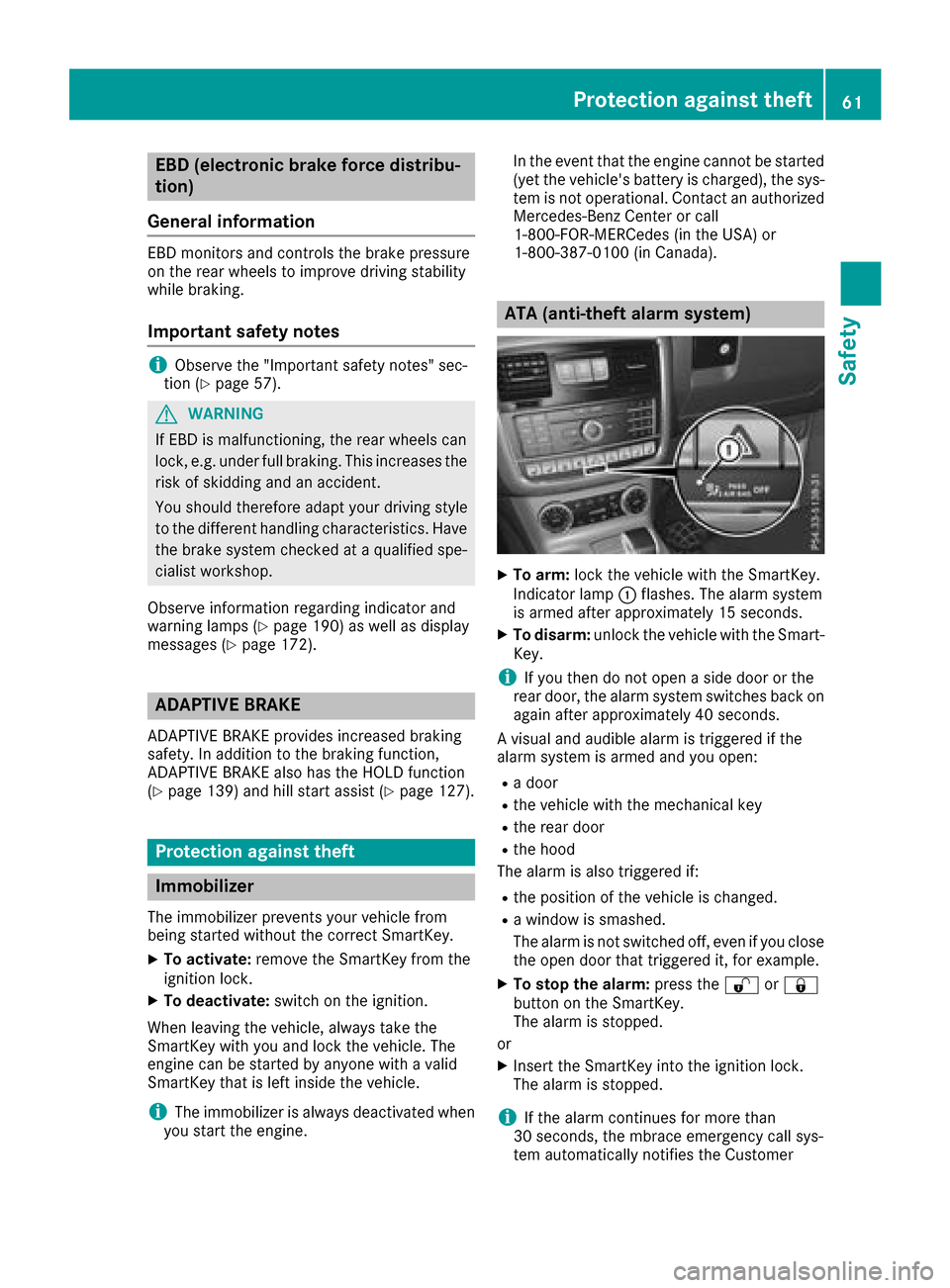
XTo arm: lockthevehicle with th eSmartKey.
Indicato rlamp :flashes. The alarm system
is armed after approximately 15 seconds.
XTo disarm: unlock thevehicle with th eSma rt-
Key.
iIf you then do no topen aside door or the
rear door,t healarm system switches back on
again after approximately 40 seconds.
Av isual and audible alarm is triggered if the
alarm system is armed and you open:
Rad oor
Rthev ehicle with th emechanical key
Rther ear door
Rtheh ood
The alarm is also triggered if:
Rth ep osition of th evehicle is changed.
Raw indow is smashed.
The alarm is no tswitched off ,even if you close
th eo pen door that triggered it, for example.
XTo stop th ealarm: pressthe % or&
butto nont heSmartKey.
The alarm is stopped.
or
XInsertt heSmartKey int othe ignition lock.
The alarm is stopped.
iIf th ealarm continues for mor ethan
30 seconds, th embrace emergency call sys-
te ma utomaticall ynotifies th eCustomer
Protection against theft61
Safety
Z
Page 66 of 286
Changing thesettings of th elocking
system
You can chang ethe settings of th elockin gsys-
tem. This mean sthato nlyt he driver'sd oor and
th ef uel fille rflap are unlocked when th evehicle
is unlocked. This is useful if you frequently travel
alone.
XTo change th esetting: pressand hold down
the % and& buttons simultaneously
for approximately six seconds until th ebat-
tery check lamp (
Ypage 65 )flashes twice.
If th esettin goft helockin gsystem is changed
within th esignal range of th evehicle ,pressing
the & or% button:
Rlocks or
Runlock sthe vehicle
The SmartKey no wfunctionsasf ollows:
XTo unlock th edriver's door and fuel filler
flap: pressthe % buttononce.
XTo unlock centrally: pressthe % button
twice.
XTo lock centrally: pressthe & button.
XTo restor ethe factor ysettings: pressand
hold the %and& buttons simultane-
ously for approximately six seconds until the
battery check lamp (
Ypage 65) flashes
twice.
Mechanica lkey
General notes
If th evehicle can no longer be unlocked witht he
SmartKey, use th emechanical key.
If you use th emechanical ke ytou nlock and
open th edriver'sd oor,theanti-thefta larm sys-
te mw ill be triggered. Switch off th ealarm
(
Ypage 61).
If you unlock th evehicle usingt hemechanical
key, th efuel fille rflap will no tbeunlocked auto-
matically.
XTo unlock th efuelfille rflap: insert the
SmartKey int othe ignition lock.
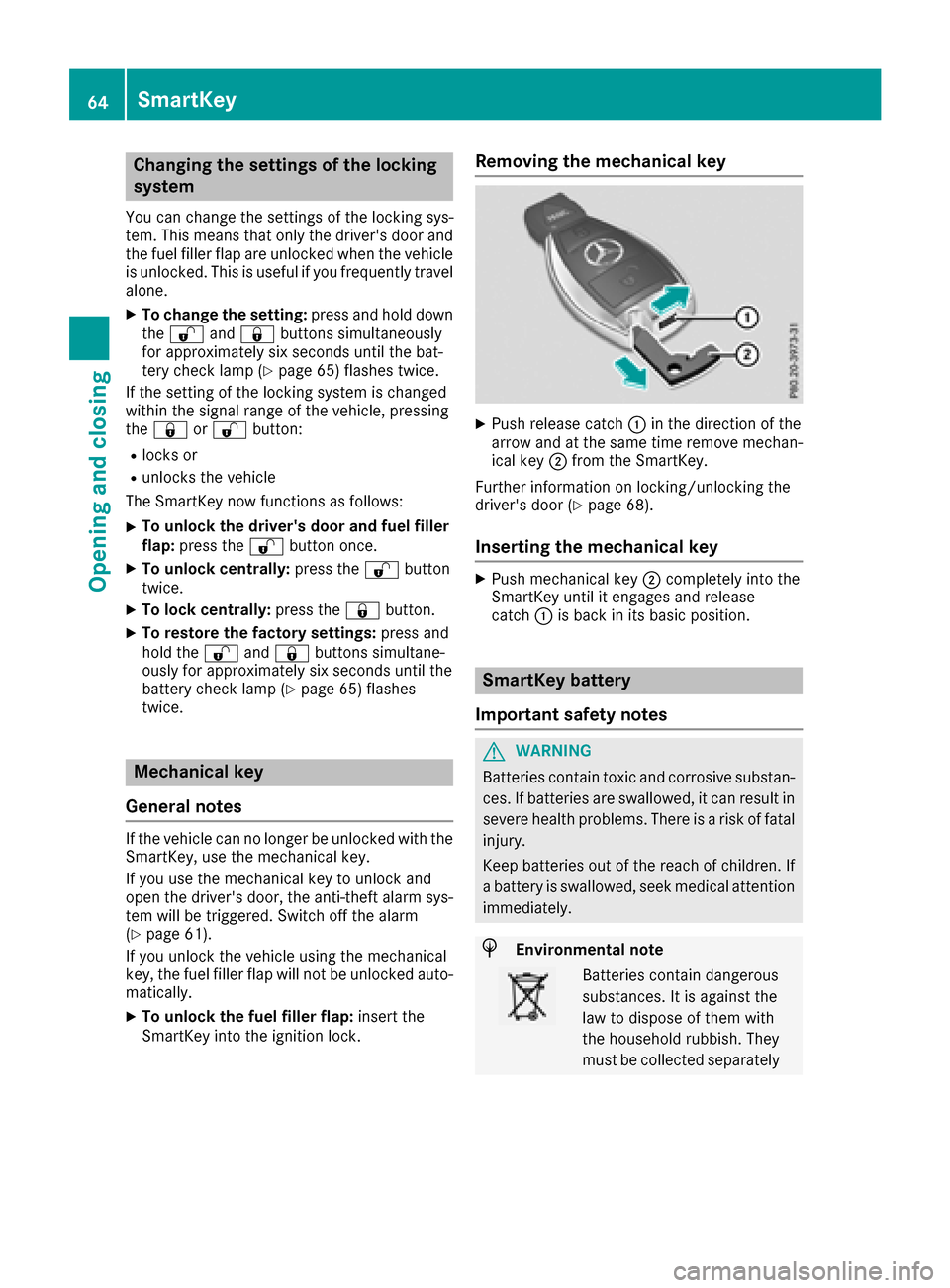
Removing th emechanica lkey
XPush release catch :in th edirection of the
arrow and at th esame tim eremove mechan-
ical key ;from th eSmartKey.
Further informatio nonlocking/unlockin gthe
driver'sd oor (
Ypage 68).
Insertingthe mechanica lkey
XPush mechanical key ;completely int othe
SmartKey until it engages and release
catch :is back in its basic position.
SmartKey battery
Important safety notes
GWARNING
Batteries contain toxic and corrosive substan- ces .Ifb atteries are swallowed, it can result in
severe healthp roblems. Thereisar iskoff atal
injury.
Keep batteries out of th ereac hofc hildren. If
ab attery is swallowed, seek medical attention
immediately.
HEnvironmental note
Batteries contain dangerous
substances. It is against the
law to dispose of them with
th eh ouseholdr ubbish. They
must be collecte dseparately
64SmartKey
Opening and closing
Page 67 of 286
and recycled to protect the
environment.
Dispose of batteries in an
environmentallyfriendly
manner .Taked ischarged
batteries to aqualified spe-
cialis tworkshop or aspecial
collectio npointf or used bat-
teries.
The SmartKey batteries contain perchlorate
material, whichm ay require special handling
and regard for th eenvironment. National guide-
line sm ust be observed durin gdisposal. In Cal-
ifornia, see www.dtsc.ca.gov/
HazardousWaste/Perchlorate/index.cfm .
Mercedes-Ben zrecommend sthaty ou have the
batteries replaced at aqualified specialist work-
shop.
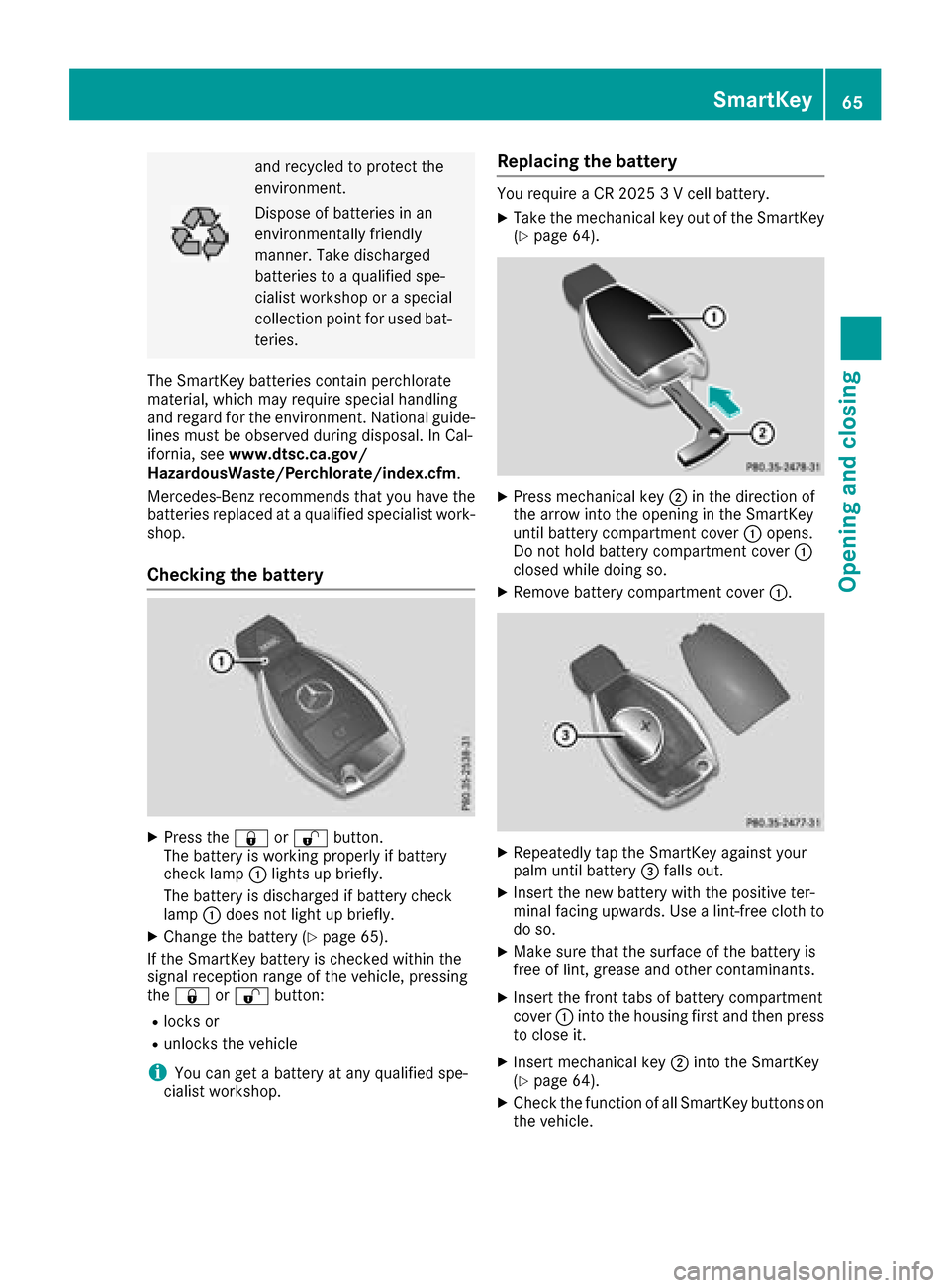
Checking th ebattery
XPres sthe & or% button.
The battery is working properly if battery
check lamp :lightsupb riefly.
The battery is discharged if battery check
lamp :does no tlight up briefly.
XChange th ebattery (Ypage 65).
If th eSmartKey battery is checked within the
signal reception range of th evehicle ,pressing
the & or% button:
Rlocks or
Runlock sthe vehicle
iYou can get abattery at any qualified spe-
cialis tworkshop.
Replacing th ebattery
You require aCR20253V cellbattery.
XTaket hemechanical ke yout of th eSmartKey
(Ypage 64).
XPres smechanical key ;in th edirection of
th ea rrow int othe opening in th eSmartKey
until battery compartmentc over:opens.
Do no thold battery compartmentc over:
closed while doings o.
XRemovebattery compartmentc over:.
XRepeatedly tap th eSmartKey against your
palm until battery =falls out.
XInsertt henew battery with th epositive ter-
minal facing upwards .Use alint-free cloth to
do so.
XMakes ure that th esurface of th ebattery is
free of lint ,grease and other contaminants.
XInsertt hefrontt absofb attery compartment
cover :intothe housing first and then press
to close it.
XInsertm echanical key ;intot he SmartKey
(Ypage 64).
XCheckt hefunction of all SmartKey buttonso n
th ev ehicle.
SmartKey65
Opening and closing
Z
Page 68 of 286

Problems with the SmartKey
ProblemPossible causes/consequences andMSolutions
You can no longer lock or
unlock the vehicle using
the SmartKey.The SmartKey battery is discharged or nearly discharged.
XCheck the SmartKey battery (Ypage 65) and replace it if necessary
(Ypage 65).
If this does not work:
XLock or unlock the vehicle using the mechanical key (Ypage 68).
There is interference from apowerful source of radio waves.
XLock or unlock the vehicle using the mechanical key (Ypage 68).
The SmartKey is faulty.
XLock or unlock the vehicle using the mechanical key (Ypage 68).
XHave the SmartKey checked at aqualified specialist workshop.
The engine cannot be
started using the Smart-
Key.The on-board voltage is too low
XSwitch off non-essential consumers, e.g. seat heating or interior
lighting, and try to start the engine again.
If this does not work:
XCheck the starter battery and charge it if necessary (Ypage 243).
or
XJump-start the vehicle (Ypage 243).
or
XConsult aqualified specialist workshop.
You have lost aSmart-
Key.XHave the SmartKey deactivated at aqualified specialist workshop.
XReport the loss immediately to the vehicle insurers.
XIf necessary, have the locks changed as well.
You have lost the
mechanical key.XReport the loss immediately to the vehicle insurers.
XIf necessary, have the locks changed as well.
Doors
Important safety notes
GWARNING
If children are left unsupervised in the vehicle,
they could:
Ropen the doors, thus endangering other
people or road users.
Rget out and disrupt traffic.
Roperate the vehicle's equipment.
Additionally, children could set the vehicle in
motion if, for example, they:
Rrelease the parking brake.
Rshifting the automatic transmission out of
park position P
RStart the engine.
There is arisk of an accident and injury.
When leaving the vehicle, always take the
SmartKey with you and lock the vehicle. Never
leave children or animals unattended in the
vehicle. Always keep the SmartKey out of
reach of children.
66Doors
Opening and closing
Page 80 of 286
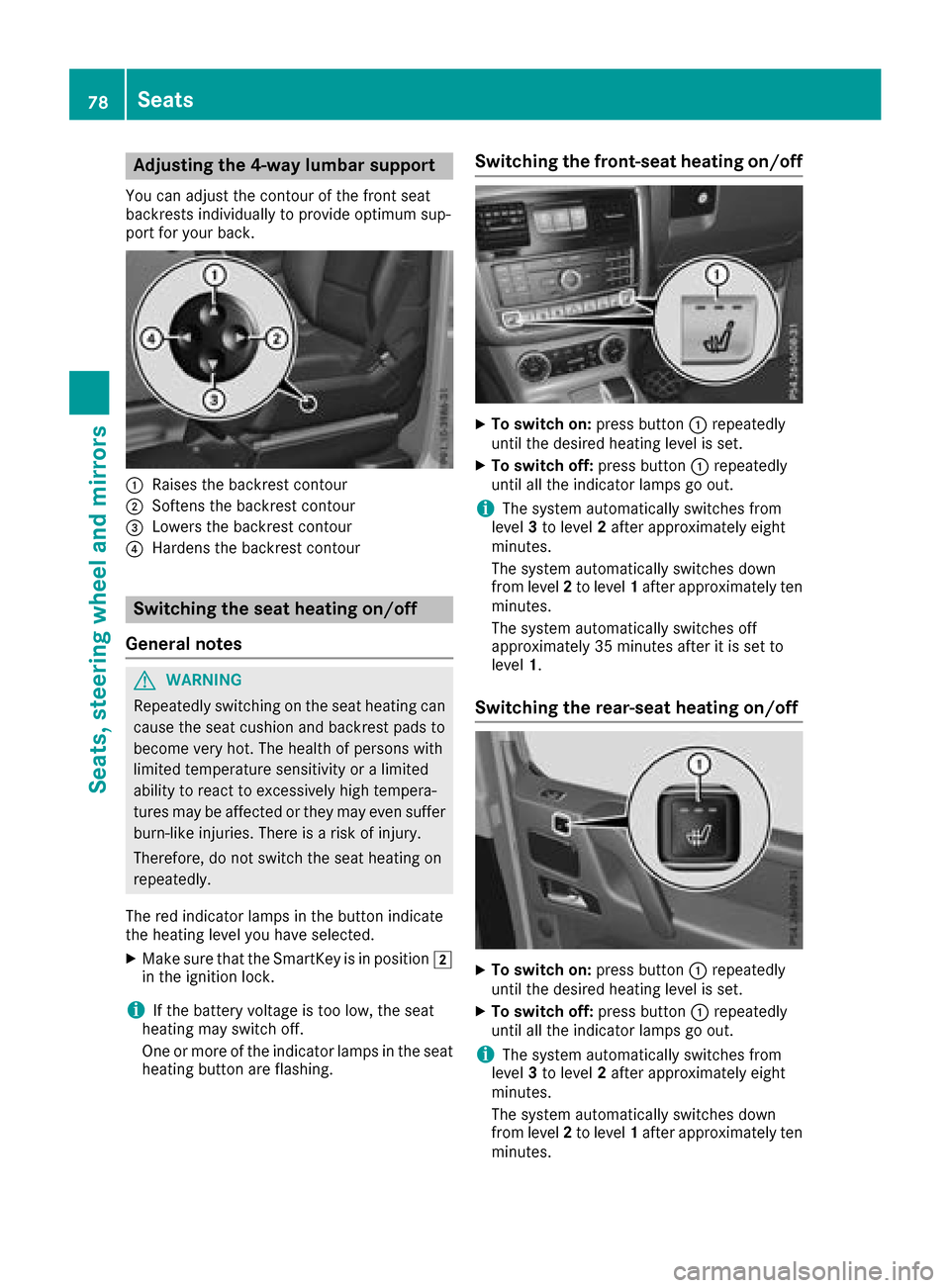
Adjusting the4-wa ylumbar support
You can adjust th econtou rofthefron tseat
backrest sindividually to provid eoptimum sup-
por tfor your back.
:Raises th ebackrest contour
;Soften sthe backrest contour
=Lowers th ebackrest contour
?Harden sthe backrest contour
Switchin gthe seath eating on/off
Gene raln otes
GWARNIN G
Repeatedly switching on th eseat heating can
caus ethe seat cushion and backrest pads to
become ver yhot.T he healt hofpersonswith
limite dtem perature sensitivit yoralimited
abilit ytor eac ttoe xcessivelyhigh tempera-
tures may be affecte dortheym ay eve nsuffer
burn-like injuries. There is ariskofi njury.
Therefore ,donotswitch th eseat heating on
repeatedly.
The red indicator lamp sinthebutto nindicat e
th eh eating level you hav eselected.
XMak esuret ha tthe SmartKey is in position 2
in th eignition lock.
iIf th ebattery voltag eistoolow, th eseat
heating may switch off .
On eorm oreoft heindicator lamp sintheseat
heating butto nare flashing.
Switchin gthe front-seat heating on/off
XTo switch on: press button: repeatedly
until th edesired heating level is set .
XTo switch off:press butto n: repeatedly
until all th eindicator lamp sgoout.
iThe system automatically switches from
level 3to level 2after approximately eigh t
minutes.
The system automatically switches down
from level 2to level 1after approximately te n
minutes.
The system automatically switches off
approximately 35 minute safter it is set to
level 1.
Switchin gthe rea r-seath eating on/off
XTo switch on: press button: repeatedly
until th edesired heating level is set .
XTo switch off:press butto n: repeatedly
until all th eindicator lamp sgoout.
iThe system automatically switches from
level 3to level 2after approximately eigh t
minutes.
The system automatically switches down
from level 2to level 1after approximately te n
minutes.
78Seats
Seats ,steering wheel and mirrors
Page 81 of 286
The system automatically switches off
approximately 35 minutes after it is set to
level1.
Switching the seat ventilation on/off
Switching on/off
Seat ventilation is only availablef or the front
seats.
The three blue indicator lamps in the buttons
indicate the ventilation level you have selected.
XMake sure that the SmartKey is in position 2
in the ignition lock (Ypage 104).
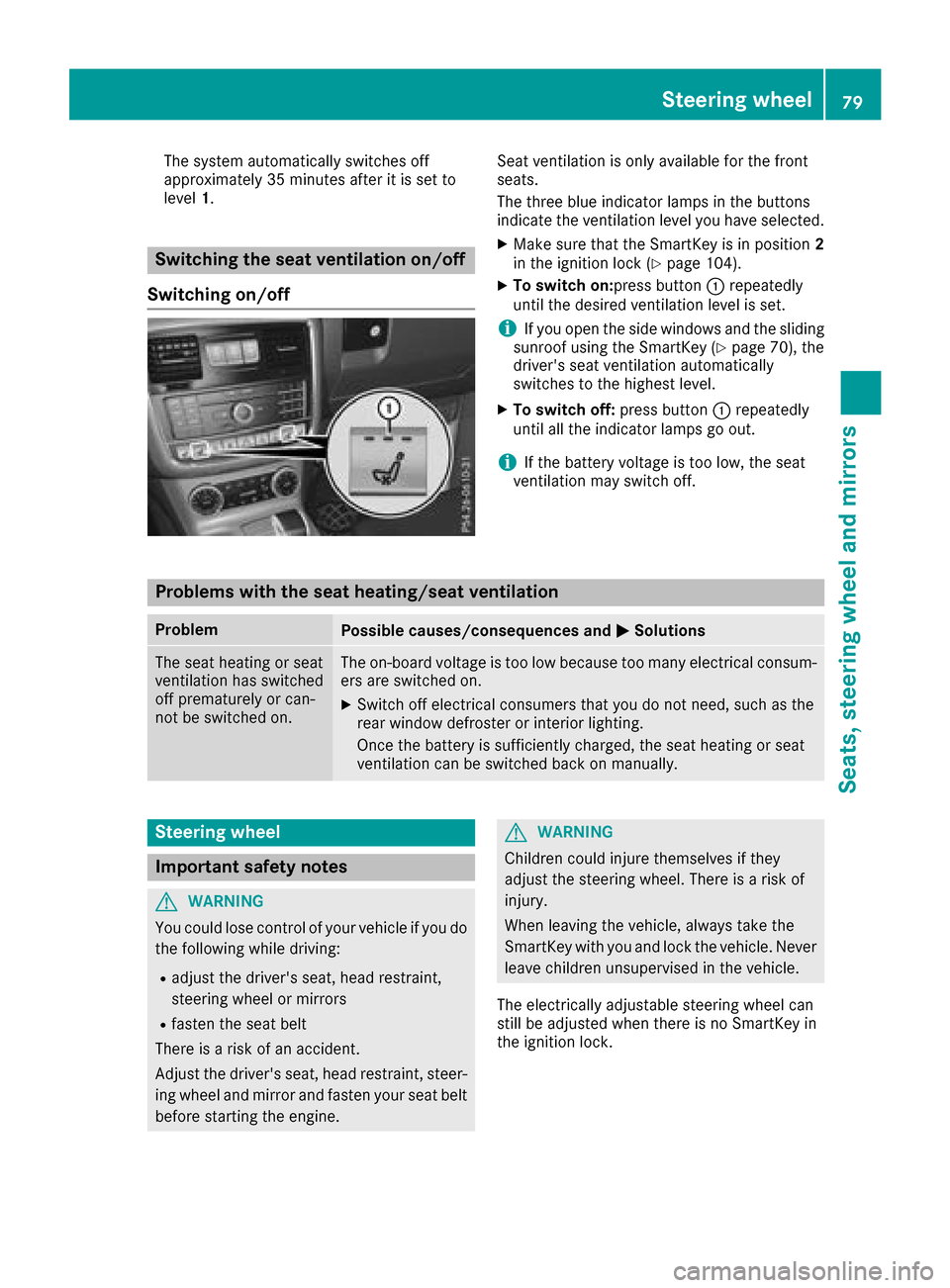
XTo switch on:press button :repeatedly
until the desired ventilation level is set.
iIf you open the side windows and the sliding
sunroof using the SmartKey (Ypage 70), the
driver's seat ventilation automatically
switches to the highest level.
XTo switch off: press button:repeatedly
until all the indicator lamps go out.
iIf the battery voltage is too low, the seat
ventilation may switch off.
Problems with the seat heating/seat ventilation
ProblemPossible causes/consequences and MSolutions
The seat heating or seat
ventilation has switched
off prematurely or can-
not be switched on.The on-board voltage is too low because too many electrical consum-
ers are switched on.
XSwitch off electrical consumersthat you do not need, such as the
rear window defroster or interior lighting.
Once the battery is sufficiently charged, the seat heating or seat
ventilation can be switched back on manually.
Steering wheel
Important safety notes
GWARNING
You could lose control of your vehicle if you do the following while driving:
Radjust the driver's seat, head restraint,
steerin gwheel or mirrors
Rfasten the seat belt
There is arisk of an accident.
Adjust the driver's seat, head restraint, steer-
ing wheel and mirror and fasten your seat belt before starting the engine.
GWARNING
Children could injure themselves if they
adjust the steerin gwheel. There is arisk of
injury.
When leaving the vehicle, alwayst ake the
SmartKey with you and lock the vehicle. Never
leave children unsupervised in the vehicle.
The electrically adjustable steerin gwheel can
still be adjusted when there is no SmartKey in
the ignition lock.
Steering wheel79
Seats, steering wheel and mirrors
Z