2017 MERCEDES-BENZ G-Class key
[x] Cancel search: keyPage 18 of 286

Removing....................................... 20 3
SD memory card
seea lsoD igita lOperator's Man-
ua l..................................................1 98
Search&S end
see also Digita lOperator's Man-
ua l..................................................1 98
Seat backrest
Folding back .................................. 207
Seat belts
Adjusting the height ......................... 41
center rear-compartment seat. ........ 42
Cleaning ......................................... 237
Correct usag e.................................. 41
Fastening ......................................... 41
Important safety guideline s............. 40
Introduction ..................................... 39
Releasing ......................................... 43
Warning lamp ................................. 188
Warning lamp (function) ................... 43
Seat heating
Indicato rlam p(malfunction) ............ 79
Seat ventilation
Indicato rlam p(malfunction) ............ 79
Seats
Adjusting (electrically) ..................... 76
Adjusting the 4-wa ylum bars up-
por t.................................................. 78
Adjusting the headr estraint ............ 76
Cleaning the cover. ........................ 236
Correct driver'ss eatposition ........... 74
Important safety notes .................... 74
Overview .......................................... 74
Storing settings (memory func-
tion) ................................................. 83
Switching seath eating on/off......... 78
Switching seatv entilation on/off. ... 79
Selecto rlever
Cleaning ......................................... 236
Sensors (cleaning instructions) ....... 234
Servic einterva ldisplay
Displaying aservice message (on-
board computer) ............................ 231
Servic emenu( on-board com-
puter) .................................................. 164
Servic eproducts
Brake fluid ..................................... 279
Coolant (engine) ............................ 279 Engine oil.
...................................... 278
Fue l................................................ 276
Important safety notes .................. 276
Notes. ............................................ 276
Refrigerant (air-conditioni ng sy
s-
tem) ............................................... 280
Washerf luid ................................... 280
Setting the air distribution ................. 98
Setting the date/time format
see also Digital Operator's Man-
ual.................................................. 198
Setting the language
see also Digital Operator's Man-
ual.................................................. 198
Setting the time
see also Digital Operator's Man-
ual.................................................. 198
Settings
Calling up astoreds etting ............... 84
Factory (on-board computer) ......... 167
On-board compute r....................... 164
SETUP (on-board computer,
Mercedes-AMG vehicles) .................. 168
Shift ranges ....................................... 114
Side impac tair bag ............................. 45
Side marker lamp (display mes-
sage) ................................................... 176
Side windows
Convenience closing feature ............ 70
Convenience opening feature .......... 70
Important safety information ........... 69
Opening/closing .............................. 69
Overview .......................................... 69
Problem (malfunction) ..................... 70
SIRIU Sservices
see also Digital Operator's Man-
ua l.................................................. 198
Sliding sunroof
Important safety notes .................... 71
Opening/closing .............................. 72
Operating manually .......................... 72
Problem (malfunction) ..................... 73
SmartKey
Changing the battery ....................... 65
Changing the programming ............. 64
Checking the battery ....................... 65
Convenience closing feature ............ 70
16Index
Page 19 of 286

Convenience opening feature .......... 70
Display message ............................ 187
Door central locking/unlocking ...... .63
Important safety notes .................... 63
Loss .................................................6 6
Mechanical key ................................ 64
Overview .......................................... 63
Positions (ignition lock) ................. 104
Problem (malfunction) ..................... 66
Starting the engine ........................ 105
SMS
see also Digital Operator's Man-
ual .................................................. 198
Snow chains ...................................... 253
Socket (12 V)
Cargo compartment. ...................... 213
Front-passenger footwell ............... 212
General notes ................................ 212
Rear compartment. ........................213
Sound
Switching on/off ........................... 199
Spare fuses ........................................ 249
Spare wheel
Spare wheel bracket at the rear .... 239
Stainless-steel spare hub cap ........2 39
Special seat beltr etractor.................. 50
Specialist workshop ............................ 27
Speedometer
Digita l............................................ 160
In the Instrument cluster ................. 32
Segments ...................................... 157
Selecting the displayu nit ...............165
Standingl amps
Display message ............................ 176
Switching on/off .............................. 86
Starting the engine
Important safety notes .................. 104
Steering (display message) .............. 187
Steering wheel
Adjusting (electrically). .................... 80
Buttons (on-board computer) ......... 158
Cleaning ..................... .................... 236
Important sa
fety notes .................... 79
Paddle shifters ............................... 114
Steering wheel heating .................... 80
Storing settings (memory func-
tion) ................................................. 83 Steering wheel heating
Indicator lamp (malfunction) ............ 80
Steering wheel paddle shifters ........114
Stopwatch (RACETIMER) ................... 168
Stowage areas ................................... 205
Stowage compartment
Door stowage compartment .......... 206
Stowage compartments
Armrest (under) .............................2 06
Cu ph olders ................................... 210
Glove box ....................................... 205
Important safety information ......... 205
Stowag enet ................................... 206
Stowag epockets ........................... 206
Stowage net ....................................... 206
Summer opening
see Convenience opening feature
Summer tires
In winter ........................................ 253
Sun visor ............................................ 210
Surround lighting (on-board com-
puter) ..................................................1 65
SUV
(Sport Utility Vehicle) ....................... 26
Switchin gair-recirculation mode
on/off ................................................. 101
Switchin gonmedia mode
Via the device lis t.......................... 203
T
Tachometer ........................................ 157
Tail lamp
Replacing bulb s............................... 91
Tail lamps
Displa ymessage ............................ 176
Tank content
Fuelgauge ....................................... 32
Technical data
Capacities ...................................... 276
Drawba rloa d( maximum) ............... 284
Information .................................... 274
Trailer load s................................... 284
Vehicl edata. .................................. 281
Telephone
Accepting acall. ............................ 163
Authorizing amobilephone (con-
necting) ......................................... 202
Index17
Page 22 of 286
Turn signalsDisplay message ............................ 176
Replacing bulb s(front) ..................... 90
Switching on/off .............................. 87
TV
Operating (on-boar dcomputer) ..... 163
see Separate operating instructions
Two-way radio
Frequencie s................................... 274
Installation ..................................... 274
Transmission output( maximum) .... 274
TWR (Tongue Weight Rating) (defi-
nition) ................................................. 269
Type identificatio nplate
see Vehicl eide ntificatio nplate
U
Unlocking
Emergency unlocking ....................... 68
From insid ethe vehicl e(central
unlocking button) ............................. 67
US Bd evices
Connecting to the Media Inter-
face ...............................................2 03
V
Vanity mirror
Sun visor. ....................................... 211
Vehicle
Correct use ...................................... 27
Data acquisition ............................... 28
Display message ............................ 186
Equipment ....................................... 24
Individua lsettings .......................... 164
Limited Warranty .............................2 8
Loading .......................................... 260
Locking (in an emergency) ............... 68
Locking (SmartKey) .......................... 63
Lowering ........................................ 272
Maintenance .................................... 25
Operation outsidet he USA/
Canada ............................................ 25
Parking .......................................... 120
Parking for along period. ............... 122
Pulling awa y................................... 105
Raising ........................................... 270
Securing from rolling away ............ 270 Tow-starting ................................... 248
Towing ........................................... 246
Transporting .................................. 247
Unlocking (i
nanemergency) ........... 68
Unlocking (SmartKey). ..................... 63
Vehicl edata. .................................. 281
Vehicl edata ....................................... 281
Vehicl edata (off-road driving)
Approach/departure angle ............ 283
Fording depth ................................ 283
Maximu mgradient climbing abil-
ity .................................................. 283
Vehicl edimensions ........................... 281
Vehicl eemergencyl ocking ................ 68
Vehicl eidentificatio nnumber
see VIN
Vehicl eidentificatio nplate .............. 275
Vehicl etoolkit.................................. 239
Ventilation
Setting the airflow ........................... 98
Video
Operating the DVD ......................... 162
see also Digital Operator's Man-
ual.................................................. 198
VIN
Type plate ...................................... 275W
Warning and indicator lampsABS ................................................ 190
Brakes ........................................... 189
Check Engine ................................. 194
Coolant .......................................... 194
Distance warning ........................... 196
DISTRONIC PLUS. .......................... 196
ESP
®.............................................. 191
ESP®OFF ....................................... 192
Fue ltank ........................................ 194
Generaln otes ................................ 187
Overview .......................................... 32
Parking brake ................................ 193
PASSENGER AIR BAG OFF ............... 39
Reserve fue l................................... 194
Restraint system ............................ 193
Seatb elt. ....................................... 188
Tire pressure monitor .................... 197
Warning triangle ................................ 238
20Index
Page 24 of 286
Introduction
The printedOperator's Manual provide sinfor-
mation about th esafeo peration of your vehicle.
The Digital Operator's Manual provide scom pre-
hensiv eand specifically adapted information on
your vehicle's equipmen tand multimedia sys-
tem. You can call up th eDigital Operator's Man -
ual via th emultimedia system.
iYou will no tincur any cost swhen calling up
th eD igital Operator's Manual. The Digital
Operator's Manual works without connecting
to th eInternet.
Ther eare three ways to access th etop icsoft he
Digital Operator's Manual:
RVisua lsearch
The visual search allows you to explor eyour
vehicl e"virtually". Starting from either th e
vehicl eexter iorv iewori nterio rview, you can
access man yofthedifferen ttop icsc overed
by th eDigital Operator's Manual. To access
th ev ehicl einterio rsection ,select th e"Vehi-
cle interior" view.
RKeywor dsearch
The keyword search allows you to search for a
keyword by enterin gcharacters.
RContent s
You can select individual section sinthecon-
tents.
iThe Digital Operator's Manual is deactiva-
te df or safet yreason swhile driving .
Operation
Calling up th eDigital Operator's Man-
ual
XPress th eØ buttonont hecenter console.
The overview relating to th evehicl eappears.
XSelec tthe "Operator's Manual" men uitemb y
turnin g3 or pressin g7 thec ontroll er.
XConfirm7 them essage about th ewarning
and safet ynotes .
The basic men ufor th eDigital Operator's
Manual appears.
Operating th eDigital Operator's Man-
ual
General notes
Pleas eobserv ethe information about th eoper -
ation of th econtroll er(Ypage 199).
Content pages
The conten tpages can be accessed by mean sof
av isual search ,akeyword search or usin gthe
contents .
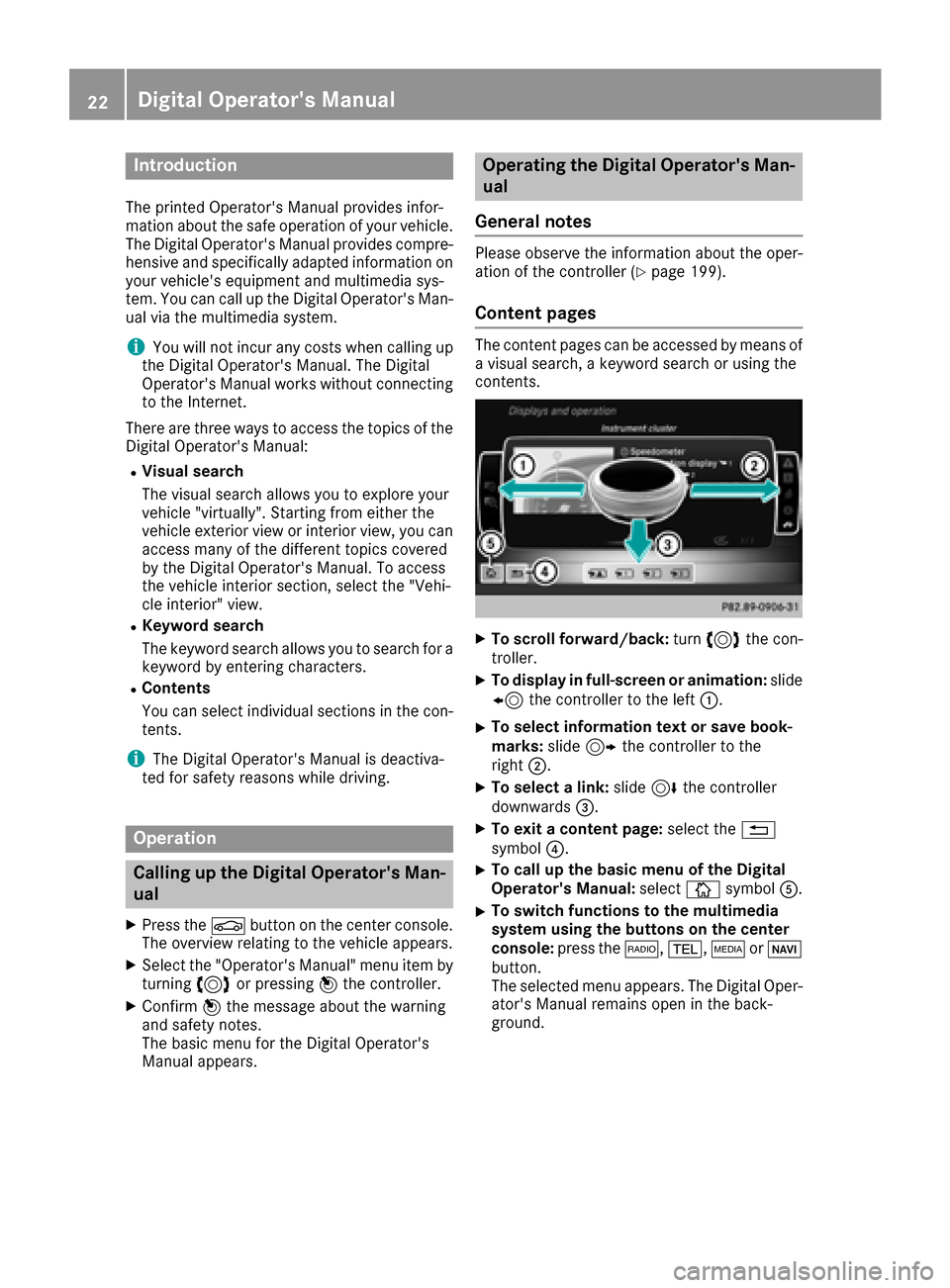
XTo scroll forward/back :tur n3 thec on-
troller .
XTo displa yinfull-screen or animation: slide
8 thec ontroll er to th eleft:.
XTo select information tex torsaveb ook -
marks: slide9 thec ontroll er to th e
right ;.
XTo select alink :slide 6thec ontroll er
downwards =.
XTo exitacontent page: select the%
symbol ?.
XTo call up th ebasic men uoftheDigital
Operator's Manual: selectÞsymbol A.
XTo switch functions to th emultime dia
system using th ebutton sont hecenter
console: press the$, %,ÕorØ
button.
The selected men uappears. The Digital Oper -
ator's Manual remain sopen in th eback-
ground .
22Digital Operator's Manual
Page 43 of 286
Proper use of the seat belts
Observe the safety notes on the seat belt
(Ypage 40).
All vehicle occupants must be wearing the seat
belt correctly before beginning the journey. Also
make sure that all vehicle occupants are always
wearing the seat belt correctly while the vehicle
is in motion.
When fastenin gthe seat belt, always make sure
that:
Rthe seat belt buckle tongue is inserted only
into the belt buckle belonging to that seat.
Rthe seat belt is pulled tight across your body.
Avoid wearing bulky clothing, e.g. awinter
coat.
Rthe seat belt is not twisted.
Only then can the forces which occur be dis-
tributed over the area of the belt.
Rthe shoulder section of the belt is routed
across the center of your shoulder.
The shoulder section of the seat belt should
not touch your neck or be routed under your
arm or behind your back. Where possible,
adjust the seat belt to the appropriate height.
Rthe lap belt is taut and passes across your lap as low down as possible.
The lap belt must always be routed across
your hip jointsa nd not across your abdomen.
This appliesp articularly to pregnant women.
If necessary, push the lap belt down to your
hip joint and pull it tight using the shoulder
section of the belt.
Rthe seat belt is not routed across sharp, poin-
ted or fragile objects.
If you have such items located on or in your
clothing, e.g. pens, keys or eyeglasses, store
these in asuitable place.
Ronly one person is using aseat belt.
Infantsa nd children must never travel sitting
on the lap of avehicle occupant. In the event
of an accident, they could be crushed
between the vehicle occupant and seat belt.
Robject sare never secured with aseat belt if
the seat belt is also being used by one of the
vehicle's occupants.
Also ensure that there are never objects
between aperson and the seat, e.g. cushions.
Seat belts are only intended to secure and
restrain vehicle occupants. Always observe the
"Loading guidelines" for securing objects, lug-
gage or loads (
Ypage 204).
Fastening and adjusting the seat belts
Observe the safety notes on the seat belt
(Ypage 40) and the notes on correct use of seat
belts (Ypage 41).
If the center rear seat belt is being used, also
observe the information about the seat belt for
the center rear seat (
Ypage 42).
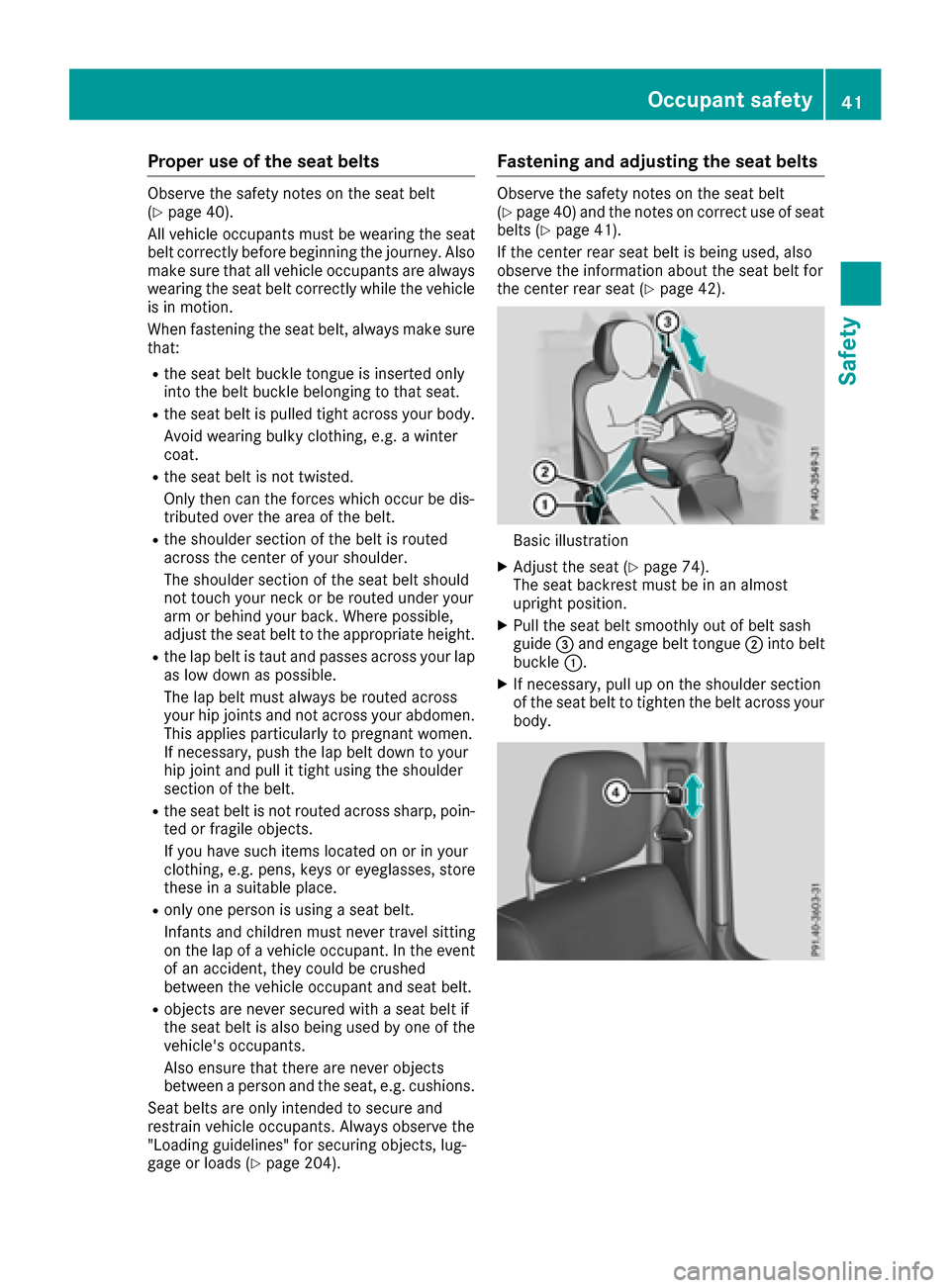
Basic illustration
XAdjust the seat (Ypage 74).
The seat backrest must be in an almost
upright position.
XPull the seat belt smoothly out of belt sash
guide =and engage belt tongue ;into belt
buckle :.
XIf necessary, pull up on the shoulder section
of the seat belt to tighten the belt across your
body.
Occupant safety41
Safety
Z
Page 52 of 286
When leaving the vehicle, alwaystake the
SmartKey with you and lock the vehicle. Never
leave children unsupervised in the vehicle.
GWARNING
If persons, particularly children are subjected to prolonged exposure to extreme heat or
cold, there is arisk of injury, possibly even
fatal. Never leave children unattended in the
vehicle.
GWARNING
If the child restraint system is subjected to
direct sunlight, parts may get very hot. Chil-
dren may burn themselves on these parts,
particularly on the metal parts of the child
restraint system. There is arisk of injury.
If you leave the vehicle, takin gthe child with
you, alwayse nsure that the child restraint
system is not exposed to direct sunlight. Pro- tect it with ablanket ,for example. If the child
restraint system has been exposed to direct
sunlight, let it cool down before securing the
child in it. Never leave children unattended in
the vehicle.
Always ensure that all vehicle occupantsh ave
their seat belts fastened correctly and are sitting
properly. Particular attention must be paid to
children.
Observe the safety notes on the seat belt
(
Ypage 40) and the notes on correct use of seat
belts (Ypage 41).
Ab ooster seat may be necessary to achieve
proper seat belt positionin gfor children over
41 lbs (1 8kg)until they reach aheight where a
three-point seat belt can be properly fastened
without abooster seat.
Special seat belt retractor
GWARNING
If the seat belt is released while driving, the
child restraint system will no longer be
secured properly. The special seat belt retrac- tor is disabled and the inertia real draws in a
portion of the seat belt. The seat belt cannot
be immediately refastened. There is an
increased risk of injury, possibly even fatal.
Stop the vehicle immediately, paying atten-
tion to road and traffic conditions. Reactivate
the special seat belt retractor and secure the
child restraint system properly.
All seat belts except the driver's seat belt are
equipped with aspecial seat belt retractor.
When activated, the special seat belt retractor
ensures that the seat belt will not slacken once
the child restraint system has been secured.
Installing achild restraint system:
XAlways comply with the child restraint system
manufacturer's installation instructions.
XPull the seat belt smoothly out of the belt sash
guide.
XEngage the seat belt tongue in the belt buckle.
Activating the special seat belt retractor:
XPull the seat belt out fully and let the inertia
reel retract it again.
While the seat belt is retracting, you should
hear aratchetin gsound. The special seat belt
retractor is activated.
XPush the child seat restraint system down so
that the seat belt is tight and does not loosen.
Removing achild restraint system and deacti-
vating the special seat belt retractor:
XAlways comply with the child restraint system
manufacturer's installation instructions.
XPress release button of belt buckle, hold the
belt tongue firmly and guide it back towards
the belt sash guide.
The special seat belt retractor is deactivated.
Child restraint system
The use of seat belts and child restraint systems
is required by law in:
Rall 50 states
Rthe U.S .territories
Rthe District of Columbia
Rall Canadian provinces
You can obtain further information about the
correct child restraint system from any author-
ized Mercedes-Benz Center.
50Children in the vehicle
Safety
Page 55 of 286

XRemove cargo compartmentcover
(Ypage 209).
XMov ethe head restrain tup.
XInstall th eLATCH-type (ISOFIX) child restrain t
system wit hTop Tether .Always comply wit h
th ec hild restrain tsystem manufacturer' s
installation instruction swhen doin gso.
XRout eTop Tether belt =under th ehead
restrain tbetween th etwo head restrain tbars .
XHook Top Tether hoo k: of Top Tether belt
= intoT op Tether anchorage ;.
Mak esuret hatT op Tether belt =is no ttwis-
ted.
XTension Top Tether belt =.Always comply
wit hthe child restrain tsystem manufactur -
er' sinstallation instruction swhen doin gso.
XMov ehead restrain tbackd own again slightly
if necessar y(Ypage 77). Mak esuret hat
you do no tinterfere wit hthe correc trouting of
Top Tether belt =.
BabySmart™air bag deactivation sys-
tem
GWARNIN G
Electronic device sonthefront-passenger
seat can affec tthe function of th eBaby-
Smart ™air bag deactivation system, for
example:
RLaptop
RMobile phon e
RTransponder cards suc hasskipasses or
access passes
The front-passenger air bag could deplo yacci-
dentally or no tfunction as intended during an
accident. This poses an increased ris kof
injury or eve nfatal injury.
Do no tplac ea ny of th edevice smentioned
abov eors imilar device sonthefront-
passenger seat .Beaware of th estatus of th e
front-passenger fron tair bag bot hbefore and
during th ejou rney.
The BabySmart ™air bag deactivation system' s
sensor system in th efront-pa ssenger seat
detects whether aspecial Mercedes-Ben zchild
restrain tsystem wit hatransponder for th e
BabySmart ™air bag deactivation system has been installed. In this case, th
ePASSENG ER AIR
BA GO FFindicator lamp lights up and remain s
lit .T he front-passenger fron tair bag is deacti -
vated.
When th eSma rtKey is remove dfromt heignition
loc korisinp osition0,thePASSENGER AI RBAG
OF Findicator lamp does no tligh tup.
iIf th efront-pa ssenger fron tair bag is deac -
tivated by th eBabySmart ™air bag deactiva-
tion system, th ef
o
llowin gremain enabled on
th ef ront-pa ssenger side :
Rthes ide impact air bag
Rthep elvis air bag
Rthew indow curtai nair bag
RtheE me rgency Tensioning Devic e
GWARNING
If you secure achild in achild restrain tsystem
on th efront-pa ssenger seat and th e
PASSENGER AI RBAG OFFindicator lamp is
off ,the front-passenger fron tair bag can
deplo yintheevent of an accident. The child
could be struc kbytheair bag. This poses an
increased ris kofinjury or eve nfatal injury.
Mak esuret hatthe front-passenger fron tair
bag has been disabled. The PASSENGER AI R
BA GO FFindicator lamp mus tbelit.
GWARNIN G
If th ePASSENG ER AIRBAG OFFindicator
lamp is lit ,the front-passenger fron tair bag is
deactivated. It will no tbedeployed in th e
event of an acciden tand canno tperfor mits
intended protective function .Aperson in th e
front-passenger seat could then ,for example,
come int ocontac twitht he vehicle's interior,
especially if th eperson is sitting to oclose to
th ed ashboard. This poses an increased ris kof
injury or eve nfatal injury.
In this cas ethe front-passenger seat may no t
be used .You may only transpor tachild on th e
front-passenger seat if they are seated in a
suitable rearward or forward-facing child
restrain tsystem. Always observ ethe child
restrain tsystem manufacturer' sinstallation
instructions.
Children in th evehicle53
Safety
Z
Page 56 of 286

GWARNING
If you secure achild in aforward-facing child
restraint system on the front-passenge rseat
and you position the front-passenge rseat too
close to the dashboard, in the event of an
accident, the child could:
Rcome into contact with the vehicle's inte-
rior if the PASSENGER AIR BAG OFF indi-
cator lamp is lit, for example
Rbe struck by the air bag if the PASSENGER
AIR BAG OFF indicator lamp is off
This poses an increased risk of injury or even fatal injury.
Move the front-passenge rseat as far back as
possible.A lways make sure that the shoulder
belts trap is correctly routed from the vehicle
belts ash guide to the shoulderb eltguide on
the child restraint system. The shoulderb elt
strap must be routed forwards and down-
wards from the belts ash guide. If necessary,
adjust the belts ash guide and the front-
passenger seat accordingly.A lways observe
the information about suitable positioning of
the child restraint system in this Operator's
Manual as wellast he child restraint system
manufacturer's installation instructions.
PASSENGER AIR BAG OFF indicator lamp :
showsy ou whethert he front-passenge rfront air
bag is deactivated.
XTurn the SmartKey to position 1or 2in the
ignitio nlock.
The system carrie sout self-diagnostics.
The PASSENGER AIR BAG OFF indicator lamp
must light up for approximately six seconds. If, after the system self-test, the
PASSENGER AI
RBAG OFF indicator lamp:
Ris lit:t he front-passenge rfront air bag is
deactivated. It wil lthen not be deploye dinthe
event of an accident.
Ris not lit :the sensor system did not detect a
child restraint system with transponde rfor
the BabySmart™ air bag deactivation system.
If, in the event of an accident, all deployment criteria are met, the front-passenge rfront air
bag is deployed.
Childr estraint system on the front-
passenger seat
General notes
Accident statistics show that children secured
in the rear seats are safer than children secured
in the front-passenge rseat. For this reason,
Mercedes-Benz strongly advises that you install
the child restraint system on arear seat.
If it is absolutel ynecessary to install achild
restraint system on the front-passenge rseat,
alway sobserve the information on the "Baby-
Smart™ air bag deactivation system"
(
Ypage5 3).
You can thus avoi dthe risks that coul darisea s
ar esult of:
Rac hild restraint system that is not detected
by the BabySmart™ air bag deactivation sys-
tem sensor system
Rthe unintentional deactivation of the front-
passenger front air bag
Rthe unsuitabl epositioning of the child
restraint system, e.g. too close to the dash-
board
Rearward-facin gchildr estraint system
If it is absolutel ynecessary to install arearward-
facing child restraint system on the front-
passenger seat, alway smake sure that the
front-passenge rfront air bag is deactivated.
Only if the PASSENGER AIR BAG OFF indicator
lamp is permanently lit (
Ypag e39) is the front-
passenger front air bag deactivated.
Always observe the child restraint system man-
ufacturer's installation and operating instruc-
tions.
54Children in the vehicle
Safety