2014 SUBARU TRIBECA key
[x] Cancel search: keyPage 6 of 426
Warranties
&Warranties for U.S.A.
All SUBARU vehicles distributed bySubaru of America, Inc. and sold at retailby an authorized SUBARU dealer in theUnited States come with the followingwarranties.
.SUBARU Limited Warranty
.Emission Control Systems Warranty
.Emissions Performance Warranty
All warranty information, including detailsof coverage and exclusions, is in the“Warranty and Maintenance Booklet”.Please read these warranties carefully.
&Warranties for Canada
All SUBARU vehicles distributed bySubaru Canada, Inc. and sold at retail byan authorized SUBARU dealer in Canadacome with the following warranties.
.SUBARU Limited Warranty
.Anti-CorrosionWarranty
.Emission Control Warranty
All warranty information, including detailsof coverage and exclusions, is in the“Warranty and Service Booklet”. Pleaseread these warranties carefully.
CAUTION
.If your vehicle is equipped with anavigation system and/or RearSeat Entertainment System, thedisplays contain mercury. There-fore, the displays of the naviga-tion system and/or Rear SeatEntertainment System must beremoved beforevehicle disposal.Once the displays have beenremoved, please reuse, recycleor dispose of them as hazardouswaste.
.If your vehicle is equipped withHigh Intensity Discharge (HID)headlights, the HID headlightscontain mercury. Therefore, it isnecessary to remove HID head-lights before vehicle disposal.Once removed, please reuse, re-cycle or dispose of the HID head-lights as hazardous waste.
How to use this Owner’s
Manual
&Using your Owner’s Manual
Before you operate your vehicle, carefullyread this manual. To protect yourself andextend the service life of your vehicle,follow the instructions in this manual.Failure to observe these instructions mayresult in serious injury and damage to yourvehicle.
This manual is composed of fourteenchapters. Each chapter begins with a brieftable of contents, so you can usually tell ataglanceifthatchaptercontainstheinformation you want.
Chapter 1: Seat, seatbelt and SRSairbags
This chapter informs you how to use theseat and seatbelt and contains precau-tions for the SRS airbags.
Chapter 2: Keys and doors
This chapter informs you how to operatethe keys, locks and windows.
Chapter 3: Instruments and controls
This chapter informs you about the opera-tion of instrument panel indicators andhow to use the instruments and otherswitches.
1
–CONTINUED–
Page 14 of 426
&On-road and off-road driving
This vehicle is classified as a utilityvehicle. Utility vehicles have a significantlyhigher rollover rate than other types ofvehicles. Your vehicle has a higher groundclearance and higher center of gravity,making it more likely to roll over thanordinary passenger cars. It also handlesand maneuvers differently from otherpassenger cars. For this reason, pleasereadcarefully the following section andfollow the instructions and precautions inorder to prevent serious injury or deathdue to loss of control, rollover and otheraccidents. Refer to“On-road and off-roaddriving”F8-6.
General information
&California proposition 65
warning
WARNING
Engine exhaust, some of its consti-tuents, and certain vehicle compo-nents contain or emit chemicalsknown to the State of California tocause cancer and birth defects orother reproductive harm. In addi-tion, certain fluids in vehicles andcertain components of product wearcontain or emit chemicals known tothe State of California to causecancer and birth defects or otherreproductive harm.
&California Perchlorate Advi-
sory
Certain vehicle components such as air-bag modules, seatbelt pretensioners andkeyless entry transmitter batteries maycontain perchlorate material. Specialhandling may apply for service or vehicleend of life disposal. See www.dtsc.ca.gov/hazardouswaste/perchlorate.
&Noise from under the vehicle
NOTE
You may hear a noise from under thevehicle approximately 5 to 10 hoursafter the engine is turned off. However,this does not indicate a malfunction.This noise is caused by the operationof the fuel evaporation leakage check-ing system and is normal. The noisewill stop after approximately 15 min-utes.
9
Page 16 of 426
Table of contents
Seat, seatbelt and SRS airbags1
Keys and doors2
Instruments and controls
Climate control4
Audio5
Interior equipment6
Starting and operating7
Driving tips8
In case of emergency9
Appearance care10
Maintenance and service11
Specifications12
Consumer information and Reporting safety defects13
Index14
3
Page 29 of 426

24
Function settings
A SUBARU dealer can change the settings of the functions shown in the following table to meet your personal requirements. Contactthe nearest SUBARU dealer for details. If your vehicle is equipped with the genuine SUBARU navigation system, the settings for someof these functions can be changed using the navigation monitor. For details, please refer to the Owner’s Manual supplement for thenavigation system.
Item Function Possible settings Default setting Page
Alarm system Alarm system Operation/Non-operation Operation 2-16
Monitoring start delay time (after closure of doors) 0 second/30 seconds 30 seconds 2-17
Impact sensor operation (only models with shocksensors (dealer option))Operation/Non-operation Non-operation 2-20
Passive arming Operation/Non-operation Non-operation 2-19
Dome light/map lights illuminationON/OFFOFF 2-16
Remote keyless entry sys-temHazard warning flasher Operation/Non-operation Operation 2-8
Audible signal Operation/Non-operation Operation 2-11
Key lock-in prevention Key lock-in preventionOperation/Non-operationOperation2-7
Remote engine start system(dealer option)Horn chirp confirmation ON/OFF ON 7-10
Rear window defogger Rear window defoggerOperation for 15 minutes/Continuous operationOperation for 15 minutes 3-37
Windshield wiper deicer Windshield wiper deicer Operation for 15 minutes/Continuous operationOperation for 15 minutes 3-36
Map lights/Dome light Operation of map lights/dome light OFF delaytimerOFF/Short/Normal/Long Normal 6-2/6-3
Map lights Illumination in conjunction with a door open Operation/Non-operation Operation(Illumination - ON)6-3
Battery drainage preventionfunctionBattery drainage prevention function Operation/Non-operation Operation 2-6
Page 55 of 426
1-24Seat, seatbelt and SRS airbags
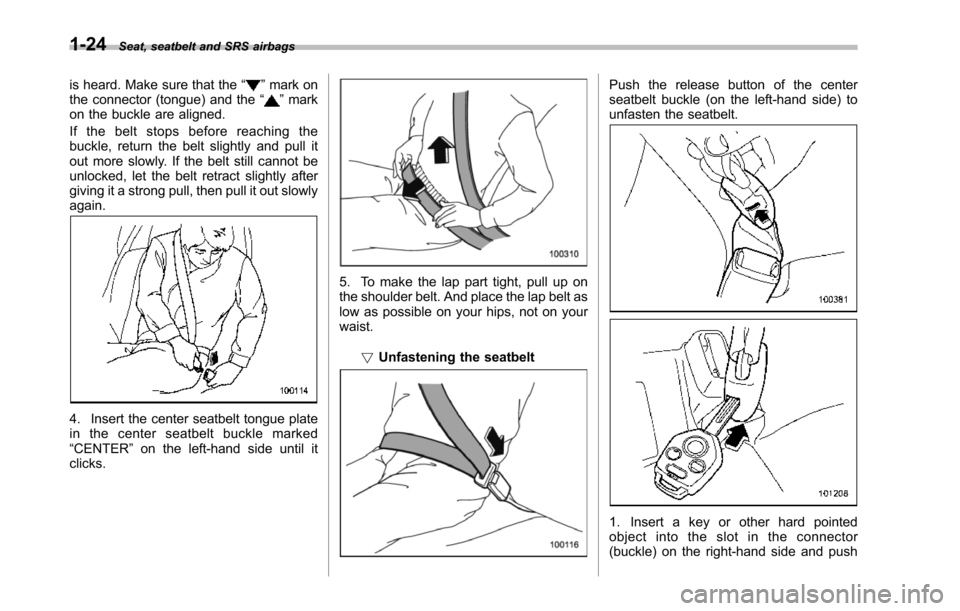
is heard. Make sure that the“”mark onthe connector (tongue) and the“”markon the buckle are aligned.
If the belt stops before reaching thebuckle, return the belt slightly and pull itout more slowly. If the belt still cannot beunlocked, let the belt retract slightly aftergiving it a strong pull, then pull it out slowlyagain.
4. Insert the center seatbelt tongue platein the center seatbelt buckle marked“CENTER”on the left-hand side until itclicks.
5. To make the lap part tight, pull up onthe shoulder belt. And place the lap belt aslow as possible on your hips, not on yourwaist.
!Unfastening the seatbelt
Push the release button of the centerseatbelt buckle (on the left-hand side) tounfasten the seatbelt.
1. Insert a key or other hard pointedobject into the slot in the connector(buckle) on the right-hand side and push
Page 106 of 426
Keys..................................................................... 2-2Key number plate................................................ 2-2
Immobilizer.......................................................... 2-3Security ID plate.................................................. 2-3Security indicator light........................................ 2-4Key replacement................................................. 2-4
Door locks........................................................... 2-5Locking and unlocking from the outside .............. 2-5Locking and unlocking from the inside................ 2-5Batterydrainage prevention function................... 2-6
Power door locking switches............................. 2-7Key lock-in prevention function........................... 2-8
Remote keyless entry system............................ 2-8Locking the doors............................................... 2-9Unlocking the doors........................................... 2-10Unlocking the rear gate...................................... 2-10Illuminated entry................................................ 2-10Vehicle finder function........................................ 2-10Sounding a panic alarm...................................... 2-11Selecting audible signal operation...................... 2-11Replacing the battery......................................... 2-11
Replacing lost transmitters................................ 2-12
Alarm system..................................................... 2-16System operation............................................... 2-16Activating and deactivating the alarm system..... 2-16If you have accidentally triggered the alarmsystem............................................................ 2-17Arming the system............................................ 2-17Disarming the system........................................ 2-18Valet mode........................................................ 2-18Passive arming.................................................. 2-19Tripped sensor identification.............................. 2-20Shock sensors (dealer option)............................ 2-20
Child safety locks.............................................. 2-21
Windows............................................................. 2-21Power windows................................................. 2-21
Rear gate............................................................ 2-24
Moonroof (if equipped)...................................... 2-25Tilt function....................................................... 2-26Sliding function................................................. 2-26Anti-entrapment function.................................... 2-26Sun shade......................................................... 2-27
Keys and doors
2
Page 107 of 426
2-2Keys and doors
Keys
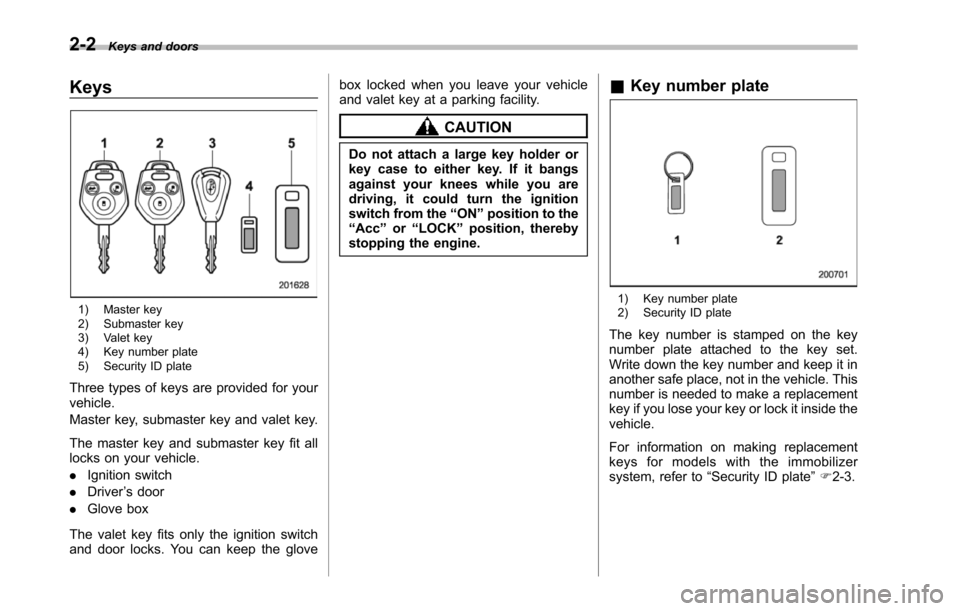
1) Master key2) Submaster key3) Valet key4) Key number plate5) Security ID plate
Three types of keys are provided for yourvehicle.
Master key, submaster key and valet key.
The masterkey and submaster key fit alllocks on your vehicle.
.Ignition switch
.Driver’s door
.Glove box
The valet key fits only the ignition switchand door locks. You can keep the glove
box locked when you leave your vehicleand valet key at a parking facility.
CAUTION
Do not attach a large key holder orkey case to either key. If it bangsagainst your knees while you aredriving, it could turn the ignitionswitch from the“ON”position to the“Acc”or“LOCK”position, therebystopping the engine.
&Key number plate
1) Key number plate2) Security ID plate
The key number is stamped on the keynumber plate attached to the key set.Writedown the key number and keep it inanother safe place, not in the vehicle. Thisnumber is needed to make a replacementkey if you lose your key or lock it inside thevehicle.
For information on making replacementkeys for models with the immobilizersystem, refer to“Security ID plate”F2-3.
Page 108 of 426
Immobilizer
CAUTION
FCC WARNING
Changes or modifications not ex-pressly approved by the party re-sponsible for compliance could voidthe user’s authority to operate theequipment.
The immobilizer system is designed toprevent an unauthorized person fromstarting the engine. Only keys registeredwith your vehicle’s immobilizer system canbe used to operate your vehicle. Even ifan unregistered key fits into the ignitionswitchand can be turned to the“START”position, the engine will automatically stopafter several seconds.
Each immobilizer key contains a trans-ponder in which the key’s ID code isstored. When a key is inserted into theignition switch and turned to the“ON”position, the transponder transmits thekey’s ID code to the immobilizer system’sreceiver. If the transmitted ID codematches the ID code registered in theimmobilizer system, the system allows theengine to be started. Since the ID code istransmitted and acted upon almost in-
stantly, the immobilizer system does notimpede normal starting of the engine.
If the engine does not start, pull out thekey once before trying again. Refer to“Ignition switch”F3-3.
This device complies with Part 15 ofthe FCC Rules and RSS-Gen of ICRules. Operation is subject to thefollowing two conditions: (1) this de-vice may not cause harmful interfer-ence, and (2) this device must acceptany interference received, includinginterference that may cause undesiredoperation.
CAUTION
.Do not place the key under directsunlight or anywhere it maybecomehot.
.Do not get the key wet. If the keygets wet, wipe it dry with a clothimmediately.
NOTE
To p r o t e c t y o u r v e h i c l e f r o m t h e f t ,please pay close attention to the fol-lowing security precautions.
.Never leaveyour vehicle unattendedwith its keys inside..Before leaving your vehicle, close all
windows and lock the doors and reargate..Do not leave spare keys or anyrecord of your key number in thevehicle.
&Security ID plate
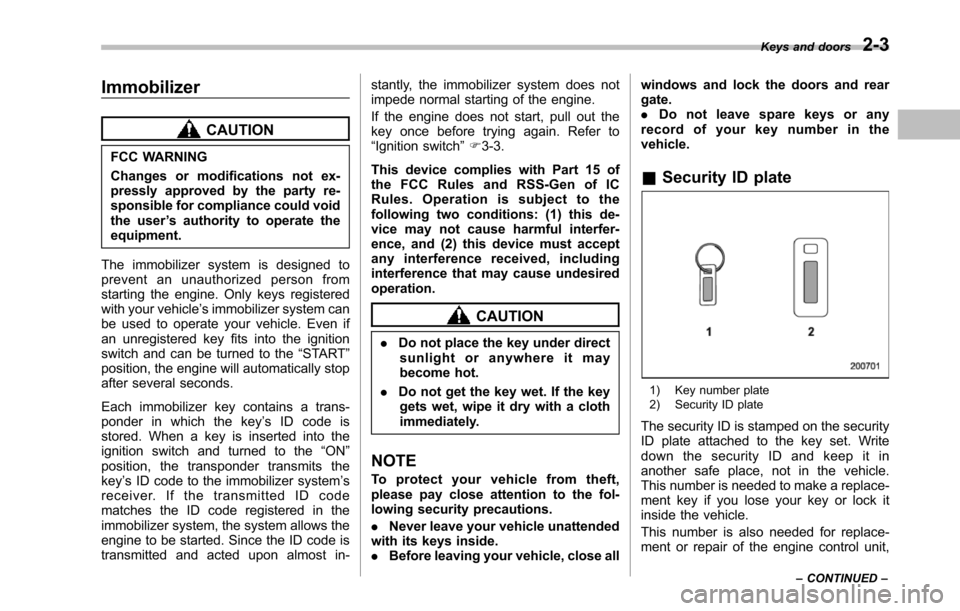
1) Key number plate2) Security ID plate
The security ID is stamped on the securityID plate attached to the key set. Writedown the security ID and keep it inanother safe place, not in the vehicle.This number is needed to make a replace-ment key if you lose your key or lock itinside the vehicle.
This number is also needed for replace-ment or repair of the engine control unit,
Keys and doors2-3
–CONTINUED–