Page 125 of 426
2-20Keys and doors
&Tripped sensor identification
The security indicator light flashes whenthe alarm system has been triggered.Also, the number of flashes indicates thelocation of unauthorized intrusion or theseverity of impact on the vehicle.
When the ignition switch is turned to the“ON”position, the indicator light willilluminate for 1 second and then flash asfollows.
.When a door or rear gate was opened:5 times
.When the ignition switch was turned tothe“ON”position by using a key notregistered with your immobilizer system: 3times
.When a strong impact or multipleimpacts were sensed: twice (only vehicleswith shock sensors (dealer option))
.When a light impact was sensed: once(onlyvehicles with shock sensors (dealeroption))
NOTE
Any of the above indicator light flash-ing patterns will recur each time theignition switchis turned to the“ON”position. Rearming the alarm systemcancels the flashing pattern of thesecurity indicator light.
&Shock sensors (dealer op-
tion)
The shock sensors trigger the alarmsystem when they sense impacts appliedto the vehicle and when any of theirelectric wires is cut. The alarm systemcauses the horn to sound and the turnsignal lights to flash for a short time whenthe sensed impact is weak, but it warns ofa strong impact or multiple impacts bysounding the horn and flashing the turnsignal lights, both lasting approximately 30seconds.
If you desire, your SUBARU dealer canconnect them and set them for activationor deactivation.
NOTE
.The shock sensors are not alwaysable to sense impacts caused by break-ing in, and cannot sense an impact thatdoes not cause vibration (such asbreaking the glass using a rescuehammer)..The shock sensors may sense vi-bration like those shown in the follow-ing list and trigger the alarm system.Select the settings of the alarm systemand shock sensors appropriately de-pending on where you usually parkyour vehicle.
Example:–Vibration from construction site–Vibration in multistory car park–Vibration from trains.You can have the sensitivity of theshock sensors adjusted to your pre-ference by your SUBARU dealer.
Page 126 of 426
Child safety locks
WARNING
Always use the child safety lockwhenever a child rides in the rear.Serious injury could result if a childaccidentally opened the door andfell out.
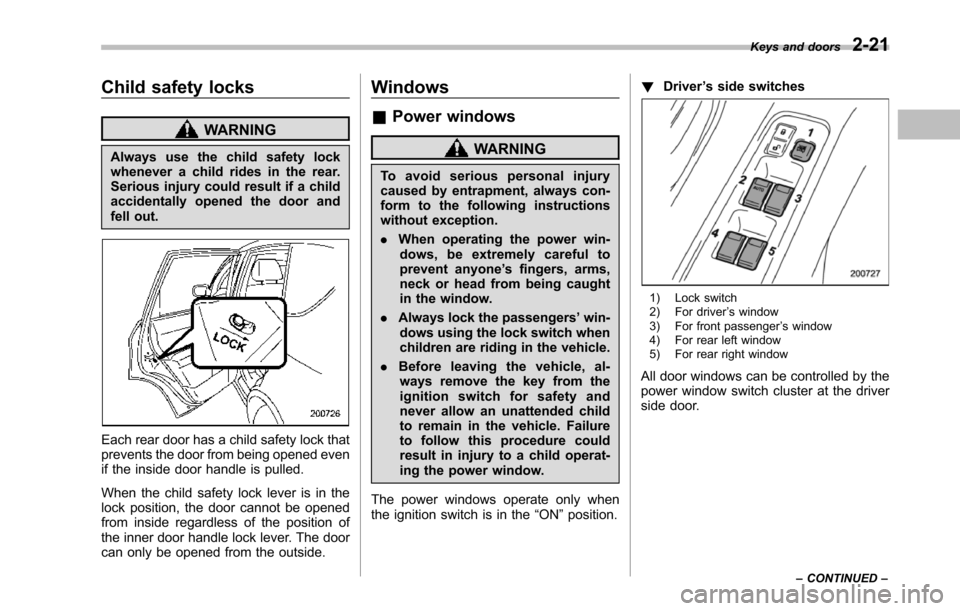
Each rear door has a child safety lock thatprevents the door from being opened evenif the inside door handle is pulled.
When the child safety lock lever is in thelock position, the door cannot be openedfrom inside regardless of the position ofthe inner door handle lock lever. The doorcan only be opened from the outside.
Windows
&Power windows
WARNING
To a v o i d s e r i o u s p e r s o n a l i n j u r ycausedby entrapment, always con-form to the following instructionswithout exception.
.When operating the power win-dows, be extremely careful toprevent anyone’s fingers, arms,neck or head from being caughtin the window.
.Always lockthe passengers’win-dows using the lock switch whenchildren are riding in the vehicle.
.Before leaving the vehicle, al-ways remove the key from theignition switch for safety andnever allow an unattended childto remain in the vehicle. Failureto follow this procedure couldresult in injury to a child operat-ing the power window.
The power windows operate only whentheignition switch is in the“ON”position.
!Driver’s side switches
1) Lock switch2) For driver’s window3) For front passenger’s window4) For rear left window5) For rear right window
All door windows can be controlled by thepower window switch cluster at the driverside door.
Keys and doors2-21
–CONTINUED–
Page 127 of 426
2-22Keys and doors
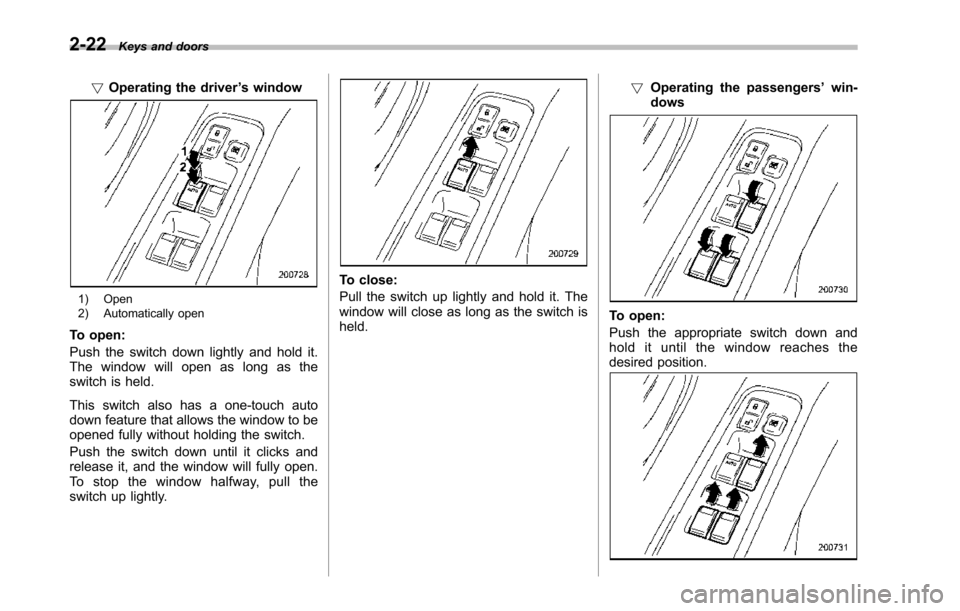
!Operating the driver’s window
1) Open2) Automatically open
To open:
Push the switch down lightly and hold it.The window will open as long as theswitch is held.
This switch also has a one-touch autodown feature that allows the window to beopened fully without holding the switch.
Push the switch down until it clicks andrelease it, and the window will fully open.To s t o p t h e w i n d o w h a l f w a y, p u l l t h eswitch up lightly.
To close:
Pull the switch up lightly and hold it. Thewindow will close as long as the switch isheld.
!Operating the passengers’win-dows
To open:
Pushthe appropriate switch down andhold it until the window reaches thedesired position.
Page 128 of 426
To close:
Pull the switch up and hold it until thewindow reaches the desired position.
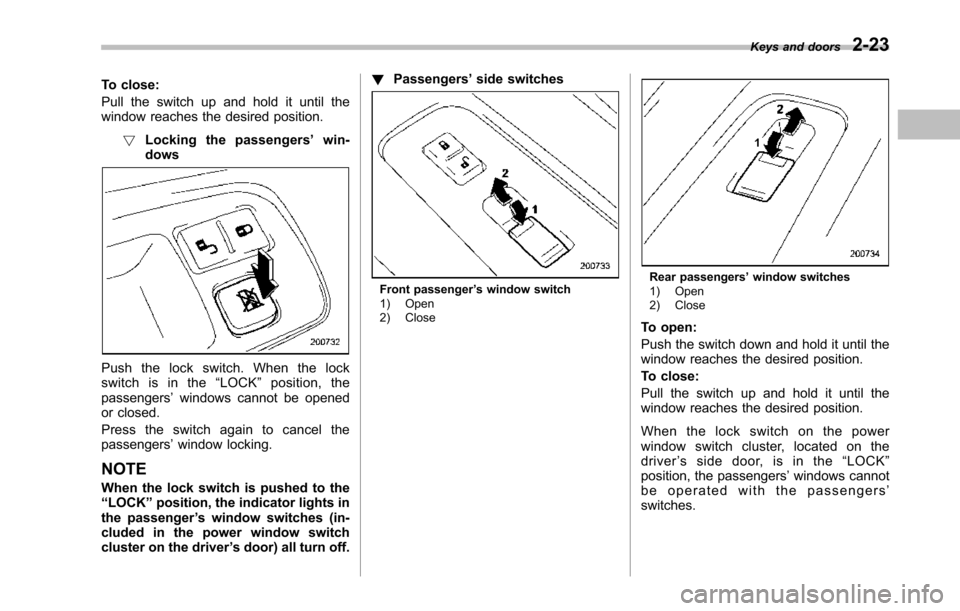
!Locking the passengers’win-dows
Push the lock switch. When the lockswitch is in the“LOCK”position, thepassengers’windows cannot be openedor closed.
Press the switch again to cancel thepassengers’window locking.
NOTE
When the lockswitch is pushed to the“LOCK”position,the indicator lights inthe passenger’s window switches (in-cluded in the power window switchcluster on the driver’s door) all turn off.
!Passengers’side switches
Front passenger’s window switch1) Open2) Close
Rear passengers’window switches1) Open2) Close
To open:
Push the switch down and hold it until thewindow reaches the desired position.
To close:
Pull the switch up and hold it until thewindow reaches the desired position.
When the lock switch on the powerwindow switch cluster, located on thedriver’ssidedoor,isinthe“LOCK”position, the passengers’windows cannotbe operated with the passengers’switches.
Keys and doors2-23
Page 129 of 426
2-24Keys and doors
Rear gate
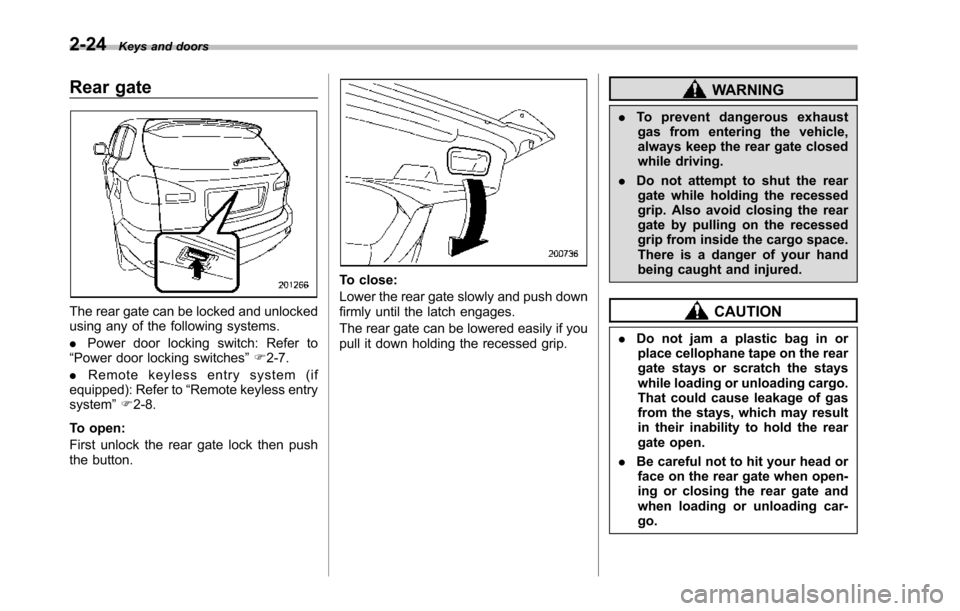
The rear gate can be locked and unlockedusing any of the following systems.
.Power door locking switch: Refer to“Power door locking switches”F2-7.
.Remote keyless entry system (ifequipped):Refer to“Remote keylessentrysystem”F2-8.
To open:
First unlock the rear gate lock then pushthe button.
To close:
Lower the rear gate slowly and push downfirmly until the latch engages.
The rear gate can be lowered easily if youpull it down holding the recessed grip.
WARNING
.To prevent dangerous exhaustgas from entering the vehicle,always keep the rear gate closedwhile driving.
.Do not attempt to shut the reargate while holding the recessedgrip. Also avoid closing the reargate by pulling on the recessedgrip from inside the cargo space.There is a danger of your handbeing caught and injured.
CAUTION
.Do not jam a plastic bag in orplace cellophane tape on the reargate stays or scratch the stayswhile loading or unloading cargo.That could cause leakage of gasfrom the stays, which may resultin their inability to hold the reargate open.
.Be careful not to hit your head orface on the rear gate when open-ing or closing the rear gate andwhen loading or unloading car-go.
Page 130 of 426
NOTE
If the rear gate cannot be unlocked dueto a discharged vehicle battery, amalfunction in the door locking/unlock-ing system or other causes, you canunlock it by manually operating therear gate lock release lever. For theprocedure, refer to“Rear gate–if therear gate cannot be unlocked”F9-18.
Moonroof (if equipped)
WARNING
Never let anyone’shands,arms,head or any objects protrude fromthe moonroof. A person could beseriously injured if the vehicle stopssuddenly or turns sharply or if thevehicle is involved in an accident.
To a v o i d s e r i o u s p e r s o n a l i n j u r ycaused by entrapment, always con-form to the following instructionswithoutexception.
.Before closing the moonroof,make sure that no one’s hands,arms, head or other objects willbe accidentally caught in themoonroof.
.Before leaving the vehicle, al-ways remove the key from theignition switch for safety andnever allow an unattended childto remain in the vehicle. Failureto follow this procedure couldresult in injury to a child operat-ingthe moonroof.
.Never try to check the anti-en-trapment function by deliberatelyplacing part of your body in themoonroof.
CAUTION
.Do not sit on the edge of the openmoonroof.
.Do not operate the moonroof iffalling snow or extremely coldconditions have caused it tofreeze shut.
.The anti-entrapment functiondoes not operate when the moon-roof is being tilted down. Be sureto confirm that it is safe to do sobeforetilting the moonroof down.
The moonroofhas both tilting and slidingfunctions.
The moonroof operates only when theignition switch is in the“ON”position.
Keys and doors2-25
–CONTINUED–
Page 131 of 426
2-26Keys and doors
&Tilt function
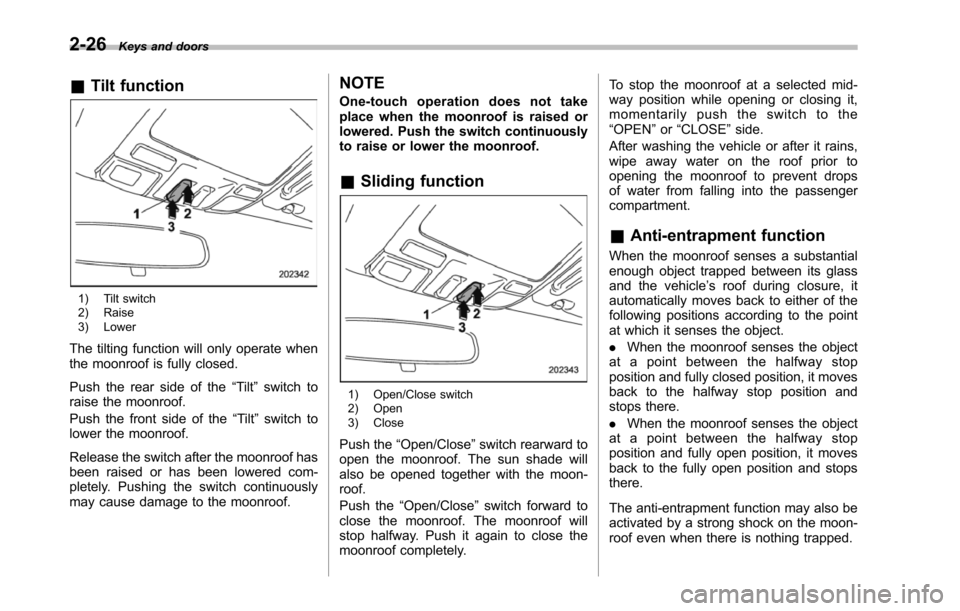
1) Tilt switch2) Raise3) Lower
The tilting function will only operate whenthe moonroof is fully closed.
Push the rear side of the“Tilt”switch toraise the moonroof.
Push the front side of the“Tilt”switchtolower the moonroof.
Release the switch after the moonroof hasbeen raised or has been lowered com-pletely. Pushing the switch continuouslymay cause damage to the moonroof.
NOTE
One-touch operation does not takeplace when the moonroof is raised orlowered. Push the switch continuouslyto raise or lower the moonroof.
&Sliding function
1) Open/Close switch2) Open3) Close
Push the“Open/Close”switch rearward toopen the moonroof. The sun shade willalso be opened together with the moon-roof.
Push the“Open/Close”switch forward toclose the moonroof. The moonroof willstop halfway. Push it again to close themoonroof completely.
To stop the moonroof at a selected mid-way position while opening or closing it,momentarily push the switch to the“OPEN”or“CLOSE”side.
After washing the vehicle or after it rains,wipe away water on the roof prior toopeningthe moonroof to prevent dropsof water from falling into the passengercompartment.
&Anti-entrapment function
When the moonroof senses a substantialenough object trapped between its glassand the vehicle’s roof during closure, itautomatically moves back to either of thefollowing positions according to the pointat which it senses the object.
.When the moonroof senses the objectat a point between the halfway stopposition and fully closed position, it movesback to the halfway stop position andstops there.
.When the moonroof senses the objectat a point between the halfway stopposition and fully open position, it movesback to the fully open position and stopsthere.
The anti-entrapment function may also beactivated by a strong shock on the moon-roof even when there is nothing trapped.
Page 132 of 426
CAUTION
Never attempt to test this functionusing fingers, hands or other partsof your body.
NOTE
For the sake of safety, it is recom-mended that you avoid driving with themoonroof fully opened.
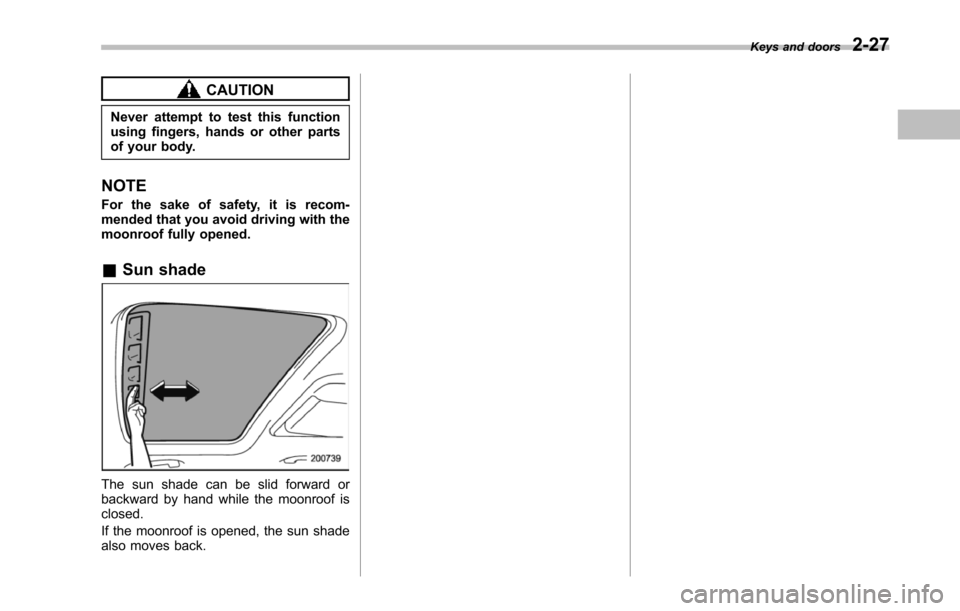
&Sun shade
The sun shade can be slid forward orbackward by hand while the moonroof isclosed.
If the moonroof is opened, the sun shadealso moves back.
Keys and doors2-27