2014 SUBARU TRIBECA lock
[x] Cancel search: lockPage 115 of 426
2-10Keys and doors
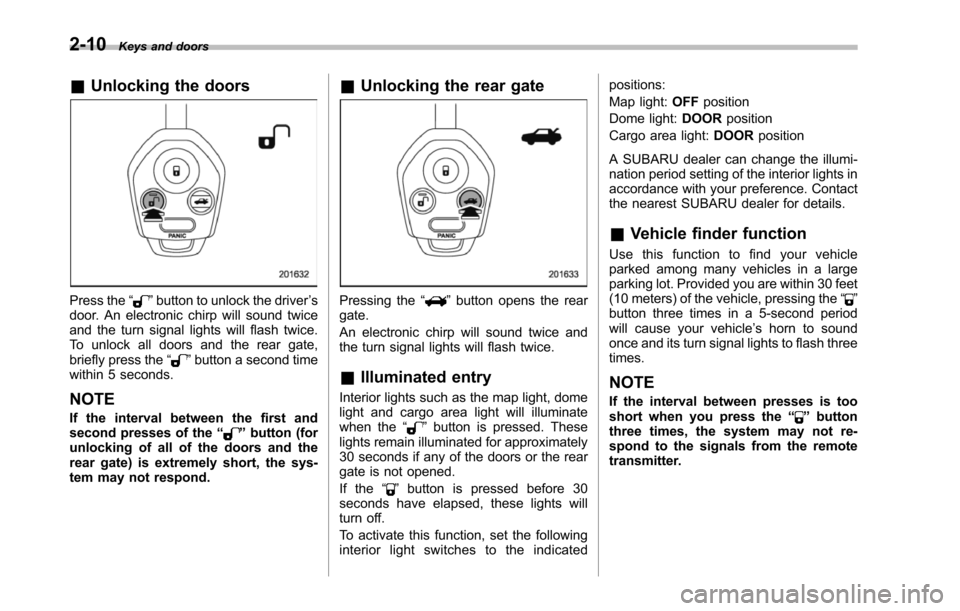
&Unlocking the doors
Press the“”button to unlock the driver’sdoor. An electronic chirp will sound twiceand the turn signal lights will flash twice.To unlock all doors and the rear gate,briefly press the“”button a second timewithin 5 seconds.
NOTE
If the interval between the first andsecond presses of the“”button (forunlocking of all of the doors and therear gate) is extremely short, the sys-tem may not respond.
&Unlocking the rear gate
Pressing the“”button opens the reargate.
An electronic chirp will sound twice andthe turn signal lights will flash twice.
&Illuminated entry
Interior lights such as the map light, domelight and cargo area light will illuminatewhen the“”button is pressed. Theselights remain illuminated for approximately30 seconds if any of the doors or the reargate is not opened.
If the“”button is pressed before 30seconds have elapsed, these lights willturn off.
To activate this function, set the followinginterior light switches to the indicated
positions:
Map light:OFFposition
Dome light:DOORposition
Cargo area light:DOORposition
A SUBARU dealer can change the illumi-nationperiod setting of the interior lights inaccordance with your preference. Contactthe nearest SUBARU dealer for details.
&Vehicle finder function
Use this function to find your vehicleparked among many vehicles in a largeparking lot. Provided you are within 30 feet(10 meters) of the vehicle, pressing the“”buttonthree times in a 5-second periodwill cause your vehicle’s horn to soundonce and its turn signal lights to flash threetimes.
NOTE
If the interval between presses is tooshort when you press the“”buttonthree times, the system may not re-spond to the signals from the remotetransmitter.
Page 116 of 426
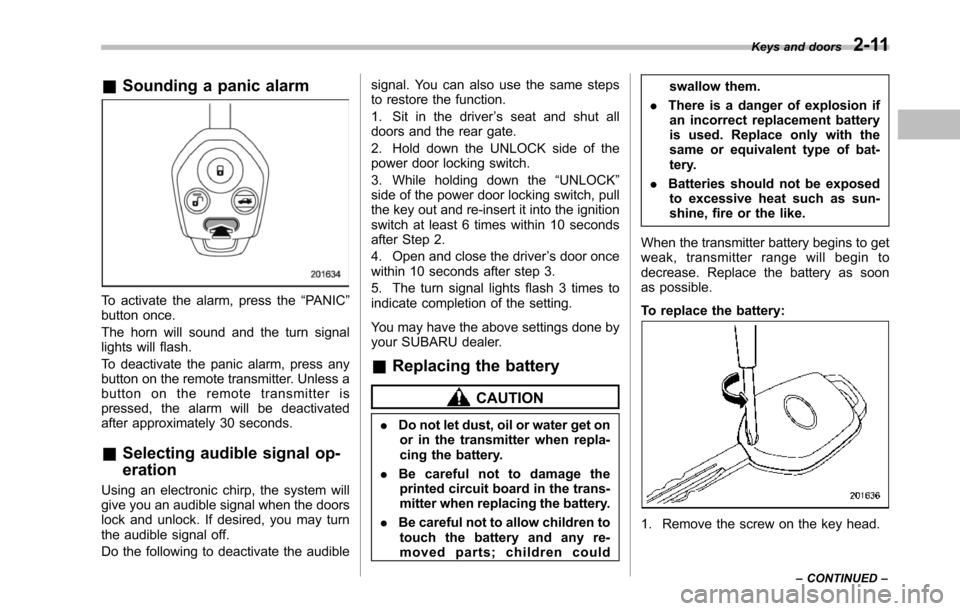
&Sounding a panic alarm
To activate the alarm, press the“PANIC”button once.
The horn will sound and the turn signallights will flash.
To deactivate the panic alarm, press anybuttonon the remote transmitter. Unless abutton on the remote transmitter ispressed, the alarm will be deactivatedafter approximately 30 seconds.
&Selecting audible signal op-
eration
Using an electronic chirp, the system willgive you an audible signal when the doorslock and unlock. If desired, you may turnthe audible signal off.
Do the following to deactivate the audible
signal. You can also use the same stepsto restore the function.
1. Sit in the driver’s seat and shut alldoors and the rear gate.
2. Hold down the UNLOCK side of thepower door locking switch.
3. While holding down the“UNLOCK”sideof the power door locking switch, pullthe key out and re-insert it into the ignitionswitch at least 6 times within 10 secondsafter Step 2.
4. Open and close the driver’s door oncewithin 10 seconds after step 3.
5. The turn signal lights flash 3 times toindicate completion of the setting.
You may have the above settings done byyour SUBARU dealer.
&Replacing the battery
CAUTION
.Do not let dust, oil or water get onor in the transmitter when repla-cing the battery.
.Be careful not to damage theprinted circuit board in the trans-mitter when replacing the battery.
.Be careful not to allow children totouch the battery and any re-moved parts; children could
swallow them.
.There is a danger of explosion ifan incorrect replacement batteryis used. Replace only with thesame or equivalent type of bat-tery.
.Batteries should not be exposedto excessive heat such as sun-shine, fire or the like.
When the transmitter battery begins to getweak, transmitter range will begin todecrease. Replace the battery as soonas possible.
To replace the battery:
1. Remove the screw on the key head.
Keys and doors2-11
–CONTINUED–
Page 118 of 426
different.
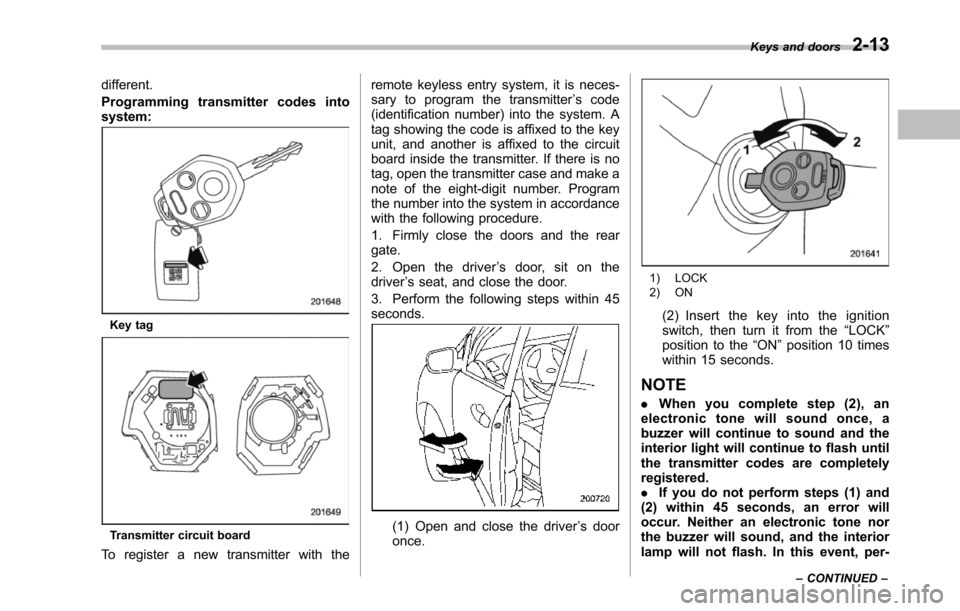
Programming transmitter codes intosystem:
Key tag
Transmitter circuit board
To register a new transmitter with the
remote keyless entry system, it is neces-sary to program the transmitter’s code(identification number) into the system. Atag showing the code is affixed to the keyunit, and another is affixed to the circuitboard inside the transmitter. If there is notag, open the transmitter case and make anote of the eight-digit number. Programthe number into the system in accordancewith the following procedure.
1. Firmly close the doors and the reargate.
2. Open the driver’s door, sit on thedriver’s seat, and close the door.
3. Perform the following steps within 45seconds.
(1) Open and close the driver’s dooronce.
1) LOCK2) ON
(2) Insert the key into the ignitionswitch, then turn it from the“LOCK”position to the“ON”position 10 timeswithin 15 seconds.
NOTE
.When you complete step (2), anelectronic tone will sound once, abuzzer will continue to sound and theinterior light will continue to flash untilthe transmitter codes are completelyregistered..If you do not perform steps (1) and(2) within 45 seconds, an error willoccur. Neither an electronic tone northe buzzer will sound, and the interiorlamp will not flash. In this event, per-
Keys and doors2-13
–CONTINUED–
Page 119 of 426

2-14Keys and doors
form the whole procedure again begin-ning with part 1.
4. Open and close the door once within15 seconds.
NOTE
.When part 4 of the procedure iscompleted, an electronic tone willsound for 30 seconds..If you do not perform the operationsin part 4 within 15 seconds, an errorwill occur and the electronic tone willnot sound. In this event, perform theregistration steps again beginning withpart 3 of the procedure.
5. Before the electronic tone stopssounding, push the“”side of the powerdoor locking switch the same number oftimes as the leftmost digit of the transmit-
ter code. For example, push the lockingswitch eight times if the leftmost digit ofthe code is 8.
NOTE
.The electronic tone will stop sound-ing when you start entering the num-ber..If you do not start entering thenumber using the lock knob beforetheelectronic tone stops sounding, anerror will occur. In this event, performthe registration steps again beginningwith part 3 of the procedure..If the interval between one push ofthe knob and the next exceeds 5seconds, an error will occur. In thisevent, perform the procedure againbeginning with part 4. If an error occurssix times, perform the procedure againstarting with part 3.
6. When you have finished entering thenumber, push the“”side of the lockingswitch within 5 seconds.
NOTE
.An electronic tone will sound..If you push the“”side of thelocking switch when more than 5seconds have passed, an error willoccur. In this event, perform the proce-dure again beginning with part 4. If anerror occurs six times, perform theprocedure again starting with part 3.
7. Perform parts 5 and 6 of the procedurefor eachof the remaining digits of thetransmitter code beginning with the sec-ond digit (counting from the left) andfinishing with the eighth digit.
Page 120 of 426
NOTE
.When you finish entering the eighthdigit, an electronic tone will sound for30 seconds..If the interval between one push ofthe switch and the next exceeds 5seconds, an error will occur. In thisevent, perform the procedure againbeginning with part 4. If an error occurssix times, perform the procedure againstarting with part 3.
8. Before the electronic tone stopssounding, use the power door lockingswitch to reenter the transmitter codebeginningwith the leftmost digit.
NOTE
If you do not start entering the numberusing the lock knob before the electro-nic tone stops sounding, an error willoccur. In this event, perform the proce-dure again beginning with part 3.
9. When you have finished entering thecode a second time, an electronic tone willsound for 1 second and automatic doorlocking and unlocking operation will takeplace once to indicate completion ofregistration, provided the code enteredthe second time is identical to that enteredthe first time.
NOTE
If the code entered the second time isnot identical to the code entered thefirst time, an error will occur. In thisevent, perform the procedure againbeginning with part 5. If an error occursfive times, perform the procedure againstarting with part 3.
10. If you wish to program another trans-mitter code into the system (up to fourtransmitter codes can be programmed intothe system), perform the procedure begin-ning with part 4. When you have finishedprogramming all of the necessary trans-mitter codes into the system, remove thekey from the ignition switch.
11. Test every registered transmitter toconfirm correctoperation.
!Deleting old transmitter codes
The control unit of the remote keylessentry system has four memory locations tostore transmitter codes, giving it the abilityto operate with up to four transmitters.When you lose a transmitter, the losttransmitter’s code remains in the memory.For security reasons, lost transmittercodes should be deleted from the mem-ory.
To delete old transmitter codes, programfour transmitter codes into the system. If
you have only one current transmitter,program it four times. If you have twocurrent transmitters, program each onetwice. If you have three current transmit-ters, program two of them once and thethird one twice. This process will leaveonly current transmitter codes in thesystem’s memory.
NOTE
Make sure no one else is operatingtheir keyless entry system within rangeof your vehicle when programmingtransmitters. If someone else were tooperate their remote transmitter whileyou are programming your transmit-ters, it is possible that their transmittercode will be programmed into yoursystem, allowing them unauthorizedaccess to your vehicle.
Keys and doors2-15
Page 121 of 426
2-16Keys and doors
Alarm system
The alarm system helps to protect yourvehicle and valuables from theft. The hornsounds and the turn signal lights flash ifsomeone attempts to break into yourvehicle.
The system can be armed and disarmedwith the remote transmitter.
The system does not operate when thekey is inserted into the ignition switch.
Your vehicle’s alarm system has been setfor activation at the time of shipment fromthe factory. You can set the system fordeactivation yourself or have it done byyour SUBARU dealer.
&System operation
The alarm system will give the followingalarms when triggered.
.The vehicle’s horn will sound for 30seconds.
.The turn signal lights will flash for 30seconds.
If any of the doors or the rear gate remainsopen after the 30-second period, the hornwill continueto sound for a maximum of 3minutes. If any of the doors or the reargate is closed while the horn is sounding,the horn will stop sounding with a delay of
up to 30 seconds.
The alarm is triggered by:
.Opening any of the doors or the reargate
.Physical impact to the vehicle, such asforced entry (only vehicles with shocksensors (dealer option))
NOTE
The alarm system can be set to triggerthe illumination of the following interiorlights.
.Dome light (illuminates only whenthe dome light switch is in the“DOOR”position).Map lights
The notifications regarding the domelight and the map lights are deactivatedas the factory setting. A SUBARUdealer can activate the system. Contactyour SUBARU dealer for details.
&Activating and deactivating
the alarm system
To change the setting of your vehicle’salarm system for activation or deactiva-tion, do the following.
1. Disarm the alarm system. Refer to“Disarming the system”F2-18.
2. Sit in the driver’s seat and shut all
doors and the rear gate.
3. Turn the ignition switch to the“ON”position.
4. Hold down the UNLOCK side of thedriver’s power door locking switch, openthe driver’s door within the following 1second, and wait 10 seconds withoutreleasing the switch. The setting will thenbe changed as follows.
If the system was previously activated:
The odometer/trip meter screen displays“AL oF”and the horn sounds twice,indicating that the system is now deacti-vated.
If the system was previously deacti-vated:
The odometer/trip meter screen displays“AL on”and the horn sounds once,indicating that the system is now acti-vated.
NOTE
Yo u m a y h a v e t h e a b o v e s e t t i n gchange done by your SUBARU dealer.
Page 122 of 426
&If you have accidentally trig-
gered the alarm system
!To stop the alarm
Do any of the following operations.
.Press any button on the remote trans-mitter.
.Turn the ignition switch to the“ON”position.
&Arming the system
!To arm the system using remotetransmitter
1. Close all windows and the moonroof.
2. Remove the key from the ignitionswitch.
3. Open the doors and get out of thevehicle.
4. Make sure that the engine hood islocked.
5. Close all doors and the rear gate.
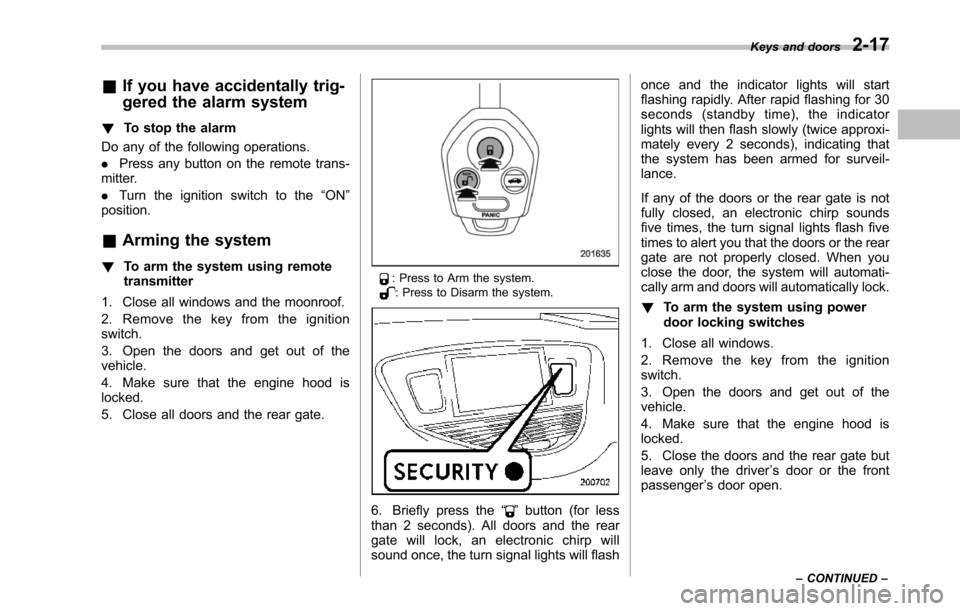
: Press to Arm the system.: Press to Disarm the system.
6. Briefly press the“”button (for lessthan 2 seconds). All doors and the reargate will lock, an electronic chirp willsound once, the turn signal lights will flash
once and the indicator lights will startflashing rapidly. After rapid flashing for 30seconds (standby time), the indicatorlights will then flash slowly (twice approxi-mately every 2 seconds), indicating thatthe system has been armed for surveil-lance.
If any of the doors or the rear gate is notfully closed, an electronic chirp soundsfive times, the turn signal lights flash fivetimes to alert you that the doors or the reargate are not properly closed. When youclose the door, the system will automati-cally arm and doors will automatically lock.
!To arm the system using powerdoor locking switches
1. Close all windows.
2. Remove the key from the ignitionswitch.
3. Open the doors and get out of thevehicle.
4. Make sure that the engine hood islocked.
5. Close the doors and the rear gate butleave only the driver’s door or the frontpassenger’s door open.
Keys and doors2-17
–CONTINUED–
Page 123 of 426
2-18Keys and doors
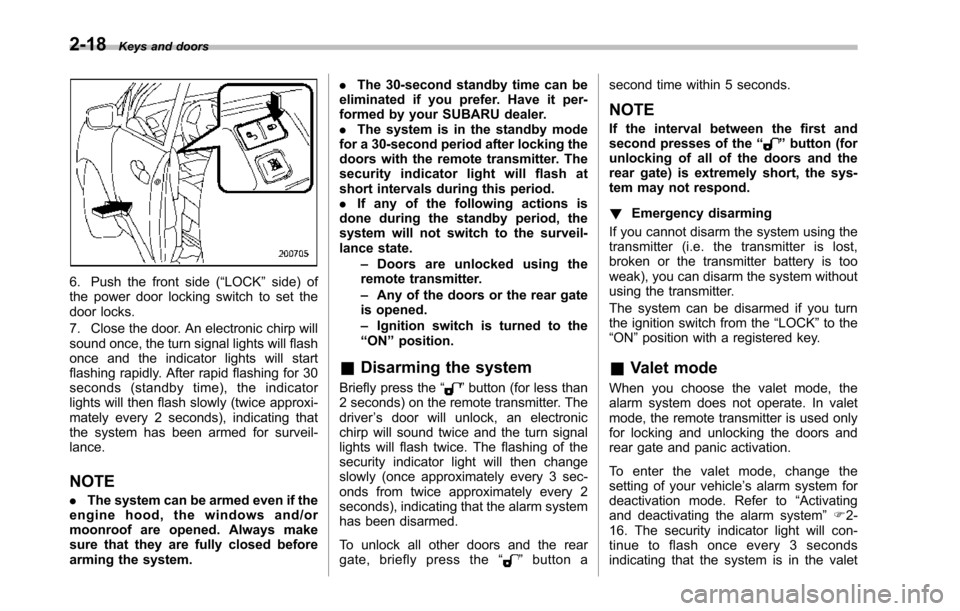
6. Push the front side (“LOCK”side) ofthe power door locking switch to set thedoor locks.
7. Close the door. An electronic chirp willsound once,the turn signal lights will flashonce and the indicator lights will startflashing rapidly. After rapid flashing for 30seconds (standby time), the indicatorlights will then flash slowly (twice approxi-mately every 2 seconds), indicating thatthe system has been armed for surveil-lance.
NOTE
.The system can be armed even if theengine hood, the windows and/ormoonroof are opened. Always makesure that they are fully closed beforearming the system.
.The 30-second standby time can beeliminated if you prefer. Have it per-formed by your SUBARU dealer..The system is in the standby modefor a 30-second period after locking thedoors with the remote transmitter. Thesecurity indicator light will flash atshort intervals during this period..If any of the following actions isdoneduring the standby period, thesystem will not switch to the surveil-lance state.–Doors are unlocked using theremote transmitter.–Any of the doors or the rear gateis opened.–Ignition switch is turned to the“ON”position.
&Disarming the system
Briefly press the“”button (for less than2 seconds) on the remote transmitter. Thedriver’s door will unlock, an electronicchirp will sound twice and the turn signallights willflash twice. The flashing of thesecurity indicator light will then changeslowly (once approximately every 3 sec-onds from twice approximately every 2seconds), indicating that the alarm systemhas been disarmed.
To unlock all other doors and the reargate, briefly press the“”button a
second time within 5 seconds.
NOTE
If the interval between the first andsecond presses of the“”button (forunlocking of all of the doors and therear gate) is extremely short, the sys-tem may not respond.
!Emergency disarming
If you cannot disarm the system using thetransmitter (i.e. the transmitter is lost,broken or the transmitter battery is tooweak), you can disarm the system withoutusing the transmitter.
The system can be disarmed if you turnthe ignition switch from the“LOCK”to the“ON”position with a registered key.
&Valet mode
When you choose the valet mode, thealarm system does not operate. In valetmode, the remote transmitter is used onlyfor locking and unlocking the doors andrear gate and panic activation.
To enter the valet mode, change thesetting of your vehicle’s alarm system fordeactivation mode. Refer to“Activatingand deactivatingthe alarm system”F2-16. The security indicator light will con-tinue to flash once every 3 secondsindicating that the system is in the valet