2014 SUBARU TRIBECA mirror
[x] Cancel search: mirrorPage 9 of 426
4
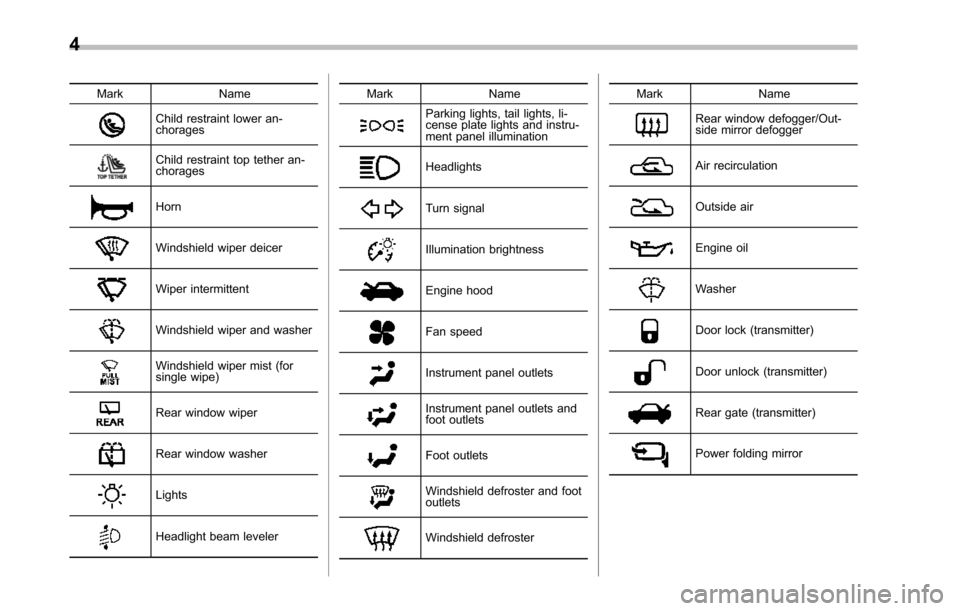
Mark Name
Child restraint lower an-chorages
Child restraint top tether an-chorages
Horn
Windshield wiper deicer
Wiper intermittent
Windshield wiper and washer
Windshield wiper mist (forsingle wipe)
Rear window wiper
Rear window washer
Lights
Headlight beam leveler
Mark Name
Parking lights, tail lights, li-cense plate lights and instru-ment panel illumination
Headlights
Turn signal
Illumination brightness
Engine hood
Fan speed
Instrument panel outlets
Instrument panel outlets andfoot outlets
Foot outlets
Windshield defroster and footoutlets
Windshield defroster
Mark Name
Rear window defogger/Out-side mirror defogger
Air recirculation
Outside air
Engine oil
Washer
Door lock (transmitter)
Door unlock (transmitter)
Rear gate (transmitter)
Power folding mirror
Page 22 of 426
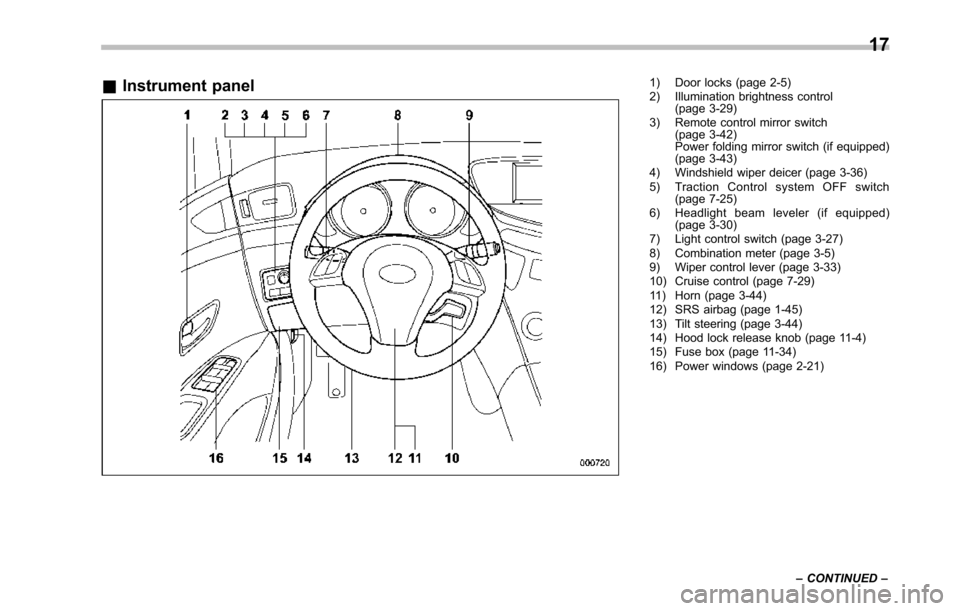
&Instrument panel1) Door locks (page 2-5)2) Illumination brightness control(page 3-29)3) Remote control mirror switch(page 3-42)Power folding mirror switch (if equipped)(page 3-43)4) Windshield wiper deicer (page 3-36)5) Traction Control system OFF switch(page 7-25)6) Headlight beam leveler (if equipped)(page 3-30)7) Light control switch (page 3-27)8) Combination meter (page 3-5)9) Wiper control lever (page 3-33)10) Cruise control (page 7-29)11) Horn (page 3-44)12) SRS airbag (page 1-45)13) Tilt steering (page 3-44)14) Hood lock release knob (page 11-4)15) Fusebox (page 11-34)16) Power windows (page 2-21)
17
–CONTINUED–
Page 82 of 426

WARNING
Do not attach accessories to thewindshield, or fit an extra-wide mir-ror over the rear view mirror. If theSRS airbag deploys, those objectscould become projectiles that couldseriouslyinjure vehicle occupants.
!Driver’s SRS frontal airbag
The driver’s SRS frontal airbag uses adual stage inflator. The inflator operates indifferent ways depending on the severityof impact, backward-forward adjustmentof the driver’s seat position and whether ornot he/she is wearing the seatbelt.
The backward-forward adjustment of thedriver’s seat position is monitored by the
driver’s seat position sensor under thedriver’s seat.
Whether or not the driver is wearing theseatbelt is monitored by the seatbeltbuckle switch.
Observe the following precautions. Failureto do so may cause the seatbelt buckleswitch and/or the seat position sensor tomalfunction,preventing the SUBARU ad-vanced frontal airbag system from func-tioning correctly or causing the system tofail.
.Do not place articles/metal objects orinstall any accessory other than a genuineSUBARU accessory under the driver’sseat. Do not allow the rear seat occupantto kick the driver’s seat or push up itsbottom surface with his/her feet.
.Do not place a magnet near theseatbelt buckle or under the driver’s seat.
If the seatbelt buckle switch and/or thedriver’s seat position sensor have failed,the SRS airbag system warning light willilluminate. Although the driver’sSRSfrontal airbag can deploy regardless ofthe backward-forward adjustment of thedriver’sseatpositionevenwhenthewarning light illuminates, have the systeminspected by your SUBARU dealer im-mediatelyif the SRS airbag system warn-ing light illuminates.
NOTE
The driver’sSRSsideairbag,SRScurtain airbag and seatbelt preten-sioner are not controlled by theSUBARU advanced frontal airbag sys-tem.
!Front passenger’s SRS frontal air-bag
The front passenger’s SRS frontal airbaguses a dual stage inflator. The inflatoroperates in different ways depending onthe severity of impact.
The total load on the seat is monitored bythe occupant detection system’s weightsensor located under the seat.
The system has another sensor thatmonitors the tension of the front passen-ger seatbelt. Using the total seat load andseatbelt tension data from the sensors,the occupant detection system determineswhether the front passenger’s SRS frontalairbag should or should not be inflated.
The occupant detection system may notinflate the front passenger’s SRS frontalairbag even when the driver’s SRS frontalairbagdeploys. This is normal.
Observe the following precautions. Failureto do so may prevent the SUBARUadvanced frontal airbag system fromfunctioning correctly or cause the systemto fail.
Seat, seatbelt and SRS airbags1-51
–CONTINUED–
Page 135 of 426
Instruments and controls
Multi function display (vehicles without agenuine SUBARU navigation system)........... 3-24Current fuel consumption................................... 3-25Average fuel consumption.................................. 3-25Driving range on remaining fuel.......................... 3-26Journey time...................................................... 3-27
Light control switch........................................... 3-27Headlights.......................................................... 3-28High/low beam change (dimmer)......................... 3-28Headlight flasher................................................ 3-28Daytime running light system............................. 3-29
Turn signal lever................................................ 3-29
Illumination brightness control......................... 3-29
Headlight beam leveler (if equipped)................ 3-30
Parking light switch........................................... 3-32
Front fog light switch........................................ 3-32
Wiper and washer.............................................. 3-33Windshield wiper and washer switches.............. 3-34Rear window wiper and washer switch............... 3-35
Windshield wiper deicer.................................... 3-36
Rear window defogger button.......................... 3-37
Mirrors................................................................ 3-38Type A inside mirror (if equipped) ...................... 3-38Type B inside mirror (if equipped) ...................... 3-38Type C inside mirror (if equipped) ...................... 3-41Outside mirrors................................................. 3-42
Tilt steering wheel............................................. 3-44
Horn.................................................................... 3-44
Page 171 of 426
3-38Instruments and controls
NOTE
The outside mirror defogger also oper-ates while the rear window defogger isoperating.
Mirrors
Always check that the inside and outsidemirrors are properly adjusted before youstart driving.
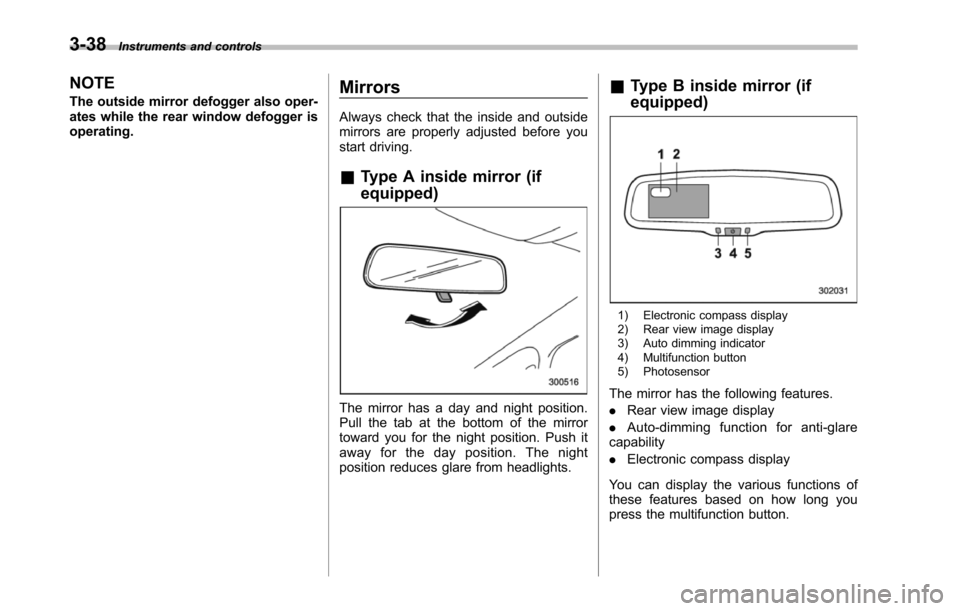
&Type A inside mirror (if
equipped)
The mirror has a day and night position.Pull the tab at the bottom of the mirrortoward you for the night position. Push itaway for the day position. The nightposition reduces glare from headlights.
&Type B inside mirror (if
equipped)
1) Electronic compass display2) Rear view image display3) Auto dimming indicator4) Multifunction button5) Photosensor
The mirror has the following features.
.Rear view image display
.Auto-dimming function for anti-glarecapability
.Electronic compass display
You can display the various functions ofthese features based on how long youpress the multifunction button.
Page 172 of 426
Gearposition
Period oftime multi-functionbutton ispressed
Functiondisplayed
R (reverse)
BrieflyRear view displayON/OFF*
More than3 secondsHelp lines indica-tion ON/OFF
ExceptR (reverse)BrieflyAuto-dimmingfunction ON/OFF*
3 to 6secondsElectronic com-pass display ON/OFF
6 to 9secondsEnterthe com-pass zone settingmode
9 to 12secondsEnter the com-passcalibrationmode
*: The setting returns to“ON”as a defaultsetting every time theignition switch is turned tothe“ON”position.
!Rear view image display
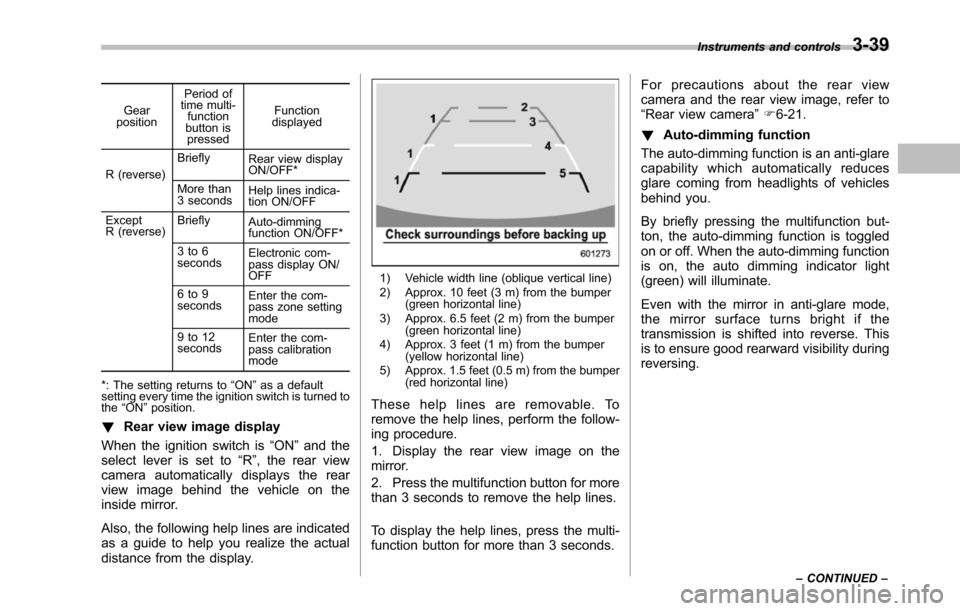
When the ignition switch is“ON”and theselect lever is set to“R”, the rear viewcamera automatically displays the rearview image behind the vehicle on theinside mirror.
Also, the following help lines are indicatedas a guide to help you realize the actualdistance from the display.
1) Vehicle width line (oblique vertical line)2) Approx. 10 feet (3 m) from the bumper(green horizontal line)3) Approx. 6.5 feet (2 m) from the bumper(green horizontal line)4) Approx. 3 feet (1 m) from the bumper(yellow horizontal line)5) Approx. 1.5 feet (0.5 m) from the bumper(red horizontal line)
These help lines are removable. Toremove the help lines, perform the follow-ing procedure.
1. Display the rear view image on themirror.
2. Press the multifunction button for morethan 3 seconds to remove the help lines.
To display the help lines, press the multi-function button for more than 3 seconds.
For precautions about the rear viewcamera and the rear view image, refer to“Rear view camera”F6-21.
!Auto-dimming function
The auto-dimming function is an anti-glarecapability which automatically reducesglare coming from headlights of vehiclesbehind you.
By briefly pressing the multifunction but-ton, the auto-dimming function is toggledon or off. When the auto-dimming functionis on, the auto dimming indicator light(green) will illuminate.
Even with the mirror in anti-glare mode,the mirror surface turns bright if thetransmissionis shifted into reverse. Thisis to ensure good rearward visibility duringreversing.
Instruments and controls3-39
–CONTINUED–
Page 173 of 426
3-40Instruments and controls
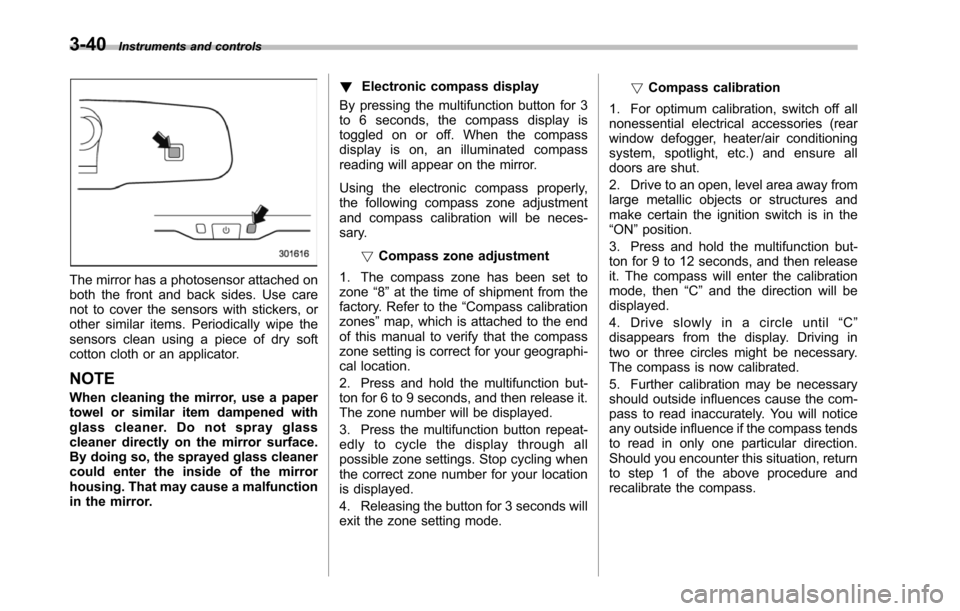
The mirror has a photosensor attached onboththe front and back sides. Use carenot to cover the sensors with stickers, orother similar items. Periodically wipe thesensors clean using a piece of dry softcotton cloth or an applicator.
NOTE
When cleaning the mirror, use a papertowel or similar item dampened withglass cleaner. Do not spray glasscleaner directly on the mirror surface.By doing so, the sprayed glass cleanercould enter the inside of the mirrorhousing. That may cause a malfunctionin the mirror.
!Electronic compass display
By pressing the multifunction button for 3to 6 seconds, the compass display istoggled on or off. When the compassdisplay is on, an illuminated compassreading will appear on the mirror.
Using the electronic compass properly,the following compass zone adjustmentand compass calibration will be neces-sary.
!Compasszone adjustment
1. The compass zone has been set tozone“8”at the time of shipment from thefactory. Refer to the“Compass calibrationzones”map, which is attached to the endof this manual to verify that the compasszone setting is correct for your geographi-cal location.
2. Press and hold the multifunction but-ton for 6 to 9 seconds, and then release it.The zone number will be displayed.
3. Press the multifunction button repeat-edly to cycle the display through allpossible zone settings. Stop cycling whenthe correct zone number for your locationis displayed.
4. Releasing the button for 3 seconds willexitthe zone setting mode.
!Compass calibration
1. For optimum calibration, switch off allnonessential electrical accessories (rearwindow defogger, heater/air conditioningsystem, spotlight, etc.) and ensure alldoors are shut.
2. Drive to an open, level area away fromlarge metallic objects or structures andmake certain the ignition switch is in the“ON”position.
3. Press and hold the multifunction but-ton for 9 to 12 seconds, and then releaseit. The compass will enter the calibrationmode,then“C”and the direction will bedisplayed.
4. Drive slowly in a circle until“C”disappears from the display. Driving intwo or three circles might be necessary.The compass is now calibrated.
5. Further calibration may be necessaryshould outside influences cause the com-pass to read inaccurately. You will noticeany outside influence if the compass tendsto read in only one particular direction.Shouldyou encounter this situation, returnto step 1 of the above procedure andrecalibrate the compass.
Page 174 of 426
&Type C inside mirror (if
equipped)
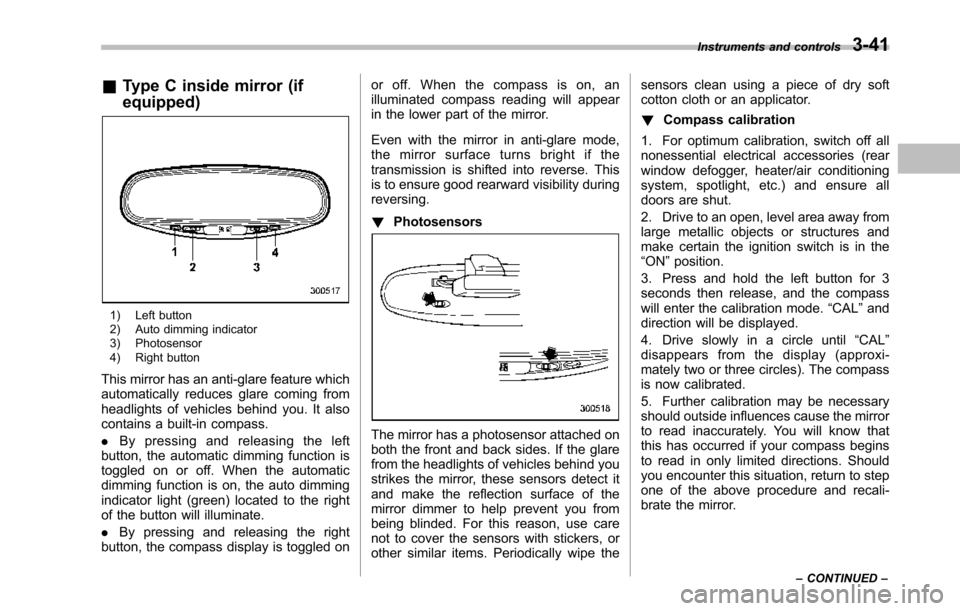
1) Left button2) Auto dimming indicator3) Photosensor4) Right button
This mirror has an anti-glare feature whichautomatically reduces glare coming fromheadlights of vehicles behind you. It alsocontains a built-in compass.
.By pressing and releasing the leftbutton, the automatic dimming function istoggled on or off. When the automaticdimming function is on, the auto dimmingindicator light (green) located to the rightof the button will illuminate.
.By pressing and releasing the rightbutton, the compass display is toggled on
or off. When the compass is on, anilluminated compass reading will appearin the lower part of the mirror.
Even with the mirror in anti-glare mode,the mirror surface turns bright if thetransmission is shifted into reverse. Thisis to ensure good rearward visibility duringreversing.
!Photosensors
The mirror has a photosensor attached onboth the front and back sides. If the glarefrom the headlights of vehicles behind youstrikes the mirror, these sensors detect itand make the reflection surface of themirror dimmer to help prevent you frombeing blinded. For this reason, use carenot to cover the sensors with stickers, orother similar items. Periodically wipe the
sensors clean using a piece of dry softcotton cloth or an applicator.
!Compass calibration
1. For optimum calibration, switch off allnonessential electrical accessories (rearwindow defogger, heater/air conditioningsystem, spotlight, etc.) and ensure alldoors are shut.
2. Drive to an open, level area away fromlarge metallic objects or structures andmake certain the ignition switch is in the“ON”position.
3. Press and hold the left button for 3seconds then release, and the compasswill enter the calibration mode.“CAL”anddirection will be displayed.
4. Drive slowly in a circle until“CAL”disappears from the display (approxi-mately two or three circles). The compassis now calibrated.
5. Further calibration may be necessaryshould outside influences cause the mirrorto read inaccurately. You will know thatthis has occurred if your compass beginsto read in only limited directions. Shouldyou encounter this situation, return to stepone of the above procedure and recali-brate the mirror.
Instruments and controls3-41
–CONTINUED–