2014 SUBARU TRIBECA mirror
[x] Cancel search: mirrorPage 175 of 426
3-42Instruments and controls
!Compass zone adjustment
1. The zone setting is factory preset toZone 8. Refer to the“Compass calibrationzone”map attached to the end of thismanual to verify that the compass zonesetting is correct for your geographicallocation.
2. Press and hold the right button for 3seconds then release, and the word“ZONE”will briefly appear and then thezone number will be displayed.
3. Press the right-hand button repeatedlyto cycle the display through all possiblezone settings. Stop cycling when thecorrect zone setting for your location isdisplayed.
4. Releasing the button for 3 seconds willexit the zone setting mode.
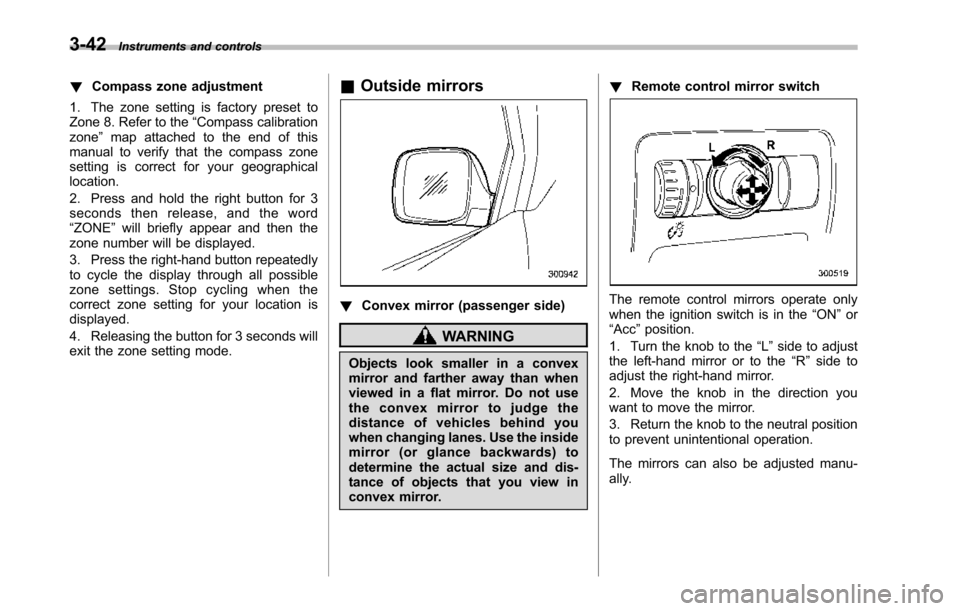
&Outside mirrors
!Convex mirror (passenger side)
WARNING
Objects look smaller in a convexmirror and farther away than whenviewed in a flat mirror. Do not usethe convex mirror to judge thedistance of vehicles behind youwhen changing lanes. Use the insidemirror (or glance backwards) todetermine the actual size and dis-tance of objects that you view inconvex mirror.
!Remote control mirror switch
The remote control mirrors operate onlywhen the ignition switch is in the“ON”or“Acc”position.
1. Turn the knob to the“L”side to adjustthe left-hand mirror or to the“R”side toadjust the right-hand mirror.
2. Move the knob in the direction youwant to move the mirror.
3. Return the knob to the neutral positionto prevent unintentional operation.
The mirrors can also be adjusted manu-ally.
Page 176 of 426
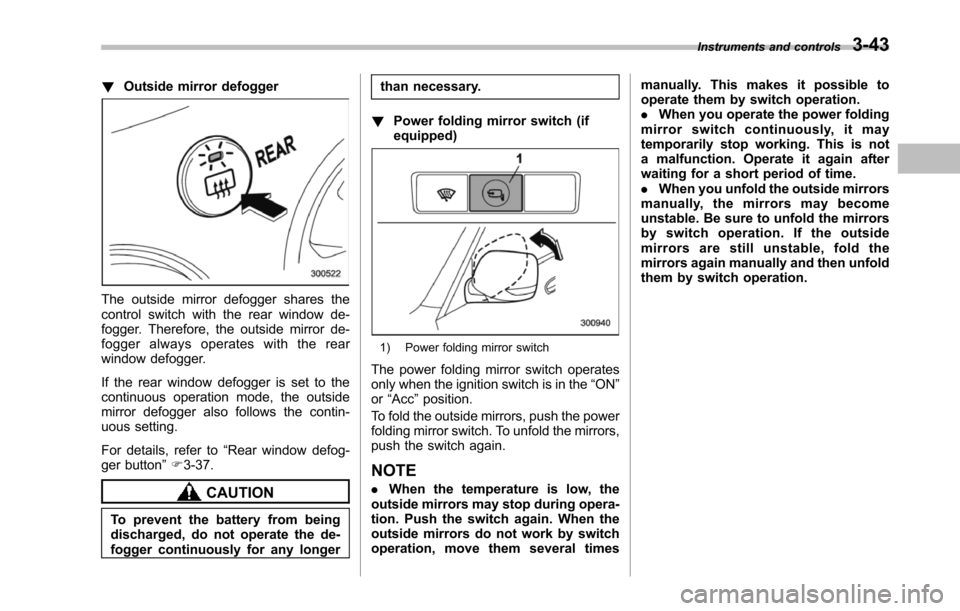
!Outside mirror defogger
The outside mirror defogger shares thecontrol switch with the rear window de-fogger. Therefore, the outside mirror de-fogger always operates with the rearwindow defogger.
If the rear window defogger is set to thecontinuous operation mode, the outsidemirror defogger also follows the contin-uous setting.
For details, refer to“Rear window defog-ger button”F3-37.
CAUTION
To prevent the battery from beingdischarged, do not operate the de-fogger continuously for any longer
than necessary.
!Power folding mirror switch (ifequipped)
1) Power folding mirror switch
The power folding mirror switch operatesonly when the ignition switch is in the“ON”or“Acc”position.
To fold the outside mirrors, push the powerfolding mirror switch. To unfold the mirrors,push the switch again.
NOTE
.When the temperature is low, theoutside mirrorsmay stop during opera-tion. Push the switch again. When theoutside mirrors do not work by switchoperation, move them several times
manually. This makes it possible tooperate them by switch operation..When you operate the power foldingmirror switch continuously, it maytemporarily stop working. This is nota malfunction. Operate it again afterwaiting for a short period of time..When you unfold the outside mirrorsmanually, the mirrors may becomeunstable. Be sure to unfold the mirrorsby switch operation. If the outsidemirrors are still unstable, fold themirrors again manually and then unfoldthem by switch operation.
Instruments and controls3-43
Page 222 of 426
Interior light......................................................... 6-2Dome light.......................................................... 6-2Cargo area light.................................................. 6-3Rear gate light.................................................... 6-3Map light............................................................. 6-3Automatic ambient light for center console area(if equipped)...................................................... 6-4
Sun visors........................................................... 6-4Sun visor extension plate.................................... 6-5Vanity mirror with light........................................ 6-5
Storage compartment......................................... 6-6Glove box........................................................... 6-6Center console box............................................. 6-6Rear console....................................................... 6-7Overhead console............................................... 6-8
Cupholder........................................................... 6-8Front passenger’s cup holder.............................. 6-8Second-row seat cup holders.............................. 6-9Third-row seat cup holders.................................. 6-9
Bottle holders...................................................... 6-9
Accessory power outlets................................... 6-10
Coat hook........................................................... 6-12
Shopping bag hook............................................ 6-13
Floor mat............................................................ 6-13
Cargo area cover (if equipped)......................... 6-14Using the cover................................................. 6-14To remove the cover.......................................... 6-15To install the cover housing............................... 6-15
Convenient tie-down hooks.............................. 6-16
Under-floor storage compartment.................... 6-16
HomeLink®Wireless Control System (ifequipped)........................................................ 6-17Garage door opener programming in theU.S.A............................................................... 6-18Programming rolling-code-protected garage dooropeners in the U.S.A........................................ 6-19Programmingfor entrance gates and garage dooropeners in Canada........................................... 6-20Programming other devices............................... 6-21Operating the HomeLink®Wireless ControlSystem............................................................ 6-21ErasingHomeLink®button memory.................... 6-21In case a problem occurs................................... 6-21
Rear view camera (if equipped)........................ 6-21How to use the rear view camera....................... 6-22Viewing range on the screen.............................. 6-23Help line............................................................ 6-24
Interior equipment
6
Page 226 of 426
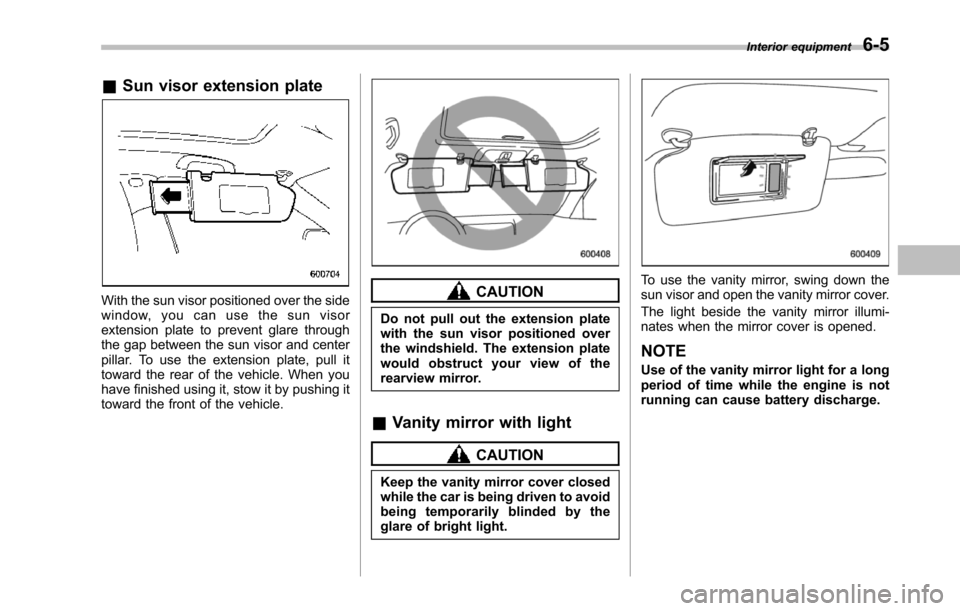
&Sun visor extension plate
With the sun visor positioned over the sidewindow, you can use the sun visorextension plate to prevent glare throughthe gap between the sun visor and centerpillar. To use the extension plate, pull ittoward the rear of the vehicle. When youhave finished using it, stow it by pushing ittoward the front of the vehicle.
CAUTION
Do not pull out the extension platewith the sun visor positioned overthe windshield. The extension platewould obstruct your view of therearview mirror.
&Vanity mirror with light
CAUTION
Keep the vanity mirror cover closedwhile the car is being driven to avoidbeing temporarily blinded by theglare of bright light.
To use the vanity mirror, swing down thesun visor and open the vanity mirror cover.
The light beside the vanity mirror illumi-nates when the mirror cover is opened.
NOTE
Use of the vanity mirror light for a longperiod of time while the engine is notrunning can cause battery discharge.
Interior equipment6-5
Page 242 of 426
opener by pressing the programmedHomeLink®button.
&Programming other devices
To program other devices such as doorlocks, home lighting and security systems,contact HomeLink at www.homelink.comor call 1-800-355-3515.
&Operating the HomeLink®
Wireless Control System
Once programmed, the HomeLink®Wire-less Control System can be used toremote-controlthe devices to which itsbuttons are programmed. To activate adevice, simply press the appropriate but-ton.The indicator light illuminates, indicat-ing that the signal is being transmitted.
&Erasing HomeLink®button
memory
NOTE
.Performing this procedure erasesthe memory of all the preprogrammedbuttons simultaneously. The memoryof individual buttons cannot be erased..It is recommended that upon thesale of the vehicle, the memory of allprogrammed HomeLink®buttons beerased for security purposes.
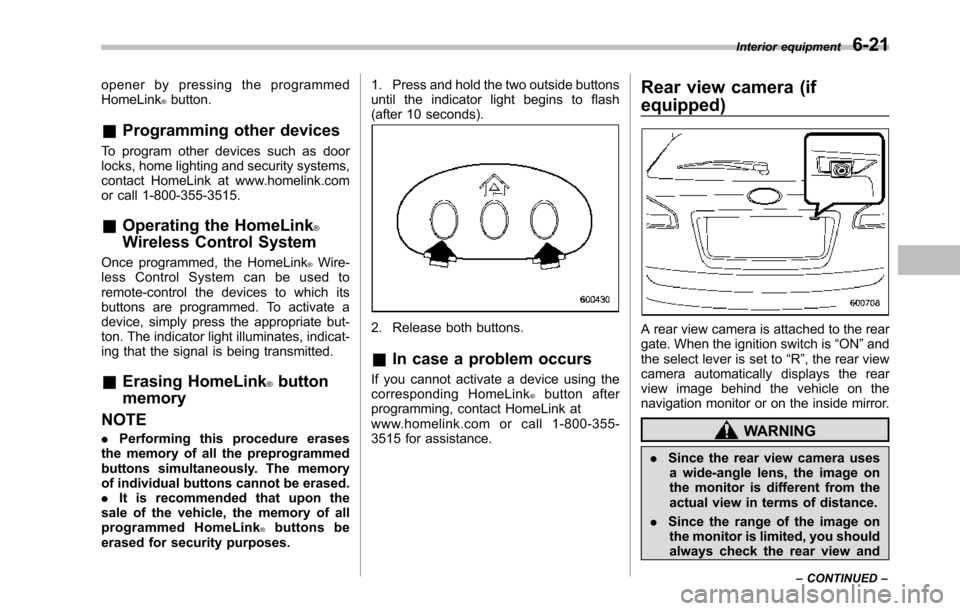
1. Press and hold the two outside buttonsuntil the indicator light begins to flash(after 10 seconds).
2. Release both buttons.
&In case a problem occurs
If you cannot activate a device using thecorresponding HomeLink®button afterprogramming, contact HomeLink atwww.homelink.com or call 1-800-355-3515 for assistance.
Rear view camera (if
equipped)
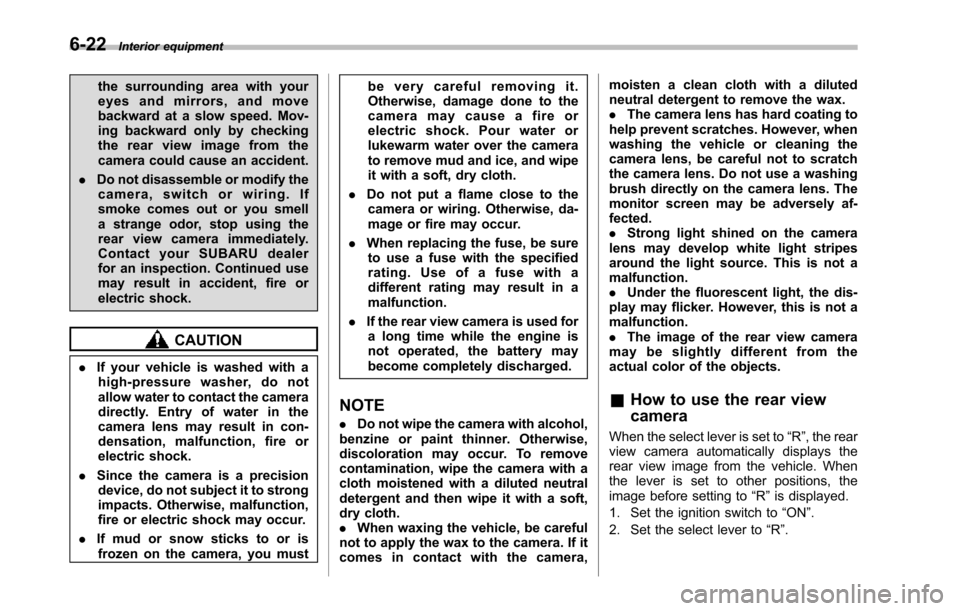
A rear view camera is attached to the reargate. When the ignition switch is“ON”andthe select lever is set to“R”, the rear viewcamera automatically displays the rearview image behind the vehicle on thenavigation monitor or on the inside mirror.
WARNING
.Since the rear view camera usesa wide-angle lens, the image onthe monitor is different from theactual view in terms of distance.
.Since the range of the image onthe monitor is limited, you shouldalways check the rear view and
Interior equipment6-21
–CONTINUED–
Page 243 of 426
6-22Interior equipment
the surrounding area with youreyes and mirrors, and movebackward at a slow speed. Mov-ing backward only by checkingthe rear view image from thecamera could cause an accident.
.Do not disassemble or modify thecamera, switch or wiring. Ifsmoke comes out or you smella strange odor, stop using therear view camera immediately.Contact your SUBARU dealerfor an inspection. Continued usemay result in accident, fire orelectric shock.
CAUTION
.If your vehicle is washed with ahigh-pressure washer, do notallow water to contact the cameradirectly. Entry of water in thecamera lens may result in con-densation, malfunction, fire orelectric shock.
.Since the camera is a precisiondevice, do not subject it to strongimpacts. Otherwise, malfunction,fire or electric shock may occur.
.If mud or snow sticks to or isfrozen on the camera, you must
be very careful removing it.Otherwise, damage done to thecamera may cause a fire orelectric shock. Pour water orlukewarm water over the camerato remove mud and ice, and wipeit with a soft, dry cloth.
.Do not put a flame close to thecamera or wiring. Otherwise, da-mage or fire may occur.
.When replacing the fuse, be sureto use a fuse with the specifiedrating. Use of a fuse with adifferent rating may result in amalfunction.
.If the rear view camera is used fora long time while the engine isnot operated, the battery maybecome completely discharged.
NOTE
.Do not wipe the camera with alcohol,benzine or paint thinner. Otherwise,discoloration may occur. To removecontamination, wipe the camera with acloth moistened with a diluted neutraldetergent and then wipe it with a soft,dry cloth..When waxing the vehicle, be carefulnot to apply the wax to the camera. If itcomes in contact with the camera,
moisten a clean cloth with a dilutedneutral detergent to remove the wax..The camera lens has hard coating tohelp prevent scratches. However, whenwashing the vehicle or cleaning thecamera lens, be careful not to scratchthe camera lens. Do not use a washingbrush directly on the camera lens. Themonitorscreen may be adversely af-fected..Strong light shined on the cameralens may develop white light stripesaround the light source. This is not amalfunction..Under the fluorescent light, the dis-play may flicker. However, this is not amalfunction..The image of the rear view cameramay be slightly different from theactual color of the objects.
&How to use the rear view
camera
When the select lever is set to“R”, the rearview camera automatically displays therear view image from the vehicle. Whenthe lever is set to other positions, theimage before setting to“R”is displayed.
1. Set the ignition switch to“ON”.
2. Set the select lever to“R”.
Page 244 of 426
NOTE
.The image of the rear view camerahas priority over other screen displays..The image of the rear view camera ishorizontally reversed as is the casewith the vehicle rearview mirror or theside view mirror..It may be difficult to see the image ofthe rearview camera in the followingcases. This is not a malfunction of thecamera.–The vehicle is in a dark place (atnight, in a tunnel, etc.).–The vehicle is in an extremely hotor cold place.–An object (such as raindrops,snow, dirt, etc.) that disturbs theview of the rear view camera sticksto the lens of the camera.–Strong light shined directly onthe camera lens (occasionally, thereare vertical lines on the screen).
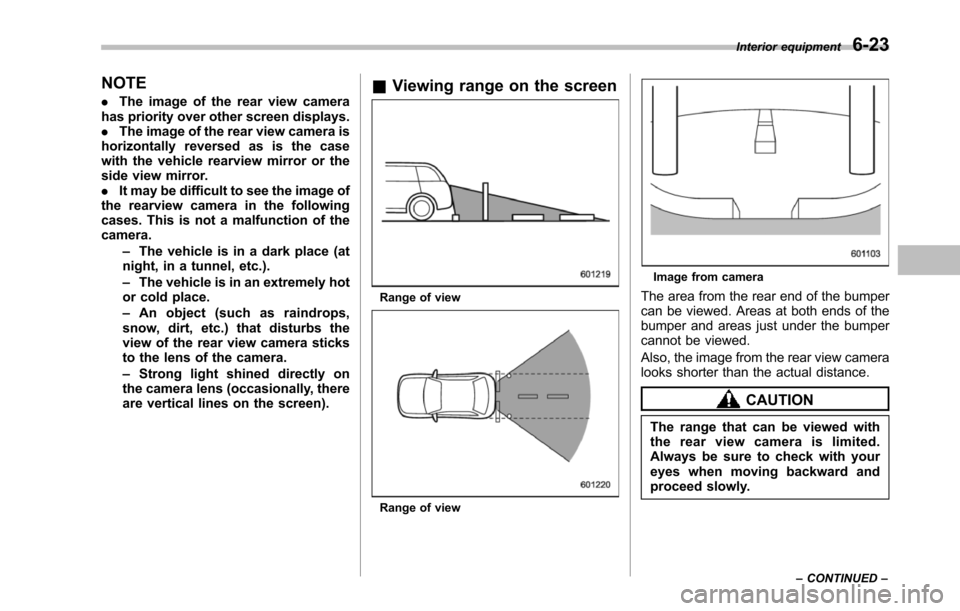
&Viewing range on the screen
Range of view
Range of view
Image from camera
Thearea from the rear end of the bumpercan be viewed. Areas at both ends of thebumper and areas just under the bumpercannot be viewed.
Also, the image from the rear view cameralooks shorter than the actual distance.
CAUTION
The rangethat can be viewed withthe rear view camera is limited.Always be sure to check with youreyes when moving backward andproceed slowly.
Interior equipment6-23
–CONTINUED–
Page 245 of 426

6-24Interior equipment
Range of view
Image from camera
The area above the camera cannot beviewed. If there is an object that has awide projection on its upper part such as asign pole behind the vehicle, the projec-
tion cannot be seen on the screen.
CAUTION
The range that can be viewed withthe rear view camera is limited.Always be sure to check with youreyes when moving backward andproceed slowly.
&Help line
The help line (distance marker and vehiclewidth line) is a guide to help you realizethe actual distance from the screen.
Help lines displayed on the navigationmonitor
Help lines displayed on the inside mirror1) Vehicle width line (oblique vertical line)2) Approx. 10 feet (3 m) from the bumper(green horizontal line)3) Approx. 6.5 feet (2 m) from the bumper(green horizontal line)4) Approx. 3 feet (1 m) from the bumper(yellow horizontal line)5) Approx. 1.5 feet (0.5 m) from the bumper(red horizontal line)
When the select lever is set to position“R”, the monitor screen displays the helplines together with the rear view image.
CAUTION
.When moving backward, alwayscheck the back with your eyeswithout relying on the help lines.
.The actual position may be dif-