2014 SUBARU TRIBECA lock
[x] Cancel search: lockPage 124 of 426
mode.
To exit valet mode, change the setting ofyour vehicle’s alarm system for activationmode. Refer to“Activating and deactivat-ing the alarm system”F2-16.
&Passive arming
When passive arming mode has beenprogrammed by the dealer, arming of thesystem is automatically accomplishedwithout using the remote transmitter. Notethat in this mode, DOORS MUST BEMANUALLY LOCKED.
!To enter the passive mode
If you wish to program the passive armingmode, have it done by your SUBARUdealer.
!Armingthe system
CAUTION
In passive mode, the system willautomatically activate the alarm butWILL NOT automatically lock thedoors. In order to lock the doorsyou must either lock them as in-dicated in step 4 below or with thekey once they have been closed.Failure to lock the doors manuallywill result in a higher security risk.
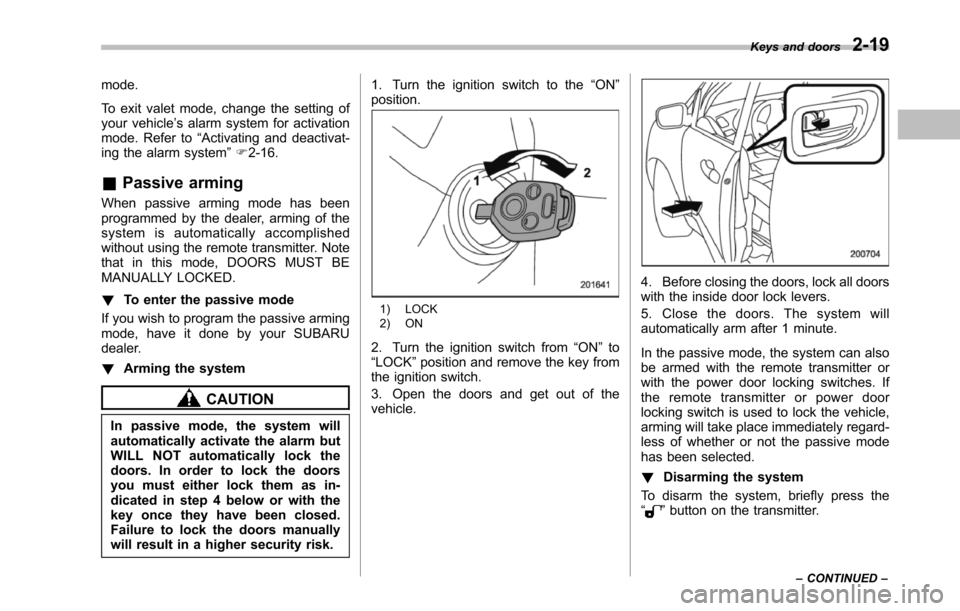
1. Turn the ignition switch to the“ON”position.
1) LOCK2) ON
2. Turn the ignition switch from“ON”to“LOCK”position and remove the key fromthe ignition switch.
3. Open the doors and get out of thevehicle.
4. Before closing the doors, lock all doorswith the inside door lock levers.
5. Close the doors. The system willautomatically arm after 1 minute.
In the passive mode, the system can alsobe armed with the remote transmitter orwith the power door locking switches. Ifthe remote transmitter or power doorlocking switch is used to lock the vehicle,arming will take place immediately regard-less of whether or not the passive modehas been selected.
!Disarming the system
To disarm the system, briefly press the“”button on the transmitter.
Keys and doors2-19
–CONTINUED–
Page 126 of 426
Child safety locks
WARNING
Always use the child safety lockwhenever a child rides in the rear.Serious injury could result if a childaccidentally opened the door andfell out.
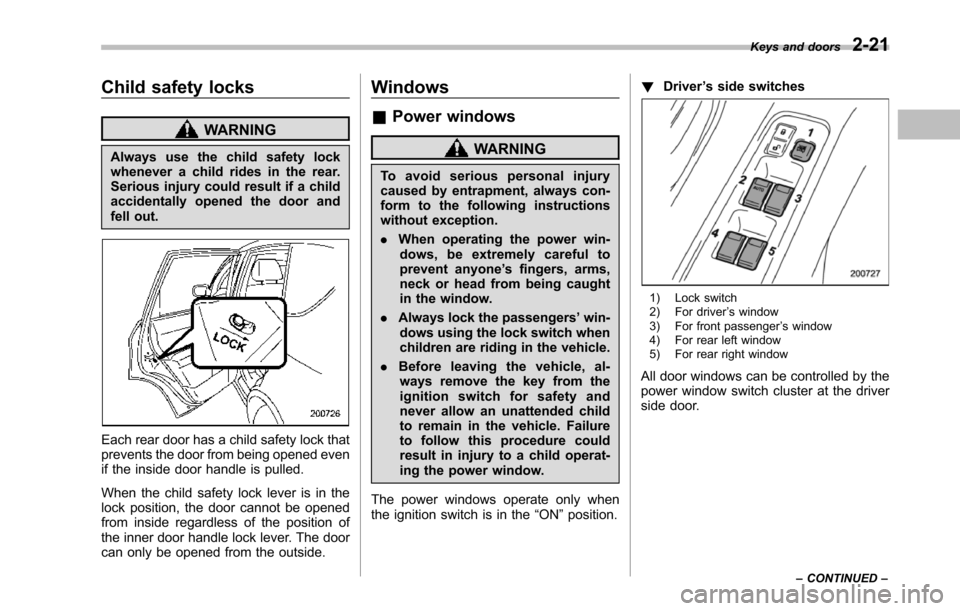
Each rear door has a child safety lock thatprevents the door from being opened evenif the inside door handle is pulled.
When the child safety lock lever is in thelock position, the door cannot be openedfrom inside regardless of the position ofthe inner door handle lock lever. The doorcan only be opened from the outside.
Windows
&Power windows
WARNING
To a v o i d s e r i o u s p e r s o n a l i n j u r ycausedby entrapment, always con-form to the following instructionswithout exception.
.When operating the power win-dows, be extremely careful toprevent anyone’s fingers, arms,neck or head from being caughtin the window.
.Always lockthe passengers’win-dows using the lock switch whenchildren are riding in the vehicle.
.Before leaving the vehicle, al-ways remove the key from theignition switch for safety andnever allow an unattended childto remain in the vehicle. Failureto follow this procedure couldresult in injury to a child operat-ing the power window.
The power windows operate only whentheignition switch is in the“ON”position.
!Driver’s side switches
1) Lock switch2) For driver’s window3) For front passenger’s window4) For rear left window5) For rear right window
All door windows can be controlled by thepower window switch cluster at the driverside door.
Keys and doors2-21
–CONTINUED–
Page 128 of 426
To close:
Pull the switch up and hold it until thewindow reaches the desired position.
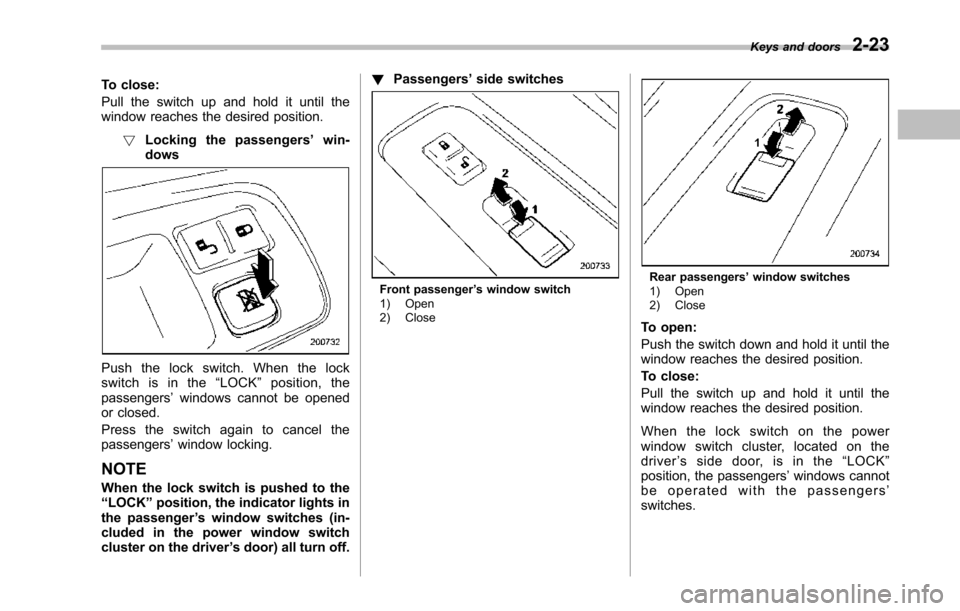
!Locking the passengers’win-dows
Push the lock switch. When the lockswitch is in the“LOCK”position, thepassengers’windows cannot be openedor closed.
Press the switch again to cancel thepassengers’window locking.
NOTE
When the lockswitch is pushed to the“LOCK”position,the indicator lights inthe passenger’s window switches (in-cluded in the power window switchcluster on the driver’s door) all turn off.
!Passengers’side switches
Front passenger’s window switch1) Open2) Close
Rear passengers’window switches1) Open2) Close
To open:
Push the switch down and hold it until thewindow reaches the desired position.
To close:
Pull the switch up and hold it until thewindow reaches the desired position.
When the lock switch on the powerwindow switch cluster, located on thedriver’ssidedoor,isinthe“LOCK”position, the passengers’windows cannotbe operated with the passengers’switches.
Keys and doors2-23
Page 129 of 426
2-24Keys and doors
Rear gate
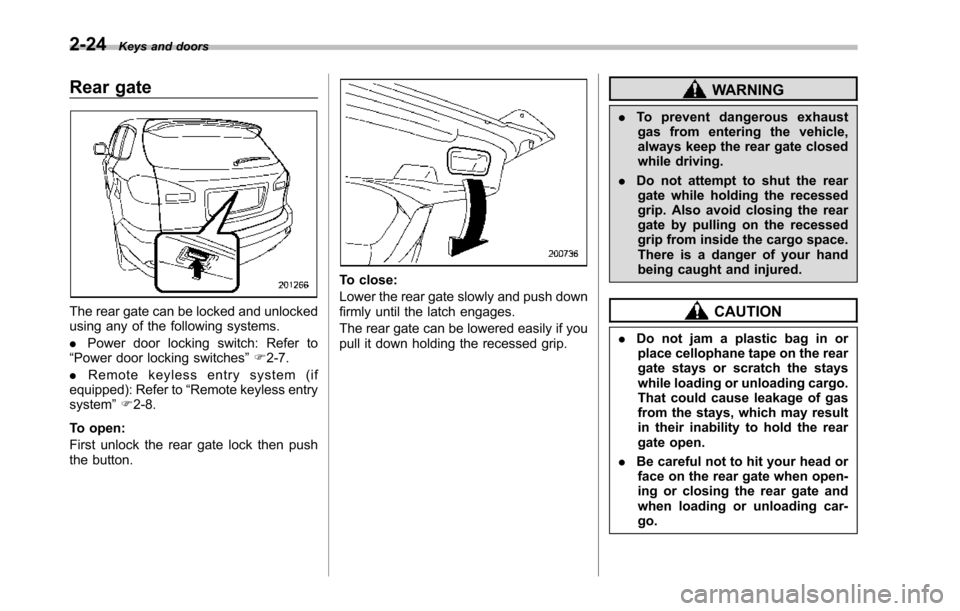
The rear gate can be locked and unlockedusing any of the following systems.
.Power door locking switch: Refer to“Power door locking switches”F2-7.
.Remote keyless entry system (ifequipped):Refer to“Remote keylessentrysystem”F2-8.
To open:
First unlock the rear gate lock then pushthe button.
To close:
Lower the rear gate slowly and push downfirmly until the latch engages.
The rear gate can be lowered easily if youpull it down holding the recessed grip.
WARNING
.To prevent dangerous exhaustgas from entering the vehicle,always keep the rear gate closedwhile driving.
.Do not attempt to shut the reargate while holding the recessedgrip. Also avoid closing the reargate by pulling on the recessedgrip from inside the cargo space.There is a danger of your handbeing caught and injured.
CAUTION
.Do not jam a plastic bag in orplace cellophane tape on the reargate stays or scratch the stayswhile loading or unloading cargo.That could cause leakage of gasfrom the stays, which may resultin their inability to hold the reargate open.
.Be careful not to hit your head orface on the rear gate when open-ing or closing the rear gate andwhen loading or unloading car-go.
Page 130 of 426
NOTE
If the rear gate cannot be unlocked dueto a discharged vehicle battery, amalfunction in the door locking/unlock-ing system or other causes, you canunlock it by manually operating therear gate lock release lever. For theprocedure, refer to“Rear gate–if therear gate cannot be unlocked”F9-18.
Moonroof (if equipped)
WARNING
Never let anyone’shands,arms,head or any objects protrude fromthe moonroof. A person could beseriously injured if the vehicle stopssuddenly or turns sharply or if thevehicle is involved in an accident.
To a v o i d s e r i o u s p e r s o n a l i n j u r ycaused by entrapment, always con-form to the following instructionswithoutexception.
.Before closing the moonroof,make sure that no one’s hands,arms, head or other objects willbe accidentally caught in themoonroof.
.Before leaving the vehicle, al-ways remove the key from theignition switch for safety andnever allow an unattended childto remain in the vehicle. Failureto follow this procedure couldresult in injury to a child operat-ingthe moonroof.
.Never try to check the anti-en-trapment function by deliberatelyplacing part of your body in themoonroof.
CAUTION
.Do not sit on the edge of the openmoonroof.
.Do not operate the moonroof iffalling snow or extremely coldconditions have caused it tofreeze shut.
.The anti-entrapment functiondoes not operate when the moon-roof is being tilted down. Be sureto confirm that it is safe to do sobeforetilting the moonroof down.
The moonroofhas both tilting and slidingfunctions.
The moonroof operates only when theignition switch is in the“ON”position.
Keys and doors2-25
–CONTINUED–
Page 134 of 426
Ignition switch..................................................... 3-3LOCK.................................................................. 3-3Acc ..................................................................... 3-4ON ...................................................................... 3-4START ................................................................ 3-4Key reminder chime............................................ 3-4Ignition switch light............................................. 3-4
Hazard warning flasher....................................... 3-5
Meters and gauges.............................................. 3-5Combination meter illumination........................... 3-5Canceling the function for meter needle/gaugemovement and combination meter sequentialillumination upon turning on the ignitionswitch............................................................... 3-5Speedometer....................................................... 3-6Odometer............................................................ 3-6Double trip meter................................................ 3-7Tachometer......................................................... 3-7Fuel gauge.......................................................... 3-8Temperature gauge............................................. 3-8
Warning and indicator lights.............................. 3-9Seatbelt warning light and chime........................ 3-10SRS airbag system warning light........................ 3-11Front passenger’s frontal airbag ON and OFFindicators......................................................... 3-12CHECK ENGINE warning light/Malfunctionindicator light................................................... 3-12Charge warning light.......................................... 3-13Oil pressure warning light.................................. 3-13AT OIL TEMP warning light................................. 3-13
Rear differential oil temperature warninglight................................................................ 3-13Low tire pressure warning light.......................... 3-14ABS warning light.............................................. 3-15Brake system warning light................................ 3-16Low fuel warning light....................................... 3-17Door open warning light.................................... 3-17Windshield washer fluid warning light................ 3-17All-Wheel Drive warning light ............................. 3-18Vehicle Dynamics Control warning light (U.S.-spec models and Canada-spec. models)/VehicleDynamics Control operation indicator light (allmodels)........................................................... 3-18Traction Control system OFF indicator light(U.S.-specmodels and Canada-spec.models)........................................................... 3-19Vehicle Dynamics Control warning light (LatinAmerica-spec. models)/Traction Control OFFindicator light (Latin America-spec. models)..... 3-19Security indicator light....................................... 3-21SPORT mode indicator light............................... 3-21Select lever/Gear position indicator.................... 3-21Turn signal indicator lights................................. 3-21High beam indicator light................................... 3-22Cruise control indicator light.............................. 3-22Cruise control set indicator light........................ 3-22Headlight indicator light..................................... 3-22Front fog lightindicator light.............................. 3-22
Clock.................................................................. 3-22
Outside temperature indicator.......................... 3-23Low outside temperature warning...................... 3-24
Instruments and controls
3
Page 136 of 426
Ignition switch
WARNING
.Never turn the ignition switch to“LOCK”while the vehicle isbeing driven or towed becausethat will lock the steering wheel,preventing steering control. Andwhen the engine is turned off, ittakes a much greater effort thanusual to steer.
.Before leaving the vehicle, al-ways removethe key from theignition switch for safety andnever allow an unattended childto remain in the vehicle. Failureto follow this procedure couldresult in injury to a child orothers. Children could operatethe power windows, the moon-roof or other controls or evenmake the vehicle move.
CAUTION
Do not attach a large key holder orkey case to either key. If it bangedagainst your knees or hands whileyou were driving, it could turn theignition switch from the“ON”posi-
tion to the“Acc”or“LOCK”posi-tion, thereby stopping the engine.Also, if the key is attached to akeyholder or to a large bunch ofother keys, centrifugal force may acton it as the vehicle moves, resultingin unwanted turning of the ignitionswitch.
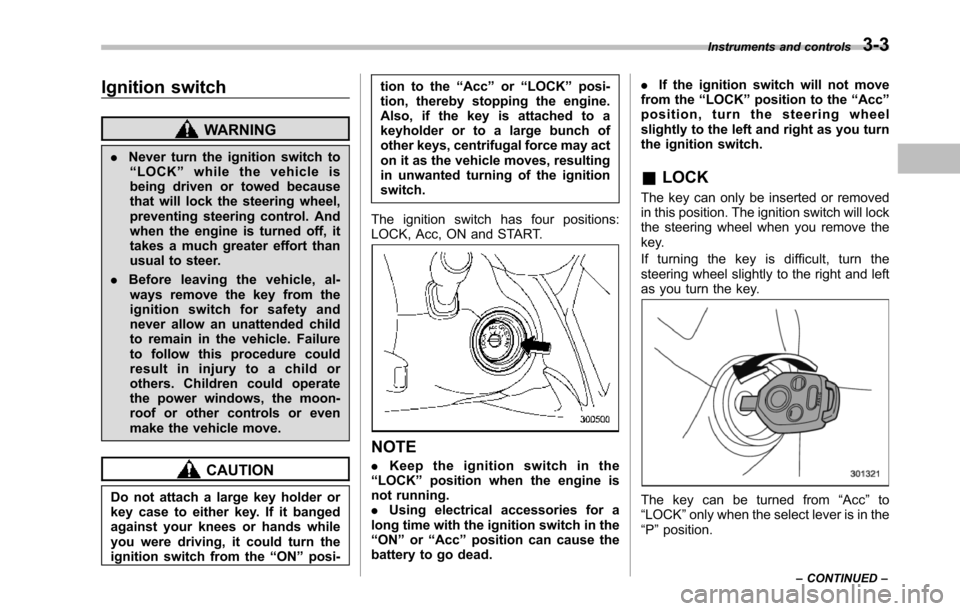
The ignition switch has four positions:LOCK, Acc, ON and START.
NOTE
.Keep the ignition switch in the“LOCK”position when the engine isnot running..Using electrical accessories for along time with the ignition switch in the“ON”or“Acc”position can cause thebattery to go dead.
.If the ignition switch will not movefrom the“LOCK”position to the“Acc”position, turn the steering wheelslightly to the left and right as you turnthe ignition switch.
&LOCK
The key can only be inserted or removedin this position. The ignition switch will lockthe steering wheel when you remove thekey.
If turning the key is difficult, turn thesteering wheel slightly to the right and leftas you turn the key.
The key can be turned from“Acc”to“LOCK”only when the select lever is in the“P”position.
Instruments and controls3-3
–CONTINUED–
Page 137 of 426
3-4Instruments and controls
&Acc
In this position the electrical accessories(radio, accessory power outlet, etc.) canbe used.
&ON
This is the normal operating position afterthe engine is started.
&START
CAUTION
Do not turn the ignition switch to the“START”position while the engineis running.
The engineis started in this position. Thestarter cranks the engine to start it. Whenthe key is released (after the engine hasstarted), the key automatically returns tothe“ON”position.
If your registered key fails to start theengine, pull out the key once (the securityindicator light will blink), and then insertthe key in the ignition switch and turn it tothe“START”position and again try to startthe engine.
NOTE
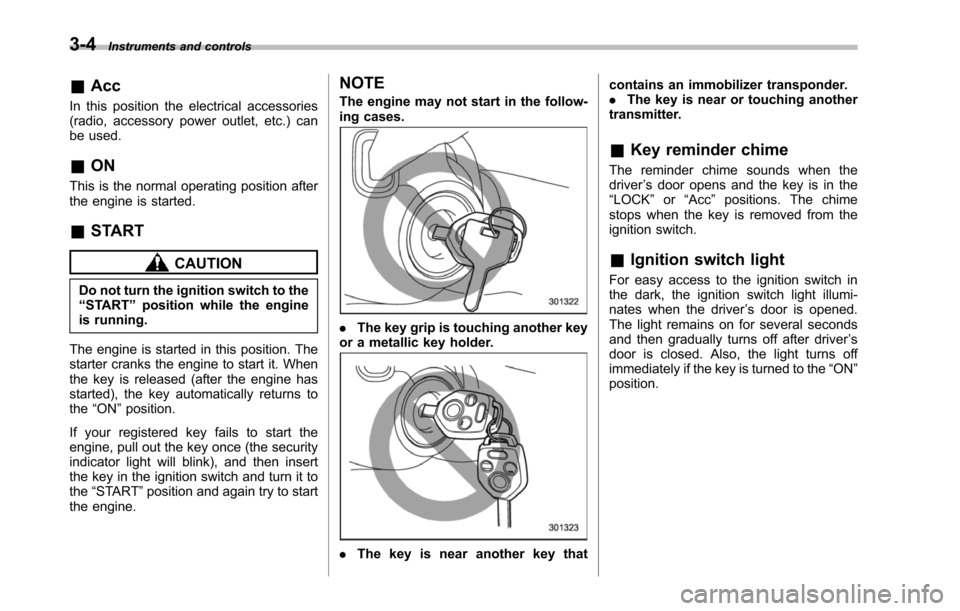
The engine may not start in the follow-ing cases.
.The key grip is touching another keyor a metallic key holder.
.Thekey is near another key that
contains an immobilizer transponder..The key is near or touching anothertransmitter.
&Key reminder chime
The reminder chime sounds when thedriver’s door opens and the key is in the“LOCK”or“Acc”positions. The chimestops when the key is removed from theignition switch.
&Ignition switch light
For easy access to the ignition switch inthe dark, the ignition switch light illumi-nates whenthe driver’s door is opened.The light remains on for several secondsand then gradually turns off after driver’sdoor is closed. Also, the light turns offimmediately if the key is turned to the“ON”position.