Page 480 of 860
480
3-3. Using the Bluetooth® audio system
SIENNA_U (OM45477U)
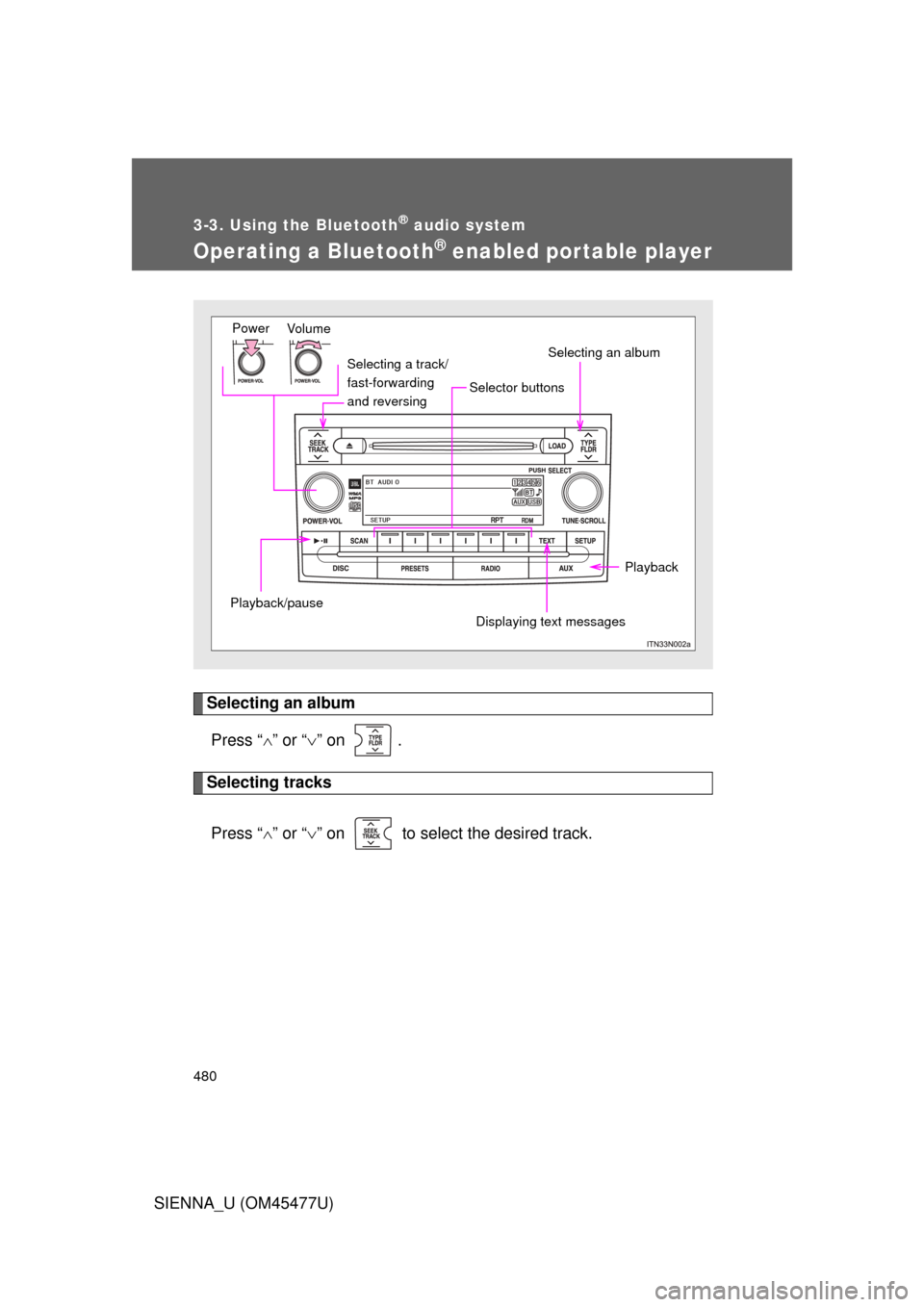
Operating a Bluetooth® enabled portable player
Selecting an albumPress “ ” or “ ” on .
Selecting tracks
Press “ ” or “ ” on to select the desired track.
Vo lu m e
Power
Displaying text messages Selecting an album
Selector buttons
Playback/pause
Playback
Selecting a track/
fast-forwarding
and reversing
Page 481 of 860
481
3-3. Using the Bluetooth
® audio system
3
Interior features
SIENNA_U (OM45477U)
Playing and pausing tracks
Press .
Fast-forwarding and rewinding tracksPress and hold “
” or “ ” on .
Switching the display
Press .
Each time the button is pressed, the display changes in the following
order: Track title Track title/Artist name Track title/Album name
Track title/Elapsed time
Using the steering wheel audio switches
P. 4 6 3
■Bluetooth® audio system functions
Depending on the portable player that is connected to the system, certain
functions may not be available.
Page 482 of 860
482
3-3. Using the Bluetooth® audio system
SIENNA_U (OM45477U)
Setting up a Bluetooth® enabled portable player
Registering a portable player in the Bluetooth® audio system allows
the system to function. The followin g functions can be used for reg-
istered portable players:
■ Functions and operation procedures
Press until “BT AUDIO” is displayed.
Press that corresponds to “SETUP”
Select one of the following functions using a voice com-
mand or .
● Registering a portable player
“Pair Audio Player”
● Selecting a portable player to be used
“Select Audio Player”
● Changing the registered name
“Change Name”
● Listing the registered portable players
“List Audio Players”
● Changing the passkey
“Set Passkey”
● Deleting a registered portable player
“Delete Audio Player”
STEP1
STEP2
STEP3
Page 488 of 860
488
SIENNA_U (OM45477U)
3-4. Using the rear audio system
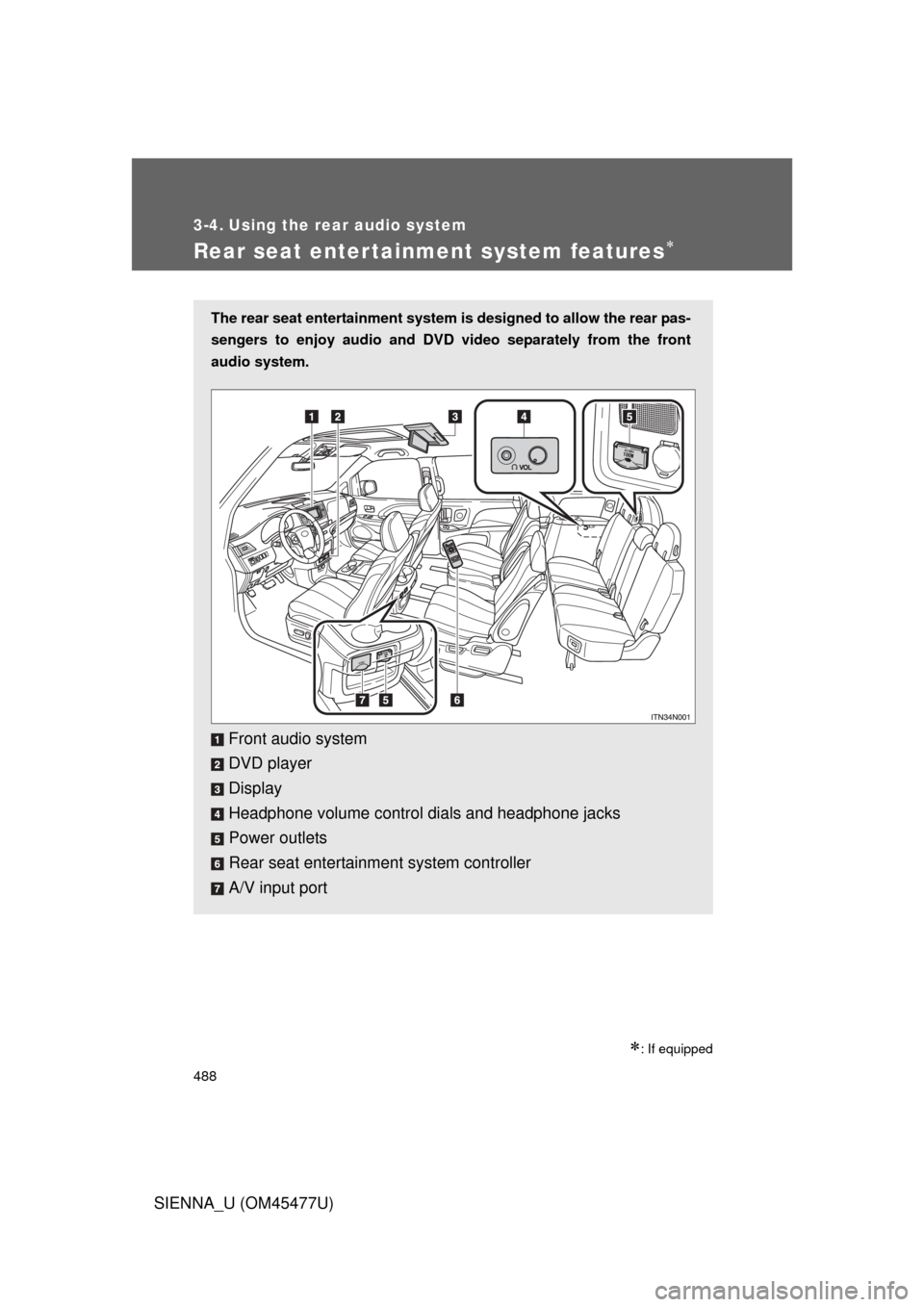
Rear seat entertainment system features
: If equipped
The rear seat entertainment system is designed to allow the rear pas-
sengers to enjoy audio and DVD video separately from the front
audio system.
Front audio system
DVD player
Display
Headphone volume control dials and headphone jacks
Power outlets
Rear seat entertainment system controller
A/V input port
Page 489 of 860
489
3-4. Using the rear audio system
3
Interior features
SIENNA_U (OM45477U)
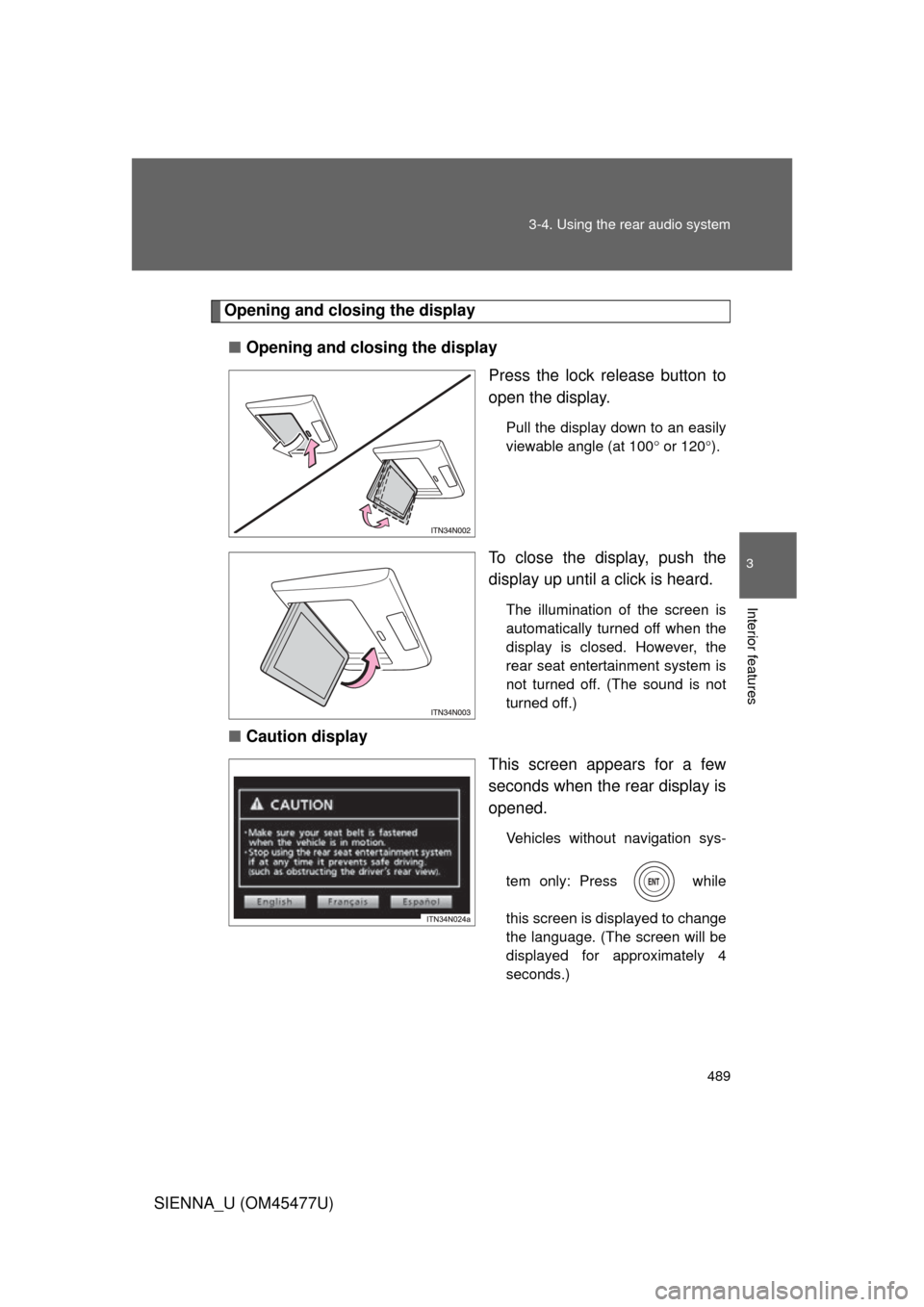
Opening and closing the display
■ Opening and closing the display
Press the lock release button to
open the display.
Pull the display down to an easily
viewable angle (at 100 or 120 ).
To close the display, push the
display up until a click is heard.
The illumination of the screen is
automatically turned off when the
display is closed. However, the
rear seat entertainment system is
not turned off. (The sound is not
turned off.)
■ Caution display
This screen appears for a few
seconds when the rear display is
opened.
Vehicles without navigation sys-
tem only: Press while
this screen is displayed to change
the language. (The screen will be
displayed for approximately 4
seconds.)
Page 492 of 860
492 3-4. Using the rear audio system
SIENNA_U (OM45477U)
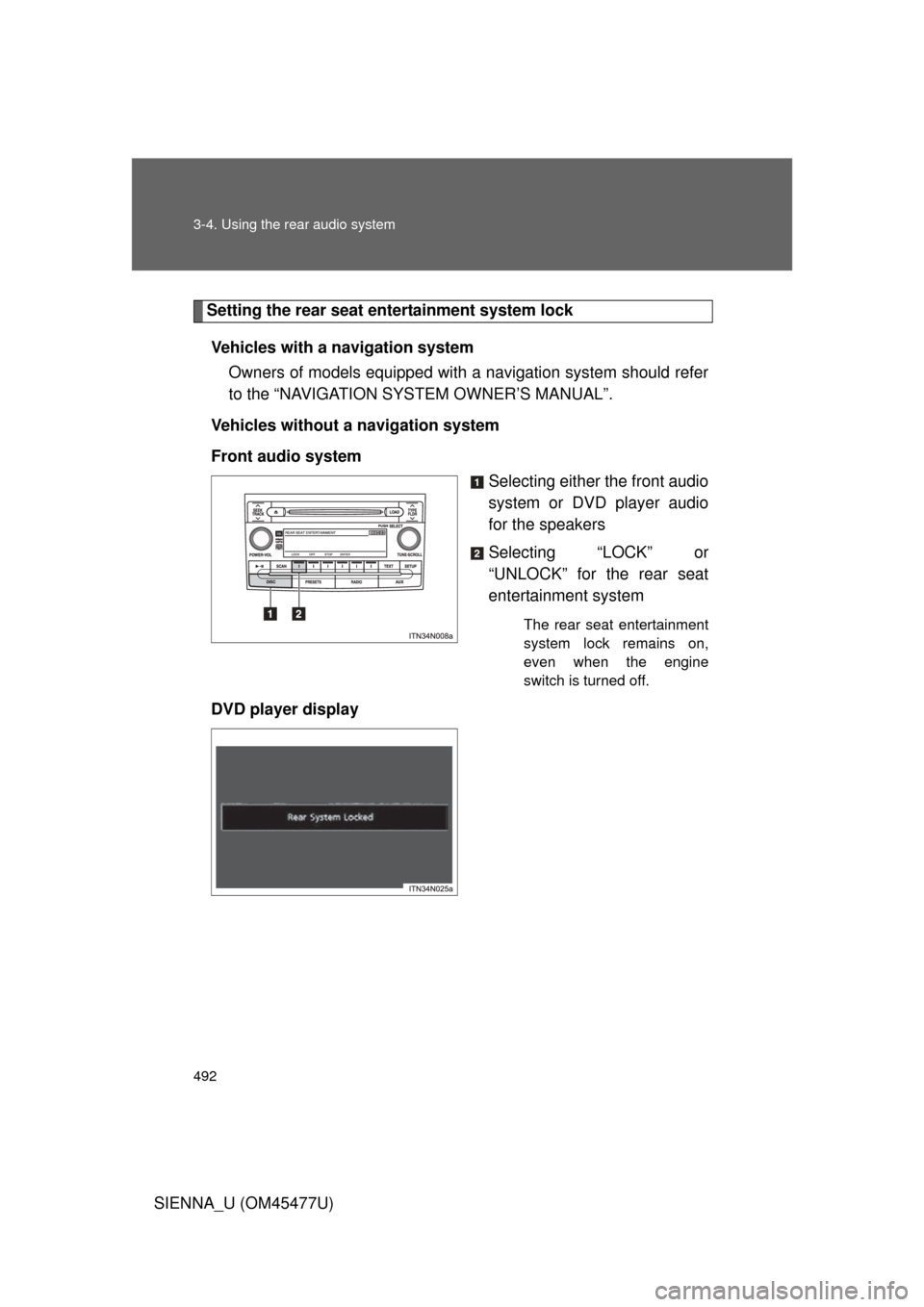
Setting the rear seat entertainment system lockVehicles with a navigation system Owners of models equipped with a navigation system should refer
to the “NAVIGATION SYSTEM OWNER’S MANUAL”.
Vehicles without a navigation system
Front audio system Selecting either the front audio
system or DVD player audio
for the speakers
Selecting “LOCK” or
“UNLOCK” for the rear seat
entertainment system
The rear seat entertainment
system lock remains on,
even when the engine
switch is turned off.
DVD player display
Page 493 of 860
493
3-4. Using the rear audio system
3
Interior features
SIENNA_U (OM45477U)
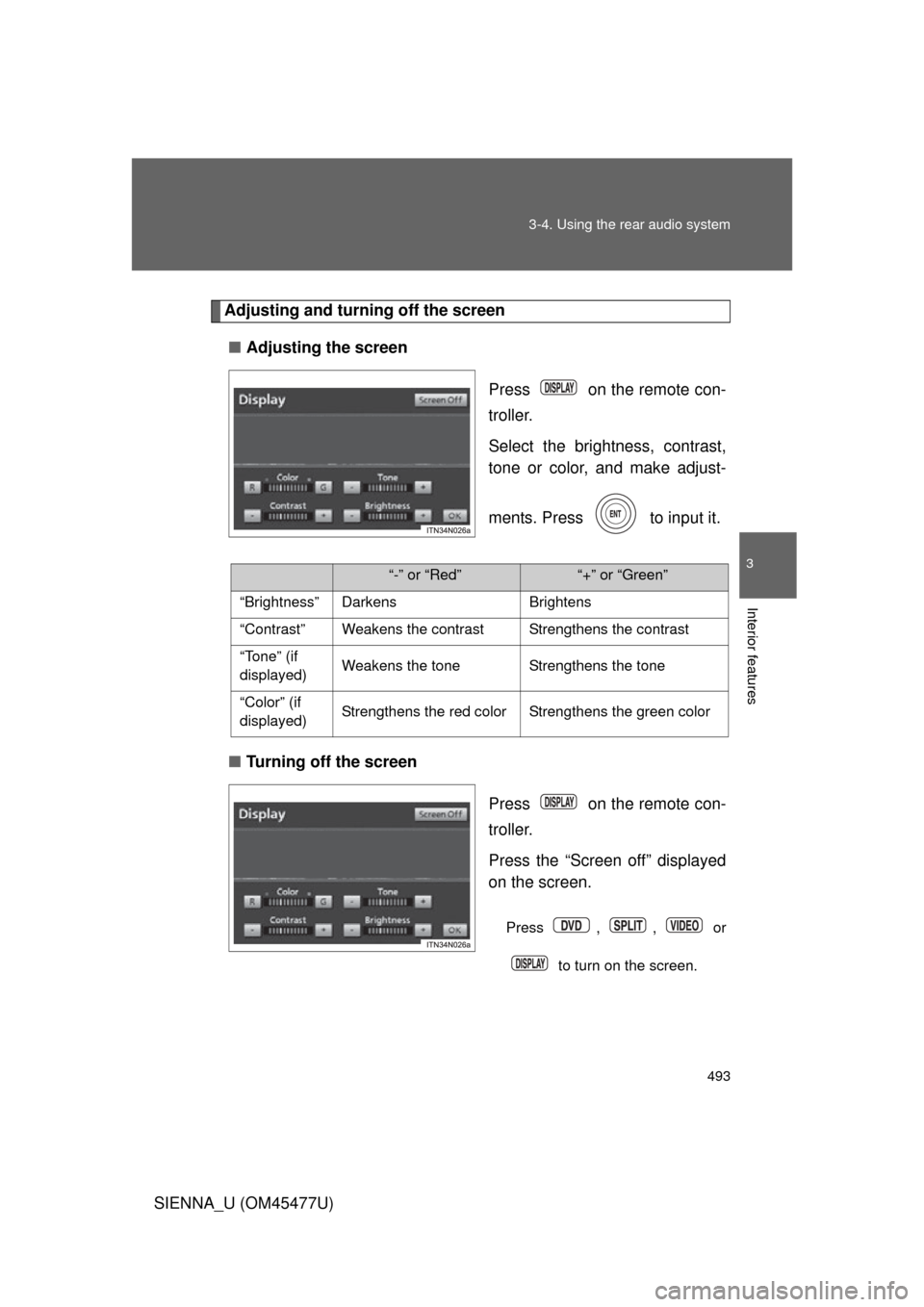
Adjusting and turning off the screen
■ Adjusting the screen
Press on the remote con-
troller.
Select the brightness, contrast,
tone or color, and make adjust-
ments. Press to input it.
■ Turning off the screen
Press on the remote con-
troller.
Press the “Screen off” displayed
on the screen.
Press , , or
to turn on the screen.
“-” or “Red”“+” or “Green”
“Brightness” Darkens Brightens
“Contrast” Weakens the contrast Strengthens the contrast
“Tone” (if
displayed) Weakens the tone Strengthens the tone
“Color” (if
displayed) Strengthens the red color Strengthens the green color
Page 495 of 860
495
3-4. Using the rear audio system
3
Interior features
SIENNA_U (OM45477U)
■
Headphone audio during split screen display
Audio from the left-hand screen will be played through the left headphone,
and audio from the right-hand screen will be played through the right head-
phone.
■ Error messages
MessageCauseCorrection Procedures
No disc found There is no disc in the
DVD player Insert a disc
Check disc• The disc is dirty or dam-
aged
• The disc is inserted upside down • Clean the disc
• Insert the disc correctly
DVD error• There is a malfunction
within the system
• Operation is stopped due to a high tempera-
ture inside the player • Eject the disc and allow
the player to cool down
• If the malfunction still exists, take the vehicle
to your Toyota dealer
No music files
found This indicates that no
playable data is
included in the disc
Eject the disc
Region code
errorThe DVD has an
incompatible DVD
region code Insert a DVD with a
compatible region code