Page 619 of 860
619
3-8. Other interior features
3
Interior features
SIENNA_U (OM45477U)
■
Deviation calibration
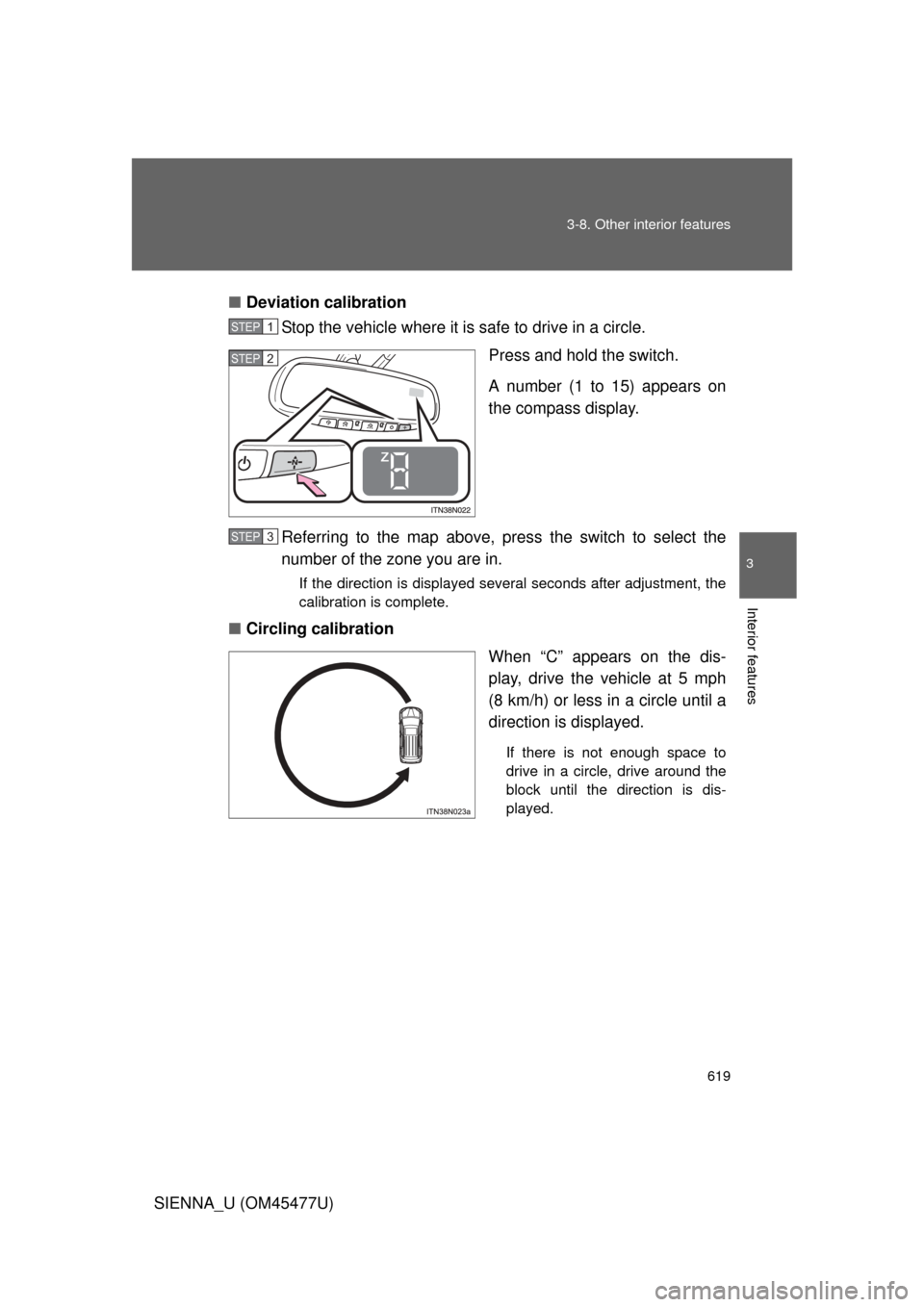
Stop the vehicle where it is safe to drive in a circle.
Press and hold the switch.
A number (1 to 15) appears on
the compass display.
Referring to the map above, pres s the switch to select the
number of the zone you are in.
If the direction is displayed several seconds after adjustment, the
calibration is complete.
■ Circling calibration
When “C” appears on the dis-
play, drive the vehicle at 5 mph
(8 km/h) or less in a circle until a
direction is displayed.
If there is not enough space to
drive in a circle, drive around the
block until the direction is dis-
played.
STEP1
STEP2
STEP3
Page 620 of 860

620 3-8. Other interior features
SIENNA_U (OM45477U)
■Conditions unfavorable to correct operation
The compass may not show the correct direction in the following conditions:
● The vehicle is stopped immediately after turning.
● The vehicle is on an inclined surface.
● The vehicle is in a place where the earth’s magnetic field is subject to
interference by artificial magnetic fields (underground car park/parking
lot, under a steel tower, between buildings, roof car park/parking lot, near
an intersection, near a large vehicle, etc.).
● The vehicle has become magnetized.
(There is a magnet or metal object near the trip information display.)
● The battery has been disconnected.
● A door is open.
CAUTION
■While driving the vehicle
Do not adjust the display. Be sure to adjust the display only when the vehicle
is stopped.
■ When doing the circling calibration
Be sure to secure a wide space, and watch out for people and vehicles in the
neighborhood. Do not violate any local traffic rules while performing circling
calibration.
Page 631 of 860
631
4-1. Maintenance and care
4
Maintenance and care
SIENNA_U (OM45477U)
■
High pressure car washes
● Do not allow the nozzles of the car wash to come within close proximity
of the windows.
● Before using car wash, check that the fuel filler door on your vehicle is
closed properly.
■ Aluminum wheels
● Remove any dirt immediately by using a neutral detergent. Do not use
hard brushes or abrasive cleaners. Do not use strong or harsh chemical
cleaners.
Use the same mild detergent and wax as used on the paint.
● Do not use detergent on the wheels when they are hot, for example after
driving for long distance in the hot weather.
● Wash detergent from the wheels immediately after use.
■ Bumpers and side moldings
Do not scrub with abrasive cleaners.
■ Notes for vehicles with a smar t key system (if equipped)
● If the door handle becomes wet while the electronic key is within the
effective range, the door may lock and unlock repeatedly. Place the key
in a position 6 ft. (2 m) or more separate from the vehicle while the vehi-
cle is being washed. (Take care to ensure that the key is not stolen.)
● If the electronic key is inside the vehicle and a door handle becomes wet
during a car wash, a message may be shown on the multi-information
display and a buzzer will sound outside the vehicle. To turn off the alarm,
lock all the doors.
Page 640 of 860

640 4-2. Maintenance
SIENNA_U (OM45477U)
■Allow inspection and repairs to be performed by a Toyota dealer
● Toyota technicians are well-trained specialists and are kept up to date
with the latest service information. They are well informed about the
operations of all systems on your vehicle.
● Keep a copy of the repair order. It proves that the maintenance that has
been performed is under warranty coverage. If any problem should arise
while your vehicle is under warranty, your Toyota dealer will promptly
take care of it.
■ Reset the maintenance data (U.S.A. only)
After the required maintenance is preformed according to the maintenance
schedule, please reset the maintenance data.
To reset the data, follow the procedures described below:
Vehicles without a smart key system
Switch the display to the trip meter A ( P. 244) and then turn the
engine switch off.
Vehicles with a smart key system
Switch the display to the trip meter A ( P. 244) and then turn the
“ENGINE START STOP” switch off.
Vehicles without a smart key system
While pressing the trip meter reset button ( P. 244), turn the
engine switch to the “ON” position.
Vehicles with a smart key system
While pressing the trip meter reset button ( P. 244), turn the
“ENGINE START STOP” switch to IGNITION ON mode.
Vehicles without a multi-information display
Continue to press and hold the button until the trip meter A displays
“000000”.
Vehicles with a multi-information display
Continue to press and hold the button until “COMPLETE” appears
on the multi-information display.
STEP1
STEP2
STEP3
Page 683 of 860
683
4-3. Do-it-yourself maintenance
4
Maintenance and care
SIENNA_U (OM45477U)
Tire inflation pressure
■Tire inflation pressure
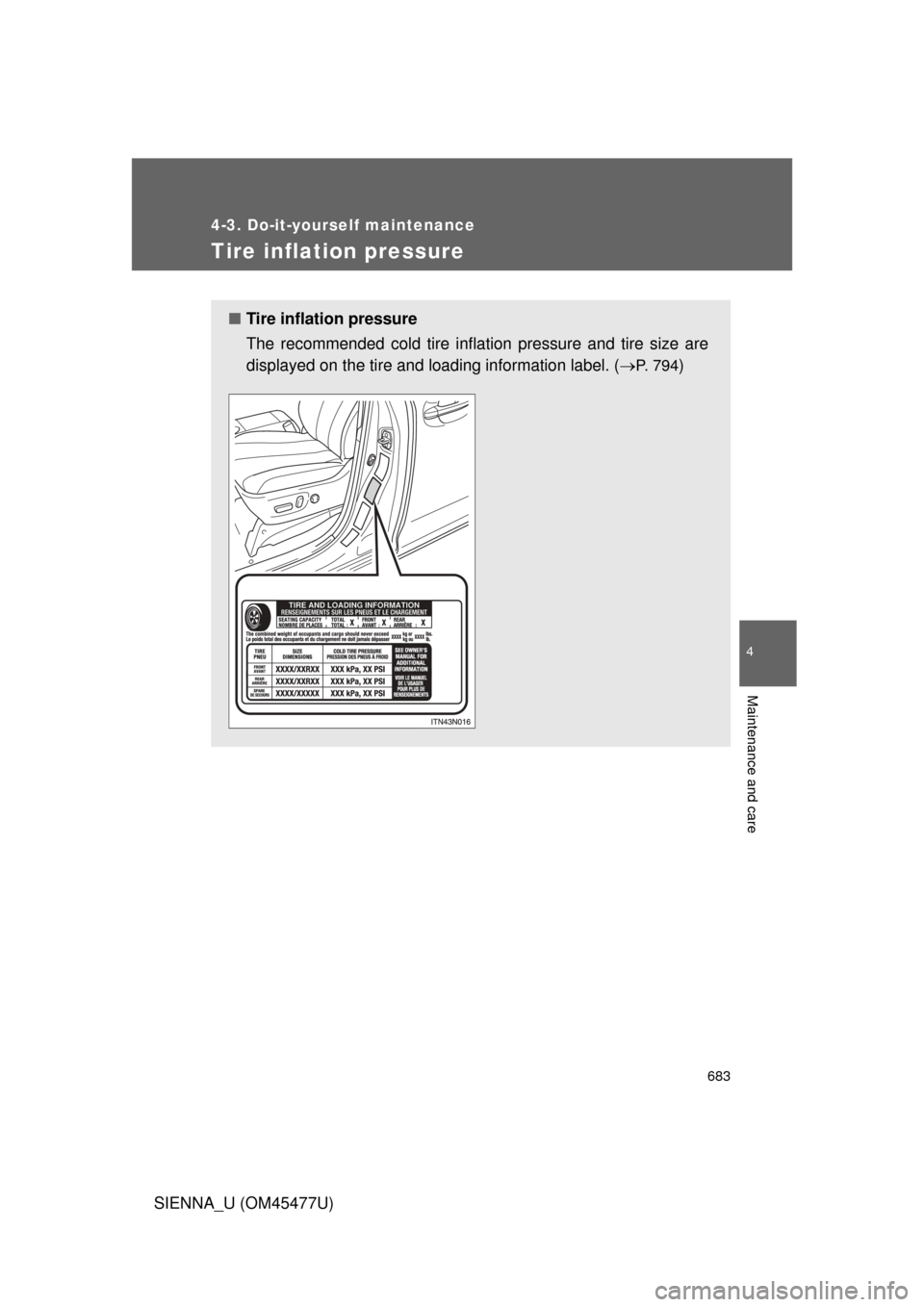
The recommended cold tire inflation pressure and tire size are
displayed on the tire and loading information label. (
P. 7 9 4)
Page 704 of 860
704 4-3. Do-it-yourself maintenance
SIENNA_U (OM45477U)■
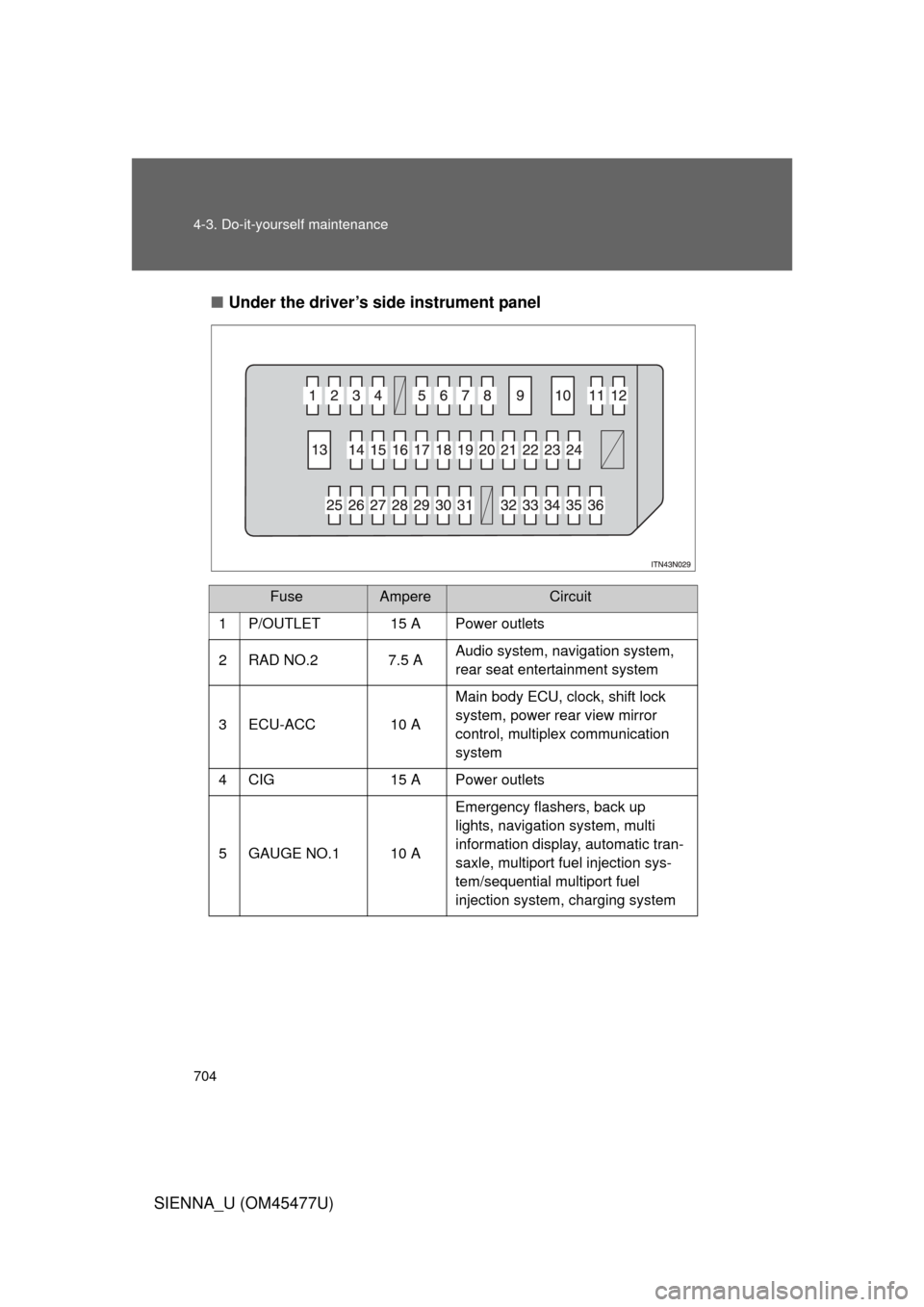
Under the driver’s side instrument panel
FuseAmpereCircuit
1P/OUTLET15 APower outlets
2 RAD NO.2 7.5 A Audio system, navigation system,
rear seat entertainment system
3 ECU-ACC 10 A Main body ECU, clock, shift lock
system, power rear view mirror
control, multiplex communication
system
4 CIG 15 A Power outlets
5 GAUGE NO.1 10 A Emergency flashers, back up
lights, navigation system, multi
information display, automatic tran-
saxle, multiport fuel injection sys-
tem/sequential multiport fuel
injection system, charging system
Page 706 of 860
706 4-3. Do-it-yourself maintenance
SIENNA_U (OM45477U)
FuseAmpereCircuit
16 PSD LH 25 A Power sliding door (left-side)
17 4WD 7.5 A Active Torque Control 4WD
18 AM1 10 A Starting system
19 GAUGE NO.2 7.5 A Gauges and meters, multi informa-
tion display
20 IG2 7.5 A Automatic transaxle, multiport fuel
injection system/sequential multi-
port fuel injection system, SRS air-
bag system, front passenger
occupant classification system,
steering lock system, smart key
system, starting system, fuel pump
21 PANEL 10 A Air conditioning system, navigation
system, front passenger’s seat belt
reminder light, audio system, steer-
ing switch, intuitive parking assist
switch, personal/interior light main
switch, shift lever light, headlight
levering switch, power door lock
main switch, clock, power quarter
window switch, seat heater switch,
emergency flashers, rear window
defogger switch, vehicle stability
control off switch, console box light,
power slide switch light
Page 721 of 860
When trouble arises5
721
SIENNA_U (OM45477U)
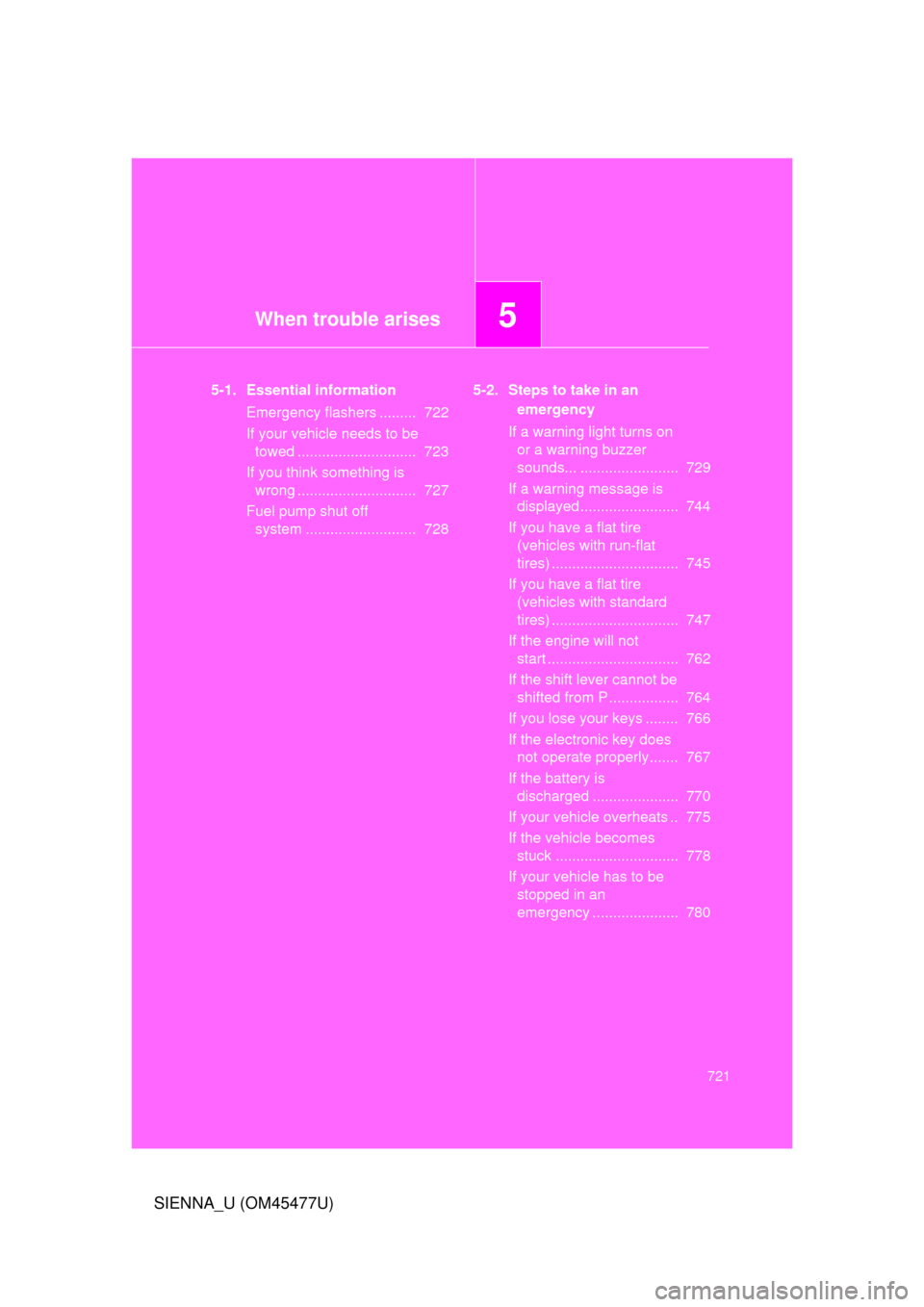
5-1. Essential informationEmergency flashers ......... 722
If your vehicle needs to be towed ............................. 723
If you think something is wrong ............................. 727
Fuel pump shut off system ........................... 728 5-2. Steps to take in an
emergency
If a warning light turns on or a warning buzzer
sounds... ........................ 729
If a warning message is displayed ........................ 744
If you have a flat tire (vehicles with run-flat
tires) ............................... 745
If you have a flat tire (vehicles with standard
tires) ............................... 747
If the engine will not start ................................ 762
If the shift lever cannot be shifted from P ................. 764
If you lose your keys ........ 766
If the electronic key does not operate properly....... 767
If the battery is discharged ..................... 770
If your vehicle overheats .. 775
If the vehicle becomes stuck .............................. 778
If your vehicle has to be stopped in an
emergency ..................... 780