Page 498 of 860
498 3-4. Using the rear audio system
SIENNA_U (OM45477U)
CAUTION
■While driving
Do not use headphones.
Doing so may cause an accident, resulting in death or serious injury.
■ When the rear seat entert ainment system is not used
Keep the display closed.
In the event of an accident or sudden braking, the opened display may hit an
occupant’s body, resulting in injury.
■ To prevent accidents and electric shock
Do not disassemble or modify the remote controller.
■ When the remote controller is not used
Stow the remote controller.
Injuries may result in the event of an accident or sudden braking.
■ Removed battery and other parts
Keep away from children. These parts are small and if swallowed by a child
they can cause choking. Failure to do so could result in death or serious
injury.
NOTICE
■For normal operation after replacing the battery
Observe the following precautions to prevent accidents.
● Always work with dry hands.
Moisture may cause the battery to rust.
● Do not touch or move any other components inside the remote controller.
● Do not bend either of the battery terminals.
Page 499 of 860
499
3-4. Using the rear audio system
3
Interior features
SIENNA_U (OM45477U)
Using the DVD player (DVD video)
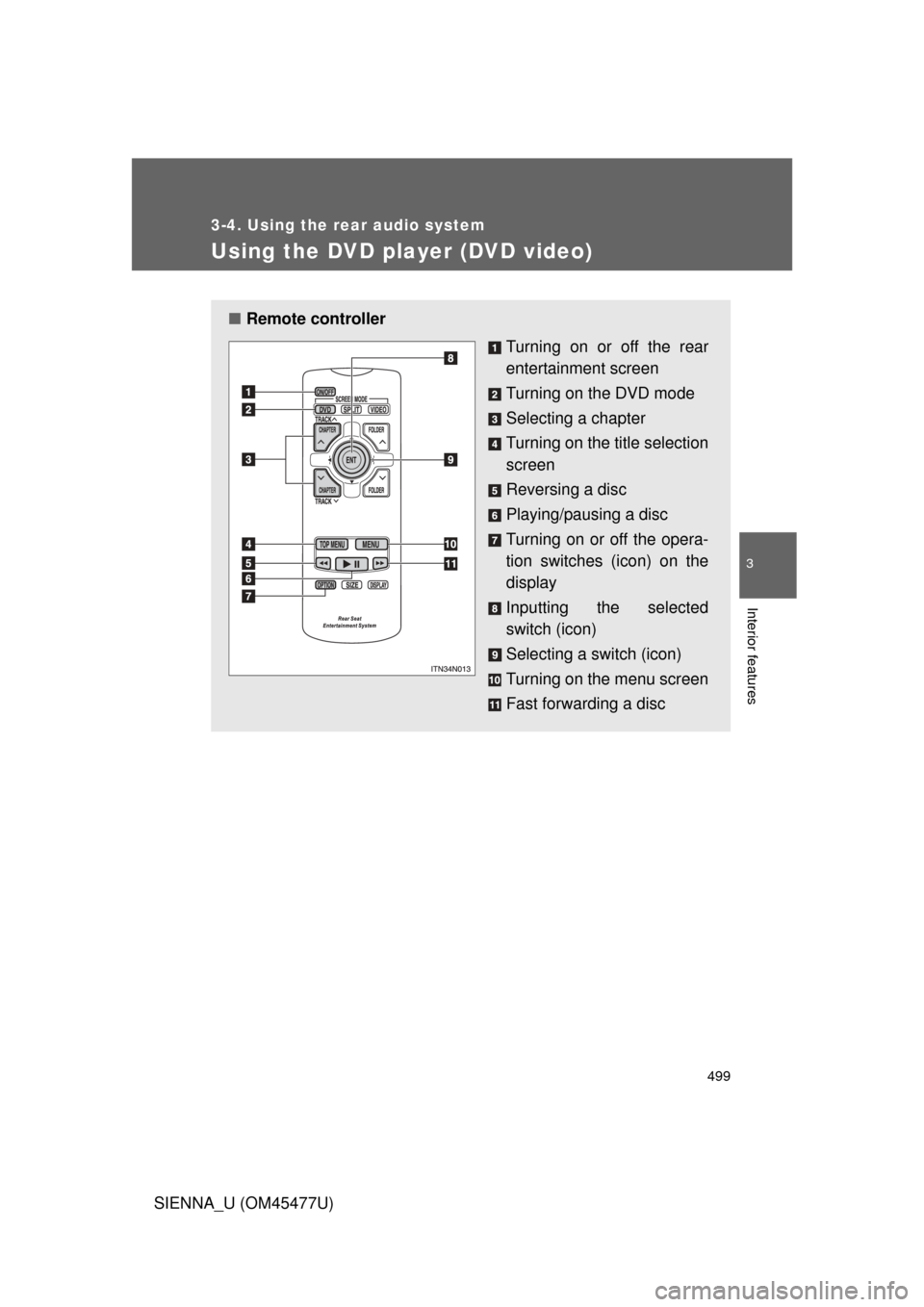
■Remote controller
Turning on or off the rear
entertainment screen
Turning on the DVD mode
Selecting a chapter
Turning on the title selection
screen
Reversing a disc
Playing/pausing a disc
Turning on or off the opera-
tion switches (icon) on the
display
Inputting the selected
switch (icon)
Selecting a switch (icon)
Turning on the menu screen
Fast forwarding a disc
Page 500 of 860
500 3-4. Using the rear audio system
SIENNA_U (OM45477U)
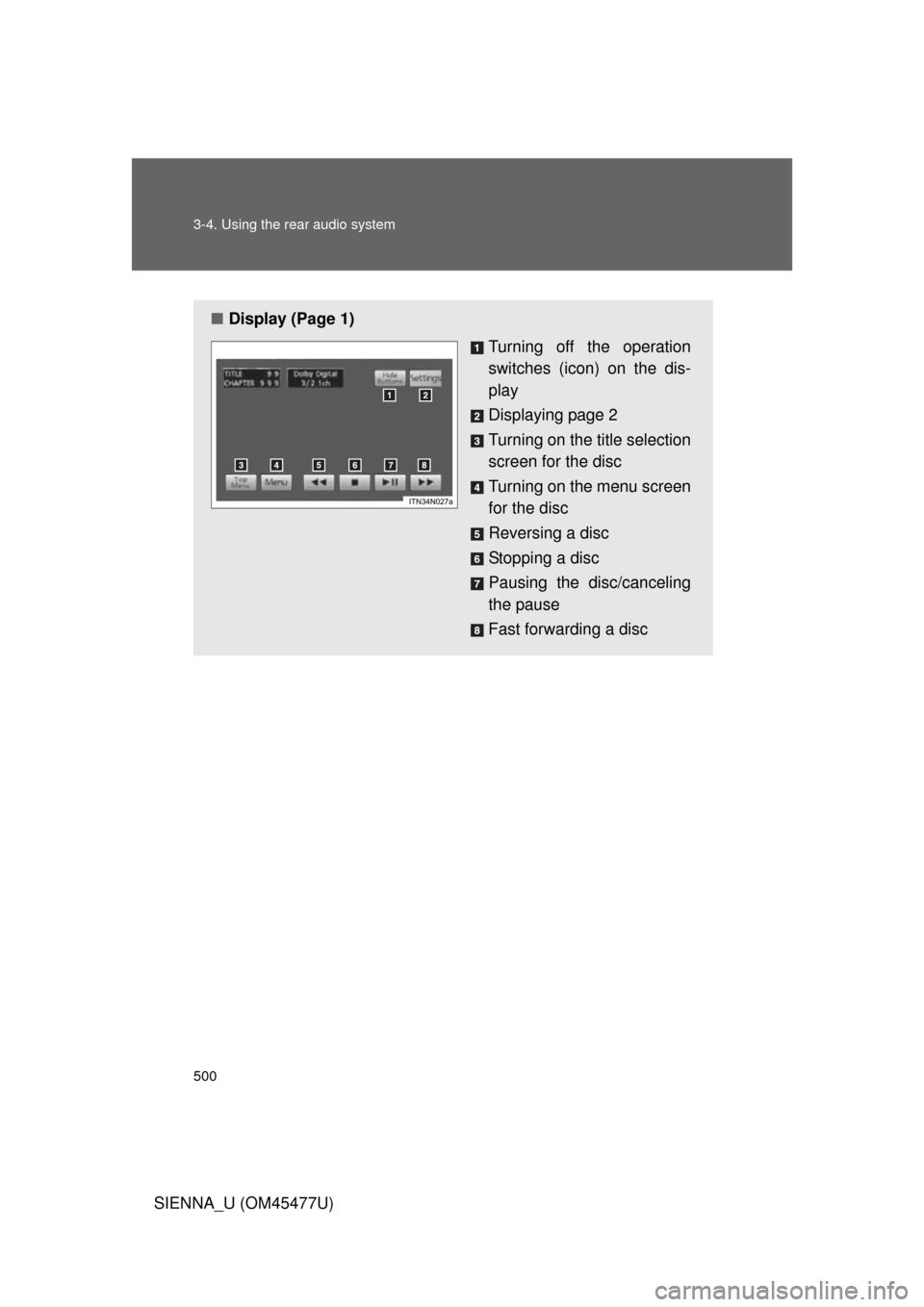
■Display (Page 1)
Turning off the operation
switches (icon) on the dis-
play
Displaying page 2
Turning on the title selection
screen for the disc
Turning on the menu screen
for the disc
Reversing a disc
Stopping a disc
Pausing the disc/canceling
the pause
Fast forwarding a disc
Page 501 of 860
501
3-4. Using the rear audio system
3
Interior features
SIENNA_U (OM45477U)
NOTICE
■
Cleaning the display
Wipe the display with a dry soft cloth.
If the screen is wiped with a rough cloth, the surface of the screen may be
scratched.
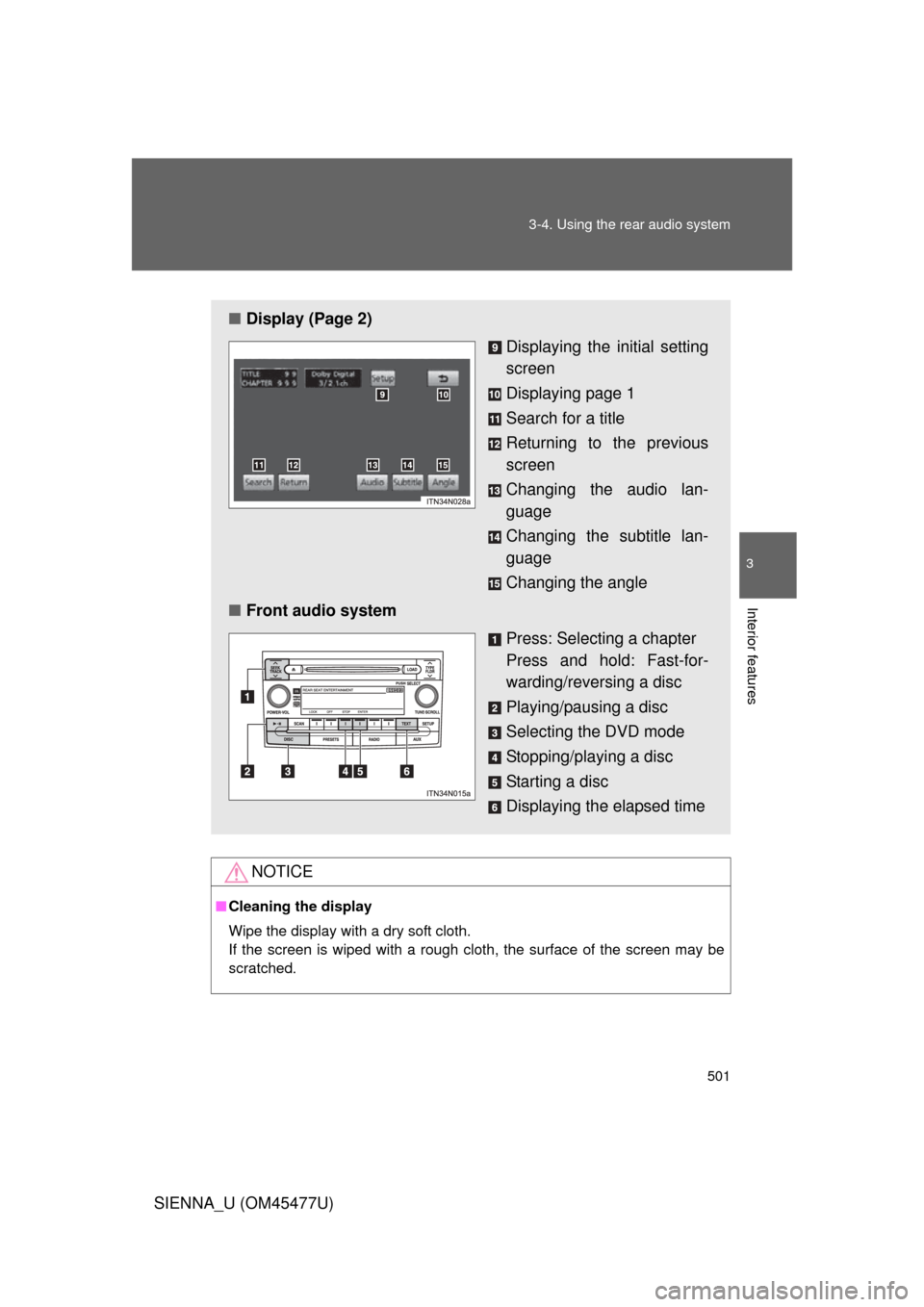
■ Display (Page 2)
Displaying the initial setting
screen
Displaying page 1
Search for a title
Returning to the previous
screen
Changing the audio lan-
guage
Changing the subtitle lan-
guage
Changing the angle
■ Front audio system
Press: Selecting a chapter
Press and hold: Fast-for-
warding/reversing a disc
Playing/pausing a disc
Selecting the DVD mode
Stopping/playing a disc
Starting a disc
Displaying the elapsed time
Page 504 of 860
504 3-4. Using the rear audio system
SIENNA_U (OM45477U)
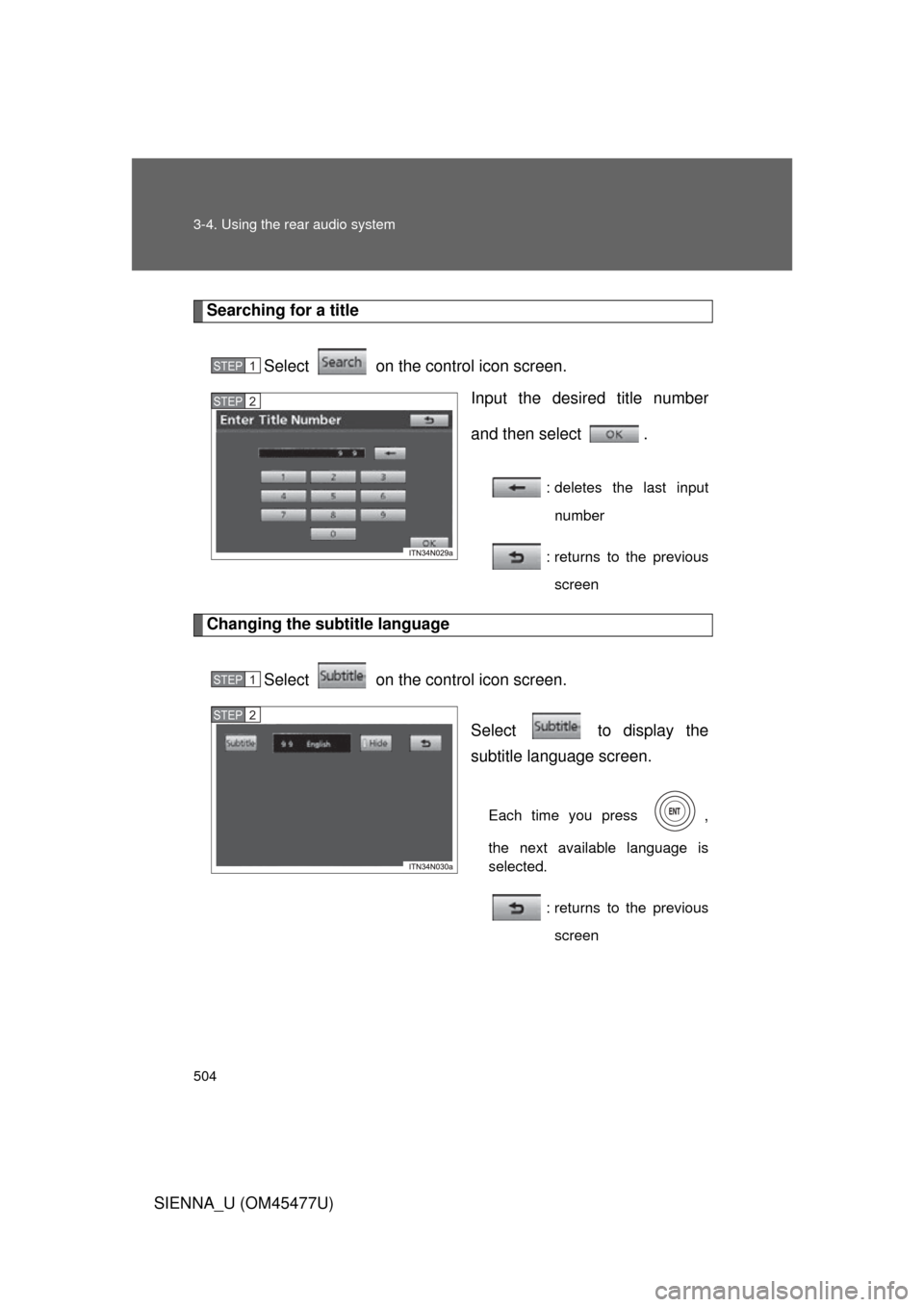
Searching for a titleSelect on the control icon screen. Input the desired title number
and then select .
: deletes the last inputnumber
: returns to the previous screen
Changing the subtitle language
Select on the control icon screen. Select to display the
subtitle language screen.
Each time you press ,
the next available language is
selected.: returns to the previousscreen
STEP1
STEP2
STEP1
STEP2
Page 505 of 860
505
3-4. Using the rear audio system
3
Interior features
SIENNA_U (OM45477U)
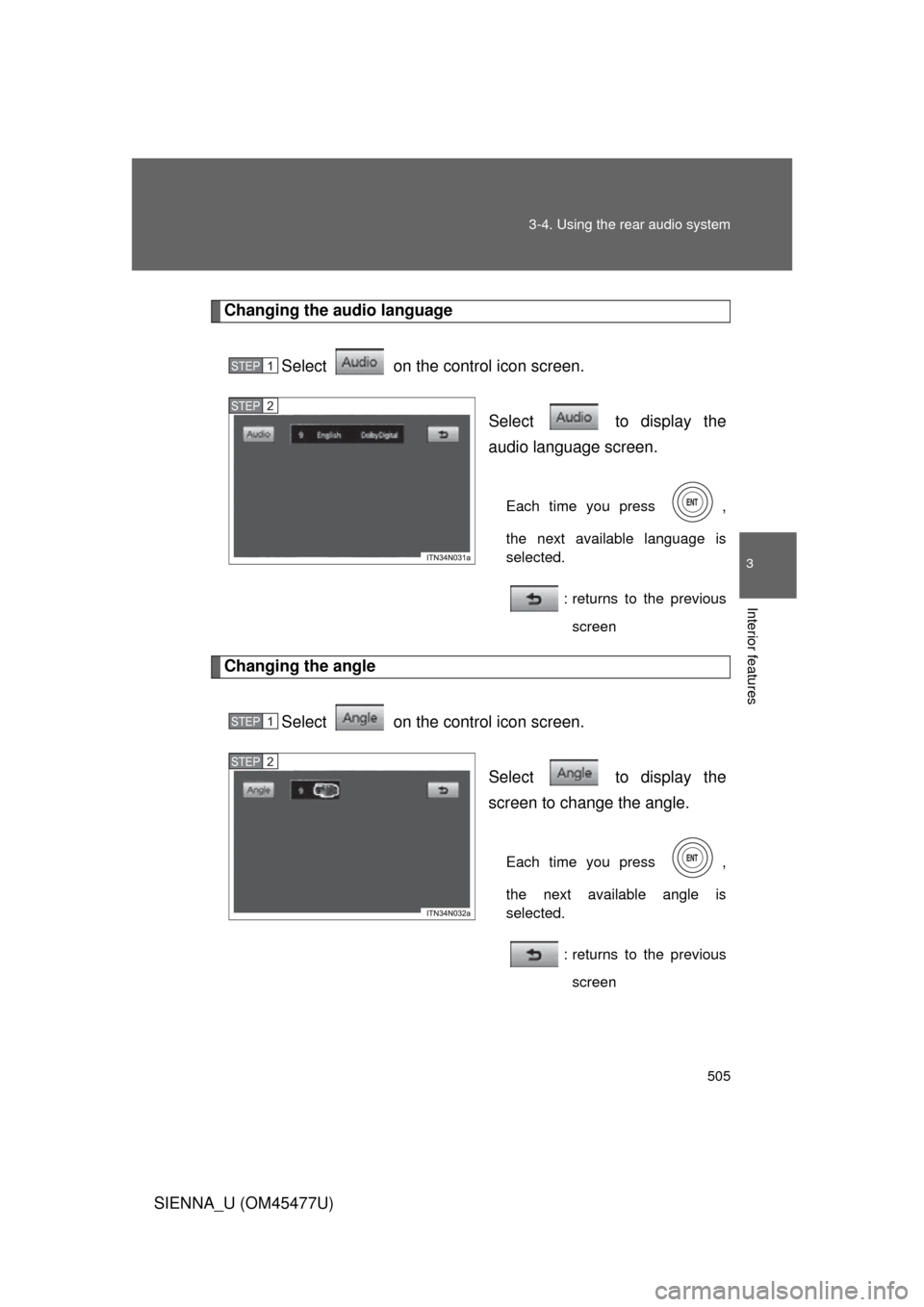
Changing the audio language
Select on the control icon screen. Select to display the
audio language screen.
Each time you press ,
the next available language is
selected.: returns to the previousscreen
Changing the angle
Select on the control icon screen. Select to display the
screen to change the angle.
Each time you press ,
the next available angle is
selected.: returns to the previousscreen
STEP1
STEP2
STEP1
STEP2
Page 509 of 860
509
3-4. Using the rear audio system
3
Interior features
SIENNA_U (OM45477U)
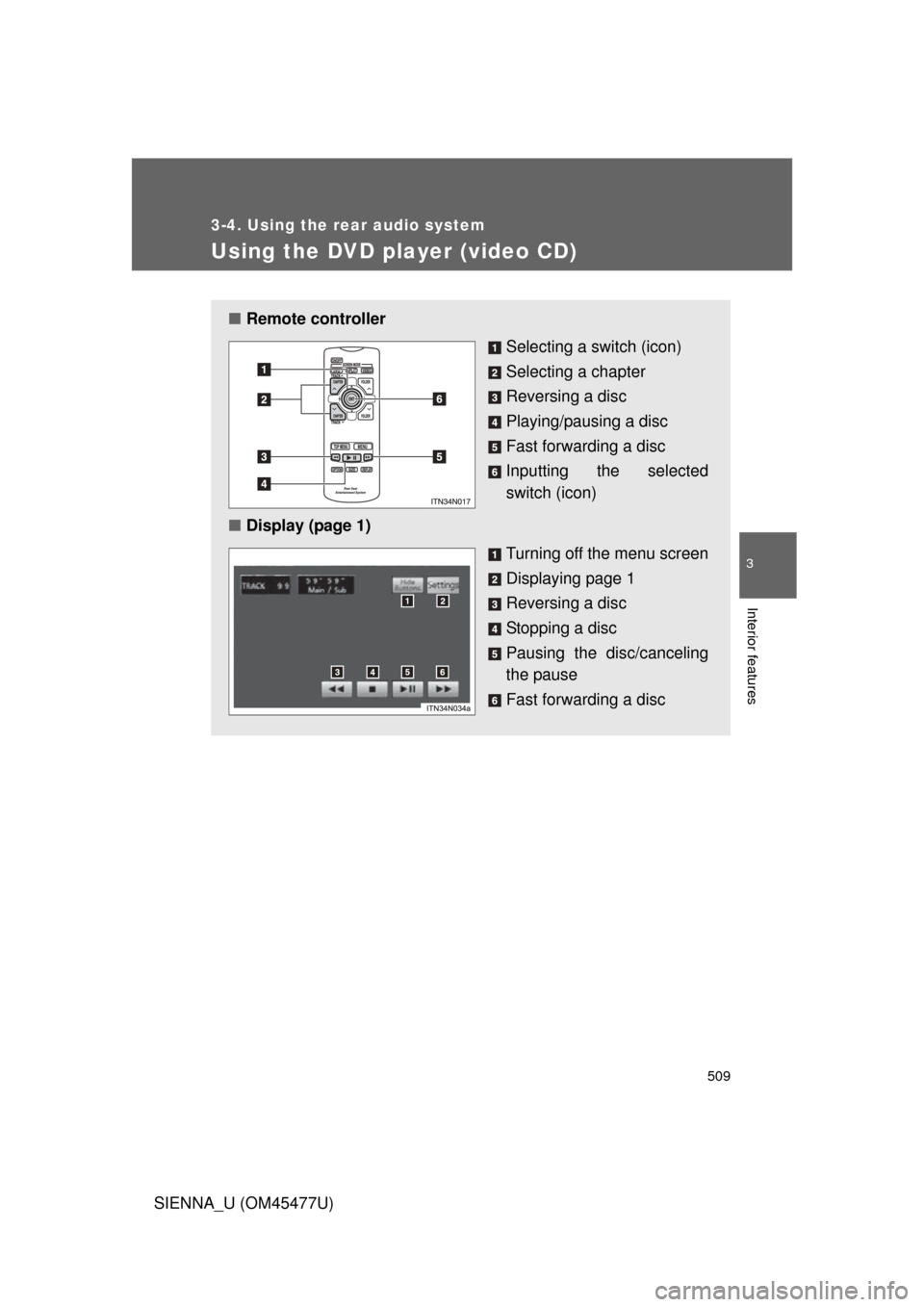
Using the DVD player (video CD)
■Remote controller
Selecting a switch (icon)
Selecting a chapter
Reversing a disc
Playing/pausing a disc
Fast forwarding a disc
Inputting the selected
switch (icon)
■ Display (page 1)
Turning off the menu screen
Displaying page 1
Reversing a disc
Stopping a disc
Pausing the disc/canceling
the pause
Fast forwarding a disc
Page 510 of 860
510 3-4. Using the rear audio system
SIENNA_U (OM45477U)
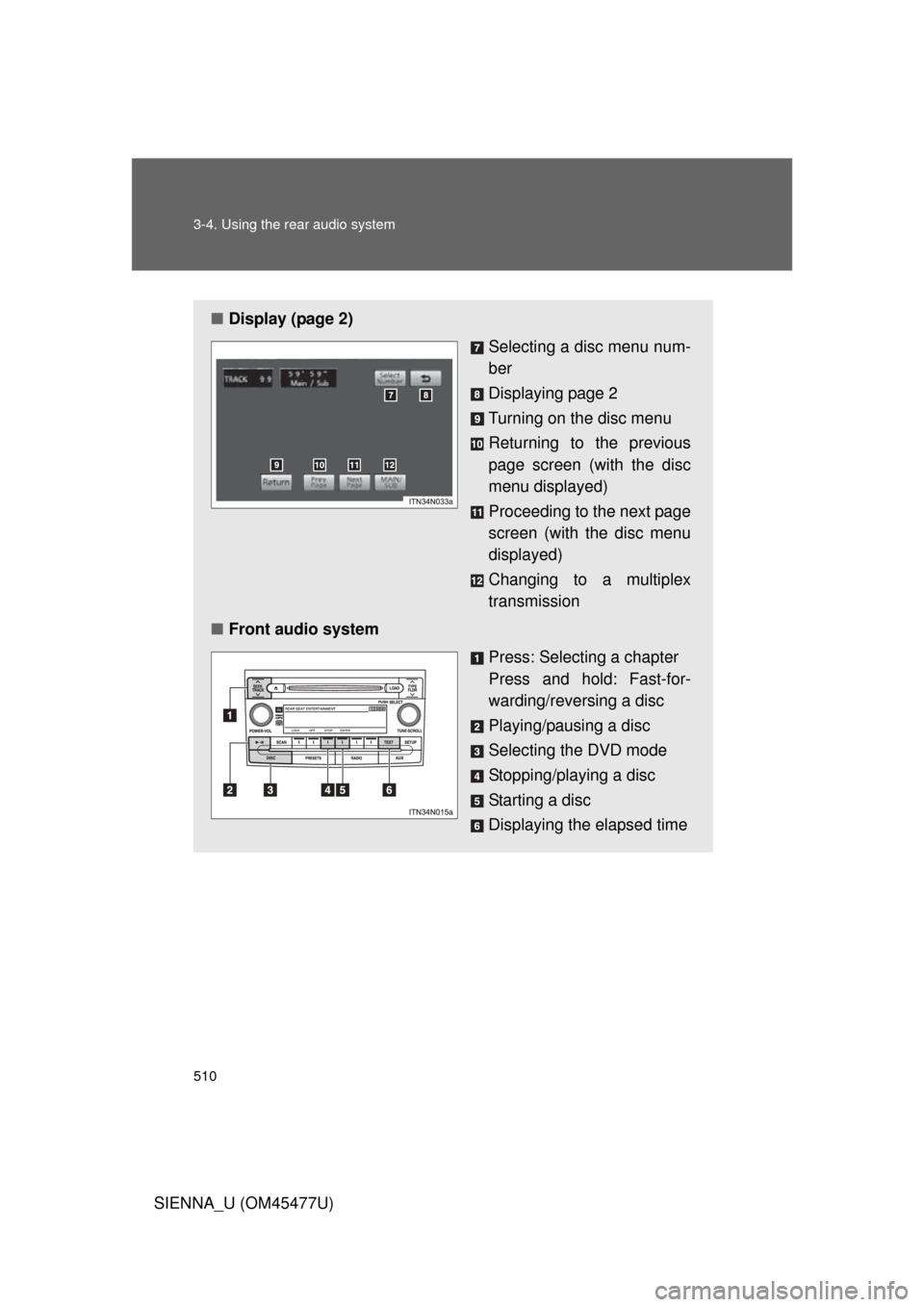
■Display (page 2)
Selecting a disc menu num-
ber
Displaying page 2
Turning on the disc menu
Returning to the previous
page screen (with the disc
menu displayed)
Proceeding to the next page
screen (with the disc menu
displayed)
Changing to a multiplex
transmission
■ Front audio system
Press: Selecting a chapter
Press and hold: Fast-for-
warding/reversing a disc
Playing/pausing a disc
Selecting the DVD mode
Stopping/playing a disc
Starting a disc
Displaying the elapsed time