2010 MERCEDES-BENZ SLS COUPE navigation
[x] Cancel search: navigationPage 106 of 361
X
Slide 001F0013repeatedly until the list is dis-
played without the speller.
or
X Select 0005and press 0017.
If COMAND can unambiguousl yassign the
characters entered to one entry, the list with-
out speller appears automatically.
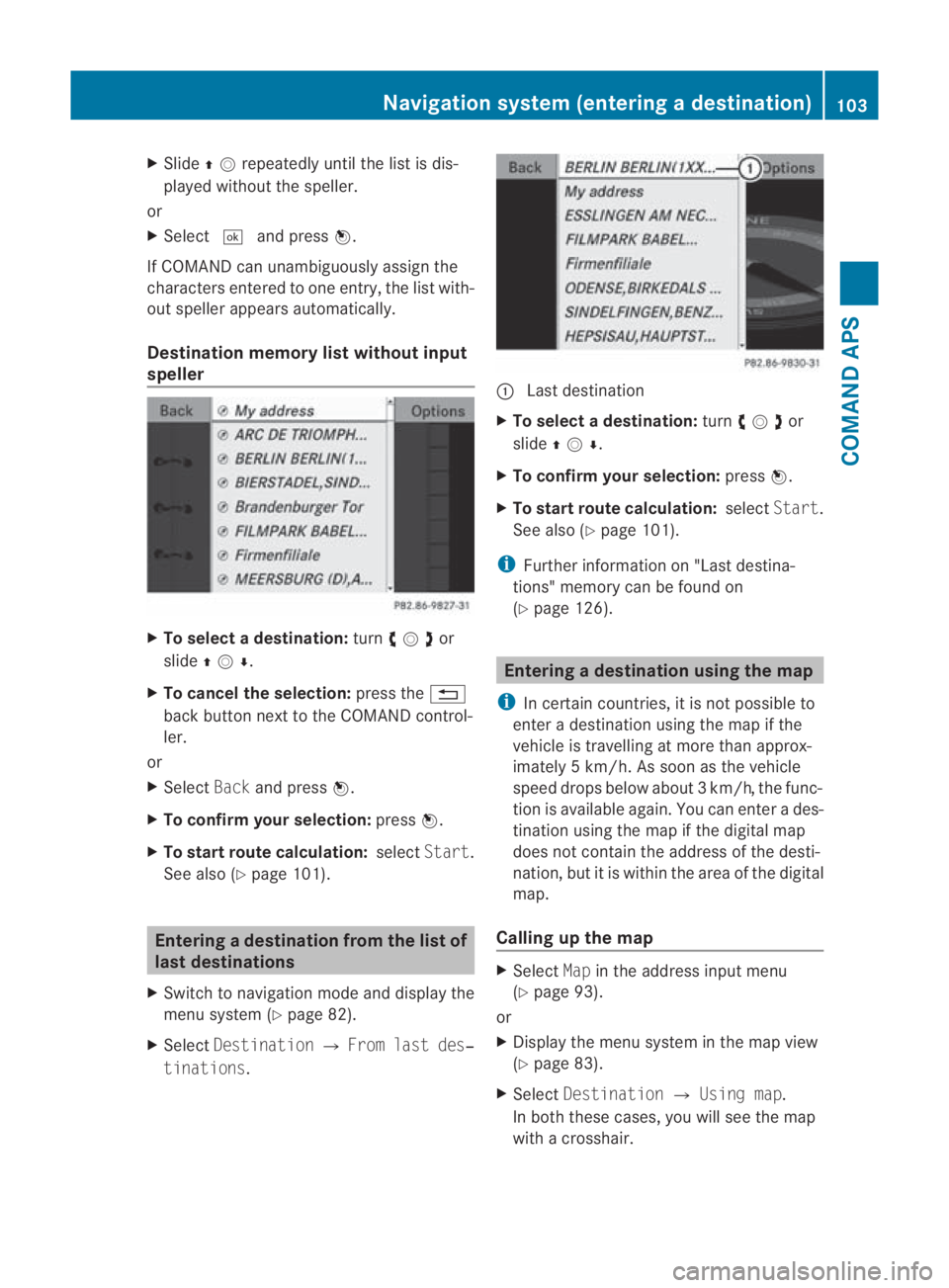
Destination memory list without input
speller X
To selectad estination:turn002800130029or
slide 001F0013000D .
X To cancel the selection: press the0001
back button next to the COMAND control-
ler.
or
X Select Backand press 0017.
X To confirm your selection: press0017.
X To start route calculation: selectStart.
See also (Y page 101). Entering
adestination from the list of
last destinations
X Switch to navigation mode and display the
menu system (Y page 82).
X Select Destination 0004From last des‐
tinations . 0001
Last destination
X To select adestination: turn002800130029or
slide 001F0013000D .
X To confirm your selection: press0017.
X To start route calculation: selectStart.
See also (Y page 101).
i Further information on "Last destina-
tions" memory can be found on
(Y page 126). Entering
adestination usin gthe map
i In certain countries, it is not possible to
enter a destination using the map if the
vehicle is travelling at more than approx-
imately 5 km/h. As soon as the vehicle
speed drops below about 3km/h, the func-
tion is available again. You can enter a des-
tination using the map if the digital map
does not contain the address of the desti-
nation, but it is withi nthe area of the digital
map.
Calling up the map X
Select Mapin the address input menu
(Y page 93).
or
X Display the menu system in the map view
(Y page 83).
X Select Destination 0004Using map.
In both these cases, you will see the map
with a crosshair. Navigation system (entering
adestination)
103COMAND APS
BA 197 ECE RE 2010/6a; 1; 2, en-GB
sabbaeu Version: 3.0.3.6 2010-05-07T14:19:43+02:00 - Seite 103 Z
Page 107 of 361
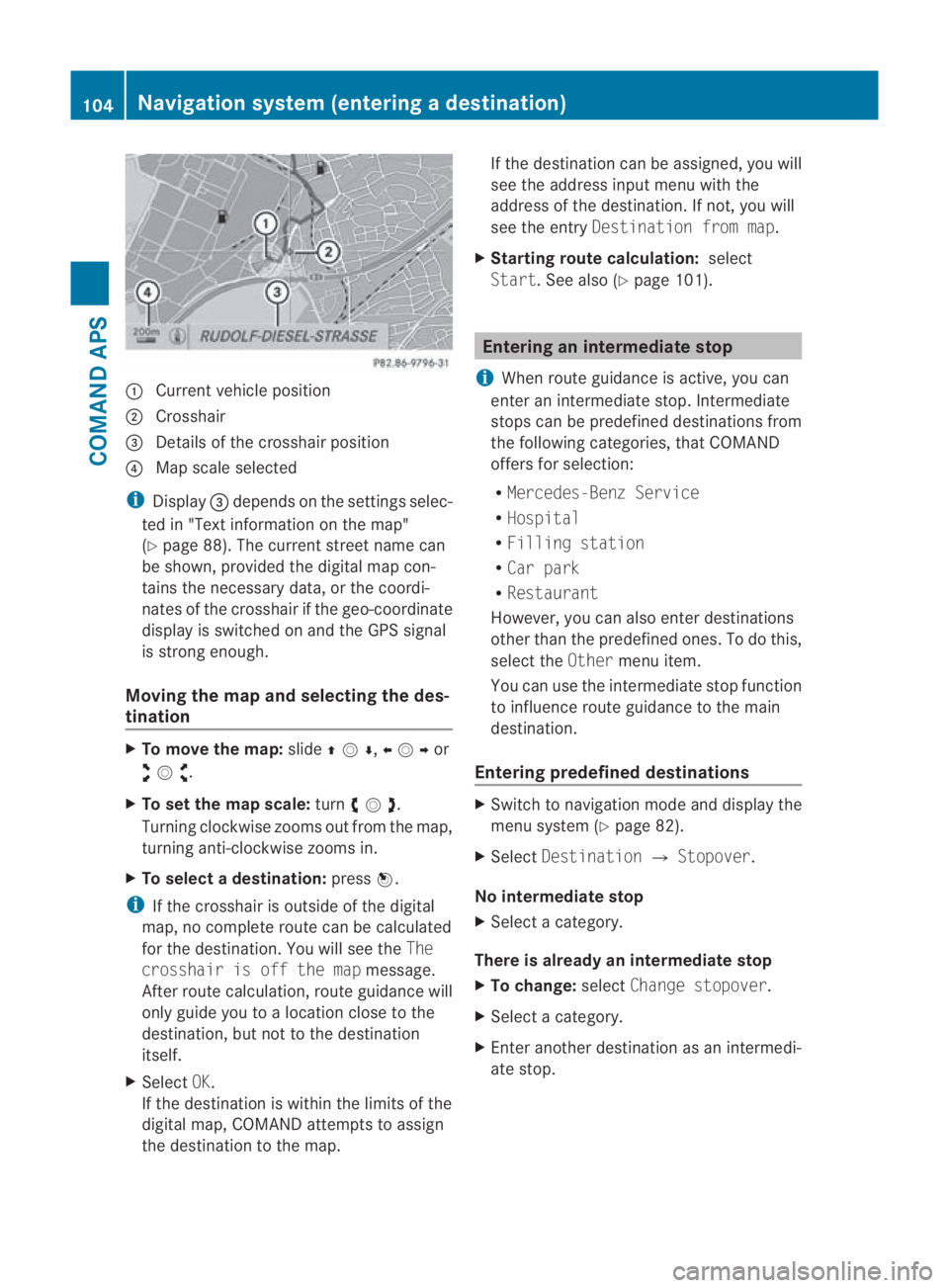
0001
Curren tvehicle position
0002 Crosshair
0015 Details of the crosshair position
0014 Map scale selected
i Display 0015depends on the settings selec-
ted in "Text information on the map"
(Y page 88). The current street name can
be shown, provided the digital map con-
tains the necessary data, or the coordi-
nates of the crosshair if the geo-coordinate
display is switched on and the GPS signal
is strong enough.
Moving the map and selecting the des-
tination X
To move the map: slide001F0013000D ,002B0013002Cor
002A00130027 .
X To set the map scale: turn002800130029 .
Turning clockwise zooms out from the map,
turning anti-clockwise zooms in.
X To select adestination: press0017.
i If the crosshair is outside of the digital
map, no complete route can be calculated
for the destination .You will see the The
crosshair is off the map message.
After route calculation, route guidance will
only guide you to a location close to the
destination, but not to the destination
itself.
X Select OK.
If the destination is within the limits of the
digital map, COMAND attempts to assign
the destination to the map. If the destination can be assigned, you will
see the address input menu with the
address of the destination .Ifnot, you will
see the entry Destination from map.
X Starting route calculation: select
Start.S ee also (Y page 101). Entering an intermediate stop
i When route guidance is active, you can
enter an intermediate stop. Intermediate
stops can be predefined destinations from
the following categories, that COMAND
offers for selection:
R Mercedes-Benz Service
R Hospital
R Filling station
R Car park
R Restaurant
However, you can also enter destinations
other than the predefined ones. To do this,
select the Othermenu item.
You can use the intermediate stop function
to influence route guidance to the main
destination.
Entering predefined destinations X
Switch to navigation mode and display the
menu system (Y page 82).
X Select Destination 0004Stopover.
No intermediate stop
X Select a category.
There is already an intermediate stop
X To change: selectChange stopover.
X Select a category.
X Enter another destination as an intermedi-
ate stop. 104
Navigation system (entering
adestination)COMAND APS
BA 197 ECE RE 2010/6a; 1; 2, en-GB
sabbaeu Version: 3.0.3.6
2010-05-07T14:19:43+02:00 - Seite 104
Page 108 of 361
Selecting
acategory
COMAND first searches in the selected cate-
gory for destinations along the route .Ifthere
are no destinations available there, COMAND
searches for destinations in an area around
the vehicle position.
If COMAND does not find any destinations,
you will see a message to this effect.
X Select OK.
X If necessary, select another category.
If COMAND finds destinations, a list
appears on the right-hand side of the dis-
play.
Here the intermediate stops of the selected
category are listed, increasing in distance
from the current vehicle position.
The list shows:
R
name
R details on intermediate stop position in
regard to direction of travel
R current distance to the intermediate stop
i For intermediate stops that are not loca-
ted along the calculated route, the linear
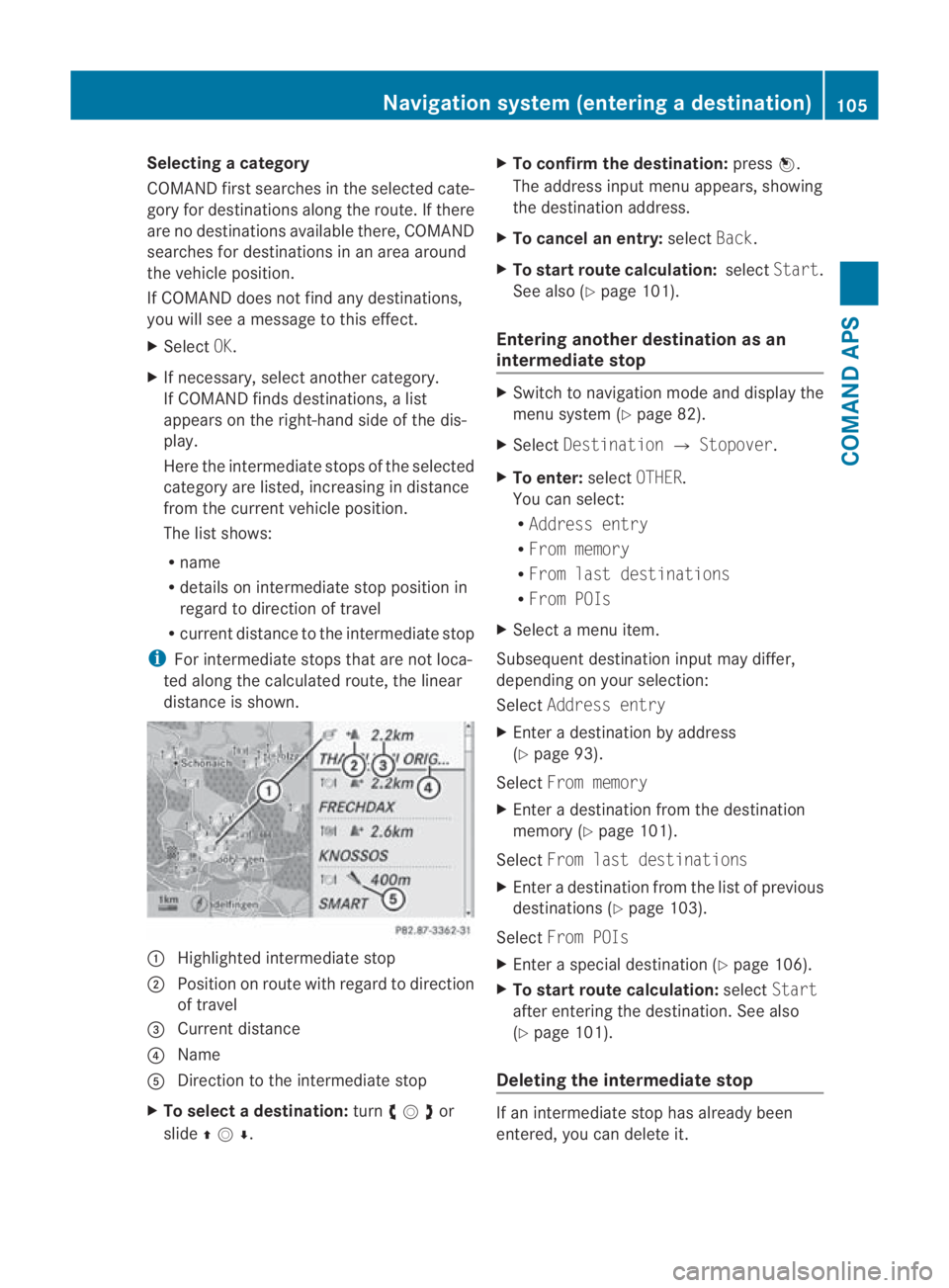
distance is shown. 0001
Highlighted intermediate stop
0002 Position on route with regard to direction
of travel
0015 Current distance
0014 Name
0012 Direction to the intermediate stop
X To selectad estination:turn002800130029or
slide 001F0013000D . X
To confirm the destination: press0017.
The address input menu appears, showing
the destination address.
X To cancel an entry: selectBack.
X To start route calculation: selectStart.
See also (Y page 101).
Entering another destinatio nas an
intermediate stop X
Switch to navigation mode and display the
menu system (Y page 82).
X Select Destination 0004Stopover .
X To enter: selectOTHER.
You can select:
R Address entry
R From memory
R From last destinations
R From POIs
X Select a menu item.
Subsequent destination input may differ,
depending on your selection:
Select Address entry
X Enter a destination by address
(Y page 93).
Select From memory
X Enter a destination from the destination
memory (Y page 101).
Select From last destinations
X Enter a destination from the list of previous
destinations (Y page 103).
Select From POIs
X Enter a special destination (Y page 106).
X To start route calculation: selectStart
after entering the destination. See also
(Y page 101).
Deleting the intermediate stop If an intermediate stop has already been
entered, you can delete it.Navigation system (entering
adestination)
105COMAND APS
BA 197 ECE RE 2010/6a; 1; 2, en-GB
sabbaeu Version: 3.0.3.6
2010-05-07T14:19:43+02:00 - Seite 105 Z
Page 109 of 361
X
If necessary, switch to navigation mode
and display the menu system (Y page 82).
X Select Destination 0004Stopover 0004
Delete stopover.
COMAND deletes the intermediate stop
and recalculates the route to the main des-
tination. Navigation system (entering special
destinations) Entering
aspecial destination in the
vicinity of the destination
X In map view with the menu system dis-
played (Y page 82), select Destination
0004 From POIs 0004Near destination.
X Continue with assigning the special desti-
nation category (Y page 106).
i Entering a special destination in the vicin-
ity of the destination is only possible when
route guidance is active. Entering
aspecial destination in the
vicinity of the current position
X Select Destination 0004From POIs 0004
Current position in map view with the
menu system displayed.
X Continue with assigning the special desti-
nation category. Entering
aspecial destination in the
vicinity of atown
Option 1 X
Select Destination 0004From POIs 0004
Other town in map view with the menu
system displayed.
X Select country (Y page 93).
X To enter a town: selectTown.
You see the list of towns with input speller. X
Proceed as described in the "Entering a
town" sectio n(Ypage 94).
X After entering the town, determine the spe-
cial destination category (Y page 106).
Option 2 X
Enter an address in the address input
menu.
X Select POI.
X Determine the special destination category
(Y page 106). Entering
aspecial destination using
name search
i This function gives you access to all spe-
cial destinations available in the digital
map.
X In map view with the menu system dis-
played (Y page 82), select Destination
0004 From POIs 0004Search by name.
You see the input speller and a list of all
special destinations in the digital map.
X Proceed as described in the "Special des-
tination list with input speller" section
(Y page 110). Assigning
aspecial destination cate-
gory
The categories and special destinations avail-
able depend on the vehicle position you have
set for the special destination.
R Special destination in the vicinity of the
destination:
Alphabetically sorted categories are avail-
able, as well as special destinations in the
vicinity of the destination position arranged
by distance.
R Special destination in the vicinity of the
current position:
Alphabetically sorted categories are avail-
able, as well as special destinations in the 106
Navigation system (entering special destinations)COMAND APS
BA 197 ECE RE 2010/6a; 1; 2, en-GB
sabbaeu
Version: 3.0.3.6 2010-05-07T14:19:43+02:00 - Seite 106
Page 110 of 361
vicinity of the vehicle position arranged by
distance.
R Special destination withi nagiven town:
If you have only entered the country and the
town, alphabetically sorted categories and
alphabetically sorted special destinations
within the town are available.
If you have entered more than the country
and the town, alphabetically sorted cate-
gories and special destination sinthe vicin-
ity of the address entered and arranged in
order of distance are available.
R Special destination using name search:
An alphabetically sorted list of all special
destinations is available.
Selecting acategory Depending on the numbe
rofavailable cate-
gories, the main category listi s displayed
either with or without the input speller during
category input (Y page 108).
Main category list with the input speller
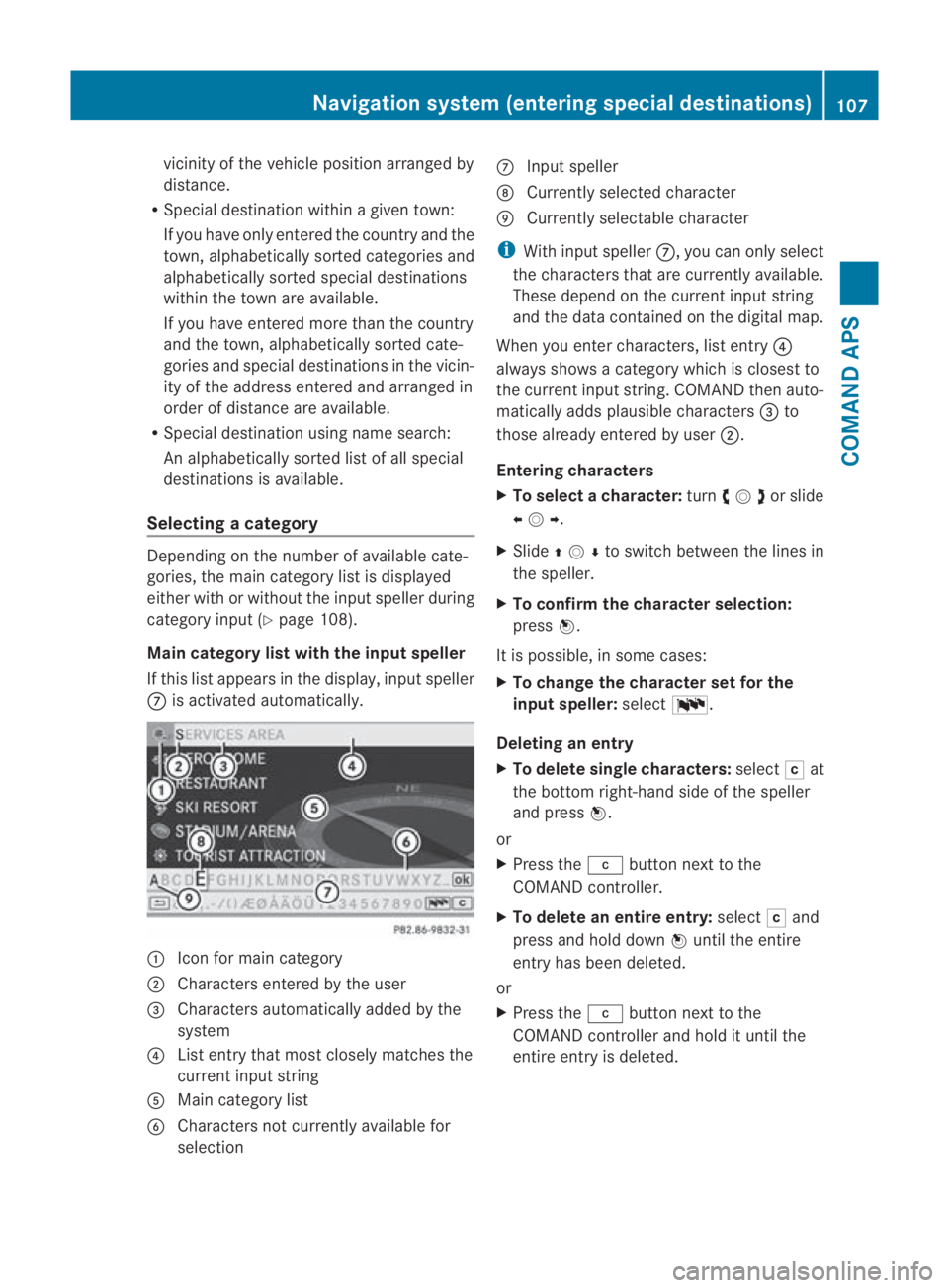
If this list appears in the display, input speller
000A is activated automatically. 0001
Icon for main category
0002 Characters entered by the user
0015 Characters automatically added by the
system
0014 List entry that most closely matches the
current input string
0012 Main category list
0013 Characters not currently available for
selection 000A
Input speller
000B Currently selected character
000C Currently selectable character
i With input speller 000A, you can only select
the characters that are currently available.
These depend on the current input string
and the data contained on the digital map.
When you enter characters, list entry 0014
always shows a category which is closest to
the current input string. COMAND then auto-
matically adds plausible characters 0015to
those already entered by user 0002.
Entering characters
X To selectac haracter:turn002800130029or slide
002B0013002C .
X Slide 001F0013000D to switch between the lines in
the speller.
X To confirm the character selection:
press 0017.
It is possible, in some cases:
X To change the character set for the
input speller: select0014.
Deleting an entry
X To delete single characters: select0004at
the bottom right-hand side of the speller
and press 0017.
or
X Press the 0013button next to the
COMAND controller.
X To delete an entire entry: select0004and
press and hold down 0017until the entire
entry has been deleted.
or
X Press the 0013button next to the
COMAND controlle rand hold it until the
entire entry is deleted. Navigation system (enterin
gspecial destinations)
107COMAND APS
BA 197 ECE RE 2010/6a; 1; 2, en-GB
sabbaeuV ersion: 3.0.3.6
2010-05-07T14:19:43+02:00 - Seite 107 Z
Page 111 of 361
Cancelling an entry
X
Select 0002at the botto mleft-hand side in
the speller and press 0017.
or
X Press the 0001back button next to the
COMAND controller.
The previous menu appears.
Accepting the first list entry
X Press and hold 0017until the list is displayed
without the speller.
i If COMAND can unambiguously assign
the characters entered to one entry, the list
is automatically displayed without the
speller.
Switching to the main category list with-
out the input speller
It is also possible to change to the list at any
time during character input.
X Slide 001F0013repeatedly until the list is dis-
played without the speller.
or
X Select 0005and press 0017.
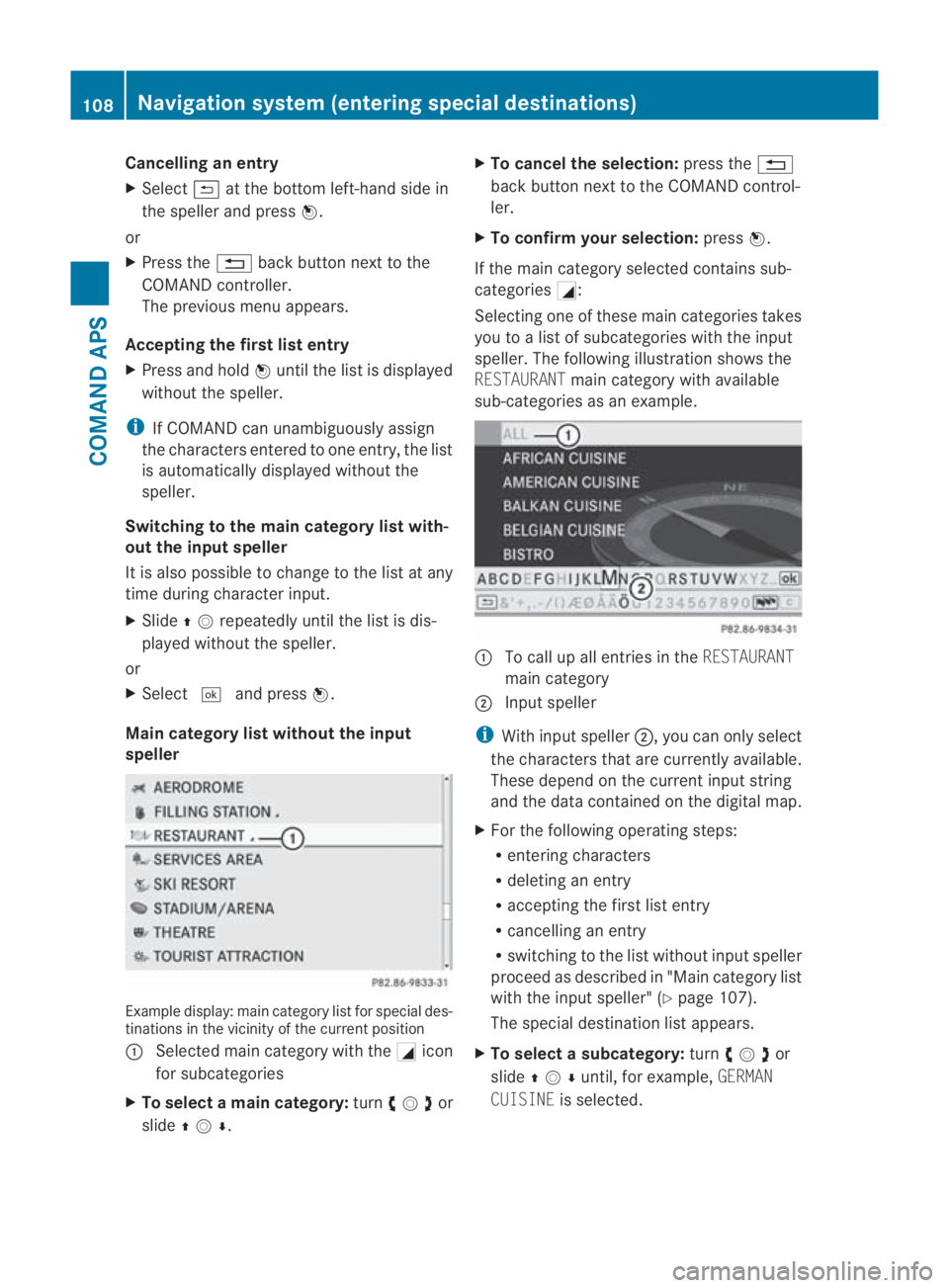
Main category list without the input
speller Example display:m
ain category list for special des-
tinations in the vicinity of the current position
0001 Selected main category with the 0005icon
for subcategories
X To select amain category: turn002800130029 or
slide 001F0013000D . X
To cancel the selection: press the0001
back button next to the COMAND control-
ler.
X To confirm your selection: press0017.
If the main category selected contains sub-
categories 0005:
Selecting one of these main categories takes
you to a list of subcategories with the input
speller. The following illustratio nshows the
RESTAURANT main category with available
sub-categories as an example. 0001
To call up all entries in the RESTAURANT
main category
0002 Input speller
i With input speller 0002, you can only select
the characters that are currently available.
These depend on the current input string
and the data contained on the digital map.
X For the following operating steps:
R
entering characters
R deleting an entry
R accepting the first list entry
R cancelling an entry
R switching to the list without input speller
proceed as described in "Main category list
with the input speller" (Y page 107).
The special destination list appears.
X To selectas ubcategory: turn002800130029or
slide 001F0013000Duntil, for example, GERMAN
CUISINE is selected. 108
Navigation system (entering special destinations)COMAND APS
BA 197 ECE RE 2010/6a; 1; 2, en-GB
sabbaeu
Version: 3.0.3.6 2010-05-07T14:19:43+02:00 - Seite 108
Page 112 of 361
X
To cancel the selection: press the0001
back button next to the COMAND control-
ler.
X To confirm your selection: press0017.
The special destination list is displayed
after you have selected a subcategory .It
contains the special destinations that are
available in the subcategory and are within
the search radius.
i If you select the ALLlist item, the special
destination list contains al lspecial desti-
nations for all subcategories in the RES‐
TAURANT main category which lie within the
search radius. The OTHERlist item at the
end of the list contains all special destina-
tions which cannot be assigned to any sub-
category of the RESTAURANTmain category
and which lie within the search radius.
If the main category selected does not con-
tain any subcategories:
Selecting it calls up the special destination
list immediately. The special destination list
then contains the special destinations that
are available in the main category and are
within the search radius.
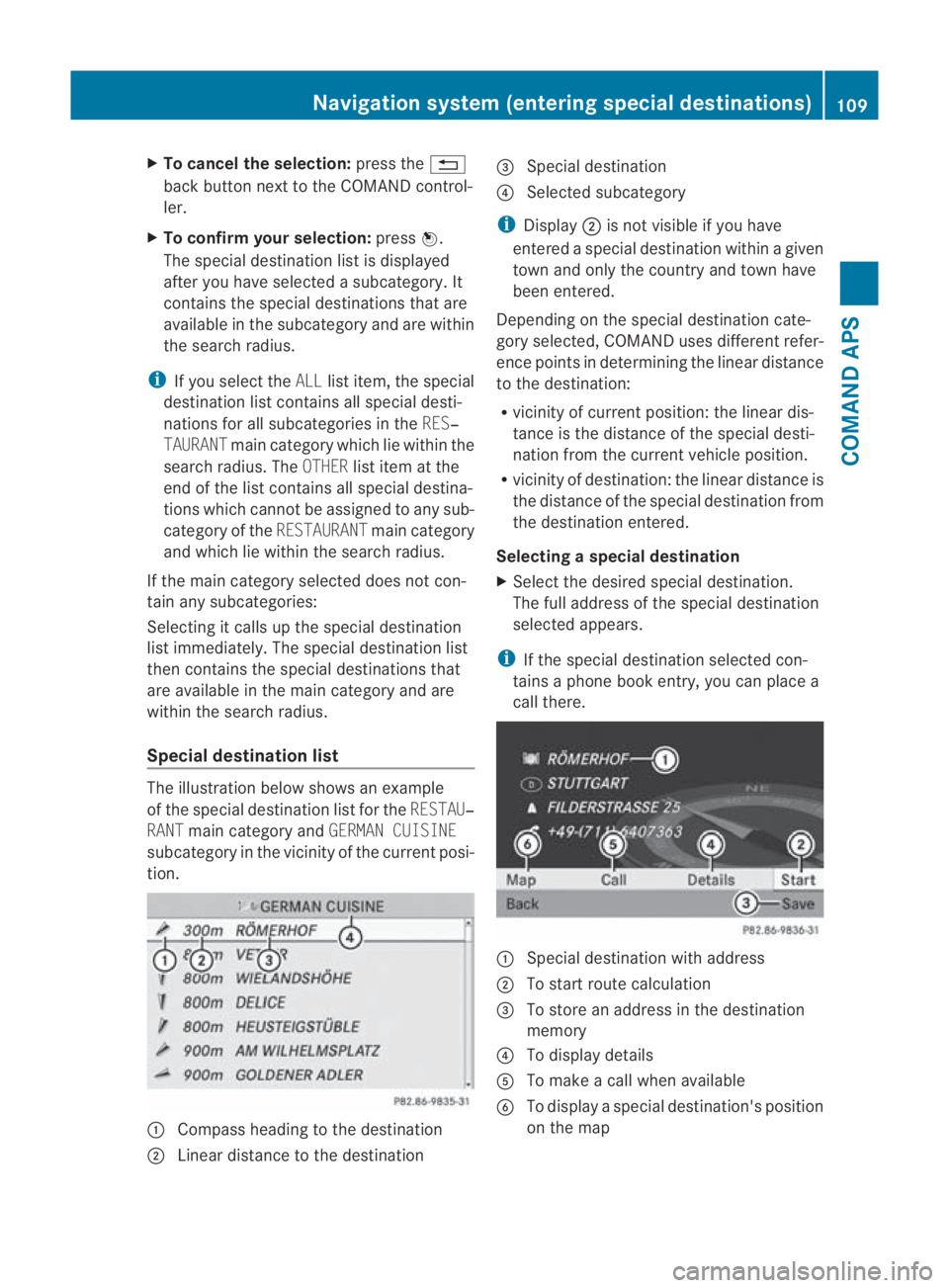
Special destination list The illustration below shows an example
of the special destination list for the
RESTAU‐
RANT main category and GERMAN CUISINE
subcategory in the vicinity of the curren tposi-
tion. 0001
Compass heading to the destination
0002 Linear distance to the destination 0015
Special destination
0014 Selected subcategory
i Display 0002is not visible if you have
entered a special destination within a given
town and only the country and town have
been entered.
Depending on the special destination cate-
gory selected, COMAND uses different refer-
ence points in determining the linear distance
to the destination:
R vicinity of current position: the linear dis-
tance is the distance of the special desti-
nation from the current vehicle position.
R vicinity of destination :the linear distance is
the distance of the special destination from
the destination entered.
Selecting aspecial destination
X Select the desired special destination.
The full address of the special destination
selected appears.
i If the special destination selected con-
tains a phone boo kentry, you can place a
call there. 0001
Special destination with address
0002 To start route calculation
0015 To store an address in the destination
memory
0014 To display details
0012 To make a call when available
0013 To display a special destination's position
on the map Navigation system (enterin
gspecial destinations)
109COMAND APS
BA 197 ECE RE 2010/6a; 1; 2, en-GB
sabbaeuV ersion: 3.0.3.6
2010-05-07T14:19:43+02:00 - Seite 109 Z
Page 113 of 361
X
To cancel the selection: press the0001
back button next to the COMAND control-
ler.
or
X Select Back.
The special destination list appears.
X Starting route calculation: select
Start.
X To store an address in the destination
memory: selectSave.Y ou can now select
storage options.
X To display details: selectDetails.
X To connec tacall:select Call.
When this menu item is available, COMAND
switches to the telephone function and
connects a call.
X To call up the map: selectMap.
X You can move the map and select the des-
tination.
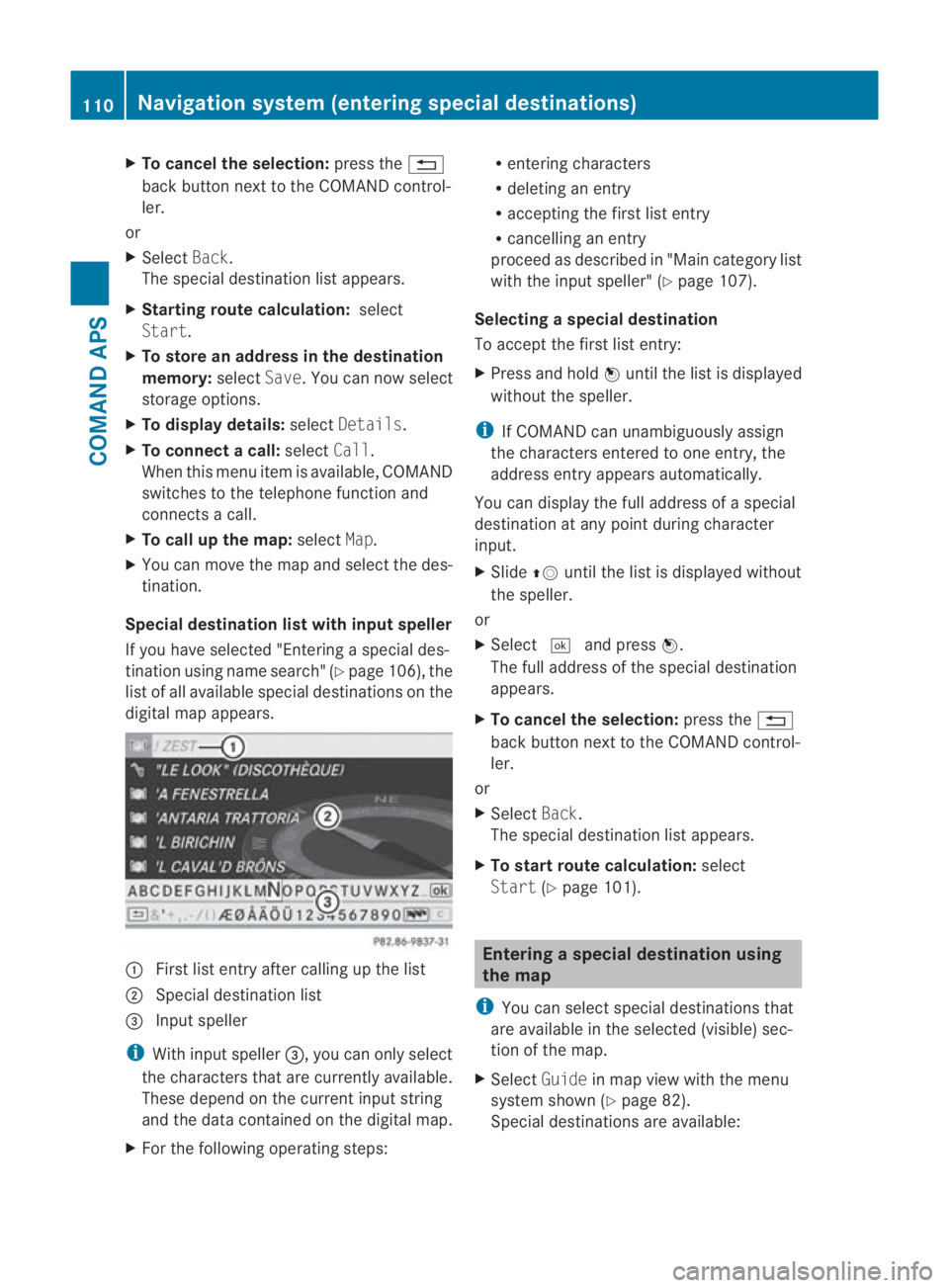
Special destination lis twith inpu tspeller
If you have selected "Entering a special des-
tination using name search" (Y page 106), the
list of all available special destinations on the
digital map appears. 0001
Firstlist entry after calling up the list
0002 Special destination list
0015 Input speller
i With input speller 0015, you can only select
the characters that are currently available.
These depend on the current input string
and the data contained on the digital map.
X For the following operating steps: R
entering characters
R deleting an entry
R accepting the first list entry
R cancelling an entry
proceed as described in "Main category list
with the input speller" (Y page 107).
Selecting aspecial destination
To accept the first list entry:
X Press and hold 0017until the list is displayed
withou tthe speller.
i If COMAND can unambiguously assign
the characters entered to one entry, the
address entry appears automatically.
You can display the full address of a special
destination at any point during character
input.
X Slide 001F0013until the list is displayed without
the speller.
or
X Select 0005and press 0017.
The full address of the special destination
appears.
X To cancel the selection: press the0001
back button next to the COMAND control-
ler.
or
X Select Back.
The special destination list appears.
X To start route calculation: select
Start (Ypage 101). Entering
aspecial destination using
the map
i You can select special destinations that
are available in the selected (visible) sec-
tion of the map.
X Select Guidein map view with the menu
system shown (Y page 82).
Special destinations are available: 110
Navigation system (entering special destinations)COMAND APS
BA 197 ECE RE 2010/6a; 1; 2, en-GB
sabbaeu
Version: 3.0.3.6 2010-05-07T14:19:43+02:00 - Seite 110