2010 MERCEDES-BENZ SLS COUPE transmission
[x] Cancel search: transmissionPage 18 of 361
Stowage compartments
...................257
Armrest (under) ............................. 258
Cuph older..................................... 258
Glove compartment .......................257
Telephone compartment ................258
Submenu (on-board computer)
Convenience .................................. 240
Factory setting ............................... 240
Instrument cluster .........................238
Lights ............................................ .238
Standard displa y............................ 233
Vehicle .......................................... .240
Sub-programmes (DAB) ....................165
Summer and standard time Switching ......................................... 73
Summer opening
see Convenience opening
Sun visor ............................................ 259
Supplemental Restraint System see SRS ........................................... 35
See SRS ........................................... 35
Surround lighting
Switching on/off (on-board com-
puter) ............................................. 239
Switching off the alarm
ATA .................................................. 49
Syste mlanguage
Setting ............................................. 78
Syste mmenu....................................... 71
Syste msettings
Menu overview ................................ .71T
Tail lamps Display message ............................ 301
Tail pipes
Cleaning ......................................... 284
Tank
see Fuel tank
Tank capacity .................................... 349
Technical data ................................... 352
Emergency spare wheel .................355
Telephone
Accepting/ending call ...................144
Accepting or rejecting a waiting
call ................................................. 146
Ending an active call ......................146Entering phone numbers ................ 145
Incoming call
................................. 144
Outgoing call ................................. 144
Reception and transmission vol-
ume ............................................... 135
see Mobile phone .......................... 236
Sending DTMF tones ..................... .146
Single call ...................................... 145
Switching hands-free microphone
on/off ............................................ 146
Telephone basic menu
Bluetooth interface ........................132
Convenience telephony .................134
Telephone compartment ..................258
Telephone mode Redialling ....................................... 145
Telephone number
Entering ......................................... 144
Temperature
Engine oil ....................................... 229
Engine oil (on-board computer) ...... 241
Outside temperature ..................... .230
Transmissio noil (on-board com-
puter )............................................. 241
Text message (SMS) (convenience
telephone)
Calling the sende r.......................... 148
Deleting ......................................... 149
Incoming ........................................ 147
Read-aloud function .......................148
Reading .......................................... 148
Storing the sende rinthe address
book ...................................... 148, 149
THERMOTRONIC
Malfunction indicator lamp ............307
Tightening torque .............................. 332
Time Lap time (on-board computer) .......241
Setting ............................................. 72
Time format
Setting ............................................. 72
Timer (on-board computer) ..............241
Time zone Setting ............................................. 73
TIREFIT kit
Using ............................................. 326
TMCPro ............................................... 119 Index
15 BA 197 ECE RE 2010/6a; 1; 2, en-GB
sabbae uV ersion: 3.0.3.6
2010-05-07T14:19:43+02:00 - Seite 15
Page 19 of 361
Tone settings
Trebl eand bass ............................... 68
Total distance recorder ....................233
Tow-away protection ..........................49
Towing ........................................ 339, 341
Towing eye Fitting ............................................ 341
Removing ....................................... 341
Town
Entering ........................................... 94
Traffic announcements on ...............164
Traffic jam function ........................... 117
Traffic Programme Switching traffic announcements
on/off ............................................ 164
Transferring acall (convenience
telephone) .......................................... 146
Transmission oil Temperature gauge (on-board
computer) ...................................... 241
Transmission output (maximum)
Telephone/two-way radio ..............347
Transport (vehicle) ............................341
Trim strips Cleaning ......................................... 285
Trip computer
On-board computer .......................232
Trip meter .......................................... 233
Resetting (on-board computer) ......234
True Image™ ........................................ 68
Turn signal Display message ............................ 300
Two-way radio
Installatio n..................................... 347
Type identification plate
see Vehicle identification plate ......348
Tyre grip ............................................. 278
Tyre pressure ..................................... 272
Calling up (on-board computer) .....273
Display message ............................ 304
Tyre pressure monitor
Warning lamp ................................. 311
Tyres
Direction of rotatio n...................... 272
General notes ................................ 270
Technical data ............................... 354
Tyre tread .......................................... .272 U
Unladen weight ................................. 352
Unlocking Emergency unlocking ..................... 322
Updating
Map software ................................... 89
Upshift indicator ............................... 229
USB devices Connecting to the Media Inter-
face ............................................... 184
Folders and playlists ......................187
Using the telephone ..........................144
Multi-function steering wheel ..........62 V
Variable Speedtronic ........................246
vCards Receiving ....................................... 137
Vehicle
Emergency unlocking ..................... 322
Individual settings (on-board com-
puter) ............................................. 238
Leaving parked up .........................321
Towing ........................................... 341
Transporting .................................. 341
Unlocking (key ).............................. 200
Vehicle battery .................................. 334
Vehicle dimensions ...........................352
Vehicle electronics ...........................346
Vehicle identification number
(VIN) ................................................... 348
Vehicle identification plate ..............348
Vehicle position Saving ...................................... 83, 127
Vehicle tool kit .................................. 288
Vehicle weights ................................. 352
Video DVD Fast forward/rewind ..................... .194
Operation ....................................... 190
Pause function ............................... 195
Picture settings .............................. 195
Selecting a film/title ..................... .195
Selecting a scene/chapter ............195
Stop function ................................. 194
Video mode
Automatic picture shutoff ..............190 16
Index BA 197 ECE RE 2010/6a; 1; 2, en-GB
sabbae uV ersion: 3.0.3.6
2010-05-07T14:19:43+02:00 - Seite 16
Page 21 of 361
Protection of the environment
H
Environmental note
Daimler's declared policy is one of integrated
environmental protection.
The objectives are for the natural resources
which form the basis of our existence on this
planet to be used sparingly and in a manner
which takes the requirements of both nature
and humanity into account.
You too can help to protect the environment
by operating your vehicle in an environmen-
tally-responsible manner.
Fuel consumption and the rate of engine,
transmission, brake and tyre wear depend on
the following factors:
R operating conditions of your vehicle
R your personal driving style
You can influence both factors.
You should bear the following in mind:
Operating conditions
R avoid short trips as these increase fuel con-
sumption.
R make sure that the tyre pressures are
always correct.
R do not carry any unnecessary weight.
R keep an eye on the vehicle's fuel consump-
tion.
R a regularly serviced vehicle will contribute
to environmental protection. You should
therefore adhere to the service intervals.
R always have maintenance work carried out
at a qualified specialist workshop, e.g. a
Mercedes-Benz Service Centre.
Personal driving style
R do not depress the accelerator pedal when
starting the engine.
R do not warm up the engine with the vehicle
stationary.
R drive carefully and maintain a safe distance
from the vehicle in front.
R avoid frequent, sudden acceleration. R
change gear in good time and use each gear
only up to 2
/ 3 of its maximum engine
speed.
R switch off the engine in stationary traffic. Returning used vehicles
Mercedes-Benz will take back your
Mercedes-Benz to dispose of it in an environ-
mentally-responsible manner, in accordance
with the European Union (EU) End of Life
Vehicles Directive.
The End of Life Vehicles Directive applies to
vehicles of up to 3.5 tgross vehicle weight, in
accordance with national regulations. For
several years, Mercedes-Benz has been
meeting all the legal requirements for a
design which allows for recycling and re-use.
There is a network of return points and dis-
assembly plants which can recycle yourv ehi-
cle in an environmentally-responsible man-
ner. The options for recycling vehicles and
parts are constantly being developed and
improved. This means that your Mercedes-
Benz will also continue to meet even the
increased recycling quotas in the future in
good time. You can obtain further information
from your national Mercedes-Benzh omepage
or your national hotline number. Operating safety
Safety notes
G
Risk of accident and injury
Always have work on the vehicle carried out
by a qualified specialist workshop. In particu-
lar, work relevant to safety or on safety-rela-
ted systems as well as maintenance work
must be carried out at aqualified specialist
workshop. The workshop must have the nec-
essary specialist knowledge and tools to carry
out the work required. Mercedes-Benz rec-
ommends that you use a Mercedes-Benz
Service Centre for this purpose. 18
Introduction BA 197 ECE RE 2010/6a; 1; 2, en-GB
sabbaeu Version: 3.0.3.6 2010-05-07T14:19:43+02:00 - Seite 18
Page 50 of 361
brakes are applied again, the brake lamps
light up continuously. The hazard warning
lamps switch off automatically if you travel
faster than 10 km/ h.You can also switch off
the hazard warning lamps using the hazard
warning switch button (Y page 216).ESP
®
(Electronic Stability Program)
You can selec tbetween the three following
states of ESP ®
:
R ESP ®
is activated.
R ESP ®
Sport is activated.
R ESP ®
is deactivated.
ESP ®
is activated as soon as you start the
engine. When ESP ®
Sport is activated, the
0005 warning lamp lights up in the instrument
panel. When ESP ®
is deactivated, the 0001
and 0002 warning lamps light up in the instru-
ment panel.
Characteristics of ESP ®ESP
®
monitors driving stability and traction,
i.e. power transmission between the tyres
and the road surface.
If ESP ®
detects that the vehicle is deviating
from the direction desired by the driver, one
or more wheels are braked to stabilise the
vehicle. If necessary, the engine output is also
modified to keep the vehicle on the desired
course within physical limits. ESP ®
assists
the driver when pulling away on wet or slip-
pery roads. ESP ®
can also stabilise the vehi-
cle during braking.
When ESP ®
intervenes, the 0002warning
lamp flashes in the instrument panel. G
Risk of accident
If the 0002 warning lamp in the instrument
cluster flashes, proceed as follows: R
do not deactivate ESP ®
under any circum-
stances
R only depress the accelerator pedal as far as
necessary when pulling away
R adapt your driving style to suit the prevail-
ing road and weather conditions
Otherwise, the vehicle could go into a skid.
ESP ®
cannot reduce the risk of an acciden tif
you drive too fast. ESP ®
cannot override the
laws of physics.
i Only use wheels with the recommended
tyre sizes. Only then will ESP ®
function
properly.
ESP ®
is activated automatically when the
engine is running .Inthe following situations,
it may be better to activate ESP ®
Sport or
deactivate ESP ®
:
R when using snow chains
R in deep snow
R on sand or gravel G
Risk of accident
Activate ESP ®
as soon as the situations
described above no longer apply.O therwise,
ESP ®
will only be able to stabilise the vehicle
to a limited degree if the vehicle starts to skid
or if a wheel starts to spin.
Characteristics of ESP ®
Sport ESP
®
Sport raises the interventio nthreshold
for stabilising the vehicle. This allows for a
sportier driving style on designated race cir-
cuits and may in certain situations improve
the traction in comparison with ESP ®
.
If you activate ESP ®
Sport:
R ESP ®
only improves driving stability to a
limited degree.
R engine torque is only restricted to a limited
degree and the drive wheels are able to
spin. The spinning wheels produce a cut-
ting effect for better traction. Driving safety systems
47Safety
BA 197 ECE RE 2010/6a; 1; 2, en-GB
sabbaeu Version: 3.0.3.6 2010-05-07T14:19:43+02:00 - Seite 47 Z
Page 78 of 361
Cancelling the first or second part of indi-
vidualisation
X Select Cancel .
Ap rompt appears asking whethe ryou
really wish to cancel.
X Select YesorNo.
If you select Yes, individualisation will be
cancelled. The data from the part cancelled
is not stored.
If you select No, the current part begins
again.
Deleting existing individualisation data
X Select System0004Settings0004Lingua‐
tronic0004Delete individualisation.
Ap rompt appears asking whethe ryou
really wish to delete.
X Select YesorNo.
The individualisation data will either be
deleted or not, depending on your selec-
tion. You will see a message to this effect.
Activating/deactivating individualisation
X Select System0004Settings0004Lingua‐
tronic0004Individualisation on.
You have switched individualisation on 0019
or off 0004. Bluetooth
®
settings
General information about Bluetooth ®i
Bluetooth ®
-capable devices must corre-
spond to a particular profile to be connec-
ted to COMAND. Every Bluetooth ®
device
has its own specific Bluetooth ®
name.
Bluetooth ®
technology is the standard for
short-range wireless data transmission of up
to approximately 10 metres. Bluetooth ®
can
be used to exchange vCards, for example.
Bluetooth ®
is a registered trademark of the
Bluetooth ®
Special Interest Group (SIG) Inc. Activating/deactivating Bluetooth
® X
Select System 0004Settings 0004Blue‐
tooth 0004Activate Bluetooth.
This switches Bluetooth ®
on 0019 or off 0004.
Connecting Bluetooth ®
devices i
To connect a Bluetooth ®
device, the Blue-
tooth ®
function must be activated in
COMAND and in the device concerned. The
Bluetooth ®
device must also be "visible" to
COMAND in order for COMAND to find and
display it. For the setting procedures,
please see the operating instructions for
the Bluetooth ®
device.
It is possible to establish a Bluetooth ®
con-
nection between COMAND and the following
types of device:
R mobile phone
R notebook
R laptop/PDA
i Bluetooth ®
-capable mobile phones must
correspond to particular profiles to be con-
nected to COMAND (Y page 129).
The volume of telephone conversations can
change after the phone has been connec-
ted.
You can connect up to ten devices to
COMAND.
The connection process includes searching
for the device and its subsequent authorisa-
tion. System settings
75COMAND APS
BA 197 ECE RE 2010/6a; 1; 2, en-GB
sabbaeu Version: 3.0.3.6 2010-05-07T14:19:43+02:00 - Seite 75 Z
Page 138 of 361
Menu overview
Name Telephone Text message
(SMS) Call lists or micro-
phone off/on Displaying the
COMAND phone
book
Bluetooth
®
tele-
phones
Importing external
data
Deleting external
data
i Available when
external data has
been imported.
Receiving vCards Text message (SMS) Displaying call lists
(without call)
Switching hands-free
microphone on/off
(during a call) Switching between Bluetooth and
convenience*t
elephony
If your vehicle is equipped with convenience
telephony*, you can switch between teleph-
ony types. You can then selec tanother
mobile phone in the Bluetooth ®
telephone
list.
Switching telephon ytype during opera-
tion During operation, you can switch from one
telephony type to another by selecting
another mobile phone in the list
(Y page 132).
Switching telephony type when switch-
ing on COMAND's standard behaviour after being
switched on is as follows:
Bracket* for the mobile phone is inserted
COMAND starts convenience telephony*. If
no mobile phone is inserted in the mobile
phone bracket*, the following message
appears: Telephone not inserted. If there
is a mobile phone in the bracket*, the PIN
query (Y page 133) or the telephone basic menu for convenience telephony*
(Y
page 134) appears.
Bracket* for the mobile phone is not inser-
ted.
COMAND starts telephony via the Blue-
tooth ®
interface and searches for the last two
mobile phones to have been connected via
the Bluetooth ®
interface. If one of the two
mobile phones is found, the telephone basic
menu for Bluetooth ®
telephony
(Y page 132) appears. If neither of the two
mobile phones is found, the Ready for
Bluetooth telephony... message
remains on the display. You now have to con-
nect yourm obile phone (Y page 129).
i The connection remains active until the
next time COMAND is switched off if you
do not connect a different mobile phone via
the phone list. During the connection, only
the Bluetooth interface functions are avail-
able to you. Reception and transmission volume
The following information is valid for Blue-
tooth ®
interface telephony and convenience
telephony*. Telephone
135COMAND APS
*optional
BA 197 ECE RE 2010/6a; 1; 2, en-GB
sabbaeu
Version: 3.0.3.6 2010-05-07T14:19:43+02:00 - Seite 135 Z
Page 139 of 361
It is generally not recommended that you
change the settings for reception and trans-
missio nvolume, as the preset values are set
to suit most mobile phones. To find out about
the best possible settings for your mobile
phone, contact a Mercedes-Benz Service
Centre or visit http://www.mercedes-
benz.com/connect .
i Incorrect settings may result in serious
impairment of reception quality.
i It is not possible to adjust these settings
while making a call.
X Press the 0008function button.
X Select Telephone0004Bluetooth tele‐
phones.
X Select an authorised mobile phone from
the list.
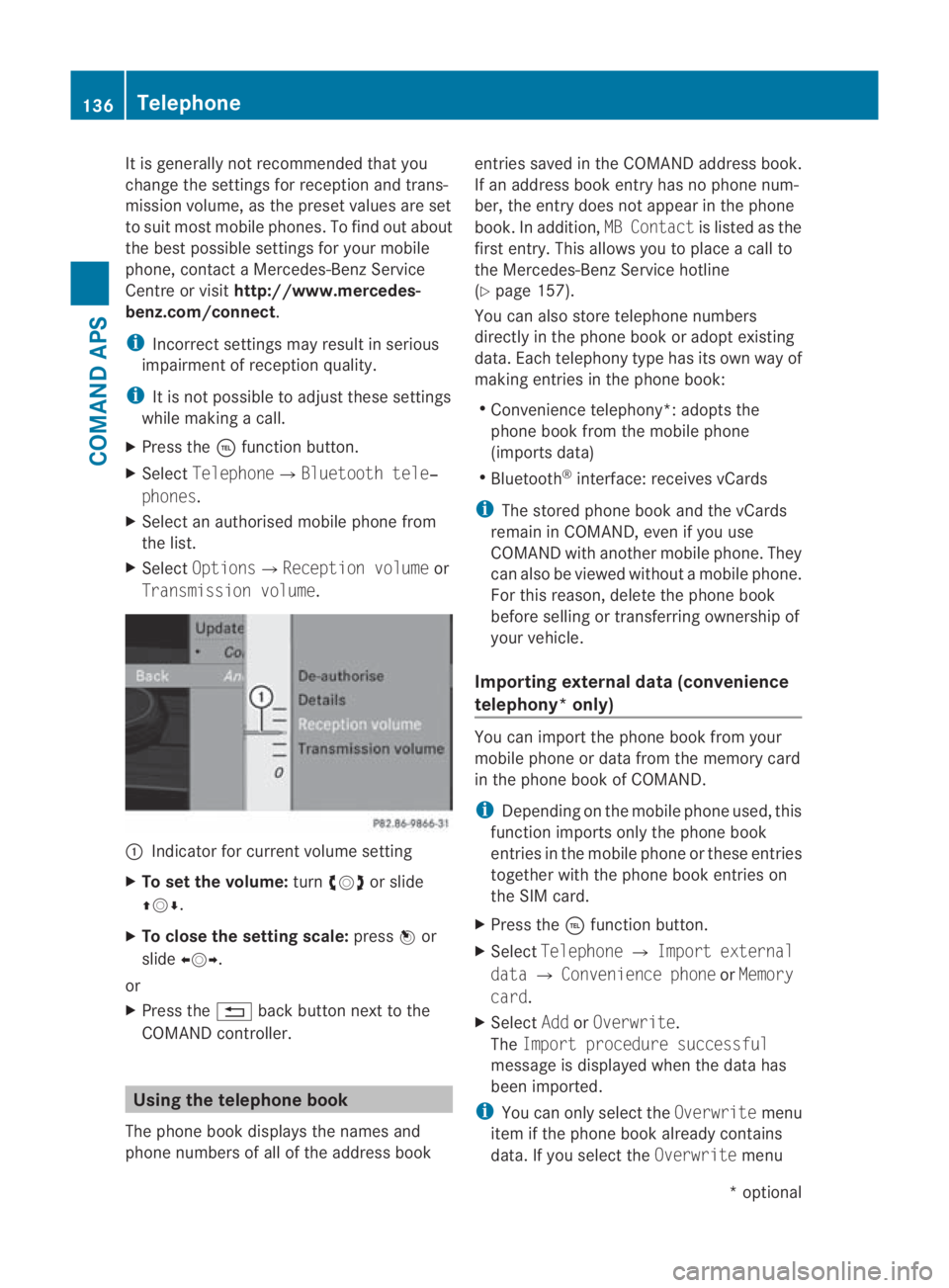
X Select Options0004Reception volume or
Transmission volume. 0001
Indicator for current volume setting
X To set the volume: turn002800130029 or slide
001F0013000D.
X To close the setting scale: press0017or
slide 002B0013002C.
or
X Press the 0001back button next to the
COMAND controller. Using the telephone book
The phone book displays the names and
phone numbers of all of the address book entries saved in the COMAND address book.
If an address book entryh
as no phone num-
ber, the entry does no tappear in the phone
book. In addition, MB Contactis listed as the
first entry. This allows you to place a call to
the Mercedes-Benz Service hotline
(Y page 157).
You can also store telephone numbers
directly in the phone book or adopt existing
data. Each telephony type has its own way of
making entries in the phone book:
R Convenience telephony*: adopts the
phone book from the mobile phone
(imports data)
R Bluetooth ®
interface: receives vCards
i The stored phone book and the vCards
remain in COMAND, even if you use
COMAND with another mobile phone. They
can also be viewed without a mobile phone.
For this reason, delete the phone book
before selling or transferring ownership of
your vehicle.
Importing external dat a(convenience
telephony* only) You can import the phone book from your
mobile phone or data from the memory card
in the phone book of COMAND.
i
Depending on the mobile phone used, this
function imports only the phone book
entries in the mobile phone or these entries
together with the phone book entries on
the SIM card.
X Press the 0008function button.
X Select Telephone 0004Import external
data 0004Convenience phone orMemory
card.
X Select AddorOverwrite .
The Import procedure successful
message is displayed when the data has
been imported.
i You can only select the Overwritemenu
item if the phone book already contains
data. If you select the Overwritemenu136
TelephoneCOMAND APS
*o
ptional
BA 197 ECE RE 2010/6a; 1; 2, en-GB
sabbaeu
Version: 3.0.3.6 2010-05-07T14:19:43+02:00 - Seite 136
Page 149 of 361
Switching the hands-free microphone on/
off
X Call up the telephone basic menu.
X To switch off: selectMike off.
If the microphone is switched off, the 000E
icon appears in the main area.
X To switch on: selectMike on.
The 000Esymbol goes out.
DTMF tone transmission
i This function is not supported by all
mobile phones.
Answering machines or other devices can be
controlled by DTMF tones, e.g. for remote
query functions.
X To send individual characters: select the
desired characters during a call.
or
X Press the corresponding button on the
COMAND control panel.
Every character selected will be transmit-
ted immediately.
X To send a phone book entry as a char-
acter string: selectName.
X Select the desired phone book entry.
The entry is immediately sent as a charac-
ter string.
X To switch back to the call display: select
Back.
Ending an active call
X If the menu of another main function is
shown, switch the display to the telephone
function.
X To end a call: select002D.
or
X Press the 0014button on the COMAND con-
trol panel or the 0015button on the multi-
function steering wheel.
Rejecting or accepting awaiting call
i The "call waiting" function must be sup-
ported by the network provider and be ena-
bled. If you are on the telephone and you receive
anothe
rcall, the call waiting display will
appear .You also hear an acoustic signal.
X To reject: selectReject.
or
X Press the 0014button on the COMAND con-
trol panel or the 0015button on the multi-
function steering wheel.
X To accept: selectAccept.
or
X Press the 0016button on the COMAND con-
trol panel or the 001Cbutton on the multi-
function steering wheel.
This ends the active call.
If you accept the waiting call using the mobile
phone, the active call will be put on hold. You
then have two calls. The call you have just
accepted is active.
Transferring acall (convenience teleph-
ony*) From the hands-fre
esystem to the mobile
phone
X Take the mobile phone out of the
bracket*.
The Telephone not inserted display
appears in the COMAND display. Subse-
quent operation is only possible using the
mobile phone.
From the mobile phone to hands-free
mode
X Insert the mobile phone into the bracket*.
Once the call has been transferred to
hands-free mode, all the functions will be
available to you which are described in the
"Functions during a single call connection"
section (Y page 145). 146
TelephoneCOMAND APS
*o
ptional
BA 197 ECE RE 2010/6a; 1; 2, en-GB
sabbaeu
Version: 3.0.3.6 2010-05-07T14:19:43+02:00 - Seite 146