2010 MERCEDES-BENZ SLS COUPE torque
[x] Cancel search: torquePage 18 of 361
Stowage compartments
...................257
Armrest (under) ............................. 258
Cuph older..................................... 258
Glove compartment .......................257
Telephone compartment ................258
Submenu (on-board computer)
Convenience .................................. 240
Factory setting ............................... 240
Instrument cluster .........................238
Lights ............................................ .238
Standard displa y............................ 233
Vehicle .......................................... .240
Sub-programmes (DAB) ....................165
Summer and standard time Switching ......................................... 73
Summer opening
see Convenience opening
Sun visor ............................................ 259
Supplemental Restraint System see SRS ........................................... 35
See SRS ........................................... 35
Surround lighting
Switching on/off (on-board com-
puter) ............................................. 239
Switching off the alarm
ATA .................................................. 49
Syste mlanguage
Setting ............................................. 78
Syste mmenu....................................... 71
Syste msettings
Menu overview ................................ .71T
Tail lamps Display message ............................ 301
Tail pipes
Cleaning ......................................... 284
Tank
see Fuel tank
Tank capacity .................................... 349
Technical data ................................... 352
Emergency spare wheel .................355
Telephone
Accepting/ending call ...................144
Accepting or rejecting a waiting
call ................................................. 146
Ending an active call ......................146Entering phone numbers ................ 145
Incoming call
................................. 144
Outgoing call ................................. 144
Reception and transmission vol-
ume ............................................... 135
see Mobile phone .......................... 236
Sending DTMF tones ..................... .146
Single call ...................................... 145
Switching hands-free microphone
on/off ............................................ 146
Telephone basic menu
Bluetooth interface ........................132
Convenience telephony .................134
Telephone compartment ..................258
Telephone mode Redialling ....................................... 145
Telephone number
Entering ......................................... 144
Temperature
Engine oil ....................................... 229
Engine oil (on-board computer) ...... 241
Outside temperature ..................... .230
Transmissio noil (on-board com-
puter )............................................. 241
Text message (SMS) (convenience
telephone)
Calling the sende r.......................... 148
Deleting ......................................... 149
Incoming ........................................ 147
Read-aloud function .......................148
Reading .......................................... 148
Storing the sende rinthe address
book ...................................... 148, 149
THERMOTRONIC
Malfunction indicator lamp ............307
Tightening torque .............................. 332
Time Lap time (on-board computer) .......241
Setting ............................................. 72
Time format
Setting ............................................. 72
Timer (on-board computer) ..............241
Time zone Setting ............................................. 73
TIREFIT kit
Using ............................................. 326
TMCPro ............................................... 119 Index
15 BA 197 ECE RE 2010/6a; 1; 2, en-GB
sabbae uV ersion: 3.0.3.6
2010-05-07T14:19:43+02:00 - Seite 15
Page 20 of 361
Volume
Adjusting ......................................... 67
Phone call s...................................... 67
Traffi cannouncements ....................67 W
Warning and indicator lamps ABS (yellow) ................................... 308
ESP ®
........................................ 47, 308
ESP ®
OFF ....................................... 309
ESP ®
Sport .................................... 309
LIM (cruise control) ........................ 244
LIM (variable Speedtronic) .............246
Tyr ep ressure monitor ...................311
Warning tone ..................................... 312
Warning triangle ................................ 288
Washer fluid Display message ............................ 305
Washer fluid reservoir ..............270, 352
Filling capacity ............................... 352
Waveband
Switching (radio )............................ 160
Wearing seat belts ............................210
Wheel bolts Tightening torque ........................... 332
Wheel chock
Use ................................................ 329
Wheels
General notes ................................ 270
Interchanging ................................. 275
Windows
Cleaning ......................................... 283
see Side windows
Windscreen washe rfluid .................. 352
Topping up ..................................... 270
Windscreen washer system .....270, 352
Windscreen wipers ...........................217
Malfunction ................................... .317
Replacing the wiper blades ............325
Winte rdriving ............................ 275, 276
Winter tyres ....................................... 275
Limiting the speed (on-board com-
puter) ............................................. 248
Wiper blades
Cleaning ......................................... 283
Replacing ....................................... 325 Index
17 BA 197 ECE RE 2010/6a; 1; 2, en-GB
sabbae uV ersion: 3.0.3.6
2010-05-07T14:19:43+02:00 - Seite 17
Page 50 of 361
brakes are applied again, the brake lamps
light up continuously. The hazard warning
lamps switch off automatically if you travel
faster than 10 km/ h.You can also switch off
the hazard warning lamps using the hazard
warning switch button (Y page 216).ESP
®
(Electronic Stability Program)
You can selec tbetween the three following
states of ESP ®
:
R ESP ®
is activated.
R ESP ®
Sport is activated.
R ESP ®
is deactivated.
ESP ®
is activated as soon as you start the
engine. When ESP ®
Sport is activated, the
0005 warning lamp lights up in the instrument
panel. When ESP ®
is deactivated, the 0001
and 0002 warning lamps light up in the instru-
ment panel.
Characteristics of ESP ®ESP
®
monitors driving stability and traction,
i.e. power transmission between the tyres
and the road surface.
If ESP ®
detects that the vehicle is deviating
from the direction desired by the driver, one
or more wheels are braked to stabilise the
vehicle. If necessary, the engine output is also
modified to keep the vehicle on the desired
course within physical limits. ESP ®
assists
the driver when pulling away on wet or slip-
pery roads. ESP ®
can also stabilise the vehi-
cle during braking.
When ESP ®
intervenes, the 0002warning
lamp flashes in the instrument panel. G
Risk of accident
If the 0002 warning lamp in the instrument
cluster flashes, proceed as follows: R
do not deactivate ESP ®
under any circum-
stances
R only depress the accelerator pedal as far as
necessary when pulling away
R adapt your driving style to suit the prevail-
ing road and weather conditions
Otherwise, the vehicle could go into a skid.
ESP ®
cannot reduce the risk of an acciden tif
you drive too fast. ESP ®
cannot override the
laws of physics.
i Only use wheels with the recommended
tyre sizes. Only then will ESP ®
function
properly.
ESP ®
is activated automatically when the
engine is running .Inthe following situations,
it may be better to activate ESP ®
Sport or
deactivate ESP ®
:
R when using snow chains
R in deep snow
R on sand or gravel G
Risk of accident
Activate ESP ®
as soon as the situations
described above no longer apply.O therwise,
ESP ®
will only be able to stabilise the vehicle
to a limited degree if the vehicle starts to skid
or if a wheel starts to spin.
Characteristics of ESP ®
Sport ESP
®
Sport raises the interventio nthreshold
for stabilising the vehicle. This allows for a
sportier driving style on designated race cir-
cuits and may in certain situations improve
the traction in comparison with ESP ®
.
If you activate ESP ®
Sport:
R ESP ®
only improves driving stability to a
limited degree.
R engine torque is only restricted to a limited
degree and the drive wheels are able to
spin. The spinning wheels produce a cut-
ting effect for better traction. Driving safety systems
47Safety
BA 197 ECE RE 2010/6a; 1; 2, en-GB
sabbaeu Version: 3.0.3.6 2010-05-07T14:19:43+02:00 - Seite 47 Z
Page 51 of 361
R
traction control is still activated.
R ESP ®
still provides support when you brake
firmly.
i If ESP ®
Sport is activated and one or more
wheels start to spin, the 0002warning lamp
in the instrument cluste rflashes. ESP ®
only
stabilises the vehicle to a limited degree.
Characteristics when ESP ®
is deactiva-
ted When you deactivate ESP
®
:
R ESP ®
no longer improves driving stability.
R engine torque is no longer limited and the
drive wheels are able to spin .The spinning
wheels produce a cutting effect for better
traction.
R traction control is still activated.
R ESP ®
still provides support when you brake
firmly.
i If ESP ®
is deactivated and one or more
wheels start to spin, the 0002warning lamp
in the instrumentc luster does not flash. In
such situations, ESP ®
will not stabilise the
vehicle.
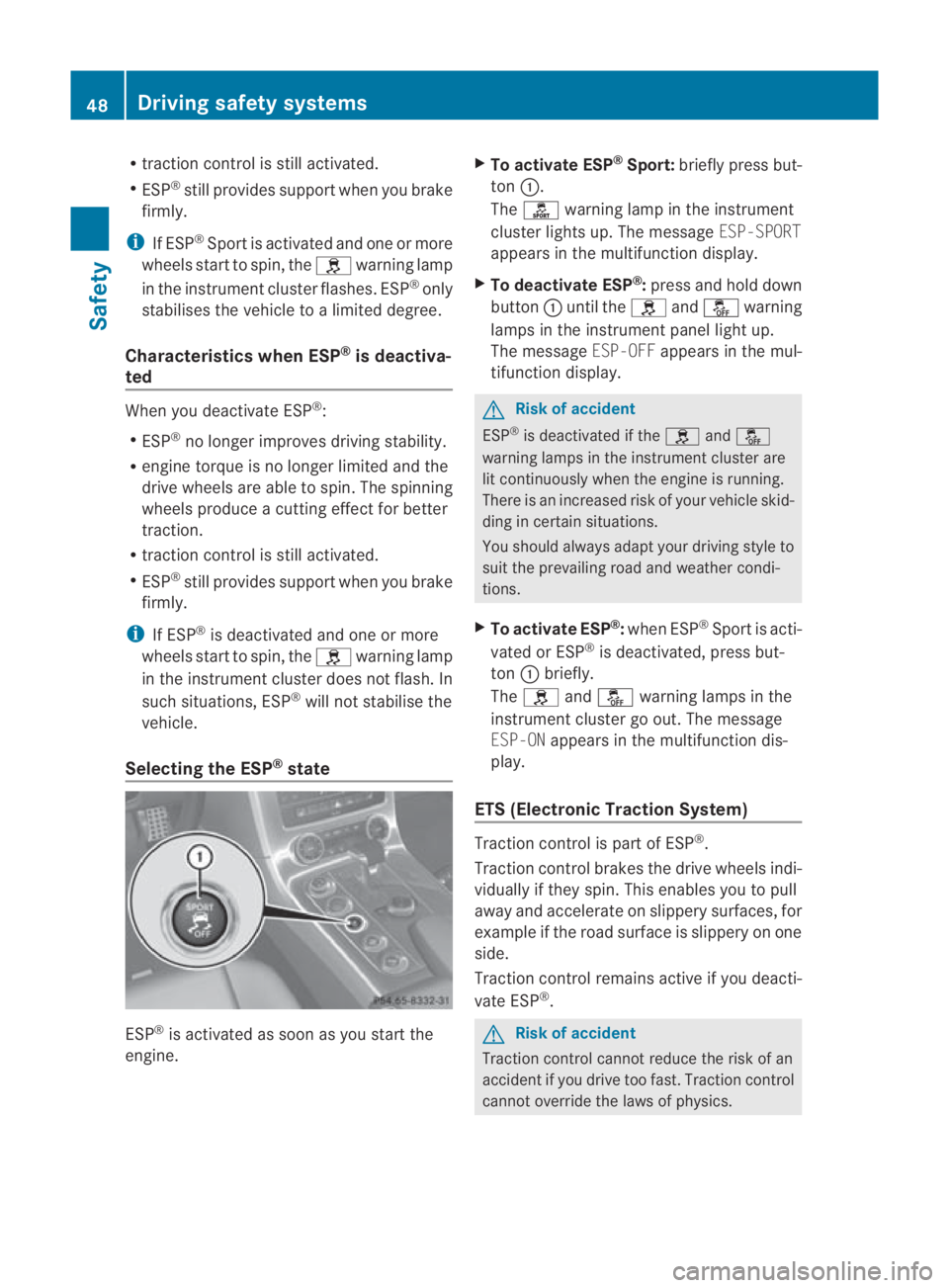
Selecting the ESP ®
state ESP
®
is activated as soon as you start the
engine. X
To activate ESP ®
Sport: briefly press but-
ton 0001.
The 0005 warning lamp in the instrument
cluster lights up. The message ESP-SPORT
appears in the multifunction display.
X To deactivate ESP ®
:press and hold down
button 0001until the 0002and0001 warning
lamps in the instrumen tpanel light up.
The message ESP-OFFappears in the mul-
tifunctio ndisplay. G
Risk of accident
ESP ®
is deactivated if the 0002and0001
warning lamps in the instrument cluster are
lit continuously when the engine is running.
There is an increased risk of your vehicle skid-
ding in certain situations.
You should always adapt your driving style to
suit the prevailing road and weathe rcondi-
tions.
X To activate ESP ®
:when ESP ®
Sport is acti-
vated or ESP ®
is deactivated, press but-
ton 0001briefly.
The 0002 and0001 warning lamps in the
instrument cluster go out. The message
ESP-ON appears in the multifunction dis-
play.
ETS (Electronic Traction System) Traction control is part of ESP
®
.
Traction control brakes the drive wheels indi-
vidually if they spin. This enables you to pull
away and accelerate on slippery surfaces, for
example if the road surface is slippery on one
side.
Traction control remains active if you deacti-
vate ESP ®
. G
Risk of accident
Traction control cannot reduce the risk of an
accident if you drive too fast. Traction control
cannot override the laws of physics. 48
Driving safety systemsSafety
BA 197 ECE RE 2010/6a; 1; 2, en-GB
sabbaeu
Version: 3.0.3.6 2010-05-07T14:19:43+02:00 - Seite 48
Page 278 of 361
short time. This is rectified after a few
minutes of driving, and the tyre pressures
are displayed for the correct positions.
Interchanging the wheels
G
Risk of accident
Interchange the front and rear wheels only if
they have the same dimensions: for example
size, offset, etc.
After every wheel interchange/change, have
the tightening torque checked at a qualified
specialist workshop that has the necessary
specialist knowledge and tools to carry out
the work required. Mercedes-Benz recom-
mends that you use a Mercedes-Benz Service
Centre for this purpose. In particular, work
relevant to safety or on safety-related sys-
tems must be carried out at a qualified spe-
cialist workshop.
The wheels could work loose if they are not
tightened to a torque of 130 Nm.
For safety reasons, Mercedes-Benz recom-
mends that you only use wheel bolts of the
correct size which have been approved for
Mercedes-Benz vehicles.
The wear patterns on the front and rear tyres
differ, depending on the operating conditions.
Interchange the wheels before a clear wear
pattern has formed on the tyres. Front tyres
typically wear more on the tyre shoulders and
the rear tyres in the centre.
On vehicles that have the same size front and
rear wheels, you can interchange the wheels
every 5000 km to 10,000 km depending on
the degree of tyre wear. Do not reverse the
direction of tyre rotation.
Cleant he contact surfaces of the wheel and
the brake disc thoroughly every time a wheel
is interchanged. Check the tyre pressure and
reactivate the tyre pressure monitor if neces-
sary.
! As your vehicle is fitted with a tyre pres-
sure monitor, electronic components are
located in the wheel. Tyre-fitting tools should not be applied in
the area of the valve, as this could damage
the electronic components.
Always have the wheels interchanged/
changed at a qualified specialist workshop,
e.g. a Mercedes-Benz Service Centre.
Winter operation
Please bear the following in mind
Have your vehicle winterproofed at a qualified
specialist workshop, e.g. at a Mercedes-Benz
Service Centre, at the onset of winter.
Observe the notes in the "Changing a wheel"
section (Y page 275). Winter tyres
Use winter tyres at temperatures below
+7 ˚C and in wintry road conditions. Only
winter tyres displaying the 0001snowflake
symbol in addition to the M+S marking pro-
vide optimum grip in wintry road conditions.
Only these tyres will allow the ABS and
ESP ®
driving safety systems to function opti-
mally in winter, as these tyres have been
designed specifically for driving on snow.
Use winter tyres of the same make and tread
on all wheels to maintain safe handling char-
acteristics. G
Risk of accident
Winter tyres with a tread depth of less than
4mmm ust be replace dimmediately. They are
no longer suitable for winter use and can no
longer provide sufficient grip. This could
cause you to lose control of yourv ehicle and
cause an accident.
Always observe the maximum permissible
speed specified for the winter tyres you have
fitted. If you fit winter tyres which have a
lower maximum permissible speed than that
of the vehicle, affix an appropriate warning
sign in the driver's field of vision. This can be Winter operation
275Operation
BA 197 ECE RE 2010/6a; 1; 2, en-GB
sabbaeu Version: 3.0.3.6 2010-05-07T14:19:43+02:00 - Seite 275 Z
Page 335 of 361
pose. In particular, work relevant to safety or
on safety-related systems must be carried out
at a qualified specialist workshop. G
Risk of accident
Only use wheel bolts that have been designed
for the wheel and the vehicle. For safety rea-
sons, Mercedes-Benz recommends that you
only use wheel bolts which have been
approved for Mercedes-Benz vehicles and the
respective wheel. Other wheel bolts could
work loose or damage the brake system.
Do not tighten the wheel bolts completely
while the vehicle is still jacked up. The vehicle
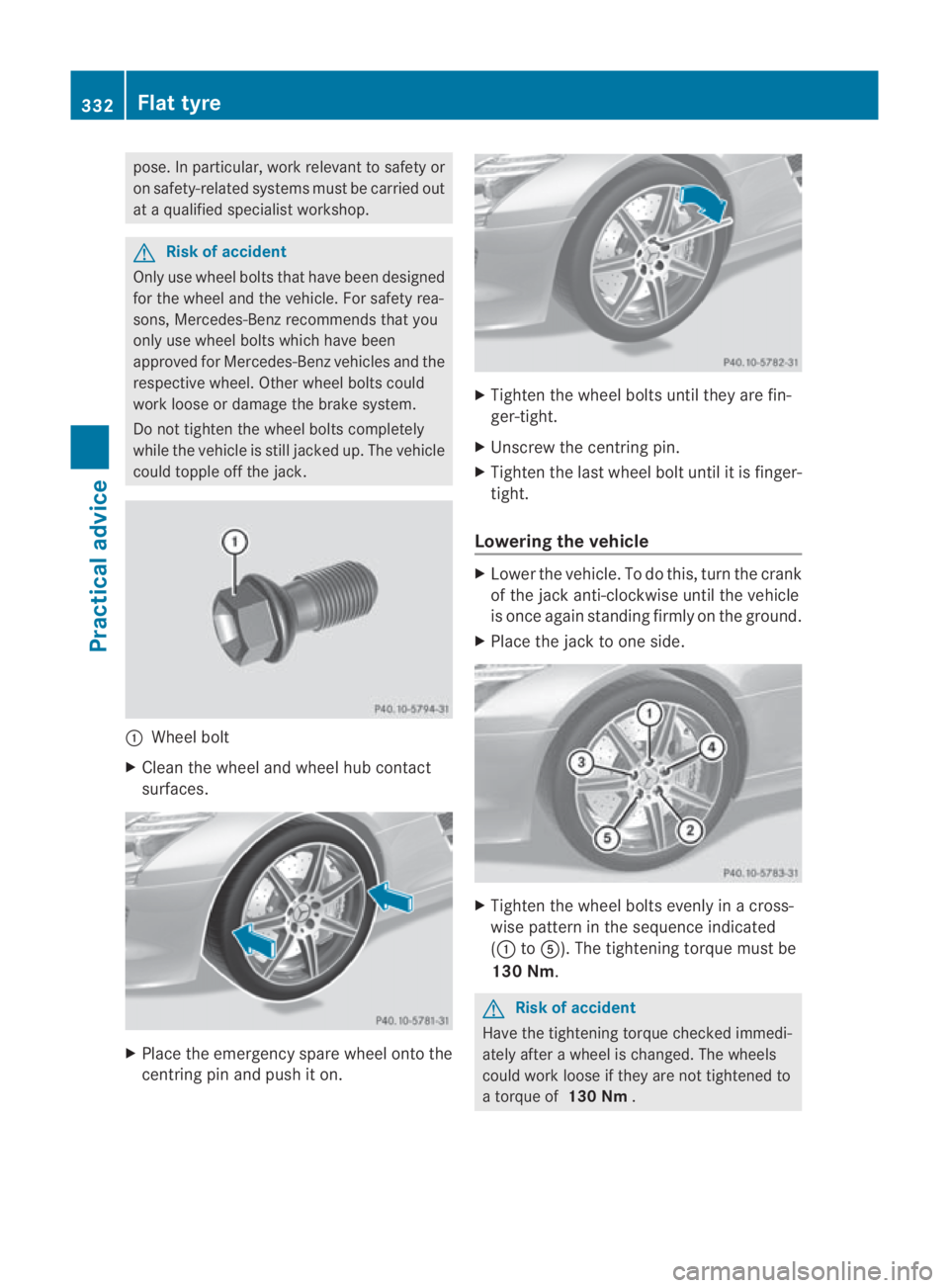
could topple off the jack. 0001
Wheel bolt
X Clean the wheel and wheel hub contact
surfaces. X
Place the emergency spare wheel onto the
centring pin and push it on. X
Tighten the wheel bolts until they are fin-
ger-tight.
X Unscrew the centring pin.
X Tighten the last wheel bolt until it is finger-
tight.
Lowering the vehicle X
Lower the vehicle. To do this, turn the crank
of the jack anti-clockwise until the vehicle
is once again standing firmly on the ground.
X Place the jack to one side. X
Tighten the wheel bolts evenly in a cross-
wise pattern in the sequence indicated
(0001 to0012). The tightening torque must be
130 Nm. G
Risk of accident
Have the tightening torque checked immedi-
ately after a wheel is changed. The wheels
could work loose if they are not tightened to
a torque of 130 Nm. 332
Flat tyrePractical advice
BA 197 ECE RE 2010/6a; 1; 2, en-GB
sabbaeu
Version: 3.0.3.6 2010-05-07T14:19:43+02:00 - Seite 332