2009 SUBARU TRIBECA air condition
[x] Cancel search: air conditionPage 359 of 2453

AC-33
Compressor
HVAC SYSTEM (HEATER, VENTILATOR AND A/C)
14.Compressor
A: INSPECTION
1. MAGNETIC CLUTCH CLEARANCE
Check the clearance of the entire circumference
around the drive plate and pulley.
Standard:
0.45±0.15 mm (0.0177±0.0059 in)
2. MAGNETIC CLUTCH OPERATION
1) Disconnect the compressor connector.
2) Connect the positive (+) lead from the battery to
the compressor connector terminal, and the nega-
tive (–) lead to the compressor body.
3) Check the magnet clutch engagement.
If there is a problem, replace the compressor.
B: REMOVAL
1) Perform the compressor oil return operation.
2) Turn the A/C switch to OFF and stop the engine.
3) Using the refrigerant recovery system, dis-
charge refrigerant.
4) Disconnect the ground cable from battery.
5) Remove the V-belts.
6) Remove the generator.
7) Remove the bolt and remove the low-pressure
hose and high-pressure hose.
8) Disconnect the compressor harness from the
body harness.
9) Remove the bolts and remove the compressor
bracket.
10) Remove the bolts, then remove the bracket
from the compressor.
C: INSTALLATION
1) Install in the reverse order of removal.
2) Replace the O-rings on low-/high-pressure hos-
es with new parts, then apply compressor oil.
3) After replacing the compressor, adjust the
amount of compressor oil.
4) Charge refrigerant.
Tightening torque:
Refer to “COMPONENT” of “General Descrip-
tion”.
AC-01287
AC-01381
AC-01289
AC-01290
Page 360 of 2453

AC-34
Condenser
HVAC SYSTEM (HEATER, VENTILATOR AND A/C)
15.Condenser
A: REMOVAL
1) Using the refrigerant recovery system, dis-
charge refrigerant.
2) Disconnect the ground cable from battery.
3) Remove the bumper upper cover.
4) Disconnect the pressure hose and pipe from the
condenser.
5) Remove the 4 bolts, lift the condenser and pull
out from the space between the radiator and
bumper.
CAUTION:
•Be careful not to damage the condenser fins.
If a damaged fin is found, repair it using a thin
screwdriver.
•If the condenser is replaced, add an appropri-
ate amount of compressor oil to the compres-
sor.
B: INSTALLATION
1) Install in the reverse order of removal.
CAUTION:
Replace the O-rings on hoses or pipes with new
parts, and then apply compressor oil.
2) Charge refrigerant.
Tightening torque:
Refer to “COMPONENT” of “General Descrip-
tion”.
tion.>
C: INSPECTION
1) Check to see that the condenser fins are not
clogged with debris or insects. Blow with com-
pressed air or flush fins with water as needed.
2) Inspect for oil leakage from the condenser. If a
failure is found, replace the condenser with a new
one.
AC-01292
AC-01291
AC-01293
Page 365 of 2453
AC-39
Hose and Tube
HVAC SYSTEM (HEATER, VENTILATOR AND A/C)
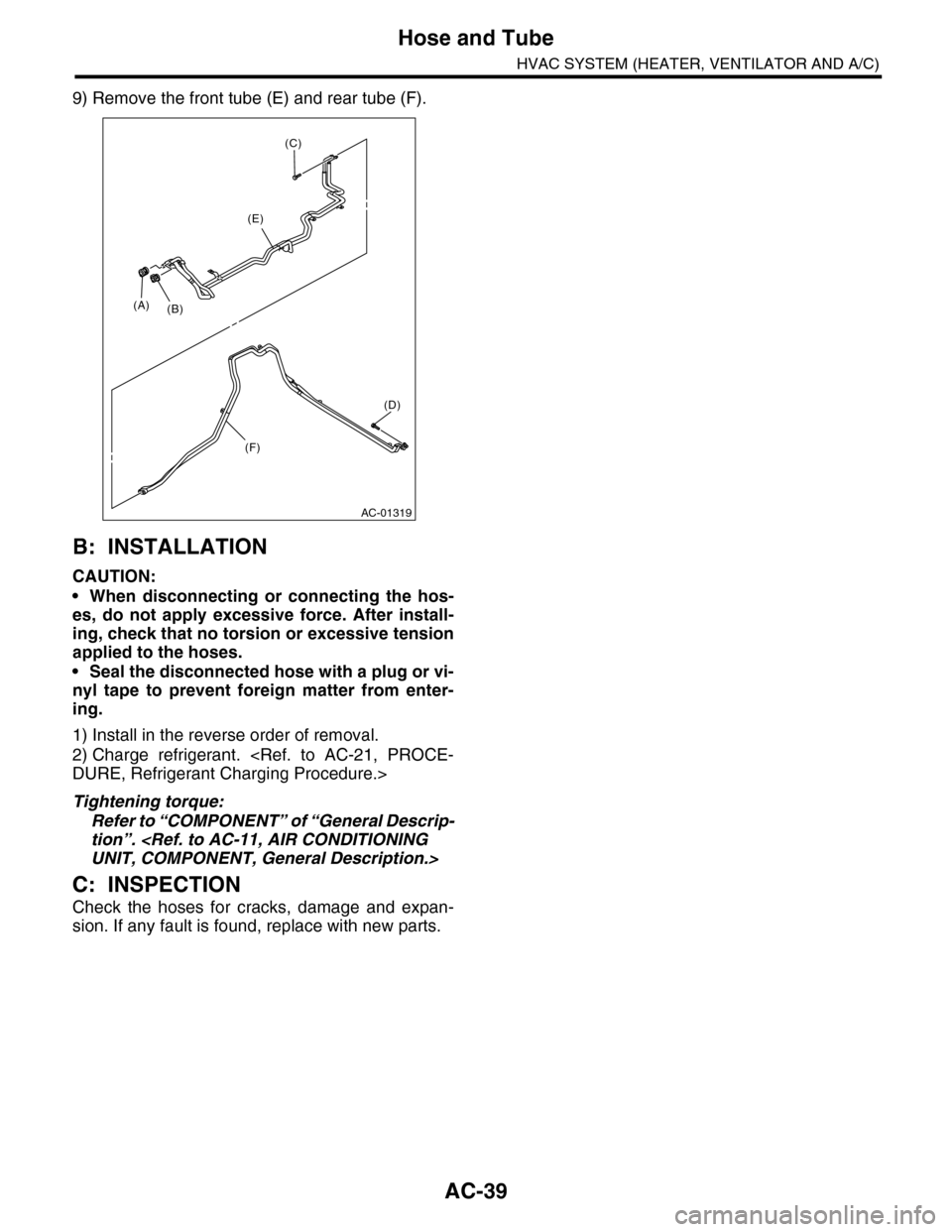
9) Remove the front tube (E) and rear tube (F).
B: INSTALLATION
CAUTION:
•When disconnecting or connecting the hos-
es, do not apply excessive force. After install-
ing, check that no torsion or excessive tension
applied to the hoses.
•Seal the disconnected hose with a plug or vi-
nyl tape to prevent foreign matter from enter-
ing.
1) Install in the reverse order of removal.
2) Charge refrigerant.
Tightening torque:
Refer to “COMPONENT” of “General Descrip-
tion”.
C: INSPECTION
Check the hoses for cracks, damage and expan-
sion. If any fault is found, replace with new parts.
AC-01319
(A)(B)
(E)
(F)
(D)
(C)
Page 376 of 2453

AC-50
General Diagnostic Table
HVAC SYSTEM (HEATER, VENTILATOR AND A/C)
29.General Diagnostic Table
A: INSPECTION
Symptom Repair order
Blower motor
Does not operate.
Fuse
Blower motor relay
Blower motor
Blower motor resistor
Blower switch
Wiring harness
Strange noiseBlower motor
Air conditioner filter
Compressor
Does not operate.
Refrigerant
Fuse
Air conditioning relay
Magnet clutch
Compressor
Pressure switch
A/C switch
Blower switch
Wiring harness
Strange noise
V- b e l t
Magnet clutch
Compressor
Belt tensioner
Cold air not emitted.
Refrigerant
V- b e l t
Magnet clutch
Compressor
Pressure switch
Expansion valve
A/C switch
Blower switch
Wiring harness
Heater duct
Heater vent duct
Te m p e r a t u r e c o n t r o l d o o r a c t u a t o r
Wa r m a ir n ot e mi t te d .
Engine coolant
Blower switch
Heater core
Te m p e r a t u r e c o n t r o l d o o r a c t u a t o r
Te m p e r a t u r e o f a i r f r o m v e n t s d o e s n o t c h a n g e .
Engine coolant
Air mix door actuator (Auto A/C)
Wire harness (Auto A/C)
Unable to switch blow vents.
Mode door actuator
Air flow switch
Wiring harness
Unable to switch suction vents.
Air inlet select switch
FRESH/RECIRC door actuator
Wiring harness
Page 377 of 2453
AC-51
General Diagnostic Table
HVAC SYSTEM (HEATER, VENTILATOR AND A/C)
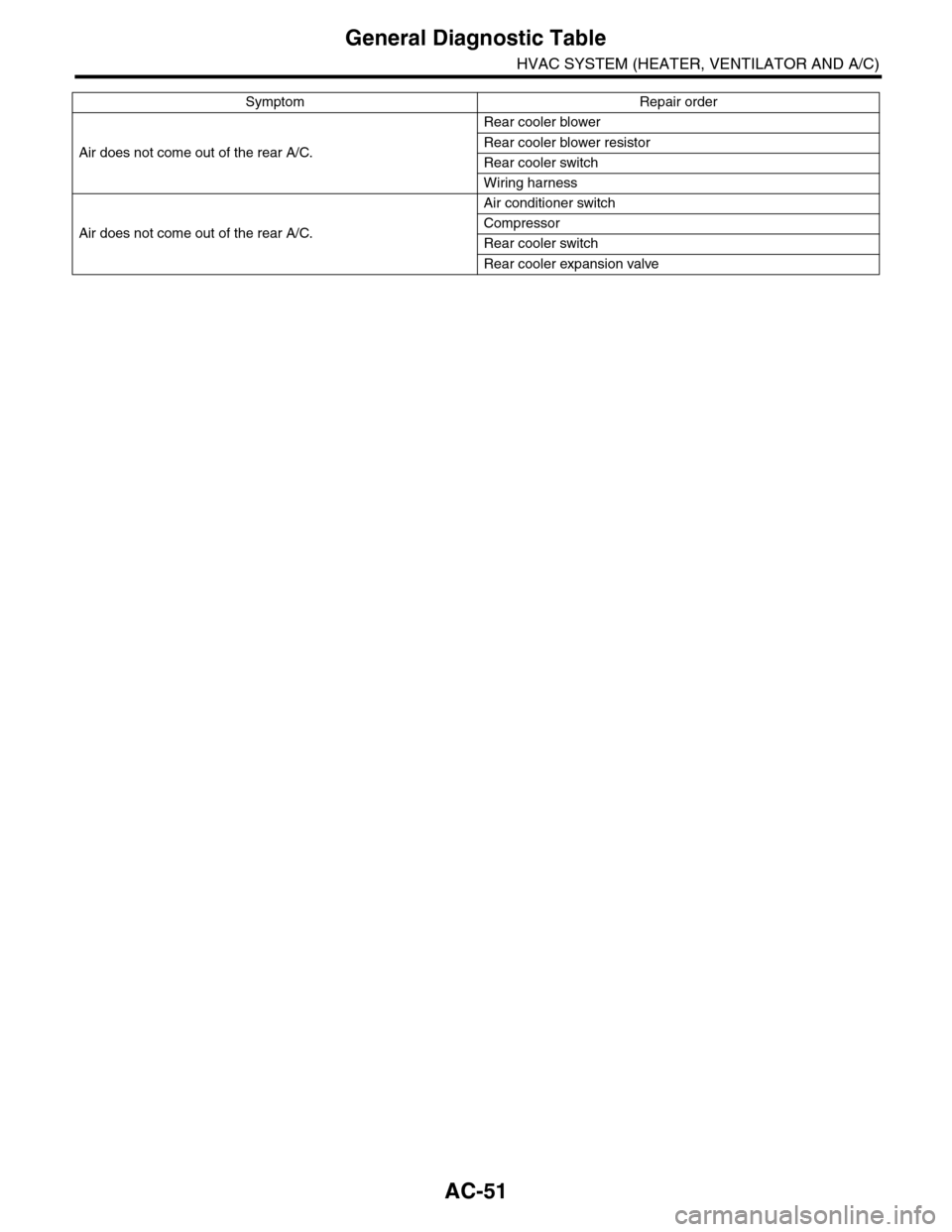
Air does not come out of the rear A/C.
Rear cooler blower
Rear cooler blower resistor
Rear cooler switch
Wiring harness
Air does not come out of the rear A/C.
Air conditioner switch
Compressor
Rear cooler switch
Rear cooler expansion valve
Symptom Repair order
Page 380 of 2453

AC(diag)-3
General Description
HVAC SYSTEM (AUTO A/C) (DIAGNOSTICS)
2. General Description
A: CAUTION
1) Never connect the battery in reverse polarity.
•Auto A/C control module may be destroyed in-
stantly.
2) Do not disconnect the battery terminals while the
engine is running.
•A large counter electromotive force will be gener-
ated in the generator, and this voltage may damage
electronic parts such as auto A/C control module
etc.
3) Before disconnecting the connectors of each
sensor and the auto A/C control module, be sure to
turn the ignition switch to OFF.
•Auto A/C control module may be damaged.
4) Every A/C-related part is a precision part. Do not
drop them.
5) Airbag system wiring harness is routed near the
A/C control panel and junction box.
CAUTION:
•For airbag system, yellow-colored wiring har-
ness and connectors are all used. Do not use
the electrical test equipment on these circuits.
•Be careful not to damage the airbag system
wiring harness when servicing the A/C control
panel and junction box.
B: INSPECTION
Before performing the diagnosis, check the follow-
ing items which might affect A/C system problems.
1. BATTERY
1) Measure the battery voltage and specific gravity
of electrolyte.
Standard voltage: 12 V
Specific gravity: 1.260 or more
2) Check the condition of the fuses for A/C system
power supply and other fuses.
3) Check the condition of harness and harness
connector connections.
2. ASPIRATOR HOSE
1) Turn the ignition switch to ON, and press the A/
C switch.
2) Turn the temperature control dial to maximum
hot position.
3) Turn the air flow control dial to “DEF” position.
4) Turn the fan speed control dial to 4th position.
5) Put a strip of paper close to the front side of in-
vehicle sensor suction port (A) located in the driv-
er’s side console side panel, and check that air is
being sucked into the port by seeing the paper
moving towards the port.
NOTE:
Be careful not to let the paper get sucked into the
port.
6) If the paper does not move at all, remove the
driver’s side console side panel
connection of the aspirator hose, in-vehicle sensor
and heater unit, and repair them if necessary.
3. A/C LINE
Check the connection for A/C line (A) and lower
side high-pressure pipe.
AC-01323
AC-01324
(A)
Page 386 of 2453

AC(diag)-9
Auto A/C Control Module I/O Signal
HVAC SYSTEM (AUTO A/C) (DIAGNOSTICS)
*1: Unable to measure the voltage for digital signal.
*2: Voltage immediately after switching FACE ⇔ DEF or maximum COOL ⇔ maximum HOT (when the damper door is operat-
ing.) for mode door and air mix door
*3: Voltage immediately after the operation for the seat heater (Always measure the voltage immediately after turning the seat
heater to ON because once reached to the target value, it switches to ON/OFF action.)
B: WIRING DIAGRAM
1. AIR CONDITIONER AUTO A/C MODEL
B7Mode door actuator power supply
(FACE)
When switching mode door from DEF → FACE
Battery voltage
— 2.5 V or more
*2
When switching mode door from FACE → DEF Less than 1 V *2
B8
Passenger’s side air mix door
actuator power supply (COOL
side)
When switching air mix door from HOT → COOL
Battery voltage
— 2.5 V or more
*2
When switching air mix door from COOL → HOT Less than 1 V *2
B9Driver’s side air mix door actuator
power supply (COOL side)
When switching air mix door from HOT → COOL
Battery voltage
— 2.5 V or more
*2
When switching air mix door from COOL → HOT Less than 1 V *2
B10 Inlet opening motor (FRESH side)FRESH Less than 1 V
RECIRC Battery voltage
B11 Driver’s seat heater Driver’s seat heater: ON (3 stages) Less than 1 V *3
B13 Passenger’s seat heater Passenger’s seat heater: ON (3 stages) Less than 1 V *3
B14 CAN communication (Lo side) Ignition switch: ON Pulse signal *1
B16 Blower motor relayBlower motor: Stopped Battery voltage
Blower motor: Operated Less than 1 V
B18Panel communication (transmitter
side)Ignition switch: ON Pulse signal *1
B19Panel communication (receiver
side)Ignition switch: ON Pulse signal *1
B20 Mode door (DEF) side
Mode: DEF ⇒ FACE Less than 1 V
Mode: FACE ⇒ DEFBattery voltage
— 2.5 V or more
B21 Passenger’s side air mix door
Air mix: Maximum HOT ⇒ maximum COOL Less than 1 V
Air mix: Maximum COOL ⇒ maximum HOTBattery voltage
— 2.5 V or more
B22 Driver’s side air mix door
Air mix: Maximum HOT ⇒ maximum COOL Less than 1 V
Air mix: Maximum COOL ⇒ maximum HOTBattery voltage
— 2.5 V or more
B23Inlet opening motor (RECIRC
side)
RECIRC Less than 1 V
FRESH Battery voltage
B24 Driver’s seat heater ground Continuity to chassis ground 0 Ω
B25 Passenger’s seat heater ground Continuity to chassis ground 0 Ω
Te r m i n a l N o . D e s c r i p t i o n M e a s u r i n g c o n d i t i o n S p e c i f i c a t i o n
Page 391 of 2453

AC(diag)-14
Diagnostic Chart for Self-diagnosis
HVAC SYSTEM (AUTO A/C) (DIAGNOSTICS)
4. SENSOR CHECK TABLE
NOTE:
When the sunload sensor check is performed indoors or in the shade, it could be diagnosed as having an
open circuit. Always check the sunload sensor with the sun shining on it.
*1: “AUTO” display does not blink when past malfunction occurred. Past malfunction means that abnormal signals were contin-
uously input for a certain time in the past.
*2: Present malfunction only is displayed for sunload sensor open circuit.
5. OPERATING MODE TABLE
*Same opening angle for both driver’s and passenger’s side
Display screen (Malfunction at
present) *1Sensor Trouble contents
21/AUTO BlinkIn-vehicle sensorOpen
–21/AUTO BlinkShort
22/AUTO Blink Ambient sensor Sensor trouble or communication malfunction
23/AUTO BlinkEvaporator sensorOpen
–23/AUTO BlinkShort
24/AUTO Blink Engine coolant temperature sensor Sensor trouble or communication malfunction
25 BlinkSunload sensorOpen *2
–25/AUTO BlinkShort
26/AUTO BlinkDriver's side air mix door actuator
potentiometer
COOL
27/AUTO BlinkHOT
–26/AUTO BlinkPassenger’s side air mix door actua-
tor potentiometer
COOL
–27/AUTO BlinkHOT
28/AUTO BlinkMode door actuator potentiometerFA C E
29/AUTO BlinkDEF
41/AUTO BlinkSeat heater thermistor (Driver’s
side)
Open
–41/AUTO BlinkShort
42/AUTO BlinkSeat heater thermistor (Passenger’s
side)
Open
–42/AUTO BlinkShort
20 Blink When all conditions are normal
Display screenFRESH/RECIRC
doorMode door Air mix door* Blower fanA/C compressor (Mag-
net clutch)
31 FRESH FACE Maximum cool LO OFF
32 RECIRC FACE Maximum cool LO ON
33 RECIRC FACE Maximum cool M1 ON
34 FRESH B/L 50% M1 ON
35 FRESH HEAT 50% M1 ON
36 FRESH HEAT Maximum hot M3 ON
37 FRESH D/H Maximum hot M3 ON
38 FRESH DEF Maximum hot HI ON