2009 SUBARU TRIBECA air condition
[x] Cancel search: air conditionPage 586 of 2453

OD(diag)-18
Subaru Select Monitor
OCCUPANT DETECTION SYSTEM (DIAGNOSTICS)
3. CLEAR MEMORY MODE
Clear the DTC stored in the airbag control module
after repairing the airbag system and occupant de-
tection system. (After the breakdown is recovered,
the breakdown code for completed recoveries are
read out when the next breakdown occurs if the
memory clear work is not performed.)
1) On the «Main Menu» display screen, select the
{Each System Check} and press the [YES] key.
2) On the «System Selection Menu» display
screen, select the {Airbag System} and press the
[YES] key.
3) On the {Airbag System} menu screen, select the
{Clear Memory} and press the [YES] key.
4) When the “Clear Memory?” is shown on the
screen, press the [YES] key.
5) When “Done” is displayed, turn the Subaru Se-
lect Monitor to OFF.
NOTE:
For details concerning operation procedure, refer
to the “SUBARU SELECT MONITOR OPERATION
MANUAL”.
4. SYSTEM CALIBRATION (REZEROING)
NOTE:
When replacing the occupant detection system, or
removing and disassembling the passenger’s seat,
always perform the system calibration after install-
ing a seat in the vehicle.
CAUTION:
When the trouble occurs in the system during
calibration process, “Occupant detection cali-
bration failure” is detected in the DTC 2A of the
airbag system and the airbag warning light
lights. In this case, after turning the ignition
switch to OFF once, redo the system calibration
(Rezeroing), or after clearing the cause of the
failure, perform the system calibration again.
1) Park empty vehicle on a level surface.
2) On the «Main Menu» display screen, select the
{Each System Check} and press the [YES] key.
3) On the «System Selection Menu» display
screen, select the {Occupant Detection System}
and press the [YES] key.
4) On the Occupant Detection System display
screen, select the {Zero Point Adjustment} and
press the [YES] key.
5) “See service manual. And check vehicle condi-
tion for successfully completing the rezeroing.” is
displayed. Check the following to adjust the condi-
tion of the vehicle.
•Adjust the seat backrest to be vertical. (Press the
power seat switch to put the seat in a position
where it will not move.)
•Adjust the seat sliding position to all the way
back. (Press the power seat switch to put the seat
in a position where it will not move.)
•Do not place anything on the top of the seat
cushion.
•Sit on the seat cushion to smooth the seat sur-
face.
•Check that the passenger’s seat belt is not in-
serted into the buckle, not tense or not stuck.
•Check that ambient temperature is in a range
from 0 to 40°C.
6) When the «Re-zeroing Adjust the passenger
seat to the condition shown in service manual» is
displayed, slide the passenger seat all the way to
the back, check that the backrest is adjusted to all
the way up, and press the [YES] key.
7) When the «Re-zeroing Unbelt the Passenger
seatbelt Continue: YES, Quit: NO» is displayed,
make sure the passenger’s seatbelt is disconnect-
ed from the buckle and press the [YES] key.
8) When the «Re-zeroing Empty the passenger
seat Continue: YES, Quit: NO» is displayed, make
sure that the passenger’s seat is empty, air bag
OFF indicator illuminates and air bag ON indicator
does not illuminate, and press the [YES] key.
NOTE:
•After pressing the [YES] key, «Now processing
.... Wait for a while. Do not touch or give impact to
vehicle and seat» is displayed. Do not touch or rock
the vehicle while the message is displayed.
•During the system calibration process, if the
«Re-zeroing is unsuccessful See service manual
Press YES to END» is displayed, go to step 10).
9) When the re-zeroing is ended normally, the«Re-
zeroing is successfully completed Press YES to
END» is displayed. Press the [YES] key and turn
the ignition switch to OFF to finish the diagnosis.
OD-00025
Page 587 of 2453

OD(diag)-19
Subaru Select Monitor
OCCUPANT DETECTION SYSTEM (DIAGNOSTICS)
10) During the system calibration process, if the
«Re-zeroing is unsuccessful See service manual
Press YES to END» is displayed, turn the ignition
switch to OFF once and turn it to ON again, and
then read the DTC of airbag system.
tor.>
When DTC is input, fix the fault and then perform
the system calibration. When DTC is not input,
check the seat and vehicle status and then perform
the system calibration again.
TION, Subaru Select Monitor.>
NOTE:
When the re-zeroing is unsuccessful, there could
be occupant detection system failure or improper
seat and vehicle status. When the airbag warning
light illuminates, read the DTC of airbag system,
and perform the diagnosis referring to “List of Diag-
nostic Trouble Code.”
B: INSPECTION
1. COMMUNICATION FOR INITIALIZING
IMPOSSIBLE
DETECTING CONDITION:
Defective harness connector
TROUBLE SYMPTOM:
Communication is impossible between the airbag
control module and the Subaru Select Monitor.
Refer to “Initial Communication Impossible” in the
DTC of the airbag system (diagnosis).
tor.>
2. WITHOUT DTC
DETECTING CONDITION:
•Defective combination meter
•Open circuit of harness
TROUBLE SYMPTOM:
•Airbag warning light remains on.
•“NO TROUBLE CODE” will be displayed on the
Subaru Select Monitor.
For detailed operation procedure, refer to “Airbag
Warning Light Failure”.
NOTE:
When the airbag warning light is OFF and “NO
TROUBLE CODE” is displayed on Subaru Select
Monitor, the system is in normal condition.
Page 594 of 2453

OD(diag)-26
Diagnostic Procedure with Diagnostic Trouble Code (DTC)
OCCUPANT DETECTION SYSTEM (DIAGNOSTICS)
14.Diagnostic Procedure with Diagnostic Trouble Code (DTC)
A: DTC 2A OCCUPANT DETECTION CALIBRATION FAILURE
DTC DETECTING CONDITION:
System calibration (Rezeroing) was not completed normally.
B: DTC 2B ODS ERRONEOUS PARTS
DTC DETECTING CONDITION:
•Wrong airbag control module is installed.
•Wrong occupant detection system is installed.
Step Check Yes No
1PERFORM RE-ZEROING.
Perfor m the system calibration using Subar u
Select Monitor.
Is the system calibration com-
pleted normally?
Finish the diagno-
sis.
Follow the system
calibration proce-
dures.
OPERATION,
Subaru Select
Monitor.>
Step Check Yes No
1CHECK THE OCCUPANT DETECTION SYS-
TEM.
1) Turn the ignition switch to OFF, disconnect
the battery ground cable, and wait more than
20 seconds.
2) Replace the passenger’s seat frame
assembly.
3) Connect the ground cable to battery.
4) Connect Subaru Select Monitor to the vehi-
cle and perform the system calibration.
Monitor.>
Is the system calibration com-
pleted normally?
Finish the diagno-
sis.
Go to step 2.
2CHECK AIRBAG CONTROL SYSTEM.
1) Turn the ignition switch to OFF, disconnect
the battery ground cable, and wait more than
20 seconds.
2) Replace the airbag control module.
3) Connect the ground cable to battery.
4) Connect Subaru Select Monitor to the vehi-
cle and perform the system calibration.
Monitor.>
Is the system calibration com-
pleted normally?
Finish the diagno-
sis.
Check between
the occupant
detection control
module and air-
bag control mod-
ule.
Page 595 of 2453

OD(diag)-27
Diagnostic Procedure with Diagnostic Trouble Code (DTC)
OCCUPANT DETECTION SYSTEM (DIAGNOSTICS)
C: DTC 2C BELT TENSION SENSOR FAILURE
DTC DETECTING CONDITION:
•Passenger's seat belt tension sensor is faulty.
•Airbag main harness circuit is open or shorted.
•Occupant detection control module is faulty.
WIRING DIAGRAM:
OD-00022
GOr
FB-47F/B FUSE No.25 (IG)
TO POWER SUPPLY ROUTING
OCCUPANT SENSINGCONTROL MODULE
BELT TENSION SENSOR
3
R
R
5
LW
W
6
LR
RB
4
LY
BW
123
WRBBW
AB61
AB59
AB56
123456
AB61(GRAY)
AB56(BROWN)
123
2
GOr
R
AB55
AB57
Step Check Yes No
1 CHECK POOR CONTACT OF CONNEC-
TORS.
Check for poor contact of the connectors
between the occupant detection control mod-
ule and belt tension sensor.
Is there poor contact? Reconnect the
connector. If the
fault is not fixed,
replace the airbag
harness.
Go to step 2.
2CHECK THE BELT TENSION SENSOR.
1) Turn the ignition switch to OFF, disconnect
the battery ground cable, and wait more than
20 seconds.
2) Disconnect the belt tension sensor connec-
tor (AB56) from the airbag harness.
3) Connect the test harness AC to the con-
nector (AB56).
4) Connect the battery ground terminal and
turn the ignition switch to ON.
Does the airbag warning light
illuminate for approximately 6
seconds and go off?
Replace the seat
belt outer.
Front Seat Belt.>
Go to step 3.
Page 597 of 2453
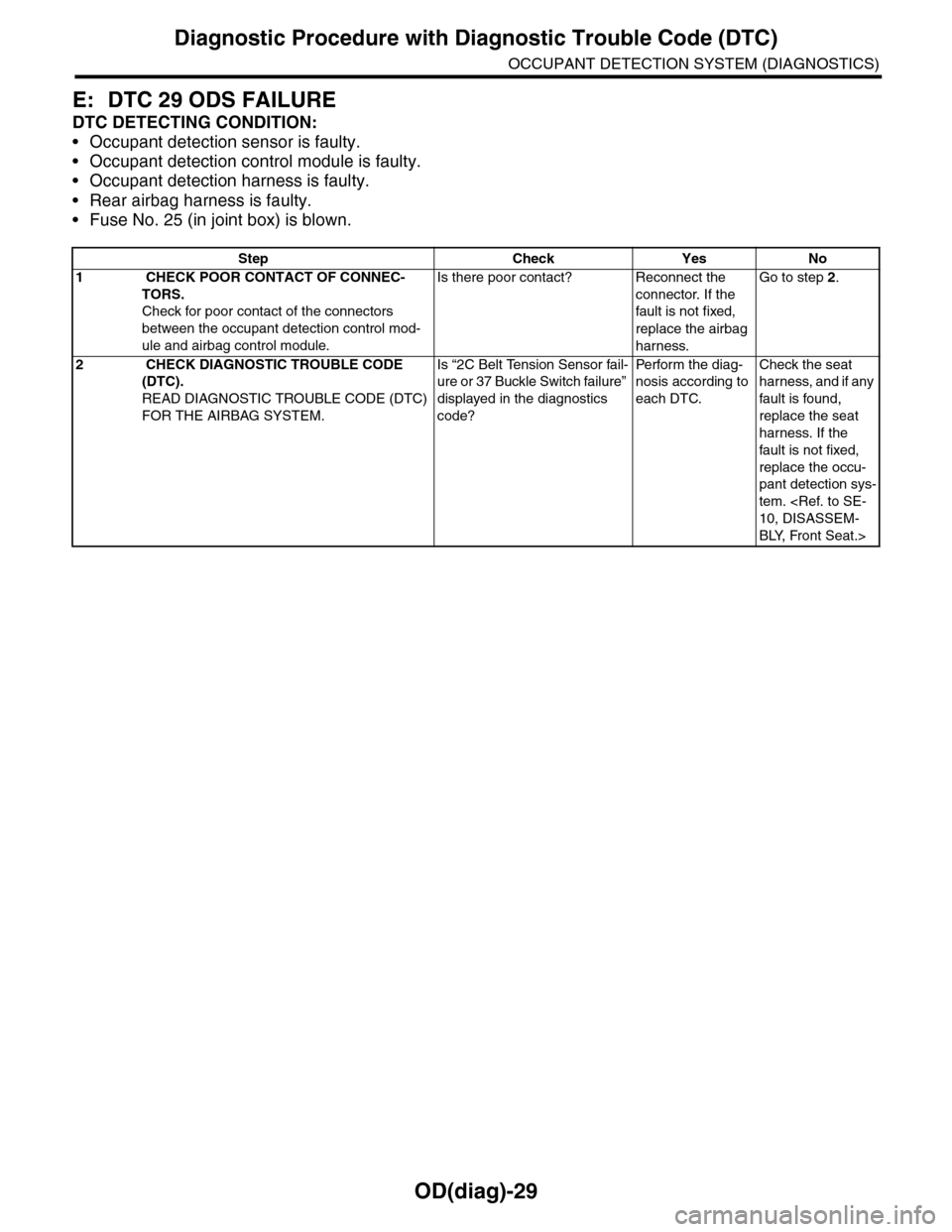
OD(diag)-29
Diagnostic Procedure with Diagnostic Trouble Code (DTC)
OCCUPANT DETECTION SYSTEM (DIAGNOSTICS)
E: DTC 29 ODS FAILURE
DTC DETECTING CONDITION:
•Occupant detection sensor is faulty.
•Occupant detection control module is faulty.
•Occupant detection harness is faulty.
•Rear airbag harness is faulty.
•Fuse No. 25 (in joint box) is blown.
Step Check Yes No
1 CHECK POOR CONTACT OF CONNEC-
TORS.
Check for poor contact of the connectors
between the occupant detection control mod-
ule and airbag control module.
Is there poor contact? Reconnect the
connector. If the
fault is not fixed,
replace the airbag
harness.
Go to step 2.
2 CHECK DIAGNOSTIC TROUBLE CODE
(DTC).
READ DIAGNOSTIC TROUBLE CODE (DTC)
FOR THE AIRBAG SYSTEM.
Is “2C Belt Tension Sensor fail-
ure or 37 Buckle Switch failure”
displayed in the diagnostics
code?
Pe r for m t h e d ia g -
nosis according to
each DTC.
Check the seat
harness, and if any
fault is found,
replace the seat
harness. If the
fault is not fixed,
replace the occu-
pant detection sys-
tem.
BLY, Front Seat.>
Page 598 of 2453

OD(diag)-30
Diagnostic Procedure with Diagnostic Trouble Code (DTC)
OCCUPANT DETECTION SYSTEM (DIAGNOSTICS)
F: DTC 37 BUCKLE SWITCH RH FAILURE
DTC DETECTING CONDITION:
•Passenger's seat buckle switch circuit is open, shorted or shorted to ground.
•Seat harness circuit is open, shorted or shorted to ground.
•Occupant detection control module is faulty.
WIRING DIAGRAM:
OD-00024
AB60
12
OCCUPANT SENSINGCONTROL MODULE
RONT SEAT BELT SWITCH RH
12
WBr
AB60
Step Check Yes No
1 CHECK POOR CONTACT OF CONNEC-
TORS.
Check for poor contact of the connectors
between the occupant detection control mod-
ule and buckle switch.
Is there poor contact? Reconnect the
connector. If the
fault is not fixed,
replace the airbag
harness.
Go to step 2.
2 CHECK THE BUCKLE SWITCH.
1) Turn the ignition switch to OFF, disconnect
the battery ground terminal, and wait for 20
seconds.
2) Disconnect the buckle switch connector
(AB60).
3) Connect the test harness AE1 and test har-
ness connector Y to the buckle switch connec-
tor (AB60).
4) Connect the battery ground terminal and
turn the ignition switch to ON.
Does the airbag warning light
illuminate for 6 seconds and go
off?
Replace the
buckle switch.
Seat Belt.>
Check the seat
harness, and if any
fault is found,
replace the seat
harness. If the
fault is not fixed,
replace the occu-
pant detection sys-
tem.
Page 742 of 2453

BR-28
Brake Booster
BRAKE
Air tightness check
Start the engine, and idle it for 1 to 2 minutes, then
turn it OFF. Depress the brake pedal several times
applying the normal pedal force. The pedal stroke
should be the longest at the 1st depression, and it
should become shorter at each successive depres-
sion. If no change occurs in the pedal height when
pressed, the brake booster is faulty.
NOTE:
•In case of defective operation, inspect the condi-
tion of the check valve and vacuum hose as well.
•Replace them if faulty, and perform the test
again.
•If the defective condition is not improved, check
accurately using a gauge.
Operation check
1) While the engine is OFF, depress the brake ped-
al several times applying the same pedal force, to
check for a change in pedal height.
2) With the brake pedal pressed, start the engine.
3) As the engine starts, the brake pedal should
move slowly toward the floor. If the pedal height
does not change, the brake booster is faulty.
NOTE:
If faulty, perform an accurate check with a gauge.
Loaded air tightness check
Depress the brake pedal while the engine is run-
ning, and turn the engine OFF while the pedal is de-
pressed. Keep the pedal depressed for 30
seconds. If the pedal height does not change, the
function of brake booster is normal. If the pedal
height increases, it is faulty.
NOTE:
If faulty, perform an accurate check with a gauge.
2. OPERATION CHECK (WITH GAUGE)
CAUTION:
When checking operation, be sure to apply the
parking brake securely.
Check with gauge
Connect the gauge as shown in the figure. After
bleeding air from the pressure gauge, perform the
checks.
(1) Normal
(2) Not OK
(3) 1st
(4) 2nd
(5) 3rd
(1) When engine is stopped
(2) When engine is started
(1)
(3)(4)
(5)
(2)
BR-00080
(1) (2)
BR-00081
(1) Pressure gauge
(2) Vacuum gauge
(3) Adapter hose
(4) Vacuum hose
(5) Pedal force gauge
(1) (2)
(3) (4) (5)
BR-00082
Page 779 of 2453

BVC(diag)-24
Diagnostic Procedure with Diagnostic Trouble Code (DTC)
BRAKE VACUUM CONTROL (BVC) (DIAGNOSTICS)
Step Check Yes No
1CHECK CONNECTOR.
Check that status of the brake vacuum sensor
and brake vacuum pump connection.
Are the brake vacuum sensor
and brake vacuum pump con-
nected firmly?
Go to step 2.Connect the con-
nector.
2CHECK FUSE.
1) Turn the ignition switch to OFF.
2) Remove the brake vacuum pump fuse.
3) Check the condition of fuse.
Is the fuse blown out? Replace the fuse. Go to step 3.
3CHECK BRAKE VACUUM PUMP RELAY.
1) Turn the ignition switch to OFF.
2) Remove the brake vacuum pump relay from
the relay box.
3) Connect the battery to terminals No. 1 and
No. 3 of the brake vacuum pump relay.
4) Measure the resistance between the brake
vacuum pump relay terminals.
Te r m i n a l s
No. 4 — No. 5:
Is the resistance less than 1
Ω?
Go to step 4.Replace the brake
vacuum pump
relay.
4CHECK BRAKE VACUUM PUMP RELAY
POWER SUPPLY.
1) Turn the ignition switch to ON.
2) Measure the voltage between brake vac-
uum pump relay connector and chassis
ground.
Connector & terminal
(VC2) No. 1 (+) — Chassis ground (–):
(VC2) No. 4 (+) — Chassis ground (–):
Is the voltage more than 10 V? Go to step 5.Repair the open or
ground short cir-
cuit of power sup-
ply circuit.
5CHECK HARNESS BETWEEN ECM AND
BRAKE VACUUM PUMP RELAY CONNEC-
TOR.
1) Turn the ignition switch to OFF.
2) Disconnect the connector of ECM.
3) Measure the resistance of the harness
between ECM and the brake vacuum pump
relay connector.
Connector & terminal
(B136) No. 8 — (VC2) No. 3:
Is the resistance less than 1
Ω?
Go to step 6.Repair the open
circuit of harness
between ECM and
the brake vacuum
pump relay con-
nector.
6CHECK HARNESS BETWEEN THE BRAKE
VACUUM PUMP AND BRAKE VACUUM
PUMP RELAY CONNECTOR.
1) Turn the ignition switch to OFF.
2) Disconnect the brake vacuum pump con-
nector.
3) Measure the resistance of the harness
between the brake vacuum pump and brake
vacuum pump relay connector.
Connector & terminal
(VC2) No. 5 — (B417) No. 1:
Is the resistance less than 1
Ω?
Go to step 7.Repair the open
circuit of the har-
ness between the
brake vacuum
pump and the
brake vacuum
pump relay con-
nector.
7CHECK THE HARNESS BETWEEN ECM
AND BRAKE VACUUM PUMP CONNECTOR.
Measure the resistance of the harness
between brake vacuum pump connector and
the chassis ground.
Connector & terminal
(B417) No. 1 — Chassis ground:
Is the resistance more than 1
MΩ?
Go to step 8.Repair the ground
short of the har-
ness between
ECM and brake
vacuum pump
connector.
8CHECK THE HARNESS BETWEEN ECM
AND BRAKE VACUUM PUMP CONNECTOR.
Measure the voltage between brake vacuum
pump connector and the chassis ground.
Connector & terminal
(B417) No. 1 (+) — Chassis ground (–):
Is the voltage less than 0.5 V? Go to step 9.Repair the battery
short of the har-
ness between the
ECM and the
brake vacuum
pump connector.