Page 867 of 2453

FS-19
Front Strut
FRONT SUSPENSION
7. Front Strut
A: REMOVAL
1) Lift-up the vehicle, and then remove the front
wheels.
2) Place an alignment mark on the camber adjust-
ing bolt and strut.
3) Remove the bolt securing the brake hose from
the strut.
4) Remove the clip securing the ABS wheel speed
sensor harness.
5) Remove the two bolts securing the housing to
the strut.
NOTE:
While holding the head of the adjusting bolt, loosen
the self–locking nut.
6) Remove the three nuts securing strut mount to
body.
B: INSTALLATION
1) Install the strut mount at the upper side of strut to
body, and tighten it with new self-locking nuts.
Tightening torque:
20 N·m (2.0 kgf-m, 14.5 ft-lb)
2) Align alignment marks on the camber adjusting
bolt and strut.
Using new self–locking nuts, install the strut to the
housing.
NOTE:
While holding the head of adjusting bolt, tighten the
self–locking nut.
Tightening torque:
175 N·m (17.9 kgf-m, 129 ft-lb)
3) Secure the ABS wheel speed sensor harness to
the strut.
4) Install the bolts which secure the brake hose to
the strut.
Tightening torque:
33 N·m (3.4 kgf-m, 24.3 ft-lb)
5) Install the front wheels.
NOTE:
Inspect the wheel alignment and adjust if neces-
sary.
FS-00037
FS-00206
FS-00207
Page 942 of 2453
RS-9
Rear Trailing Link
REAR SUSPENSION
4. Rear Trailing Link
A: REMOVAL
1) Lift-up the vehicle, and then remove the rear
wheels.
2) Remove the bracket, and remove the parking
brake cable from the guide.
3) Remove the ABS wheel speed sensor harness
from the trailing link.
4) Remove the trailing link.
B: INSTALLATION
NOTE:
•Be sure to use a new self-locking nut.
•Always tighten the stabilizer bushing in the state
where the vehicle is at curb weight and the wheels
are in full contact with the ground.
Install in the reverse order of removal.
Tightening torque:
Trailing link
120 N·m (12.2 kgf-m, 89 ft-lb)
Parking Brake Cable bracket
33 N·m (3.4 kgf-m, 24 ft-lb)
C: DISASSEMBLY
Using the ST and a pipe, press the bushing out.
ST 20099PA010 INSTALLER & REMOVER
(1) Guide
RS-00180
(1)
RS-00181
(1) 39 mm dia., 50 mm long pipe
(2) Trailing link
RS-00182
ST
(2)
(1)
Page 994 of 2453

VDC(diag)-2
Basic Diagnostic Procedure
VEHICLE DYNAMICS CONTROL (VDC) (DIAGNOSTICS)
1. Basic Diagnostic Procedure
A: PROCEDURE
NOTE:
•To check the harness for broken wires or short circuits, shake problem spot or connector.
•Refer to “Check List for Interview”.
Step Check Yes No
1CHECK PRE-INSPECTION.
1) Ask the customer when and how the trou-
ble occurred using the interview checklist.
view.>
2) Before performing diagnostics, check the
component which might affect VDC problems.
Description.>
Is the component that might
influence the VDC problem
normal?
Go to step 2.Repair or replace
each component.
2CHECK INDICATION OF DTC.
1) Turn the ignition switch to OFF.
2) Connect the Subaru Select Monitor to data
link connector.
3) Turn the ignition switch to ON, and the Sub-
aru Select Monitor power switch to ON.
4) Read the DTC.
OPERATION, Read Diagnostic Trouble Code
(DTC).>
NOTE:If the communication function of the Subaru Se-
lect Monitor cannot be executed normally,
check the communication circuit.
VDC(diag)-19, COMMUNICATION FOR INI-
TIALIZING IMPOSSIBLE, INSPECTION, Sub-
aru Select Monitor.>
5) Record all DTCs and freeze frame data.
Is DTC displayed? Go to step 4.Go to step 3.
3PERFORM GENERAL DIAGNOSTICS.
1) Inspect using “General Diagnostic Table”.
Diagnostic Table.>
2) Perform the clear memory mode.
VDC(diag)-24, OPERATION, Clear Memory
Mode.>
3) Perform the inspection mode.
VDC(diag)-23, PROCEDURE, Inspection
Mode.>
4) Read the DTC.
OPERATION, Read Diagnostic Trouble Code
(DTC).>
5) Check the DTC is not displayed.
Do the VDC warning light and
ABS warning light go off after
starting the engine?
Finish the diagno-
sis.
Check the combi-
nation meter cir-
cuit.
VDC(diag)-29,
ABS WARNING
LIGHT DOES NOT
GO OFF, Warning
Light Illumination
Patter n.>
VDC(diag)-26,
VDC WARNING
LIGHT, TCS OFF
INDICATOR
LIGHT AND VDC
INDICATOR
LIGHT DO NOT
COME ON, Warn-
ing Light Illumina-
tion Pattern.>
Page 1001 of 2453
VDC(diag)-9
General Description
VEHICLE DYNAMICS CONTROL (VDC) (DIAGNOSTICS)
3. General Description
A: CAUTION
1. SRS AIRBAG SYSTEM
Airbag system wiring harness is routed near the
ABS wheel speed sensor and VDCCM&H/U.
CAUTION:
•All airbag system wiring harness and con-
nectors are colored yellow. Do not use the elec-
trical test equipment on these circuits.
•Be careful not to damage the airbag system
wiring harness when servicing the ABS wheel
speed sensor and VDCCM&H/U.
B: INSPECTION
Before performing diagnosis, check the following
items which might affect VDC problems.
1. BATTERY
Measure the battery voltage and check electrolyte.
Standard voltage: 12 V or more
Specific gravity: 1.260 or more
2. GROUND
Check the tightening torque of ground (GB-7) bolt
of VDC.
Tightening torque:
13 N·m (1.3 kgf-m, 9.6 ft-lb)
3. BRAKE FLUID
1) Check the brake fluid level.
2) Check the brake fluid for leaks.
4. HYDRAULIC UNIT
Check the hydraulic unit.
•With brake tester
DRAULIC UNIT VDC OPERATION WITH BRAKE
TESTER, INSPECTION, VDC Control Module &
Hydraulic Control Unit (VDCCM&H/U).>
•Without brake tester
ING THE HYDRAULIC UNIT VDC OPERATION
USING A PRESSURE GAUGE, INSPECTION,
VDC Control Module & Hydraulic Control Unit (VD-
CCM&H/U).>
5. BRAKE DRAG
Check for brake drag.
6. BRAKE PAD AND ROTOR
Check the brake pad and rotor.
•Front
Pad.>
Rotor.>
•Rear
Pad.>
Rotor.>
7. TIRE
Check the tire specifications, tire wear and air pres-
sure.
Description.>
Page 1019 of 2453
VDC(diag)-27
Warning Light Illumination Pattern
VEHICLE DYNAMICS CONTROL (VDC) (DIAGNOSTICS)
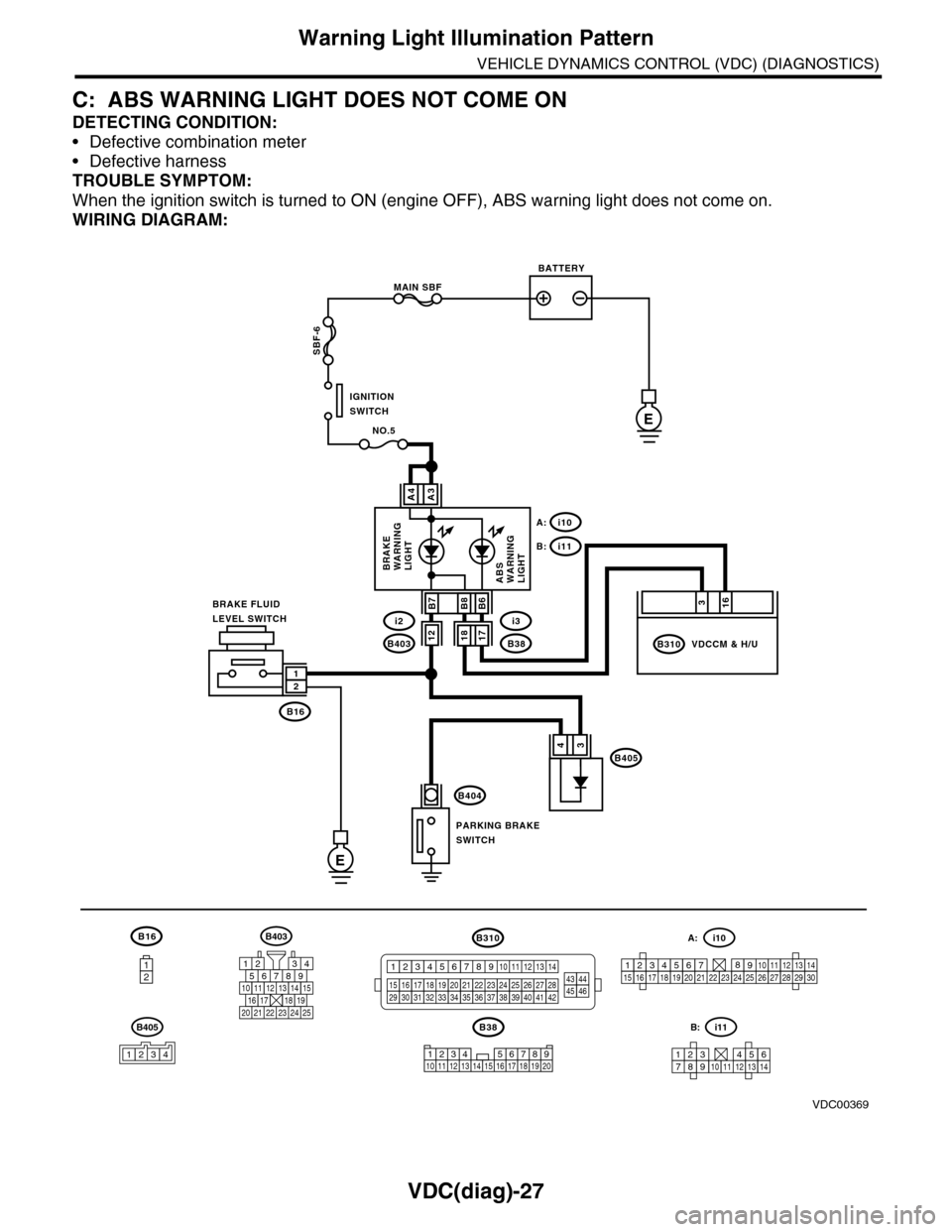
C: ABS WARNING LIGHT DOES NOT COME ON
DETECTING CONDITION:
•Defective combination meter
•Defective harness
TROUBLE SYMPTOM:
When the ignition switch is turned to ON (engine OFF), ABS warning light does not come on.
WIRING DIAGRAM:
B16
12
B38
E
MAIN SBF
SBF-6
E
NO.5
B16
B404
A3A4
12
34B405
1234 5678910 11 12 13 14 15 16 17 18 19 20
BATTERY
IGNITIONSWITCH
BRAKE FLUIDLEVEL SWITCH
PARKING BRAKESWITCH
BRAKEWARNINGLIGHTABSWARNINGLIGHT
316
B310B38
i3
i10A:
i11B:
VDCCM & H/U
B8
1817B403
i2B7B6
VDC00369
12
B405
1234
B403
567821943
10
2422 23 25
1112131415161718192021
B310
1234
1516171819202122232425262728293031323334353637383940414245464344568910 11 12 13 147
1234567891011121314
i11B:
123456789101112131415161718192021222324252627282930
i10A:
Page 1021 of 2453
VDC(diag)-29
Warning Light Illumination Pattern
VEHICLE DYNAMICS CONTROL (VDC) (DIAGNOSTICS)
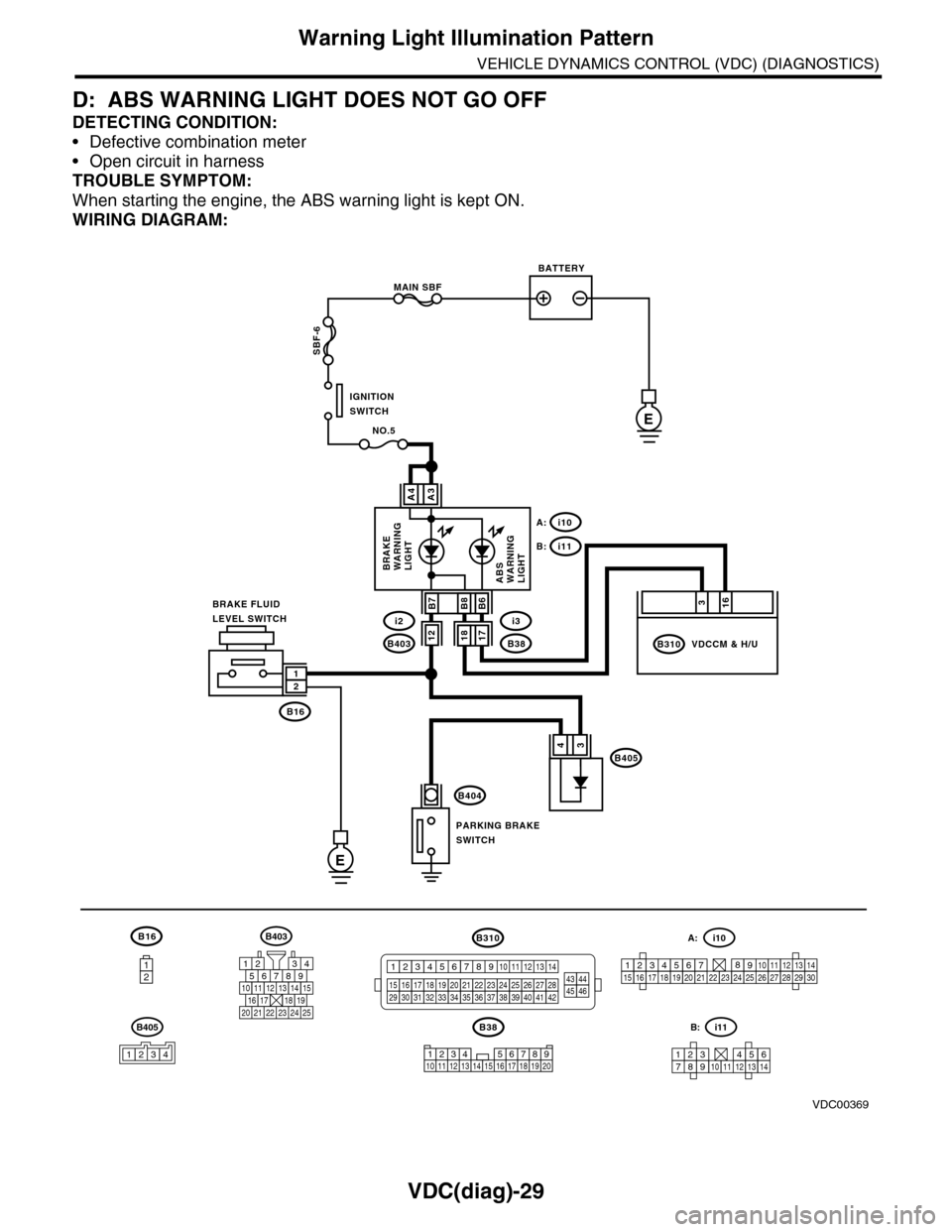
D: ABS WARNING LIGHT DOES NOT GO OFF
DETECTING CONDITION:
•Defective combination meter
•Open circuit in harness
TROUBLE SYMPTOM:
When starting the engine, the ABS warning light is kept ON.
WIRING DIAGRAM:
B16
12
B38
E
MAIN SBF
SBF-6
E
NO.5
B16
B404
A3A4
12
34B405
1234 5678910 11 12 13 14 15 16 17 18 19 20
BATTERY
IGNITIONSWITCH
BRAKE FLUIDLEVEL SWITCH
PARKING BRAKESWITCH
BRAKEWARNINGLIGHTABSWARNINGLIGHT
316
B310B38
i3
i10A:
i11B:
VDCCM & H/U
B8
1817B403
i2B7B6
VDC00369
12
B405
1234
B403
567821943
10
2422 23 25
1112131415161718192021
B310
1234
1516171819202122232425262728293031323334353637383940414245464344568910 11 12 13 147
1234567891011121314
i11B:
123456789101112131415161718192021222324252627282930
i10A:
Page 1031 of 2453
VDC(diag)-39
Diagnostic Procedure with Diagnostic Trouble Code (DTC)
VEHICLE DYNAMICS CONTROL (VDC) (DIAGNOSTICS)
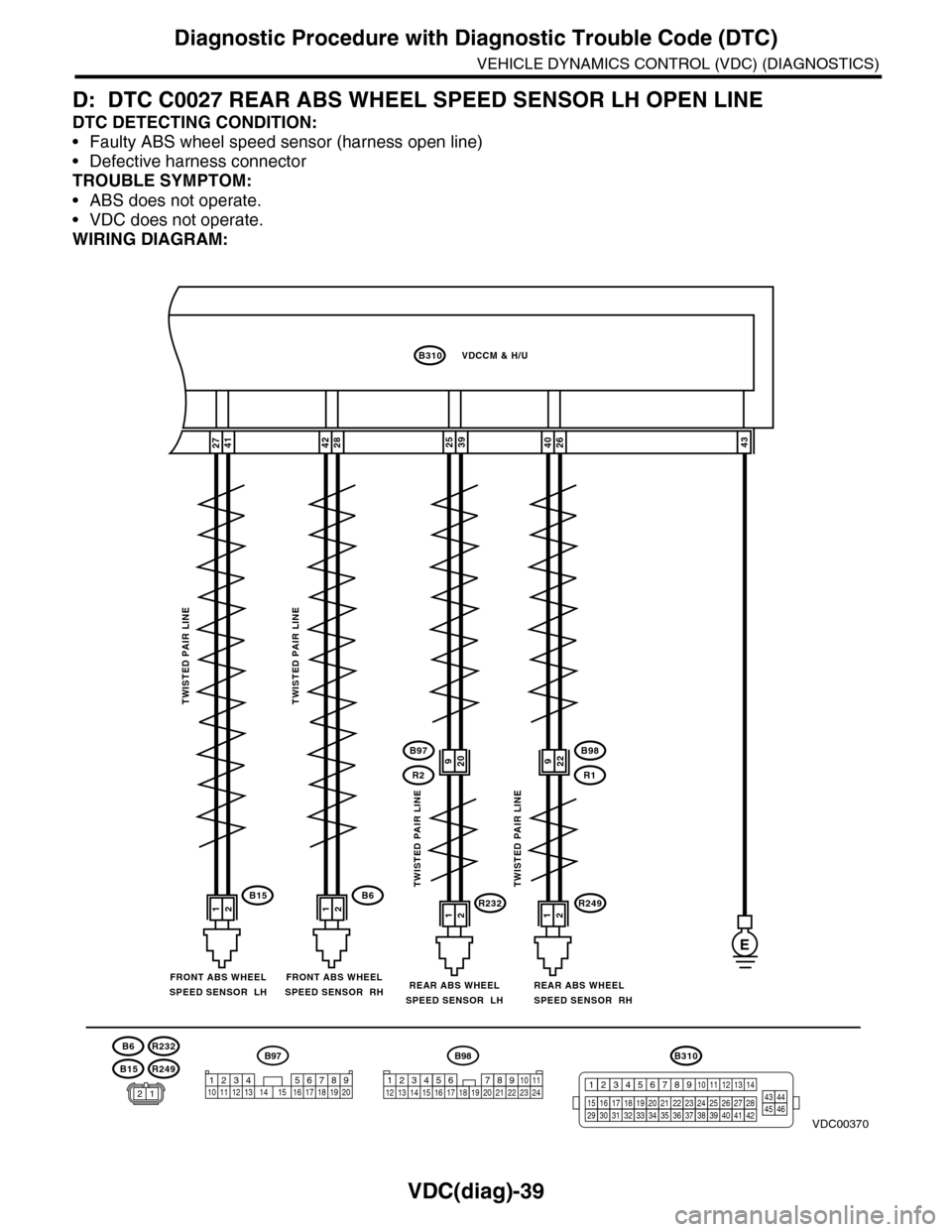
D: DTC C0027 REAR ABS WHEEL SPEED SENSOR LH OPEN LINE
DTC DETECTING CONDITION:
•Faulty ABS wheel speed sensor (harness open line)
•Defective harness connector
TROUBLE SYMPTOM:
•ABS does not operate.
•VDC does not operate.
WIRING DIAGRAM:
26404127392543
B98
R249R232
R1
B97
R2
E
12121212B6B15
2842
B310VDCCM & H/U
TWISTED PAIR LINETWISTED PAIR LINE
TWISTED PAIR LINETWISTED PAIR LINE
REAR ABS WHEELSPEED SENSOR RH
FRONT ABS WHEELSPEED SENSOR RHFRONT ABS WHEELSPEED SENSOR LHREAR ABS WHEELSPEED SENSOR LH
B15
B6
R249
R232
VDC00370
920922
B310
1234
1516171819202122232425262728293031323334353637383940414245464344568910 11 12 13 147
B98
3412 8910 1112 13 14 15 16 17 18 19 20 21 22 23 2456 7
B97
1234 5678910 11 12 13 14 15 16 17 18 19 2012
Page 1032 of 2453
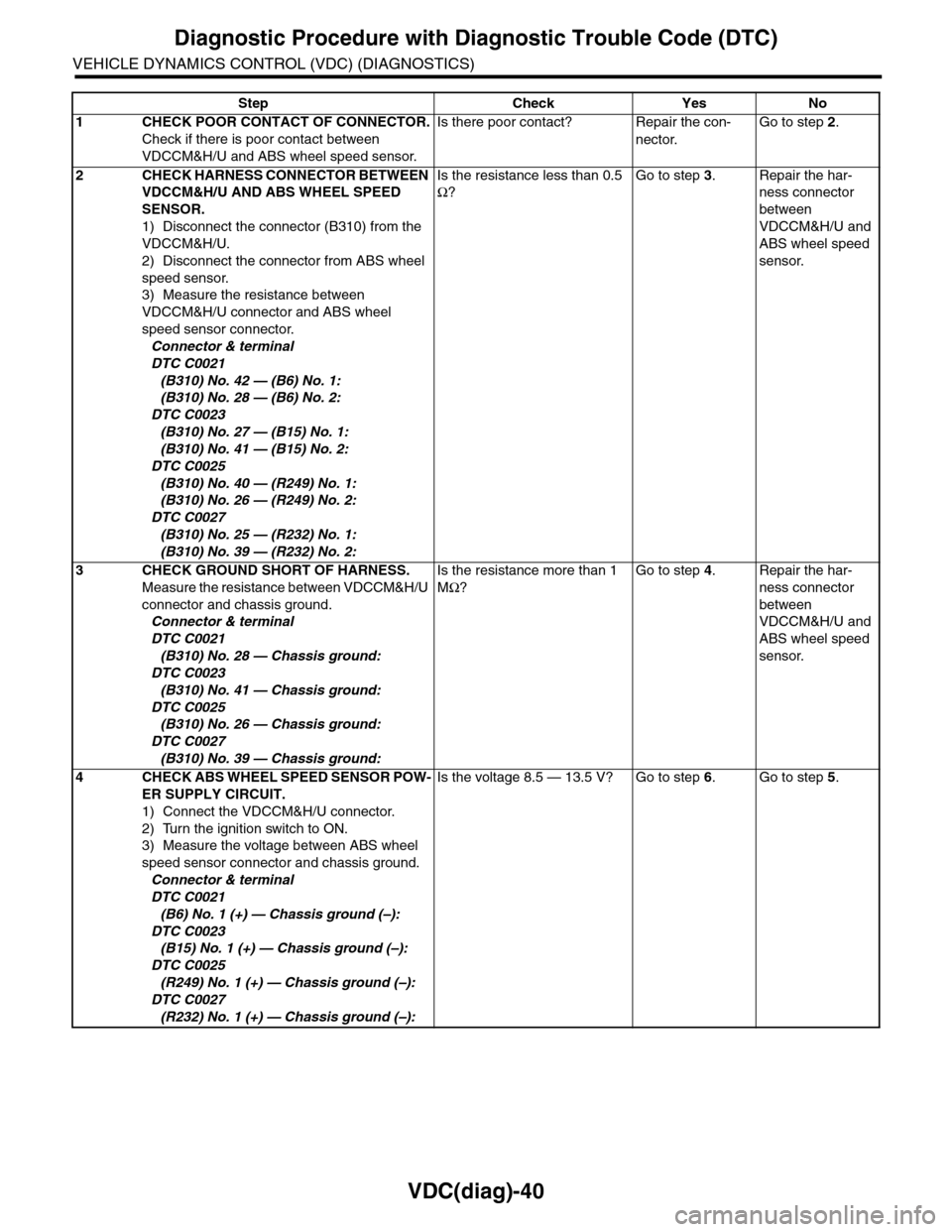
VDC(diag)-40
Diagnostic Procedure with Diagnostic Trouble Code (DTC)
VEHICLE DYNAMICS CONTROL (VDC) (DIAGNOSTICS)
Step Check Yes No
1CHECK POOR CONTACT OF CONNECTOR.
Check if there is poor contact between
VDCCM&H/U and ABS wheel speed sensor.
Is there poor contact? Repair the con-
nector.
Go to step 2.
2CHECK HARNESS CONNECTOR BETWEEN
VDCCM&H/U AND ABS WHEEL SPEED
SENSOR.
1) Disconnect the connector (B310) from the
VDCCM&H/U.
2) Disconnect the connector from ABS wheel
speed sensor.
3) Measure the resistance between
VDCCM&H/U connector and ABS wheel
speed sensor connector.
Connector & terminal
DTC C0021
(B310) No. 42 — (B6) No. 1:
(B310) No. 28 — (B6) No. 2:
DTC C0023
(B310) No. 27 — (B15) No. 1:
(B310) No. 41 — (B15) No. 2:
DTC C0025
(B310) No. 40 — (R249) No. 1:
(B310) No. 26 — (R249) No. 2:
DTC C0027
(B310) No. 25 — (R232) No. 1:
(B310) No. 39 — (R232) No. 2:
Is the resistance less than 0.5
Ω?
Go to step 3.Repair the har-
ness connector
between
VDCCM&H/U and
ABS wheel speed
sensor.
3CHECK GROUND SHORT OF HARNESS.
Measure the resistance between VDCCM&H/U
connector and chassis ground.
Connector & terminal
DTC C0021
(B310) No. 28 — Chassis ground:
DTC C0023
(B310) No. 41 — Chassis ground:
DTC C0025
(B310) No. 26 — Chassis ground:
DTC C0027
(B310) No. 39 — Chassis ground:
Is the resistance more than 1
MΩ?
Go to step 4.Repair the har-
ness connector
between
VDCCM&H/U and
ABS wheel speed
sensor.
4CHECK ABS WHEEL SPEED SENSOR POW-
ER SUPPLY CIRCUIT.
1) Connect the VDCCM&H/U connector.
2) Turn the ignition switch to ON.
3) Measure the voltage between ABS wheel
speed sensor connector and chassis ground.
Connector & terminal
DTC C0021
(B6) No. 1 (+) — Chassis ground (–):
DTC C0023
(B15) No. 1 (+) — Chassis ground (–):
DTC C0025
(R249) No. 1 (+) — Chassis ground (–):
DTC C0027
(R232) No. 1 (+) — Chassis ground (–):
Is the voltage 8.5 — 13.5 V? Go to step 6.Go to step 5.