2007 TOYOTA SIENNA control arm
[x] Cancel search: control armPage 48 of 3000
IN–36INTRODUCTION – HOW TO TROUBLESHOOT ECU CONTROLLED SYSTEMS
IN
HOW TO PROCEED WITH
TROUBLESHOOTING
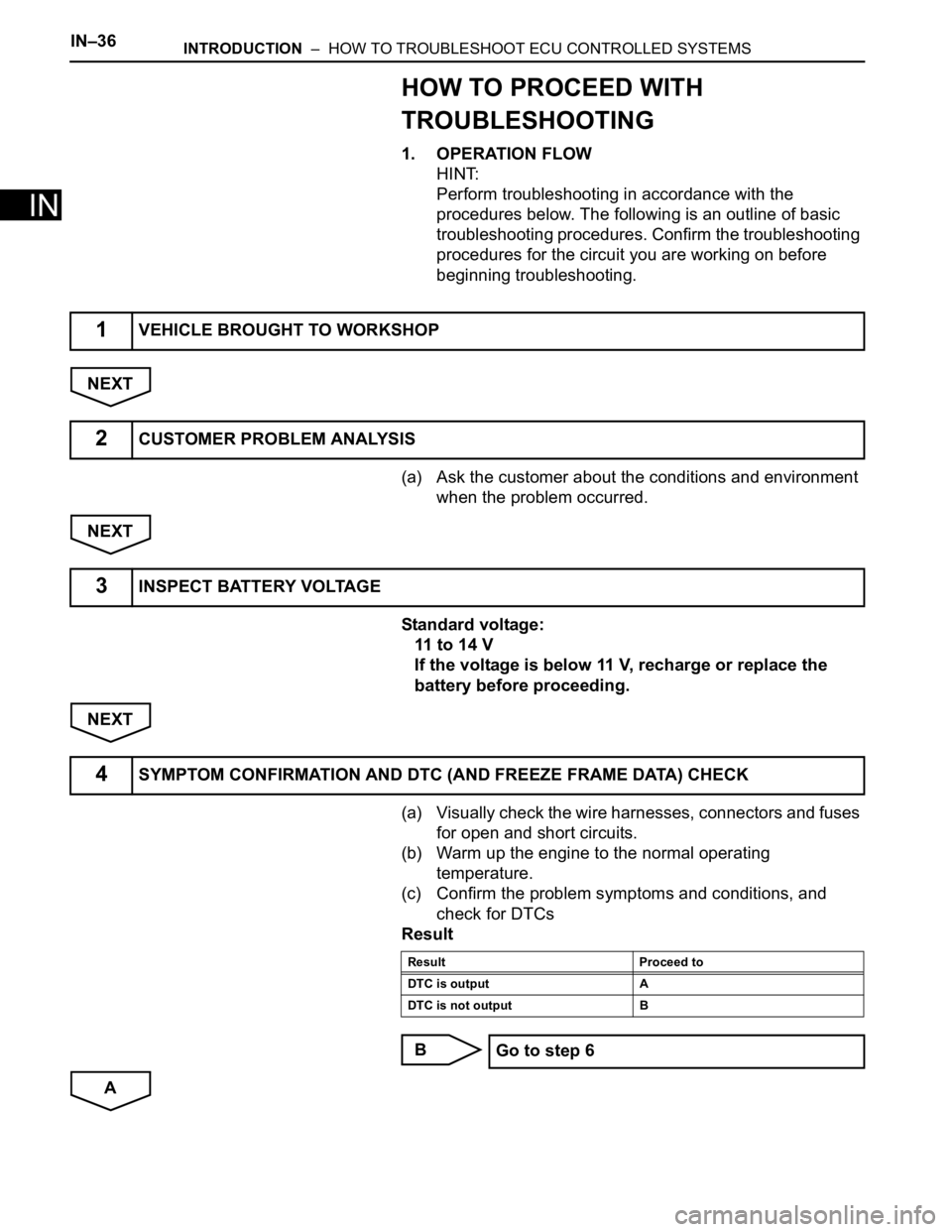
1. OPERATION FLOW
HINT:
Perform troubleshooting in accordance with the
procedures below. The following is an outline of basic
troubleshooting procedures. Confirm the troubleshooting
procedures for the circuit you are working on before
beginning troubleshooting.
NEXT
(a) Ask the customer about the conditions and environment
when the problem occurred.
NEXT
Standard voltage:
11 to 14 V
If the voltage is below 11 V, recharge or replace the
battery before proceeding.
NEXT
(a) Visually check the wire harnesses, connectors and fuses
for open and short circuits.
(b) Warm up the engine to the normal operating
temperature.
(c) Confirm the problem symptoms and conditions, and
check for DTCs
Result
B
A
1VEHICLE BROUGHT TO WORKSHOP
2CUSTOMER PROBLEM ANALYSIS
3INSPECT BATTERY VOLTAGE
4SYMPTOM CONFIRMATION AND DTC (AND FREEZE FRAME DATA) CHECK
Result Proceed to
DTC is output A
DTC is not output B
Go to step 6
Page 53 of 3000

INTRODUCTION – HOW TO TROUBLESHOOT ECU CONTROLLED SYSTEMSIN–41
IN
If a DTC was displayed in the initial DTC check, the
problem may have occurred in a wire harness or
connector in that circuit in the past. Check the wire
harness and connectors.
B
A
The problem still occurs in a place other than the diagnostic
circuit (the DTC displayed first is either for a past problem or
a secondary problem).
4. SYMPTOM SIMULATION
HINT:
The most difficult case in troubleshooting is when no
problem symptoms occur. In such a case, a thorough
problem analysis must be carried out. A simulation of the
same or similar conditions and environment in which the
problem occurred in the customer's vehicle should be
carried out. No matter how much skill or experience a
technician has, troubleshooting without confirming the
problem symptoms will lead to important repairs being
overlooked and mistakes or delays.
For example:
With a problem that only occurs when the engine is
cold or as a result of vibration caused by the road
during driving, the problem can never be
determined if the symptoms are being checked on
a stationary vehicle or a vehicle with a warmed-up
engine. Vibration, heat or water penetration
(moisture) is difficult to reproduce. The symptom
simulation tests below are effective substitutes for
the conditions and can be applied on a stationary
vehicle. Important points in the symptom
simulation test:
In the symptom simulation test, the problem
symptoms as well as the problem area or parts
must be confirmed. First, narrow down the
possible problem circuits according to the
symptoms. Then, connect the tester and carry out
the symptom simulation test, judging whether the
circuit being tested is defective or normal. Also,
confirm the problem symptoms at the same time.
Refer to the problem symptoms table for each
system to narrow down the possible causes.SYSTEM NORMAL
TROUBLESHOOTING OF EACH PROBLEM SYMPTOM
Page 66 of 3000
IN–36INTRODUCTION – HOW TO TROUBLESHOOT ECU CONTROLLED SYSTEMS
IN
HOW TO PROCEED WITH
TROUBLESHOOTING
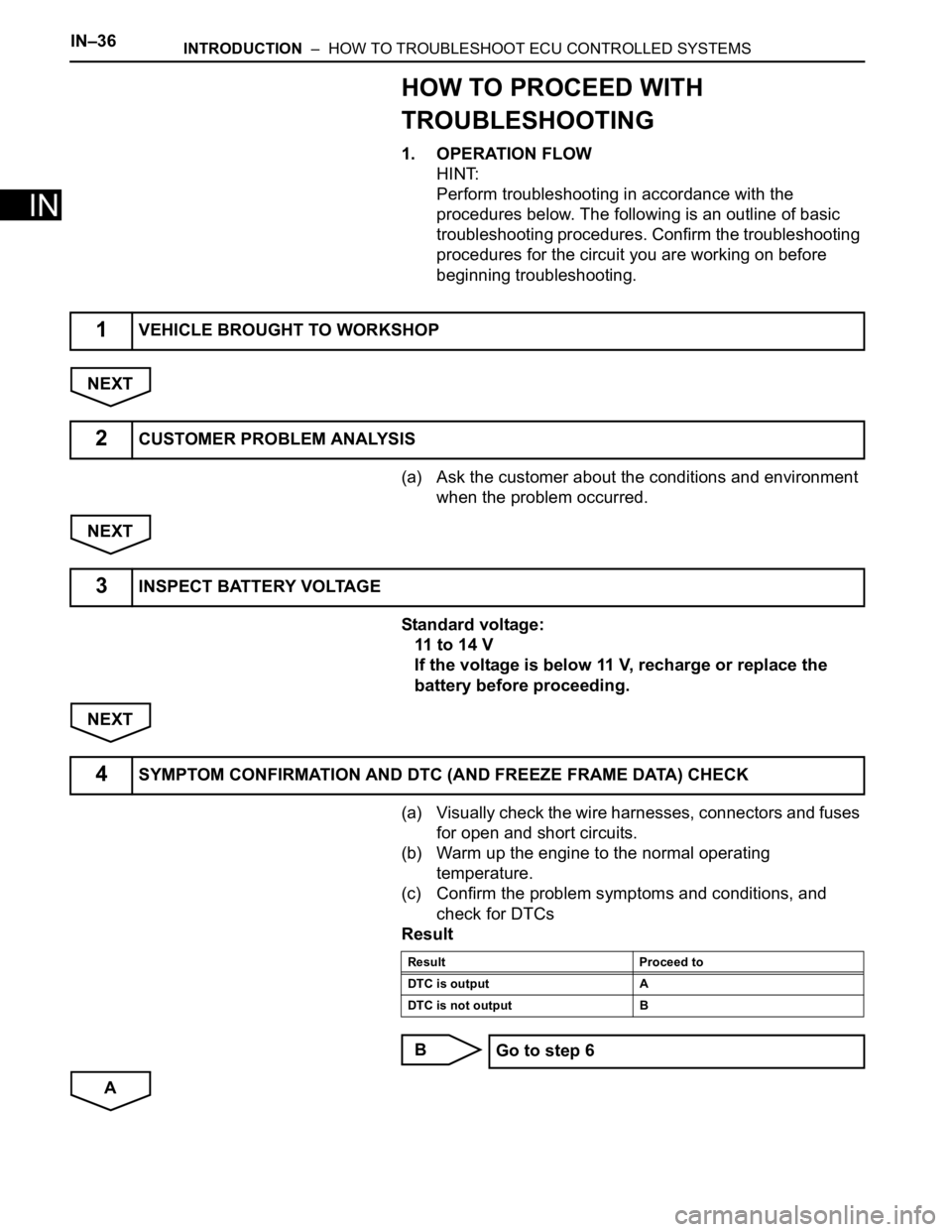
1. OPERATION FLOW
HINT:
Perform troubleshooting in accordance with the
procedures below. The following is an outline of basic
troubleshooting procedures. Confirm the troubleshooting
procedures for the circuit you are working on before
beginning troubleshooting.
NEXT
(a) Ask the customer about the conditions and environment
when the problem occurred.
NEXT
Standard voltage:
11 to 14 V
If the voltage is below 11 V, recharge or replace the
battery before proceeding.
NEXT
(a) Visually check the wire harnesses, connectors and fuses
for open and short circuits.
(b) Warm up the engine to the normal operating
temperature.
(c) Confirm the problem symptoms and conditions, and
check for DTCs
Result
B
A
1VEHICLE BROUGHT TO WORKSHOP
2CUSTOMER PROBLEM ANALYSIS
3INSPECT BATTERY VOLTAGE
4SYMPTOM CONFIRMATION AND DTC (AND FREEZE FRAME DATA) CHECK
Result Proceed to
DTC is output A
DTC is not output B
Go to step 6
Page 71 of 3000

INTRODUCTION – HOW TO TROUBLESHOOT ECU CONTROLLED SYSTEMSIN–41
IN
If a DTC was displayed in the initial DTC check, the
problem may have occurred in a wire harness or
connector in that circuit in the past. Check the wire
harness and connectors.
B
A
The problem still occurs in a place other than the diagnostic
circuit (the DTC displayed first is either for a past problem or
a secondary problem).
4. SYMPTOM SIMULATION
HINT:
The most difficult case in troubleshooting is when no
problem symptoms occur. In such a case, a thorough
problem analysis must be carried out. A simulation of the
same or similar conditions and environment in which the
problem occurred in the customer's vehicle should be
carried out. No matter how much skill or experience a
technician has, troubleshooting without confirming the
problem symptoms will lead to important repairs being
overlooked and mistakes or delays.
For example:
With a problem that only occurs when the engine is
cold or as a result of vibration caused by the road
during driving, the problem can never be
determined if the symptoms are being checked on
a stationary vehicle or a vehicle with a warmed-up
engine. Vibration, heat or water penetration
(moisture) is difficult to reproduce. The symptom
simulation tests below are effective substitutes for
the conditions and can be applied on a stationary
vehicle. Important points in the symptom
simulation test:
In the symptom simulation test, the problem
symptoms as well as the problem area or parts
must be confirmed. First, narrow down the
possible problem circuits according to the
symptoms. Then, connect the tester and carry out
the symptom simulation test, judging whether the
circuit being tested is defective or normal. Also,
confirm the problem symptoms at the same time.
Refer to the problem symptoms table for each
system to narrow down the possible causes.SYSTEM NORMAL
TROUBLESHOOTING OF EACH PROBLEM SYMPTOM
Page 236 of 3000

THEFT DETERRENT – THEFT DETERRENT SYSTEMTD–3
TD
SYSTEM DESCRIPTION
1. OUTLINE OF THEFT DETERRENT SYSTEM
(a) When the theft deterrent system detects that the
vehicle is being tampered with, the system sets off
the alarm, causing the horns to sound and the lights
to light up or blink in order to alert people around the
vehicle to the theft.
(b) The theft deterrent system has 2 modes; one is the
active arming mode (see ACTIVE ARMING MODE)
and the other is passive arming mode (see
PASSIVE ARMING MODE). The passive arming
mode can be switched ON/OFF using the specified
method.
(c) Each mode has 4 states; a disarmed state, an
arming preparation state, an armed state and an
alarm sounding state.
(1) Disarmed state:
• The alarm function is not operating.
• The theft deterrent system is not operating.
(2) Arming preparation state:
• The time until the system goes into the armed
state.
• The theft deterrent system is not operating.
(3) Armed state:
• The theft deterrent system is operating.
(4) Alarm sounding state:
• Alarm function is operating.
Alarm time:
Approx. 60 sec.
Refer to table below for alarm method and time:
HINT:
If any of the doors are unlocked with no key in
the ignition key cylinder during the armed state,
a forced door lock signal will be output (see
FORCED DOOR LOCK CONTROL).
2. ACTIVE ARMING MODE
HINT:
• Active arming mode starts the alarm control
immediately after the doors are locked.
• This system activates as described in the diagram
below when one of items for each condition is met.
Alarm MethodHeadlight Blinking (approx. 0.4 second cycles)
Taillight Blinking (approx. 0.4 second cycles)
Hazard Warning Light Blinking (cycles of flasher relay)
Interior Light Illuminating
Vehicle HornSounding
(approx. 0.4 second cycles)
Security HornSounding
(approx. 0.4 second cycles)
Alarm Time Approx. 60 sec.
Page 238 of 3000

THEFT DETERRENT – THEFT DETERRENT SYSTEMTD–5
TD
3. PASSIVE ARMING MODE
HINT:
• Passive arming mode starts the alarm control after
the key is removed from the ignition key cylinder and
doors are closed.
• Passive arming mode can be switched ON/OFF by
the specified method.
• The alarm is initially set (when shipped from factory)
to active arming mode (not passive arming mode).
• During passive arming mode, the theft deterrent
system goes into the armed state even if the doors
are not locked.
• Detecting that the doors are unlocked does not set off
the alarm during passive arming mode.
• A forced door lock signal is not output during passive
arming mode (see FORCED DOOR LOCK
CONTROL).
• Although the theft deterrent system detects that the
doors are opened during passive arming mode, the
alarm will not go off immediately because an entry
delay time is set.
• If any of the following conditions is met during passive
arming mode, the theft deterrent system will switch to
active arming mode.
– With all doors and engine hood closed, lock all
doors by key operation.
– With all doors and engine hood closed, lock all
doors by wireless operation.
– With any door or the engine hood open, lock all
doors and close all doors and engine hood.
• This system activates as described in the diagram
below when one of items for each condition is met.
Condition (6)1. Unlock any door by wireless operation.
2. Unlock any door by key operation.
3. Insert key into ignition key cylinder and turn ignition switch from OFF to ON.
Condition (7) 1. After approx. 60 sec., alarm stops and system returns to armed state. Condition Item
Page 240 of 3000

THEFT DETERRENT – THEFT DETERRENT SYSTEMTD–7
TDHINT:
*1: When any door is opened while all the doors are
closed during passive arming mode, the entry delay
time starts. If the switch condition (armed state
disarmed state (1) or (2)) is met during the entry
delay time, the theft deterrent system will return to
disarmed state (1) or (2). However, if the switch
condition for disarmed state (1) or (2) is not met, the
theft deterrent system will recognize it as a theft and
set off the alarm.
Entry delay time of 0, 14 or 30 sec. can be selected
by the customizing function.
4. FORCED DOOR LOCK CONTROL
(a) The forced door lock control prevents the vehicle
from being tampered with. Immediately after a door
is unlocked (alarm starts), the door is forced to lock
by a forced door lock signal.
(1) Conditions that force the doors to lock:
No key is in the ignition key cylinder and both of
the following conditions are met.
• The theft deterrent system is in the alarm
sounding state of active arming mode.
• Any door is unlocked.
Condition (3)1. Unlock all door by wireless operation.
2. Insert key into ignition key cylinder.
3. Reconnect battery.
4. Turn ignition switch from OFF to ON.
5. Unlock any door by key operation.
Condition (4) 1. With all doors and engine hood closed, allow approx. 30 sec. to elapse.
Condition (5) 1. Open any door or the engine hood.
Condition (6)1. Open any door and allow entry delay time
*1 to elapse.
2. Open engine hood.
3. Reconnect battery.
4. Directly connect ignition switch without key (or turn ignition switch ON without key).
Condition (7)1. Unlock all door by wireless operation.
2. Unlock all door by key operation.
3. Insert key into ignition key cylinder and turn ignition switch from OFF to ON.
Condition (8) 1. After approx. 60 sec., alarm stops and system returns to armed state. Condition Item
Page 241 of 3000

TD–8THEFT DETERRENT – THEFT DETERRENT SYSTEM
TD
5. ALARM MEMORY FUNCTION
(a) If the alarm is set off (tampering is detected) while
the theft deterrent system is armed, it will be
recorded by the alarm memory function. Whenever
you cancel the theft deterrent system, the alarm
memory function causes the taillights to light up for
2 seconds in order to inform you that the alarm has
been set off.
(1) Conditions of the alarm memory function that
cause the taillights to light up:
When the theft deterrent system has entered
into the alarm sounding state (tampering has
been detected) even once, the taillights will light
up for 2 seconds if any of the following
conditions is met.
• Switched to the disarmed state from the
armed state during active arming mode.
• Switched to the disarmed state (1) from the
armed state during passive arming mode.
HINT:
Active arming mode: See ACTIVE ARMING
MODE.
Passive arming mode: See PASSIVE ARMING
MODE.
6. PANIC ALARM CONTROL
(a) The panic alarm control makes it possible to
voluntarily set off the panic alarm by pressing the
PANIC switch on the wireless transmitter.
(1) Conditions that cause the panic alarm control to
set off the panic alarm:
The panic alarm control sets off the panic alarm
by pressing the PANIC switch on the wireless
transmitter for over 2, 4 seconds under the
following conditions:
• The ignition switch is OFF.
• The theft deterrent system is not in the alarm
sounding state. (This condition is common
both to active arming mode and to passive
arming mode.)
(2) Conditions that cause the panic alarm control to
shut off the alarm:
The panic alarm control shuts off the panic alarm
when any of the following conditions is met
during panic alarm operation:
• The ignition switch is turned ON.
• Either of the switches on the wireless
transmitter (LOCK/UNLOCK) is pressed.
• The panic alarm ends (60 sec. have passed).