Page 622 of 3502
AV-94
INTEGRATED COLOR DISPLAY SYSTEM
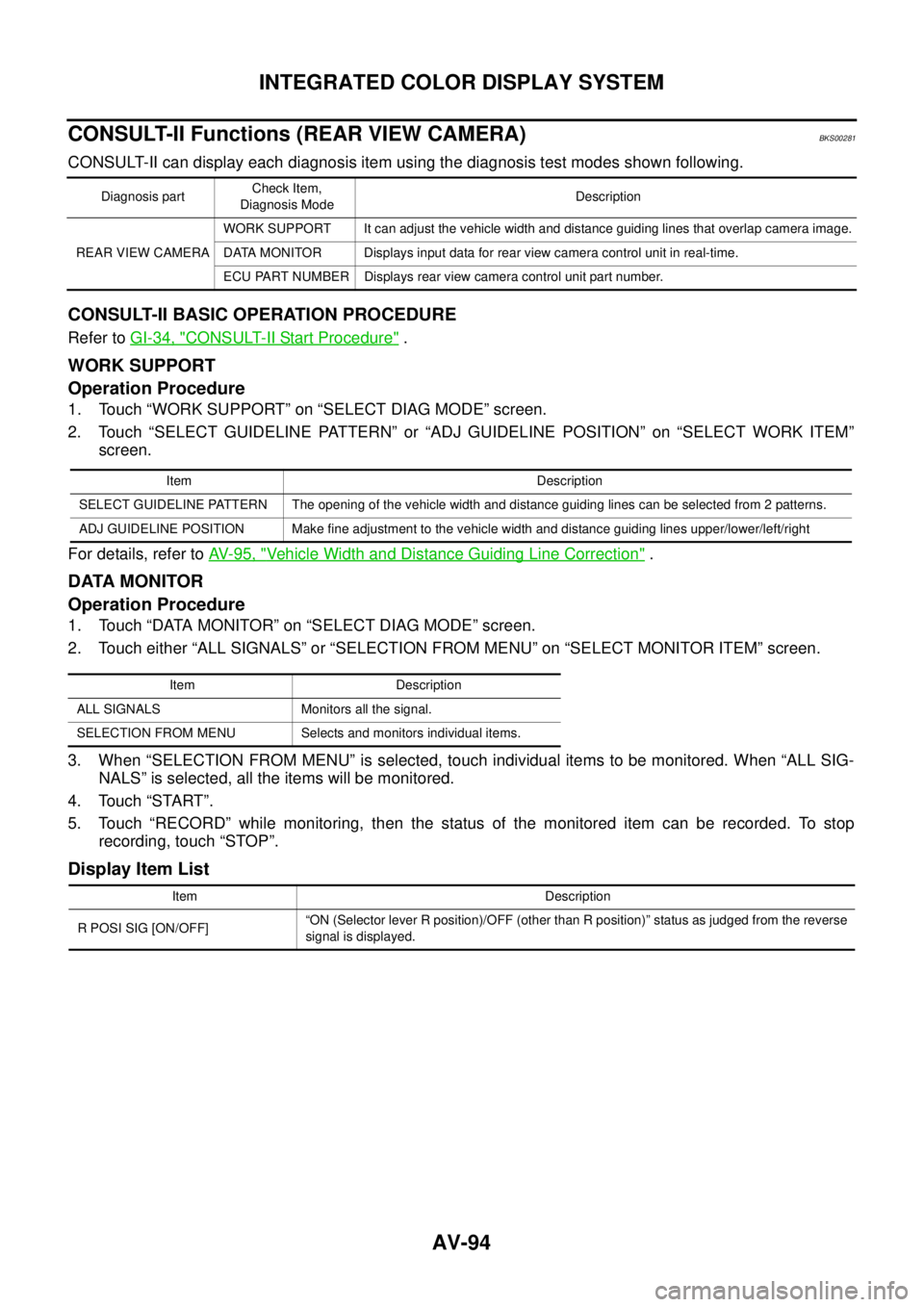
CONSULT-II Functions (REAR VIEW CAMERA)BKS00281
CONSULT-II can display each diagnosis item using the diagnosis test modes shown following.
CONSULT-II BASIC OPERATION PROCEDURE
Refer to GI-34, "CONSULT-II Start Procedure" .
WORK SUPPORT
Operation Procedure
1. Touch “WORK SUPPORT” on “SELECT DIAG MODE” screen.
2. Touch “SELECT GUIDELINE PATTERN” or “ADJ GUIDELINE POSITION” on “SELECT WORK ITEM”
screen.
For details, refer to AV- 9 5 , "
Vehicle Width and Distance Guiding Line Correction" .
DATA MONITOR
Operation Procedure
1. Touch “DATA MONITOR” on “SELECT DIAG MODE” screen.
2. Touch either “ALL SIGNALS” or “SELECTION FROM MENU” on “SELECT MONITOR ITEM” screen.
3. When “SELECTION FROM MENU” is selected, touch individual items to be monitored. When “ALL SIG-
NALS” is selected, all the items will be monitored.
4. Touch “START”.
5. Touch “RECORD” while monitoring, then the status of the monitored item can be recorded. To stop
recording, touch “STOP”.
Display Item List
Diagnosis partCheck Item,
Diagnosis ModeDescription
REAR VIEW CAMERAWORK SUPPORT It can adjust the vehicle width and distance guiding lines that overlap camera image.
DATA MONITOR Displays input data for rear view camera control unit in real-time.
ECU PART NUMBER Displays rear view camera control unit part number.
Item Description
SELECT GUIDELINE PATTERN The opening of the vehicle width and distance guiding lines can be selected from 2 patterns.
ADJ GUIDELINE POSITION Make fine adjustment to the vehicle width and distance guiding lines upper/lower/left/right
Item Description
ALL SIGNALS Monitors all the signal.
SELECTION FROM MENU Selects and monitors individual items.
Item Description
R POSI SIG [ON/OFF]“ON (Selector lever R position)/OFF (other than R position)” status as judged from the reverse
signal is displayed.
Page 629 of 3502
INTEGRATED COLOR DISPLAY SYSTEM
AV-101
C
D
E
F
G
H
I
J
L
MA
B
AV
Rear View Image Is Not Displayed (RGB Image Is Displayed)BKS00286
Symptom: Rear view image is not displayed when selector lever is set in R position. (RGB image is displayed.)
1. CHECK CONDITION
1. Turn ignition switch ON.
2. When setting selector lever in R position, make sure that the screen does not change or changes into the
screen where nothing is displayed.
Does the screen change into the screen where nothing is displayed?
YES >> GO TO 2.
NO >> GO TO 12.
2. CONSULT-II FUNCTIONS
1. Connect “CONSULT-II”. Refer to AV- 9 4 , "
CONSULT-II BASIC OPERATION PROCEDURE" .
2. Check if “REARVIEW CAMERA” is shown on the SELECT SYSTEM screen.
Is
“REARVIEW CAMERA” shown?
YES >> GO TO 3.
NO >> Check rear view camera control unit power supply and ground circuit, and repair malfunctioning
part.
3. CONSULT-II FUNCTIONS
Check if reverse signals input to the rear view camera control unit are normal with DATA MONITOR. Refer to
AV- 9 4 , "
DATA MONITOR" .
OK or NG
OK >> GO TO 4.
NG >> Check rear view camera control unit reverse signal circuit, and repair malfunctioning part.
4. CHECK HARNESS
1. Turn ignition switch OFF.
2. Disconnect rear view camera control unit and rear view camera connectors.
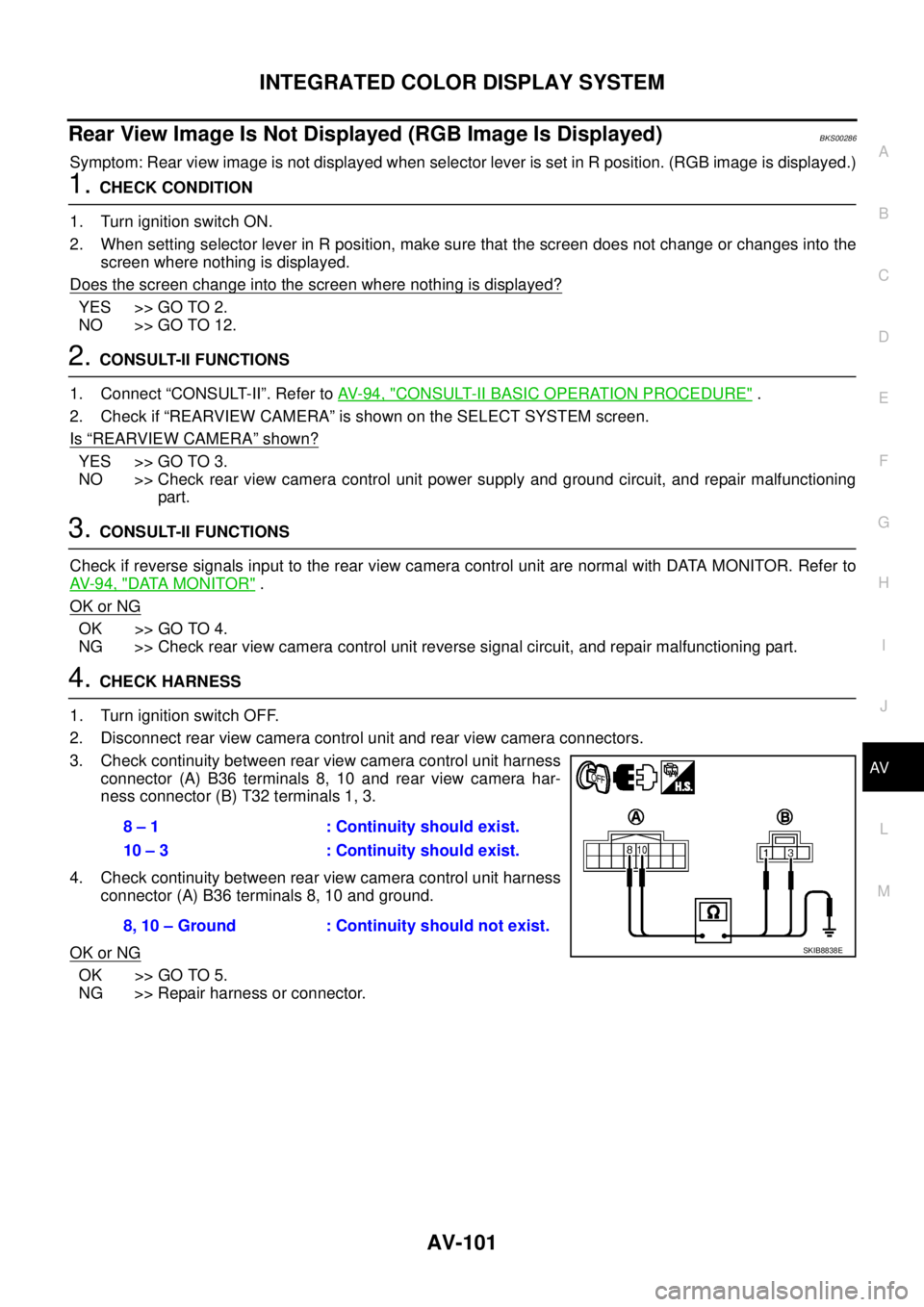
3. Check continuity between rear view camera control unit harness
connector (A) B36 terminals 8, 10 and rear view camera har-
ness connector (B) T32 terminals 1, 3.
4. Check continuity between rear view camera control unit harness
connector (A) B36 terminals 8, 10 and ground.
OK or NG
OK >> GO TO 5.
NG >> Repair harness or connector.8 – 1 : Continuity should exist.
10 – 3 : Continuity should exist.
8, 10 – Ground : Continuity should not exist.
SKIB8838E
Page 632 of 3502

AV-104
INTEGRATED COLOR DISPLAY SYSTEM
11 . CHECK RGB AREA (YS) SIGNAL
1. Connect display control unit and display connectors.
2. Turn ignition switch ON.
3. When displaying rear view image, check voltage waveform
between display control unit harness connector M83 terminal 51
and ground with CONSULT-ll or oscilloscope.
OK or NG
OK >> Replace display.
NG >> Replace display control unit.
12. SELF-DIAGNOSIS
Start self-diagnosis, and check the self-diagnosis result. Refer to AV- 8 7 , "
Self-Diagnosis Mode" .
OK or NG
OK >> GO TO 13.
NG >> Repair malfunctioning part.
13. CHECK DISPLAY CONTROL UNIT REVERSE SIGNAL
Select “Vehicle Signal” of DCU Confirmation mode, and check the reverse signal inputting to display control
unit. Refer to AV- 9 0 , "
Vehicle Signal" .
OK or NG
OK >> GO TO 14.
NG >> Check display control unit reverse signal circuit, and repair malfunctioning part.
14. CHECK HARNESS
1. Turn ignition switch OFF.
2. Disconnect rear view camera control unit and display control unit connectors.
3. Check continuity between rear view camera control unit harness
connector (A) B36 terminal 5 and display control unit harness
connector (B) M82 terminal 8.
OK or NG
OK >> GO TO 15.
NG >> Repair harness or connector.51 – Ground
When displaying RGB image : Approx. 5 V
When displaying rear view image : Approx. 0 V
SKIB7847E
5 – 8 : Continuity should exist.
SKIB7848E
Page 640 of 3502
AV-112
INTEGRATED COLOR DISPLAY SYSTEM
Removal and Installation of A/C and AV SwitchBKS0028E
REMOVAL
Remove A/C and AV switch integral with audio unit. Refer to AV- 3 4 , "Removal and Installation of Audio Unit" .
INSTALLATION
Installation is the reverse order of removal.
Removal and Installation of DisplayBKS0028G
REMOVAL
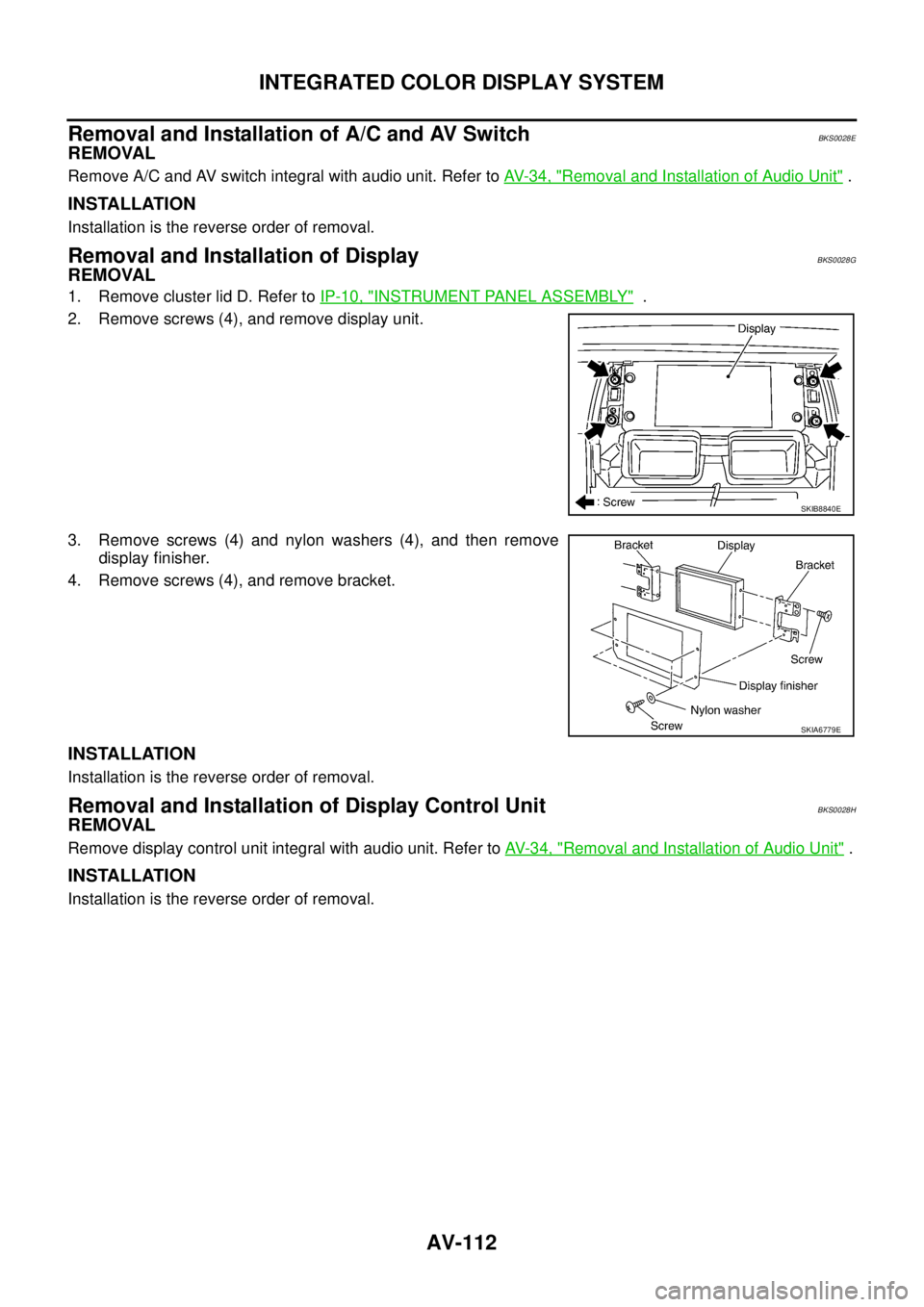
1. Remove cluster lid D. Refer to IP-10, "INSTRUMENT PANEL ASSEMBLY" .
2. Remove screws (4), and remove display unit.
3. Remove screws (4) and nylon washers (4), and then remove
display finisher.
4. Remove screws (4), and remove bracket.
INSTALLATION
Installation is the reverse order of removal.
Removal and Installation of Display Control UnitBKS0028H
REMOVAL
Remove display control unit integral with audio unit. Refer to AV- 3 4 , "Removal and Installation of Audio Unit" .
INSTALLATION
Installation is the reverse order of removal.
SKIB8840E
SKIA6779E
Page 641 of 3502
INTEGRATED COLOR DISPLAY SYSTEM
AV-113
C
D
E
F
G
H
I
J
L
MA
B
AV
Removal and Installation of Rear View CameraBKS0028I
REMOVAL
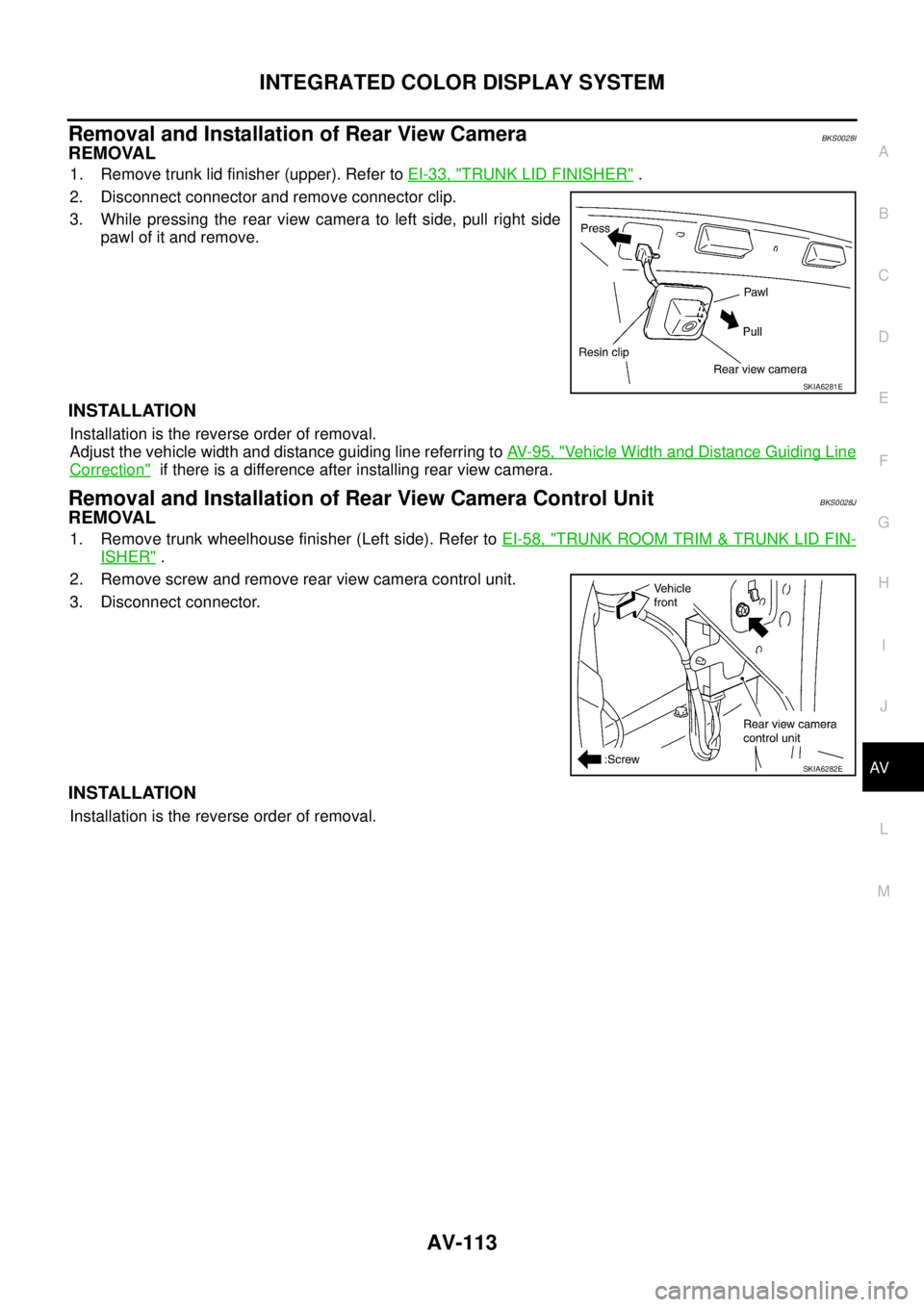
1. Remove trunk lid finisher (upper). Refer to EI-33, "TRUNK LID FINISHER" .
2. Disconnect connector and remove connector clip.
3. While pressing the rear view camera to left side, pull right side
pawl of it and remove.
INSTALLATION
Installation is the reverse order of removal.
Adjust the vehicle width and distance guiding line referring to AV- 9 5 , "
Vehicle Width and Distance Guiding Line
Correction" if there is a difference after installing rear view camera.
Removal and Installation of Rear View Camera Control UnitBKS0028J
REMOVAL
1. Remove trunk wheelhouse finisher (Left side). Refer to EI-58, "TRUNK ROOM TRIM & TRUNK LID FIN-
ISHER" .
2. Remove screw and remove rear view camera control unit.
3. Disconnect connector.
INSTALLATION
Installation is the reverse order of removal.
SKIA6281E
SKIA6282E
Page 658 of 3502
BCS-16
BCM (BODY CONTROL MODULE)
Removal and Installation of BCMBKS001UN
REMOVAL
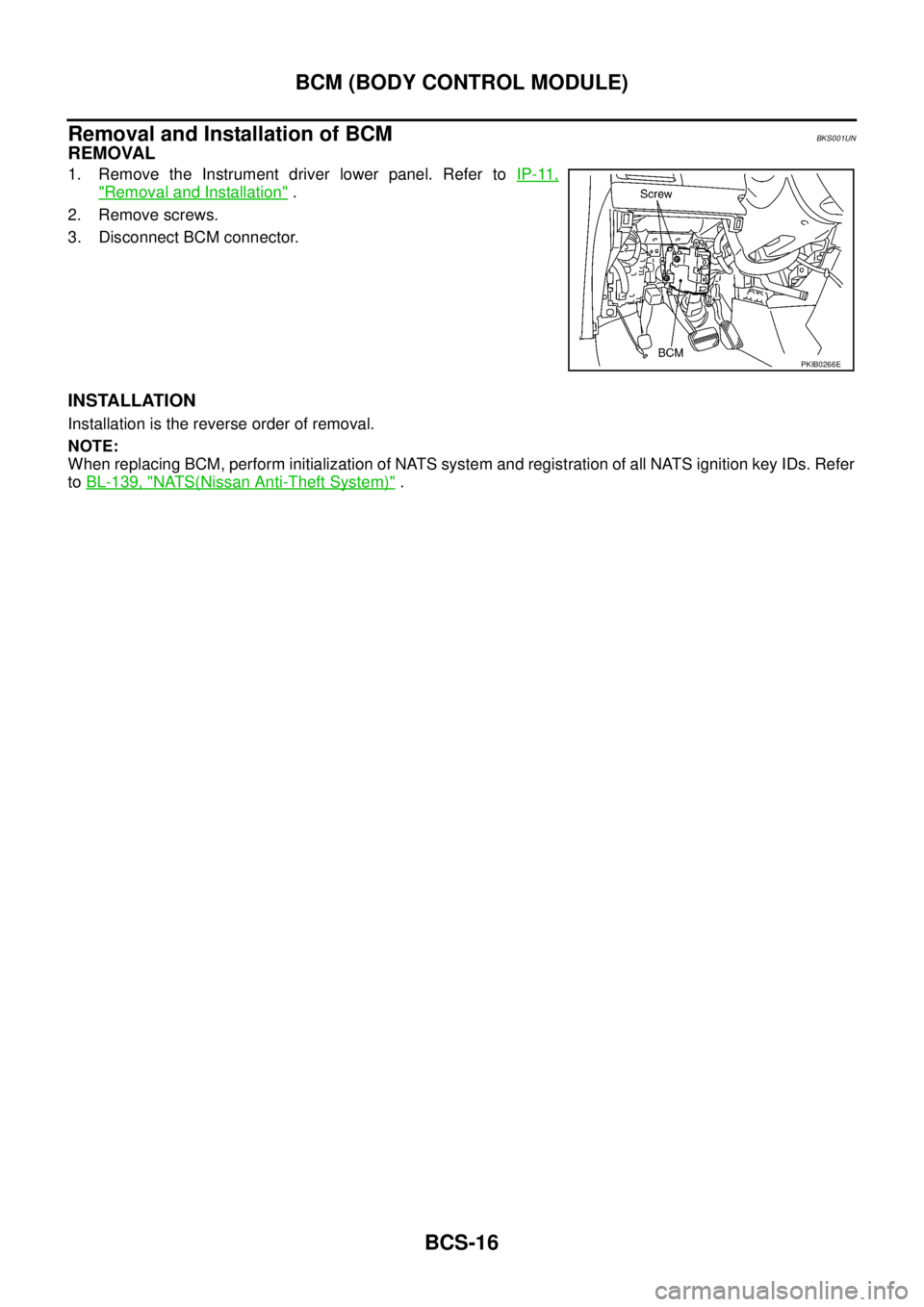
1. Remove the Instrument driver lower panel. Refer to IP-11,
"Removal and Installation" .
2. Remove screws.
3. Disconnect BCM connector.
INSTALLATION
Installation is the reverse order of removal.
NOTE:
When replacing BCM, perform initialization of NATS system and registration of all NATS ignition key IDs. Refer
to BL-139, "
NATS(Nissan Anti-Theft System)" .
PKIB0266E
Page 673 of 3502
HOOD
BL-15
C
D
E
F
G
H
J
K
L
MA
B
BL
REMOVAL
Hood Assembly
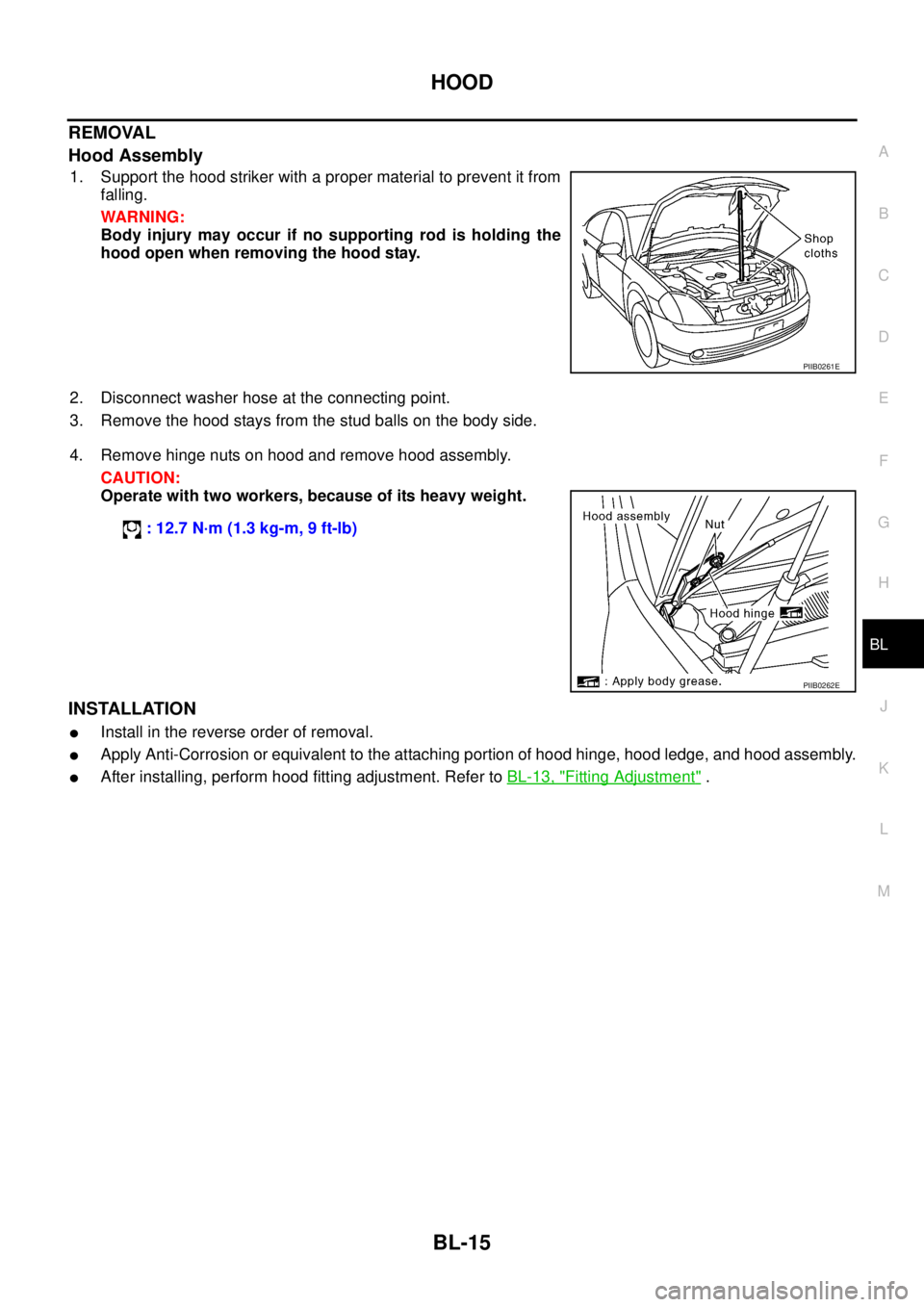
1. Support the hood striker with a proper material to prevent it from
falling.
WARNING:
Body injury may occur if no supporting rod is holding the
hood open when removing the hood stay.
2. Disconnect washer hose at the connecting point.
3. Remove the hood stays from the stud balls on the body side.
4. Remove hinge nuts on hood and remove hood assembly.
CAUTION:
Operate with two workers, because of its heavy weight.
INSTALLATION
�Install in the reverse order of removal.
�Apply Anti-Corrosion or equivalent to the attaching portion of hood hinge, hood ledge, and hood assembly.
�After installing, perform hood fitting adjustment. Refer to BL-13, "Fitting Adjustment" .
PIIB0261E
: 12.7 N·m (1.3 kg-m, 9 ft-lb)
PIIB0262E
Page 674 of 3502
BL-16
HOOD
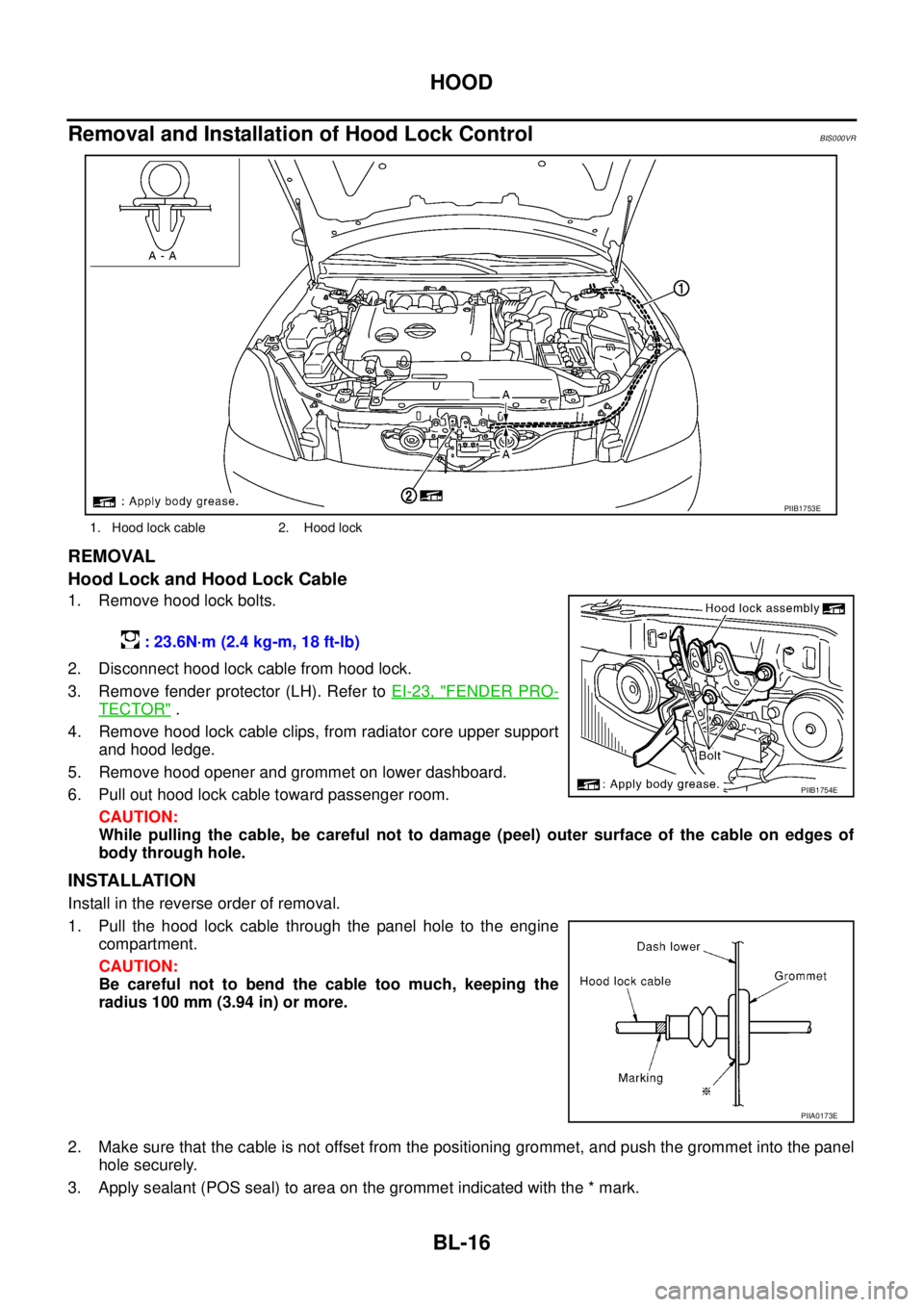
Removal and Installation of Hood Lock ControlBIS000VR
REMOVAL
Hood Lock and Hood Lock Cable
1. Remove hood lock bolts.
2. Disconnect hood lock cable from hood lock.
3. Remove fender protector (LH). Refer to EI-23, "
FENDER PRO-
TECTOR" .
4. Remove hood lock cable clips, from radiator core upper support
and hood ledge.
5. Remove hood opener and grommet on lower dashboard.
6. Pull out hood lock cable toward passenger room.
CAUTION:
While pulling the cable, be careful not to damage (peel) outer surface of the cable on edges of
body through hole.
INSTALLATION
Install in the reverse order of removal.
1. Pull the hood lock cable through the panel hole to the engine
compartment.
CAUTION:
Be careful not to bend the cable too much, keeping the
radius 100 mm (3.94 in) or more.
2. Make sure that the cable is not offset from the positioning grommet, and push the grommet into the panel
hole securely.
3. Apply sealant (POS seal) to area on the grommet indicated with the * mark.
1. Hood lock cable 2. Hood lock
PIIB1753E
: 23.6N·m (2.4 kg-m, 18 ft-lb)
PIIB1754E
PIIA0173E