Page 521 of 3502
REFRIGERANT LINES
ATC-143
C
D
E
F
G
H
I
K
L
MA
B
AT C
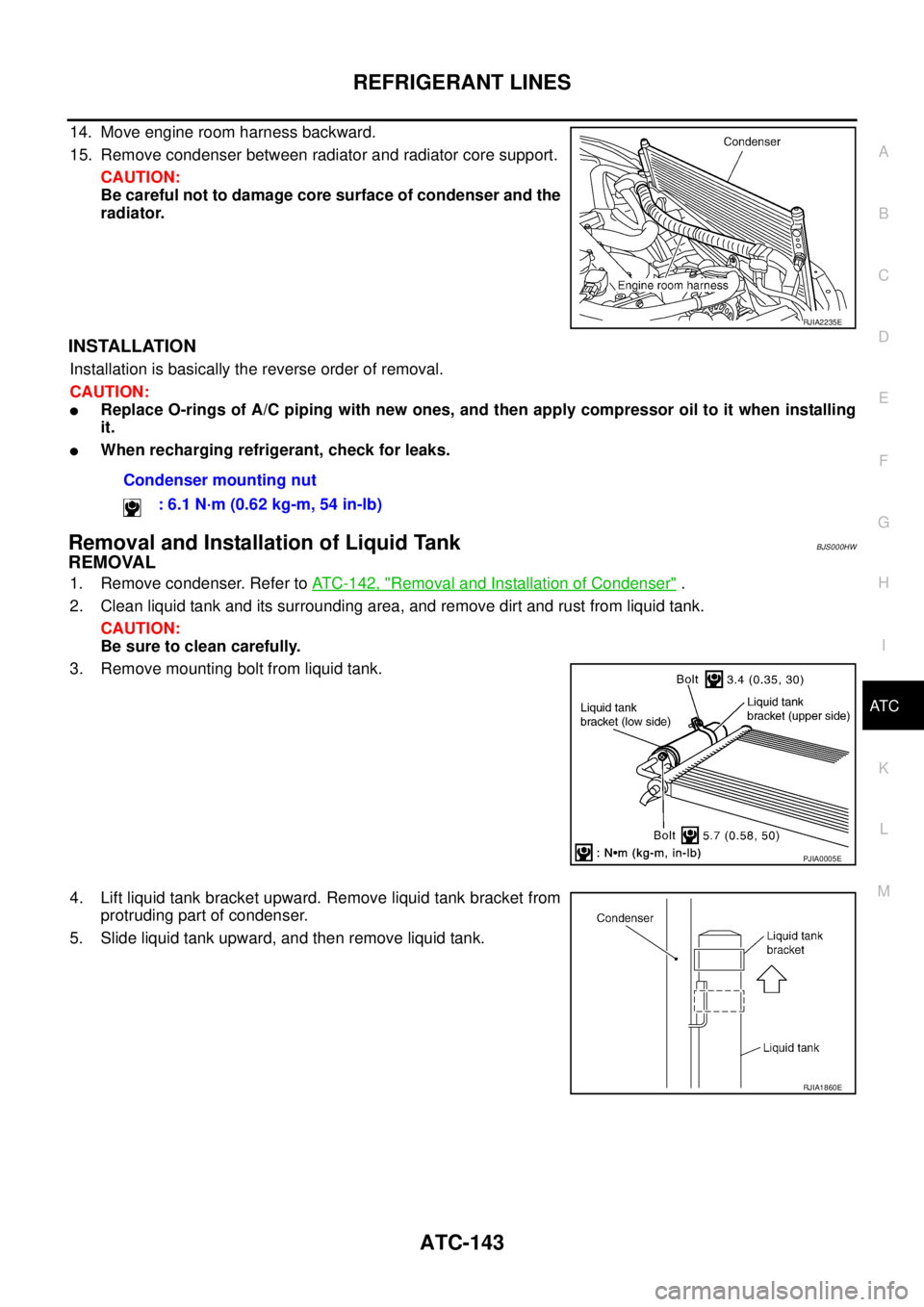
14. Move engine room harness backward.
15. Remove condenser between radiator and radiator core support.
CAUTION:
Be careful not to damage core surface of condenser and the
radiator.
INSTALLATION
Installation is basically the reverse order of removal.
CAUTION:
�Replace O-rings of A/C piping with new ones, and then apply compressor oil to it when installing
it.
�When recharging refrigerant, check for leaks.
Removal and Installation of Liquid TankBJS000HW
REMOVAL
1. Remove condenser. Refer to ATC-142, "Removal and Installation of Condenser" .
2. Clean liquid tank and its surrounding area, and remove dirt and rust from liquid tank.
CAUTION:
Be sure to clean carefully.
3. Remove mounting bolt from liquid tank.
4. Lift liquid tank bracket upward. Remove liquid tank bracket from
protruding part of condenser.
5. Slide liquid tank upward, and then remove liquid tank.
RJIA2235E
Condenser mounting nut
: 6.1 N·m (0.62 kg-m, 54 in-lb)
PJIA0005E
RJIA1860E
Page 522 of 3502

ATC-144
REFRIGERANT LINES
INSTALLATION
Install liquid tank, and then install liquid tank bracket on condenser.
CAUTION:
�Make sure liquid tank bracket is securely installed at protru-
sion of condenser. (Make sure liquid tank bracket does not
move to a position below center of liquid tank.)
�Replace O-rings of A/C piping with new ones, and then
apply compressor oil to it when installing it.
�When recharging refrigerant, check for leaks.
Removal and Installation of Refrigerant Pressure SensorBJS000HX
REMOVAL
1. Remove condenser. Refer to ATC-142, "Removal and Installation of Condenser" .
2. Remove refrigerant pressure sensor from condenser.
CAUTION:
When working, be careful not to damage the condenser
fins.
INSTALLATION
Installation is basically the reverse order of removal.
CAUTION:
Apply compressor oil to O-ring of refrigerant pressure sensor when installing it.
Removal and Installation of EvaporatorBJS000HY
REMOVAL
1. Remove low-pressure pipe 2 and high-pressure pipe 2. Refer to ATC-140, "Removal and Installation of
Low-pressure Pipe 2 and High-pressure Pipe 2" .
CAUTION:
Cap or wrap the joint of the pipe with suitable material such as vinyl tape to avoid the entry of air.
2. Slide evaporator, and then remove it from heater & cooling unit
assembly.
3. Remove intake sensor from evaporator, and then remove evap-
orator.
RJIA1861E
RJIA2237E
RJIA3281E
Page 523 of 3502

REFRIGERANT LINES
ATC-145
C
D
E
F
G
H
I
K
L
MA
B
AT C
INSTALLATION
Installation is basically the reverse order of removal.
CAUTION:
�Replace O-rings of A/C piping with new ones, and then apply compressor oil to it when installing
it.
�Female-side piping connection is thin and easy to deform. Slowly insert the male-side piping
straight in axial direction.
�Insert piping securely until a click is heard.
�After piping connection is completed, pull male-side piping by hand to make sure that connection
does not come loose.
�O-rings are different from low-pressure pipe 1 (high-pressure pipe 2) and low-pressure pipe 2
(high-pressure pipe 3).
�Mark the mounting position of intake sensor bracket prior to removal so that the reinstalled sen-
sor can be located in the same position.
�When recharging refrigerant, check for leaks.
Removal and Installation of Expansion ValveBJS000HZ
REMOVAL
1. Remove evaporator. Refer to ATC-144, "Removal and Installation of Evaporator" .
2. Remove mounting bolts, and then remove expansion valve.
CAUTION:
Cap or wrap the joint of the pipe with suitable material such
as vinyl tape to avoid the entry of air.
INSTALLATION
Installation is basically the reverse order of removal.
CAUTION:
�Replace O-rings of evaporator with new ones, and then apply compressor oil to it when installing
it.
�O-rings are different from low-pressure pipe 1 (high-pressure pipe 1) and low-pressure pipe 2
(high-pressure pipe 2).
�When recharging refrigerant, check for leaks.
RJIA3327E
Page 544 of 3502
AV-16
AUDIO (WITH INTEGRATED DISPLAY SYSTEM)
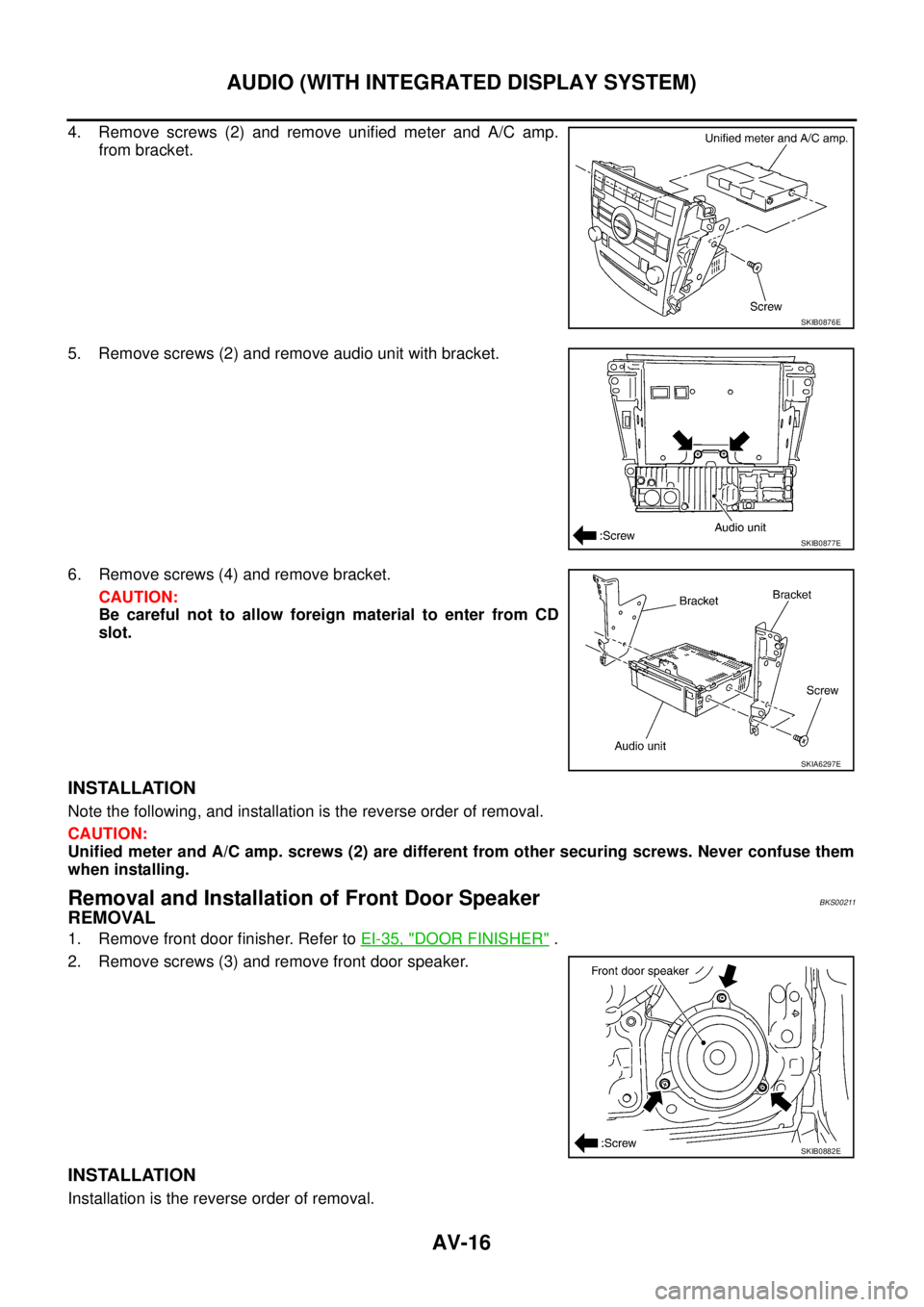
4. Remove screws (2) and remove unified meter and A/C amp.
from bracket.
5. Remove screws (2) and remove audio unit with bracket.
6. Remove screws (4) and remove bracket.
CAUTION:
Be careful not to allow foreign material to enter from CD
slot.
INSTALLATION
Note the following, and installation is the reverse order of removal.
CAUTION:
Unified meter and A/C amp. screws (2) are different from other securing screws. Never confuse them
when installing.
Removal and Installation of Front Door SpeakerBKS00211
REMOVAL
1. Remove front door finisher. Refer to EI-35, "DOOR FINISHER" .
2. Remove screws (3) and remove front door speaker.
INSTALLATION
Installation is the reverse order of removal.
SKIB0876E
SKIB0877E
SKIA6297E
SKIB0882E
Page 545 of 3502
AUDIO (WITH INTEGRATED DISPLAY SYSTEM)
AV-17
C
D
E
F
G
H
I
J
L
MA
B
AV
Removal and Installation of Rear Door SpeakerBKS00212
REMOVAL
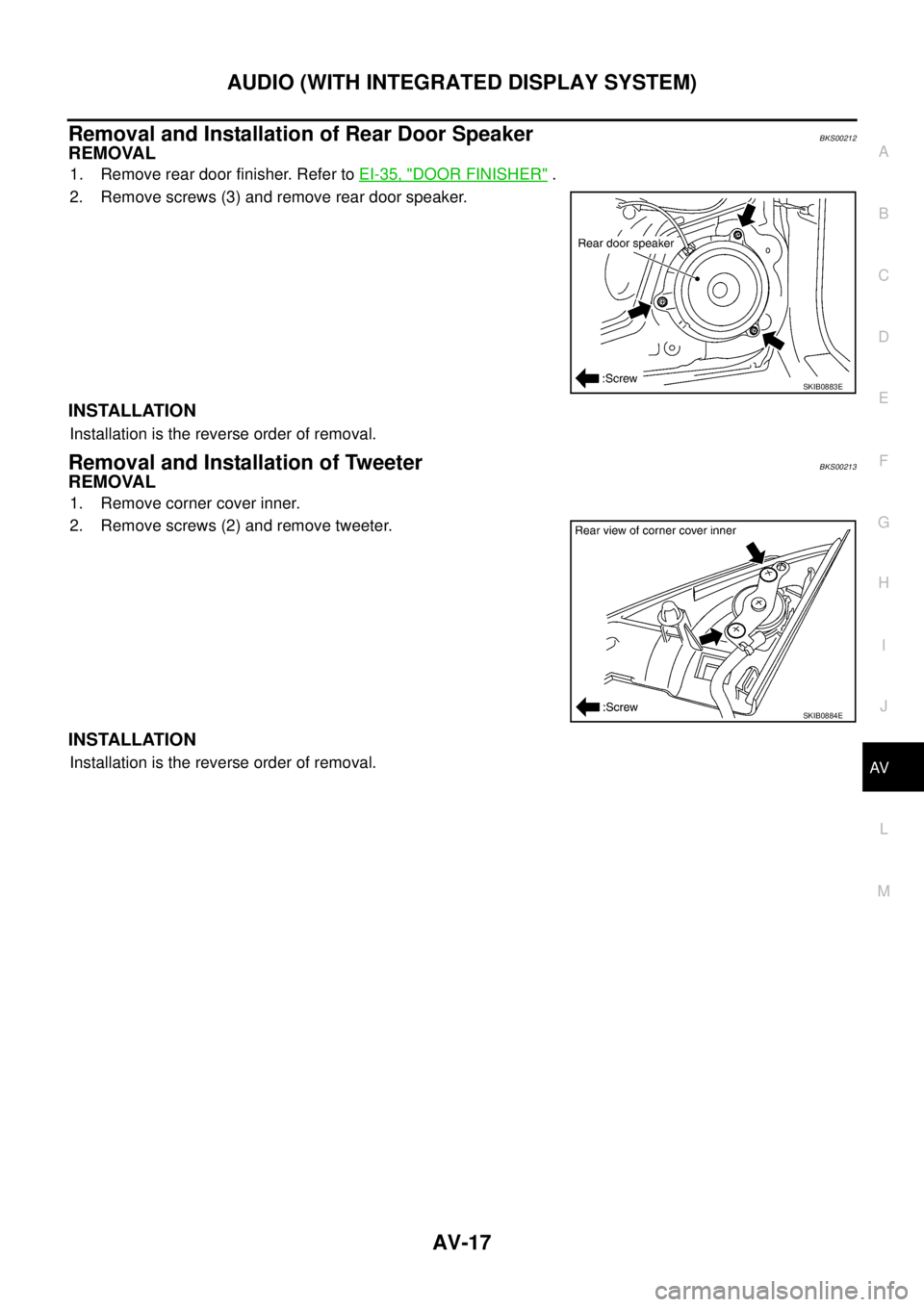
1. Remove rear door finisher. Refer to EI-35, "DOOR FINISHER" .
2. Remove screws (3) and remove rear door speaker.
INSTALLATION
Installation is the reverse order of removal.
Removal and Installation of TweeterBKS00213
REMOVAL
1. Remove corner cover inner.
2. Remove screws (2) and remove tweeter.
INSTALLATION
Installation is the reverse order of removal.
SKIB0883E
SKIB0884E
Page 563 of 3502
AUDIO (WITH INTEGRATED COLOR DISPLAY SYSTEM)
AV-35
C
D
E
F
G
H
I
J
L
MA
B
AV
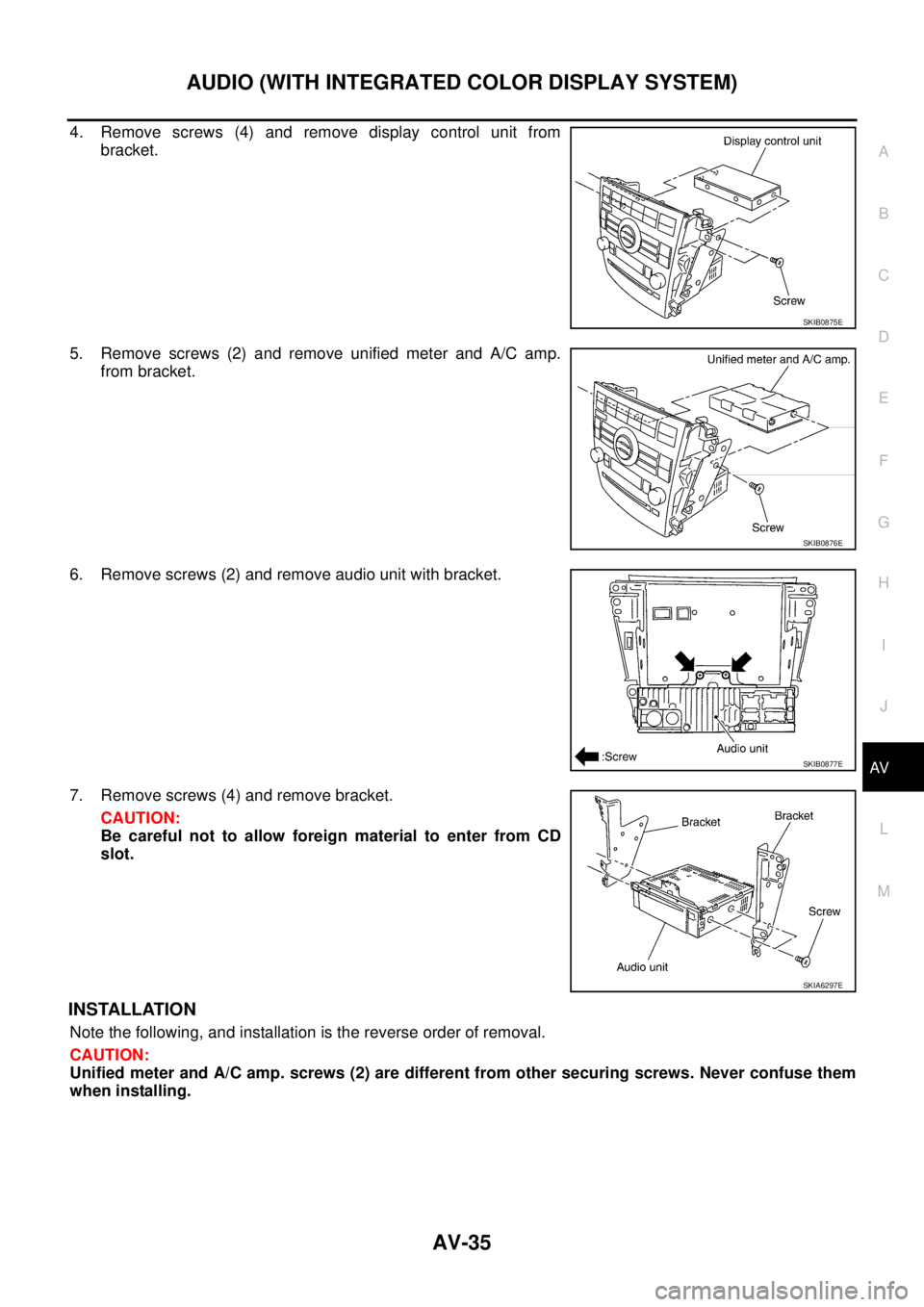
4. Remove screws (4) and remove display control unit from
bracket.
5. Remove screws (2) and remove unified meter and A/C amp.
from bracket.
6. Remove screws (2) and remove audio unit with bracket.
7. Remove screws (4) and remove bracket.
CAUTION:
Be careful not to allow foreign material to enter from CD
slot.
INSTALLATION
Note the following, and installation is the reverse order of removal.
CAUTION:
Unified meter and A/C amp. screws (2) are different from other securing screws. Never confuse them
when installing.
SKIB0875E
SKIB0876E
SKIB0877E
SKIA6297E
Page 564 of 3502
AV-36
AUDIO (WITH INTEGRATED COLOR DISPLAY SYSTEM)
Removal and Installation of Rear Audio Control SwitchBKS002CZ
REMOVAL
1. Remove tray box from the center armrest. Refer to SE-117, "Removal and Installation of Seatback" .
2. Disconnect connector.
3. Push pawl on reverse side and remove the rear audio control
switch.
INSTALLATION
Installation is the reverse order of removal.
Removal and Installation of CD Auto ChangerBKS0028X
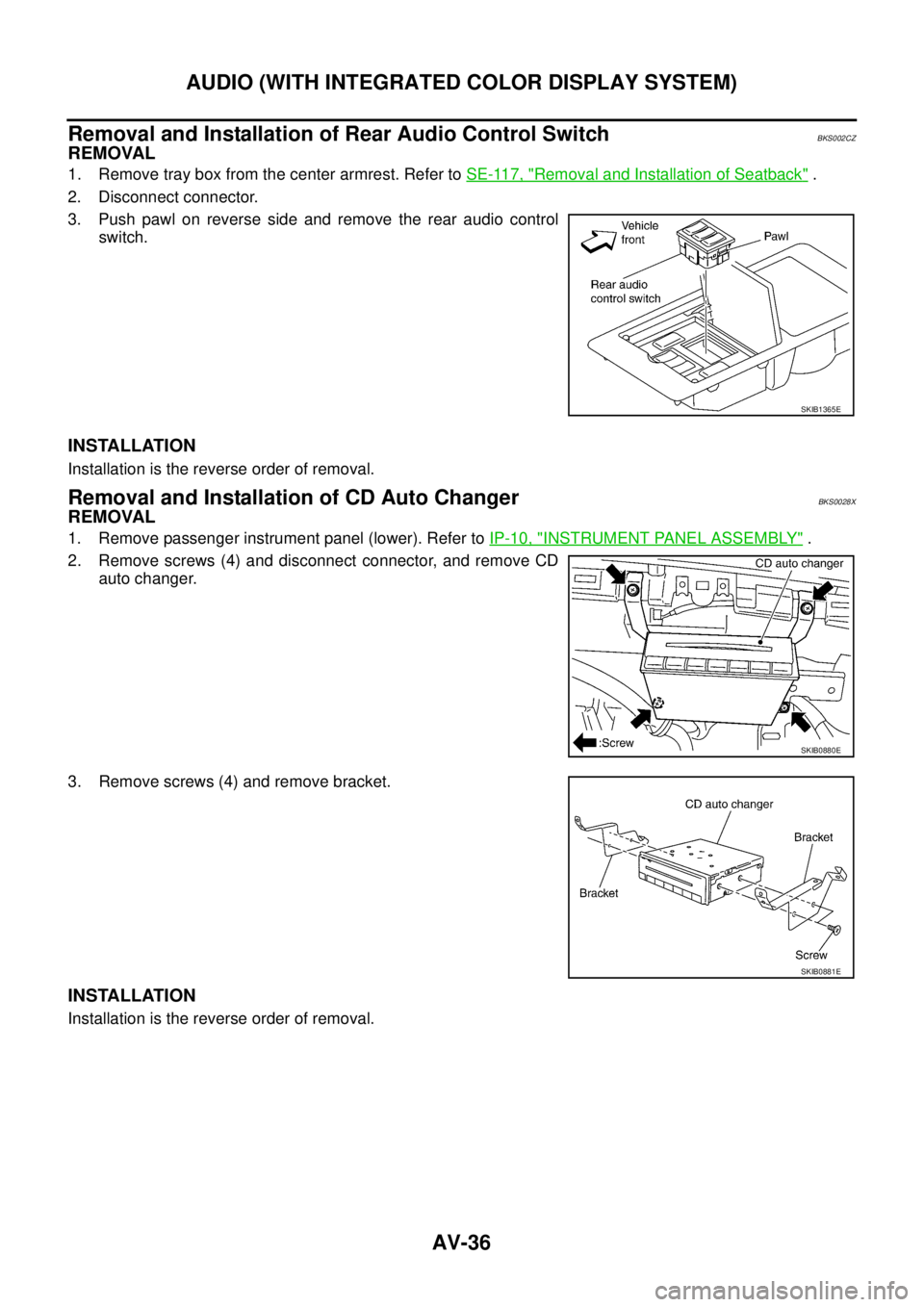
REMOVAL
1. Remove passenger instrument panel (lower). Refer to IP-10, "INSTRUMENT PANEL ASSEMBLY" .
2. Remove screws (4) and disconnect connector, and remove CD
auto changer.
3. Remove screws (4) and remove bracket.
INSTALLATION
Installation is the reverse order of removal.
SKIB1365E
SKIB0880E
SKIB0881E
Page 565 of 3502
AUDIO (WITH INTEGRATED COLOR DISPLAY SYSTEM)
AV-37
C
D
E
F
G
H
I
J
L
MA
B
AV
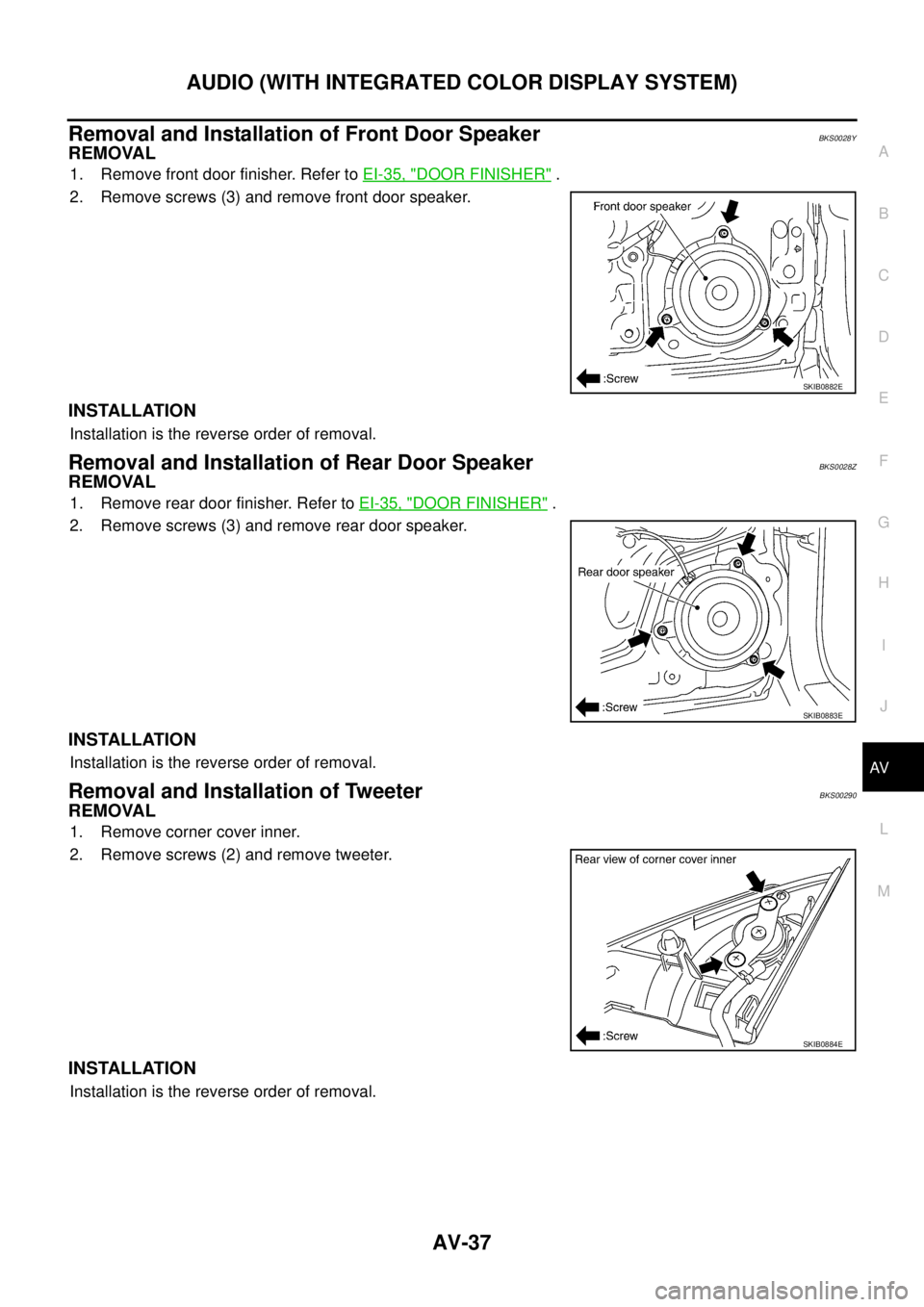
Removal and Installation of Front Door SpeakerBKS0028Y
REMOVAL
1. Remove front door finisher. Refer to EI-35, "DOOR FINISHER" .
2. Remove screws (3) and remove front door speaker.
INSTALLATION
Installation is the reverse order of removal.
Removal and Installation of Rear Door SpeakerBKS0028Z
REMOVAL
1. Remove rear door finisher. Refer to EI-35, "DOOR FINISHER" .
2. Remove screws (3) and remove rear door speaker.
INSTALLATION
Installation is the reverse order of removal.
Removal and Installation of TweeterBKS00290
REMOVAL
1. Remove corner cover inner.
2. Remove screws (2) and remove tweeter.
INSTALLATION
Installation is the reverse order of removal.
SKIB0882E
SKIB0883E
SKIB0884E