Page 62 of 4323
PP±4
± PREPARATIONENGINE MECHANICAL
62 Author�: Date�:
2005 SEQUOIA (RM1146U)
09843±18040Diagnosis Check Wire No.2
09950±50013Puller C Set
(09951±05010)Hanger 150Crankshaft pulley
Crankshaft timing pulley
(09952±05010)Slide ArmCrankshaft pulley
Crankshaft timing pulley
(09953±05010)Center Bolt 100Crankshaft pulley
Crankshaft timing pulley
(09953±05020)Center Bolt 150Crankshaft pulley
Crankshaft timing pulley
(09954±05011)Claw No.1Crankshaft timing pulley
(09954±05021)Claw No.2Crankshaft pulley
09950±60010Replacer Set
(09951±00240)Replacer 24
(09951±00440)Replacer 44
(09952±06010)Adapter
09950±70010Handle Set
Page 196 of 4323

DID7N±01
DI±2
± DIAGNOSTICSENGINE
196 Author�: Date�:
2005 SEQUOIA (RM1146U)
DEFINITION OF TERMS
TermDefinition
Monitor descriptionDescription of what the ECM monitors and how it detects malfunctions (monitoring purpose and its details).
Related DTCsA group of diagnostic trouble codes that are output by the ECM based on the same malfunction detection logic..
Typical enabling condition
Preconditions that allow the ECM to detect malfunctions.
With all preconditions satisfied, the ECM sets the DTC when the monitored value(s) exceeds the malfunction
threshold(s).
Sequence of operation
The priority order that is applied to monitoring, if multiple sensors and components are used to detect the malfunc-
tion.
When a sensor is being monitored, the next sensor or component will not be monitored until the sensor monitoring
is finished.
Required sensor/compo-
nentsThe sensors and components that are used by the ECM to detect malfunctions.
Frequency of operation
The number of times that the ECM checks for malfunctions per driving cycle.
ºOnce per driving cycleº means that the ECM detects the malfunction only one time during a single driving cycle.
ºContinuousº means that the ECM detects malfunction every time an enabling condition is met.
DurationThe minimum time that the ECM must sense a continuous deviation in the monitored value(s) before setting a
DTC. This timing begins after the ºtypical enabling conditionsº are met.
Malfunction thresholdsBeyond this value, the ECM will conclude that there is a malfunction and set a DTC.
MIL operation
MIL illumination timing after a defect is detected.
ºImmediatelyº means that the ECM illuminates MIL the instant the ECM determines that there is a malfunction.
º2 driving cycleº means that the ECM illuminates MIL if the same malfunction is detected again in the 2nd driving
cycle.
Page 203 of 4323

DI3H8±10
Vehicle Brought to Workshop
Customer Problem Analysis P. DI±10
Problem Symptom Confirmation
If the engine does not start perform steps 10 and 12 firstConnect the OBD II scan tool or hand±held tester to DLC3.
If the display indicates a communication fault in the tool, inspect DLC3 P.DI±40
Check DTC and Freeze Frame Data
Record or Print DTC and Freeze Frame Data P. DI±43
Clear DTC and Freeze Frame Data P. DI±43
Visual Inspection
Setting the Check Mode Diagnosis P. DI±44
Symptom Simulation P. IN±24
Basic Inspection P. DI±12DTC Chart P. DI±58
Problem Symptoms Table P. DI±33
Circuit Inspection P. DI±73
Adjustment, Repair
DTC Check P. DI±43
Items insideare titles of pages in
in the bottom portion. See the indicated
pages for detailed explanations. this manual, with the page number
Malfunction
occurs.Malfunction does not occur.
Parts Inspection
Check for Intermittent Problems P. DI±11
Identification of Problem
Confirmation Test
End 1
2
3
4
5
6
7
108
9
11
12
13
15 14
16
Normal Malfunction code.
17The hand±held tester can be used at
bold frame.
± DIAGNOSTICSENGINE
DI±9
203 Author�: Date�:
2005 SEQUOIA (RM1146U)
HOW TO PROCEED WITH TROUBLESHOOTING
Troubleshoot in accordance with the procedure on the following page.
Page 204 of 4323

DI3H9±07
ENGINE CONTROL SYSTEM Check Sheet
Customer's Name
Driver's Name
Data Vehicle
Brought in
Engine model
VIN
Production Date
Licence Plate No.
Odometer Reading
Problem Symptoms
Engine does
not Start
Difficult to
Start
Poor Idling
Poor
Driveability
Engine Stall
Others
Engine does not crankNo initial combustionNo complete combustion
Engine cranks slowly
Other
Incorrect first idleIdling rpm is abnormalHigh ( rpm)Low ( rpm)
Rough idling
Other
HesitationBack fireMuffler explosion (after±fire)Surging
Knocking
Other
Soon after startingAfter accelerator pedal depressed
After accelerator pedal released
During A/C operation
Shifting from N to D
Other
Dates Problem
Occurred
Problem Frequency
Condition When
Problem Occurs
Weather
Engine Operation
Engine Temp. Place Outdoor
TemperatureConstant
Sometimes ( times per day/month)Once only
Other
Fine
CloudyRainySnowyVarious/Other
Hot
Warm CoolCold (approx. °C/ °F)
Highway
SuburbsInner cityUphillDownhill
Rough road
Other
Cold
Warming upAfter warming upAny temp.Other
Starting
Just after starting ( min.)IdlingRacing
Driving
Constant speedAccelerationDeceleration
A/C switch ON/OFF
Other
Condition of malfunction indicator lightRemains on Sometimes lights up Does not light up
NormalMalfunction code(s) (code )
Freeze frame data ( )
NormalMalfunction code(s) (code )
Freeze frame data ( )
Normal Mode
(Pre±check)
Check Mode DTC InspectionInspector's
Name
km
miles
(MIL)
DI±10
± DIAGNOSTICSENGINE
204 Author�: Date�:
2005 SEQUOIA (RM1146U)
CUSTOMER PROBLEM ANALYSIS CHECK
Page 205 of 4323
DID7R±01
± DIAGNOSTICSENGINE
DI±11
205 Author�: Date�:
2005 SEQUOIA (RM1146U)
CHECK FOR INTERMITTENT PROBLEMS
HINT:
Hand±held tester only:
Inspect the vehicle's ECM using check mode. Intermittent problems are easier to detect with a hand±held
tester when the ECM is in check mode. In check mode, the ECM uses 1trip detection logic, which is more
sensitive to malfunctions than normal mode (default), which uses 2 trip detection logic.
(d) Clear DTCs (see page DI±43).
(e) Switch the ECM from normal mode to check mode using a hand±held tester (see page DI±44).
(f) Perform a simulation test (see page IN±24).
(g) Check and wiggle the harness(es), connector(s) and terminal(s) (see page IN±35).
Page 206 of 4323
DID7S±01
DI±12
± DIAGNOSTICSENGINE
206 Author�: Date�:
2005 SEQUOIA (RM1146U)
BASIC INSPECTION
When the malfunction is not confirmed in the DTC check, troubleshooting should be carried out in all the
possible circuits considered as causes of the problem. In many cases, by carrying out the basic engine check
shown in the following flowchart, the location causing the problem can be found quickly and efficiently. There-
fore, using this check is essential in the engine troubleshooting.
1 Is battery voltage 11 V or more when engine stopped?
NO Charge or replace battery.
YES
2 Is engine cranked?
NO Proceed to page ST±15 and continue to trouble-
shoot.
YES
3 Does engine start?
NO Go to step 6.
YES
Page 207 of 4323
± DIAGNOSTICSENGINE
DI±13
207 Author�: Date�:
2005 SEQUOIA (RM1146U)
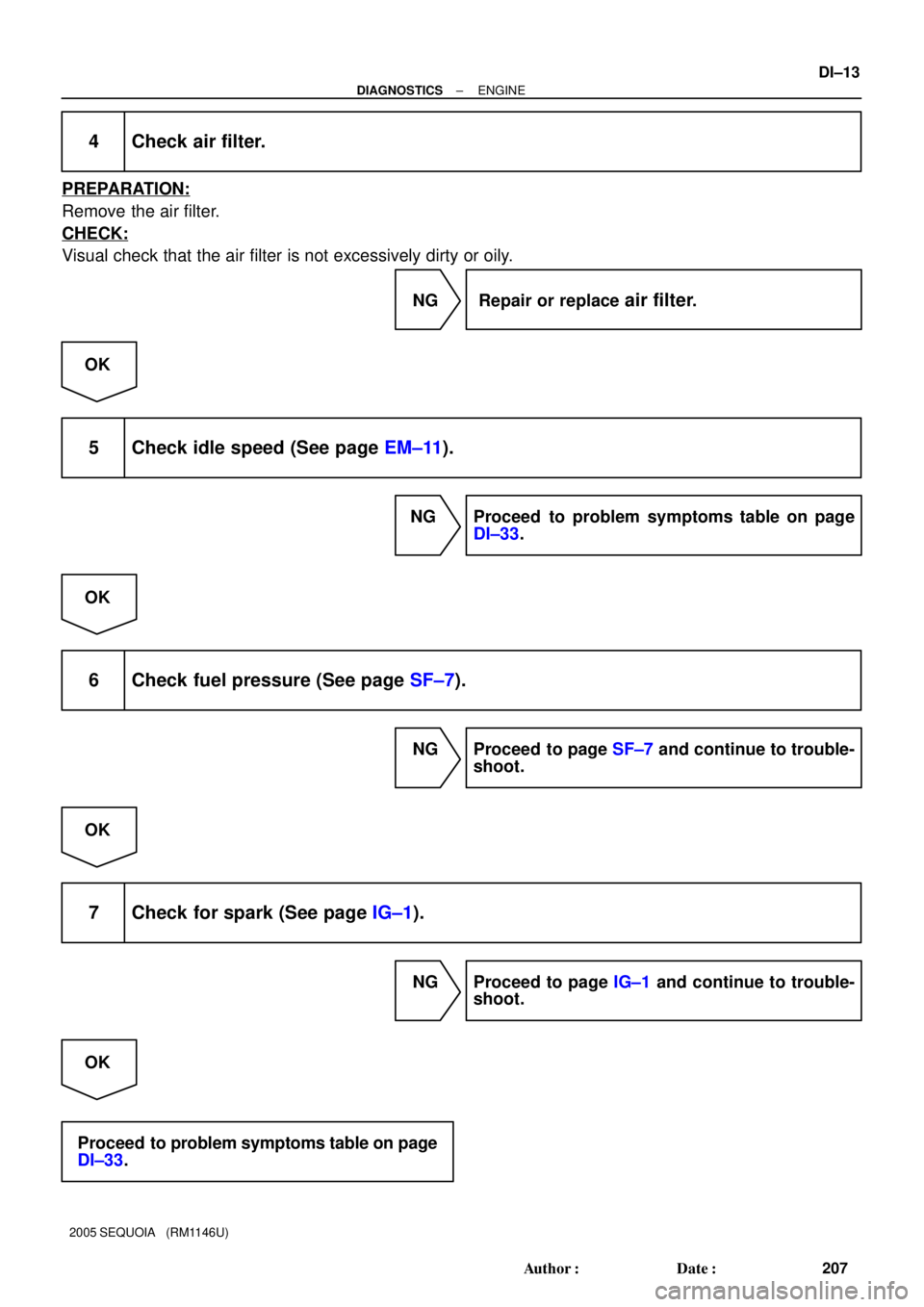
4 Check air filter.
PREPARATION:
Remove the air filter.
CHECK:
Visual check that the air filter is not excessively dirty or oily.
NG Repair or replace
air filter.
OK
5 Check idle speed (See page EM±11).
NG Proceed to problem symptoms table on page
DI±33.
OK
6 Check fuel pressure (See page SF±7).
NG Proceed to page SF±7 and continue to trouble-
shoot.
OK
7 Check for spark (See page IG±1).
NG Proceed to page IG±1 and continue to trouble-
shoot.
OK
Proceed to problem symptoms table on page
DI±33.
Page 220 of 4323
![TOYOTA SEQUOIA 2001 Service Repair Manual DID7W±01
MID
TIDScaling Test Result Minimum Test Limit Maximum Test Limit
$E1 $E8ECT sensor output when estimated
ECT reached to malfunction criteria Multiply by 0.1 [°C]
Malfunction criteria Maxim](/manual-img/14/57465/w960_57465-219.png "TOYOTA SEQUOIA 2001 Service Repair Manual DID7W±01
MID
TIDScaling Test Result Minimum Test Limit Maximum Test Limit
$E1 $E8ECT sensor output when estimated
ECT reached to malfunction criteria Multiply by 0.1 [°C]
Malfunction criteria Maxim")
DID7W±01
MID
TIDScaling Test Result Minimum Test Limit Maximum Test Limit
$E1 $E8ECT sensor output when estimated
ECT reached to malfunction criteria Multiply by 0.1 [°C]
Malfunction criteria Maximum test limit
DI±26
± DIAGNOSTICSENGINE
220 Author�: Date�:
2005 SEQUOIA (RM1146U)
CHECKING MONITOR STATUS
1. OUTLINE
The monitor results and the test values can be checked with the OBD II scan tool.
The engine control module (ECM) monitors the emissions±related components as the thermostat, catalyst
converter and evaporative emissions (EVAP), and determines whether they are functioning normally or not.
When finished and monitoring, the ECM stores the monitor results and the test values.
The monitor result indicates whether the component is functioning normally or not. The test value is the value
that was used to determine the monitor result. If the test value is outside the test limit (malfunction criterion),
the ECM determines the component is malfunctioning. Some emissions±related components have multiple
test values to determine monitor result. If one of these test values is outside test limit, the ECM determines
the component is determine monitor result. If one of these test values is outside test limit, the ECM deter-
mines the components is malfunctioning.
2. DESCRIPTION
The test value and test limit information are described as shown in the following table. This information is
included under ºMONITOR RESULTº in the emissions±related DTC sections.
Thermostat:
�MID (Monitor Identification Data) is assigned to each emissions±related component.
�TID (Test Identification Data) is assigned to each test value.
�Scaling is used to calculate the test value indicated on generic OBD II scan tools.
3. PROCEDURE (USING HAND±HELD TESTER)
(a) Connect the hand±held tester to the DLC3.
(b) Turn the ignition switch and hand±held tester ON.
(c) Clear DTCs.
(d) Allow the vehicle to drive, in accordance with the applicable drive pattern described in the READINESS
MONITOR DRIVE PATTERN section (see page DI±27).
(e) Check the monitor result. Select the hand±held tester menus: DIAGNOSIS/ENHANCED OBDII/MON-
ITOR INFO/MONITOR STATUS. The monitor result appears after the component name.
�AVAIL indicates the component has not been monitored yet.
�COMPL indicates the component is functioning normally.
�INCMPL indicates the component is malfunctioning.
(f) Check the test value(s). Select the hand±held tester menus: DIAGNOSIS/ENHANCED OBDII/MON-
ITOR INFO/TEST RESULT.
(g) Select the component and press ENTER. If the monitor result has been COMPL or INCMPL, the accu-
racy test value appears.
(h) Compare the test value with the test limits, MIN and MAX.
�If the test value is outside of the test limit, the component is malfunctioning.
�If the test value is on the borderline of the test limit, a malfunction is concealed in the component.
HINT:
The monitor result might on rare occasions be COMPL even if the malfunction indicator lamp (MIL) is illumi-
nated. This indicates the system malfunctioned on a previous driving cycle. This might be caused by an inter-
mittent problem.