2001 CHRYSLER VOYAGER light
[x] Cancel search: lightPage 53 of 4284

seconds instead of 5, the CMTC will set the
variance to 8 and enter the fast calibration
mode.
3. The VAR light will come on and the last variance
setting will be displayed.
4. Press the STEP button to set the zone number.
5. Press the US/M button and resume normal op-
eration.
NOTE: Do not attach any magnetic device
such as a magnetic CB antenna to the
vehicle. This can cause the compass to give
false readings.
3.15 POWER DOOR LOCK SYSTEM
When the BCM receives input for a lock request
from a door lock switch, RKE or cylinder lock switch
(only with VTSS), it will turn the lock driver on for
a specified time of 375 msec. If the request is there
beyond 375 msec, the BCM considers the door lock
signal stuck. Once a door lock or unlock signal is
stuck for longer than 10 seconds, the BCM will set
a trouble code and the signal input is ignored until
the stuck condition disappears. The door lock
switches provide a variable amount of resistance
thereby dropping the voltage of the multiplexed
(MUX) circuit and the BCM will respond to that
command.
3.15.1 SLIDING DOOR MEMORY LOCK
When the BCM receives an input for a lock
request and a sliding door is open, the BCM will
turn on the lock driver as described above, and will
turn it on again when all sliding doors are closed.
NOTE: If the BCM receives an unlock input before
a sliding door is closed, this will cancel the memory
lock.
3.15.2 DOOR LOCK INHIBIT
When the key is in the ignition and in any
position and either front door is open, the door lock
switches LOCK functions are disabled. The UN-
LOCK functions are still functional. This protects
against locking the vehicle with the keys still in the
ignition. The RKE key fob will still lock the doors as
usual. This allows the driver to lock the vehicle with
the engine running for warm up.
3.15.3 AUTOMATIC DOOR LOCKS
This feature can be enabled or disabled by using
either the DRBIIItor the customer programming
method. When enabled all the doors will lock when
the vehicle reaches a speed of 18 MPH (29 KMH)
and all the doors are closed. If a door is opened and
the vehicle slows to below 18 MPH (29 KMH), thedoor locks will operate again once all doors are
closed and the speed is above 15 MPH (24 KMH).
3.15.4 REMOTE KEYLESS ENTRY (RKE)
The body control module interfaces with the RKE
module via a one-way serial bus interface. The RKE
module is not on the PCI bus. The RKE module
sends a 0-5 volt pulse width signal to the BCM
depending on which button on the transmitter was
pressed. The BCM controls the door lock/unlock
functions and the arming/disarming of the Vehicle
Theft Security System (if equipped) and the activa-
tion of illuminated entry. The BCM will also send
the appropriate messages to the Power Sliding
Doors and Power Liftgate modules. The Intelligent
Power Module (IPM) activates the park lamps,
headlamps, and horn for horn chirp when sent the
appropriate message from the BCM as received
from the RKE transmitter. When a one-button
press is made for unlock, both driver side doors will
unlock and the front and rear turn signal will flash.
When a second press is initiated (within 5 seconds
of the first) both passenger doors will unlock and all
four turn signals will flash.
The RKE module is capable of retaining up to 4
individual access codes (4 transmitters). If the
PRNDL is in any position except park, the BCM will
ground the interface thereby disabling the RKE.
The 2 button transmitter will have 2-CR2016
batteries in series. The 5 button transmitter will
have 1-CR2016 battery. The minimum battery life
should be approximately 4.7 years based on 20
transmissions a day at 84ÉF (25ÉC). Using the
DRBIIItand selecting RKE FOB Test can test the
transmitter.
The RKE module can be programmed via the
DRBIIItor the customer programming method.
The BCM will only allow programming mode to be
entered when the ignition is in the on position, the
PRNDL is in park position, and the VTSS (if
equipped) is in the disarmed mode.
3.16 POWER FOLDING MIRRORS
The power folding mirrors are powered to two
positions: folded and unfolded. The driver may
choose fold or unfold with a switch that is located on
the right side of the steering column. The folding
mirror switch grounds a sense wire that comes from
the Body Control Module when it is placed in the
fold position. The mirrors will move to the position
designated by the switch whether the ignition
switch is the On or Off position and both front doors
are closed. When the Power Folding Mirror switch
is left in the fold position during a vehicle exit the
mirrors will automatically unfold then refold after
both front doors are closed. This is to prevent mirror
contact with either front door when opened. When
24
GENERAL INFORMATION
Page 57 of 4284
defined as the amount of time from the start of a
wipe to the beginning of the next wipe. The rear
wiper system delay time is based on the following:
7.75 - (MPH x .05) = Seconds delay
Examples:
At zero (0) MPH the delay is 7.75 seconds.
At 100 MPH the delay is 2.75 seconds.
3.21.8 WIPE AFTER WASH
When the driver presses the wash button for over
1.5 seconds and releases it, the wiper will continue
to run for 2 additional wipe cycles.
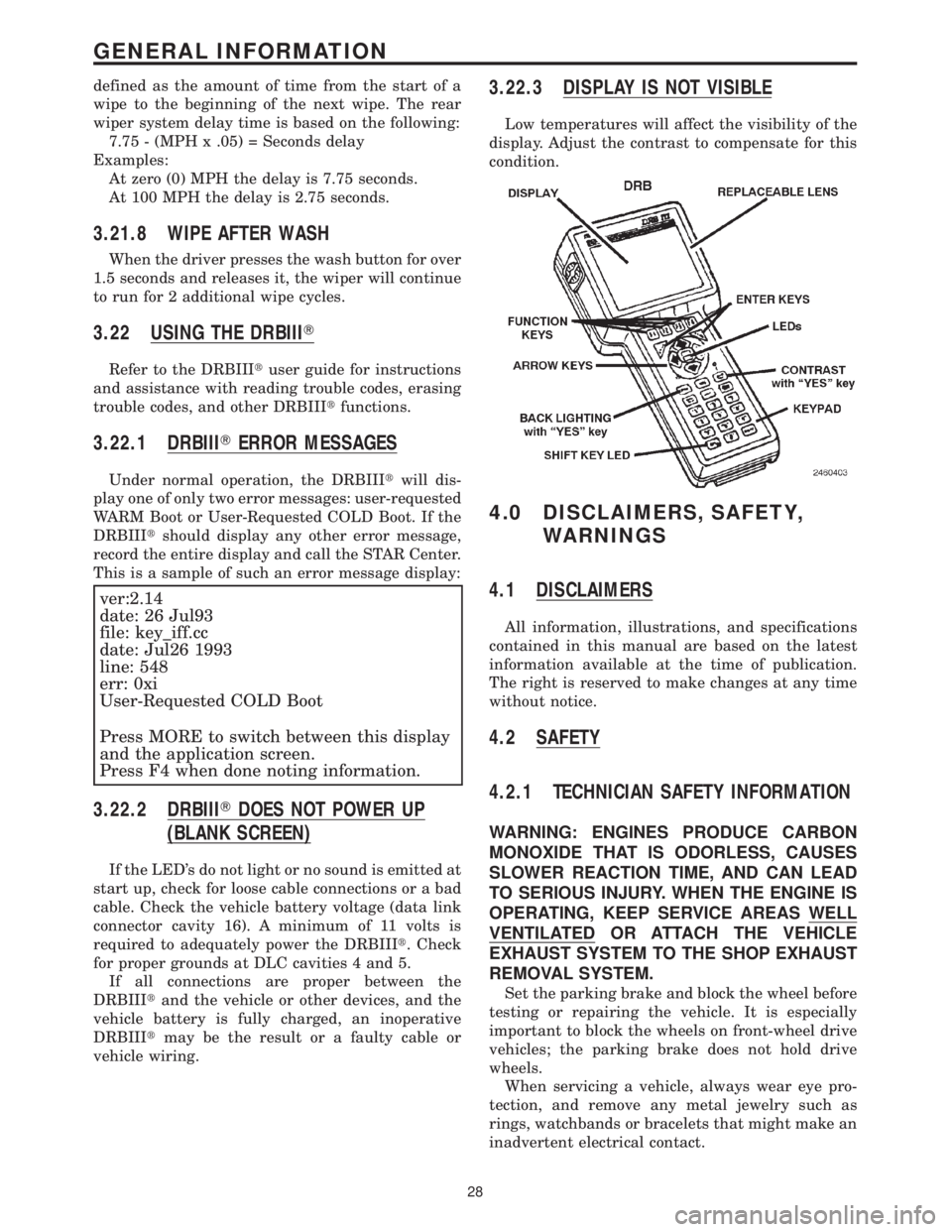
3.22 USING THE DRBIIIT
Refer to the DRBIIItuser guide for instructions
and assistance with reading trouble codes, erasing
trouble codes, and other DRBIIItfunctions.
3.22.1 DRBIIITERROR MESSAGES
Under normal operation, the DRBIIItwill dis-
play one of only two error messages: user-requested
WARM Boot or User-Requested COLD Boot. If the
DRBIIItshould display any other error message,
record the entire display and call the STAR Center.
This is a sample of such an error message display:
ver:2.14
date: 26 Jul93
file: key_iff.cc
date: Jul26 1993
line: 548
err: 0xi
User-Requested COLD Boot
Press MORE to switch between this display
and the application screen.
Press F4 when done noting information.
3.22.2 DRBIIITDOES NOT POWER UP
(BLANK SCREEN)
If the LED's do not light or no sound is emitted at
start up, check for loose cable connections or a bad
cable. Check the vehicle battery voltage (data link
connector cavity 16). A minimum of 11 volts is
required to adequately power the DRBIIIt. Check
for proper grounds at DLC cavities 4 and 5.
If all connections are proper between the
DRBIIItand the vehicle or other devices, and the
vehicle battery is fully charged, an inoperative
DRBIIItmay be the result or a faulty cable or
vehicle wiring.
3.22.3 DISPLAY IS NOT VISIBLE
Low temperatures will affect the visibility of the
display. Adjust the contrast to compensate for this
condition.
4.0 DISCLAIMERS, SAFETY,
WARNINGS
4.1 DISCLAIMERS
All information, illustrations, and specifications
contained in this manual are based on the latest
information available at the time of publication.
The right is reserved to make changes at any time
without notice.
4.2 SAFETY
4.2.1 TECHNICIAN SAFETY INFORMATION
WARNING: ENGINES PRODUCE CARBON
MONOXIDE THAT IS ODORLESS, CAUSES
SLOWER REACTION TIME, AND CAN LEAD
TO SERIOUS INJURY. WHEN THE ENGINE IS
OPERATING, KEEP SERVICE AREAS WELL
VENTILATED OR ATTACH THE VEHICLE
EXHAUST SYSTEM TO THE SHOP EXHAUST
REMOVAL SYSTEM.
Set the parking brake and block the wheel before
testing or repairing the vehicle. It is especially
important to block the wheels on front-wheel drive
vehicles; the parking brake does not hold drive
wheels.
When servicing a vehicle, always wear eye pro-
tection, and remove any metal jewelry such as
rings, watchbands or bracelets that might make an
inadvertent electrical contact.
28
GENERAL INFORMATION
Page 59 of 4284
WARNING: BEFORE ROAD TESTING A
VEHICLE, BE SURE THAT ALL
COMPONENTS ARE REASSEMBLED.
DURING THE TEST DRIVE, DO NOT TRY TO
READ THE DRBIIITSCREEN WHILE IN
MOTION. DO NOT HANG THE DRBIIITFROM
THE REAR VIEW MIRROR OR OPERATE IT
YOURSELF. HAVE AN ASSISTANT
AVAILABLE TO OPERATE THE DRBIIIT.
5.0 REQUIRED TOOLS AND
EQUIPMENT
DRBIIIt(diagnostic read-out box)
Jumper wires
Ohmmeter
Voltmeter
Sentry Key Tester
Test Light
8310 Airbag System Load Tool
8443 SRS Airbag System Load Tool
Diagnostic Junction Port Tester 8339
6.0 GLOSSARY OF TERMS
ABSantilock brake system
ACMairbag control module
AECMairbag electronic control module
(ACM)
ASDMairbag system diagnostic module
(ACM)
AT Cautomatic temperature control
BCMbody control module
CABcontroller antilock brake
CMTCcompass/mini-trip computer
CPAconnector positive assurance
DABdriver airbag
DCHAdiesel cabin heater assist
(cabin heater)
DLCdata link connector
DTCdiagnostic trouble code
DRdriver
EBLelectric back lite (rear window de-
fogger)ECMEngine control module
EVICelectronic vehicle information center
FCMfront control module
GCCGulf Coast Countries
HVACheater ventilation, air conditioning
IPMintelligent power module
LDUlower drive unit
LHDLeft Hand Drive
MICmechanical instrument cluster
MTCmanual temperature control
MSMMmemory seat/mirror module
OBDon board diagnostics
ODOodometer
ORCoccupant restraint controller
PA Bpassenger airbag
PASSpassenger
PCIProgrammable Communication In-
terface (vehicle communication bus)
PCMpowertrain control module
PDCpower distribution center
PLGpower liftgate
PLGMpower liftgate module
PSDpower sliding door
PSDMpower sliding door module
PWMpulse width modulated
RHDRight Hand Drive
RKEremote keyless entry
SABseat airbag
SBTseat belt tensioner
SIACMside impact airbag control module
SKIMsentry key immobilizer module
SKISsentry key immobilizer system
SQUIBalso called initiator (located inside
airbag)
SRSsupplemental restraint system
TCMtransmission control module
VFDvacuum fluorescent display
VTSSvehicle theft security system
30
GENERAL INFORMATION
Page 63 of 4284
TEST ACTION APPLICABILITY
1 Ensure that the battery is fully charged.
WARNING: TURN THE IGNITION OFF, DISCONNECT THE BATTERY AND
WAIT TWO MINUTES BEFORE PROCEEDING.
WARNING: IF THE OCCUPANT RESTRAINT CONTROLLER IS DROPPED
AT ANY TIME, IT MUST BE REPLACED.
Disconnect the Occupant Restraint Controller Connector.
NOTE: Check connectors - Clean and repair as necessary.
WARNING: TURN IGNITION ON, THEN RECONNECT THE BATTERY.
With the DRBIIIt, read the active FCM DTCs.
Turn the ignition off.
With the DRBIIIt, read the active FCM DTCs.
NOTE: The ORC RUN ONLY DRIVER OPEN code may not set until the
ignition key is turned off.
Select the active FCM DTC that was displayed on the DRB.All
1. ORC RUN ONLY DRIVER OPEN
Go To 2
2. ORC RUN ONLY DRIVER OVER VOLTAGE
Go To 5
3. ORC RUN ONLY SHORT TO GROUND
Go To 6
4. ORC RUN ONLY DRIVER OVER CURRENT
Go To 6
5. ORC RUN ONLY DRIVER OVER TEMP
Go To 6
6. None of the above.
Replace the Front Control Module.
Perform BODY VERIFICATION TEST - VER 1.
NOTE: When reconnecting airbag system components the Ignition must be
turned off and the Battery must be disconnected.
2WARNING: TURN THE IGNITION OFF, DISCONNECT THE BATTERY AND
WAIT TWO MINUTES BEFORE PROCEEDING.
WARNING: IF THE OCCUPANT RESTRAINT CONTROLLER IS DROPPED
AT ANY TIME, IT MUST BE REPLACED.
Disconnect the Occupant Restraint Controller.
TURN THE IGNITION ON, THEN RECONNECT THE BATTERY.
Connect a test light to ground and the ORC Run Only Driver circuit at the Occupant
Restraint Controller connector.
Cycle the ignition switch from ON to OFF.
With the DRBIIIt, read the active FCM DTCs.
Does the DRB show an active ORC RUN ONLY DRIVER OPEN code?All
Ye s®Go To 3
No®Replace the Occupant Restraint Controller in accordance with
Service Instructions. WARNING: make sure the battery is discon-
nected and wait 2 minutes before proceeding.
Perform AIRBAG VERIFICATION TEST - VER 1.
NOTE: When reconnecting airbag system components the Ignition must be
turned off and the Battery must be disconnected.
34
AIRBAG
FCM, ORC RUN ONLY DRIVER OPEN - ACTIVE ÐContinued
Page 72 of 4284

TEST ACTION APPLICABILITY
1 Ensure that the battery is fully charged.
WARNING: TURN THE IGNITION OFF, DISCONNECT THE BATTERY AND
WAIT TWO MINUTES BEFORE PROCEEDING.
WARNING: IF THE OCCUPANT RESTRAINT CONTROLLER IS DROPPED
AT ANY TIME, IT MUST BE REPLACED.
Disconnect the Occupant Restraint Controller Connector.
NOTE: Check connectors - Clean and repair as necessary.
WARNING: TURN IGNITION ON, THEN RECONNECT THE BATTERY.
With the DRBIIIt, read the active FCM DTCs.
Turn the ignition off.
With the DRBIIIt, read the active FCM DTCs.
NOTE: The ORC RUN-START DRIVER OPEN code may not set until the
ignition key is turned off.
Select the active FCM DTC displayed on the DRB.All
1. ORC RUN-START DRIVER OPEN
Go To 2
2. ORC RUN-START DRIVER OVER VOLTAGE
Go To 5
3. ORC RUN-START SHORT TO GROUND
Go To 6
4. ORC RUN-START DRIVER OVER CURRENT
Go To 6
5. ORC RUN-START DRIVER OVER TEMP
Go To 6
6. None of the above.
Replace the Front Control Module.
Perform BODY VERIFICATION TEST - VER 1.
NOTE: When reconnecting airbag system components the Ignition must be
turned off and the Battery must be disconnected.
2WARNING: TURN THE IGNITION OFF, DISCONNECT THE BATTERY AND
WAIT TWO MINUTES BEFORE PROCEEDING.
WARNING: IF THE OCCUPANT RESTRAINT CONTROLLER IS DROPPED
AT ANY TIME, IT MUST BE REPLACED.
Disconnect the Occupant Restraint Controller.
TURN THE IGNITION ON, THEN RECONNECT THE BATTERY.
Connect a test light to ground and the ORC Run-Start Driver circuit at the ORC
connector.
Cycle the ignition switch from ON to OFF.
With the DRBIIIt, read the active FCM DTCs.
Does the DRB show an active ORC RUN-START DRIVER OPEN code?All
Ye s®Go To 3
No®Replace the Occupant Restraint Controller in accordance with
Service Instructions. WARNING: make sure the battery is discon-
nected and wait 2 minutes before proceeding.
Perform AIRBAG VERIFICATION TEST - VER 1.
NOTE: When reconnecting airbag system components the Ignition must be
turned off and the Battery must be disconnected.
43
AIRBAG
FCM, ORC RUN-START DRIVER OPEN - ACTIVE ÐContinued
Page 227 of 4284
Symptom List:
CD CHANGER TEMPERATURE HIGH
CD CHANGER TEMPERATURE LOW
Test Note: All symptoms listed above are diagnosed using the same tests.
The title for the tests will be CD CHANGER TEMPERATURE
HIGH.
When Monitored and Set Condition:
CD CHANGER TEMPERATURE HIGH
When Monitored: Continuously with the ignition and CD Changer turned on.
Set Condition: The code will set if the temperature inside the CD Changer is above +65É
C (+145É F).
CD CHANGER TEMPERATURE LOW
When Monitored: Continuously with the ignition and CD Changer turned on.
Set Condition: The code will set if the temperature inside the CD Changer is below -23É
C (-10É F).
POSSIBLE CAUSES
LOW OR HIGH TEMPERATURE FAILURE
TEST ACTION APPLICABILITY
1 With the DRBIIIt, erase the audio DTC's.
Start the engine and allow the engine to reach normal operating temperature.
If the vehicle has been in the hot sunlight or extreme cold move the vehicle indoors
and open the doors to allow the inside temperature to stabilize.
The CD Changer will operate between -23É C and 65É C (-10É F and +145É F).
With the DRBIIIt, read DTC's.
Does the DRBIIItdisplay CD CHANGER TEMPERATURE LOW or CD CHANGER
TEMPERATURE HIGH?All
Ye s®Replace the CD Changer.
Perform BODY VERIFICATION TEST - VER 1.
No®Test Complete.
198
AUDIO
Page 229 of 4284
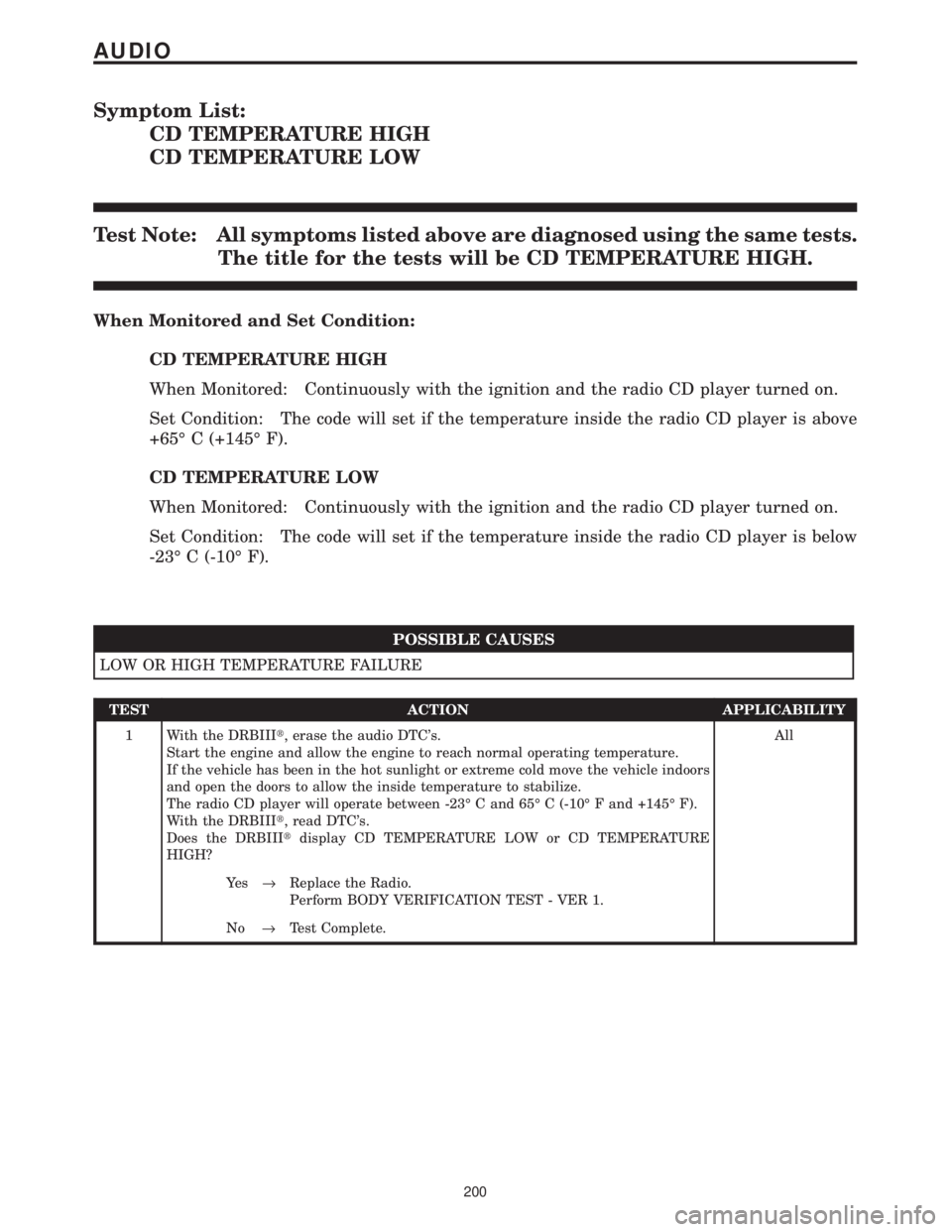
Symptom List:
CD TEMPERATURE HIGH
CD TEMPERATURE LOW
Test Note: All symptoms listed above are diagnosed using the same tests.
The title for the tests will be CD TEMPERATURE HIGH.
When Monitored and Set Condition:
CD TEMPERATURE HIGH
When Monitored: Continuously with the ignition and the radio CD player turned on.
Set Condition: The code will set if the temperature inside the radio CD player is above
+65É C (+145É F).
CD TEMPERATURE LOW
When Monitored: Continuously with the ignition and the radio CD player turned on.
Set Condition: The code will set if the temperature inside the radio CD player is below
-23É C (-10É F).
POSSIBLE CAUSES
LOW OR HIGH TEMPERATURE FAILURE
TEST ACTION APPLICABILITY
1 With the DRBIIIt, erase the audio DTC's.
Start the engine and allow the engine to reach normal operating temperature.
If the vehicle has been in the hot sunlight or extreme cold move the vehicle indoors
and open the doors to allow the inside temperature to stabilize.
The radio CD player will operate between -23É C and 65É C (-10É F and +145É F).
With the DRBIIIt, read DTC's.
Does the DRBIIItdisplay CD TEMPERATURE LOW or CD TEMPERATURE
HIGH?All
Ye s®Replace the Radio.
Perform BODY VERIFICATION TEST - VER 1.
No®Test Complete.
200
AUDIO
Page 236 of 4284

Symptom List:
NBS OUTPUT 1 OPEN
NBS OUTPUT 2 OPEN
Test Note: All symptoms listed above are diagnosed using the same tests.
The title for the tests will be NBS OUTPUT 1 OPEN.
When Monitored and Set Condition:
NBS OUTPUT 1 OPEN
When Monitored: Continuously.
Set Condition: If the FCM detects no voltage present on the NBS relay control circuit.
NBS OUTPUT 2 OPEN
When Monitored: Continuously.
Set Condition: If the FCM detects no voltage present on the NBS relay control circuit.
POSSIBLE CAUSES
CHECK DTCS
FUSED B+ CIRCUIT OPEN
NBS RELAY OPEN
NBS RELAY CONTROL CIRCUIT OPEN
FRONT CONTROL MODULE
TEST ACTION APPLICABILITY
1 Turn the ignition on.
NOTE: If neither DTC will reset or is active, refer to the wiring diagrams
located in the service information to help isolate a possible intermittent
condition.
With the DRB, read the FCM DTC's.
Are both the NBS Output 1 Open and the NBS Output 2 Open DTC's set?All
Ye s®Go To 2
No®Replace the Front Control Module in accordance with the Service
Information.
Perform BODY VERIFICATION TEST - VER 1.
2 Remove the NBS Relay from the IPM.
Using a 12-volt test light connected to ground, probe cavity 86 of the NBS Relay
connector.
Is the test light illuminated?All
Ye s®Go To 3
No®Check IPM Fuse #14 for an open. If OK, replace the Intelligent
Power Module (IPM).
Perform BODY VERIFICATION TEST - VER 1.
207
AUDIO