Page 4232 of 4770
RS0EX±01
H01871
± SUPPLEMENTAL RESTRAINT SYSTEMSIDE AIRBAG ASSEMBLY (TMMK Made)
RS±57
2202 Author�: Date�:
INSTALLATION
NOTICE:
Never use airbag parts from another vehicle. When replac-
ing parts, replace them with new parts.
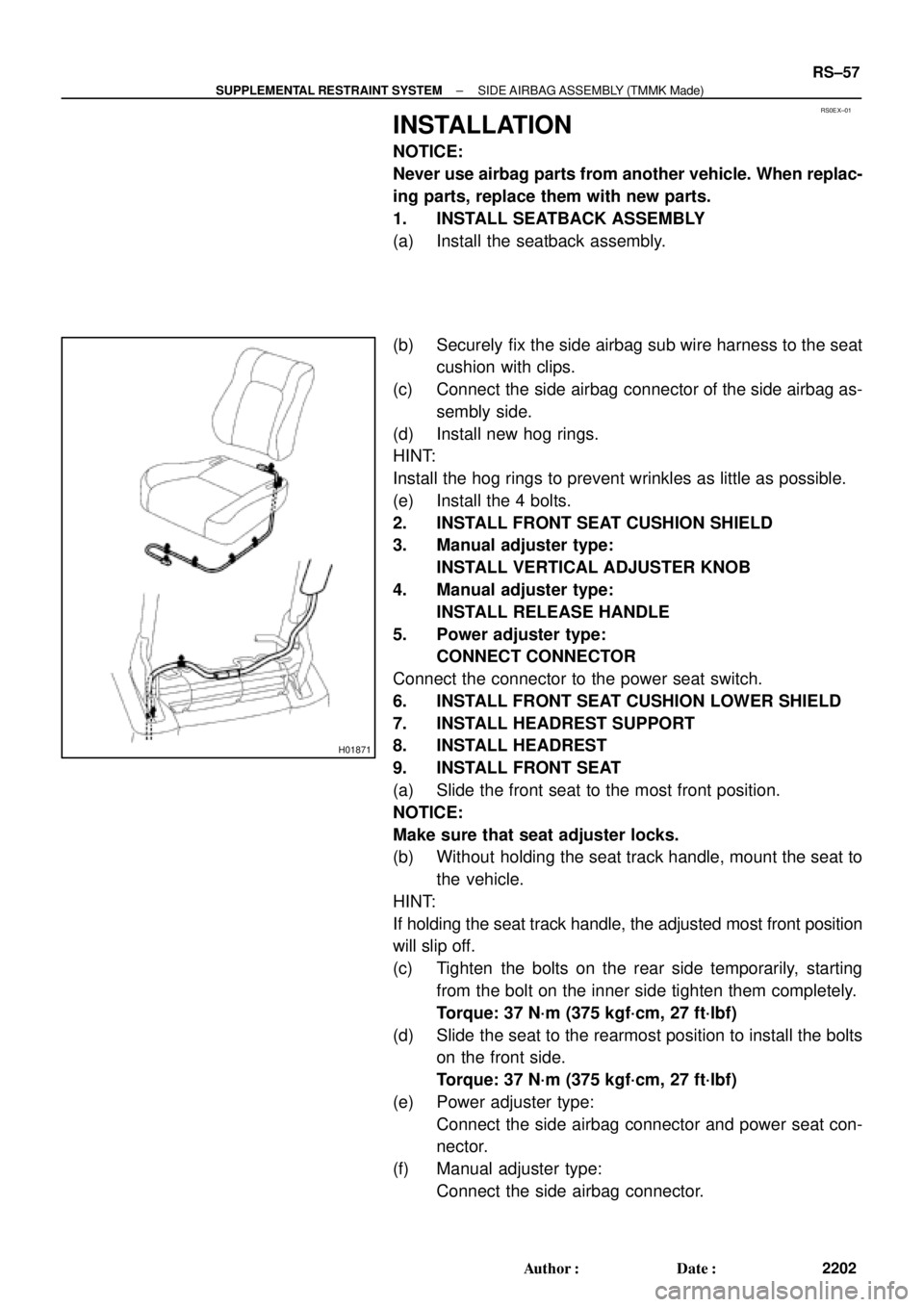
1. INSTALL SEATBACK ASSEMBLY
(a) Install the seatback assembly.
(b) Securely fix the side airbag sub wire harness to the seat
cushion with clips.
(c) Connect the side airbag connector of the side airbag as-
sembly side.
(d) Install new hog rings.
HINT:
Install the hog rings to prevent wrinkles as little as possible.
(e) Install the 4 bolts.
2. INSTALL FRONT SEAT CUSHION SHIELD
3. Manual adjuster type:
INSTALL VERTICAL ADJUSTER KNOB
4. Manual adjuster type:
INSTALL RELEASE HANDLE
5. Power adjuster type:
CONNECT CONNECTOR
Connect the connector to the power seat switch.
6. INSTALL FRONT SEAT CUSHION LOWER SHIELD
7. INSTALL HEADREST SUPPORT
8. INSTALL HEADREST
9. INSTALL FRONT SEAT
(a) Slide the front seat to the most front position.
NOTICE:
Make sure that seat adjuster locks.
(b) Without holding the seat track handle, mount the seat to
the vehicle.
HINT:
If holding the seat track handle, the adjusted most front position
will slip off.
(c) Tighten the bolts on the rear side temporarily, starting
from the bolt on the inner side tighten them completely.
Torque: 37 N´m (375 kgf´cm, 27 ft´lbf)
(d) Slide the seat to the rearmost position to install the bolts
on the front side.
Torque: 37 N´m (375 kgf´cm, 27 ft´lbf)
(e) Power adjuster type:
Connect the side airbag connector and power seat con-
nector.
(f) Manual adjuster type:
Connect the side airbag connector.
Page 4242 of 4770
RS01P±14
H06728
LH:
RH:
± SUPPLEMENTAL RESTRAINT SYSTEMFRONT AIRBAG SENSOR
RS±67
2212 Author�: Date�:
INSTALLATION
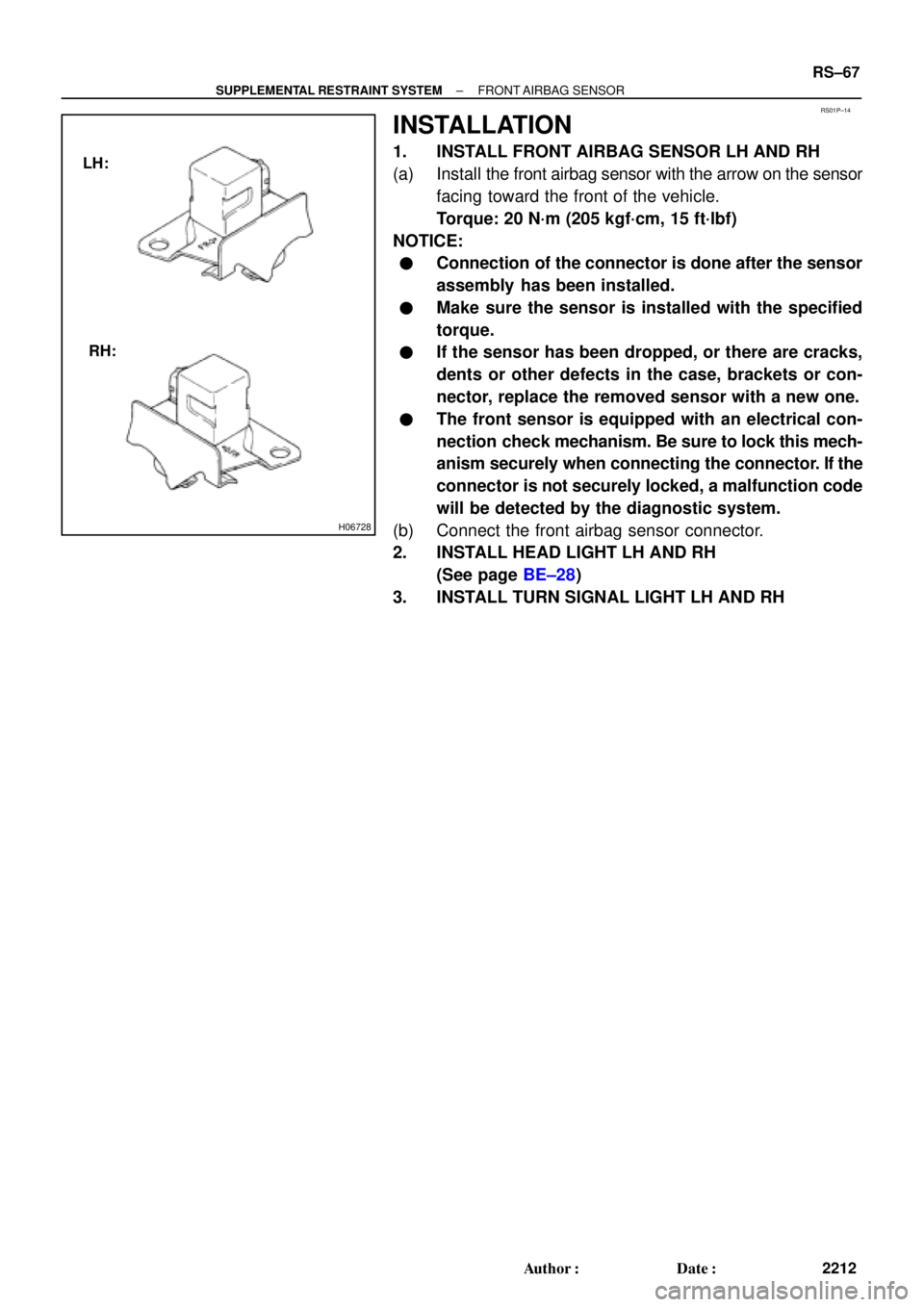
1. INSTALL FRONT AIRBAG SENSOR LH AND RH
(a) Install the front airbag sensor with the arrow on the sensor
facing toward the front of the vehicle.
Torque: 20 N´m (205 kgf´cm, 15 ft´lbf)
NOTICE:
�Connection of the connector is done after the sensor
assembly has been installed.
�Make sure the sensor is installed with the specified
torque.
�If the sensor has been dropped, or there are cracks,
dents or other defects in the case, brackets or con-
nector, replace the removed sensor with a new one.
�The front sensor is equipped with an electrical con-
nection check mechanism. Be sure to lock this mech-
anism securely when connecting the connector. If the
connector is not securely locked, a malfunction code
will be detected by the diagnostic system.
(b) Connect the front airbag sensor connector.
2. INSTALL HEAD LIGHT LH AND RH
(See page BE±28)
3. INSTALL TURN SIGNAL LIGHT LH AND RH
Page 4258 of 4770
ST03L±03
P10584
Ohmmeter
Continuity
P10585
Ohmmeter
No Continuity
P10586
P10587
ST0040
ST±8
± STARTING (5S±FE)STARTER
1715 Author�: Date�:
INSPECTION
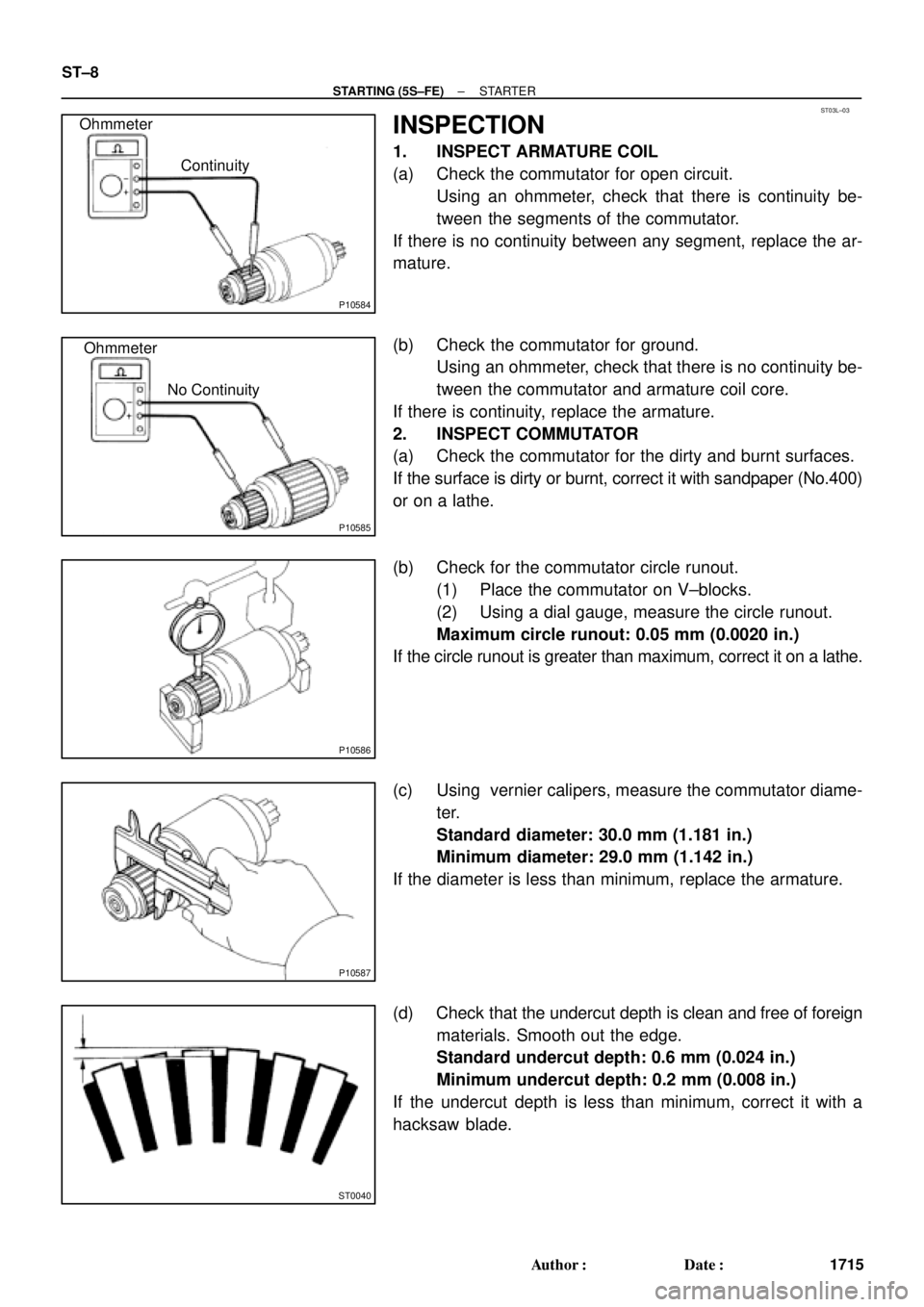
1. INSPECT ARMATURE COIL
(a) Check the commutator for open circuit.
Using an ohmmeter, check that there is continuity be-
tween the segments of the commutator.
If there is no continuity between any segment, replace the ar-
mature.
(b) Check the commutator for ground.
Using an ohmmeter, check that there is no continuity be-
tween the commutator and armature coil core.
If there is continuity, replace the armature.
2. INSPECT COMMUTATOR
(a) Check the commutator for the dirty and burnt surfaces.
If the surface is dirty or burnt, correct it with sandpaper (No.400)
or on a lathe.
(b) Check for the commutator circle runout.
(1) Place the commutator on V±blocks.
(2) Using a dial gauge, measure the circle runout.
Maximum circle runout: 0.05 mm (0.0020 in.)
If the circle runout is greater than maximum, correct it on a lathe.
(c) Using vernier calipers, measure the commutator diame-
ter.
Standard diameter: 30.0 mm (1.181 in.)
Minimum diameter: 29.0 mm (1.142 in.)
If the diameter is less than minimum, replace the armature.
(d) Check that the undercut depth is clean and free of foreign
materials. Smooth out the edge.
Standard undercut depth: 0.6 mm (0.024 in.)
Minimum undercut depth: 0.2 mm (0.008 in.)
If the undercut depth is less than minimum, correct it with a
hacksaw blade.
Page 4260 of 4770
P13481
No Continuity Ohmmeter
B01162
Lock
Free
B01163
Ohmmeter
Terminal 50Terminal C
Continuity
B01164
Ohmmeter
Terminal 50Continuity
ST±10
± STARTING (5S±FE)STARTER
1717 Author�: Date�:
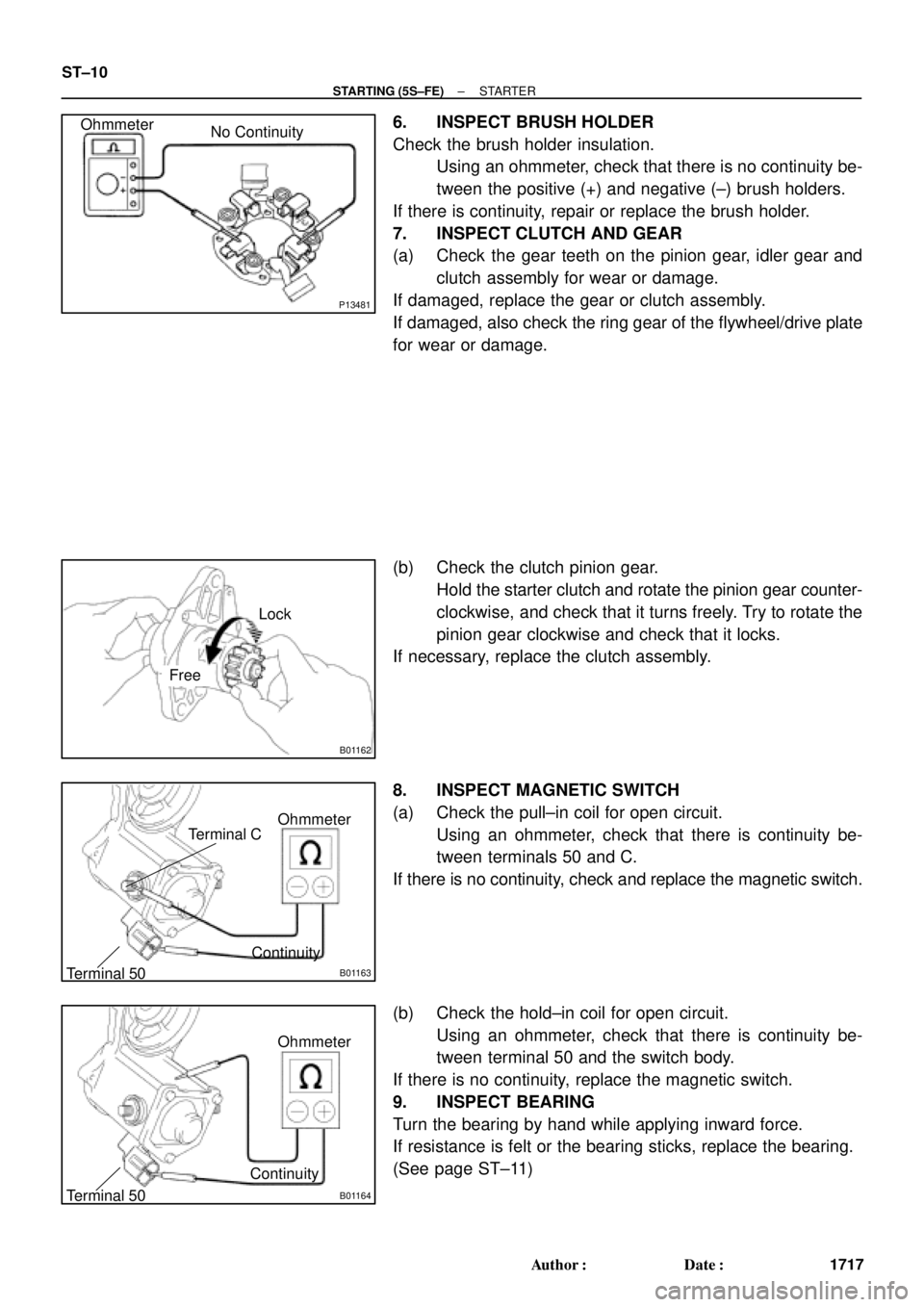
6. INSPECT BRUSH HOLDER
Check the brush holder insulation.
Using an ohmmeter, check that there is no continuity be-
tween the positive (+) and negative (±) brush holders.
If there is continuity, repair or replace the brush holder.
7. INSPECT CLUTCH AND GEAR
(a) Check the gear teeth on the pinion gear, idler gear and
clutch assembly for wear or damage.
If damaged, replace the gear or clutch assembly.
If damaged, also check the ring gear of the flywheel/drive plate
for wear or damage.
(b) Check the clutch pinion gear.
Hold the starter clutch and rotate the pinion gear counter-
clockwise, and check that it turns freely. Try to rotate the
pinion gear clockwise and check that it locks.
If necessary, replace the clutch assembly.
8. INSPECT MAGNETIC SWITCH
(a) Check the pull±in coil for open circuit.
Using an ohmmeter, check that there is continuity be-
tween terminals 50 and C.
If there is no continuity, check and replace the magnetic switch.
(b) Check the hold±in coil for open circuit.
Using an ohmmeter, check that there is continuity be-
tween terminal 50 and the switch body.
If there is no continuity, replace the magnetic switch.
9. INSPECT BEARING
Turn the bearing by hand while applying inward force.
If resistance is felt or the bearing sticks, replace the bearing.
(See page ST±11)
Page 4265 of 4770
B01238
(1)(2)
(3) (4)
(5) (6)
(7)
Long
Short
(7)
InsideLead Terminal
B01239
40 mm
Wooden Block
Contact Plate
20 mm37 mm
(kgf/cm2) =100 kgf
Ram diameter (cm)
2x 3.14 (p)2
Ram diameter (in.)
2x 3.14 (p)2(psi) =221 lbf
(kPa) = x 98.1
x 6.9 (kgf/cm2)
(kPa) = (psi)
± STARTING (5S±FE)STARTER
ST±15
1722 Author�: Date�:
HINT:
Match the protrusion of the insulator with the indentation of the
housing.
(6) Wave washer
(7) Terminal nut
NOTICE:
Be careful to install the terminal insulators
(inside) and wave washers in the correct direction.
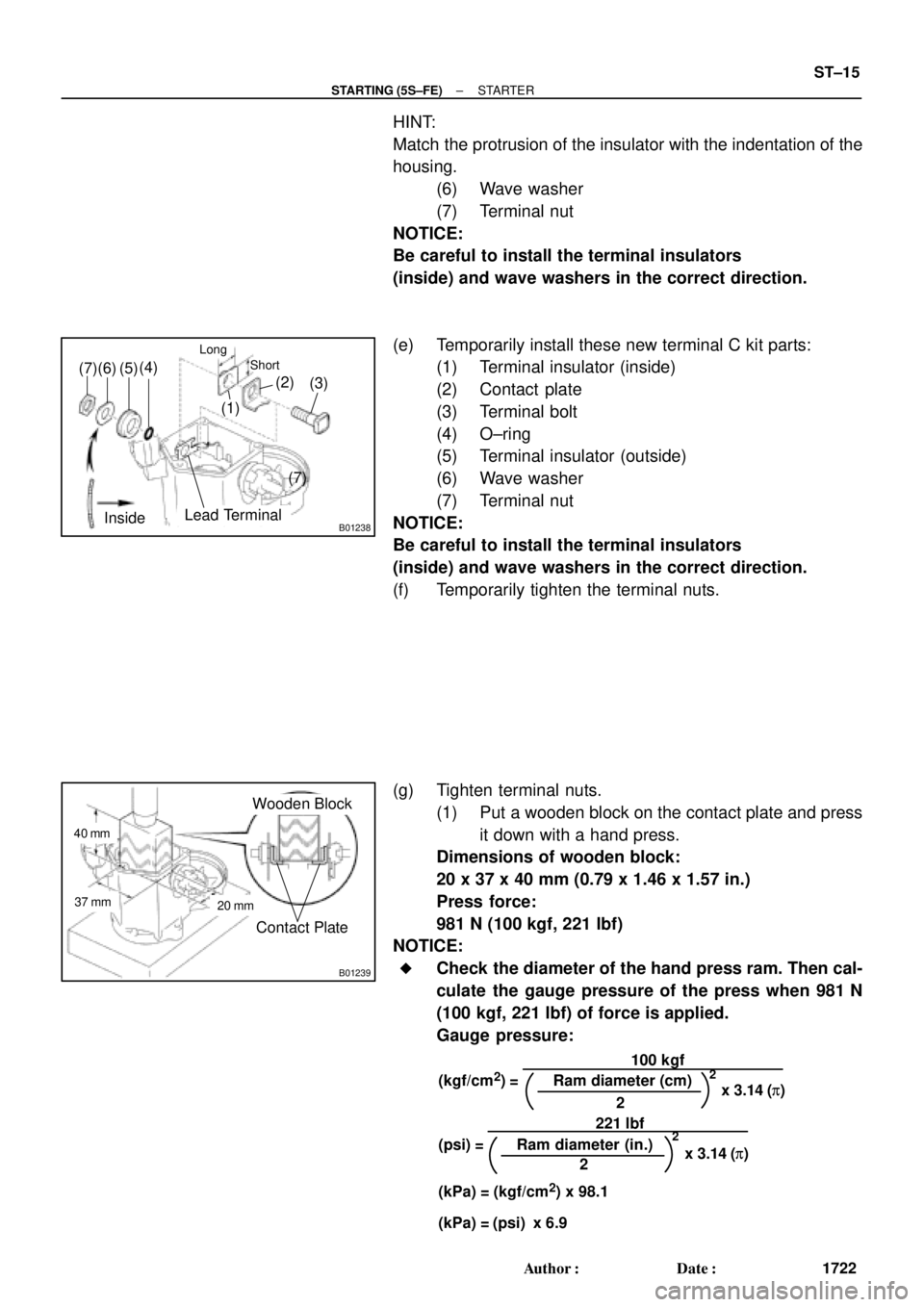
(e) Temporarily install these new terminal C kit parts:
(1) Terminal insulator (inside)
(2) Contact plate
(3) Terminal bolt
(4) O±ring
(5) Terminal insulator (outside)
(6) Wave washer
(7) Terminal nut
NOTICE:
Be careful to install the terminal insulators
(inside) and wave washers in the correct direction.
(f) Temporarily tighten the terminal nuts.
(g) Tighten terminal nuts.
(1) Put a wooden block on the contact plate and press
it down with a hand press.
Dimensions of wooden block:
20 x 37 x 40 mm (0.79 x 1.46 x 1.57 in.)
Press force:
981 N (100 kgf, 221 lbf)
NOTICE:
�Check the diameter of the hand press ram. Then cal-
culate the gauge pressure of the press when 981 N
(100 kgf, 221 lbf) of force is applied.
Gauge pressure:
Page 4278 of 4770
ST01X±03
P10584
Ohmmeter
Continuity
P10585
Ohmmeter
No Continuity
P10586
P10587
ST0040
ST±8
± STARTING (1MZ±FE)STARTER
1735 Author�: Date�:
INSPECTION
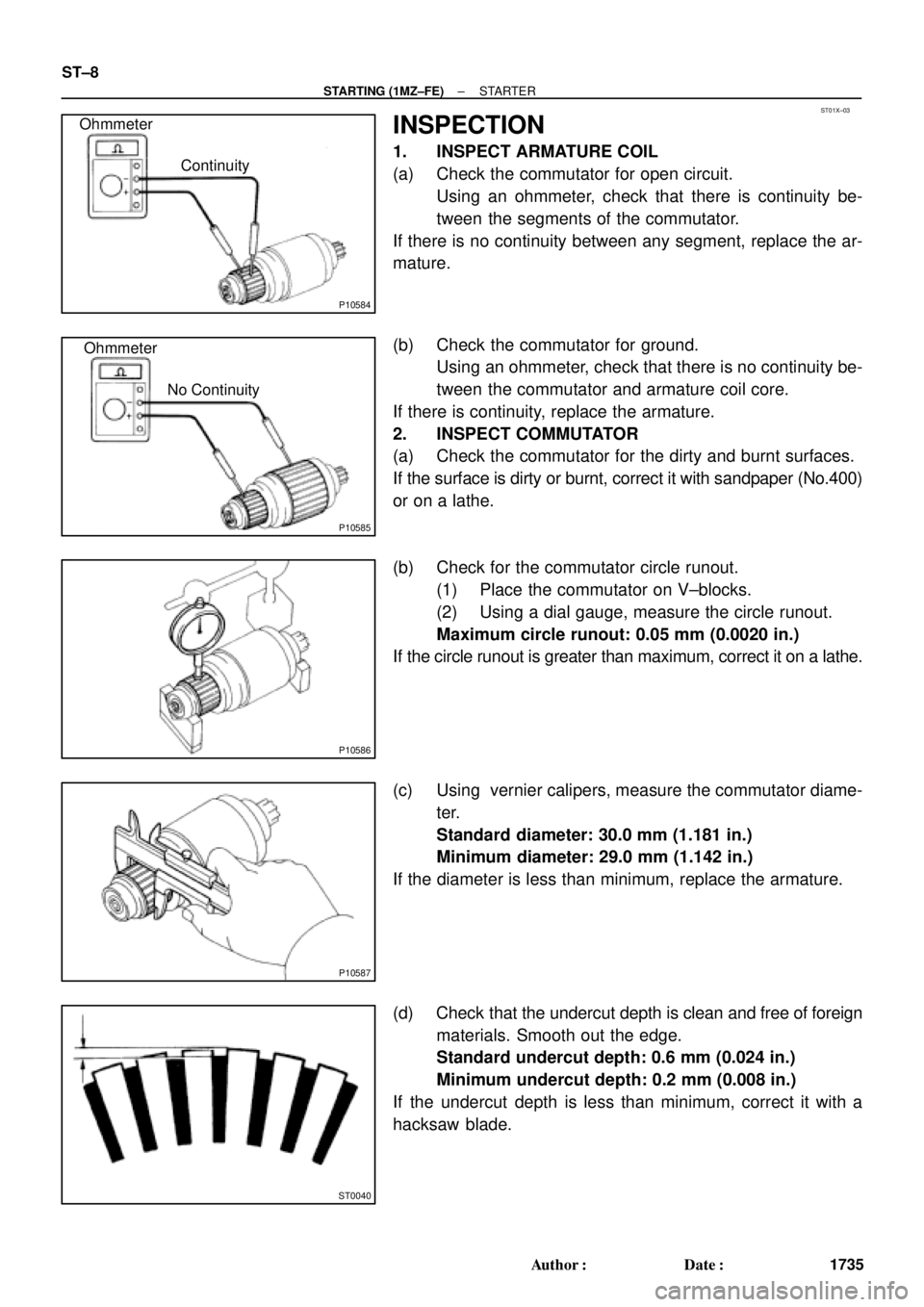
1. INSPECT ARMATURE COIL
(a) Check the commutator for open circuit.
Using an ohmmeter, check that there is continuity be-
tween the segments of the commutator.
If there is no continuity between any segment, replace the ar-
mature.
(b) Check the commutator for ground.
Using an ohmmeter, check that there is no continuity be-
tween the commutator and armature coil core.
If there is continuity, replace the armature.
2. INSPECT COMMUTATOR
(a) Check the commutator for the dirty and burnt surfaces.
If the surface is dirty or burnt, correct it with sandpaper (No.400)
or on a lathe.
(b) Check for the commutator circle runout.
(1) Place the commutator on V±blocks.
(2) Using a dial gauge, measure the circle runout.
Maximum circle runout: 0.05 mm (0.0020 in.)
If the circle runout is greater than maximum, correct it on a lathe.
(c) Using vernier calipers, measure the commutator diame-
ter.
Standard diameter: 30.0 mm (1.181 in.)
Minimum diameter: 29.0 mm (1.142 in.)
If the diameter is less than minimum, replace the armature.
(d) Check that the undercut depth is clean and free of foreign
materials. Smooth out the edge.
Standard undercut depth: 0.6 mm (0.024 in.)
Minimum undercut depth: 0.2 mm (0.008 in.)
If the undercut depth is less than minimum, correct it with a
hacksaw blade.
Page 4280 of 4770
P13481
No Continuity Ohmmeter
B01162
Lock
Free
B01163
Ohmmeter
Terminal 50Terminal C
Continuity
B01164
Ohmmeter
Terminal 50Continuity
ST±10
± STARTING (1MZ±FE)STARTER
1737 Author�: Date�:
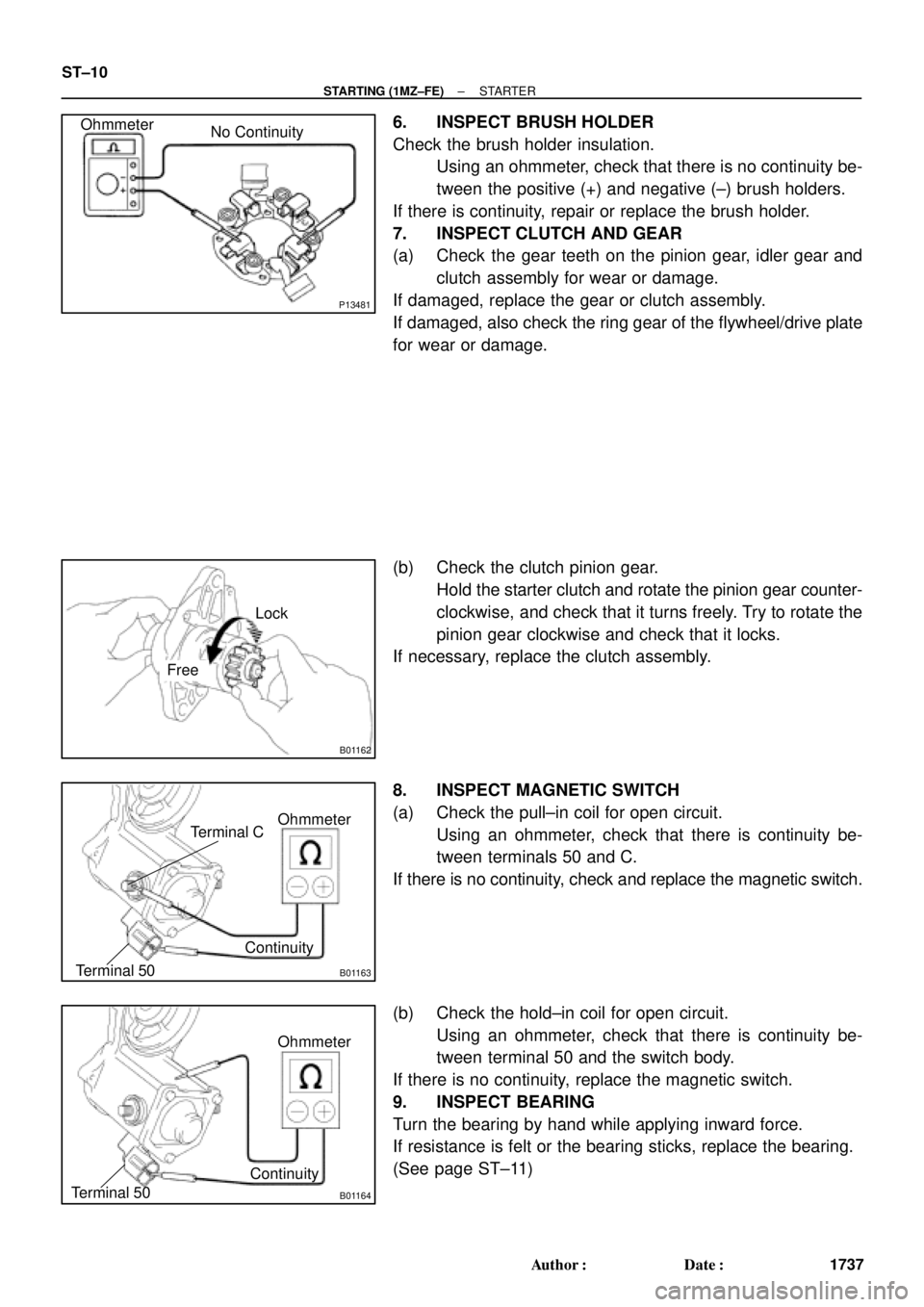
6. INSPECT BRUSH HOLDER
Check the brush holder insulation.
Using an ohmmeter, check that there is no continuity be-
tween the positive (+) and negative (±) brush holders.
If there is continuity, repair or replace the brush holder.
7. INSPECT CLUTCH AND GEAR
(a) Check the gear teeth on the pinion gear, idler gear and
clutch assembly for wear or damage.
If damaged, replace the gear or clutch assembly.
If damaged, also check the ring gear of the flywheel/drive plate
for wear or damage.
(b) Check the clutch pinion gear.
Hold the starter clutch and rotate the pinion gear counter-
clockwise, and check that it turns freely. Try to rotate the
pinion gear clockwise and check that it locks.
If necessary, replace the clutch assembly.
8. INSPECT MAGNETIC SWITCH
(a) Check the pull±in coil for open circuit.
Using an ohmmeter, check that there is continuity be-
tween terminals 50 and C.
If there is no continuity, check and replace the magnetic switch.
(b) Check the hold±in coil for open circuit.
Using an ohmmeter, check that there is continuity be-
tween terminal 50 and the switch body.
If there is no continuity, replace the magnetic switch.
9. INSPECT BEARING
Turn the bearing by hand while applying inward force.
If resistance is felt or the bearing sticks, replace the bearing.
(See page ST±11)
Page 4285 of 4770
B01238
(1)(2)
(3) (4)
(5) (6)
(7)
Long
Short
(7)
InsideLead Terminal
B01239
40 mm
Wooden Block
Contact Plate
20 mm37 mm
(kgf/cm2) =100 kgf
Ram diameter (cm)
2x 3.14 (p)2
Ram diameter (in.)
2x 3.14 (p)2(psi) =221 lbf
(kPa) = x 98.1
x 6.9 (kgf/cm2)
(kPa) = (psi)
± STARTING (1MZ±FE)STARTER
ST±15
1742 Author�: Date�:
HINT:
Match the protrusion of the insulator with the indentation of the
housing.
(6) Wave washer
(7) Terminal nut
NOTICE:
Be careful to install the terminal insulators
(inside) and wave washers in the correct direction.
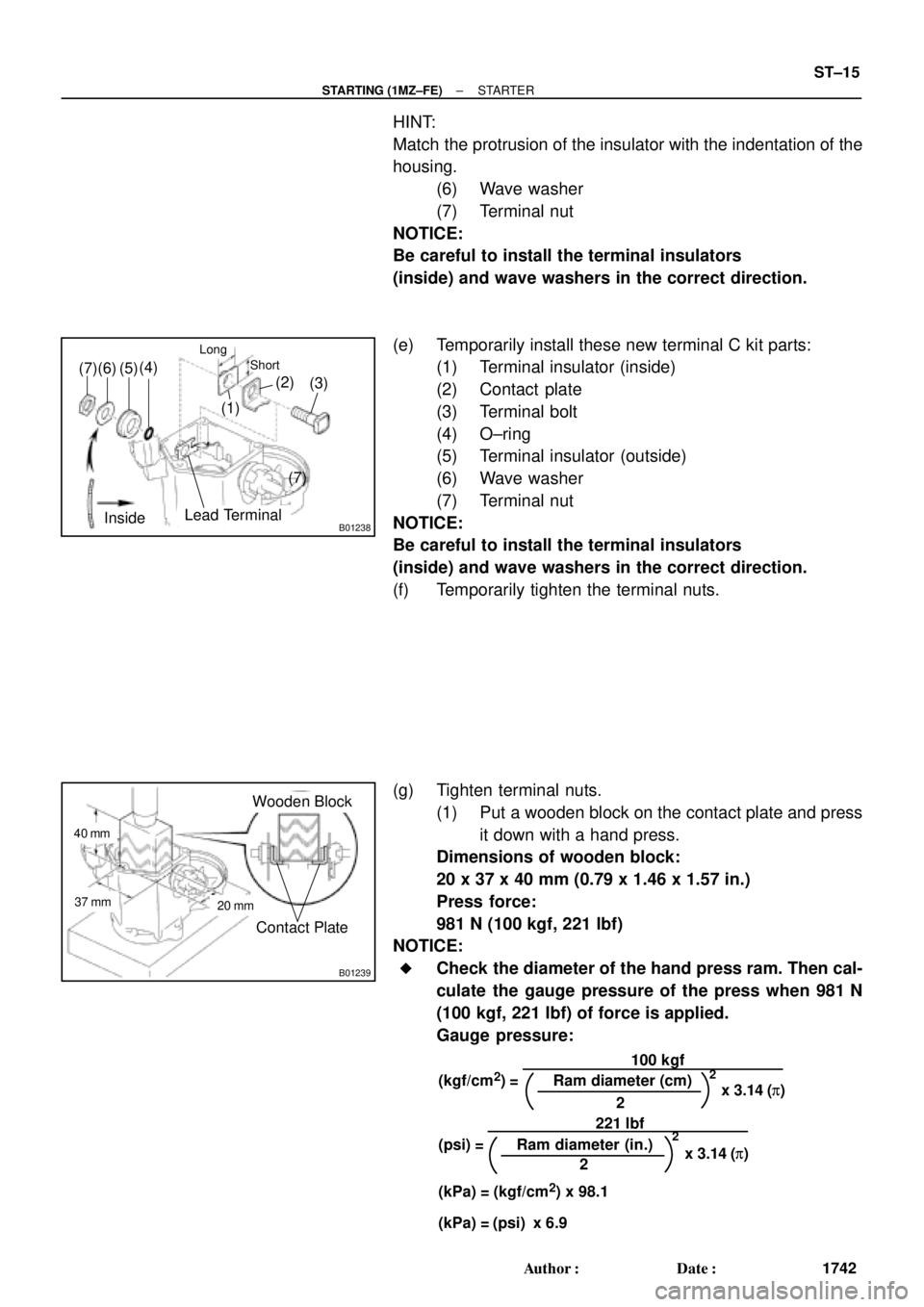
(e) Temporarily install these new terminal C kit parts:
(1) Terminal insulator (inside)
(2) Contact plate
(3) Terminal bolt
(4) O±ring
(5) Terminal insulator (outside)
(6) Wave washer
(7) Terminal nut
NOTICE:
Be careful to install the terminal insulators
(inside) and wave washers in the correct direction.
(f) Temporarily tighten the terminal nuts.
(g) Tighten terminal nuts.
(1) Put a wooden block on the contact plate and press
it down with a hand press.
Dimensions of wooden block:
20 x 37 x 40 mm (0.79 x 1.46 x 1.57 in.)
Press force:
981 N (100 kgf, 221 lbf)
NOTICE:
�Check the diameter of the hand press ram. Then cal-
culate the gauge pressure of the press when 981 N
(100 kgf, 221 lbf) of force is applied.
Gauge pressure: