2000 DODGE NEON steering
[x] Cancel search: steeringPage 970 of 1285
The kickdown valve makes possible a forced down-
shift from third to second, second to first, or third to
first (depending on vehicle speed). This can be done
by depressing the accelerator pedal past the detent
feel near wide open throttle.
The shuttle valve has two separate functions and
performs each independently of the other. The first is
providing fast release of the kickdown band, and
smooth front clutch engagement when a lift-foot
upshift from second to third is made. The second
function is to regulate the application of the kick-
down servo and band when making third±to±second
kickdown.
The bypass valve provides for smooth application
of the kickdown band on 1-2 upshifts.
The torque converter clutch solenoid allows for the
electronic control of the torque converter clutch. It
also disengages the torque converter at closed throt-
tle. This is done during engine warm-up and part-
throttle acceleration.
The switch valve directs oil to apply the torque
converter clutch in one position. The switch valve
releases the torque converter clutch in the other posi-
tion.
CLUTCHES, BAND SERVOS, AND
ACCUMULATOR
The front and rear clutch pistons, and both servo
pistons, are moved hydraulically to engage the
clutches and apply the bands. The pistons are
released by spring tension when hydraulic pressure
is released. On the 2-3 upshift, the kickdown servo
piston is released by spring tension and hydraulic
pressure.
The accumulator controls the hydraulic pressure
on the apply±side of the kickdown servo during the
1-2 upshift; thereby cushioning the kickdown band
application at any throttle position.
BRAKE TRANSMISSION SHIFT INTERLOCK
SYSTEM
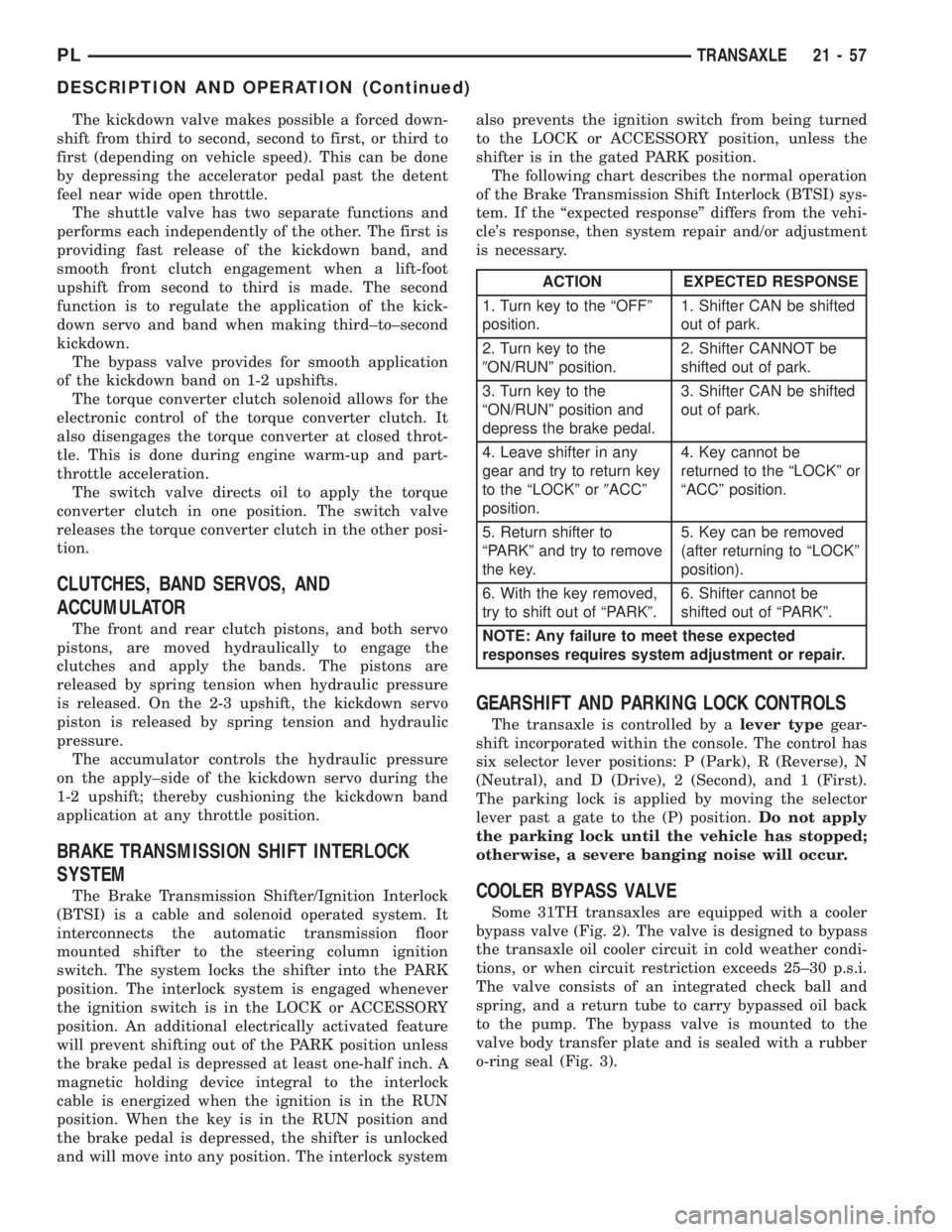
The Brake Transmission Shifter/Ignition Interlock
(BTSI) is a cable and solenoid operated system. It
interconnects the automatic transmission floor
mounted shifter to the steering column ignition
switch. The system locks the shifter into the PARK
position. The interlock system is engaged whenever
the ignition switch is in the LOCK or ACCESSORY
position. An additional electrically activated feature
will prevent shifting out of the PARK position unless
the brake pedal is depressed at least one-half inch. A
magnetic holding device integral to the interlock
cable is energized when the ignition is in the RUN
position. When the key is in the RUN position and
the brake pedal is depressed, the shifter is unlocked
and will move into any position. The interlock systemalso prevents the ignition switch from being turned
to the LOCK or ACCESSORY position, unless the
shifter is in the gated PARK position.
The following chart describes the normal operation
of the Brake Transmission Shift Interlock (BTSI) sys-
tem. If the ªexpected responseº differs from the vehi-
cle's response, then system repair and/or adjustment
is necessary.
GEARSHIFT AND PARKING LOCK CONTROLS
The transaxle is controlled by alever typegear-
shift incorporated within the console. The control has
six selector lever positions: P (Park), R (Reverse), N
(Neutral), and D (Drive), 2 (Second), and 1 (First).
The parking lock is applied by moving the selector
lever past a gate to the (P) position.Do not apply
the parking lock until the vehicle has stopped;
otherwise, a severe banging noise will occur.
COOLER BYPASS VALVE
Some 31TH transaxles are equipped with a cooler
bypass valve (Fig. 2). The valve is designed to bypass
the transaxle oil cooler circuit in cold weather condi-
tions, or when circuit restriction exceeds 25±30 p.s.i.
The valve consists of an integrated check ball and
spring, and a return tube to carry bypassed oil back
to the pump. The bypass valve is mounted to the
valve body transfer plate and is sealed with a rubber
o-ring seal (Fig. 3).
ACTION EXPECTED RESPONSE
1. Turn key to the ªOFFº
position.1. Shifter CAN be shifted
out of park.
2. Turn key to the
9ON/RUNº position.2. Shifter CANNOT be
shifted out of park.
3. Turn key to the
ªON/RUNº position and
depress the brake pedal.3. Shifter CAN be shifted
out of park.
4. Leave shifter in any
gear and try to return key
to the ªLOCKº or9ACCº
position.4. Key cannot be
returned to the ªLOCKº or
ªACCº position.
5. Return shifter to
ªPARKº and try to remove
the key.5. Key can be removed
(after returning to ªLOCKº
position).
6. With the key removed,
try to shift out of ªPARKº.6. Shifter cannot be
shifted out of ªPARKº.
NOTE: Any failure to meet these expected
responses requires system adjustment or repair.
PLTRANSAXLE 21 - 57
DESCRIPTION AND OPERATION (Continued)
Page 993 of 1285
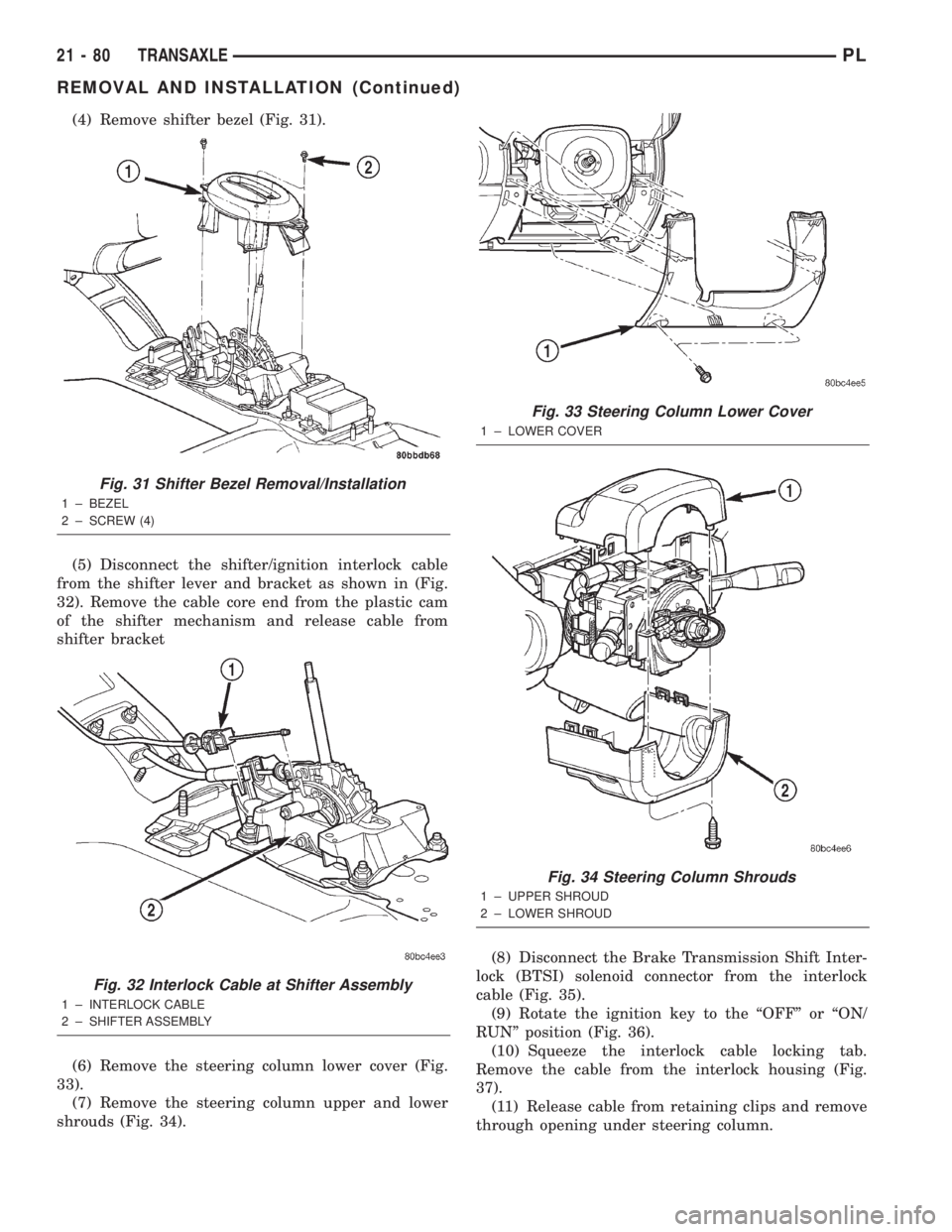
(4) Remove shifter bezel (Fig. 31).
(5) Disconnect the shifter/ignition interlock cable
from the shifter lever and bracket as shown in (Fig.
32). Remove the cable core end from the plastic cam
of the shifter mechanism and release cable from
shifter bracket
(6) Remove the steering column lower cover (Fig.
33).
(7) Remove the steering column upper and lower
shrouds (Fig. 34).(8) Disconnect the Brake Transmission Shift Inter-
lock (BTSI) solenoid connector from the interlock
cable (Fig. 35).
(9) Rotate the ignition key to the ªOFFº or ªON/
RUNº position (Fig. 36).
(10) Squeeze the interlock cable locking tab.
Remove the cable from the interlock housing (Fig.
37).
(11) Release cable from retaining clips and remove
through opening under steering column.
Fig. 31 Shifter Bezel Removal/Installation
1 ± BEZEL
2 ± SCREW (4)
Fig. 32 Interlock Cable at Shifter Assembly
1 ± INTERLOCK CABLE
2 ± SHIFTER ASSEMBLY
Fig. 33 Steering Column Lower Cover
1 ± LOWER COVER
Fig. 34 Steering Column Shrouds
1 ± UPPER SHROUD
2 ± LOWER SHROUD
21 - 80 TRANSAXLEPL
REMOVAL AND INSTALLATION (Continued)
Page 994 of 1285
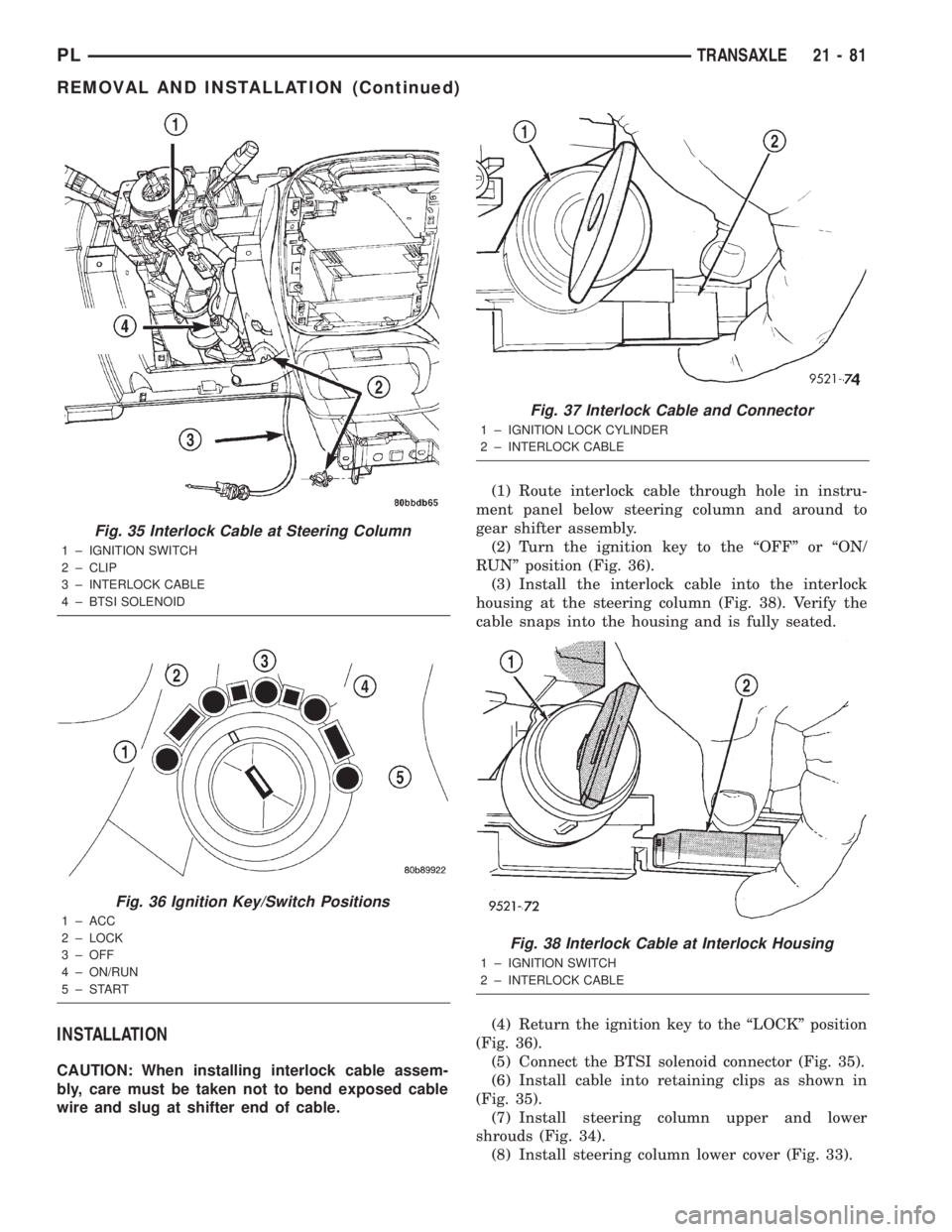
INSTALLATION
CAUTION: When installing interlock cable assem-
bly, care must be taken not to bend exposed cable
wire and slug at shifter end of cable.(1) Route interlock cable through hole in instru-
ment panel below steering column and around to
gear shifter assembly.
(2) Turn the ignition key to the ªOFFº or ªON/
RUNº position (Fig. 36).
(3) Install the interlock cable into the interlock
housing at the steering column (Fig. 38). Verify the
cable snaps into the housing and is fully seated.
(4) Return the ignition key to the ªLOCKº position
(Fig. 36).
(5) Connect the BTSI solenoid connector (Fig. 35).
(6) Install cable into retaining clips as shown in
(Fig. 35).
(7) Install steering column upper and lower
shrouds (Fig. 34).
(8) Install steering column lower cover (Fig. 33).
Fig. 35 Interlock Cable at Steering Column
1 ± IGNITION SWITCH
2 ± CLIP
3 ± INTERLOCK CABLE
4 ± BTSI SOLENOID
Fig. 36 Ignition Key/Switch Positions
1 ± ACC
2 ± LOCK
3 ± OFF
4 ± ON/RUN
5±START
Fig. 37 Interlock Cable and Connector
1 ± IGNITION LOCK CYLINDER
2 ± INTERLOCK CABLE
Fig. 38 Interlock Cable at Interlock Housing
1 ± IGNITION SWITCH
2 ± INTERLOCK CABLE
PLTRANSAXLE 21 - 81
REMOVAL AND INSTALLATION (Continued)
Page 995 of 1285
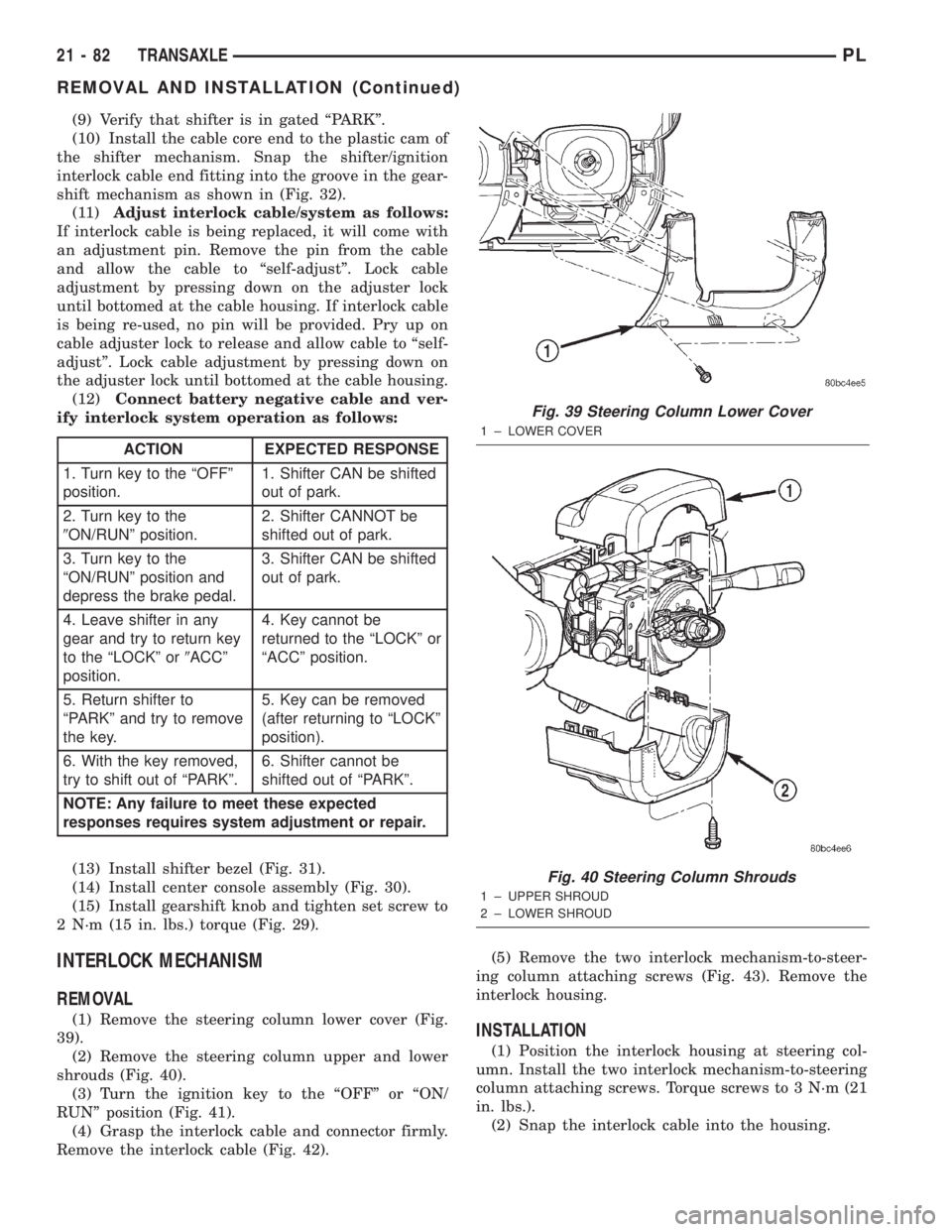
(9) Verify that shifter is in gated ªPARKº.
(10) Install the cable core end to the plastic cam of
the shifter mechanism. Snap the shifter/ignition
interlock cable end fitting into the groove in the gear-
shift mechanism as shown in (Fig. 32).
(11)Adjust interlock cable/system as follows:
If interlock cable is being replaced, it will come with
an adjustment pin. Remove the pin from the cable
and allow the cable to ªself-adjustº. Lock cable
adjustment by pressing down on the adjuster lock
until bottomed at the cable housing. If interlock cable
is being re-used, no pin will be provided. Pry up on
cable adjuster lock to release and allow cable to ªself-
adjustº. Lock cable adjustment by pressing down on
the adjuster lock until bottomed at the cable housing.
(12)Connect battery negative cable and ver-
ify interlock system operation as follows:
(13) Install shifter bezel (Fig. 31).
(14) Install center console assembly (Fig. 30).
(15) Install gearshift knob and tighten set screw to
2 N´m (15 in. lbs.) torque (Fig. 29).
INTERLOCK MECHANISM
REMOVAL
(1) Remove the steering column lower cover (Fig.
39).
(2) Remove the steering column upper and lower
shrouds (Fig. 40).
(3) Turn the ignition key to the ªOFFº or ªON/
RUNº position (Fig. 41).
(4) Grasp the interlock cable and connector firmly.
Remove the interlock cable (Fig. 42).(5) Remove the two interlock mechanism-to-steer-
ing column attaching screws (Fig. 43). Remove the
interlock housing.INSTALLATION
(1) Position the interlock housing at steering col-
umn. Install the two interlock mechanism-to-steering
column attaching screws. Torque screws to 3 N´m (21
in. lbs.).
(2) Snap the interlock cable into the housing.
ACTION EXPECTED RESPONSE
1. Turn key to the ªOFFº
position.1. Shifter CAN be shifted
out of park.
2. Turn key to the
9ON/RUNº position.2. Shifter CANNOT be
shifted out of park.
3. Turn key to the
ªON/RUNº position and
depress the brake pedal.3. Shifter CAN be shifted
out of park.
4. Leave shifter in any
gear and try to return key
to the ªLOCKº or9ACCº
position.4. Key cannot be
returned to the ªLOCKº or
ªACCº position.
5. Return shifter to
ªPARKº and try to remove
the key.5. Key can be removed
(after returning to ªLOCKº
position).
6. With the key removed,
try to shift out of ªPARKº.6. Shifter cannot be
shifted out of ªPARKº.
NOTE: Any failure to meet these expected
responses requires system adjustment or repair.
Fig. 39 Steering Column Lower Cover
1 ± LOWER COVER
Fig. 40 Steering Column Shrouds
1 ± UPPER SHROUD
2 ± LOWER SHROUD
21 - 82 TRANSAXLEPL
REMOVAL AND INSTALLATION (Continued)
Page 996 of 1285
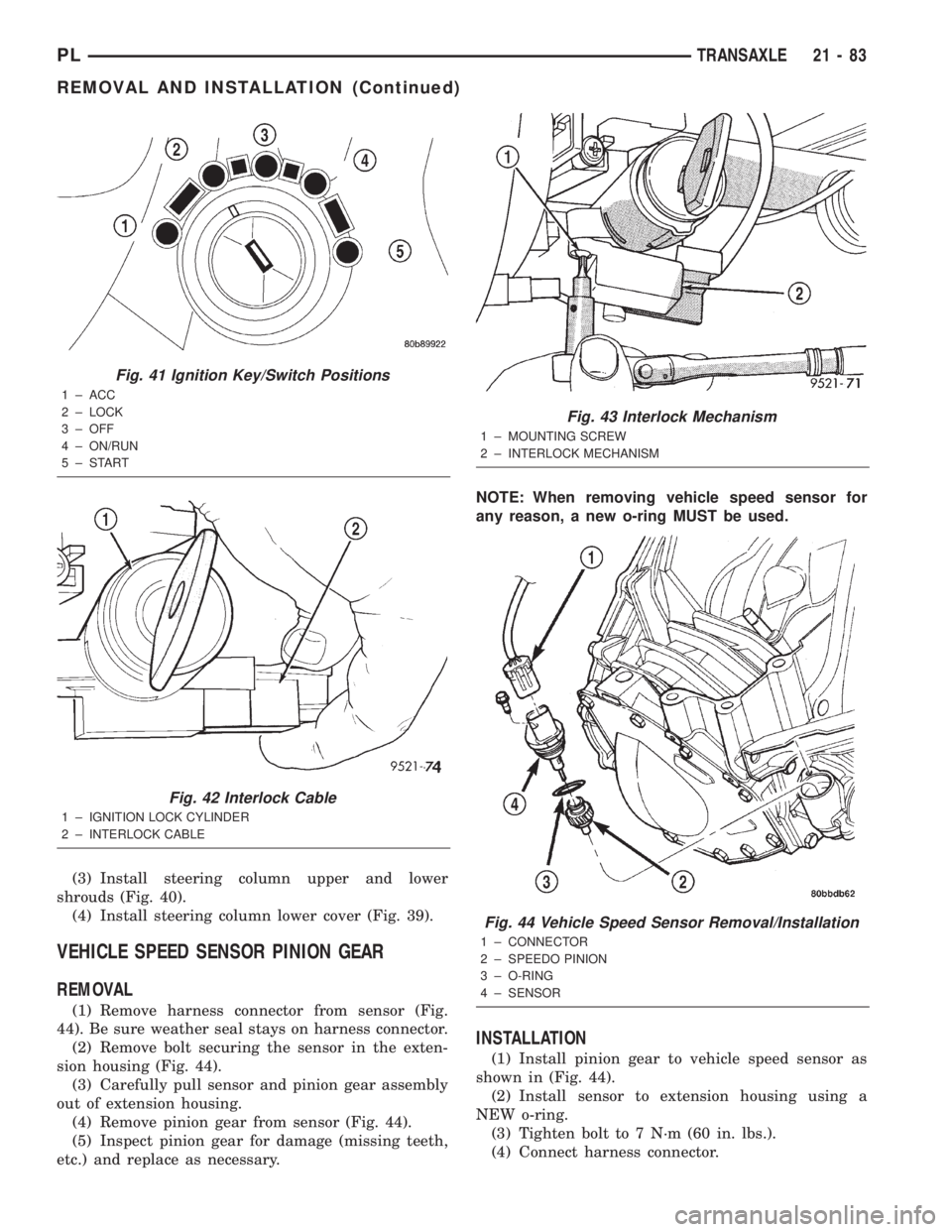
(3) Install steering column upper and lower
shrouds (Fig. 40).
(4) Install steering column lower cover (Fig. 39).
VEHICLE SPEED SENSOR PINION GEAR
REMOVAL
(1) Remove harness connector from sensor (Fig.
44). Be sure weather seal stays on harness connector.
(2) Remove bolt securing the sensor in the exten-
sion housing (Fig. 44).
(3) Carefully pull sensor and pinion gear assembly
out of extension housing.
(4) Remove pinion gear from sensor (Fig. 44).
(5) Inspect pinion gear for damage (missing teeth,
etc.) and replace as necessary.NOTE: When removing vehicle speed sensor for
any reason, a new o-ring MUST be used.
INSTALLATION
(1) Install pinion gear to vehicle speed sensor as
shown in (Fig. 44).
(2) Install sensor to extension housing using a
NEW o-ring.
(3) Tighten bolt to 7 N´m (60 in. lbs.).
(4) Connect harness connector.
Fig. 41 Ignition Key/Switch Positions
1 ± ACC
2 ± LOCK
3 ± OFF
4 ± ON/RUN
5±START
Fig. 42 Interlock Cable
1 ± IGNITION LOCK CYLINDER
2 ± INTERLOCK CABLE
Fig. 43 Interlock Mechanism
1 ± MOUNTING SCREW
2 ± INTERLOCK MECHANISM
Fig. 44 Vehicle Speed Sensor Removal/Installation
1 ± CONNECTOR
2 ± SPEEDO PINION
3 ± O-RING
4 ± SENSOR
PLTRANSAXLE 21 - 83
REMOVAL AND INSTALLATION (Continued)
Page 1072 of 1285
signals when the vehicle is equipped with Anti-Lock
Brakes.
The use of tires from different manufactures on the
same vehicle is NOT recommended. The proper tire
pressure should be maintained on all four tires.
SPARE TIRE±TEMPORARY
The temporary spare tire is designed for emer-
gency use only. The original tire should be repaired
or replaced at the first opportunity, then reinstalled.
Do not exceed speeds of 50 M. P. H. when using the
temporary spare tire. Refer to Owner's Manual for
complete details.
REPLACEMENT TIRES
The original equipment tires provide a proper bal-
ance of many characteristics such as:
²Ride
²Noise
²Handling
²Durability
²Tread life
²Traction
²Rolling resistance
²Speed capabilityIt is recommend that tires equivalent to the origi-
nal equipment tires be used when replacement is
needed.
Failure to use equivalent replacement tires may
adversely affect the safety and handling of the vehi-
cle.
The use of oversize tires may cause interference
with vehicle components. Under extremes of suspen-
sion and steering travel, interference with vehicle
components may cause tire damage.
WARNING: FAILURE TO EQUIP THE VEHICLE WITH
TIRES HAVING ADEQUATE SPEED CAPABILITY
CAN RESULT IN SUDDEN TIRE FAILURE.
DIAGNOSIS AND TESTING
TREAD WEAR INDICATORS
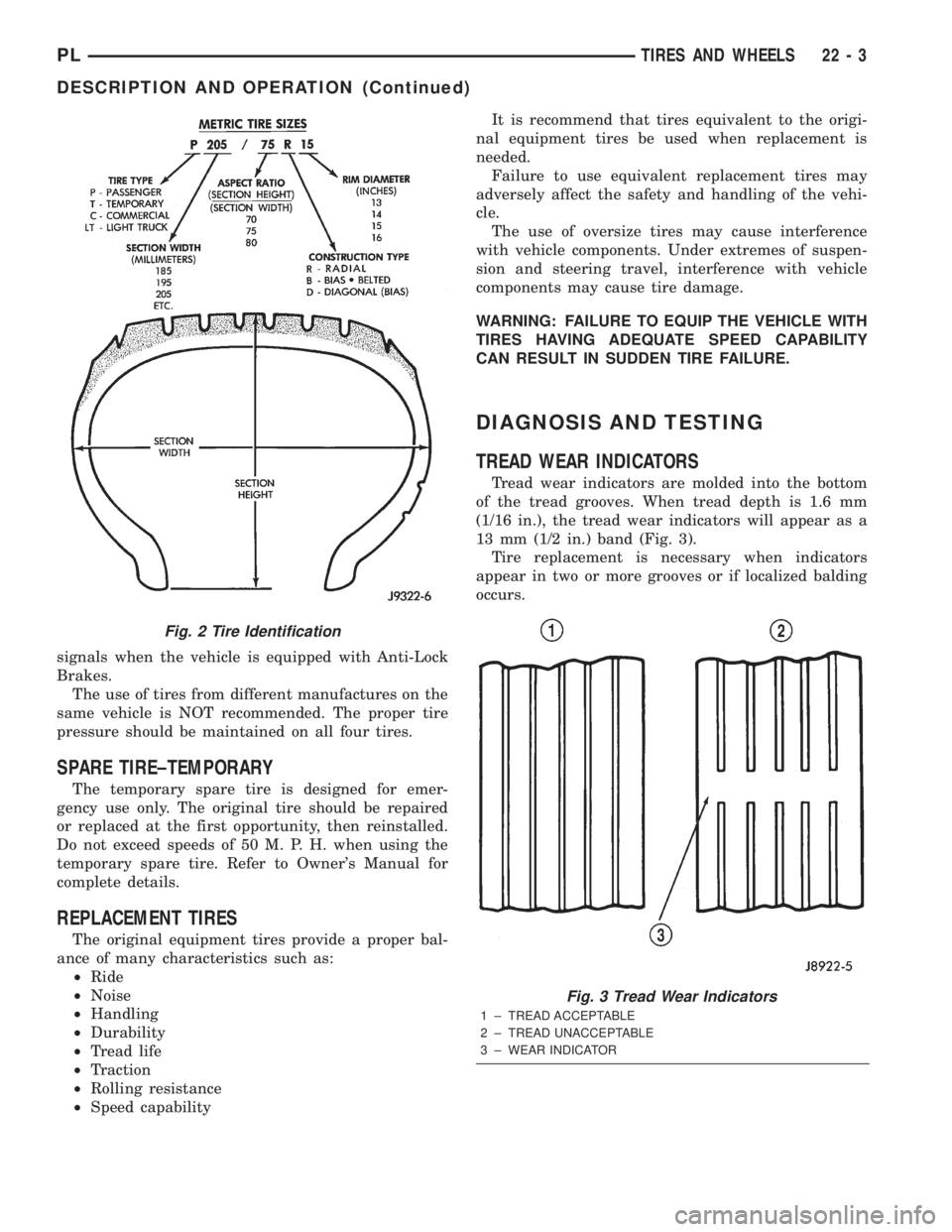
Tread wear indicators are molded into the bottom
of the tread grooves. When tread depth is 1.6 mm
(1/16 in.), the tread wear indicators will appear as a
13 mm (1/2 in.) band (Fig. 3).
Tire replacement is necessary when indicators
appear in two or more grooves or if localized balding
occurs.
Fig. 2 Tire Identification
Fig. 3 Tread Wear Indicators
1 ± TREAD ACCEPTABLE
2 ± TREAD UNACCEPTABLE
3 ± WEAR INDICATOR
PLTIRES AND WHEELS 22 - 3
DESCRIPTION AND OPERATION (Continued)
Page 1082 of 1285
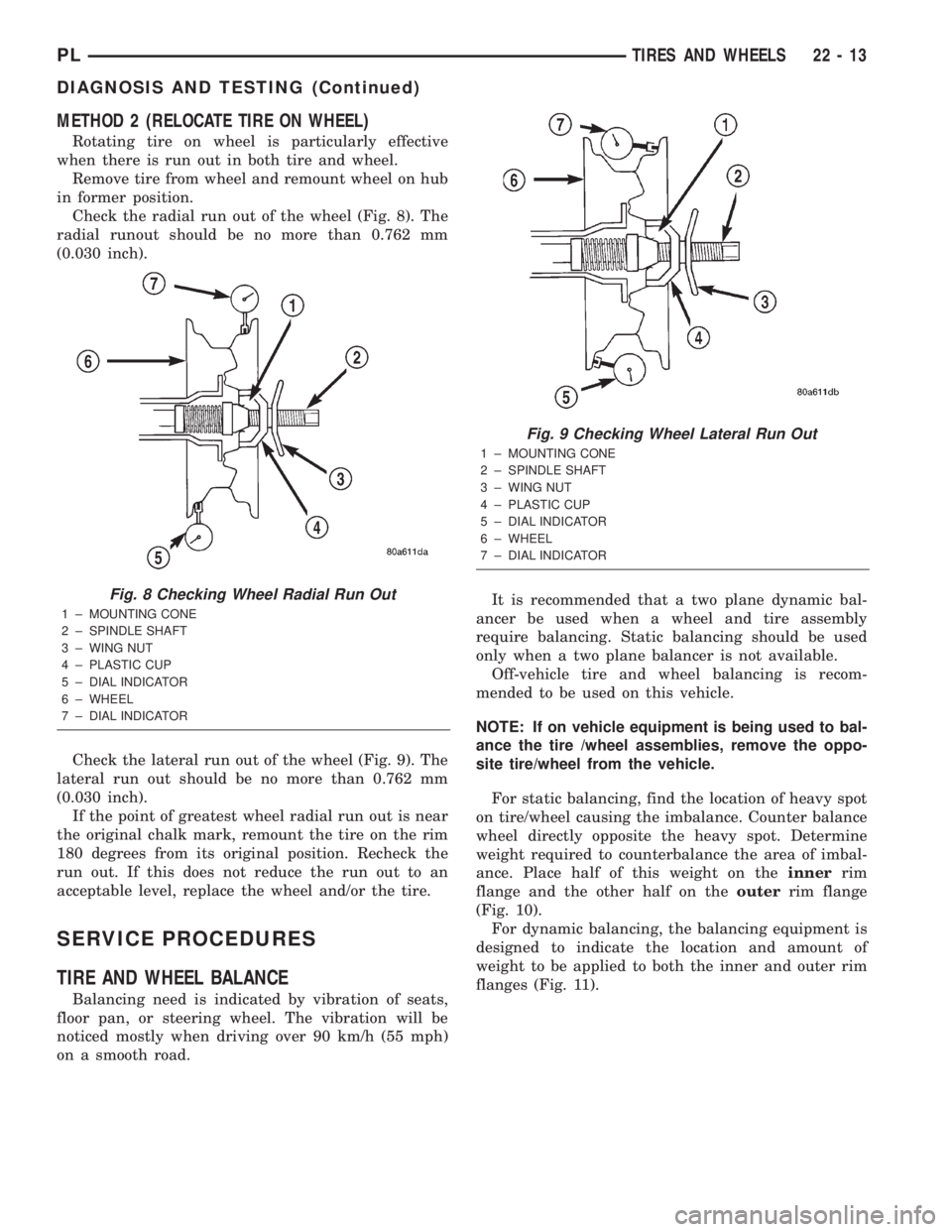
METHOD 2 (RELOCATE TIRE ON WHEEL)
Rotating tire on wheel is particularly effective
when there is run out in both tire and wheel.
Remove tire from wheel and remount wheel on hub
in former position.
Check the radial run out of the wheel (Fig. 8). The
radial runout should be no more than 0.762 mm
(0.030 inch).
Check the lateral run out of the wheel (Fig. 9). The
lateral run out should be no more than 0.762 mm
(0.030 inch).
If the point of greatest wheel radial run out is near
the original chalk mark, remount the tire on the rim
180 degrees from its original position. Recheck the
run out. If this does not reduce the run out to an
acceptable level, replace the wheel and/or the tire.
SERVICE PROCEDURES
TIRE AND WHEEL BALANCE
Balancing need is indicated by vibration of seats,
floor pan, or steering wheel. The vibration will be
noticed mostly when driving over 90 km/h (55 mph)
on a smooth road.It is recommended that a two plane dynamic bal-
ancer be used when a wheel and tire assembly
require balancing. Static balancing should be used
only when a two plane balancer is not available.
Off-vehicle tire and wheel balancing is recom-
mended to be used on this vehicle.
NOTE: If on vehicle equipment is being used to bal-
ance the tire /wheel assemblies, remove the oppo-
site tire/wheel from the vehicle.
For static balancing, find the location of heavy spot
on tire/wheel causing the imbalance. Counter balance
wheel directly opposite the heavy spot. Determine
weight required to counterbalance the area of imbal-
ance. Place half of this weight on theinnerrim
flange and the other half on theouterrim flange
(Fig. 10).
For dynamic balancing, the balancing equipment is
designed to indicate the location and amount of
weight to be applied to both the inner and outer rim
flanges (Fig. 11).
Fig. 8 Checking Wheel Radial Run Out
1 ± MOUNTING CONE
2 ± SPINDLE SHAFT
3 ± WING NUT
4 ± PLASTIC CUP
5 ± DIAL INDICATOR
6 ± WHEEL
7 ± DIAL INDICATOR
Fig. 9 Checking Wheel Lateral Run Out
1 ± MOUNTING CONE
2 ± SPINDLE SHAFT
3 ± WING NUT
4 ± PLASTIC CUP
5 ± DIAL INDICATOR
6 ± WHEEL
7 ± DIAL INDICATOR
PLTIRES AND WHEELS 22 - 13
DIAGNOSIS AND TESTING (Continued)
Page 1093 of 1285
OPERATION
BULB CHECK
Each time the ignition key is turned to the ON
position, the malfunction indicator (check engine)
lamp on the instrument panel should illuminate for
approximately 2 seconds then go out. This is done for
a bulb check.
OBTAINING DTC'S USING DRB SCAN TOOL
(1) Connect the DRB scan tool to the data link
(diagnostic) connector. This connector is located inthe passenger compartment; at the lower edge of
instrument panel; near the steering column.
(2) Turn the ignition switch on and access the
ªRead Faultº screen.
(3) Record all the DTC's and ªfreeze frameº infor-
mation shown on the DRB scan tool.
(4) To erase DTC's, use the ªErase Trouble Codeº
data screen on the DRB scan tool.Do not erase any
DTC's until problems have been investigated
and repairs have been performed.
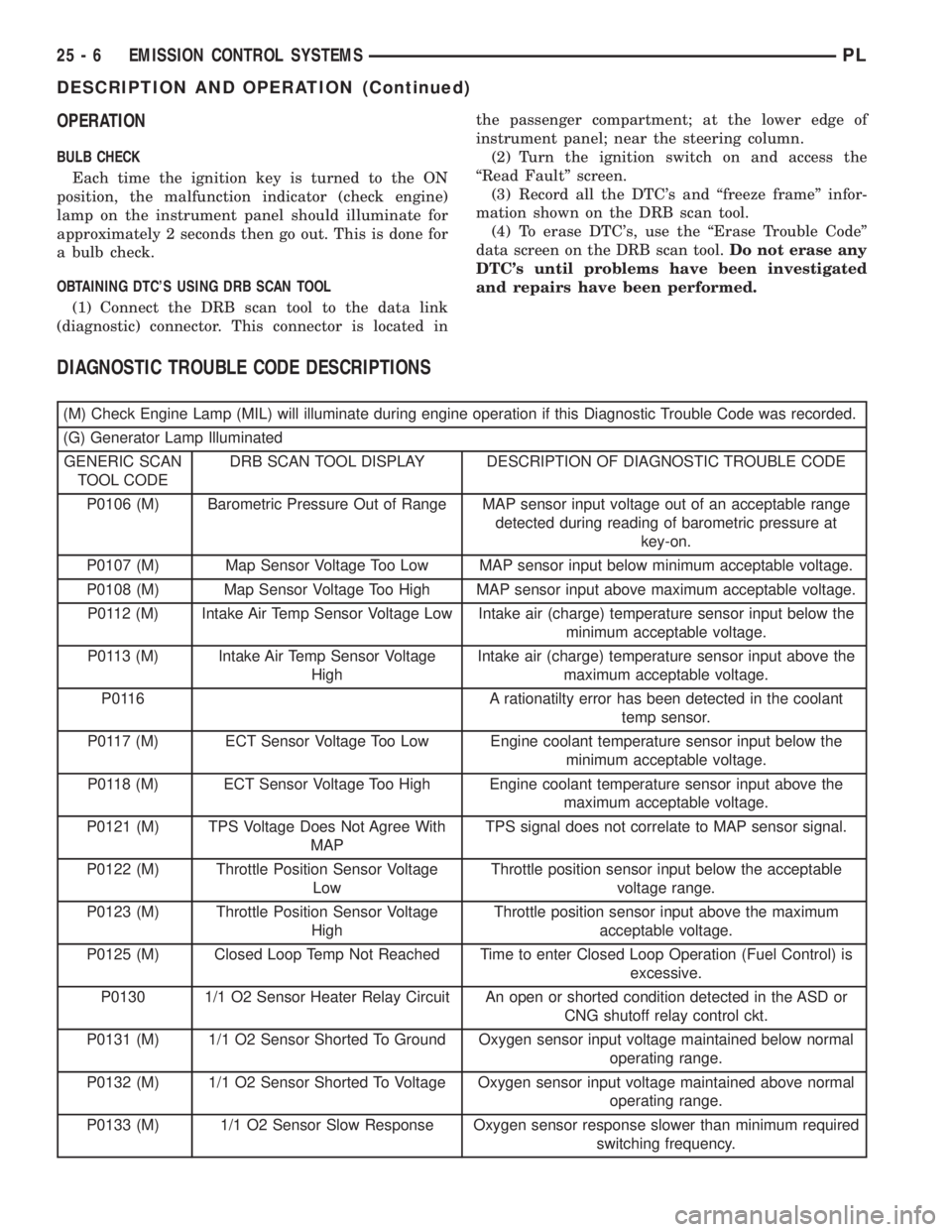
DIAGNOSTIC TROUBLE CODE DESCRIPTIONS
(M) Check Engine Lamp (MIL) will illuminate during engine operation if this Diagnostic Trouble Code was recorded.
(G) Generator Lamp Illuminated
GENERIC SCAN
TOOL CODEDRB SCAN TOOL DISPLAY DESCRIPTION OF DIAGNOSTIC TROUBLE CODE
P0106 (M) Barometric Pressure Out of Range MAP sensor input voltage out of an acceptable range
detected during reading of barometric pressure at
key-on.
P0107 (M) Map Sensor Voltage Too Low MAP sensor input below minimum acceptable voltage.
P0108 (M) Map Sensor Voltage Too High MAP sensor input above maximum acceptable voltage.
P0112 (M) Intake Air Temp Sensor Voltage Low Intake air (charge) temperature sensor input below the
minimum acceptable voltage.
P0113 (M) Intake Air Temp Sensor Voltage
HighIntake air (charge) temperature sensor input above the
maximum acceptable voltage.
P0116 A rationatilty error has been detected in the coolant
temp sensor.
P0117 (M) ECT Sensor Voltage Too Low Engine coolant temperature sensor input below the
minimum acceptable voltage.
P0118 (M) ECT Sensor Voltage Too High Engine coolant temperature sensor input above the
maximum acceptable voltage.
P0121 (M) TPS Voltage Does Not Agree With
MAPTPS signal does not correlate to MAP sensor signal.
P0122 (M) Throttle Position Sensor Voltage
LowThrottle position sensor input below the acceptable
voltage range.
P0123 (M) Throttle Position Sensor Voltage
HighThrottle position sensor input above the maximum
acceptable voltage.
P0125 (M) Closed Loop Temp Not Reached Time to enter Closed Loop Operation (Fuel Control) is
excessive.
P0130 1/1 O2 Sensor Heater Relay Circuit An open or shorted condition detected in the ASD or
CNG shutoff relay control ckt.
P0131 (M) 1/1 O2 Sensor Shorted To Ground Oxygen sensor input voltage maintained below normal
operating range.
P0132 (M) 1/1 O2 Sensor Shorted To Voltage Oxygen sensor input voltage maintained above normal
operating range.
P0133 (M) 1/1 O2 Sensor Slow Response Oxygen sensor response slower than minimum required
switching frequency.
25 - 6 EMISSION CONTROL SYSTEMSPL
DESCRIPTION AND OPERATION (Continued)