2000 AUDI ALLROAD light
[x] Cancel search: lightPage 114 of 306
Ignition
switch
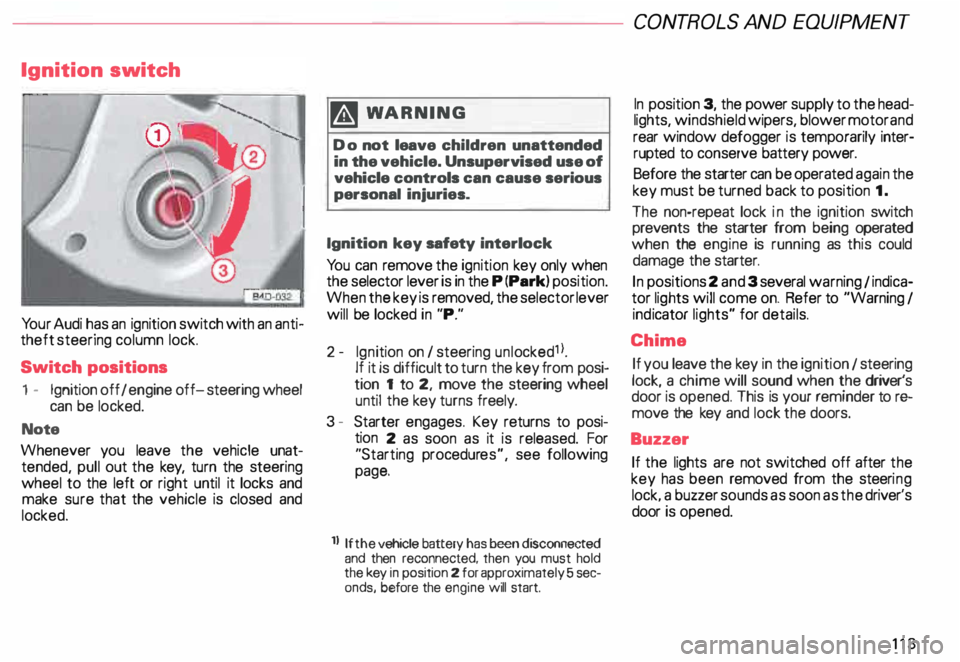
Yo ur Audi has an ignition switch with an anti
theft steering column lock.
Switch positions
1 - Ignition off I engine off-steering wheel
can be locked.
Note
Whenever you leave the vehicle unat
tended, pull out the key, turn the steering
wheel to the left or right until it locks and
make sure that the vehicle is closed and
locked. m
WARNING
Do not leave children unattended
in the vehicle. Unsupervised use of
vehicle controls can cause serious
personal injuries.
Ignition key safety interlock
Yo u can remove the ignition key only when
the selector lever is in the P (Park) position.
When the key is removed, the selector lever
will be locked in "P."
2- Ignition on I steering unlocked1 l.
If it is difficult to turn the key from posi
tion 1 to 2, move the steering wheel
until the key turns freely.
3 - Starter engages. Key returns to posi
tion 2 as soon as it is released. For
"Starting procedures", see following
page.
ll If the
vehicle battery has been disconnected
and then reconnected, then you must hold
the key in position 2 for approximately 5 sec
onds, before the engine will start. CONT
ROLS AND EQUIPMEN T
In position 3, the power supply to the head
lights, windshield wipers, blower motor and
rear window defogger is temporarily inter·
rupted to conserve battery power.
Before the starter can be operated again the
key must be turned back to position 1.
The non-repeat lock in the ignition switch
prevents the starter from being operated
when the engine is running as this could
damage the starter.
In positions 2 and 3 several warning 1 indica
tor lights will come on. Refer to "Warning I
ind icator lights" for details.
Chime If you leave the key in the ignition 1 steering
lock, a chime will sound when the driver's
door is opened. This is your reminder tor&
move the key and lock the doors.
Buzzer If the lights are not switched off after the
key has been removed from the steeri ng
lock. a buzzer sounds as soon as the driver's
door is opened.
113
Page 115 of 306

CONTROLS
AND EQUIPMENT---------------------
Starting procedures
� WARN ING
• Always fasten safety belts be
fore driving.
• Never start or let the engine run
in a confined or enclosed area. Ex
haust fumes from the engine con
tain carbon monoxide, a colorless
and odorless gas. Carbon monox
ide can be fatal if inhaled.
• Never leave the engine idling
unattended. An unattended ve
hicle with a running engine poses
a danger of personal injury or
theft.
114
dib To avoid unnecessary engine
W wear and to reduce exhaust
emissions, do not let your vehicle
stand end warm up. Be ready to
drive off immediately after starting
your vehicle. Maintain moderate
speed until the engine is completely
warm. Remember, the engine per
forms bast at operating tempera
ture.
Manual transmission
Yo ur Audi with manual transmission is
equipped with an "interlock-fea ture".
Start the engine with the gearshift
lever in Neutral and the clutch pedal
fully depressed. Remember, you
must depress and hold the clutch
pedal all the way down, otherwise
the engine will not start.
Automatic transmission
Engine will start with selector lever in N
(Neutral) or P (Park) only. Starting
engine
• Do not depress the gas pedal while
starting. This applies at any outside temper
ature.
• As soon as the engine starts, release the
ignition key.
• If the engine does not start the first time
or stalls, turn the ignition off and restart.
• Operate the starter for no more than
10 seconds.
• Allow about 30 seconds between each
starting attempt.
• When starting a very hot engine, it may
be necessary to slightly depress the gas
pedal after starting the engine.
Page 117 of 306

CONTROLS AND EQUIPMENT---------------------
Instrument cluster
Pos. see page
1 - Engine oil temperature gauge ... 117
2 - Tachometer ...... ........... .. 117
with digital clock and date display 117
3- Warning I ind icator lights ..... .. 122
4 - Engine coolant temperature gauge 118
5- Fuel gauge
119 Pos.
6 · Speedometer
with odometer,
trip odometer display ... .
7 - Vo ltmeter ............ .
8 - Set I check knob for see
page
119
12 0
12 0
Setting the clock . . . . . .
118
Auto -check system ............ 140
Clock and Odometer lighting .... 12 0
Service indicator . . . . . . . . . . . . . . 121 Pos.
see page
9 - Driver information system
Auto-C heck System display . . . . 138
Outside air temperature display .
137
Trip computer display . . . . . . . . 146
Selector lever position display . .
1 07
Radio frequency display ........ 138
Service interval display . . . . . . 121
1 0 -Reset knob for
Trip odometer ......•.. _ ..... .. 120
Service indicator . . . . . . . . . . . . 121
Page 118 of 306

The illustration on previous page shows the
arrangement of the instrument cluster in a
U.S. vehicle.
1 - Engine oil temperature
gauge �
Of (C)
Engine oil temperature ranges from 150 OF
(60 °C) to 350 °F (180 °C). With the needle
around 150 °F (60 °C), do not accelerate un
der full load.
If the needle moves into the upper zone in
excepti onal cases, reduce your speed. The
needle should then return to the normal
zone.
If the needle stays in upper zone, stop the
vehicle, switch off the engine and check the
oil leve l. If the oil level is correct and the oil
pressure warning light does not flash when
the engine is started, you can drive to the
next authorized Audi Dealer but do·not run
engine at high speeds. 2
- Ta chometer with clock
Ta chometer
The red area at the end of the scale indi
cates maximum permissible engine rpm
(rev olutions per minute) for all gears after
the break-in period. Before reaching this
area, the next higher gear or selector lever
position "D" should be selected or the foot
eased off the accelerator pedal.
r.Gb Upshifting early saves fuel and
1!/!:i reduces engine noise.
Shift to the next lower gear when engine
rpm drops below 1,500 rpm. CONT
ROLS AND EQUIPMENT
Digital clock with date display
The clock and date are located in the
tachometer dial. Adjusting the clock I date:
see next page.
When the ignition is off the clock I date dis
play can be illuminated by pressing the set
butt on. See illustration above.
117
Page 119 of 306
CONTROLS AND
EQUIPMENT-----------------------------------------
Setting the time I date
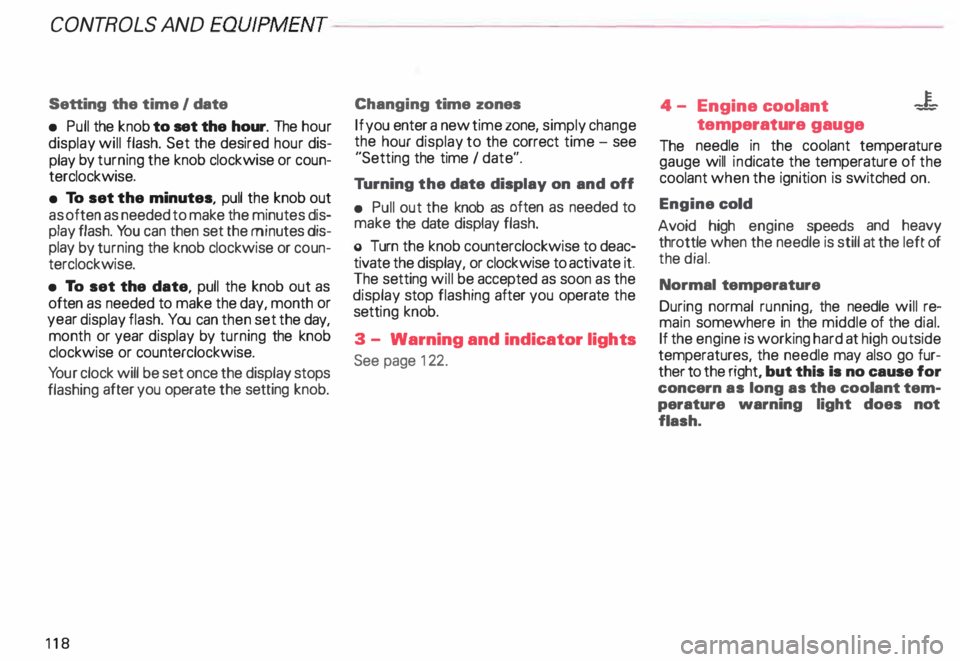
• Pull the knob to set the hour. The hour
display will flash. Set the desired hour dis
play by turning the knob clockwise or coun
terclockwise.
• To set the minutes, pull the knob out
as often as needed to make the minutes dis
play flash. You can then set the minutes dis
play by turning the knob clockwise or coun
terclockwise.
• To set the date, pull the knob out as
often as needed to make the day, month or
year display flash. You can then set the day,
month or year display by turning the knob
clockwise or counterclockwise.
Yo ur clock will be set once the display stops
flashing after you operate the setting knob.
118 Changing
time zones
If you enter a new time zone, simply change
the hour display to the correct time -see
"Setting the time I date".
Tu rning the date display on and off
• Pull out the knob as often as needed to
make the date display flash.
o Turn the knob counterclockwise to deac
tivate the display, or clockwise to activate it.
The setting will be accepted as soon as the
display stop flashing after you operate the
setti ng knob.
3 - Warning and indicator lights
See page 122. 4
- Engine coolant -¥
-
temperature gauge
The needle in the coolant temperature
gauge will indicate the temperature of the
coolant when the ignition is switched on.
Engine cold
Avoid high engine speeds and heavy
throttle when the needle is still at the left of
the dial.
Normal temperature
During normal running, the needle will re
main somewhere in the middle of the dial.
If the engine is working hard at high outside
temperatures, the needle may also go fur
ther to the right, but this Is no cause for
concern as long as the coolant tem
perature warning light does not
flash.
Page 120 of 306

--------------------CONTROLS AND EQUIPMENT
Warning light
If the coolant warning light m the Auto
Check System (see page 141) flashes when
driving, the engine may be overheated be
cause of low coolant level.
Note
Do not install accessories (addi
tional lights or Insect screens. for
example) on top of the front bumper.
They may restrict engine cooling
and cause engine damage.
Always heed all WA RNINGS
on page 142 and 232. 5
- Fuel gauge
iU
The fuel gauge works when the ignition is
switched on.
The fuel tank capacity is approximately 18.5
gallons (70 liters).
When the needle reaches the red area
there is a reserve of about 2.4 U.S. gallon �
(9 liters) of fuel left in the tank. lime to re
fuel.
The fuel pump symbol in the instrument
cluster lights up as an additional reminder to
refuel.
Never run the tank completely dry. See also
page 222. 6
- Speedometer I odometer
Speedometer Refer to "Break-In Period" before driving
off see page 193.
The speedometer indicates the speed.
On U.S. models, the outer row of numbers
� larg ": numbers) indicates the vehicle speed
1n m1les per hour (mph). The inner row
(small numbers) indicates the vehicle
speed in kilometres per hour (km I h).
The arrangement of the instruments in the
c !uster may vary depending on engine ver
SIOn.
119
Page 121 of 306

CONTROLS AND
EQUIPMEN T--------------------
Odometer
The odometer indicates the distance driven.
USA models:
Miles
Canada models: Kilometres
On the trip odometer, the last digit indicates
1 /,0 of a mile or 1 00 meters.
Reset knob for trip odometer
To record a distance, reset the trip odome
ter by pressing the knob until the display re
turns to zero -see illustrat ion.
12 0 When
the ignition is off, the display can be
ill umin ated by pressing the test knob for the
Auto-Check System. See page 116, posi
tion 8. The display switches off automati
cally after about 15 seconds.
Also the display will remain illuminated for
abo �t 30 seconds after you open the driv
er's door.
Defect message
If there is a defect in the instrument cluster,
"dEF" will be displayed continuously in the
trip odometer display area. Have this prob
lem corrected as soon as possible by an au
thorized Audi Dealer.
7 - Vo ltmeter
The voltmeter indicates the voltage for the
vehicle's total electrical system, which
should normally be between 12 and
14 volts. If the display drops below 12 volts
when the engine is running, have the power
supply (battery and alternator) checked by
an authorized Audi Dealer. See also
pages 127 and 143.
The voltage may fall below 8 volts while the
engine is being started. 8
- Set I Check knob
Setting the clock ...• ... .
Auto-ch eck system
Odometer lighting .
Service indicator .. 118
14 0
12 0
121
9 - Driver information system
Auto-C heck System display . . . . . ... 138
Outside air temperature display .... 137
Tr ip computer display . . . . . . . . 146
Selector lever position display ....... 1 07
Radio frequency display . . . . . . 138
Service interval display . . . . . . . . . . .
121
10 -Reset knob
Reset knob for trip odometer . .... .. 12 0
Service indicator . . . . . .. . . . . . . 121
Page 123 of 306

CONT
ROLS AND EQUIPMENT
Warning /Ind icator lights
Yo ur vehicle is equipped with several impor
tant warning and indic ator lights to help you
monitor the continued reliable operation of
your vehicle. Furthermore, certain func
tions and vehicle components are consis
tently monitored by the Auto-Check System
(see page 138). Please be sure to get to
know these lights so if one should come on
you know what to do.
12 2 �W
ARNING
• Failure to heed warning lights
and other important vehicle infor
mation may result in serious per
sonal injury or vehicle damage.
• Whenever stalled or stopped for
repair, move the vehicle a safe dis
tance off the road, stop the en
gine, and turn on the emergency
flasher -see page 152.
• The engine compartment of any
motor vehicle is a potentially haz
ardous area. Before you check any
thing in the engine compartment,
stop the engine and let it cool
down. Always exercise extreme
caution when working under the
engine hood. -sea page 232. -Always heed all WA RNINGS
l!!l on page 232, chapter ""En
gine compartment ...