2000 AUDI ALLROAD light
[x] Cancel search: lightPage 69 of 306

CONT
ROLS AND
EQUIPMENT---------------------
If the alarm has sounded one time, and then
the vehicle is forced open again (for exam
ple, someone tries to forcibly open a door,
and then tries to force open the rear lid), the
signal will sound once again.
You can also trigger the alarm by pressing
the PANIC switch on your remote control
to alert other people in case of emergency
or when in another difficult situation. The
alarm can be switched off by pressing the
PA NIC switch again.
Warn ing lights
After you lock the vehicle, the warning light
on the window sills will blink quickly first for
30 seconds and will then blink slowly. This
is to let you know that the anti-theft alarm
system is activated, including the interior
move ment sensors.
If the warning lights come on continuously
for about 30 seconds instead of flashing
when the vehicle is locked, this indicates
that the interior movement sensor is defec
tive.
68 Swit
ching off the interior
movement sensors l
Yo u should switch off the interior move
ment sensors if there is the possibility that
the alarm system could be set off, for exam
ple by a pet left in the vehicle. •
Press the switch in the door pillar (see il
lustration). The indicator light in the switch
will come on. The indicator light on the win
dow sills will come on for approx imately
3 seconds. This verifies that the interior
movement sensors have been deactivat ed.
The sensors will be reactivated when you
unlo ck and lock the vehicle again.
• Lock the vehicle.
The indi cator lights in the doorpillarwill blink
quickly for approximately 3 seconds at first.
Then, after approximately 30 seconds, the
light will flash slowly.
Page 70 of 306

·--------------------CONT
ROLS AND EQUIPMENT
Power windows
The switches are located in the driver's
door. Also, the front passenger's door and
each rear door has its own power window
switch.
If the respective switch is pushed or pulled
the window will open or close.
• Switches A and B operate the front door
win dows.
• Switches C and D operate the rear win
dows.
• Safety switch S The
safety switch {S) in the armrest on the
driver's door can turn off the rear power win
dows. This feature has been provided for
the safety of small children riding in the rear
of the vehicle.
A symbol lights up in the safety switch
when the switches in the rear doors are de
activated.
Normally , the power windows can be
opened and closed only with the ignition on.
However, when the ignition is off the win
dows can still be operated by means of the
control switches as long as the driver's and
front passenger's doors are closed. yvhen
either door is opened, the power w1ndow
operation will be deactivated.
�W ARNING
• Do not leave children unat
tended In the vehicle, especially
with access to vehicle keys. Unsu
pervised use of the keys can result
in sta rting of the engine and use of
vehicle systems such as power
windows, etc. which could result
in serious injury. m
WARNING continued
• Remember also that the power
windows will continue to operate
until the ignition key has been re
moved and one of the front doors
has been opened.
• Be careful when closing the win
dows. Check to see that no one is
in the way, or serious injury could
result I
• Switch off the power to the rear
windows -if necessary -using the
safety switch S.
• Always remove the ignition key
whenever you leave your vehicle.
• If you lock your vehicle from the
outside, no one especially children
should remain in the vehicle. The
windows will not open in case of
an emergency.
• Do not stick anything on the
windows or the windshield that
may Interfere with the driver's vi
sion.
69
Page 72 of 306
---------------------CONTROLS AND EQUIPMEN T
Convenience close I open
feature
For the convenience of the driver all win
dows can be closed I opened centrally with
the ignition key while locking I unlocking the
vehicle:
Closing windows
In sert key into the lock of driver's door,
turn and hold in the locking position until all
windows are closed. The automatic close
func tion will stop imme diately if the key is
released.
�W ARNING
• Be careful when closing the win
dows.
• Check to see that no one is in
the way, or serious injury could re
sult. Opening
windows
Inse rt key into the lock of driver's door,
turn the key and hold in the unlocking posi
tion until all windows are opened.
This feature enables the driver, to let the
heat escape from the interior of the car, af
ter having parked in direct sunlight.
The convenience close I open feature is not
available when locking the vehicle using the
remote control. Note
If you disconnect and then reconnect the
battery, the convenience open and close
feature will not work.
The follow ing steps describe how to reacti
vate the convenience open I close feature
after reconnecting the battery:
• Close the window completely by lifting
the power window switch and holding.
• Release the switch and then lift it again
for a second.
• The convenience feature is now acti
vated.
71
Page 73 of 306

CONT
ROLS AND EQUIPMENT
Mir rors
Adjust the outside and inside mi rrors before
driving and after adjusting your seat to prop
er driving position. It is im porta nt for safe
driving that you have good vision to the rear.
Inside dey-night mirror
Manual anti-glare adjustment
Yo u can adjust the day -night mirror from
clear daylight visibility to non-glare visibility
at night by moving the lever at the bottom
of the mirror.
To ensure the best possible antiillare ef
fect, the lever on the lower edge of the mir
ror should be pointing forwards when the
basic setting is made.
Daylight driving -lever to front
Night driving -lever to rear.
72 Automatic
anti-glare adjustment•
When the ignition is switc hed on the interior
mirror will darken automatically depending
on the amount of light shinin g into the car
from the rear (e. g. headlights).
When you move the selector lever I gear
shift lever into Reverse R or when you
switch the interior lights on, the inside mir
ror will return to its original position (dim
ming effect off).
The mirror will return to the original position
(i. e. not anti-dazzle) when the selector lever
I gearshift lever is moved to position R. Outside
mirrors
Adjust the outside mirrors so that the side
of your own vehicle can just be seen. This
setting ensures the best possible field of
view, and in addition it serves as an instant
check on the mirror setti ng.
Self-d imming day I night outside
mirrors
The dimming of the outside mirrors is con
trolled by the inside day I night mirror.
The dimming of the outside mirrors works
only properly and without any interference,
if the rear window shade* is rolled up and I
or the light shining on the inside mirror is not
blocked by other objects.
Page 74 of 306
---------------------CONTROLS AND
EQUIPMENT
�W ARNING
• The right hand outside mirror
has a convex (curved) surface. Re
member that vehicles or other ob
jects seen in a convex mirror will
appear smaller and farther away
than when seen in a flat mirror. If
you use this mirror to estimate dis
tances of following vehicles when
changing lanes, you could esti
mate incorrectly and cause an ac
cident.
• Whenever possible, use the in
side mirror to determine the actual
distance and size of vehicles or
other objects seen in the convex
mirror. Adj
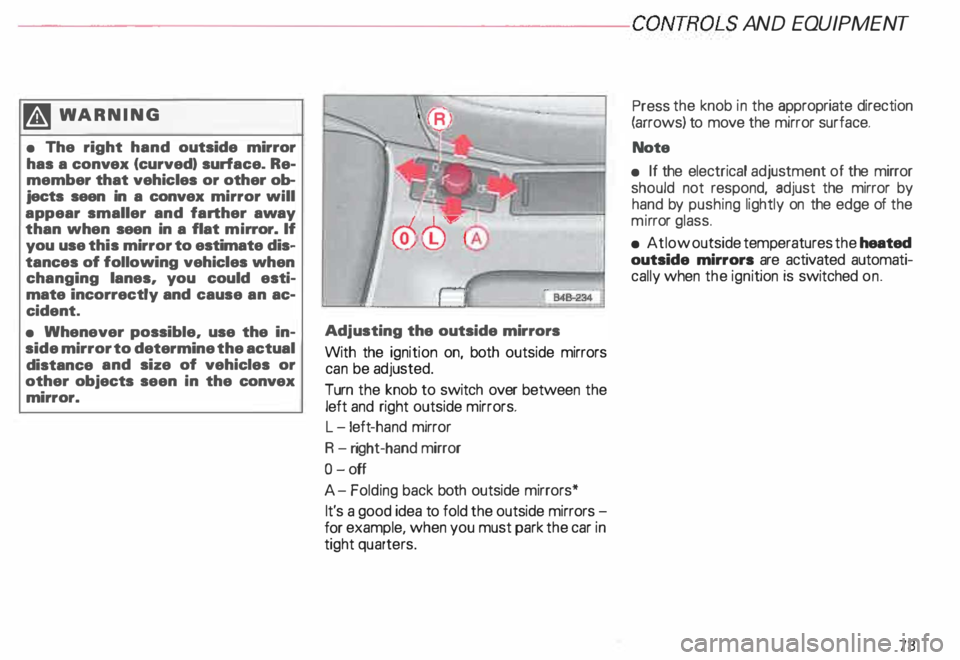
usting the outside mirrors
With the ignition on, both outside mirrors
can be adjusted.
Turn the knob to switch over between the
left and right outside mirrors.
L -l eft -hand mirror
R -right-hand mirror
0- off
A- Folding back both outside mirrors*
It's a good idea to fold the outside mirrors
for example, when you must park the car in
tight quarters. Press
the knob in the appropriate direction
(arrows) to move the mirror surface.
Note
• If the electrical adjustment of the mirror
should not respond, adjust the mirror by
hand by pushing lightly on the edge of the
mi rror glass.
• At low outside temperatures the heated
outside mirrors are activated automati
cally when the ignition is switched on.
73
Page 75 of 306
CONTROLS AND EQUIPMENT---------------------
Folding down of the outside
mirror passenger•s side1l
When you move the selector lever I gear
shift lever into R (Reverse), the outside mir
ror on the passenger's side will tilt slightly
downwards, provided you have switched to
the right-hand outside mirror.
This makes it possible to see the edge of
the curb when parking your vehicle. The
mirror will return to its original position as
soon as you move the selector lever I gear
shift lever out of R (Reverse), or if you
switch the remote control back to the driv
er's outside mirror.
1 l Only on
vehicles with memory for driver's seat.
74 Memory*
The setting of the outside mirrors is auto
matically stored in the memory for the driv
er's seat adjustment together with the seat
position.
Memory function for driver's seat and out
side mirrors see page 81.
Adjust the mirrors os described and then
store this setting together with your seating
position memory.
Page 78 of 306
·---------------------CONTROLS AND
EQUIPMENT
We recommend that you adjust the driver's
seat as follows:
adjust the seat in fore and aft direction so
that you can easily push the pedals all the
way while keeping your knee slightly
bent.
adjust the seatback so that when you sit
with your back against the seatback, you
can still grasp the top of the steeri ng
wheel.
adjust the steeri ng wheel so that the dis
tance from the center of your breastb one
to the center of the airbag cover on the
steering wheel must be at least
10 inches (25 em) or more.
See illustration on previous page. �W
ARNING
• Navar sit closer than 10 inches
(25 em) to the steering wheal.
• If you cannot sit more than
10 inches (25 em) from the steer
ing wheel, we recommend that
you investigate whether adaptive
equipment may be available to
help you reach the pedals and in
crease your seating distance from
the steering wheal. Front
passenger's seat
To avoid contact with the airbag while it is
unfolding, the adult front seat passenger
must not sit any closer to the instrument
panel than necessary and always properly
wear availaple three point belts.
We recommend that you adjust the passen
ger's seat as follows:
backrest upright (never reclined)
place your feet on the
floor _in front
of the
passenger's seat
adjust the passenger's seat as far as pos
sible to the rear of the fore and aft adjust
ment range.
77
Page 85 of 306
CONTROLS AND EQ
UIPMEN T---------------------
Retrieving using the
memory buttons
• With the passenger's door open, de
press and release the desired memory but
ton. The seat will automatically adjust to the
stored position.
• If the door has been closed, you must
then depress and hold the memory button
until the seat has reached its stored posi
tion.
Note
You can not reca ll the stored seat adjust
ment for the front passenger's seat using
the remote control in the master key.
84 Emergency
Off
In an emergency, you can interrupt
any retrieval procedure by
• pressing the '"STOP'" button (see il
lustration on page 81 and 83). or
• tapping one of the memory buttons.
Pushing the"ON/OFF"button to the OFF
position only switches off the Memory. The
stored settings will not be erased.
It's a good idea to turn the Memory off if the
vehicle is going to be used temporarily by a
driver whose driving position will not be
memorized.
The advantage is that the personal settings
that have already been memorized will re
main intact and will not change each time
the vehicle is unlocked using the remote
control. Note
The memory function is switched off when
the STOP button is pressed. The word
''OFF" lights up if the headlights are
switched on. However, the programmed
seat, outside mirrors and steering wheel
positions remain stored in the memory.